# oyo
A diff viewer that works **two ways**:
**step through changes** or **review a classic scrollable diff**.
https://github.com/user-attachments/assets/0f43b54b-69fe-4cf3-9221-a7749872342b
**oyo** extends traditional diffs with an optional step-through mode. Use it like a normal diff viewer with scrolling and hunk navigation, or step through changes one at a time and watch the code evolve. You can switch between both modes at any time.
## Two ways to use oyo
### 1. Classic diff (scroll-only)
Review all changes at once, scroll freely, and jump between hunks, just like a traditional diff viewer.
- Scroll the full diff
- Jump between hunks
- No stepping required
Enable with:
- `oy --no-step`
- Toggle in-TUI with `s`
- Set `stepping = false` in config
### 2. Step-through review (default)
Apply changes incrementally and watch the file transform from old to new.
- Step change-by-change
- See precise evolution of the code
- Useful for large refactors or careful reviews
oyo does **not** replace classic diffs, it adds a new way to review them.
## Features
- **Classic diff mode (no-step)**
Scroll the full diff with hunk navigation, no stepping required
- **Step-through navigation**
Move through changes one at a time with keyboard shortcuts
- **Hunk navigation**
Jump between groups of related changes in both modes
- **Four view modes**:
- **Unified**: Watch the code morph from old to new state
- **Split**: See old and new versions with synchronized stepping
- **Evolution**: Watch the file evolve, deletions simply disappear
- **Blame**: Per-line git blame gutter (opt-in)
- **Inline review comments**: Add/update/remove line and hunk comments across views; printed to stdout on quit
- **Word-level diffing**: See exactly which words changed within a line
- **Multi-file support**: Navigate between changed files with preserved positions
- **Search**: Regex search with to jump between matches
- **Syntax highlighting**: Toggle on/off for code-aware coloring (auto-enabled in no-step mode)
- **Blame hints**: One-shot or toggle blame previews while stepping (opt-in)
- **Command palette**: Search for commands and files without leaving the diff
- **Line wrap**: Toggle wrapping for long lines
- **Fold unchanged blocks**: Toggle to collapse long context sections
- **Animated transitions**: Smooth fade in/out animations as changes are applied
- **Playback**: Automatically step through all changes at a configurable speed
- **Git integration**: Works as a git external diff tool or standalone
- **Commit picker**: Browse recent commits and pick ranges interactively (`oy view`)
- **Themes**: Built-in themes plus `.tmTheme` syntax themes (configurable, with light/dark variants)
- **Configurable**: XDG config file support for customization
## Installation
### npm (macOS, Linux)
```bash
npm i -g @ahkohd/oyo
```
### Pi package (`/diff`, `/review` commands)
```bash
pi install npm:@ahkohd/pi-oyo
```
### Homebrew (macOS, Linux)
```bash
brew install ahkohd/oyo/oy
```
### AUR (Arch Linux)
```bash
paru -S oyo
```
### Cargo
```bash
cargo install oyo --locked --force
```
## Usage
### Classic diff (scroll-only)
```bash
oy --no-step
# or toggle in-app with `s`
```
### Step-through diff
```bash
oy
```
### Compare files
```bash
oy old.rs new.rs
```
### Compare a file against HEAD
```bash
oy path/to/file.rs
```
Runs a working-tree vs `HEAD` diff for that file (like `git diff path/to/file.rs`).
### Commit picker
```bash
oy view
```
### View modes
```bash
oy old.rs new.rs --view split
oy old.rs new.rs --view evolution
```
### Autoplay
```bash
oy old.rs new.rs --autoplay
oy old.rs new.rs --speed 100
```
### Git ranges
```bash
oy --range HEAD~1..HEAD
oy --range main...feature
```
### Staged changes
```bash
oy --staged
```
### Review output
```bash
# default: prints review comments to stdout on quit
oy --no-step
# also write review comments to a file
oy --no-step --review-output-file /tmp/oy-review.txt
# file-only output (for tool integrations)
oy --no-step --review-output-file /tmp/oy-review.txt --no-print-review
# ephemeral review session (disable autosave/restore)
oy --no-step --no-review-persist
# start a fresh persisted review session (clear saved state for this diff)
oy --no-step --clear-review-session
```
---
## Git Integration
### Recommended (`git difftool`)
```bash
git difftool -y --tool=oy
```
`~/.gitconfig`:
```gitconfig
[difftool "oy"]
cmd = oy "$LOCAL" "$REMOTE"
[difftool]
prompt = false
[alias]
d = difftool -y --tool=oy
```
> Note: keep your pager (`less`, `moar`, `moor`) for `git diff`.
> Do **not** set `core.pager` or `interactive.diffFilter` to `oy`.
---
## Jujutsu (jj)
```toml
[ui]
paginate = "never"
diff-formatter = ["oy", "$left", "$right"]
[diff-tools.oy]
command = ["oy", "$left", "$right"]
```
### Keyboard Shortcuts
**Vim-style counts**: Most navigation commands support count prefixes (e.g., `10j` moves 10 steps forward, `5J` scrolls down 5 lines).
| Key | Action |
|-----|--------|
| `↓` / `j` | Next step (scrolls in no-step mode; moves file selection when focused) |
| `↑` / `k` | Previous step (scrolls in no-step mode; moves file selection when focused) |
| `→` / `l` | Next hunk (scrolls in no-step mode) |
| `←` / `h` | Previous hunk (scrolls in no-step mode) |
| `b` | Jump to beginning of current hunk (scrolls in no-step mode) |
| `e` | Jump to end of current hunk (scrolls in no-step mode) |
| `gb` | Blame current step (opt-in, step mode) |
| `p` / `P` | Peek change (modified → old → mixed) / Peek old hunk |
| `y` / `Y` | Yank line/hunk to clipboard |
| `/` | Search (diff pane, regex) |
| `n` / `N` | Next/previous match |
| `:line` / `:h` / `:s` | Go to line / hunk / step |
| `<` | First applied step |
| `>` | Last step |
| `gg` | Go to start (scroll-only in no-step mode) |
| `G` | Go to end (scroll-only in no-step mode) |
| `Space` / `B` | Autoplay forward/reverse |
| `Tab` | Cycle view mode |
| `Shift+Tab` | Cycle view mode (reverse) |
| `K` | Scroll up (supports count) |
| `J` | Scroll down (supports count) |
| `H` | Scroll left (supports count) |
| `L` | Scroll right (supports count) |
| `0` | Start of line (horizontal) |
| `$` | End of line (horizontal) |
| `Ctrl+u` | Half page up |
| `Ctrl+d` | Half page down |
| `Ctrl+g` | Show full file path |
| `gy` / `gY` | Copy patch for line/hunk |
| `Ctrl+p` | Command palette |
| `Ctrl+Shift+p` | Quick file search |
| `z` | Center on active change |
| `Z` | Toggle zen mode |
| `a` | Toggle animations |
| `w` | Toggle line wrap |
| `f` | Toggle context folding |
| `t` | Toggle syntax highlight |
| `E` | Toggle evo syntax (context/full) |
| `c` / `C` | Next/prev conflict |
| `m` / `M` | Add/update line/hunk comment |
| `x` / `X` | Remove line/hunk comment |
| `Ctrl+x` | Clear all comments |
| `s` | Toggle stepping (no-step mode) |
| `S` | Toggle strikethrough |
| `r` | Replay last step (count supported) |
| `R` | Refresh all files |
| `Ctrl+f` | Toggle file panel |
| `Enter` | Focus file list |
| `]` | Next file (supports count) |
| `[` | Previous file (supports count) |
| `+` / `=` | Increase speed |
| `-` | Decrease speed |
| `?` | Toggle help |
| `q` / `Esc` | Quit (prints comments if any; closes help/path popups) |
Clipboard support uses system tools: `pbcopy` (macOS), `wl-copy` / `xclip` / `xsel` (Linux), `clip` (Windows).
Search is case-insensitive regex; invalid patterns fall back to literal matching.
## Configuration
Create a config file at `~/.config/oyo/config.toml`:
```toml
[ui]
auto_center = true # Auto-center on active change (default: true)
overscroll = false # EOF overscroll when centering (opt-in)
topbar = true # Show top bar in diff view (default: true)
view_mode = "unified" # Default: "unified", "split", "evolution", or "blame"
line_wrap = false # Wrap long lines (default: false, uses horizontal scroll)
fold_context = "off" # "off", "on", or "counts"
scrollbar = false # Show scrollbar (default: false)
strikethrough_deletions = false # Show strikethrough on deleted text
gutter_signs = true # Show +/- sign column (unified/evolution)
stepping = true # Enable stepping (false = no-step mode)
[navigation.wrap]
step = "none" # "none" | "step" | "file"
hunk = "none" # "none" | "hunk" | "file"
# [ui.diff]
# bg = false # Full-line diff background (true/false)
# fg = "theme" # "theme" or "syntax"
# highlight = "text" # "text" | "word" | "none"
# max_bytes = 16777216 # Defer diffing above this size (bytes)
# full_context_max_bytes = 2097152 # Full-context render up to this size (bytes)
# defer = true # Defer large diffs and compute in background
# idle_ms = 250 # Idle time before background diff compute
# extent_marker = "neutral" # "neutral" or "diff"
# extent_marker_scope = "progress" # "progress" or "hunk"
# extent_marker_context = false # show extent markers on unchanged lines
# [ui.blame]
# enabled = false # Show git blame hints (opt-in)
# mode = "one_shot" # "one_shot" or "toggle"
# hunk_hint = true # Show blame hint when jumping to a hunk
# [ui.time]
# mode = "relative" # "relative" | "absolute" | "custom"
# format = "[year]-[month]-[day] [hour]:[minute]" # Used when mode = "custom"
# [ui.split]
# align_lines = false # Insert blanks to keep split panes aligned
# align_fill = "╱" # Fill character for aligned blanks (empty = no marker)
# [ui.evo]
# syntax = "context" # "context" (non-diff only) or "full" (diff + context)
# [ui.unified]
# modified_step_mode = "mixed" # "mixed" or "modified" (unified pane only)
# theme = { name = "tokyonight" } # Built-ins listed below
primary_marker = "▶" # Marker for primary active line (single-width char recommended)
primary_marker_right = "◀" # Right pane marker (optional, defaults to ◀)
extent_marker = "▌" # Left pane extent marker (Left Half Block)
extent_marker_right = "▐" # Right pane extent marker (optional, defaults to ▐)
zen = false # Start in zen mode (minimal UI)
[ui.syntax]
mode = "on" # "on" or "off"
# theme = "tokyonight" # builtin name or "custom.tmTheme" (from ~/.config/oyo/themes)
# # default: ui.theme.name, fallback to "ansi"
# [ui.syntax.warmup]
# active_lines = 100 # lines per tick while navigating
# pending_lines = 300 # lines per tick while catching up to a pending checkpoint
# idle_lines = 1000 # lines per tick while idle
# debounce_ms = 80 # wait before warming a new viewport target
[playback]
speed = 200 # Autoplay interval in milliseconds
autoplay = false # Start with autoplay enabled
animation = false # Enable fade animations
animation_duration = 150 # Animation duration per phase (ms)
auto_step_on_enter = true # Auto-step to first change when entering a file
auto_step_blank_files = true # Auto-step when file would be blank at step 0 (new files)
[files]
panel_visible = true # Show file panel in multi-file mode
panel_width = 30 # File panel width (columns)
counts = "active" # Per-file +/- counts: active, focused, all, off
[no_step]
auto_jump_on_enter = true # Jump to first hunk when entering a file in no-step mode
[comments.mentions]
file_scope = "repo" # "changed" | "repo" (git-aware via ls-files)
finder = "auto" # "auto" | "builtin" | "fzf"
```
Example config:
```toml
[ui]
zen = false
auto_center = true
overscroll = false
view_mode = "unified"
gutter_signs = false
topbar = true
[ui.blame]
enabled = true
[ui.theme]
name = "tokyonight"
[ui.diff]
fg = "syntax"
bg = true
highlight = "text"
max_bytes = 16777216
full_context_max_bytes = 2097152
defer = true
idle_ms = 250
extent_marker = "diff"
extent_marker_scope = "hunk"
[ui.syntax]
mode = "on"
[ui.evo]
syntax = "full"
[ui.split]
align_lines = true
[playback]
speed = 200
animation = true
animation_duration = 150
autoplay = false
[comments.mentions]
file_scope = "repo"
finder = "auto"
```
Config is loaded from (in priority order):
1. `$XDG_CONFIG_HOME/oyo/config.toml`
2. `~/.config/oyo/config.toml`
3. Platform-specific (e.g., `~/Library/Application Support/oyo/config.toml` on macOS)
Theme and syntax theme configuration is documented in [THEME.md](./docs/THEME.md).
[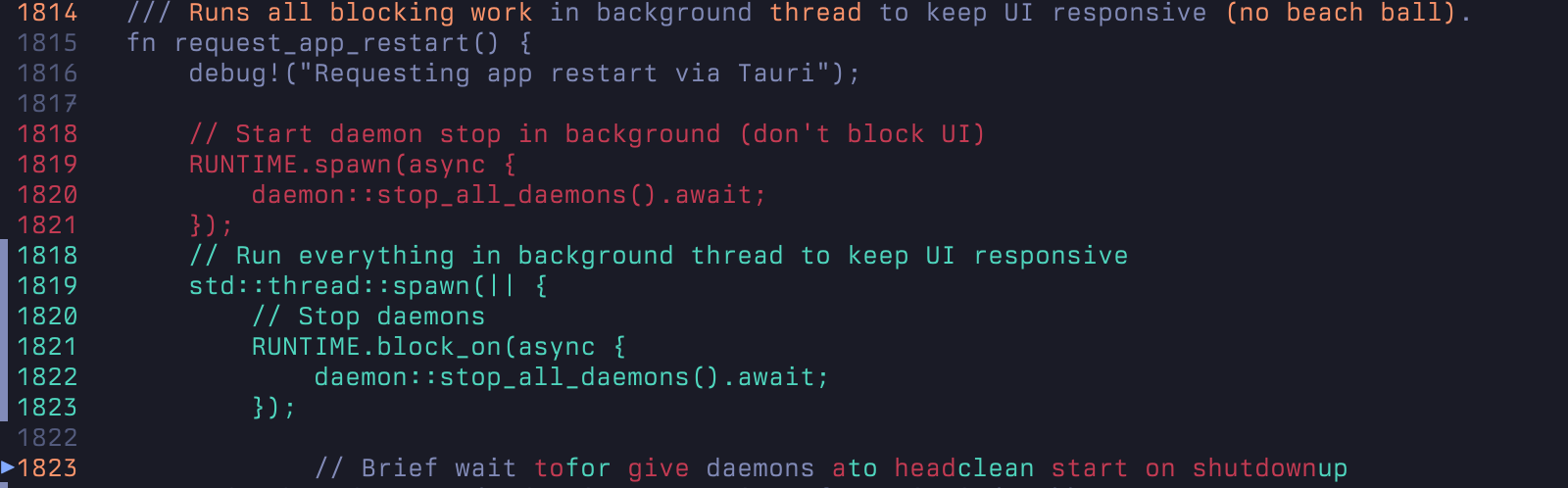](./docs/DIFF_PREVIEWS.md)
*Diff styling previews are available in [DIFF_PREVIEWS.md](./docs/DIFF_PREVIEWS.md).*
## How It Works
Stepping applies changes in file order. The view renders applied changes, highlights the
active change, and keeps pending changes muted.
## Development
```bash
# Build everything
cargo build
# Run tests
cargo test
# Run CLI in development
cargo run --bin oy -- old.rs new.rs
```