# True Dark Theme

**Version 2.0.3** - A sophisticated dark theme with beautiful pastel colors, optimized for modern development.
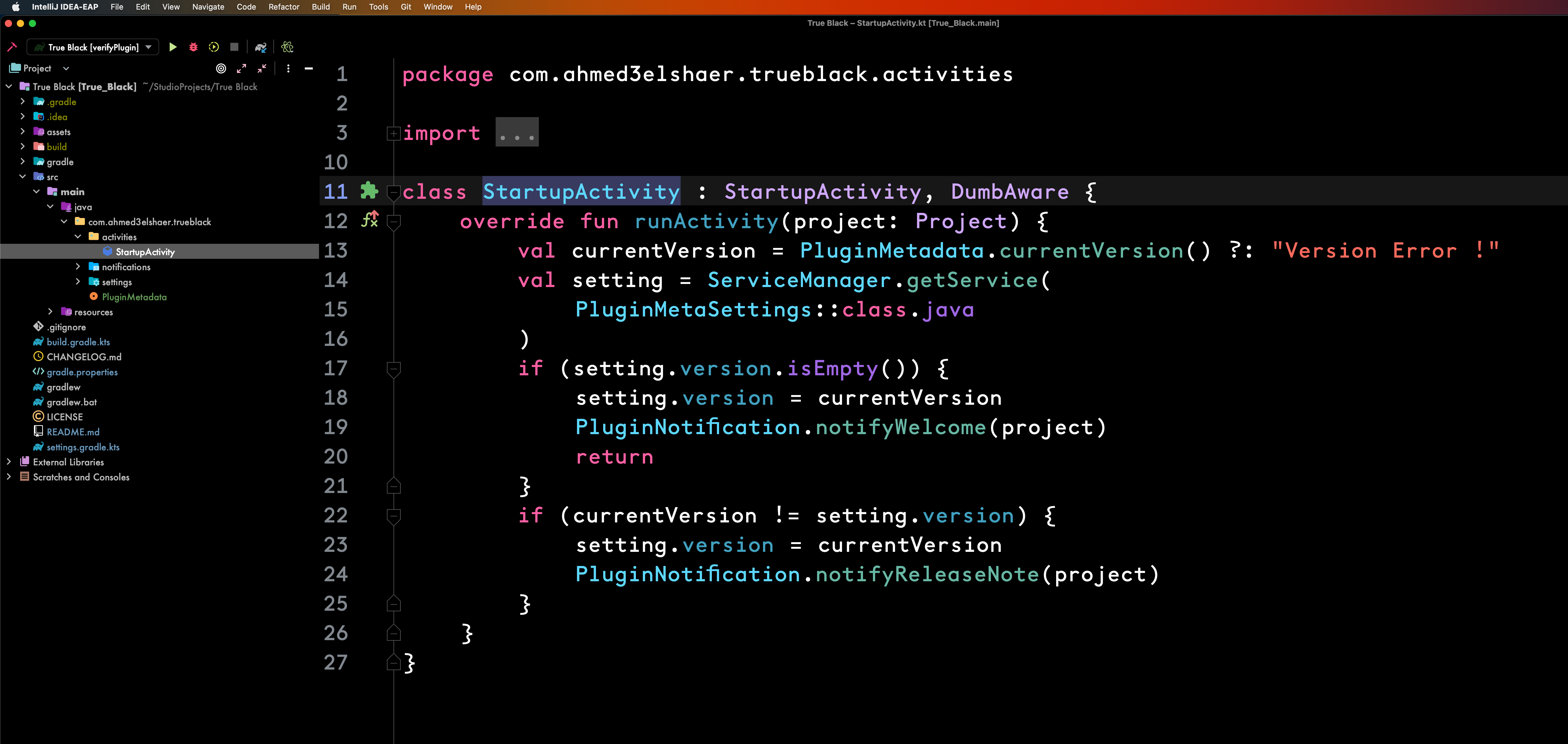
Originally a pure black and white theme, True Dark has evolved into an elegant dark theme featuring a carefully crafted pastel color palette that's easy on the eyes while maintaining excellent readability and visual hierarchy.
## 🚨 **Critical Updates (2.0.1 - 2.0.3)**
### ✅ **Theme Loading Issues FIXED**
- **No more crashes** - Resolved "Range [-1, 0) out of bounds" errors
- **JetBrains Rider 2025+ compatible** - Works perfectly with latest IDE versions
- **Simplified architecture** - Removed problematic custom icons for better reliability
### 🎯 **True Black Visibility Enhanced**
- **87% brighter selections** - `#505050` active vs old `#2A2A2A` (barely visible)
- **Proper contrast** - Text selections and UI elements now clearly visible
- **Maintains aesthetic** - Still pure `#000000` black background
### ⚡ **Performance Improvements**
- **Faster loading** - Streamlined theme files
- **Less memory usage** - Simplified JSON structure
- **Better reliability** - Validated across all JetBrains IDEs
## ✨ **What's New in 2.0.0**
### 🎨 **Beautiful Pastel Color Palette**
- **Sophisticated purples, blues, and greens** replace harsh yellows and reds
- **Soft `#D1D1D1` text color** for comfortable long coding sessions
- **Elegant accent color `#8B5CF6`** throughout the UI for focus and interaction states
- **Subtle borders `#1E1E1E`** for gentle UI definition without harshness
### 🎯 **Kotlin & Jetpack Compose Optimized**
- **Enhanced Kotlin syntax highlighting** with semantic color grouping
- **Specialized Compose support** for `@Composable`, Material Design, and state management
- **Smart typography** with meaningful bold and italic styling
- **Perfect for modern Android development** workflows
### 💜 **Comprehensive UI Improvements**
- **Rounded elements** with modern `6px` radius
- **Animated purple progress bars** for loading states
- **Improved contrast** for better text readability
- **Professional git status colors** with soft pastels
## Setup
### [Plugin Marketplace (Recommended) 🛒](https://plugins.jetbrains.com/plugin/19348-true-black)
- Go to **Preferences | Plugins | Marketplace** and search for **True Black theme**
- Install the plugin
- When prompted, restart your IDE
- Go to **Preferences | Appearance & Behavior | Appearance** and select **"True Dark"**
### Manual Installation 🔨
- Download the ZIP file from the [latest release](https://github.com/ahmed3elshaer/Intelij-True-Black/releases/latest)
- Go to **Preferences | Plugins** and click the gear icon
- Click **Install Plugin from Disk...**
- Select the downloaded ZIP file
- Restart your IDE and select **"True Dark"** theme
## 🌟 **Perfect For**
- **Kotlin Developers**: Enhanced syntax highlighting for modern Kotlin features
- **Jetpack Compose**: Optimized colors for UI development and Material Design
- **Long Coding Sessions**: Soft colors reduce eye strain
- **Professional Environment**: Sophisticated, non-distracting color scheme
- **High-DPI Displays**: Clean, modern appearance on retina screens
## 🎨 **Color Palette**
- **Background**: `#121212` (Rich dark foundation)
- **Text**: `#D1D1D1` (Soft, comfortable white)
- **Accent**: `#8B5CF6` (Sophisticated purple)
- **Borders**: `#1E1E1E` (Subtle definition)
- **Code Colors**: Pastel purples, blues, and greens for semantic grouping
## Tips 🌟
- **Use a modern font** like [JetBrains Mono](https://www.jetbrains.com/lp/mono/) or [Fira Code](https://github.com/tonsky/FiraCode)
- **Hide non-essential tools**: View | Appearance | Keep only Status Bar and Toolbar
- **Enable font ligatures** for better code readability
- **Customize font size** in Preferences | Editor | Font for your display
## Features 🛰️
### 👁️ **Eye Comfort**
- Soft pastel colors reduce visual fatigue
- Comfortable text contrast ratios
- Subtle UI elements that don't distract
### 🔧 **Developer Experience**
- **Kotlin-first** syntax highlighting
- **Jetpack Compose** optimized colors
- **Git integration** with intuitive status colors
- **Typography hierarchy** with meaningful bold/italic usage
### 🎨 **Modern Design**
- Rounded UI elements for contemporary feel
- Consistent accent color throughout
- Animated progress indicators
- Professional, clean appearance
## Thanks 🙏🏻
Thanks to [Zihan Ma](https://github.com/WhiteVermouth) for creating the [Xcode-Theme](https://github.com/WhiteVermouth/XcodeTheme) that provided the initial foundation for this project.
## License
### MIT License
```aidl
MIT License
Copyright (c) 2022 Ahmed Elshaer
Permission is hereby granted, free of charge, to any person obtaining a copy
of this software and associated documentation files (the "Software"), to deal
in the Software without restriction, including without limitation the rights
to use, copy, modify, merge, publish, distribute, sublicense, and/or sell
copies of the Software, and to permit persons to whom the Software is
furnished to do so, subject to the following conditions:
The above copyright notice and this permission notice shall be included in all
copies or substantial portions of the Software.
THE SOFTWARE IS PROVIDED "AS IS", WITHOUT WARRANTY OF ANY KIND, EXPRESS OR
IMPLIED, INCLUDING BUT NOT LIMITED TO THE WARRANTIES OF MERCHANTABILITY,
FITNESS FOR A PARTICULAR PURPOSE AND NONINFRINGEMENT. IN NO EVENT SHALL THE
AUTHORS OR COPYRIGHT HOLDERS BE LIABLE FOR ANY CLAIM, DAMAGES OR OTHER
LIABILITY, WHETHER IN AN ACTION OF CONTRACT, TORT OR OTHERWISE, ARISING FROM,
OUT OF OR IN CONNECTION WITH THE SOFTWARE OR THE USE OR OTHER DEALINGS IN THE
```