flutter-skill
Give any AI agent eyes and hands inside any running app.
10 platforms. Zero test code. One MCP server.


Demo •
Quick Start •
AI Platforms •
Platforms •
vs Others •
Docs
🚀 Zero config. Zero test code. Just talk to your AI.
If this saves you time, please consider starring the repo ⭐ — it helps others find it!
---
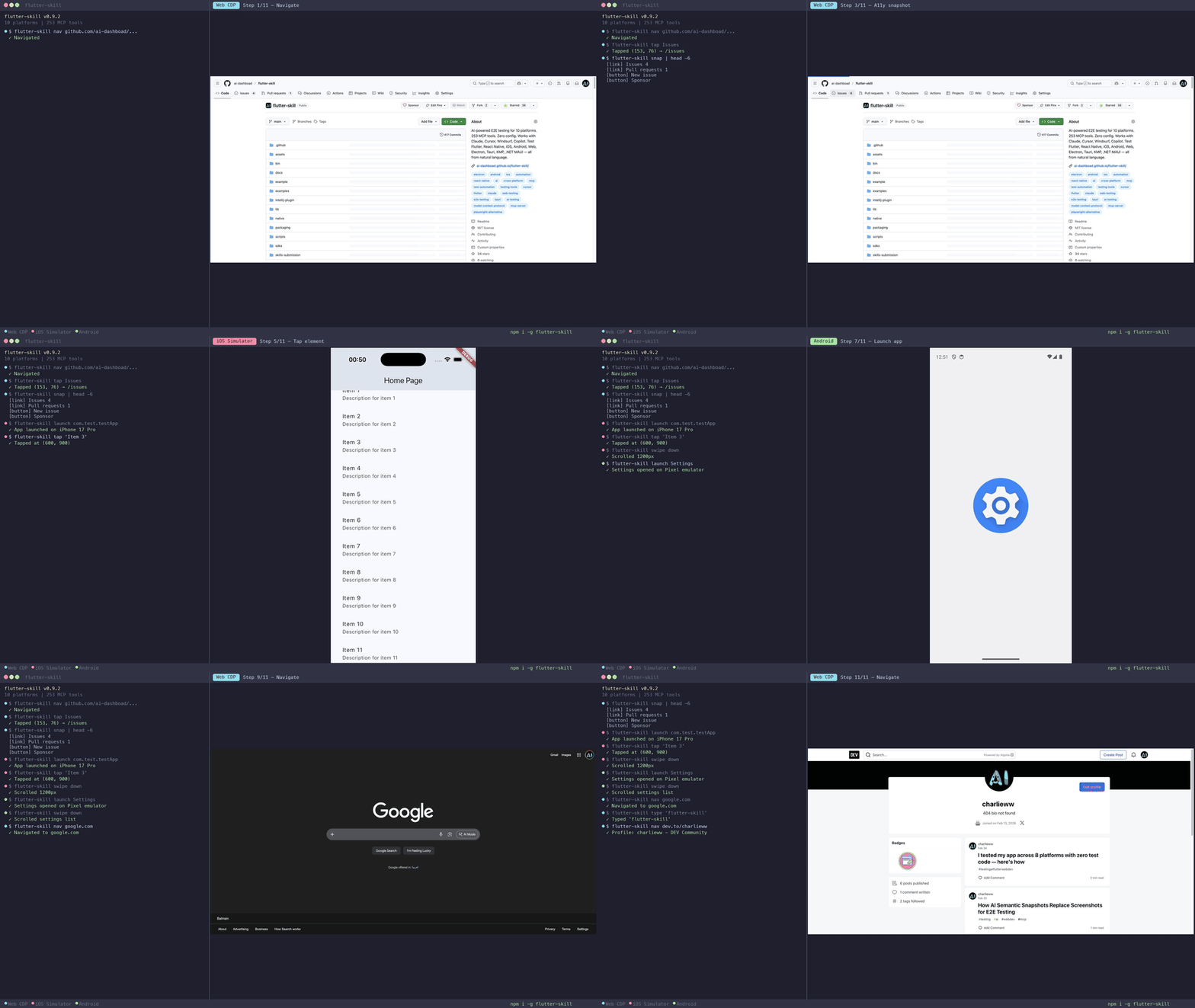
## 30-Second Demo
https://github.com/user-attachments/assets/d4617c73-043f-424c-9a9a-1a61d4c2d3c6
> **One prompt. 28 AI-driven actions. Zero test code.** The AI explores a TikTok clone, navigates tabs, scrolls feeds, tests search, fills forms — all autonomously.
---
## Why This Exists
Writing E2E tests is painful. Maintaining them is worse. **flutter-skill** takes a different approach:
- 🔌 **Connects any AI agent** (Claude, Cursor, Windsurf, Copilot, OpenClaw) directly to your running app via [MCP](https://modelcontextprotocol.io/)
- 👀 **The agent sees your screen** — taps buttons, types text, scrolls, navigates — like a human tester who never sleeps
- ✅ **Zero test code** — no Page Objects, no XPath, no brittle selectors. Just plain English
- ⚡ **Zero config** — 2 lines of code, works on all 10 platforms
```
You: "Test the checkout flow with an empty cart, then add 3 items and complete purchase"
Your AI agent handles the rest — screenshots, taps, text entry, assertions, navigation.
No Page Objects. No XPath. No brittle selectors. Just plain English.
```
---
## Quick Start
**1. Install** (30 seconds)
```bash
npm install -g flutter-skill
```
**2. Add to your AI** (copy-paste into MCP config)
```json
{
"mcpServers": {
"flutter-skill": {
"command": "flutter-skill",
"args": ["server"]
}
}
}
```
> Works with **Claude Desktop, Cursor, Windsurf, Copilot, Cline, OpenClaw** — any MCP-compatible agent.
**3. Add to your app** (2 lines for Flutter)
```dart
import 'package:flutter_skill/flutter_skill.dart';
void main() {
if (kDebugMode) FlutterSkillBinding.ensureInitialized();
runApp(MyApp());
}
```
**4. Test** — just talk to your AI:
> *"Launch my app, explore every screen, and report any bugs"*
That's it. **Zero configuration. Zero test code. Works in under 60 seconds.**
📦 More install methods (Homebrew, Scoop, Docker, IDE, Agent Skill)
| Method | Command |
|--------|---------|
| npm | `npm install -g flutter-skill` |
| Homebrew | `brew install ai-dashboad/flutter-skill/flutter-skill` |
| Scoop | `scoop install flutter-skill` |
| Docker | `docker pull ghcr.io/ai-dashboad/flutter-skill` |
| pub.dev | `dart pub global activate flutter_skill` |
| VSCode | Extensions → "Flutter Skill" |
| JetBrains | Plugins → "Flutter Skill" |
| Agent Skill | `npx skills add ai-dashboad/flutter-skill` |
| Zero-config | `flutter-skill init` (auto-detects & patches your app) |
---
## Use with AI Platforms
### MCP Server Mode (IDE Integration)
Works with any MCP-compatible AI tool. One config line:
```json
{
"mcpServers": {
"flutter-skill": {
"command": "flutter-skill",
"args": ["server"]
}
}
}
```
| Platform | Config File | Status |
|----------|-------------|--------|
| **Cursor** | `.cursor/mcp.json` | ✅ |
| **Claude Desktop** | `claude_desktop_config.json` | ✅ |
| **Windsurf** | `~/.codeium/windsurf/mcp_config.json` | ✅ |
| **VSCode Copilot** | `.vscode/mcp.json` | ✅ |
| **Cline** | VSCode Settings → Cline → MCP | ✅ |
| **OpenClaw** | Skill or MCP config | ✅ |
| **Continue.dev** | `.continue/config.json` | ✅ |
### HTTP Serve Mode (CLI & Automation)
For standalone browser automation, CI/CD pipelines, or remote access:
```bash
# Start server
flutter-skill serve https://your-app.com
# Use CLI client commands
flutter-skill nav https://google.com
flutter-skill snap # Accessibility tree (99% fewer tokens)
flutter-skill screenshot /tmp/ss.jpg
flutter-skill tap "Login"
flutter-skill type "hello@example.com"
flutter-skill eval "document.title"
flutter-skill tools # List all available tools
```
| Command | Description |
|---------|-------------|
| `nav ` | Navigate to URL |
| `snap` | Accessibility tree snapshot |
| `screenshot [path]` | Take screenshot |
| `tap ` | Tap element |
| `type ` | Type via keyboard |
| `key [mod]` | Press key |
| `eval ` | Execute JavaScript |
| `title` | Get page title |
| `text` | Get visible text |
| `hover ` | Hover element |
| `upload ` | Upload file |
| `tools` | List tools |
| `call [json]` | Call any tool |
Supports `--port=N`, `--host=H` flags and `FS_PORT`/`FS_HOST` env vars.
### Two Modes Compared
| | `server` (MCP stdio) | `serve` (HTTP) |
|---|---|---|
| **Use case** | IDE / AI agent integration | CLI / automation / CI/CD |
| **Protocol** | MCP (JSON-RPC over stdio) | HTTP REST |
| **Tools** | 253 (dynamic per page) | 246 (generic) |
| **Browser** | Auto-launches Chrome | Connects to existing Chrome |
| **Best for** | Cursor, Claude, VSCode | OpenClaw, scripts, pipelines |
> **Full CLI client reference:** [docs/CLI_CLIENT.md](docs/CLI_CLIENT.md)
---
## 10 Platforms, One Tool
Most testing tools work on 1-2 platforms. flutter-skill works on **10**.
| Platform | SDK | Test Score |
|----------|-----|:----------:|
| **Flutter** (iOS/Android/Web) | [`flutter_skill`](https://pub.dev/packages/flutter_skill) | ✅ 188/195 |
| **React Native** | [`sdks/react-native`](sdks/react-native/) | ✅ 75/75 |
| **Electron** | [`sdks/electron`](sdks/electron/) | ✅ 75/75 |
| **Tauri** (Rust) | [`sdks/tauri`](sdks/tauri/) | ✅ 75/75 |
| **Android** (Kotlin) | [`sdks/android`](sdks/android/) | ✅ 74/75 |
| **KMP Desktop** | [`sdks/kmp`](sdks/kmp/) | ✅ 75/75 |
| **.NET MAUI** | [`sdks/dotnet-maui`](sdks/dotnet-maui/) | ✅ 75/75 |
| **iOS** (Swift/UIKit) | [`sdks/ios`](sdks/ios/) | ✅ 19/19 |
| **Web** (any website) | [`sdks/web`](sdks/web/) | ✅ |
| **Web CDP** (zero-config) | No SDK needed | ✅ 141/156 |
**Total: 656/664 tests passing (98.8%)** — each platform tested against a complex social media app with 50+ elements.
---
## ⚡ Performance
Real benchmarks from automated test runs against a complex social media app:
| Operation | Web (CDP) | Electron | Android |
|-----------|:---------:|:--------:|:-------:|
| `connect` | 93 ms | 55 ms | 103 ms |
| `tap` | **1 ms** | **1 ms** | **2 ms** |
| `enter_text` | **1 ms** | **1 ms** | **2 ms** |
| `inspect` | 3 ms | 12 ms | 10 ms |
| `snapshot` | **2 ms** | **8 ms** | **29 ms** |
| `screenshot` | **31 ms** | **80 ms** | **88 ms** |
| `eval` | **1 ms** | — | — |
**Token efficiency:** `snapshot()` returns a structured element tree instead of an image — **87–99% fewer tokens** than sending screenshots to your AI agent.
**How fast is that?** A `tap` takes 1–2 ms end-to-end. Browser automation tools like Playwright and Selenium typically take 50–100 ms for the same operation. That's 50–100× faster, because flutter-skill talks directly to the app runtime instead of going through WebDriver or CDP indirection.
### Heavy DOM Sites (Real-World)
Tested 15 MCP tools against production websites — **75/75 passed, zero timeouts:**
| Site | Tools | Total Time | `snapshot` | `screenshot` | `count_elements` |
|------|:-----:|:----------:|:----------:|:------------:|:----------------:|
| YouTube | 15/15 ✅ | 6.9s | 43 ms | 30 ms | 4 ms |
| Amazon | 15/15 ✅ | 14.2s | 1 ms | 5 ms | 2 ms |
| Reddit | 15/15 ✅ | 17.9s | 6 ms | 32 ms | 51 ms |
| Hacker News | 15/15 ✅ | 4.8s | 53 ms | 188 ms | 1 ms |
| Wikipedia | 15/15 ✅ | 7.8s | 15 ms | 336 ms | 1 ms |
> Total time includes page load. Tool execution is consistently sub-100ms even on heavy DOM sites.
---
## Why Not Playwright / Appium / Detox?
| | flutter-skill | Playwright MCP | Appium | Detox |
|---|:---:|:---:|:---:|:---:|
| **MCP tools** | **253** | ~33 | ❌ | ❌ |
| **Platforms** | **10** | 1 (web) | Mobile | React Native |
| **Setup time** | 30 sec | Minutes | Hours | Hours |
| **Test code needed** | ❌ None | ✅ Yes | ✅ Yes | ✅ Yes |
| **AI-native (MCP)** | ✅ | ✅ | ❌ | ❌ |
| **Self-healing tests** | ✅ | ❌ | ❌ | ❌ |
| **Monkey/fuzz testing** | ✅ | ❌ | ❌ | ❌ |
| **Visual regression** | ✅ | ❌ | ❌ | ❌ |
| **Network mock/replay** | ✅ | ❌ | ❌ | ❌ |
| **API + UI testing** | ✅ | ❌ | ❌ | ❌ |
| **Multi-device sync** | ✅ | ❌ | Partial | ❌ |
| **Accessibility audit** | ✅ | ❌ | ❌ | ❌ |
| **i18n testing** | ✅ | ❌ | ❌ | ❌ |
| **Performance monitoring** | ✅ | ❌ | ❌ | ❌ |
| **Natural language** | ✅ | ❌ | ❌ | ❌ |
| **Flutter support** | ✅ Native | Partial | Partial | ❌ |
| **Desktop apps** | ✅ | ✅ | ❌ | ❌ |
| **AI page understanding** | ✅ AX Tree | ❌ Screenshots | ❌ | ❌ |
| **Boundary/security test** | ✅ 13 payloads | ❌ | ❌ | ❌ |
| **Batch actions** | ✅ 5+/call | 1/call | 1/call | 1/call |
**flutter-skill is the only AI-native E2E testing tool that works across mobile, web, and desktop — with 7× more tools than the nearest competitor.**
---
## CLI Commands
```bash
# 🤖 AI autonomous exploration — finds bugs automatically
flutter-skill explore https://my-app.com --depth=3
# 🐒 Monkey/fuzz testing — random actions, crash detection
flutter-skill monkey https://my-app.com --actions=100 --seed=42
# 🚀 Parallel multi-platform testing
flutter-skill test --url https://my-app.com --platforms web,electron,android
# 🌐 Zero-config WebMCP server — any website becomes testable
flutter-skill serve https://my-app.com
```
---
## 🧠 AI-Native: 95% Fewer Tokens
Most AI testing tools send **screenshots** to the LLM — each one costs ~4,000 tokens.
flutter-skill uses Chrome's **Accessibility Tree** to give your AI a compact semantic summary of any page:
```json
// page_summary → ~200 tokens (vs ~4,000 for a screenshot)
{
"title": "Shopping Cart",
"nav": ["Home", "Products", "Cart", "Account"],
"forms": [{"input:Coupon Code": "text"}],
"buttons": ["Apply", "Checkout", "Continue Shopping"],
"features": {"search": true, "pagination": true},
"links": 47, "inputs": 3
}
```
Then batch multiple actions in one call:
```json
// explore_actions → 5 actions per call (vs 5 separate tool calls)
{"actions": [
{"type": "fill", "target": "input:Coupon Code", "value": "SAVE20"},
{"type": "tap", "target": "button:Apply"},
{"type": "tap", "target": "button:Checkout"},
{"type": "fill", "target": "input:Email", "value": "test@example.com"},
{"type": "tap", "target": "button:Continue"}
]}
```
**Result:** Your AI agent tests faster, costs less, and understands pages better than screenshot-based tools.
| | flutter-skill | Screenshot-based tools |
|---|:---:|:---:|
| Tokens per page | **~200** | ~4,000 |
| Actions per call | **5+** | 1 |
| Understands semantics | ✅ roles, names, state | ❌ pixels only |
| Works with Shadow DOM | ✅ | ❌ |
---
## What It Can Do
|
### 👀 See
- `screenshot` — capture the screen
- `inspect_interactive` — all tappable/typeable elements with semantic refs
- `find_element` / `wait_for_element`
- `get_elements` — full element tree
|
### 👆 Interact
- `tap` / `long_press` / `swipe` / `drag`
- `enter_text` / `set_text` / `clear_text`
- `scroll` — all directions
- `go_back` / `press_key`
|
|
### 🔍 Inspect (v0.8.0)
- **Semantic refs**: `button:Login`, `input:Email`
- Stable across UI changes
- `tap(ref: "button:Submit")`
- 7 roles: button, input, toggle, slider, select, link, item
|
### 🚀 Control
- `launch_app` — launch with flavors
- `hot_reload` / `hot_restart`
- `get_logs` / `get_errors`
- `scan_and_connect` — auto-find apps
|
253 tools — full reference
**AI Explore:** `page_summary`, `explore_actions`, `boundary_test`, `explore_report`
**Launch & Connect:** `launch_app`, `scan_and_connect`, `connect_cdp`, `hot_reload`, `hot_restart`, `list_sessions`, `switch_session`, `close_session`, `disconnect`, `stop_app`
**Screen:** `screenshot`, `screenshot_region`, `screenshot_element`, `native_screenshot`, `inspect`, `inspect_interactive`, `snapshot`, `get_widget_tree`, `find_by_type`, `get_text_content`, `get_visible_text`
**Interaction:** `tap`, `double_tap`, `long_press`, `enter_text`, `set_text`, `clear_text`, `swipe`, `scroll_to`, `drag`, `go_back`, `press_key`, `type_text`, `hover`, `fill`, `select_option`, `set_checkbox`, `focus`, `blur`, `native_tap`, `native_input_text`, `native_swipe`
**Smart Testing:** `smart_tap`, `smart_enter_text`, `smart_assert` (self-healing with fuzzy match)
**Assertions:** `assert_text`, `assert_visible`, `assert_not_visible`, `assert_element_count`, `assert_batch`, `wait_for_element`, `wait_for_gone`, `wait_for_idle`, `wait_for_stable`, `wait_for_url`, `wait_for_text`, `wait_for_element_count`
**Visual Regression:** `visual_baseline_save`, `visual_baseline_compare`, `visual_baseline_update`, `visual_regression_report`, `visual_verify`, `visual_diff`, `compare_screenshot`
**Network Mock:** `mock_api`, `mock_clear`, `record_network`, `replay_network`, `intercept_requests`, `clear_interceptions`, `block_urls`, `http_request`
**API Testing:** `api_request`, `api_assert`
**Coverage & Reliability:** `coverage_start`, `coverage_stop`, `coverage_report`, `coverage_gaps`, `retry_on_fail`, `stability_check`
**Data-Driven:** `test_with_data`, `generate_test_data`
**Multi-Device:** `multi_connect`, `multi_action`, `multi_compare`, `multi_disconnect`, `parallel_snapshot`, `parallel_tap`
**Accessibility:** `accessibility_audit`, `a11y_full_audit`, `a11y_tab_order`, `a11y_color_contrast`, `a11y_screen_reader`
**i18n:** `set_locale`, `verify_translations`, `i18n_snapshot`
**Performance:** `perf_start`, `perf_stop`, `perf_report`, `get_performance`, `get_frame_stats`, `get_memory_stats`
**Session:** `save_session`, `restore_session`, `session_diff`
**Recording & Export:** `record_start`, `record_stop`, `record_export` (Playwright, Cypress, XCUITest, Espresso, Detox, Maestro, +5 more), `video_start`, `video_stop`
**Auth:** `auth_inject_session`, `auth_biometric`, `auth_otp`, `auth_deeplink`
**CDP Browser:** `navigate`, `reload`, `go_forward`, `get_title`, `get_page_source`, `eval`, `get_tabs`, `new_tab`, `switch_tab`, `close_tab`, `get_cookies`, `set_cookie`, `clear_cookies`, `get_local_storage`, `set_local_storage`, `clear_local_storage`, `generate_pdf`, `set_viewport`, `emulate_device`, `throttle_network`, `go_offline`, `set_geolocation`, `set_timezone`, `set_color_scheme`
**Debug:** `get_logs`, `get_errors`, `get_console_messages`, `get_network_requests`, `diagnose`, `diagnose_project`, `reset_app`
---
## Platform Setup
Flutter (iOS / Android / Web)
```yaml
dependencies:
flutter_skill: ^0.9.37
```
```dart
import 'package:flutter_skill/flutter_skill.dart';
void main() {
if (kDebugMode) FlutterSkillBinding.ensureInitialized();
runApp(MyApp());
}
```
React Native
```bash
npm install flutter-skill-react-native
```
```js
import FlutterSkill from 'flutter-skill-react-native';
FlutterSkill.start();
```
Electron
```bash
npm install flutter-skill-electron
```
```js
const { FlutterSkillBridge } = require('flutter-skill-electron');
FlutterSkillBridge.start(mainWindow);
```
iOS (Swift)
```swift
// Swift Package Manager: FlutterSkillSDK
import FlutterSkill
FlutterSkillBridge.shared.start()
Text("Hello").flutterSkillId("greeting")
```
Android (Kotlin)
```kotlin
implementation("com.flutterskill:flutter-skill:0.8.0")
FlutterSkillBridge.start(this)
```
Tauri (Rust)
```toml
[dependencies]
flutter-skill-tauri = "0.8.0"
```
KMP Desktop
Add Gradle dependency — see [`sdks/kmp`](sdks/kmp/) for details.
.NET MAUI
Add NuGet package — see [`sdks/dotnet-maui`](sdks/dotnet-maui/) for details.
---
## Example Prompts
Just tell your AI what to test:
| Prompt | What happens |
|--------|-------------|
| *"Test login with wrong password"* | Screenshots → enters creds → taps login → verifies error |
| *"Explore every screen and report bugs"* | Systematically navigates all screens, tests all elements |
| *"Fill registration with edge cases"* | Tests emoji 🌍, long strings, empty fields, special chars |
| *"Compare checkout flow on iOS and Android"* | Runs same test on both platforms, compares screenshots |
| *"Take screenshots of all 5 tabs"* | Taps each tab, captures state |
---
## Contributing
See [CONTRIBUTING.md](CONTRIBUTING.md) for guidelines.
```bash
git clone https://github.com/ai-dashboad/flutter-skill
cd flutter-skill
dart pub get
dart run bin/flutter_skill.dart server # Start MCP server
```
---
## Links
| | |
|---|---|
| 📦 [pub.dev](https://pub.dev/packages/flutter_skill) | 🧩 [VSCode](https://marketplace.visualstudio.com/items?itemName=AIDashboard.flutter-skill) |
| 📦 [npm](https://www.npmjs.com/package/flutter-skill) | 🧩 [JetBrains](https://plugins.jetbrains.com/plugin/29991-flutter-skill) |
| 🍺 [Homebrew](https://github.com/ai-dashboad/homebrew-flutter-skill) | 📖 [Docs](docs/USAGE_GUIDE.md) |
| 🤖 [Agent Skill](https://skills.sh/ai-dashboad/flutter-skill) | 📋 [Changelog](CHANGELOG.md) |
---
⭐ If flutter-skill saves you time, star it so others can find it too!
MIT License © 2025