#  - Official PyTorch Implementation
#####
- Official PyTorch Implementation
##### [Lingteng Qiu*](https://lingtengqiu.github.io/), [Xiaodong Gu*](https://scholar.google.com.hk/citations?user=aJPO514AAAAJ&hl=zh-CN&oi=ao), [Peihao Li*](https://liphao99.github.io/), [Qi Zuo*](https://scholar.google.com/citations?user=UDnHe2IAAAAJ&hl=zh-CN), [Weichao Shen](https://scholar.google.com/citations?user=7gTmYHkAAAAJ&hl=zh-CN), [Junfei Zhang](https://scholar.google.com/citations?user=oJjasIEAAAAJ&hl=en), [Kejie Qiu](https://sites.google.com/site/kejieqiujack/home), [Weihao Yuan](https://weihao-yuan.com/)
[Guanying Chen+](https://guanyingc.github.io/), [Zilong Dong+](https://baike.baidu.com/item/%E8%91%A3%E5%AD%90%E9%BE%99/62931048), [Liefeng Bo](https://scholar.google.com/citations?user=FJwtMf0AAAAJ&hl=zh-CN)
##### Tongyi Lab, Alibaba Group
ICCV 2025
[](https://aigc3d.github.io/projects/LHM/)
[](https://arxiv.org/pdf/2503.10625)
[](https://huggingface.co/spaces/DyrusQZ/LHM)
[](https://www.modelscope.cn/studios/Damo_XR_Lab/LHM)
[](https://modelscope.cn/studios/Damo_XR_Lab/Motionshop2)
[](https://www.apache.org/licenses/LICENSE-2.0)
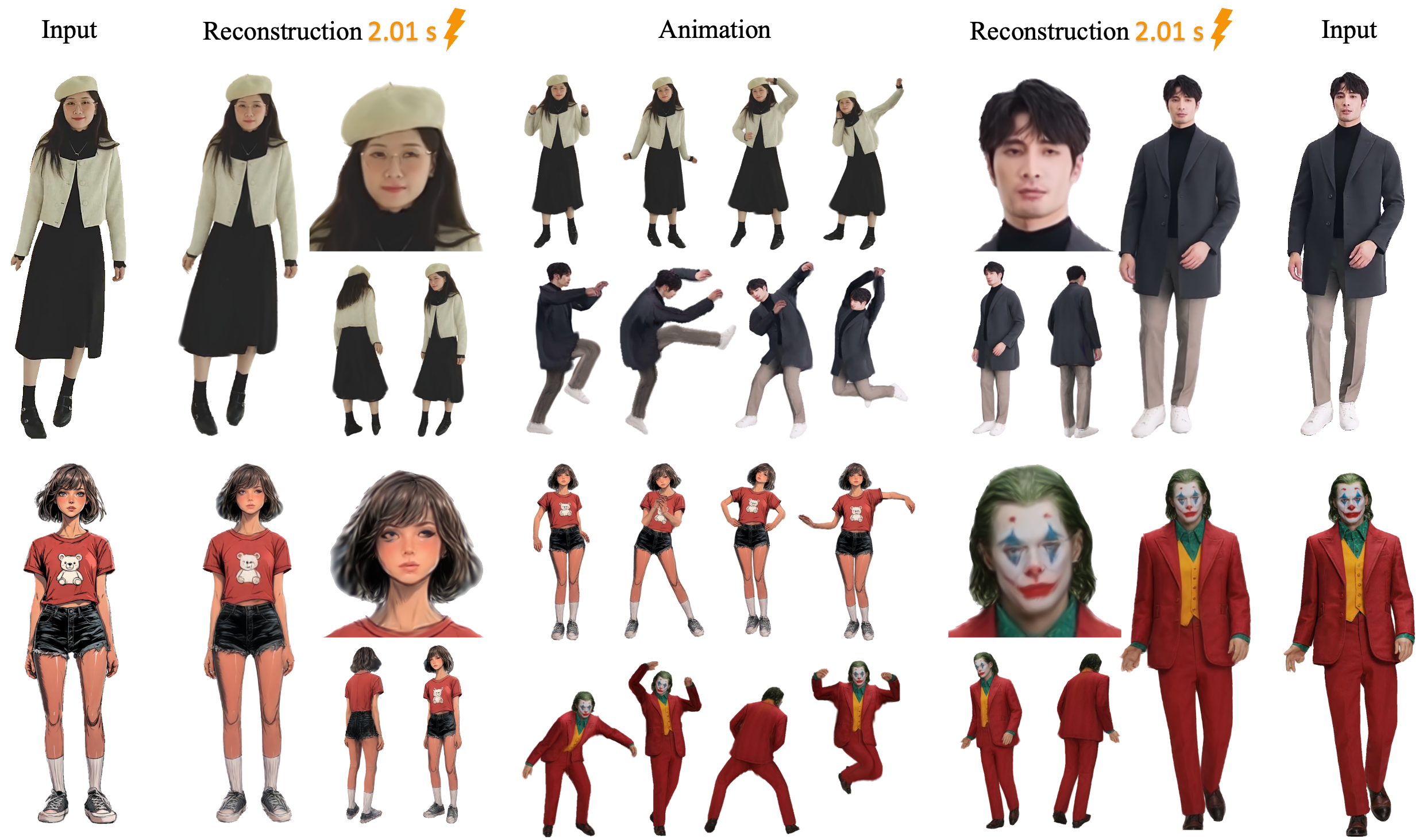
如果您熟悉中文,可以[阅读中文版本的README](./README_CN.md)
## 📢 Latest Updates
**[March 2026]** **LHM++ is now open-sourced!** Supports arbitrary view inputs with higher efficiency—8-view input runs on just 8GB GPU memory—and superior rendering quality. See [GitHub](https://github.com/aigc3d/LHM-plusplus) | [arXiv](https://arxiv.org/abs/2506.13766)
**[June 26, 2025]** LHM is got accepted by ICCV2025!!!
**[April 16, 2025]** We have released a memory-saving version of motion and LHM. Now you can run the entire pipeline on 14 GB GPUs.
**[April 13, 2025]** We have released LHM-MINI, which allows you to run LHM on 16 GB GPUs. 🔥🔥🔥
**[April 10, 2025]** We release the motion extraction node and animation infer node of LHM on ComfyUI. With a extracted offline motion, you can generate a 10s animation clip in 20s!!! Update your [ComfyUI](https://github.com/aigc3d/LHM/tree/feat/comfyui) branch right now.🔥🔥🔥
**[April 9, 2025]** we build a detailed tutorial to guide users to install [LHM-ComfyUI](https://github.com/aigc3d/LHM/blob/feat/comfyui/Windows11_install.md) on Windows step by step!
**[April 9, 2025]** We release the video processing pipeline to create your training data [LHM_Track](https://github.com/aigc3d/LHM_Track)!
For more details about the updates, see 👉 👉 👉 [logger](./assets/News_logger.md).
### TODO List
- [x] Core Inference Pipeline (v0.1) 🔥🔥🔥
- [x] HuggingFace Demo Integration 🤗🤗🤗
- [x] ModelScope Deployment
- [x] Motion Processing Scripts
- [ ] Release Training data & Testing Data (License Available)
- [ ] Training Codes Release
## 🚀 Getting Started
We provide a [video](https://youtu.be/Q56Jllz33tk) that teaches us how to install LHM and LHM-ComfyUI step by step on YouTube, submitted by [softicelee2](https://github.com/softicelee2).
We provide a [video](https://www.bilibili.com/video/BV18So4YCESk/) that teaches us how to install LHM step by step on bilibili, submitted by 站长推荐推荐.
We provide a [video](https://www.bilibili.com/video/BV1J9Z1Y2EiJ/) that teaches us how to install LHM-ComfyUI step by step on bilibili, submitted by 站长推荐推荐.
### Build from Docker
Please sure you had install nvidia-docker in our system.
```
# Linux System only
# CUDA 121
# step0. download docker images
wget -P ./lhm_cuda_dockers https://virutalbuy-public.oss-cn-hangzhou.aliyuncs.com/share/aigc3d/data/for_lingteng/LHM/LHM_Docker/lhm_cuda121.tar
# step1. build from docker file
sudo docker load -i ./lhm_cuda_dockers/lhm_cuda121.tar
# step2. run docker_file and open the communication port 7860
sudo docker run -p 7860:7860 -v PATH/FOLDER:DOCKER_WORKSPACES -it lhm:cuda_121 /bin/bash
```
### Environment Setup
Clone the repository.
```bash
git clone git@github.com:aigc3d/LHM.git
cd LHM
```
### Windows Installation
Set Up a Virtual Environment
Open **Command Prompt (CMD)**, navigate to the project folder, and run:
```bash
python -m venv lhm_env
lhm_env\Scripts\activate
install_cu121.bat
python ./app.py
```
```bash
# cuda 11.8
pip install rembg
sh ./install_cu118.sh
# cuda 12.1
sh ./install_cu121.sh
```
The installation has been tested with python3.10, CUDA 11.8 or CUDA 12.1.
Or you can install dependencies step by step, following [INSTALL.md](INSTALL.md).
### Model Weights
Please note that the model will be downloaded automatically if you do not download it yourself.
| Model | Training Data | BH-T Layers | ModelScope| HuggingFace |Inference Time|input requirement|
| :--- | :--- | :--- | :--- | :--- | :--- |:--- |
| LHM-MINI | 300K Videos + 5K Synthetic Data | 2 | [ModelScope](https://modelscope.cn/models/Damo_XR_Lab/LHM-MINI) |[huggingface](https://huggingface.co/3DAIGC/LHM-MINI)| 1.41 s | half & full body|
| LHM-500M | 300K Videos + 5K Synthetic Data | 5 | [ModelScope](https://modelscope.cn/models/Damo_XR_Lab/LHM-500M) |[huggingface](https://huggingface.co/3DAIGC/LHM-500M)| 2.01 s | full body|
| LHM-500M-HF | 300K Videos + 5K Synthetic Data | 5 | [ModelScope](https://modelscope.cn/models/Damo_XR_Lab/LHM-500M-HF) |[huggingface](https://huggingface.co/3DAIGC/LHM-500M-HF)| 2.01 s | half & full body|
| LHM-1.0B | 300K Videos + 5K Synthetic Data | 15 | [ModelScope](https://modelscope.cn/models/Damo_XR_Lab/LHM-1B) |[huggingface](https://huggingface.co/3DAIGC/LHM-1B)| 6.57 s | full body|
| LHM-1B-HF | 300K Videos + 5K Synthetic Data | 15 | [ModelScope](https://modelscope.cn/models/Damo_XR_Lab/LHM-1B-HF) |[huggingface](https://huggingface.co/3DAIGC/LHM-1B-HF)| 6.57 s | half & full body|
Model cards with additional details can be found in [model_card.md](modelcard.md).
#### Download from HuggingFace
```python
from huggingface_hub import snapshot_download
model_dir = snapshot_download(repo_id='3DAIGC/LHM-MINI', cache_dir='./pretrained_models/huggingface')
# 500M-HF Model
model_dir = snapshot_download(repo_id='3DAIGC/LHM-500M-HF', cache_dir='./pretrained_models/huggingface')
# 1B-HF Model
model_dir = snapshot_download(repo_id='3DAIGC/LHM-1B-HF', cache_dir='./pretrained_models/huggingface')
```
#### Download from ModelScope
```python
from modelscope import snapshot_download
model_dir = snapshot_download(model_id='Damo_XR_Lab/LHM-MINI', cache_dir='./pretrained_models')
# 500M-HF Model
model_dir = snapshot_download(model_id='Damo_XR_Lab/LHM-500M-HF', cache_dir='./pretrained_models')
# 1B-HF Model
model_dir = snapshot_download(model_id='Damo_XR_Lab/LHM-1B-HF', cache_dir='./pretrained_models')
```
### Download Prior Model Weights
```bash
# Download prior model weights
wget https://virutalbuy-public.oss-cn-hangzhou.aliyuncs.com/share/aigc3d/data/LHM/LHM_prior_model.tar
tar -xvf LHM_prior_model.tar
```
### Data Motion Preparation
We provide the test motion examples, we will update the processing scripts ASAP :).
```bash
# Download prior model weights
wget https://virutalbuy-public.oss-cn-hangzhou.aliyuncs.com/share/aigc3d/data/LHM/motion_video.tar
tar -xvf ./motion_video.tar
```
After downloading weights and data, the folder of the project structure seems like:
```bash
├── configs
│ ├── inference
│ ├── accelerate-train-1gpu.yaml
│ ├── accelerate-train-deepspeed.yaml
│ ├── accelerate-train.yaml
│ └── infer-gradio.yaml
├── engine
│ ├── BiRefNet
│ ├── pose_estimation
│ ├── SegmentAPI
├── example_data
│ └── test_data
├── exps
│ ├── releases
├── LHM
│ ├── datasets
│ ├── losses
│ ├── models
│ ├── outputs
│ ├── runners
│ ├── utils
│ ├── launch.py
├── pretrained_models
│ ├── dense_sample_points
│ ├── gagatracker
│ ├── human_model_files
│ ├── sam2
│ ├── sapiens
│ ├── voxel_grid
│ ├── arcface_resnet18.pth
│ ├── BiRefNet-general-epoch_244.pth
├── scripts
│ ├── exp
│ ├── convert_hf.py
│ └── upload_hub.py
├── tools
│ ├── metrics
├── train_data
│ ├── example_imgs
│ ├── motion_video
├── inference.sh
├── README.md
├── requirements.txt
```
### 💻 Local Gradio Run
Now, we support user motion sequence input. As the pose estimator requires some GPU memory, this Gradio application requires at least 24 GB of GPU memory to run LHM-500M.
```bash
# Memory-saving version; More time available for Use.
# The maximum supported length for 720P video is 20s.
python ./app_motion_ms.py
python ./app_motion_ms.py --model_name LHM-1B-HF
# Support user motion sequence input. As the pose estimator requires some GPU memory, this Gradio application requires at least 24 GB of GPU memory to run LHM-500M.
python ./app_motion.py
python ./app_motion.py --model_name LHM-1B-HF
# preprocessing video sequence
python ./app.py
python ./app.py --model_name LHM-1B
```
### 🏃 Inference Pipeline
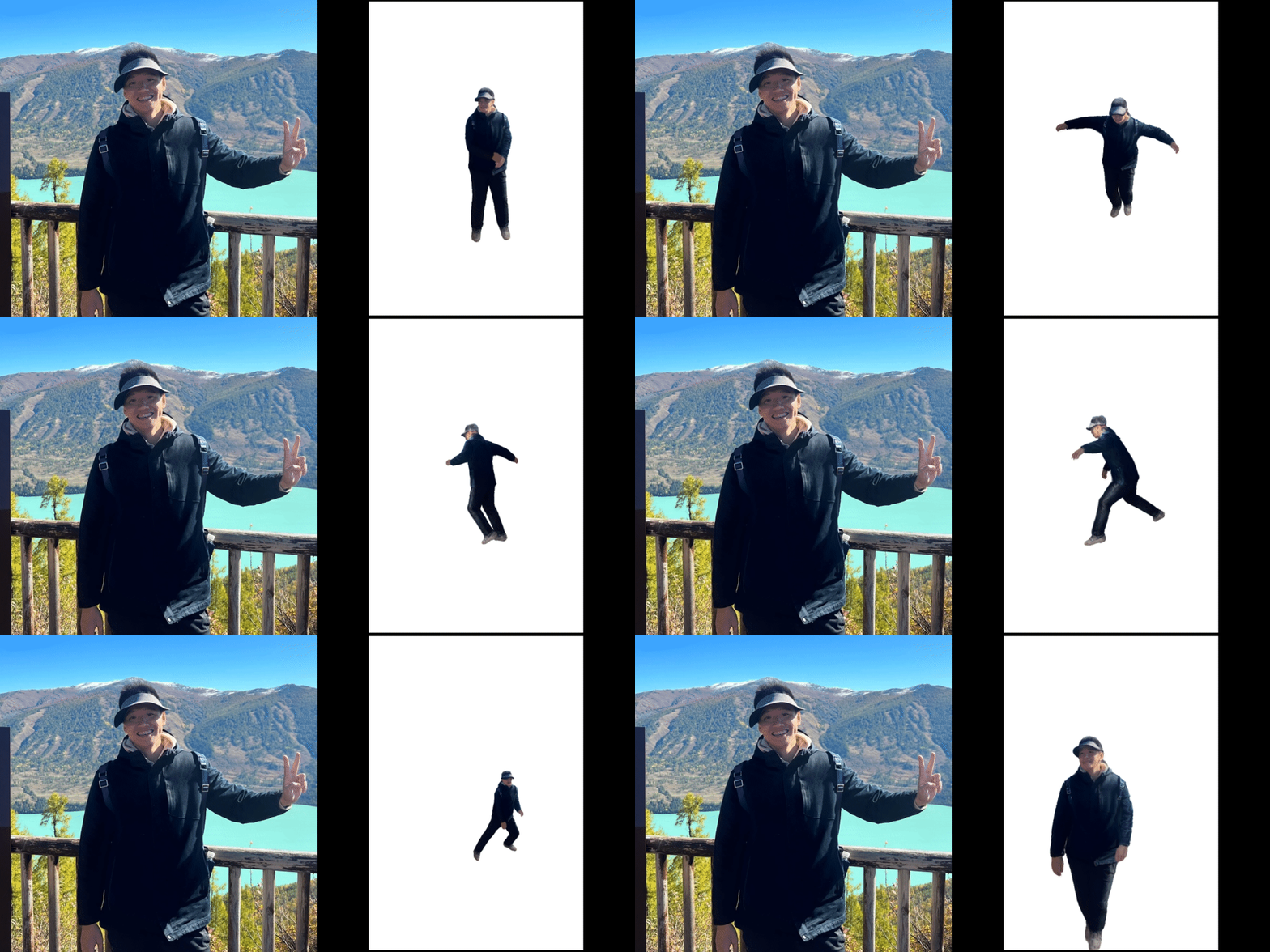
Now we support upper-body image input!
 ```bash
# MODEL_NAME={LHM-500M-HF, LHM-500M, LHM-1B, LHM-1B-HF}
# bash ./inference.sh LHM-500M-HF ./train_data/example_imgs/ ./train_data/motion_video/mimo1/smplx_params
# bash ./inference.sh LHM-500M ./train_data/example_imgs/ ./train_data/motion_video/mimo1/smplx_params
# bash ./inference.sh LHM-1B ./train_data/example_imgs/ ./train_data/motion_video/mimo1/smplx_params
# animation
bash inference.sh ${MODEL_NAME} ${IMAGE_PATH_OR_FOLDER} ${MOTION_SEQ}
# export mesh
bash ./inference_mesh.sh ${MODEL_NAME}
```
### Custom Video Motion Processing
- Download model weights for motion processing.
```bash
wget -P ./pretrained_models/human_model_files/pose_estimate https://virutalbuy-public.oss-cn-hangzhou.aliyuncs.com/share/aigc3d/data/LHM/yolov8x.pt
wget -P ./pretrained_models/human_model_files/pose_estimate https://virutalbuy-public.oss-cn-hangzhou.aliyuncs.com/share/aigc3d/data/LHM/vitpose-h-wholebody.pth
```
- Install extra dependencies.
```bash
cd ./engine/pose_estimation
pip install mmcv==1.3.9
pip install -v -e third-party/ViTPose
pip install ultralytics
```
- Run the script.
```bash
# python ./engine/pose_estimation/video2motion.py --video_path ./train_data/demo.mp4 --output_path ./train_data/custom_motion
python ./engine/pose_estimation/video2motion.py --video_path ${VIDEO_PATH} --output_path ${OUTPUT_PATH}
# for half-body video, e.g. ./train_data/xiaoming.mp4, we recommend to use command as below:
python ./engine/pose_estimation/video2motion.py --video_path ${VIDEO_PATH} --output_path ${OUTPUT_PATH} --fitting_steps 100 0
```
- Use the motion to drive the avatar.
```bash
# if not sam2? pip install rembg.
# bash ./inference.sh LHM-500M-HF ./train_data/example_imgs/ ./train_data/custom_motion/demo/smplx_params
# bash ./inference.sh LHM-1B-HF ./train_data/example_imgs/ ./train_data/custom_motion/demo/smplx_params
bash inference.sh ${MODEL_NAME} ${IMAGE_PATH_OR_FOLDER} ${OUTPUT_PATH}/${VIDEO_NAME}/smplx_params
```
## Compute Metric
We provide some simple scripts to compute the metrics.
```bash
# download pretrain model into ./pretrained_models/
wget https://virutalbuy-public.oss-cn-hangzhou.aliyuncs.com/share/aigc3d/data/LHM/arcface_resnet18.pth
# Face Similarity
python ./tools/metrics/compute_facesimilarity.py -f1 ${gt_folder} -f2 ${results_folder}
# PSNR
python ./tools/metrics/compute_psnr.py -f1 ${gt_folder} -f2 ${results_folder}
# SSIM LPIPS
python ./tools/metrics/compute_ssim_lpips.py -f1 ${gt_folder} -f2 ${results_folder}
```
## ComfyUI Node of LHM
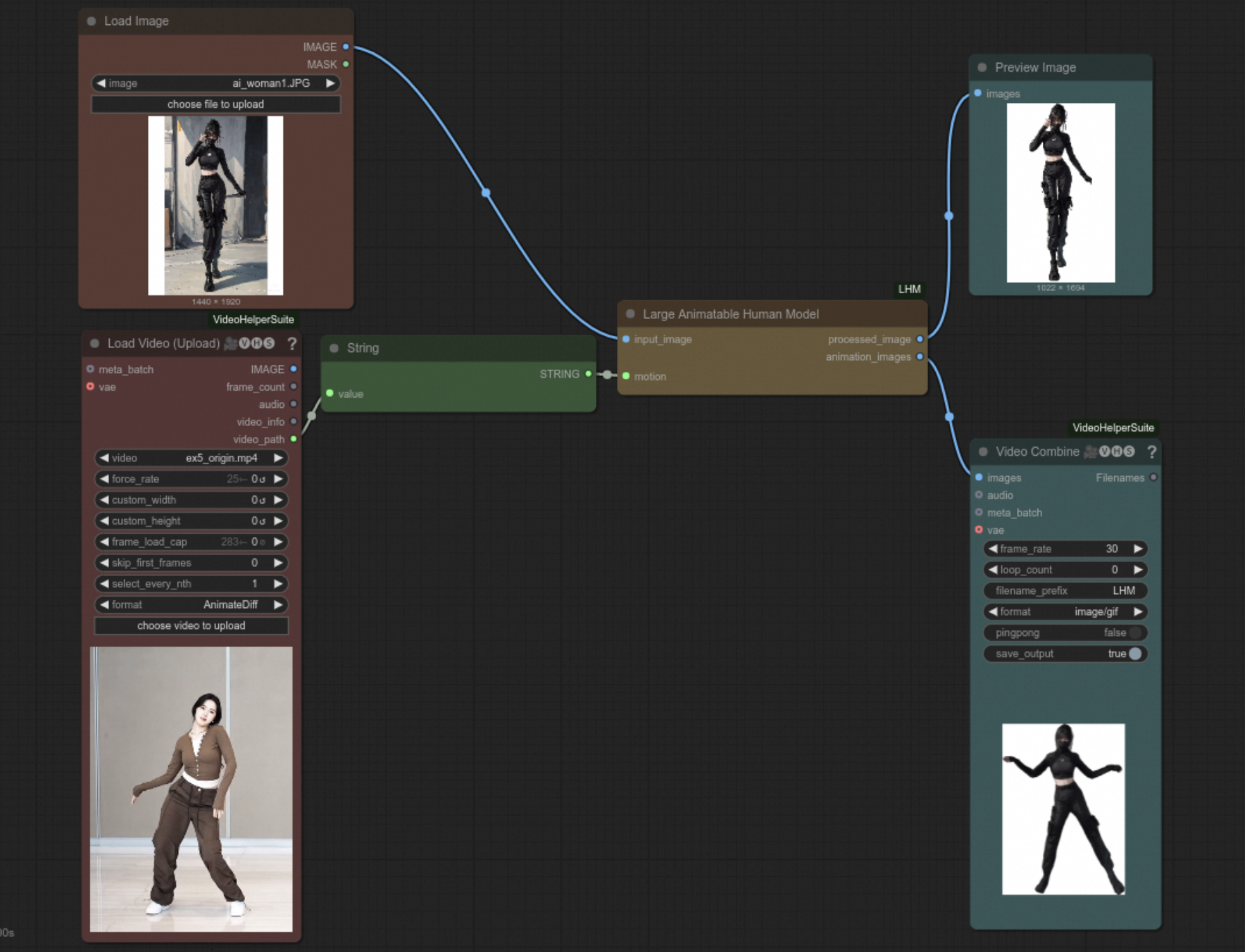
We have implemented a standard workflow and related nodes for customlize video animation. You can use any character and any driven videos this time! See branch [feat/comfyui](https://github.com/aigc3d/LHM/tree/feat/comfyui) for more information!
## Contribute Needed
We need a comfyui windows install guide of our feat/comfyui branch. If you are familiar with comfyui and successfully install it on windows, welcome to submit a pr to update windows install guide for our community!
## Acknowledgement
This work is built on many amazing research works and open-source projects:
- [OpenLRM](https://github.com/3DTopia/OpenLRM)
- [ExAvatar](https://github.com/mks0601/ExAvatar_RELEASE)
- [DreamGaussian](https://github.com/dreamgaussian/dreamgaussian)
Thanks for their excellent works and great contribution to 3D generation and 3D digital human area.
We would like to express our sincere gratitude to [站长推荐推荐](https://space.bilibili.com/175365958?spm_id_from=333.337.0.0) and [softicelee2](https://github.com/softicelee2) for the installation tutorial video on bilibili.
## More Works
Welcome to follow our team other interesting works:
- [LHM++](https://github.com/aigc3d/LHM-plusplus)
- [AniGS](https://github.com/aigc3d/AniGS)
- [LAM](https://github.com/aigc3d/LAM)
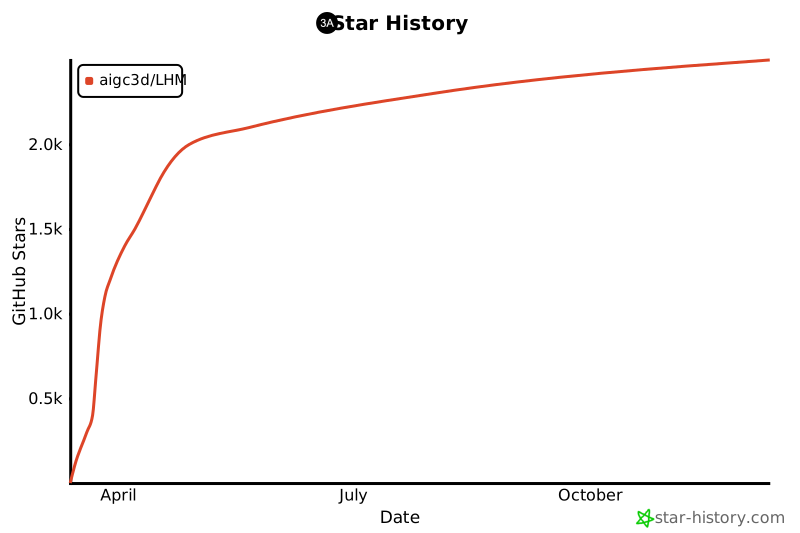
## ✨ Star History
[](https://star-history.com/#aigc3d/LHM&Date)
## Citation
```
@inproceedings{qiu2025LHM,
title={LHM: Large Animatable Human Reconstruction Model from a Single Image in Seconds},
author={Lingteng Qiu and Xiaodong Gu and Peihao Li and Qi Zuo
and Weichao Shen and Junfei Zhang and Kejie Qiu and Weihao Yuan
and Guanying Chen and Zilong Dong and Liefeng Bo
},
booktitle={arXiv preprint arXiv:2503.10625},
year={2025}
}
```
```bash
# MODEL_NAME={LHM-500M-HF, LHM-500M, LHM-1B, LHM-1B-HF}
# bash ./inference.sh LHM-500M-HF ./train_data/example_imgs/ ./train_data/motion_video/mimo1/smplx_params
# bash ./inference.sh LHM-500M ./train_data/example_imgs/ ./train_data/motion_video/mimo1/smplx_params
# bash ./inference.sh LHM-1B ./train_data/example_imgs/ ./train_data/motion_video/mimo1/smplx_params
# animation
bash inference.sh ${MODEL_NAME} ${IMAGE_PATH_OR_FOLDER} ${MOTION_SEQ}
# export mesh
bash ./inference_mesh.sh ${MODEL_NAME}
```
### Custom Video Motion Processing
- Download model weights for motion processing.
```bash
wget -P ./pretrained_models/human_model_files/pose_estimate https://virutalbuy-public.oss-cn-hangzhou.aliyuncs.com/share/aigc3d/data/LHM/yolov8x.pt
wget -P ./pretrained_models/human_model_files/pose_estimate https://virutalbuy-public.oss-cn-hangzhou.aliyuncs.com/share/aigc3d/data/LHM/vitpose-h-wholebody.pth
```
- Install extra dependencies.
```bash
cd ./engine/pose_estimation
pip install mmcv==1.3.9
pip install -v -e third-party/ViTPose
pip install ultralytics
```
- Run the script.
```bash
# python ./engine/pose_estimation/video2motion.py --video_path ./train_data/demo.mp4 --output_path ./train_data/custom_motion
python ./engine/pose_estimation/video2motion.py --video_path ${VIDEO_PATH} --output_path ${OUTPUT_PATH}
# for half-body video, e.g. ./train_data/xiaoming.mp4, we recommend to use command as below:
python ./engine/pose_estimation/video2motion.py --video_path ${VIDEO_PATH} --output_path ${OUTPUT_PATH} --fitting_steps 100 0
```
- Use the motion to drive the avatar.
```bash
# if not sam2? pip install rembg.
# bash ./inference.sh LHM-500M-HF ./train_data/example_imgs/ ./train_data/custom_motion/demo/smplx_params
# bash ./inference.sh LHM-1B-HF ./train_data/example_imgs/ ./train_data/custom_motion/demo/smplx_params
bash inference.sh ${MODEL_NAME} ${IMAGE_PATH_OR_FOLDER} ${OUTPUT_PATH}/${VIDEO_NAME}/smplx_params
```
## Compute Metric
We provide some simple scripts to compute the metrics.
```bash
# download pretrain model into ./pretrained_models/
wget https://virutalbuy-public.oss-cn-hangzhou.aliyuncs.com/share/aigc3d/data/LHM/arcface_resnet18.pth
# Face Similarity
python ./tools/metrics/compute_facesimilarity.py -f1 ${gt_folder} -f2 ${results_folder}
# PSNR
python ./tools/metrics/compute_psnr.py -f1 ${gt_folder} -f2 ${results_folder}
# SSIM LPIPS
python ./tools/metrics/compute_ssim_lpips.py -f1 ${gt_folder} -f2 ${results_folder}
```
## ComfyUI Node of LHM
We have implemented a standard workflow and related nodes for customlize video animation. You can use any character and any driven videos this time! See branch [feat/comfyui](https://github.com/aigc3d/LHM/tree/feat/comfyui) for more information!

## Contribute Needed
We need a comfyui windows install guide of our feat/comfyui branch. If you are familiar with comfyui and successfully install it on windows, welcome to submit a pr to update windows install guide for our community!
## Acknowledgement
This work is built on many amazing research works and open-source projects:
- [OpenLRM](https://github.com/3DTopia/OpenLRM)
- [ExAvatar](https://github.com/mks0601/ExAvatar_RELEASE)
- [DreamGaussian](https://github.com/dreamgaussian/dreamgaussian)
Thanks for their excellent works and great contribution to 3D generation and 3D digital human area.
We would like to express our sincere gratitude to [站长推荐推荐](https://space.bilibili.com/175365958?spm_id_from=333.337.0.0) and [softicelee2](https://github.com/softicelee2) for the installation tutorial video on bilibili.
## More Works
Welcome to follow our team other interesting works:
- [LHM++](https://github.com/aigc3d/LHM-plusplus)
- [AniGS](https://github.com/aigc3d/AniGS)
- [LAM](https://github.com/aigc3d/LAM)
## ✨ Star History
[](https://star-history.com/#aigc3d/LHM&Date)
## Citation
```
@inproceedings{qiu2025LHM,
title={LHM: Large Animatable Human Reconstruction Model from a Single Image in Seconds},
author={Lingteng Qiu and Xiaodong Gu and Peihao Li and Qi Zuo
and Weichao Shen and Junfei Zhang and Kejie Qiu and Weihao Yuan
and Guanying Chen and Zilong Dong and Liefeng Bo
},
booktitle={arXiv preprint arXiv:2503.10625},
year={2025}
}
```