# dsh-auto-memory — DSH Auto Memory Plugin / DSH 自动记忆与人性化交互插件

A cache-friendly three-layer memory engine for the DeepSeek Harness Web GUI — lean auto injection, per-turn AI consolidation, on-demand reads and cross-tool memory inheritance — wrapped in human touches: proactive calendar reminders, warm AI greetings, and a daily journal that writes itself.
DSH Web GUI 的记忆与人性化交互插件:三层记忆自动注入与检索、每日反思、AI 时段问候与三级抽屉、每轮自动沉淀、智能检索、日历视图与设置页,支持继承其他 AI 工具的历史记忆。
> **Quick install**: `cd ~/.dsh/profiles/web` → `pnpm add @a9i5k4/dsh-auto-memory` → append `"@a9i5k4/dsh-auto-memory"` to `dsh.profile.bundles` in that directory's `package.json` → restart **dsh web** (the 「Memory」entry appears in the sidebar). Full instructions in [Installation](#installation-one-command); no-pnpm alternative: `npm install @a9i5k4/dsh-auto-memory`.
[**English**](README.md) | [中文版](README.zh-CN.md)
---
## Installation (one command)
> Prerequisite: install [DeepSeek Harness](https://github.com/deepseek-ai/deepseek-harness) (dsh) and start `dsh web` at least once.
Run in the **profile directory** (`~/.dsh/profiles/web`):
```bash
cd ~/.dsh/profiles/web
pnpm add @a9i5k4/dsh-auto-memory
```
> pnpm v11 默认限制安装发布不足 1 天的版本。当天发布想立即拿到新版,在 profile 目录的 pnpm-workspace.yaml 加 `minimumReleaseAge: 0`,或用显式版本 `pnpm add @a9i5k4/dsh-auto-memory@0.1.16`。(pnpm v11 blocks packages published <1 day ago; set `minimumReleaseAge: 0` in pnpm-workspace.yaml or use an explicit version for same-day releases.)
Then edit `package.json` in that directory and append to the `dsh.profile.bundles` array:
```json
"@a9i5k4/dsh-auto-memory"
```
Restart **dsh web** to activate (the 「Memory」entry appears in the sidebar).
> No pnpm? Use npm: `npm install @a9i5k4/dsh-auto-memory`
## Updating (check & upgrade)
The plugin is a normal npm package, so updating is one command in the same profile directory:
```bash
cd ~/.dsh/profiles/web
pnpm up @a9i5k4/dsh-auto-memory # or: npm install @a9i5k4/dsh-auto-memory@latest
```
Then restart **dsh web**.
The Settings → Auto Memory page has a **Check for updates** button that compares your installed version with the latest one on the npm registry (it shows the update command when a newer version exists).
## AI-Era Installation (copy-paste for your AI)
> It's the AI era — just copy the sentence below to your AI assistant (DeepSeek / Claude / Codex etc.) and it will do the installation for you.
```text
Install the npm package @a9i5k4/dsh-auto-memory in the DeepSeek Harness web profile
directory ~/.dsh/profiles/web (run "pnpm add @a9i5k4/dsh-auto-memory" or "npm install @a9i5k4/dsh-auto-memory"),
append "@a9i5k4/dsh-auto-memory" to the dsh.profile.bundles array in package.json,
then restart dsh web to activate the plugin.
```
---
## A companion that takes initiative
Auto Memory is designed to feel less like a database and more like an assistant who knows you:
- **Proactive reminders** — when the AI notices a deadline, appointment or promise in your conversation, it files it into the calendar automatically and reminds you in later sessions before the time arrives (`calendar_add` / `calendar_done` / `calendar_remove`).
- **Warm greetings** — an AI-written greeting for the current period (morning / afternoon / evening) that mentions your most important work of the day; come back after an hour away and it says "welcome back" and catches you up.
- **It writes its own journal** — after every conversation turn, a small subagent quietly decides what's worth keeping and appends topic-grouped entries to today's log; long-term decisions are promoted to project notes and cross-project rules to user-level memory. You never have to remember to log anything.
- **Daily reflections** — structured results / lessons / next steps are kept in the background, so you can review how a day really went.
- **Calendar with human touches** — semantic colors for urgency, a day timeline (07:00–22:00), location and reminder fields; the AI maintains it from context instead of you filling forms.
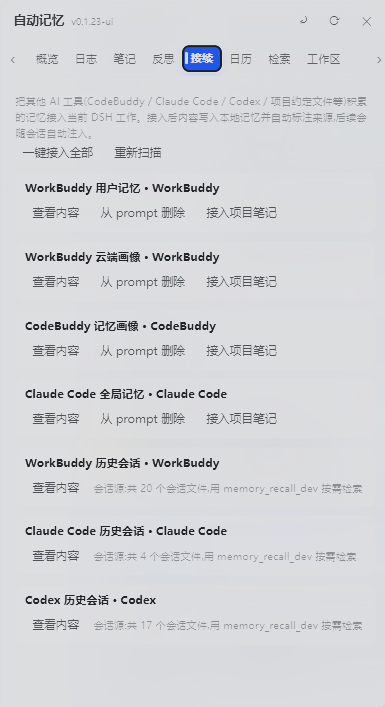
- **Inherited memory** — memories accumulated in WorkBuddy / CodeBuddy / Claude Code / Codex are discoverable and importable, so the plugin picks up where your other AI tools left off.
### Under the hood — engineering that stays out of your way
- **Prefix-cache friendly** — static rules live in the system prompt, dynamic memory in runtime snapshots; the prompt stays byte-stable so DeepSeek's prefix cache keeps hitting (no repeated re-encoding of your whole history).
- **Lean injection, low token cost** — only the last day of logs + a reflection digest are injected; everything else is fetched on demand via `memory_read` / `memory_recall`.
- **Rate-limited AI** — auto-consolidation runs at most 8×/day with a configurable cooldown (doubled outside work hours), so memory stays useful without burning your budget.
- **Credentials never enter the prompt** — sensitive sections (tokens / secrets / credentials) are filtered out of injection while staying safe in the files.
- **Cross-workspace & cross-tool** — centralized storage readable from any session; memories from WorkBuddy / CodeBuddy / Claude Code / Codex are discoverable and importable.
## Features
### Three-layer Memory
| Layer | Location | Description |
|---|---|---|
| User-level memory | `~/.dsh/memory/MEMORY.md` | Cross-project rules & preferences |
| Project notes | `~/.dsh/memory/workspaces/{workspace}/MEMORY.md` | Project conventions & decisions (centralized) |
| Daily logs | `~/.dsh/memory/workspaces/{workspace}/YYYY-MM-DD.md` | Append-only work log (centralized) |
| Reflections | `~/.dsh/memory/workspaces/{workspace}/reflections/YYYY-MM-DD.md` | Daily reflection (structured, kept in background) |
> **Centralized storage (WorkBuddy-style)**: all workspace memories live under one root — `~/.dsh/memory/workspaces/`, one subdirectory per workspace (readable by any model in any session via injection + cross-workspace `memory_recall`). Legacy per-workspace `.dsh-memory/` folders are auto-migrated on first run after upgrade (the old copies are kept, not deleted).
- **Auto injection (at the end of the system prompt)**: every prompt gets a `` block (user rules + project notes + reflection digest + recent 1 day of log tails + external memory paths + pending calendar items + writing discipline); it is placed at the very end of the system prompt so the model reads the memory discipline right before replying
- **Lean by default, details on demand (v0.1.24)**: injection stays small — the last 1 day of logs, a reflection digest (achievements section only), and paths for external memory instead of full text. `memory_read` fetches full log/reflection/user/notes/calendar files when needed; sensitive sections (credentials/tokens/secrets) are **filtered out of the prompt** but kept in the files
- **Visible memory ops**: when the AI updates or searches memory, it says so in plain text in the chat reply (e.g. "Logged X to today's journal", "I checked memory and found..."), not hidden inside tool calls
### Auto-Consolidation — memory writes itself after every turn (v0.1.9)
Every finished conversation turn is automatically evaluated (via a small subagent) and anything worth keeping is written for you — no reliance on the model remembering to log:
- **Today's log** gets entries like `- 21:03 [自动沉淀] …` — no manual `memory_log` needed for routine work
- **Long-term value is promoted**: project decisions/architecture → project notes (with a `## YYYY-MM-DD` heading); cross-project rules → user-level memory
- **Small talk is skipped** (content threshold `autoConsolidateMinChars`), each turn is deduplicated by turn number, subagent turns are ignored
- **Agent traces in the GUI**: the overview shows "Auto-consolidated N points today (latest HH:MM)"; the panel refreshes on open, every 30s while open, and via the ⟳ button
- **`memory_consolidate` tool**: read recent logs and distill long-term decisions / architecture / user preferences into MEMORY.md on demand ("dream-like" consolidation)
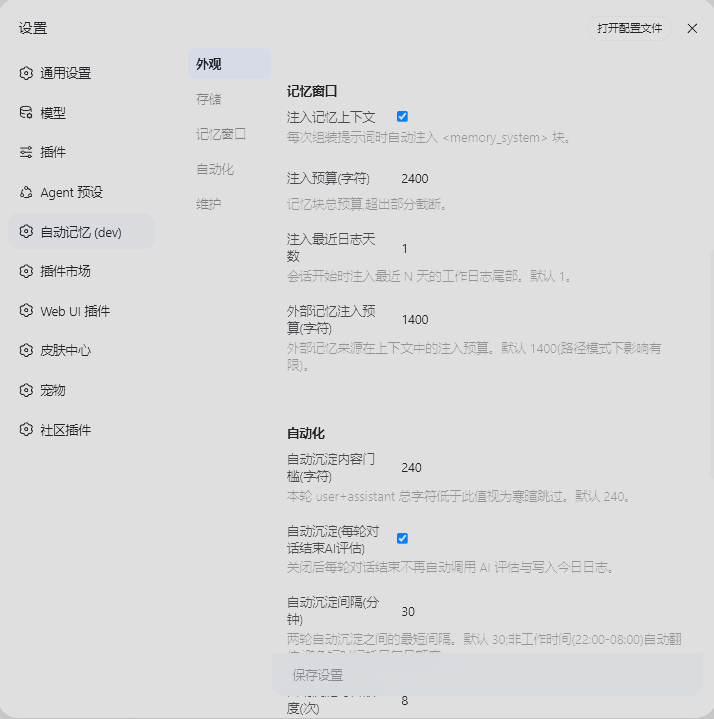
- Configurable in `~/.dsh/dsh-auto-memory.json`: `autoConsolidate` (default true), `autoConsolidateMinChars` (default 240), `autoConsolidateCooldownMinutes` (default 30, doubled 22:00–08:00), `autoConsolidateDailyMax` (default 8) — all adjustable in the Settings → Automation section
### AI Greetings & Three-level Drawers (Overview page, v0.1.9)
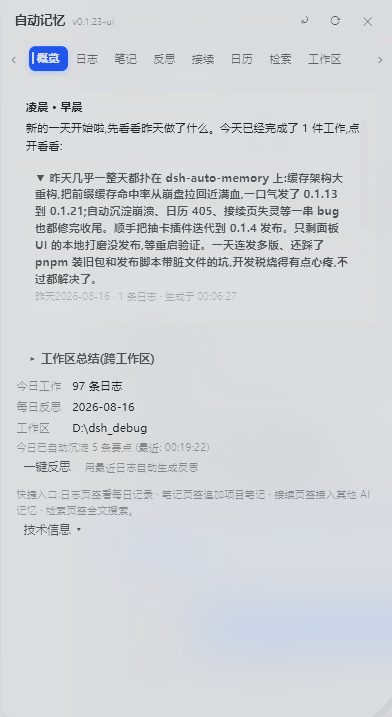
The first thing you see when opening the memory panel is an **AI-generated** period greeting, not a template and not technical info:
- **AI-written greeting**: a subagent writes a warm, casual greeting for the current period (morning / forenoon / noon / afternoon / evening), mentioning your most important work of the day; generated once per period per day and cached in `.dsh-memory/greetings/` — no repeated API cost
- **Drawer titles are the AI summaries**: the "Today afternoon / Today evening" window titles are replaced with the AI's casual summary text itself
- **Three-level drawer structure**:
- Level 1: period drawer, titled with the AI summary
- Level 2: inside it, small drawers — one per work item the AI distilled (with a point count)
- Level 3: expand a work item to read its detail points
- **Summaries are cached**: structured results live in `.dsh-memory/summaries/`; opening the panel reads the cache (offline-friendly, no regeneration); the ⟳ refresh button or returning after >1h away forces a fresh generation; every summary shows its generation time
- **Smart timing**: if you were away for more than 1 hour and come back, the greeting says "Welcome back" with what was finished meanwhile
- **Daily reflection stays in background**: structured reflections (results / lessons / next steps) are kept, while the front page only shows a light greeting
### Smart Search (Search tab, v0.1.9)
The Search tab adds a **Smart search** button next to the keyword search:
- The AI expands your natural-language query into 3-6 keywords (e.g. "last time publishing npm hit a snag" → 发布 / 踩坑 / GitHub / npm / 推送)
- Scans all three memory layers plus reflections with those keywords
- The AI then composes a **conversational answer** in natural language, citing where each fact came from (log date / project note / user-level memory) — it never fabricates facts not present in memory
- Raw keyword hits with their sources are listed under the answer
### Calendar View (Four Quadrants)
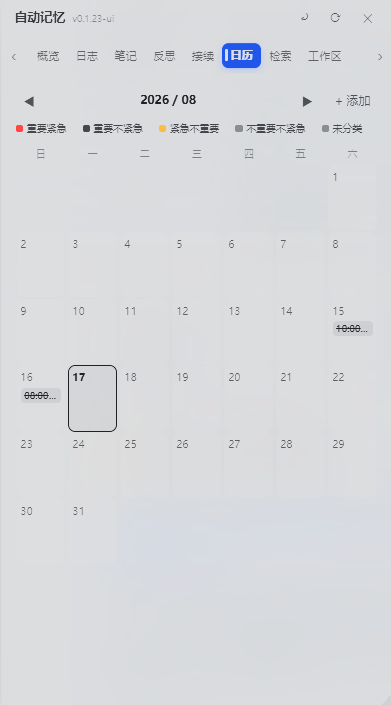
「Calendar」tab (liquid-glass monthly view):
- Monthly grid, today highlighted, click any date to add an item
- **Four-quadrant colors**: Urgent & Important (red) / Important (blue) / Urgent (orange) / Neither (gray)
- Click an item to toggle done, click again to delete; legend + weekday header
- **Cross-conversation persistence**: data lives at user level `~/.dsh/memory/CALENDAR.md`, shared across workspaces, survives DSH reinstall
- **AI-maintained**: the AI extracts deadlines and appointments from conversations and writes them to the calendar automatically (`calendar_add` / `calendar_list` / `calendar_done` / `calendar_remove`), restating it in plain text; pending items are injected into every session's system prompt
### Agent Tools
`memory_log` / `memory_note` / `memory_user` / `memory_recall` / `memory_external` / `memory_maintain` / `memory_status` / `memory_reflect` / `memory_consolidate` / `calendar_add` / `calendar_list` / `calendar_done` / `calendar_remove`
### UI
- Sidebar 「Memory」entry → floating panel (Overview / Logs / Notes / Reflections / Connect / Calendar / Search)
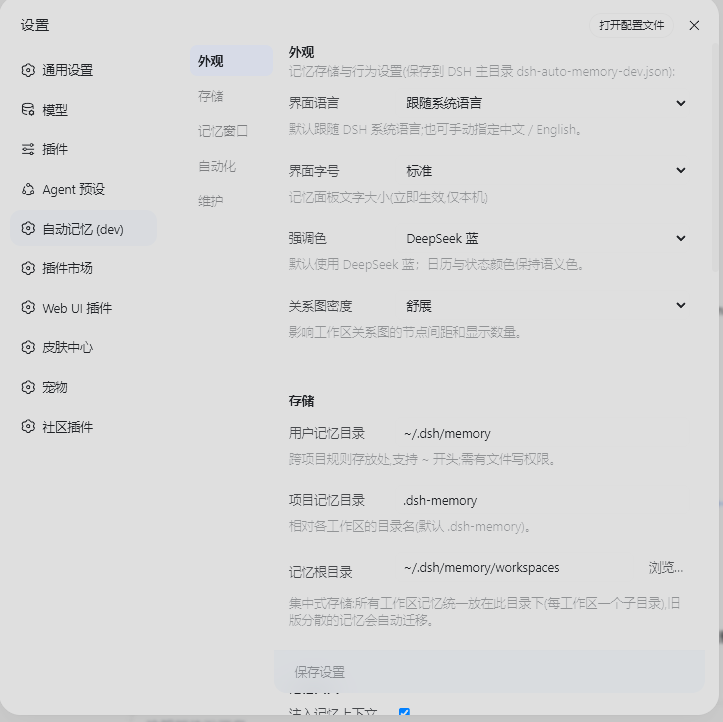
- Settings page (Settings → Auto Memory): storage paths, injection budget, reflection style, UI language (中文 / English), **panel font size (Small / Normal / Large / Extra large, default Large)** — applies immediately, no save needed
- **External memory inheritance**: import memories accumulated by other AI tools (CodeBuddy / Claude Code / Codex / project convention files)
---
## Screenshots
All screenshots below are real captures of the plugin running inside the DSH Web GUI (Chinese UI for now; English UI captures will be added later).
### Memory panel overview — away greeting & AI period summaries
 ### Connect — inherit global memory & history sessions from other AI agents
 ### Calendar — AI adds items, toggles status and marks completion from context
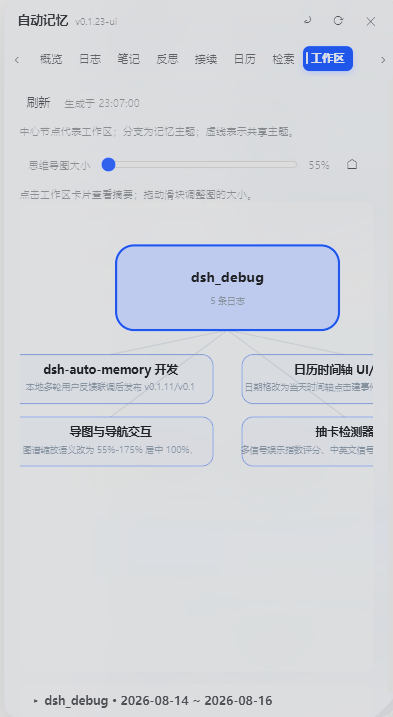
 ### Workspace mind map — auto-generated, workspace-centered cross-workspace overview
 ### Settings — highly customizable, covers most technical details
 ## Beyond the screenshots
- **Auto-consolidation**: every finished turn is evaluated by a small subagent and topic-grouped entries are written to today's log automatically (`## 主题(HH:MM)` + bullet points) — no `memory_log` needed for routine work. Long-term value is promoted to project notes / user-level memory, small talk is skipped, failures are queued and retried every 5 minutes (a 15-second heartbeat file proves the loop is alive).
- **Smart search**: ask in natural language — the AI expands your query into keywords, scans every memory layer, then answers conversationally with sources cited.
- **Calendar with day timeline (v0.1.24)**: click a date to open a 07:00–22:00 timeline with events placed on their time slots; add events with location/reminder/details; the AI proactively files deadlines via `calendar_add` and marks them done via `calendar_done`/`calendar_remove`.
- **Workspace mind map (v0.1.24)**: an AI-generated graph of workspaces, topics and cross-workspace links; pan by dragging, resize with the slider, click a card for details.
- **Memory panel UI (v0.1.24)**: liquid-glass panel with smooth animations everywhere — tab strip with arrow scrolling, expanding sections (greeting drawers, workspace summaries), floating save bar in Settings that highlights when there are unsaved changes.
- **External memory management (v0.1.24)**: per-source view/import/remove — imported sources show "✓" and become "Delete" buttons per target (notes vs user-level); full content is read on demand and never injected in bulk.
- **Calendar reminders**: pending items are injected into future sessions' system prompts until completed — the AI reminds you without being asked.
- **One-click update**: the settings page shows your installed version vs. the npm registry latest; registry installs get a one-click update button (pnpm/npm runs under the hood), then restart to apply.
---
## Configuration
Defaults (JSON file `~/.dsh/dsh-auto-memory.json`):
```json
{
"userMemoryDir": "~/.dsh/memory",
"projectMemoryDir": ".dsh-memory",
"injectEnabled": true,
"injectBudgetChars": 2400,
"recentDaysInjected": 1,
"reflectEnabled": true,
"reflectStyle": "auto",
"locale": "zh",
"autoConsolidate": true,
"autoConsolidateMinChars": 240,
"autoConsolidateCooldownMinutes": 30,
"autoConsolidateDailyMax": 8,
"externalInjectionChars": 1400,
"memoryRoot": "~/.dsh/memory/workspaces",
"dayBoundaryMinutes": 450
}
```
Adjustable in the GUI (Settings → Auto Memory), including the UI language (zh / en), the panel font size and the day boundary.
### v0.1.9 hardening (budget / boundary / picker)
- **Daily write budget with auto-compaction**: user memory ≤ 4000 chars/day, project notes ≤ 3000 chars/day (shared across sessions, reset at the day boundary). Going over the budget never rejects the write — the framework compacts the pre-today sections with an AI pass (merge duplicates, drop stale entries, keep hard facts) and then writes; if AI is unavailable, the oldest sections are archived to `archived-user.md` / `archive/notes-archived.md` (nothing is lost). Compaction is throttled to once per 10 minutes.
- **Day boundary (late-night belongs to yesterday)**: `dayBoundaryMinutes` (default 450 = 07:30). Work logged before the boundary is appended to the previous day's log, and the daily reflection for the previous day starts only after the boundary — no more "it's 00:30, tell me what you did yesterday" right after midnight.
- **Native OS folder picker**: the "Browse…" button next to the memory root opens the real system folder picker (via the DSH directory-picker native backend); falls back to the in-app browser when no native picker is available. Changing the root auto-migrates existing workspace memory folders to the new location (old files are kept) and all path variables follow the new config on the next refresh.
- **30-day distillation**: `memory_maintain` distills logs older than 30 days with an AI pass into the project notes, archives the originals under `archive/`, and removes them from the active log list.
- **First-turn injection guarantee**: a `pre-step` hook awaits the memory state refresh before the first step, so the model sees memory from the very first token (previously the async load could leave the first turn empty).
- **Per-step reminder with timestamp**: the injected discipline block carries a live `HH:MM:SS` timestamp that refreshes on every prompt assembly, and a 15-second heartbeat file proves the background loop is alive.
---
## Structure
- `lib/index.js` — Host half: engine, injection, tools, routes (zero runtime deps, Node built-ins only)
- `lib/client.js` — Browser half: memory panel (with calendar view) + settings page (built-in zh/en i18n)
- `cordis.patch.yml` — Plugin row (`auto-memory`)
---
## Limitations
- Memory files are plain-text Markdown; no secrets stored unless explicitly requested.
- `memory_recall` session search depends on the deployed session-query index; without it, only local search works.
- Plugin-set changes require a dsh restart.
---
## Release Info
- GitHub: https://github.com/Aik358/dsh-auto-memory
- npm: `@a9i5k4/dsh-auto-memory`
- License: BSD-3-Clause
## Beyond the screenshots
- **Auto-consolidation**: every finished turn is evaluated by a small subagent and topic-grouped entries are written to today's log automatically (`## 主题(HH:MM)` + bullet points) — no `memory_log` needed for routine work. Long-term value is promoted to project notes / user-level memory, small talk is skipped, failures are queued and retried every 5 minutes (a 15-second heartbeat file proves the loop is alive).
- **Smart search**: ask in natural language — the AI expands your query into keywords, scans every memory layer, then answers conversationally with sources cited.
- **Calendar with day timeline (v0.1.24)**: click a date to open a 07:00–22:00 timeline with events placed on their time slots; add events with location/reminder/details; the AI proactively files deadlines via `calendar_add` and marks them done via `calendar_done`/`calendar_remove`.
- **Workspace mind map (v0.1.24)**: an AI-generated graph of workspaces, topics and cross-workspace links; pan by dragging, resize with the slider, click a card for details.
- **Memory panel UI (v0.1.24)**: liquid-glass panel with smooth animations everywhere — tab strip with arrow scrolling, expanding sections (greeting drawers, workspace summaries), floating save bar in Settings that highlights when there are unsaved changes.
- **External memory management (v0.1.24)**: per-source view/import/remove — imported sources show "✓" and become "Delete" buttons per target (notes vs user-level); full content is read on demand and never injected in bulk.
- **Calendar reminders**: pending items are injected into future sessions' system prompts until completed — the AI reminds you without being asked.
- **One-click update**: the settings page shows your installed version vs. the npm registry latest; registry installs get a one-click update button (pnpm/npm runs under the hood), then restart to apply.
---
## Configuration
Defaults (JSON file `~/.dsh/dsh-auto-memory.json`):
```json
{
"userMemoryDir": "~/.dsh/memory",
"projectMemoryDir": ".dsh-memory",
"injectEnabled": true,
"injectBudgetChars": 2400,
"recentDaysInjected": 1,
"reflectEnabled": true,
"reflectStyle": "auto",
"locale": "zh",
"autoConsolidate": true,
"autoConsolidateMinChars": 240,
"autoConsolidateCooldownMinutes": 30,
"autoConsolidateDailyMax": 8,
"externalInjectionChars": 1400,
"memoryRoot": "~/.dsh/memory/workspaces",
"dayBoundaryMinutes": 450
}
```
Adjustable in the GUI (Settings → Auto Memory), including the UI language (zh / en), the panel font size and the day boundary.
### v0.1.9 hardening (budget / boundary / picker)
- **Daily write budget with auto-compaction**: user memory ≤ 4000 chars/day, project notes ≤ 3000 chars/day (shared across sessions, reset at the day boundary). Going over the budget never rejects the write — the framework compacts the pre-today sections with an AI pass (merge duplicates, drop stale entries, keep hard facts) and then writes; if AI is unavailable, the oldest sections are archived to `archived-user.md` / `archive/notes-archived.md` (nothing is lost). Compaction is throttled to once per 10 minutes.
- **Day boundary (late-night belongs to yesterday)**: `dayBoundaryMinutes` (default 450 = 07:30). Work logged before the boundary is appended to the previous day's log, and the daily reflection for the previous day starts only after the boundary — no more "it's 00:30, tell me what you did yesterday" right after midnight.
- **Native OS folder picker**: the "Browse…" button next to the memory root opens the real system folder picker (via the DSH directory-picker native backend); falls back to the in-app browser when no native picker is available. Changing the root auto-migrates existing workspace memory folders to the new location (old files are kept) and all path variables follow the new config on the next refresh.
- **30-day distillation**: `memory_maintain` distills logs older than 30 days with an AI pass into the project notes, archives the originals under `archive/`, and removes them from the active log list.
- **First-turn injection guarantee**: a `pre-step` hook awaits the memory state refresh before the first step, so the model sees memory from the very first token (previously the async load could leave the first turn empty).
- **Per-step reminder with timestamp**: the injected discipline block carries a live `HH:MM:SS` timestamp that refreshes on every prompt assembly, and a 15-second heartbeat file proves the background loop is alive.
---
## Structure
- `lib/index.js` — Host half: engine, injection, tools, routes (zero runtime deps, Node built-ins only)
- `lib/client.js` — Browser half: memory panel (with calendar view) + settings page (built-in zh/en i18n)
- `cordis.patch.yml` — Plugin row (`auto-memory`)
---
## Limitations
- Memory files are plain-text Markdown; no secrets stored unless explicitly requested.
- `memory_recall` session search depends on the deployed session-query index; without it, only local search works.
- Plugin-set changes require a dsh restart.
---
## Release Info
- GitHub: https://github.com/Aik358/dsh-auto-memory
- npm: `@a9i5k4/dsh-auto-memory`
- License: BSD-3-Clause