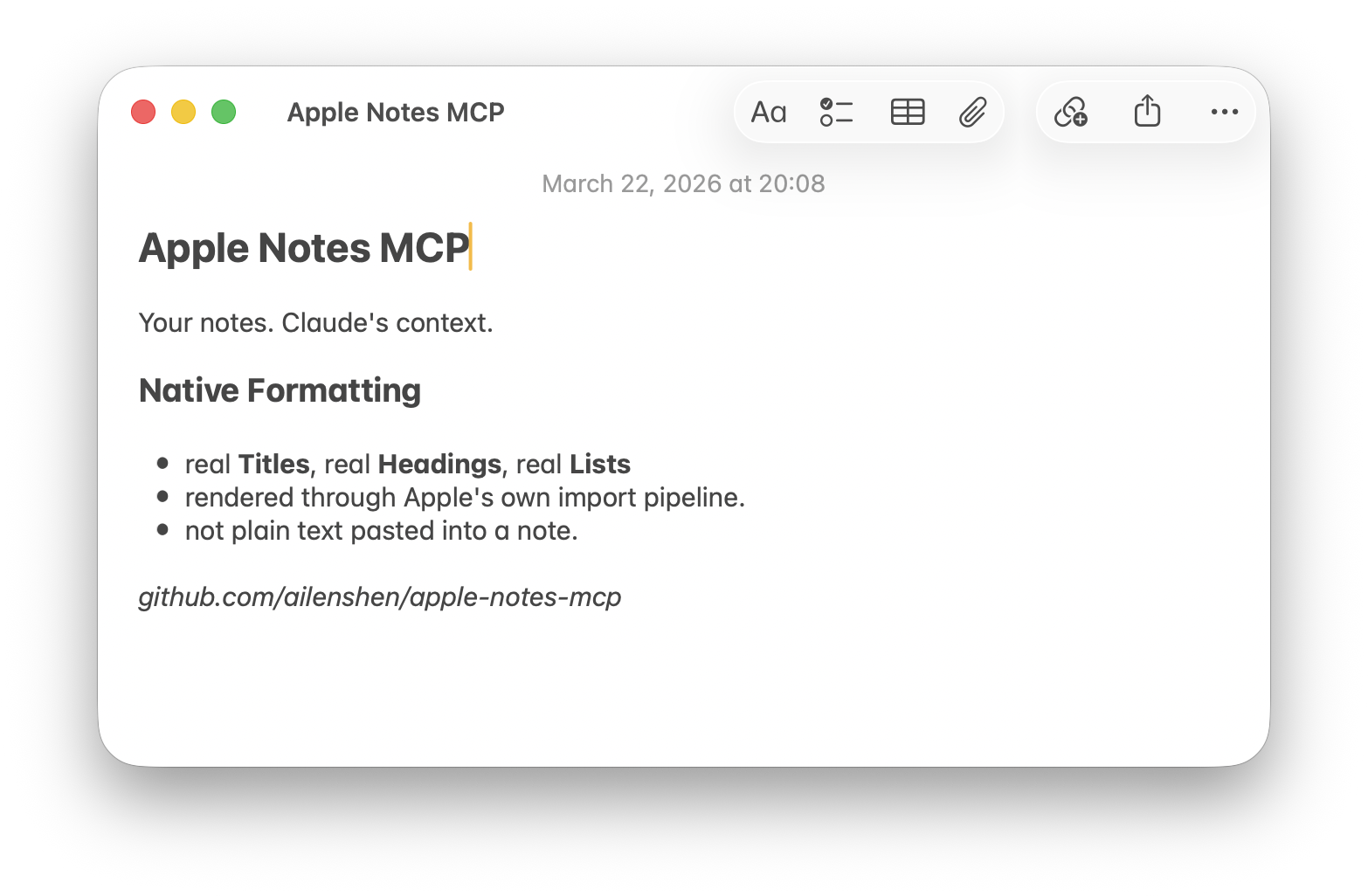
# Apple Notes MCP Server
Read and write Apple Notes, with **Apple Notes native formatting** support.
[](https://glama.ai/mcp/servers/ailenshen/apple-notes-mcp)
Most Apple Notes MCP servers can only write plain text. This one creates natively formatted notes — Titles, Headings, Bold, Lists all render as real Apple Notes styles, not plain text. This is achieved by leveraging Notes.app's built-in Markdown import capability.
**Requires:** macOS 26 (Tahoe) or later, [Node.js](https://nodejs.org/) 24+
## Setup
### 1. Add to your MCP client
**Claude Desktop** — edit `~/Library/Application Support/Claude/claude_desktop_config.json`:
```json
{
"mcpServers": {
"apple-notes": {
"command": "npx",
"args": ["-y", "@ailenshen/apple-notes-mcp@latest"]
}
}
}
```
**Claude Code** — run in Terminal:
```bash
claude mcp add apple-notes -- npx -y @ailenshen/apple-notes-mcp@latest
```
### 2. Grant permissions
To support native formatting, the server uses Notes.app's built-in Markdown import — it opens `.md` files with Notes.app and automatically confirms the Import dialog. This requires two macOS permissions for `node`:
| Permission | Where to enable | Why |
|-----------|----------------|-----|
| **Full Disk Access** | System Settings > Privacy & Security > Full Disk Access > enable `node` | Read the Notes database for listing and searching |
| **Accessibility** | System Settings > Privacy & Security > Accessibility > enable `node` | Auto-confirm the Import dialog when creating notes |
On first use, macOS will prompt you to approve — just click Allow. If you missed the prompt, go to the settings above and turn on `node` manually. After granting, restart your MCP client.
> If a permission is missing, the server will tell you exactly which one and how to fix it.
### 3. Start using it
Just talk to your AI naturally:
- "List all my notes in the Projects folder"
- "Search my notes for 'meeting agenda'"
- "Read my Shopping List note"
- "Create a note in Work with today's action items"
- "Update my Shopping List with these new items"
- "Delete the note called 'Old Draft'"
## What Can It Do?
| Tool | Description |
|------|-------------|
| `list_notes` | Browse notes, optionally filter by folder |
| `search_notes` | Find notes by keyword |
| `get_note` | Read full content as Markdown |
| `create_note` | Write Markdown → natively formatted note |
| `update_note` | Replace content, preserving folder |
| `delete_note` | Move to Recently Deleted |
### Markdown support in Notes
| Element | Works? |
|---------|--------|
| Headings, **bold**, *italic*, lists, `inline code` | Yes |
| Block quotes | Content kept, no indent style |
| Links | Text kept, URL lost |
| Tables, footnotes | No |
## Remote Access (HTTP mode)
Want to access your Apple Notes from your phone or another computer?
```bash
npx @ailenshen/apple-notes-mcp@latest --http
```
This prints an endpoint URL with a built-in secret:
```
Endpoint: http://localhost:3100/mcp/a3f8b2c9e1d4...
```
Point your remote MCP client to this URL. To access over the internet, put it behind HTTPS using a tunnel (ngrok, Cloudflare Tunnel, etc.).
| Flag | Default | Description |
|------|---------|-------------|
| `--port ` | 3100 | Port number |
| `--secret ` | random | Custom URL secret |
To keep it running across reboots, see the [wiki](https://github.com/ailenshen/apple-notes-mcp/wiki) for a LaunchAgent example.
## How It Works
| Action | Method | Speed |
|--------|--------|-------|
| List / Search | SQLite (read-only) | < 100ms |
| Read | AppleScript → Markdown | ~1s |
| Create | Native Markdown import | ~0.5s |
| Update | Delete + Create | ~1.5s |
| Delete | AppleScript | ~1s |
- **Reading** queries the Notes database directly via SQLite — fast and safe. Content is converted from Apple's HTML to Markdown via [turndown](https://github.com/mixmark-io/turndown).
- **Creating** uses macOS's native Markdown import (`open -a Notes`), so formatting is preserved natively. Notes.app briefly appears (~0.5s) during creation.
- **Updating** deletes the old note and creates a new one, automatically preserving the original folder.
- **Deleting** moves notes to Recently Deleted, same as doing it by hand.
## Known Limitations
- **Partial note editing** (e.g. "fix just this paragraph") is not supported. `update_note` always replaces the full content. This is a fundamental limitation of how Notes exposes content — its AppleScript interface returns HTML, not the original Markdown, so a clean read→edit→write round-trip isn't possible today.
- **Notes briefly appears** during note creation. The Markdown import flow requires auto-confirming a dialog in Notes.app, which may momentarily bring it to the foreground.
These limitations would be lifted if Apple adds Markdown import/export to AppleScript, or opens an official Notes API — both are tracked for future macOS releases.
## Vision
Apple Notes is the most natural place to keep personal knowledge on Apple devices — it syncs everywhere, it's fast, and it's private. But it's a walled garden with no API.
This project makes Apple Notes a first-class data source for AI. The long-term goal: wherever you're talking to AI — on your Mac, on your phone, on the web — your Apple Notes are always accessible, readable, and writable.
## License
MIT