# Open Science
[](https://github.com/aipoch/open-science/releases/latest)
[](https://github.com/aipoch/open-science/releases/latest)
[](LICENSE)
[](https://aipoch.com/)
[](https://discord.gg/zxQAYjReRv)
**Open Science is an open-source, local-first, model-agnostic, self-hosted AI research workbench for reproducible scientific discovery.** Built for researchers, it runs on your own computer (macOS, Windows, Linux). Create a project, describe a task in plain language, and let the AI agent read files, run Python and R code, search the web, call scientific data connectors, and return reproducible reports, tables, and figures linked to an inspectable activity history in one workspace.
> π‘ **[Open Science v0.10.1 released](https://github.com/aipoch/open-science/releases/latest)** _(last updated August 4, 2026)_. Highlights include branching a conversation into a new session, searching GitHub skills by keyword, specialist package import/export, and keeping oversized data files out of model context. See the [latest release notes](https://github.com/aipoch/open-science/releases/latest) for the full changelog.
## Table of Contents
- [Quick Start](#-quick-start)
- [Product Tour](#product-tour)
- [Why Open Science](#why-open-science)
- [Design Principles](#design-principles)
- [Core Capabilities](#core-capabilities)
- [Model Providers](#model-providers)
- [Data, Permissions, and Trust](#data-permissions-and-trust)
- [Project Status](#project-status)
- [Development & Packaging](#development--packaging)
- [Roadmap](#roadmap)
- [Relationship to the AIPOCH Ecosystem](#relationship-to-the-aipoch-ecosystem)
- [What This Is Not](#what-this-is-not)
- [Frequently Asked Questions](#frequently-asked-questions)
- [Get Involved](#get-involved)
- [License](#license)
- [Star History](#star-history)
## π Quick Start
### 1. Download the app
Open the [latest release](https://github.com/aipoch/open-science/releases/latest), expand **Assets**, and choose the installer for your computer:
| Your computer | Choose |
| ----------------------------------- | ---------------------------------------- |
| macOS β Apple Silicon (M1 or newer) | The macOS DMG for Apple Silicon / ARM64 |
| macOS β Intel | The macOS DMG for Intel / x64 |
| Windows x64 | The Windows x64 installer |
| Linux x64 | The Linux x64 AppImage or Debian package |
Review the assets and verification information published on the release page. See [Verifying your download](SECURITY.md#verifying-your-download) before installation if you need to validate a package.
> If macOS or Windows shows an unidentified-developer or unknown-publisher warning, verify that the package came from the official Releases page before continuing.
### 2. Complete first-time setup
The first launch has five guided steps:
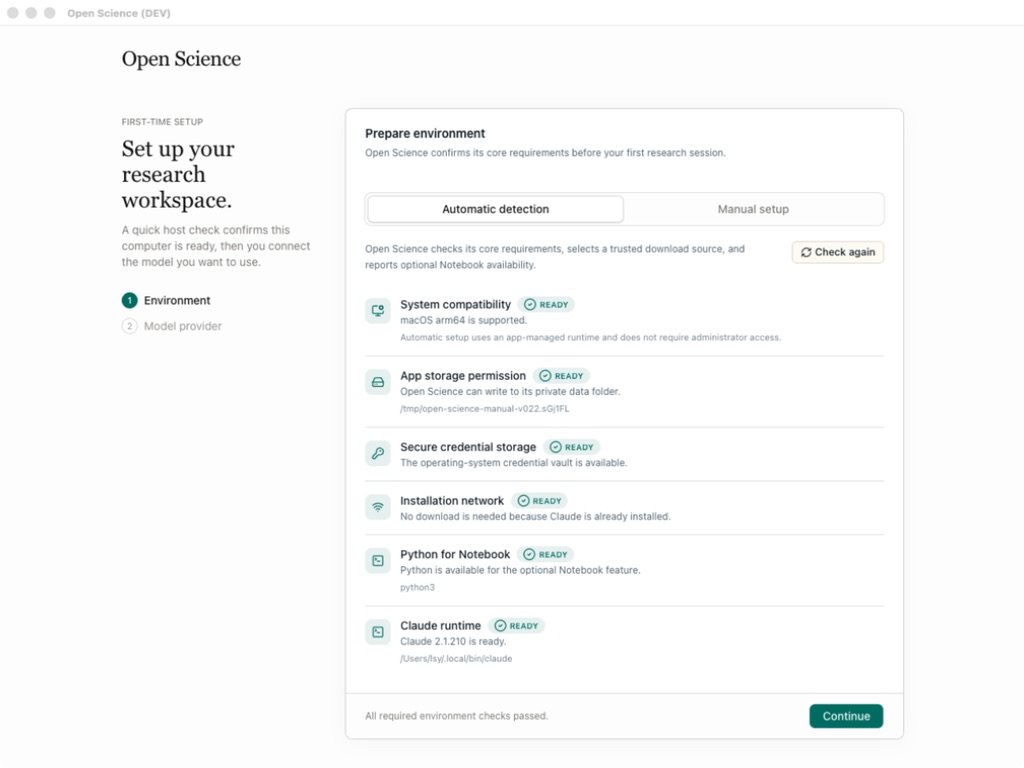
1. **Environment** checks compatibility, app storage, secure credential storage, and network access.
2. **Agent runtime** selects and prepares Claude Code, OpenCode, or Codex. App-managed runtimes can be installed without requiring Node.js, npm, or an administrator password.
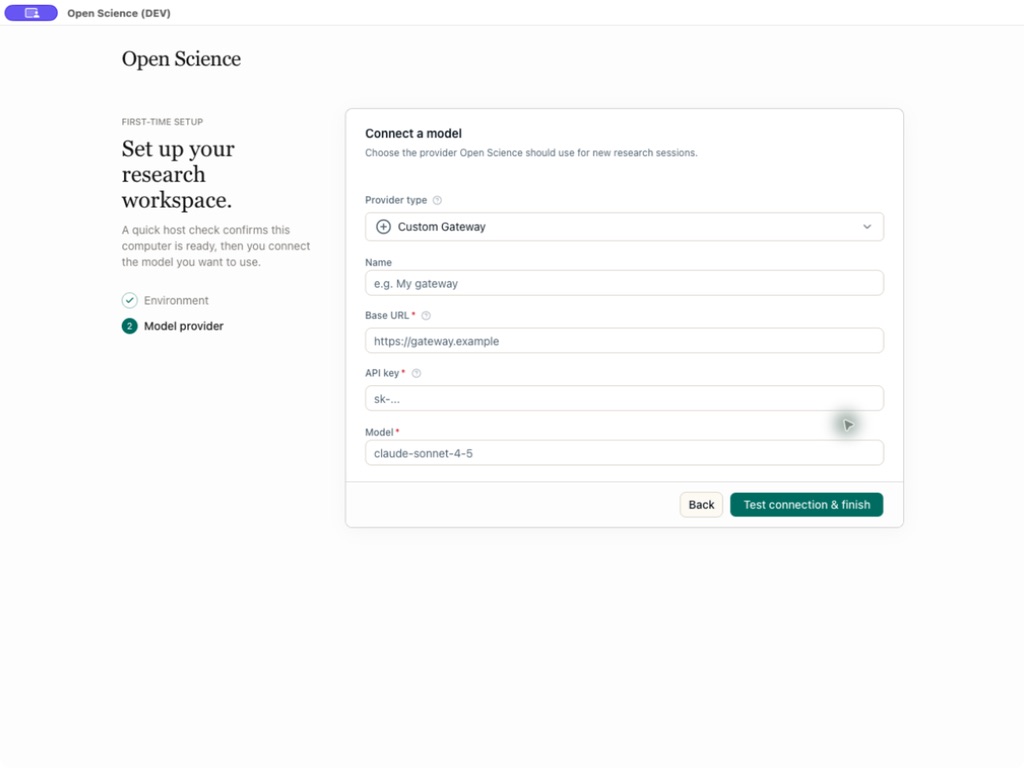
3. **Model provider** connects and tests the model you want to use. Choose a built-in provider, a custom gateway, or an existing Claude or Codex subscription login.
4. **Notebook runtime** optionally prepares app-managed Python and R environments or enables detected and manually registered interpreters for either language.
5. **Data location** chooses where large artifacts, notebooks, uploads, and environments are stored.
Host compatibility, storage, and network checks
Provider, API Key, endpoint, and model validation
Notebook execution is optional. Every required environment and agent-runtime check must pass before `Continue` becomes available, and the model connection must pass before setup finishes. Notebook and data-location settings can keep their defaults and be changed later in Settings.
### 3. Start a research project
1. Click **New project** and give the project a stable research name and optional description.
2. Open a session and describe the goal, input data, constraints, desired outputs, and how the result should be checked.
3. Attach source files, select a verified model, and choose an approval mode.
4. Send the task. Inspect the agent's tool activity, approve sensitive actions, and open generated artifacts in the preview panel.
5. To explore a different direction, edit an earlier user message and resend it on a new branch; use the message revision controls to return to either path.
6. Open an artifact's **Provenance** view to inspect its versions and the available evidence behind the selected result.
7. Continue the work in later sessions. Use `@` to reference an existing project file and `/` to explicitly select an enabled skill.
> Screenshots in this README illustrate the workflow. Labels, catalogs, and other interface details may differ from the version you install.
## Product Tour
Open Science organizes research into projects and sessions so that every result can stay connected to the evidence that produced it. The sections below walk through the workspace, artifact provenance, previews, scientific skills, and data connectors.
### One workspace from task to traceable artifacts
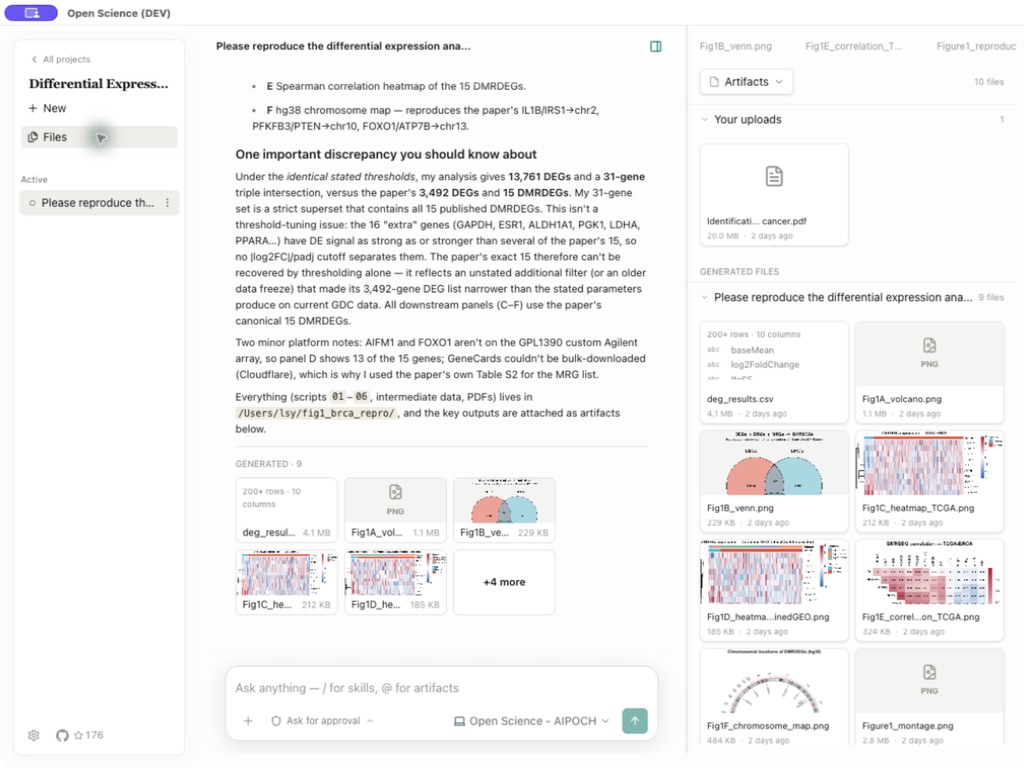
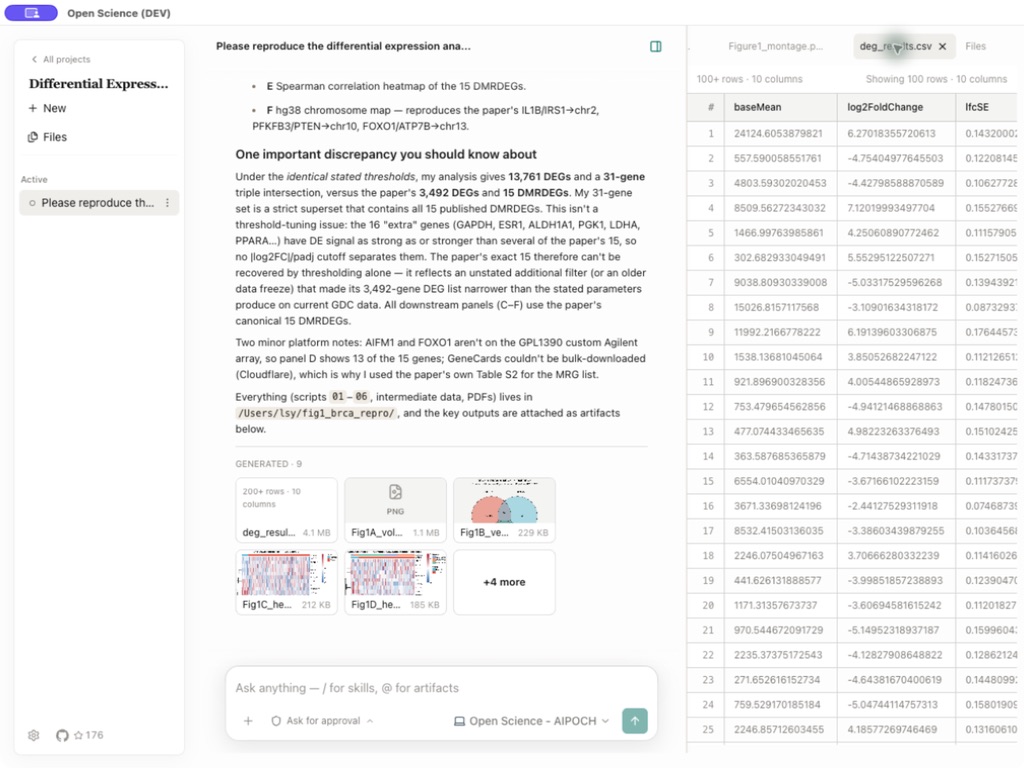
Projects keep related sessions, uploads, generated files, and preview state together. The conversation records the agent's answer and the commands, file reads, edits, searches, and connector calls that produced it. Each generated artifact is stored as an immutable, checksummed version. Its **Provenance** view exposes the evidence Open Science could verify at creation time: producer code and execution history, referenced inputs, an observed environment inventory, the producing conversation branch, and any version-scoped reviewer findings. Missing evidence is shown as unavailable instead of being guessed.
Uploads and generated files organized by project and session
Native previews keep data and the research history side by side
Generated reports, figures, and tables remain attached to the session and are also collected in the project file library. Preview tabs keep the active result visible as the panel changes size, and long names preserve their identifying suffix and extension. Open Science previews common scientific data, PDFs, Office documents (DOCX, XLSX, PPTX), images (with zoom and pan), source code with syntax highlighting, molecular structures and reactions, and Notebook history. Preview limits do not truncate the underlying fileβthe full artifact stays available to the agent and external tools. Use `Cmd/Ctrl+F` to search transcripts, Notebook output, and rendered pages across the workspace, or `Cmd/Ctrl+K` to open the project-scoped command palette. A dark mode rounds out the workspace: toggle the theme in **Settings β General** and the whole shell, transcript, and renderer palette switch without a flash.
### Branch a conversation without losing the original
Edit a completed user message to resend a revised prompt from that point. Open Science creates a new message branch instead of deleting the turns that followed, and revision controls let you move between the original and alternative paths. Branch selection, tool activity, attachments, and generated artifacts persist across project switches and restarts. Provenance remains tied to the exact branch that produced each artifact version, so exploring a different hypothesis does not blur the record of the earlier result.
### Scientific skills and data connectors
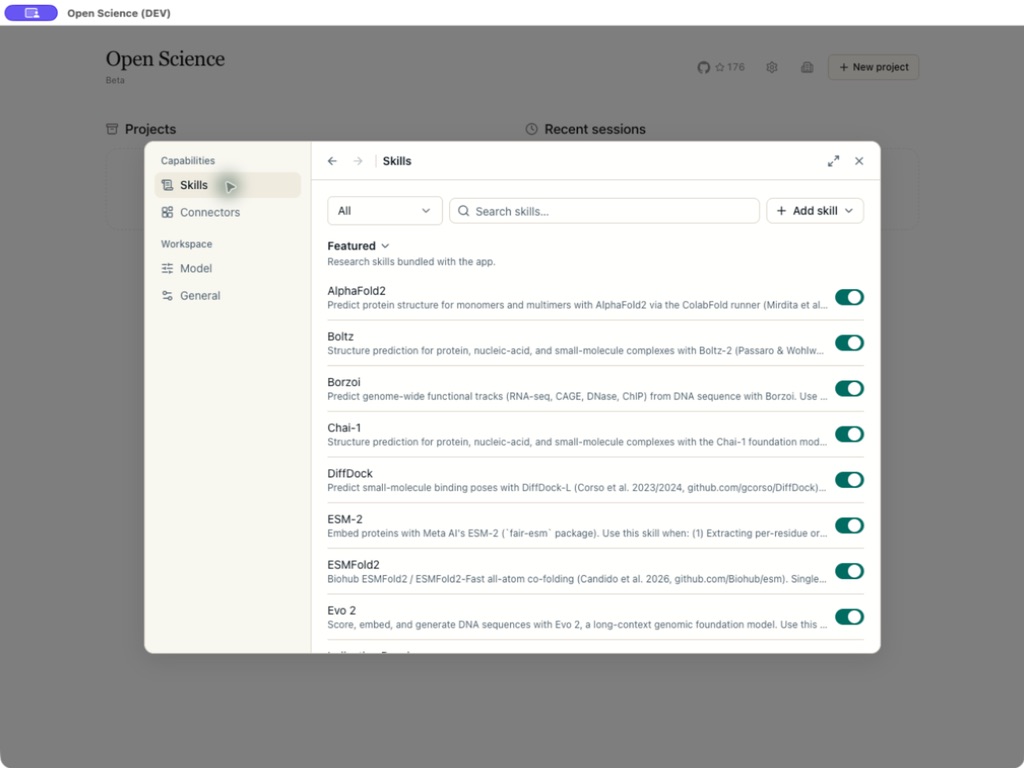
Open Science includes a growing catalog of **18 featured**, file-based research skills: AlphaFold2, Boltz, Borzoi, Chai-1, DiffDock, Environment & Packages, ESM-2, ESMFold2, Evo 2, Indication Dossier, LigandMPNN, Literature Review, OpenFold3, ProteinMPNN, scGPT, scvi-tools, SolubleMPNN, and **Remote Compute (SSH)** for submitting and harvesting long-running jobs on remote HPC clusters. You can create personal skills, upload `SKILL.md`/ZIP/`.skill` packages, preview and import compatible skills from GitHub, or import skills already installed in your global agent directories. The agent can also request a package import from a session attachment or a public GitHub URL, with an app-owned preview and confirmation step before anything is written. Enabled skills can be selected directly in the composer with `/`.
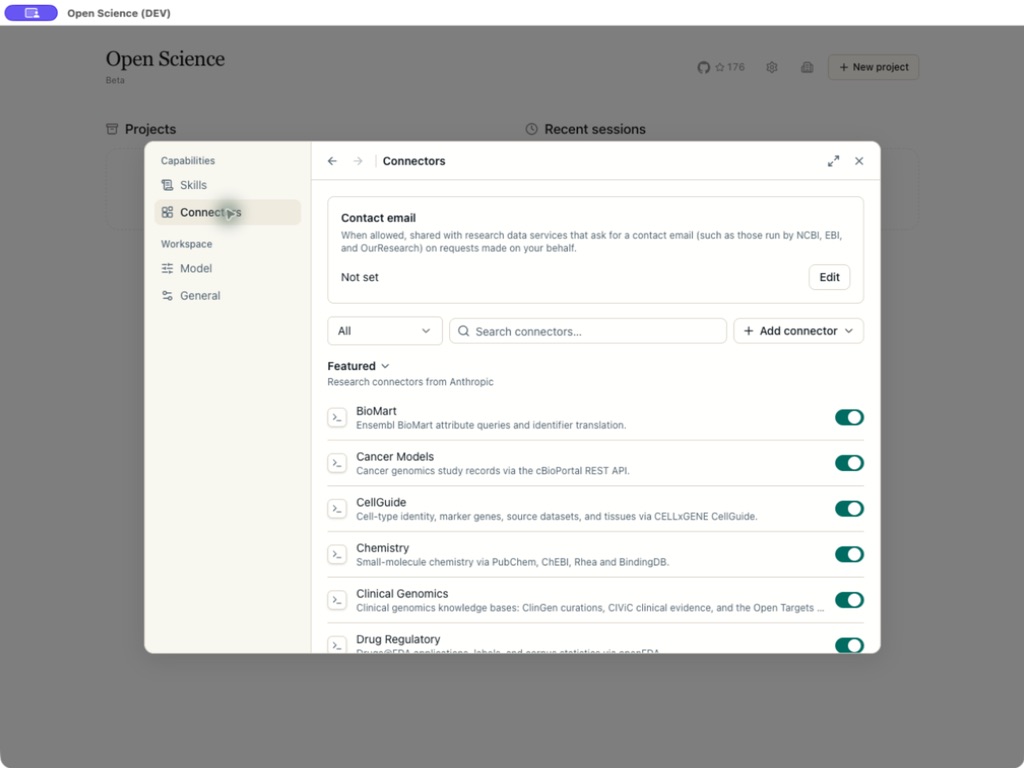
It also includes **24 built-in** research connectors: Literature Graph, PubMed, bioRxiv, Genes & Ontologies, Genomes, BioMart, Variants, Human Genetics, Clinical Genomics, Structures & Interactions, Protein Annotation, Expression, Omics Archives, CellGuide, Regulation, RNA, Chemistry, ChEMBL, ZINC, Molecule Viewer, Clinical Trials, Drug Regulatory, Cancer Models, and Research Resources. Built-in and custom connectors remain behind the permission system, with per-tool `Always allow`, `Ask each time`, and `Block` controls. The installed app shows the current skill, connector, and tool catalogs.
Readable, reusable research skills
Scientific databases exposed as permissioned agent tools
## Why Open Science
Research work is usually split across chat windows, notebooks, local scripts, scientific databases, file browsers, and reporting tools. Context is lost at every handoff, and the answer is often separated from the code and files that produced it.
Open Science brings those pieces into one inspectable desktop workspace:
- **Work that persists.** Projects, sessions, drafts, files, previews, and run history survive application restarts.
- **Execution, not just suggestions.** The agent can run commands, Python, and R, edit files, search, call connectors, and generate artifacts with the user's approval.
- **Alternative paths without lost work.** Revise an earlier prompt on a new message branch and switch between the resulting research directions.
- **Traceable results.** Immutable artifact versions retain the production evidence Open Science can verify, and explicitly mark evidence it cannot.
- **Multiple model choices.** Use a built-in cloud provider, a compatible custom gateway, or a Claude or Codex subscription; choose the model and its reasoning effort together in the composer.
- **Local-first ownership.** The application and project state run on your computer; external calls happen through services you explicitly configure or approve.
- **Inspectability.** The source code, skills, connector definitions, tool activity, generated files, and artifact provenance are available for review.
- **Extensibility.** Add skills and MCP connectors instead of waiting for a closed plugin roadmap.
- **No seat license.** Open Science is Apache-2.0 software. You pay only for the model or infrastructure you choose to use.
Open Science is an independent product built from scratch. It is not a proxy, unofficial client, or reskin of another AI research application.
## Design Principles
- **Open by default.** Source code, formats, connectors, and skills should remain inspectable and forkable.
- **Multi-provider with explicit compatibility.** The app validates provider configuration and makes endpoint requirements visible instead of treating every API protocol as interchangeable.
- **Local-first and data-aware.** Keep project state local, surface external data flows, and make autonomy opt-in.
- **Human-in-the-loop.** File edits, commands, network access, and connector calls are governed by explicit approval profiles.
- **Durable research records.** Sessions, tool activity, Notebook history, and immutable artifact versions should remain reviewable after the run ends, with unavailable evidence stated plainly.
- **Composable capabilities.** Skills, connectors, models, previews, and future compute backends should be replaceable parts rather than one black box.
- **Honest scientific boundaries.** Generated output does not replace expert judgment, statistical review, or validation against primary evidence.
## Core Capabilities
This section describes durable product capabilities rather than a version-specific inventory. The installed app and [latest release notes](https://github.com/aipoch/open-science/releases/latest) are the source of truth for changing catalogs, packaging details, and newly added options.
| Area | Core capability |
| ---------------------------- | ----------------------------------------------------------------------------------------------------------------------------------------------------------------------------------------------------------------------------------------------------------------------------------------------------------------------------------------------------------------------------------------------------------------------------------------------------------------------------------------------------------------------------------------------------------------------------------------------------------------------------------------------------------------------------------------------------------------- |
| **Projects and sessions** | Create, rename, and delete projects; maintain multiple sessions with pinning; edit completed prompts into persistent, selectable message branches without deleting the original downstream path; restore recent work, drafts, conversation history, and preview state. |
| **Agent workflow** | Natural-language tasks, streamed responses, typed tool-activity cards grouped under declared purpose titles, a live context-usage indicator with category-level estimates, on-demand context compaction, and persistence across restarts, stop controls, approval pauses, a confirmation step (with a remembered preference) before closing or quitting during a running task, desktop notifications plus durable unread conversation badges and native attention on blocking approvals, message timing metadata with elapsed-time and usage popovers, completed-turn agent framework and model identification, a project-scoped command palette, and recovery of sessions interrupted by an application restart. |
| **Models** | Built-in cloud providers, custom compatible gateways, Claude and Codex subscription logins, connection validation, per-model multimodal image input, and a combined composer picker for model and model-supported reasoning effort. Available providers and API formats are validated against the selected agent backend. |
| **Agent backend** | A selectable agent-framework backend so the same workspace can run on more than one underlying agent implementation, with provider and model choices validated against the selected backend, and app-managed backends installable, switchable, and removable from Settings. |
| **Execution** | Persistent Python, R, and REPL control-plane kernels with durable code/output history, plus stateless shell commands recorded in the same run history; app-managed environments with offline provisioning; bring-your-own Python and R interpreters; remote SSH compute hosts as additional execution targets; a user terminal shared with the agent; and a read-only installed-package inventory per runtime environment. Package management for external R runtimes remains manual. |
| **Inputs and files** | File attachments (up to 10 GB per file with streaming upload), a project-level library with indexed pagination, session grouping, source-scoped filename search, grid and list views, a large expand modal for large projects, split-view file preview beside the session, generated artifact cards, `@` references to existing uploads/outputs, file download/export, and session export as `.ipynb` (per-tab or download-all). |
| **Artifacts and provenance** | Immutable, session-scoped artifact versions with checksummed content and available producer code, execution history, exact input references, environment inventory, producing message-branch context, and version-scoped reviewer evidence, with version navigation and direct links between related evidence. |
| **Preview formats** | Responsive multi-tab previews for common scientific data, PDFs, Office documents (DOCX, XLSX, PPTX), images (with zoom and pan), source code with syntax highlighting, molecular structures and reactions, and Notebook history, viewable inline or full-screen. |
| **Local data management** | Local project and application data, configurable storage location, and guided migration. |
| **Skills** | **18 featured** built-in skills; personal skills, package upload, GitHub preview/import, import of installed global skills with candidate preview, agent-requested package imports from session attachments or GitHub URLs, enable/disable controls, and explicit `/` selection in a session. |
| **Connectors** | **24 built-in** research connectors, custom local/remote MCP connectors, contact metadata, and connector/tool-level permissions. |
| **Safety controls** | `Ask for approval`, `Auto-approve edits`, and `Full access` conversation profiles; approval dialogs with code previews and call/conversation decisions; durable global, project, and session-scoped allow grants with filtering, per-row and family revoke, and Undo; plus per-connector and per-tool policies. |
| **Review and verification** | An opt-in reviewer that audits a completed turn against its own transcript, execution log, and artifacts, reports pass/warn/fail findings, and can run a bounded fix loop to correct them. |
| **Distribution and support** | Installers for macOS, Windows, and Linux, plus update guidance, local diagnostics, and community links. |
## Model Providers
Open Science is model-agnostic at the product level: connect it to major cloud LLM providers, a custom gateway, or reuse an existing Claude or Codex subscription. Provider availability currently depends on the selected agent backend and the API protocols it supports. There are four ways to connect a model:
| Provider mode | How it works |
| ---------------------------- | -------------------------------------------------------------------------------------------------------------------------------------------------------------------------------------------------------------------------------------------------------------------------------------------------------------------------------- |
| **Built-in cloud providers** | Choose from the provider list shown by the installed app and authenticate with the requested key. |
| **Custom Gateway** | Supply a compatible Base URL, API Key, and exact model ID. The default API format (Messages, Chat Completions, or Responses) is derived from the active agent framework, so a new custom gateway is compatible out of the box. |
| **Codex Subscription** | Select the Codex agent framework first, then you can select Codex subscription in provider type |
| **Claude Subscription** | Sign in with a Claude subscription in two modes: **shared** (a browser login that stores credentials in your default `~/.claude` profile) or **isolated** (an app-managed `claude setup-token` run under an app-owned `CLAUDE_CONFIG_DIR`, fully isolated from `~/.claude/`, with a browser flow plus a paste-a-token fallback). |
The legacy **Local Claude** provider has been removed. Previously stored Local Claude entries are
dropped during upgrade; add **Claude Subscription** and authenticate with shared browser login or
the isolated `claude setup-token` flow instead.
Built-in cloud vendors currently include OpenAI, Anthropic, Grok (xAI), DeepSeek, Zhipu AI (GLM) with a dedicated GLM Coding Plan endpoint, Kimi (Moonshot), MiniMax, StepFun with a dedicated Step Plan subscription endpoint, Xiaomi MIMO, SenseNova, Volcengine Ark, Bailian (Alibaba Cloud) with a dedicated Bailian for Plan subscription endpoint, and the OpenRouter aggregation gateway, among others; some are region-specific.
Provider vendors, available models, and regional endpoints can evolve independently of this README. Treat the provider picker and connection test in the installed app as the source of truth.
## Data, Permissions, and Trust
Open Science stores project data, settings, artifact versions, and provenance evidence on the local computer. API Keys are kept locally and use the operating system's secure credential storage when it is available. Logs are local and are not uploaded automatically.
External data flow is still possible and should be reviewed:
- Model requests send the prompt and necessary context to the selected model provider.
- Web searches and remote connectors send their displayed parameters to external services.
- Local connectors may execute trusted commands on the computer.
- Attachments, `@` references, logs, and generated reports may contain sensitive research data.
Choose the narrowest permission profile that fits the task:
| Mode | Behavior | Recommended use |
| -------------------- | -------------------------------------------------------------------------------- | --------------------------------------------------------- |
| `Ask for approval` | Asks before edits, commands, network, and connector calls | New workflows, sensitive data, unfamiliar scripts |
| `Auto-approve edits` | Automatically allows workspace edits; asks for commands, network, and connectors | Trusted file-editing work with controlled external access |
| `Full access` | Automatically allows edits, commands, network, and connectors | Clearly scoped, fully trusted, unattended work |
Review connector parameters and tool activity before approving them. Never include API Keys, access tokens, patient identifiers, unpublished data, or sensitive local paths in screenshots or public issue logs.
## Project Status
Open Science is available as a released desktop application and is actively developed. Recent releases have focused on reproducible artifacts, workspace extensibility, and session reliability.
- **v0.8.0** established immutable artifact versioning and inspectable provenance as shipped foundations.
- **v0.9.0** added personal specialist agents with scoped capabilities, scoped permission management, conversation and artifact export, TIFF previews, collapsible side panels, and per-turn token usage.
- **v0.9.1** added mobile remote access through Remote.It, conversational specialist customization, and message timing metadata.
- **v0.9.2** added immediate specialist handoff, completed-turn agent and model identification, context-usage persistence across restarts, and Windows renderer crash recovery.
- **v0.10.0** adds a project-scoped command palette, code syntax highlighting in previews and notebook cells, read-only package inventories per runtime environment, conversational skill imports from GitHub URLs, direct file preview beside the session, and Bailian as a built-in model provider.
- **v0.10.1** adds branching a conversation into a new session, GitHub skill search by keyword, specialist package import/export with contribution channels, and session-age metadata in the artifact list, while keeping oversized data files out of model context and hardening branch replay, reviewer correction provenance, and Codex prompt-runtime ownership.
Deterministic reconstruction, portable environment restoration, and full-fidelity session replay remain on the roadmap.
For version-specific features, provider and catalog changes, platform packaging, and recent fixes, use the [latest release notes](https://github.com/aipoch/open-science/releases/latest) and the installed app. For a maintained shipped/partial/planned breakdown, see the [Capability Map](ROADMAP.md#capability-map).
Open Science assists execution and record-keeping; researchers remain responsible for methods, interpretation, privacy, and scientific validity.
## Development & Packaging
Open Science is an Electron application built with React, TypeScript, Prisma/SQLite, and an ACP-based agent runtime.
Prerequisites for source development:
- Node.js LTS or newer with npm
- Git
- Python 3 only if you want Notebook execution
```bash
git clone https://github.com/aipoch/open-science.git
cd open-science
npm install
npm run dev
```
`npm install` automatically generates the Prisma client and installs Electron native dependencies. `npm run dev` builds the Electron main/preload bundles, starts the renderer, and opens the desktop app. Development data is isolated under `~/.open-science-project`.
Useful commands:
| Command | Purpose |
| ---------------------- | ---------------------------------------- |
| `npm run dev` | Start the development application |
| `npm run dev:web` | Dev app + localhost web UI (127.0.0.1) |
| `npm run dev:headless` | Dev backend + web UI, no Electron window |
| `npm run lint` | Run ESLint |
| `npm run typecheck` | Type-check main and renderer code |
| `npm test` | Run the Vitest suite |
| `npm run build` | Type-check and build the application |
| `npm run build:web` | Build the optional localhost web UI |
| `npm run build:mac` | Package macOS builds |
| `npm run build:win` | Package Windows builds |
| `npm run build:linux` | Package Linux builds |
Packaged output is written under `dist/`.
### Localhost web and headless modes
The desktop backend can optionally serve the same renderer to a browser on the local computer. This
feature is off by default and binds only to `127.0.0.1`.
```bash
npm run build:web
npm run dev:web
```
Open the authenticated URL printed by the application. Use `npm run dev:headless` to start the
backend, tray, agent runtime, and localhost web service without opening an Electron window.
Set `OPEN_SCIENCE_WEB_PORT` to choose a port (default `44100`). Explicitly quitting the
application still shuts down agent and Notebook processes normally.
### Mobile remote access
The same localhost web UI can be reached from a phone or tablet through Remote.It pairing. Pair
a browser with a six-digit Open Science code, approve it once on the desktop, and the workspace
stays reachable without exposing the loopback server directly. Browser trust is revocable, and
mode changes or service shutdown immediately invalidate active remote sessions.
### Headless CLI and SDK
The headless CLI and zero-dependency Node.js SDK use the same local daemon, projects, sessions,
credentials, and permissions as the desktop and web interfaces. Detailed usage lives with the
publishable package so there is one command reference to maintain:
- [CLI guide](packages/open-science/CLI.md) - installation, service lifecycle, task automation,
artifacts, output formats, and exit codes
- [SDK package overview](packages/open-science/README.md) - Node.js quick start and package entry point
## Roadmap
The product roadmap and capability status are maintained in [ROADMAP.md](ROADMAP.md). This README intentionally does not duplicate the moving list of priorities or release targets.
## Relationship to the AIPOCH Ecosystem
[AIPOCH](https://aipoch.com/open-science) ([GitHub org](https://github.com/aipoch)) builds Open Science as the desktop orchestration layer for open scientific AI workflows.
- [aipoch/medical-research-skills](https://github.com/aipoch/medical-research-skills) is a broader collection of 500+ file-based medical and scientific research skills, all of which can be inspected, imported, and paired with Open Science from GitHub.
- Open Science supplies the project/session workspace, agent runtime, execution, artifacts, previews, permissions, and connectors that turn those instructions into an interactive workflow.
Skills and connectors can execute code or send data externally. Review their source, license, scripts, and network behavior before enabling them.
## What This Is Not
- **Not just a chat UI.** The product is organized around persistent projects, execution, files, artifacts, and reviewable tool activity.
- **Not an unofficial client for another product.** It is an independent implementation with its own codebase, data model, interface, and roadmap.
- **Not a replacement for scientific judgment.** Outputs still require domain review, statistical validation, and verification against primary sources.
## Frequently Asked Questions
### **Q: What should I do the first time I open Open Science?**
A: Complete the five setup steps: **Environment**, **Agent runtime**, **Model provider**, **Notebook runtime**, and **Data location**. Fix required rows marked `Action needed`, install or repair the selected agent if offered, and test the model connection. Notebook setup and a custom data location are optional.
### **Q: What is an API Key, and where do I get one?**
A: An API Key is a secret credential issued by a model provider. Create or copy one from that provider's developer/API console. The provider may bill requests made with the key. Treat it like a password: never share it or commit it to a repository.
### **Q: Do I need an API Key?**
A: Not if you reuse an existing subscription login β a Claude subscription through shared browser login or an isolated app-managed `claude setup-token` flow, or a ChatGPT/Codex subscription login on the Codex backend. Built-in cloud providers and custom gateways require their own keys.
### **Q: Which model providers can I use?**
A: Open the provider picker during setup or under `Settings β Model` for the choices supported by your installed app and selected agent backend. You can use a built-in cloud provider, a compatible Custom Gateway, a Claude subscription through shared or isolated login, or a Codex subscription on the Codex backend.
### **Q: Why does the model connection test fail?**
A: Check the API Key for missing characters or spaces, verify the Base URL and region, use the provider's exact model ID, and confirm network access and account balance. For a Claude subscription, retry the shared browser login or refresh the isolated `claude setup-token` credential, depending on the selected mode.
### **Q: Why is `Continue` disabled during setup?**
A: The current step has not met its required condition. Fix any environment row marked `Action needed`, install or repair the selected agent runtime, or validate the model provider, depending on the active step. Notebook setup is optional and only affects Notebook execution.
### **Q: Setup is complete. How do I start a research task?**
A: Create or open a project, start a session, attach any source files, and describe the goal, constraints, expected output, and validation criteria. Use `@` to reference a project file and `/` to select an enabled skill.
### **Q: How do I run jobs on a remote HPC cluster?**
A: Enable the **Remote Compute (SSH)** skill under **Settings β Skills**, register your cluster under **Settings β Compute**, then start a session and select the skill with `/remote-compute-ssh`. The skill handles host registration, short commands via SSH, and fully async job submission β the app automatically starts an analysis turn when the job finishes, so you never write a polling loop.
### **Q: Is there a command-line interface?**
A: Yes. Install it in one click from **Settings β General β Command line tool β Install command** (adds `open-science` to your PATH; no separate Node.js needed). The CLI controls the local service and submits research tasks without opening a browser:
```bash
# Start the service in the background
open-science start --no-open
# Create a project and run a task, wait for completion
open-science project create "Systematic review"
open-science run --project "Systematic review" \
--prompt-file ./task.md \
--approval-profile auto \
--skill literature-review \
--wait --json
# Download a generated artifact
open-science artifacts list --json
open-science artifacts download --output ./report.md
```
See the [CLI guide](packages/open-science/CLI.md) for the full command reference, JSON/JSONL output formats, exit codes, and headless service options.
### **Q: How do I inspect where a generated result came from?**
A: Open the generated artifact and choose **Provenance**. Select a version to inspect the content identity and the available producer code, execution history, inputs, environment inventory, producing conversation context, and reviewer evidence. Evidence Open Science could not verify is marked unavailable.
### **Q: Can I revise an earlier request without losing the conversation that followed?**
A: Yes. Edit a completed user message and resend it to create a new branch from that point. The original later turns remain available, and the revision arrows beside the message switch between the alternative paths.
### **Q: Does my research data stay on my computer?**
A: Projects, sessions, files, settings, and configured credentials are stored locally by default. Content needed for model requests, web searches, or connector calls may still be sent to the external service you selected, so review sensitive inputs and provider policies before running a task.
## Get Involved
| Channel | Use it for |
| ------------------------------------------------------------------------ | ----------------------------------------------------------------------- |
| [GitHub Issues](https://github.com/aipoch/open-science/issues) | Bugs, reproducible failures, and concrete feature proposals |
| [GitHub Discussions](https://github.com/aipoch/open-science/discussions) | Design questions, roadmap proposals, and longer technical conversations |
| [Discord](https://discord.gg/zxQAYjReRv) | Community help, contributor coordination, and informal discussion |
| [X / @aipoch_ai](https://x.com/aipoch_ai) | Release announcements and build-in-public updates |
| [Website](https://aipoch.com/) | Product overview, downloads, and the rest of the AIPOCH ecosystem |
Before opening a public issue, remove API Keys, tokens, private file paths, unpublished data, patient identifiers, and other sensitive material from logs and screenshots. See [CONTRIBUTING.md](CONTRIBUTING.md) for the development workflow.
> β **Star the repo:** If this project has been helpful, we'd greatly appreciate a star on GitHub. Starring the repository encourages continued development. It only takes a second, but it has a meaningful impact on the project.
## License
Apache License 2.0 β see [LICENSE](LICENSE).
## Star History