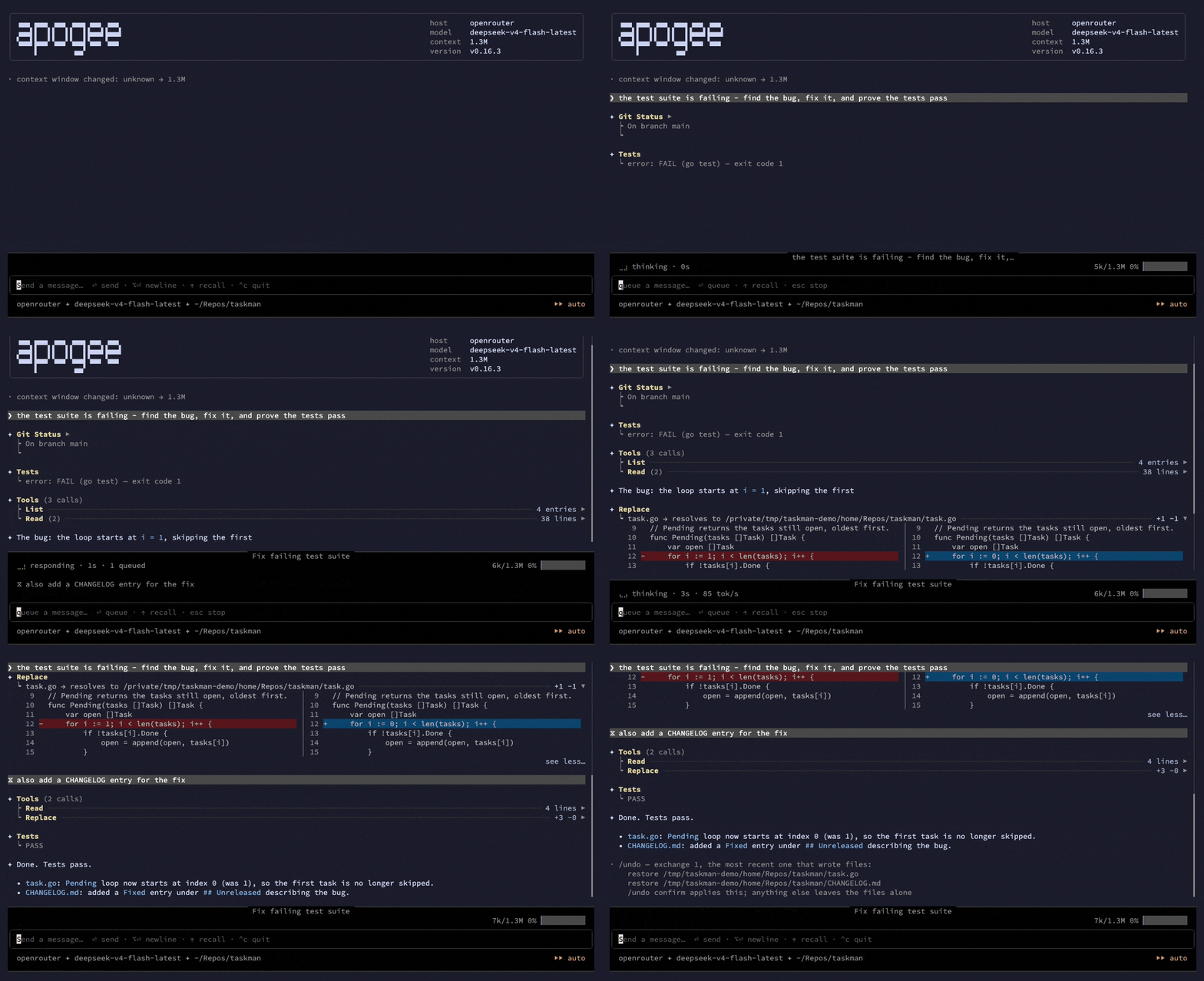
# **apogee** - an open-source AI coding agent for local LLMs, in your terminal
**apogee is an open-source AI coding agent that runs in your terminal and works with
local LLMs.** Point it at a local model server — llama.cpp, Ollama, LM Studio, vLLM — and
your code never leaves your machine: no API key, no cloud, works offline. The one request
apogee makes on its own is a check for a newer release on github.com when the TUI starts;
[`update-check: false`](docs/manual/configuration.md#update-check) turns it off. Point it at any
OpenAI-compatible endpoint, at OpenRouter, or at Claude over the Anthropic API, and the
same agent runs there. One binary for Windows, macOS and Linux.
Either way you get a real coding agent: it reads your code, edits files, runs commands
and tests, uses git, searches the web, and hands work to sub-agents — in a loop, until the
task is done. It runs in any terminal, including the one inside VS Code, Zed or your IDE.
## Why apogee
Three things set it apart from other AI coding assistants.
- **Small local models do real work here.** Most agents quietly assume a frontier model.
apogee gives every model a *floor*: seven always-on guards that catch what a model gets
wrong on its own. A malformed tool call is repaired and retried; a tool call the model
wrote as JSON in its text is run anyway; a call it keeps repeating is broken out of; an
empty reply is retried; a model that narrates instead of acting is told to act; a
pointless re-read of a file is cut short; a huge stale tool result is trimmed on its way
back to the model. Each only changes what the model sees *after its own mistake*, so
they lift a small model without getting in a big one's way — and each can be switched
off. The rule behind them is the whole project: nothing apogee puts in front of a model
may make that model perform worse than the bare loop, and anything more opinionated
than the floor has to earn its place on an eval bench before it ships turned on.
- **Autonomy fenced by the operating system, not by a prompt.** Four autonomy modes run
from read-only Plan up to unsupervised Auto — and Auto is confined at the OS level on
all three platforms: Linux landlock, or user + mount namespaces via `bwrap` where the
kernel has no landlock; macOS seatbelt; a restricted Windows token. An unsupervised
agent *cannot* write outside your workspace. Where the OS cannot enforce the fence,
apogee asks before each command instead of running it unbounded.
- **A complete agent, in a UI that gets out of your way.** The whole loop is here — file
edits, shell, git, tests, web, MCP servers, skills, parallel sub-agents — inside a
terminal UI built with care: type your next message while the model streams and queue
it into the running task, recall any prompt you have sent, fold away what you are done
reading, open any path it prints with a click, and undo an exchange's file changes one
at a time — snapshot-backed, so a shell command's writes are in reach too, and it
survives a relaunch.
Under the hood apogee is an embeddable Go engine; the terminal UI is its first front-end,
not its identity. `apogee headless`, `apogee daemon` and the eval bench run over the same core.
## Install
Every way in lands the same thing: one static binary, no runtime beside it.
**Homebrew — macOS and Linux:**
```bash
brew tap airiclenz/tap
brew trust --tap airiclenz/tap # once per machine, on Homebrew 5.1+
brew install apogee
apogee --version
```
The formula installs the prebuilt binary for your platform — nothing is compiled, no Go
toolchain needed; `brew upgrade apogee` moves you to the next release. `brew trust` is
what Homebrew 5.1+ wants before loading a third-party tap;
`brew untrust --tap airiclenz/tap` revokes it.
**Scoop — Windows:**
```powershell
scoop bucket add airiclenz https://github.com/airiclenz/scoop-bucket
scoop install apogee
apogee --version
```
The bucket's manifest installs the release archive for your architecture and checks its
`SHA256SUMS` hash; `scoop update apogee` moves you to the next release.
**winget — Windows:**
```powershell
winget install AiricLenz.Apogee
apogee --version
```
**Not live yet:** the package's first submission to `microsoft/winget-pkgs` is still
awaiting review there, so `winget install AiricLenz.Apogee` finds nothing until it lands —
until then, install on Windows with Scoop or the prebuilt archive below.
`winget upgrade AiricLenz.Apogee` moves you to the next release. Each release reaches
winget through a manifest pull request that winget's own reviewers merge, so it can
arrive there a little after the releases page has it.
**A prebuilt archive — Windows, macOS, or Linux, `amd64` or `arm64`.** Every release
carries all six targets on the
[releases page](https://github.com/airiclenz/apogee/releases/latest), with one
`SHA256SUMS` file covering every archive.
```bash
# macOS / Linux — resolves the latest release; to pin one, set VERSION= instead
VERSION=$(curl -fsSL https://api.github.com/repos/airiclenz/apogee/releases/latest | sed -n 's/.*"tag_name": *"v\([^"]*\)".*/\1/p')
PLATFORM=darwin_arm64 # or darwin_amd64 · linux_amd64 · linux_arm64
curl -fsSLO "https://github.com/airiclenz/apogee/releases/download/v$VERSION/apogee_${VERSION}_${PLATFORM}.tar.gz"
tar -xzf "apogee_${VERSION}_${PLATFORM}.tar.gz"
sudo install -m 0755 "apogee_${VERSION}_${PLATFORM}/apogee" /usr/local/bin/apogee
apogee --version
```
On Windows, download `apogee__windows_arm64.zip` (or `_amd64`), unpack it, and
put `apogee.exe` somewhere on your `PATH`.
An archive install updates itself: `apogee update` fetches the latest release for your
platform, verifies it against that release's `SHA256SUMS`, checks the new binary reports
the release before swapping it in, and asks first (`--yes` skips the question). It needs
the binary's directory to be writable by you. Every other channel upgrades with its own
command, and the interactive TUI names the right one on its startup box when a newer
release is out — see [Updating apogee](docs/manual/updating.md).
The binaries are **not code-signed** yet. On macOS a *browser* download is quarantined —
`xattr -d com.apple.quarantine ./apogee` clears that (the `curl` above never sets it) —
and Windows SmartScreen may warn about an unrecognised publisher. `SHA256SUMS` is the
check worth making.
**From source:** a clone plus `make build` — see
[Building from source](docs/manual/building.md). Or, with Go installed,
`go install github.com/airiclenz/apogee/cmd/apogee@latest` — `@main` and `@` work
in place of `@latest` too.
## Quick start
```bash
apogee
```
On first run apogee writes a documented starter config to `~/.apogee/` and asks which
server to talk to. Or skip the config and point one session straight at a server — no
GPU needed, a free OpenRouter model will do (a key is at
[openrouter.ai/keys](https://openrouter.ai/keys)):
```bash
export APOGEE_API_KEY=sk-or-your-key
apogee --endpoint https://openrouter.ai/api --model google/gemma-4-31b-it:free
```
or a local one:
```bash
apogee --endpoint http://localhost:8080 --model qwen3-coder
```
Then describe what you want done. `Shift+Tab` cycles the autonomy mode — Plan →
Ask-Before → Allow-Edits → Auto — and `--mode plan` starts there. `/` opens the command
menu, `@` references a file, and a double-tap of `esc` stops a run.
The full tour is in [the manual](docs/manual/README.md).
## What apogee can do
### Works with local models and cloud APIs
- **Any OpenAI-compatible endpoint**, local or remote. A local llama.cpp, Ollama,
LM Studio or vLLM server keeps every byte on your machine and needs no key.
- **Claude over the Anthropic API.** A server entry with `wire: anthropic` speaks the
Messages API directly — the same tool loop and the same guards.
- **Keys stay out of your config file.** A server entry can pull its key from a command
or an environment variable, so the token lives in your password manager or keychain;
apogee offers to move a plaintext key into your OS secret store on startup.
- **Model profiles** adapt to models that don't speak native tool calls: tool menus
injected as text, fenced or custom-regex calls parsed back out, thinking channels
stripped — while native models stay byte-identical on the wire. Profiles for Gemma,
gpt-oss, `minimax-m3` and `qwen3.8` ship built in; a profile can carry its own tool list too, so
a small model sees fewer, clearer tools.
- **Switch without restarting.** `/model` and `/server` move the session; `/effort` sets
how hard the model thinks, from the levels your model reports.
- **Sub-agents can run on a different server than you do** — a small model steering
while a bigger one does the heavy reading, or the reverse. You choose the server, or
let the model pick per job.
- **[llama-launcher](https://github.com/airiclenz/llama-launcher) integration** — load and
switch local model servers from `/model`, unload or stop them with `/unload-model` and
`/stop-server`, and remember your pick per server.
### The agent loop
- **36 built-in tools** (30 on the default menu): read, write, edit, copy, move and
delete files, grep and find, git, terminal, Python, diagnostics, test runners, web
fetch, web search and raw HTTP, a task list the model keeps for itself, a question back
to you, skills the model loads for itself, and delegation to sub-agents.
- **Workflows** — one brief over many items, each item done by a fresh sub-agent that
reports one line back, so fifty items cost your agent fifty lines, not fifty
conversations. Write one down as a recipe skill and start it with `/name`, or send it
to the background with `/bg` and be told when it ends; the model's own `fan_out` and
`workflow` tools are off until you turn them on, and lifting `workflow` also lets the model
send one `sub_agent` delegation to the background and be woken with its report. See
[Workflows](docs/manual/workflows.md).
- **Parallel sub-agents**, each with a context window of its own and a token, time and
step budget; a job can be narrowed to read-only tools, and by default a sub-agent cannot
delegate further. Open one as its own full screen to watch it work, and type to it while
it runs.
- **Skills** — short markdown playbooks you invoke with `/name`. apogee ships five
(debugging, planning, code review, commit hygiene, and a code audit that runs as a
workflow), reads your own from
`~/.apogee/skills`, and picks up skills a repository ships. As you type, it names the
skills that clearly fit above the input box; `Tab` picks one. `/skills export` copies a
shipped skill into your library to make it your own.
- **Workspace context files** — an `AGENTS.md` at the workspace root goes into the system
prompt on its own; `context-files:` picks the names, or turns it off.
- **MCP servers** over stdio, SSE, or streamable-http, for tools apogee doesn't ship — with
an `env-allowlist:` so a stdio server inherits only the environment you name, and an OAuth
browser login (`auth: oauth`, `apogee mcp login`) for a streamable-http server that wants one.
- **Reads your dependencies.** On a Go project the toolchain's `GOROOT` and module cache
are readable, so the model can open the standard library and your modules, never write
them.
- **A Console family, off by default** — the REPLs, shells and dev servers a model keeps
alive across turns, for models that ask for them.
- **Long jobs don't fall off the context window.** apogee compacts the conversation,
trims stale tool output, skips a re-read of a file that hasn't changed, and folds a
sub-agent's own history while it works.
- **PDFs read as text**, page by page, whether the model opens one or you attach it.
- **Images for a model that reads them** — on a server marked
[`vision: true`](docs/manual/configuration.md#images--vision), attach one with
`@shot.png` or paste it with `⌃v`; it waits on an `attached:` row above the prompt and
goes out with your next message.
### Safety and control
- **Four autonomy modes** — Plan (reads code and git history; its own per-session scratch
directory is the one place it writes), Ask-Before (asks before every write and command,
except into that scratch directory), Allow-Edits, and OS-confined Auto. `Shift+Tab`
cycles them at any time, mid-run included — or click the mode marker in the footer —
and `/confine` reports or changes
[Auto's blast radius](docs/manual/configuration.md#auto-modes-blast-radius).
- **A dangerous-action guard in every mode** — the genuinely destructive commands are
refused outright, the merely alarming ones are put in front of you first, and a
`git commit` that would carry a secret asks you in every mode. Add rules of your own,
or drop shipped ones, with
[`dangerous-rules:`](docs/manual/configuration.md#adding-and-removing-rules--dangerous-rules).
- **Approvals you grant once mean what you think they mean**: they are scoped to the
call you approved and honoured across the whole sub-agent tree, and the prompt shows
the path a call really resolves to before you answer.
- **Allow and deny lists for every address a model can choose** — the web tools and MCP
endpoints; private and link-local ranges are refused by default. The tools' subprocesses
never see your API key (a global MCP server without `env-allowlist:` and a global `run:`
Reaction do inherit your environment — see [SECURITY.md](SECURITY.md)).
- **`/undo` and `/redo`** — put back everything an exchange changed in your workspace,
one exchange at a time, with a preview before anything is touched and a skip for any
file you edited since. apogee images the workspace around each exchange, so a write by
a shell command or an MCP server is as reversible as one of its own file tools, and the
record outlives the process — a resumed session still reaches it, and
`apogee undo ` reverts an unattended run from a fresh one.
### The terminal UI
- **Type — and select — while it works.** The prompt box stays live during a run: queue
your next message into the running task, or a slash command to run at the next idle;
walk back through every prompt you have sent; select transcript text mid-stream.
- **Read what you want, hide what you don't.** Fold any block or group of tool calls,
scroll with the keyboard or the mouse; paths are printed as plain text, so your
terminal's own cmd/ctrl-click opens them.
- **The mouse answers everything.** Every approval, picker, menu and browser takes two
clicks — the first highlights, the second sends.
- **Git from the footer.** Click the branch and its counts in the footer — the mode marker
is the footer's other click target — or run `/git`, for fetch, pull, push, sync, switch
branch or rebase onto upstream: each your own act, reported as a note, the counts read
again at once. See [git actions](docs/manual/commands.md#git-actions--git-and-the-footers-git-segment).
- **Side-by-side diffs** for every file the agent writes.
- **`/thinking`** shows the model's reasoning as plain text, **`/advice`** shows what
your `advise:` reactions told it, by Turn, **`/inspect`** lists every attempt each
model call made — server, timings, tokens per second, outcome — and, once
`ui.inspector` is on, every request and response too, readable by default and raw on
`ctrl+r`, and
**`/usage`** shows what the session cost — the main agent and each sub-agent, cache
hits included, and the money spent in your currency once a server has a `price:`
(the footer keeps the running total).
- **Colour schemes** as single YAML files, switchable live, with your own beside the
built-in `dark` and `light`.
### Sessions, schedules and scripts
- **Sessions that survive anything** — every completed turn autosaves;
`apogee --continue` resumes where you left off, `/sessions` browses, renames and
deletes, `/fork` branches a new session from any earlier prompt, and an interrupted
task picks up with `/continue`. Optional retention rules keep the store from growing
for ever. See [Sessions](docs/manual/sessions.md).
- **Watch a running session** — a session open in another terminal, a headless run or a
daemon firing shows as `● live` in `/sessions`; `⏎` (or `apogee --resume `) follows
it live and read-only — the streamed answer, tool cards, delegations and `/thinking` —
and `esc` takes you back. Another user's sessions can be watched the same way once both
sides opt in. See [Watching a live session](docs/manual/sessions.md#watching-a-live-session).
- **Scheduled prompts** — `/schedule` runs a prompt on a cycle while apogee is open;
[`apogee daemon`](docs/manual/daemon.md) keeps standing schedules running under your
OS's supervisor — `apogee daemon install` writes the systemd, launchd or Task Scheduler
unit — every firing saved as a session you can browse.
- **Scriptable** — [`apogee headless`](docs/manual/headless.md) runs one prompt
unattended with clean stdout and meaningful exit codes, or with `--format json` a
versioned stream of event lines for a script to parse (`--seams` adds one line per
loop seam, for debugging what fired where).
- **Reactions** — run a command, POST a webhook or call an MCP tool when an exchange
ends, a file changes or an approval is waiting; a `gate:` entry can deny a tool call, or hand it to you,
before it runs; an `advise:` entry hands the model a fact about a call that just
finished, briefs it when a session starts and again after a compaction fold, or
rides the next request apogee sends it — fenced, capped, never saved with the
session. See
[Reactions](docs/manual/reactions.md).
- **[`apogee probe`](docs/manual/probe.md)** reports what this host, model and terminal
can do, what `config.yaml` resolves to, and how many tokens apogee itself puts in front
of the model at turn 1 — without running an agent.
- **Deliverables you actually see** — a finished report is opened on your desktop, or
served over a one-off link when apogee runs on a remote box.
### Configuration
- **A settings screen** — `/settings` shows every resolved setting, says where each
value came from, and writes one key at a time with your comments and layout intact.
- **A watched config** — edits to `~/.apogee/config.yaml`, or to the project's own
`.apogee/config.yaml`, from anywhere apply to the running session; a few keys (each
marked in the configuration manual) take effect at the next start.
- **A project config and Allow rules** — a repository's committable `.apogee/config.yaml` may
set a few project keys, propose MCP servers and reactions, and `allow:` rules (`go test`, an
MCP server) skip the prompt — a project's rules, servers and reactions only once you adopt
them, since allowing `go test` or a project script runs whatever the repo's code does.
- **Your own system prompt** — replace apogee's, layer your text onto it, or give one
model a prompt of its own.
- **Turn any tool off** — or on — for every model or for one, because a shorter tool
list is often the thing that makes a small model better.
## Documentation
The [manual](docs/manual/README.md) carries the full reference:
| Page | Covers |
|---|---|
| [Commands](docs/manual/commands.md) | Every in-chat command, skills, `@file` references, the keys, `/undo` and `/redo`, `/settings` |
| [Sessions](docs/manual/sessions.md) | Saving, resuming, forking, browsing, renaming conversations; watching a live one |
| [Configuration](docs/manual/configuration.md) | `~/.apogee/config.yaml` and a project's `.apogee/config.yaml` end to end: servers and wires, API keys, model profiles, tools, the floor guards, the system prompt, confinement |
| [Workflows](docs/manual/workflows.md) | One brief over many items: `fan_out`, recipes, `/bg` background workflows, background `sub_agent`, `/workflows` |
| [Reactions](docs/manual/reactions.md) | Commands, webhooks and MCP tools fired on what a session did (`run:`), that advise the model on a tool result, at a session's start, after a compaction fold or on the outgoing request (`advise:`) or that gate a tool call (`gate:`), migrating from `hooks:` |
| [`apogee probe`](docs/manual/probe.md) | Diagnosing what a host, model and terminal can do, what the config file says, and what the model is sent at turn 1 |
| [`apogee headless`](docs/manual/headless.md) | One unattended prompt, for scripts; the JSON event lines |
| [`apogee daemon`](docs/manual/daemon.md) | Standing schedules that outlive the session |
| [Updating apogee](docs/manual/updating.md) | The update notice on the startup box, the upgrade command for each install channel, `apogee update` for archive installs |
| [Building from source](docs/manual/building.md) | Prerequisites, Makefile targets, cross-compilation, the release runbook |
Working on this repo *with* a coding agent? [`AGENTS.md`](AGENTS.md) is the agent-facing
map — where the docs live, and the conventions that aren't derivable from the code.
## Status
**Pre-production `0.x` on `main`.** Under SemVer a `0.x` version makes no API-stability
promise — the Go API may still move while the tool hardens — but every release ships
prebuilt binaries for all six targets, a Homebrew formula, a Scoop manifest and a winget
submission. Functionally the loop is complete: full tool suite, MCP client, parallel
sub-agents, skills, sessions, schedules, and OS-confined Auto mode on all three platforms.
What changed lately lives in the [CHANGELOG](CHANGELOG.md); what is next lives in the
issue register (capcom, `.capcom/`).
## Why Go
Portability is the point. Go cross-compiles to a single static binary with no runtime,
and one language covers both the agent and the bench that evaluates it. The TUI is built
on the Charm stack (Bubble Tea, Lipgloss, Bubbles) with Cobra for the CLI.
## License
MIT — see [LICENSE](LICENSE).