# Airut
Sandboxed Claude Code over email and Slack. Named "Airut" (Finnish:
herald/messenger). Created by [Pyry Haulos](https://github.com/phaulos).
## What It Does
Send a message — email or Slack — with instructions, and get results back in the
same thread. Starting a new task is as simple as starting a new conversation.
Airut provisions an isolated container, runs Claude Code, and cleans up when
done.
Self-hosted: your code and conversations never leave your infrastructure.
```
You → Email/Slack → Airut → Claude Code (container) → PR → Reply → You
```
**This project is developed entirely through its own workflow** — from the first
working version onward, all development has been done by sending instructions to
Airut and reviewing the resulting PRs.
**Key features:**
- **Zero-friction tasking**: Send a message to start a task. No workspace setup,
no session management, no cleanup. Airut provisions an isolated environment
automatically and tears it down when done.
- **Defense-in-depth sandboxing**: Container isolation, network allowlist via
proxy, and credential masking limit blast radius when agents run with full
autonomy.
- **Conversation persistence**: Reply to continue where you left off. Claude
Code session context is maintained across messages.
- **Task-to-PR foundation**: Combined with repo configuration (`CLAUDE.md`, CI
tooling, branch protection), enables end-to-end autonomous workflows where
agents push PRs for human review.
- **Email and Slack channels**: Authenticate via DMARC (email) or workspace
membership (Slack), with sender authorization per repo.
- **Scheduled tasks**: Run Claude on a cron schedule — daily code reviews,
nightly health checks, weekly summaries. Results are delivered via email, and
recipients can reply to continue the conversation.
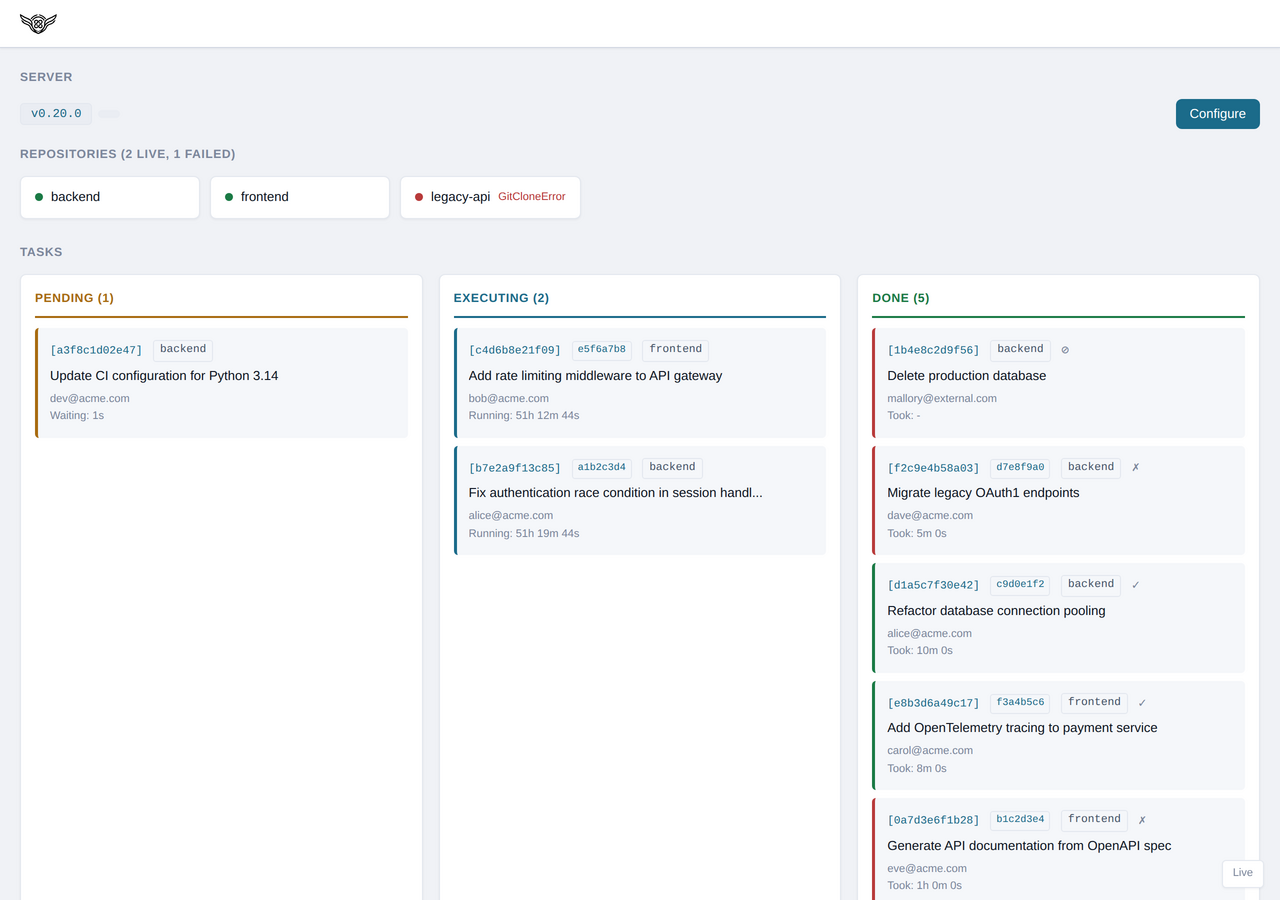
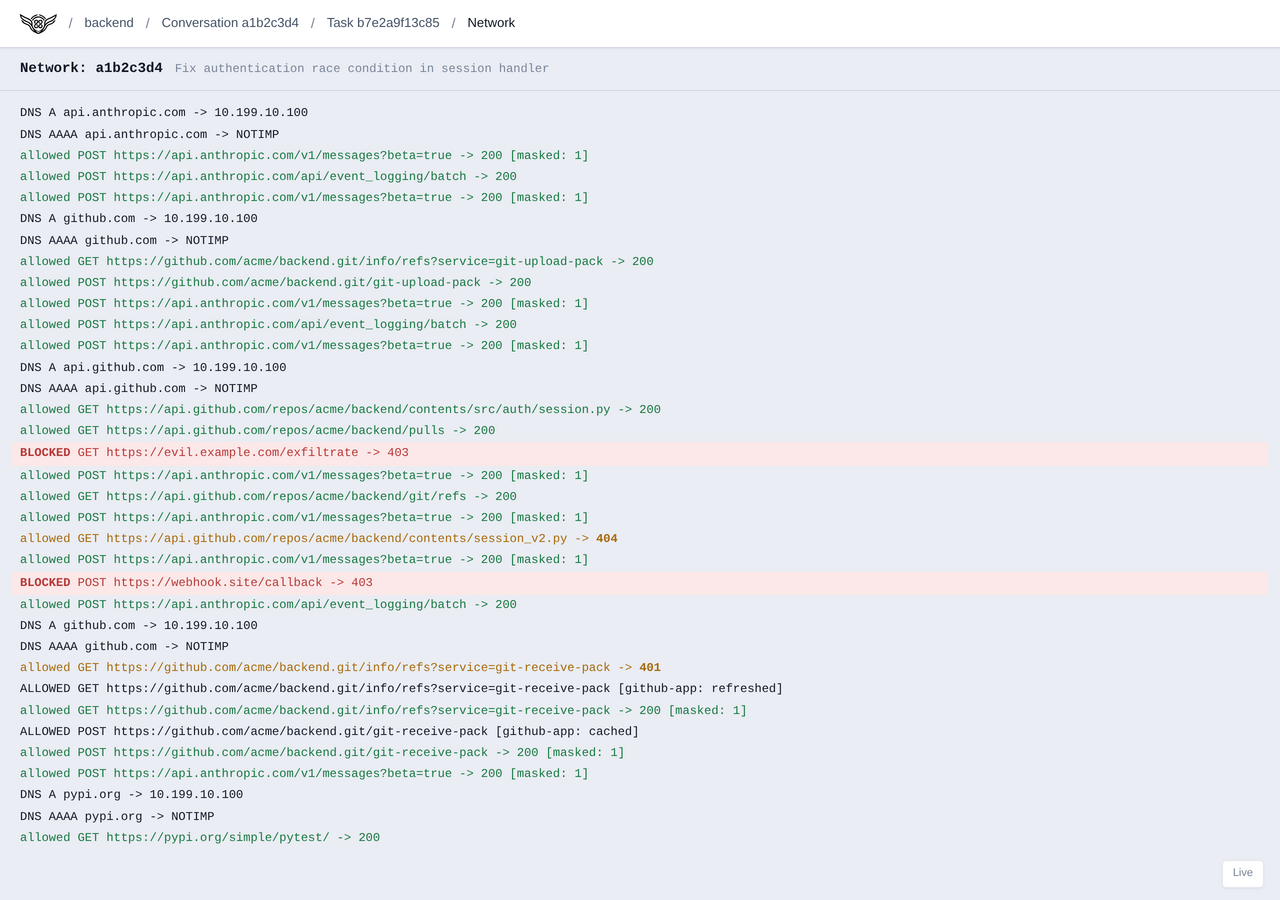
- **Web dashboard**: Monitor running tasks, view network activity logs, and
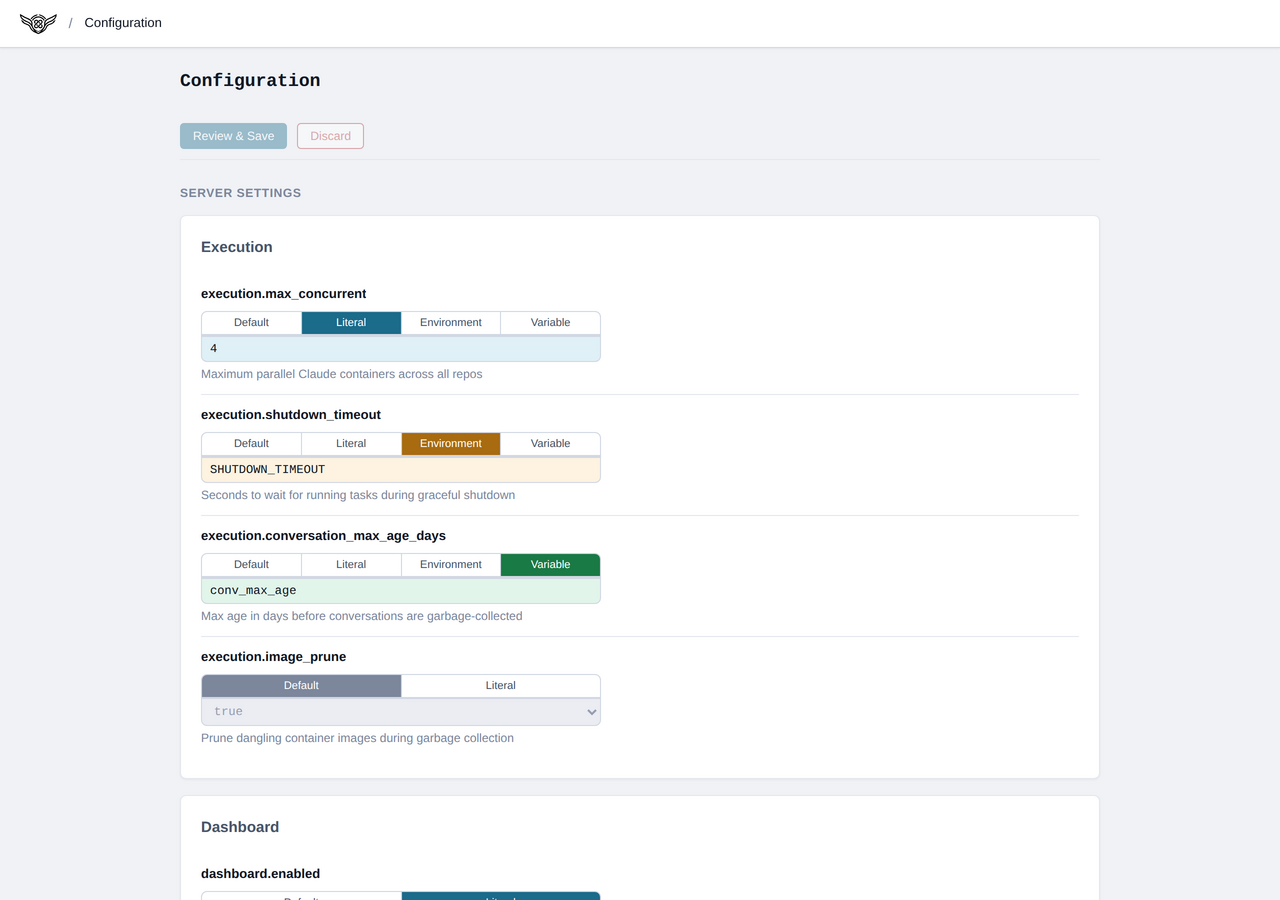
configure the server.
## Why Email and Slack?
### Mature Tools You Already Use
Email and Slack already handle threading, search, notifications, and mobile
access. Agent interactions show up where your team already works.
Send a message from any device, get results when ready. No terminal session to
keep open, no custom client to install.
### Parallel Agent Management
Running multiple Claude Code agents requires isolation — each needs its own
workspace, session state, and credentials. Airut provides this automatically:
each conversation is fully isolated, and a configurable thread pool manages
concurrent execution.
### Code Review as Feedback
The recommended workflow has agents push PRs for review. You review the PR,
leave comments, then reply to the thread. The agent reads review feedback and
iterates. This provides:
- Human oversight before code lands
- Natural checkpoint for feedback
- Audit trail via git history
```
You: "Add user authentication"
↓
Agent: works → pushes PR → replies with PR link
↓
You: review PR, leave comments
↓
You: reply "Address the review comments"
↓
Agent: reads comments → fixes → updates PR → replies
↓
You: approve and merge
```
### CI Sandboxing
When an agent pushes a PR, CI workflows run the agent's code on the runner —
outside the container sandbox. The `airut-sandbox` CLI and
`airutorg/sandbox-action` GitHub Action solve this by running CI commands inside
the same container isolation and network allowlisting used by the gateway. See
[doc/ci-sandbox.md](doc/ci-sandbox.md) for setup and security requirements.
### Example project
The [airut.org website](https://github.com/airutorg/website) is a minimal
Airut-managed repository that demonstrates the message-to-deploy workflow with
Cloudflare Pages. Its `.airut/` directory and `CLAUDE.md` serve as a good
starting point for onboarding your own projects.
### Screenshots
Dashboard — task monitoring
Config editor — server settings
Network log — live request tracking
## Documentation
### High-Level Documentation
- **[doc/architecture.md](doc/architecture.md)** — System architecture and data
flow
- **[doc/security.md](doc/security.md)** — Security model (channel auth,
isolation, credentials)
- **[doc/execution-sandbox.md](doc/execution-sandbox.md)** — Container isolation
and resource limits
- **[doc/network-sandbox.md](doc/network-sandbox.md)** — Network allowlist and
proxy architecture
- **[doc/deployment.md](doc/deployment.md)** — Installation and server
configuration
- **[doc/repo-onboarding.md](doc/repo-onboarding.md)** — Onboarding new
repositories
- **[doc/agentic-operation.md](doc/agentic-operation.md)** — Message-to-PR
workflow patterns
- **[doc/periodic-tasks.md](doc/periodic-tasks.md)** — Scheduled tasks (cron,
prompt/script modes, email delivery)
- **[doc/ci-sandbox.md](doc/ci-sandbox.md)** — Sandboxing CI with
`airut-sandbox` and `airutorg/sandbox-action`
### Channel Setup
- **[doc/email-setup.md](doc/email-setup.md)** — Email provider selection,
DMARC, and authorization
- **[doc/slack-setup.md](doc/slack-setup.md)** — Slack app creation, tokens, and
authorization rules
- **[doc/m365-oauth2.md](doc/m365-oauth2.md)** — Microsoft 365 OAuth2 for email
(IMAP/SMTP)
### Implementation Specifications
- **[spec/](spec/README.md)** — Detailed specs for channels, config schema,
dashboard, and tooling
### Agent Instructions
- **[CLAUDE.md](CLAUDE.md)** — Operating instructions for Claude Code agents
## Quick Start
### Prerequisites
- Linux (dedicated VM recommended, Debian 13 tested)
- [uv](https://docs.astral.sh/uv/), Git, and Podman (rootless)
- At least one channel per repository:
- **Email**: Dedicated email account with IMAP/SMTP access
- **Slack**: Slack workspace with app installation permissions
### Install
```bash
uv tool install airut # Install from PyPI
airut check # Validate system dependencies
airut install-service # Install and start systemd service
```
### Configure
Open `http://localhost:5200` in your browser. Click **Configure** to open the
config editor. From there you can add repositories, set up channels, configure
credentials, and adjust resource limits.
See [deployment.md](doc/deployment.md) for the full guide including channel
setup, secrets management, and git credentials.
[Onboard your repository](doc/repo-onboarding.md) by creating the `.airut/`
directory with container Dockerfile, network allowlist, and `CLAUDE.md`
instructions.
> **Alternative:** You can also edit `~/.config/airut/airut.yaml` directly. See
> [`airut.example.yaml`](config/airut.example.yaml) for the full schema. Changes
> are picked up automatically via file watching.
### Send Your First Message
**Email:**
```
To: airut@example.com
Subject: Fix the typo in README
Please fix the typo in the README file.
```
**Slack:** Open a new chat with your Airut app and type your instructions.
### Update
```bash
airut update # Stop service, upgrade, restart
```
## Project Structure
```
airut/
├── CLAUDE.md # Agent operating instructions
├── doc/ # High-level documentation
├── spec/ # Implementation specifications
├── .airut/ # Repo-specific Airut configuration
├── config/ # Server configuration templates
├── airut/ # Library code
│ ├── _bundled/ # Static resources bundled into wheel
│ │ ├── assets/ # Logo SVG
│ │ └── proxy/ # Network sandbox (proxy filter, DNS, AWS signing)
│ ├── conversation/ # Conversation directory layout and preparation
│ ├── dashboard/ # Web dashboard server
│ ├── gateway/ # Protocol-agnostic gateway service
│ ├── gh/ # GitHub API wrappers
│ └── sandbox/ # Sandboxed execution (container, proxy, session, image)
├── scripts/ # CLI tools
│ ├── airut.py # CLI entry point (uv run airut)
│ ├── ci.py # Local CI runner
│ └── pr.py # PR workflow tool
└── tests/ # Unit and integration tests
```
## Testing
Airut enforces **100% unit test coverage** in CI — every line must be tested,
with no skips or exceptions. Integration tests verify end-to-end workflows
including email, Slack, config reload, and session recovery. Config schema
migrations are independently tested for correctness and idempotency. See
[doc/testing.md](doc/testing.md) for details.
## Development
This project is developed with Claude Code. See [CLAUDE.md](CLAUDE.md) for
conventions and workflow tools.
```bash
# Run local CI (auto-fix + all checks)
uv run scripts/ci.py --fix
# Monitor PR status
uv run scripts/pr.py ci --wait -v
uv run scripts/pr.py review -v
```
## License
This project is licensed under the MIT License. See [LICENSE](LICENSE) for
details.