[简体中文](README.md) | [English](README_EN.md) | 日本語
# 雹 Hail
[](https://github.com/aistra0528/Hail/actions)
[](https://hosted.weblate.org/engage/hail/)
[](https://github.com/aistra0528/Hail/releases)
[](LICENSE)
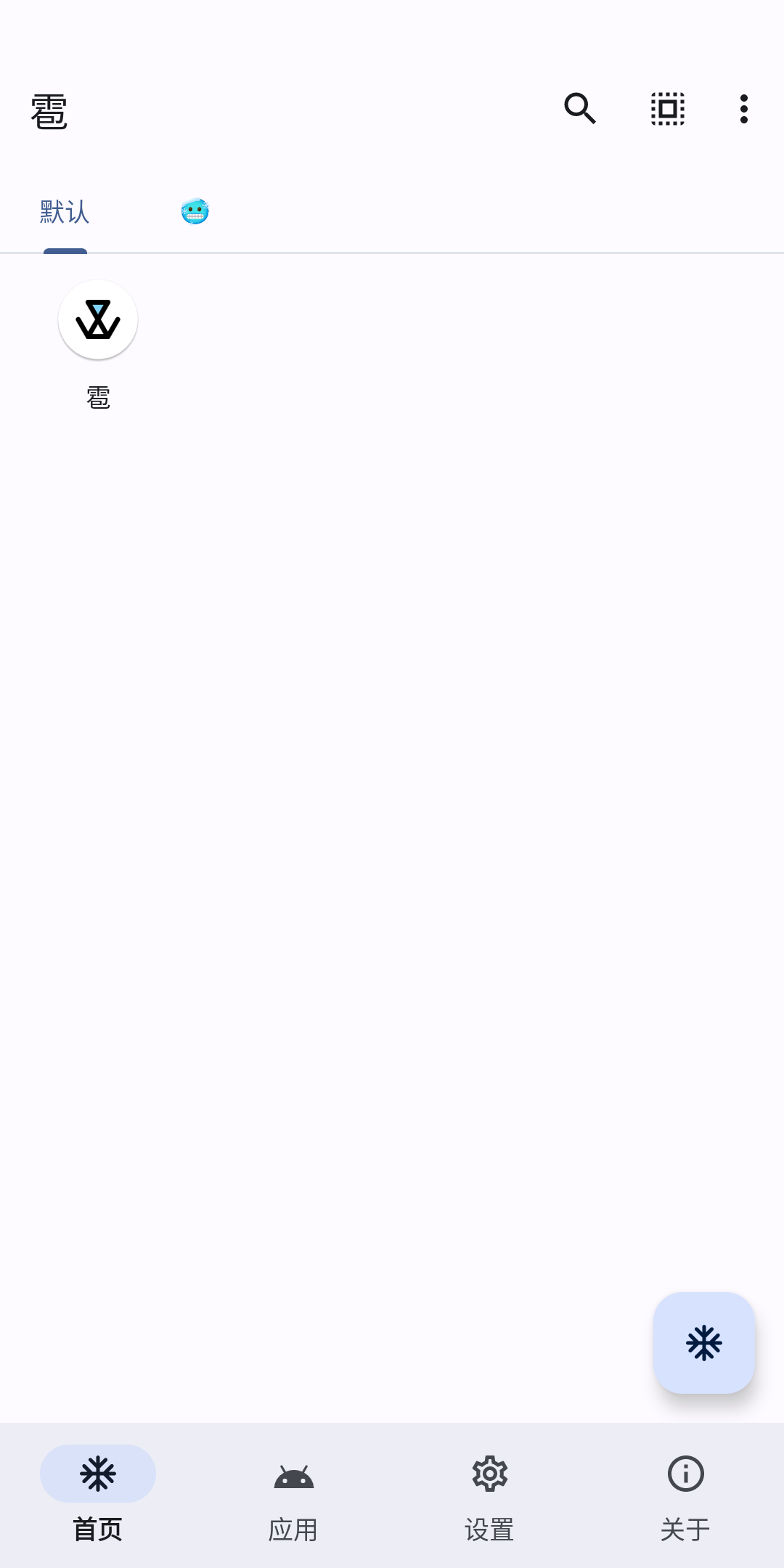
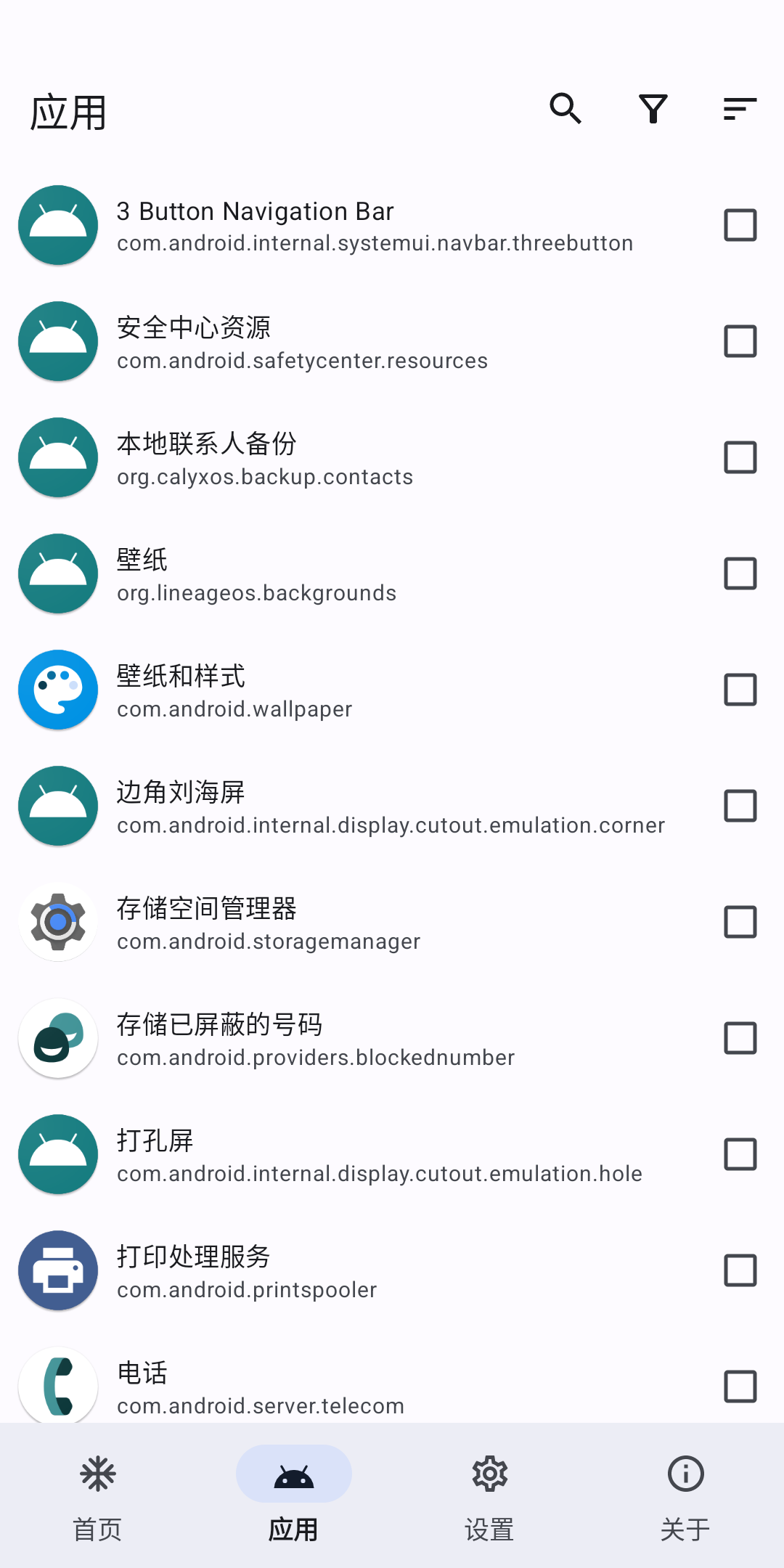
雹は、Androidアプリを凍結するための自由ソフトウェアです。[GitHub Releases](https://github.com/aistra0528/Hail/releases)
[ ](https://f-droid.org/packages/com.aistra.hail/)
 ## 凍結
凍結`freeze`は、**アプリが不要なときに即座に停止する**
(オンデマンドリクエスト)動作を指す言葉で、デバイスの使用をより良くし、RAMの使用量を削減し、電力を節約します。ユーザーは、アプリを解凍
`unfreeze`
して元の状態に戻すこともできます。
一般的に、「凍結」は無効化を意味しますが、雹はアプリを隠したり、一時停止したりすることもできます。
### 無効化
無効化されたアプリは、ランチャーに表示されず、インストール済みアプリのリストには「無効」と表示されます。アプリを有効化
`enable`
して元に戻します。
### 隠す
隠されたアプリは、ランチャーやインストール済みアプリのリストに表示されません。アプリを表示`unhide`して元に戻します。
> この状態では、アプリはほぼアンインストールされた状態になりますが、アプリのデータや実際のパッケージファイルはデバイスから削除されません。
### 一時停止 (Android 7.0+)
一時停止されたアプリは、デバイスのランチャーでアイコンがグレースケールで表示されます。アプリを再開`unsuspend`して元に戻します。
> この状態では、アプリの通知は非表示になり、開始されたアクティビティは停止され、トースト、ダイアログ、オーディオの再生もできません。
> ユーザーが一時停止されたアプリを起動しようとすると、システムは代わりにユーザーに対してこのアプリを使用できないことを通知するダイアログを表示します。
一時停止は、ユーザーがアプリと対話するのを防ぐだけで、アプリがバックグラウンドで実行されるのを防ぐことは**ありません**。
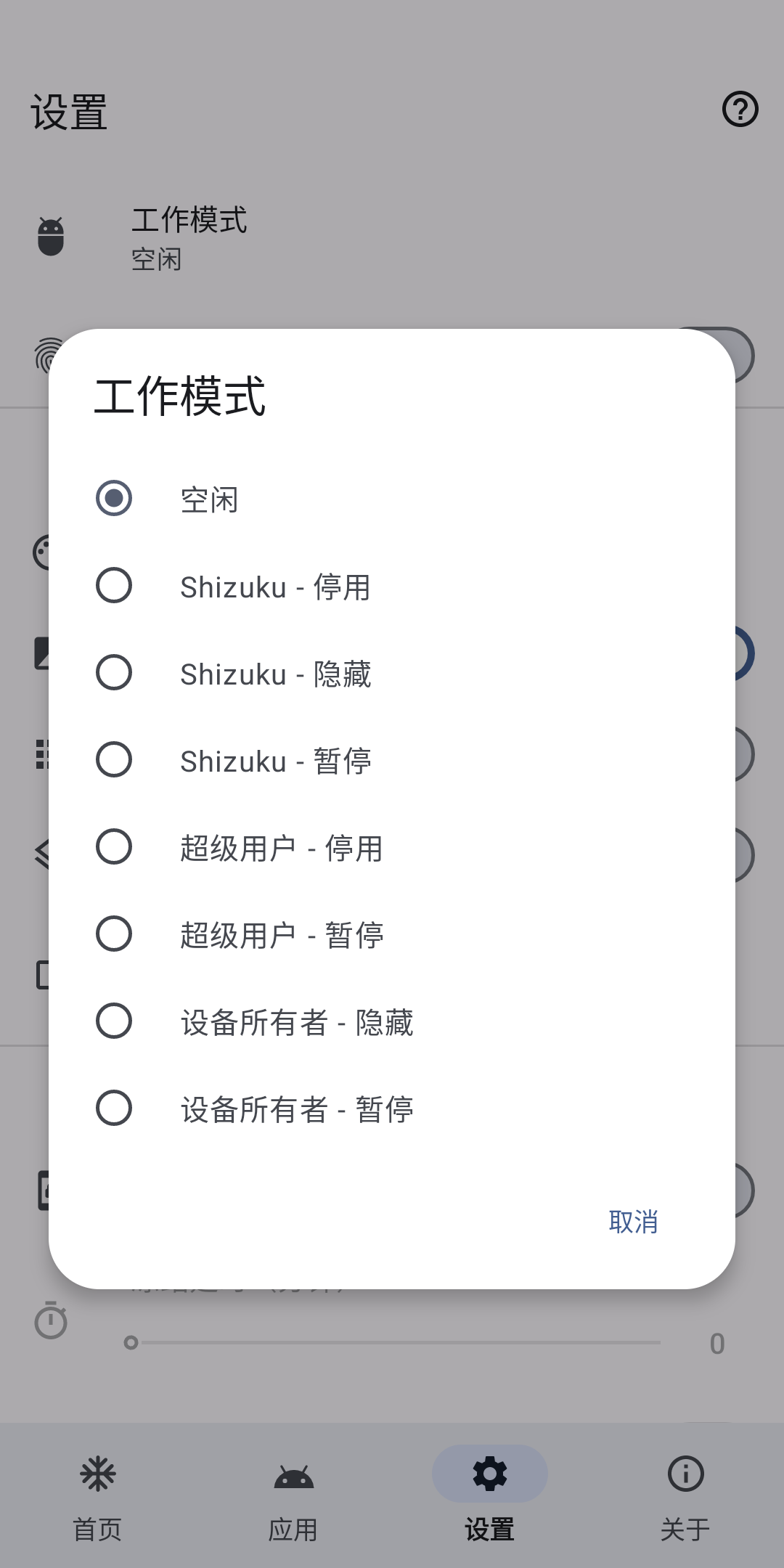
## 作業モード
**雹で凍結されたアプリは、同じ作業モードで解凍する必要があります。**
1. ワイヤレスデバッグをサポートするデバイス(Android 11+)またはroot化されたデバイスの場合、`Shizuku`を推奨します。
2. root化されたデバイスの場合、`Root`が代替手段です。**速度が遅いです。**
| Privilege | Force Stop | Disable | Hide | Suspend | Uninstall/Reinstall (System Apps) |
|---------------------------------------------------------------------------------------------------|------------|---------|------|---------|-----------------------------------|
| Root | ✓ | ✓ | ✓ | ✓ | ✓ |
| デバイス所有者 | ✗ | ✗ | ✓ | ✓ | ✗ |
| 特権システムアプリ | ✓ | ✓ | ✗ | ✗ | ✗ |
| [Shizuku](https://github.com/RikkaApps/Shizuku) (root)/[Sui](https://github.com/RikkaApps/Sui) | ✓ | ✓ | ✓ | ✓ | ✓ |
| [Shizuku](https://github.com/RikkaApps/Shizuku) (adb) | ✓ | ✓ | ✗ | ✓ | ✓ |
| [Dhizuku](https://github.com/iamr0s/Dhizuku) | ✗ | ✗ | ✓ | ✓ | ✗ |
| [Island](https://github.com/oasisfeng/island)/[Insular](https://gitlab.com/secure-system/Insular) | ✗ | ✗ | ✓ | ✓ | ✗ |
### デバイス所有者
**アンインストールする前にデバイス所有者を削除する必要があります**
#### adbでデバイス所有者を設定する
[Android デバッグブリッジ (adb) ガイド](https://developer.android.com/studio/command-line/adb)
[Android SDK プラットフォームツールのダウンロード](https://developer.android.com/studio/releases/platform-tools)
adbコマンドを発行します:
```shell
adb shell dpm set-device-owner com.aistra.hail/.receiver.DeviceAdminReceiver
```
デバイス所有者が正常に設定された場合、adbは次のメッセージを出力します:
```
Success: Device owner set to package com.aistra.hail
Active admin set to component {com.aistra.hail/com.aistra.hail.receiver.DeviceAdminReceiver}
```
それ以外の場合は、検索エンジンでメッセージを検索してください。
#### デバイス所有者を削除する
設定 > デバイス所有者を削除
### 特権システムアプリ
次の特権アプリの権限が必要です:
```xml
```
このモードを使用するには、雹を特権システムアプリとしてインストールする必要があります。
推奨される方法は、ROMをビルドする際に雹をインポートすることです。`Android.bp`の例:
```bp
android_app_import {
name: "Hail",
apk: "Hail.apk",
privileged: true,
dex_preopt: {
enabled: false,
},
presigned: true,
preprocessed: true,
required: ["privapp-permissions_com.aistra.hail.xml"]
}
prebuilt_etc {
name: "privapp-permissions_com.aistra.hail.xml",
src: "privapp-permissions.xml",
sub_dir: "permissions",
}
```
## 復元
### adbで
com.package.nameをターゲットアプリのパッケージ名に置き換えます。
```shell
# アプリを有効化
adb shell pm enable com.package.name
# アプリの非表示を解除(rootが必要)
adb shell su -c pm unhide com.package.name
# アプリの一時停止を解除
adb shell pm unsuspend com.package.name
```
### ファイルを変更する
`/data/system/users/0/package-restrictions.xml`にアクセスします。このファイルにはアプリの制限に関する情報が保存されています。これを変更、名前変更、または削除できます。
- アプリを有効化:`enabled`の値を2(DISABLED)または3(DISABLED_USER)から1(ENABLED)に変更します。
- アプリの非表示を解除:`hidden`の値をtrueからfalseに変更します。
- アプリの一時停止を解除:`suspended`の値をtrueからfalseに変更します。
### リカバリーモードでデータを消去する
**私の責任ではありません :(**
## API
```shell
adb shell am start -a action -e key value
```
`action`は次の定数のいずれかです:
- `com.aistra.hail.action.LAUNCH`
:ターゲットアプリを解凍して起動します。解凍されている場合は、直接起動します。`key="package"` `value="com.package.name"`
- `com.aistra.hail.action.FREEZE`
:ターゲットアプリを凍結します。ホームにチェックされている必要があります。`key="package"` `value="com.package.name"`
- `com.aistra.hail.action.UNFREEZE`:ターゲットアプリを解凍します。`key="package"` `value="com.package.name"`
- `com.aistra.hail.action.FREEZE_TAG`
:ターゲットタグ内のすべての非ホワイトリストアプリを凍結します。`key="tag"` `value="タグ名"`
- `com.aistra.hail.action.UNFREEZE_TAG`:ターゲットタグ内のすべてのアプリを解凍します。`key="tag"` `value="タグ名"`
- `com.aistra.hail.action.FREEZE_ALL`:ホームのすべてのアプリを凍結します。`extra`は必要ありません。
- `com.aistra.hail.action.UNFREEZE_ALL`:ホームのすべてのアプリを解凍します。`extra`は必要ありません。
- `com.aistra.hail.action.FREEZE_NON_WHITELISTED`:ホームのすべての非ホワイトリストアプリを凍結します。`extra`は必要ありません。
- `com.aistra.hail.action.FREEZE_AUTO`:ホームのアプリを自動的に凍結します。`extra`は必要ありません。
- `com.aistra.hail.action.LOCK`:画面をロックします。`extra`は必要ありません。
- `com.aistra.hail.action.LOCK_FREEZE`:ホームのすべてのアプリを凍結し、画面をロックします。`extra`は必要ありません。
or use following `schema`:
- `hail://launch?package=xxx`
- `hail://freeze?package=xxx`
- `hail://unfreeze?package=xxx`
- `hail://freeze_tag?tag=xxx`
- `hail://unfreeze_tag?tag=xxx`
- `hail://freeze_all`
- `hail://unfreeze_all`
- `hail://freeze_non_whitelisted`
- `hail://freeze_auto`
- `hail://lock`
- `hail://lock_freeze`
## 翻訳を手伝う
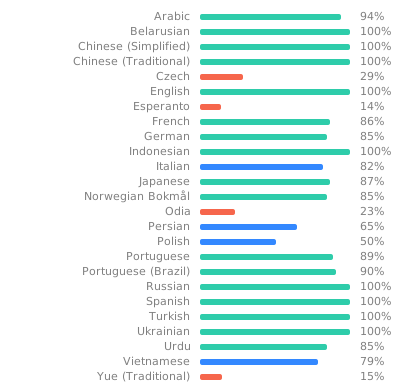
雹をあなたの言語に翻訳するか、既存の翻訳を改善するには、[Weblate](https://hosted.weblate.org/engage/hail/)を使用してください。
[](https://hosted.weblate.org/engage/hail/)
## ライセンス
Hail - Freeze Android apps
Copyright (C) 2021-2026 Aistra
Copyright (C) 2022-2026 Hail contributors
This program is free software: you can redistribute it and/or modify
it under the terms of the GNU General Public License as published by
the Free Software Foundation, either version 3 of the License, or
(at your option) any later version.
This program is distributed in the hope that it will be useful,
but WITHOUT ANY WARRANTY; without even the implied warranty of
MERCHANTABILITY or FITNESS FOR A PARTICULAR PURPOSE. See the
GNU General Public License for more details.
You should have received a copy of the GNU General Public License
along with this program. If not, see .
## 凍結
凍結`freeze`は、**アプリが不要なときに即座に停止する**
(オンデマンドリクエスト)動作を指す言葉で、デバイスの使用をより良くし、RAMの使用量を削減し、電力を節約します。ユーザーは、アプリを解凍
`unfreeze`
して元の状態に戻すこともできます。
一般的に、「凍結」は無効化を意味しますが、雹はアプリを隠したり、一時停止したりすることもできます。
### 無効化
無効化されたアプリは、ランチャーに表示されず、インストール済みアプリのリストには「無効」と表示されます。アプリを有効化
`enable`
して元に戻します。
### 隠す
隠されたアプリは、ランチャーやインストール済みアプリのリストに表示されません。アプリを表示`unhide`して元に戻します。
> この状態では、アプリはほぼアンインストールされた状態になりますが、アプリのデータや実際のパッケージファイルはデバイスから削除されません。
### 一時停止 (Android 7.0+)
一時停止されたアプリは、デバイスのランチャーでアイコンがグレースケールで表示されます。アプリを再開`unsuspend`して元に戻します。
> この状態では、アプリの通知は非表示になり、開始されたアクティビティは停止され、トースト、ダイアログ、オーディオの再生もできません。
> ユーザーが一時停止されたアプリを起動しようとすると、システムは代わりにユーザーに対してこのアプリを使用できないことを通知するダイアログを表示します。
一時停止は、ユーザーがアプリと対話するのを防ぐだけで、アプリがバックグラウンドで実行されるのを防ぐことは**ありません**。
## 作業モード
**雹で凍結されたアプリは、同じ作業モードで解凍する必要があります。**
1. ワイヤレスデバッグをサポートするデバイス(Android 11+)またはroot化されたデバイスの場合、`Shizuku`を推奨します。
2. root化されたデバイスの場合、`Root`が代替手段です。**速度が遅いです。**
| Privilege | Force Stop | Disable | Hide | Suspend | Uninstall/Reinstall (System Apps) |
|---------------------------------------------------------------------------------------------------|------------|---------|------|---------|-----------------------------------|
| Root | ✓ | ✓ | ✓ | ✓ | ✓ |
| デバイス所有者 | ✗ | ✗ | ✓ | ✓ | ✗ |
| 特権システムアプリ | ✓ | ✓ | ✗ | ✗ | ✗ |
| [Shizuku](https://github.com/RikkaApps/Shizuku) (root)/[Sui](https://github.com/RikkaApps/Sui) | ✓ | ✓ | ✓ | ✓ | ✓ |
| [Shizuku](https://github.com/RikkaApps/Shizuku) (adb) | ✓ | ✓ | ✗ | ✓ | ✓ |
| [Dhizuku](https://github.com/iamr0s/Dhizuku) | ✗ | ✗ | ✓ | ✓ | ✗ |
| [Island](https://github.com/oasisfeng/island)/[Insular](https://gitlab.com/secure-system/Insular) | ✗ | ✗ | ✓ | ✓ | ✗ |
### デバイス所有者
**アンインストールする前にデバイス所有者を削除する必要があります**
#### adbでデバイス所有者を設定する
[Android デバッグブリッジ (adb) ガイド](https://developer.android.com/studio/command-line/adb)
[Android SDK プラットフォームツールのダウンロード](https://developer.android.com/studio/releases/platform-tools)
adbコマンドを発行します:
```shell
adb shell dpm set-device-owner com.aistra.hail/.receiver.DeviceAdminReceiver
```
デバイス所有者が正常に設定された場合、adbは次のメッセージを出力します:
```
Success: Device owner set to package com.aistra.hail
Active admin set to component {com.aistra.hail/com.aistra.hail.receiver.DeviceAdminReceiver}
```
それ以外の場合は、検索エンジンでメッセージを検索してください。
#### デバイス所有者を削除する
設定 > デバイス所有者を削除
### 特権システムアプリ
次の特権アプリの権限が必要です:
```xml
```
このモードを使用するには、雹を特権システムアプリとしてインストールする必要があります。
推奨される方法は、ROMをビルドする際に雹をインポートすることです。`Android.bp`の例:
```bp
android_app_import {
name: "Hail",
apk: "Hail.apk",
privileged: true,
dex_preopt: {
enabled: false,
},
presigned: true,
preprocessed: true,
required: ["privapp-permissions_com.aistra.hail.xml"]
}
prebuilt_etc {
name: "privapp-permissions_com.aistra.hail.xml",
src: "privapp-permissions.xml",
sub_dir: "permissions",
}
```
## 復元
### adbで
com.package.nameをターゲットアプリのパッケージ名に置き換えます。
```shell
# アプリを有効化
adb shell pm enable com.package.name
# アプリの非表示を解除(rootが必要)
adb shell su -c pm unhide com.package.name
# アプリの一時停止を解除
adb shell pm unsuspend com.package.name
```
### ファイルを変更する
`/data/system/users/0/package-restrictions.xml`にアクセスします。このファイルにはアプリの制限に関する情報が保存されています。これを変更、名前変更、または削除できます。
- アプリを有効化:`enabled`の値を2(DISABLED)または3(DISABLED_USER)から1(ENABLED)に変更します。
- アプリの非表示を解除:`hidden`の値をtrueからfalseに変更します。
- アプリの一時停止を解除:`suspended`の値をtrueからfalseに変更します。
### リカバリーモードでデータを消去する
**私の責任ではありません :(**
## API
```shell
adb shell am start -a action -e key value
```
`action`は次の定数のいずれかです:
- `com.aistra.hail.action.LAUNCH`
:ターゲットアプリを解凍して起動します。解凍されている場合は、直接起動します。`key="package"` `value="com.package.name"`
- `com.aistra.hail.action.FREEZE`
:ターゲットアプリを凍結します。ホームにチェックされている必要があります。`key="package"` `value="com.package.name"`
- `com.aistra.hail.action.UNFREEZE`:ターゲットアプリを解凍します。`key="package"` `value="com.package.name"`
- `com.aistra.hail.action.FREEZE_TAG`
:ターゲットタグ内のすべての非ホワイトリストアプリを凍結します。`key="tag"` `value="タグ名"`
- `com.aistra.hail.action.UNFREEZE_TAG`:ターゲットタグ内のすべてのアプリを解凍します。`key="tag"` `value="タグ名"`
- `com.aistra.hail.action.FREEZE_ALL`:ホームのすべてのアプリを凍結します。`extra`は必要ありません。
- `com.aistra.hail.action.UNFREEZE_ALL`:ホームのすべてのアプリを解凍します。`extra`は必要ありません。
- `com.aistra.hail.action.FREEZE_NON_WHITELISTED`:ホームのすべての非ホワイトリストアプリを凍結します。`extra`は必要ありません。
- `com.aistra.hail.action.FREEZE_AUTO`:ホームのアプリを自動的に凍結します。`extra`は必要ありません。
- `com.aistra.hail.action.LOCK`:画面をロックします。`extra`は必要ありません。
- `com.aistra.hail.action.LOCK_FREEZE`:ホームのすべてのアプリを凍結し、画面をロックします。`extra`は必要ありません。
or use following `schema`:
- `hail://launch?package=xxx`
- `hail://freeze?package=xxx`
- `hail://unfreeze?package=xxx`
- `hail://freeze_tag?tag=xxx`
- `hail://unfreeze_tag?tag=xxx`
- `hail://freeze_all`
- `hail://unfreeze_all`
- `hail://freeze_non_whitelisted`
- `hail://freeze_auto`
- `hail://lock`
- `hail://lock_freeze`
## 翻訳を手伝う
雹をあなたの言語に翻訳するか、既存の翻訳を改善するには、[Weblate](https://hosted.weblate.org/engage/hail/)を使用してください。
[](https://hosted.weblate.org/engage/hail/)
## ライセンス
Hail - Freeze Android apps
Copyright (C) 2021-2026 Aistra
Copyright (C) 2022-2026 Hail contributors
This program is free software: you can redistribute it and/or modify
it under the terms of the GNU General Public License as published by
the Free Software Foundation, either version 3 of the License, or
(at your option) any later version.
This program is distributed in the hope that it will be useful,
but WITHOUT ANY WARRANTY; without even the implied warranty of
MERCHANTABILITY or FITNESS FOR A PARTICULAR PURPOSE. See the
GNU General Public License for more details.
You should have received a copy of the GNU General Public License
along with this program. If not, see .