
by AityTech









Persistent Memory System for AI Coding Assistants
Your AI assistant forgets everything between sessions. AgentKits Memory fixes that.
Decisions, patterns, errors, and context — all persisted locally via MCP.
Website • Docs • Quick Start • How It Works • Platforms • CLI • Web Viewer
English · 简体中文 · 日本語 · 한국어 · Español · Deutsch · Français · Português · Tiếng Việt · Русский · العربية
--- ## Features | Feature | Benefit | |---------|---------| | **100% Local** | All data stays on your machine. No cloud, no API keys, no accounts | | **Blazing Fast** | Native SQLite (better-sqlite3) = instant queries, zero latency | | **Zero Config** | Works out of the box. No database setup required | | **Multi-Platform** | Claude Code, Cursor, Windsurf, Cline, OpenCode — one setup command | | **MCP Server** | 9 tools: save, search, timeline, details, recall, list, update, delete, status | | **Auto-Capture** | Hooks capture session context, tool usage, summaries automatically | | **AI Enrichment** | Background workers enrich observations with AI-generated summaries | | **Vector Search** | sqlite-vec semantic similarity with multilingual embeddings (100+ languages) | | **Web Viewer** | Browser UI to view, search, add, edit, delete memories | | **3-Layer Search** | Progressive disclosure saves ~87% tokens vs fetching everything | | **Lifecycle Mgmt** | Auto-compress, archive, and clean up old sessions | | **Export/Import** | Backup and restore memories as JSON | --- ## How It Works ``` Session 1: "Use JWT for auth" Session 2: "Add login endpoint" ┌──────────────────────────┐ ┌──────────────────────────┐ │ You code with AI... │ │ AI already knows: │ │ AI makes decisions │ │ ✓ JWT auth decision │ │ AI encounters errors │ ───► │ ✓ Error solutions │ │ AI learns patterns │ saved │ ✓ Code patterns │ │ │ │ ✓ Session context │ └──────────────────────────┘ └──────────────────────────┘ │ ▲ ▼ │ .claude/memory/memory.db ──────────────────┘ (SQLite, 100% local) ``` 1. **Setup once** — `npx @aitytech/agentkits-memory` configures your platform 2. **Auto-capture** — Hooks record decisions, tool usage, and summaries as you work 3. **Context injection** — Next session starts with relevant history from past sessions 4. **Background processing** — Workers enrich observations with AI, generate embeddings, compress old data 5. **Search anytime** — AI uses MCP tools (`memory_search` → `memory_details`) to find past context All data stays in `.claude/memory/memory.db` on your machine. No cloud. No API keys required. --- ## Design Decisions That Matter Most memory tools scatter data across markdown files, require Python runtimes, or send your code to external APIs. AgentKits Memory makes fundamentally different choices: | Design Choice | Why It Matters | |---------------|----------------| | **Single SQLite database** | One file (`memory.db`) holds everything — memories, sessions, observations, embeddings. No scattered files to sync, no merge conflicts, no orphaned data. Backup = copy one file | | **Native Node.js, zero Python** | Runs wherever Node runs. No conda, no pip, no virtualenv. Same language as your MCP server — one `npx` command, done | | **Token-efficient 3-layer search** | Search index first (~50 tokens/result), then timeline context, then full details. Only fetch what you need. Other tools dump entire memory files into context, burning tokens on irrelevant content | | **Auto-capture via hooks** | Decisions, patterns, and errors are recorded as they happen — not after you remember to save them. Session context injection happens automatically on next session start | | **Local embeddings, no API calls** | Vector search uses a local ONNX model (multilingual-e5-small). Semantic search works offline, costs nothing, and supports 100+ languages | | **Background workers** | AI enrichment, embedding generation, and compression run asynchronously. Your coding flow is never blocked | | **Multi-platform from day one** | One `--platform=all` flag configures Claude Code, Cursor, Windsurf, Cline, and OpenCode simultaneously. Same memory database, different editors | | **Structured observation data** | Tool usage is captured with type classification (read/write/execute/search), file tracking, intent detection, and AI-generated narratives — not raw text dumps | | **No process leaks** | Background workers self-terminate after 5 minutes, use PID-based lock files with stale-lock cleanup, and handle SIGTERM/SIGINT gracefully. No zombie processes, no orphaned workers | | **No memory leaks** | Hooks run as short-lived processes (not long-running daemons). Database connections close on shutdown. Embedding subprocess has bounded respawn (max 2), pending request timeouts, and graceful cleanup of all timers and queues | --- ## Web Viewer View and manage your memories through a modern web interface. ```bash npx @aitytech/agentkits-memory web ``` Then open **http://localhost:1905** in your browser. ### Session List Browse all sessions with timeline view and activity details. 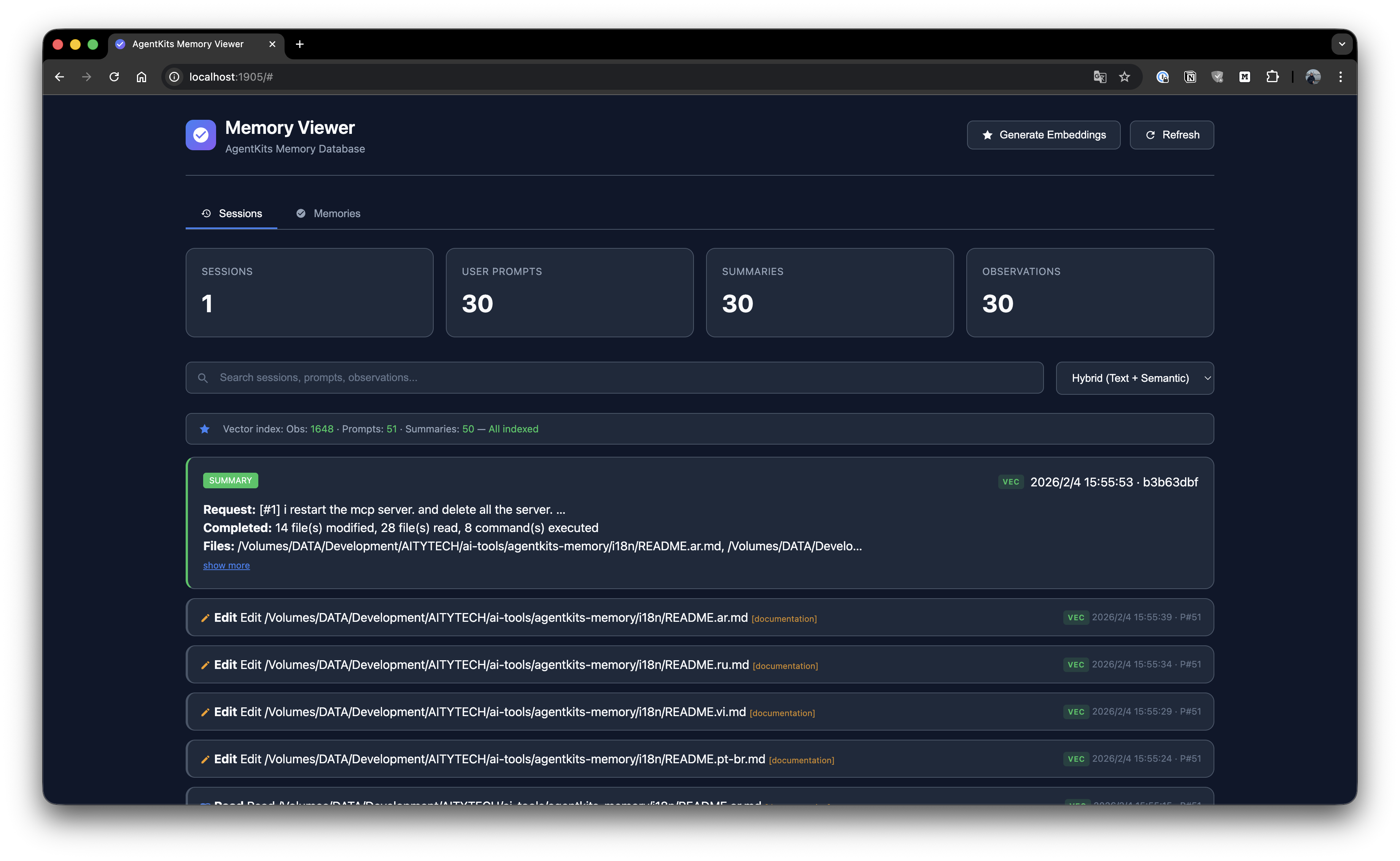 ### Memory List Browse all stored memories with search and namespace filtering. 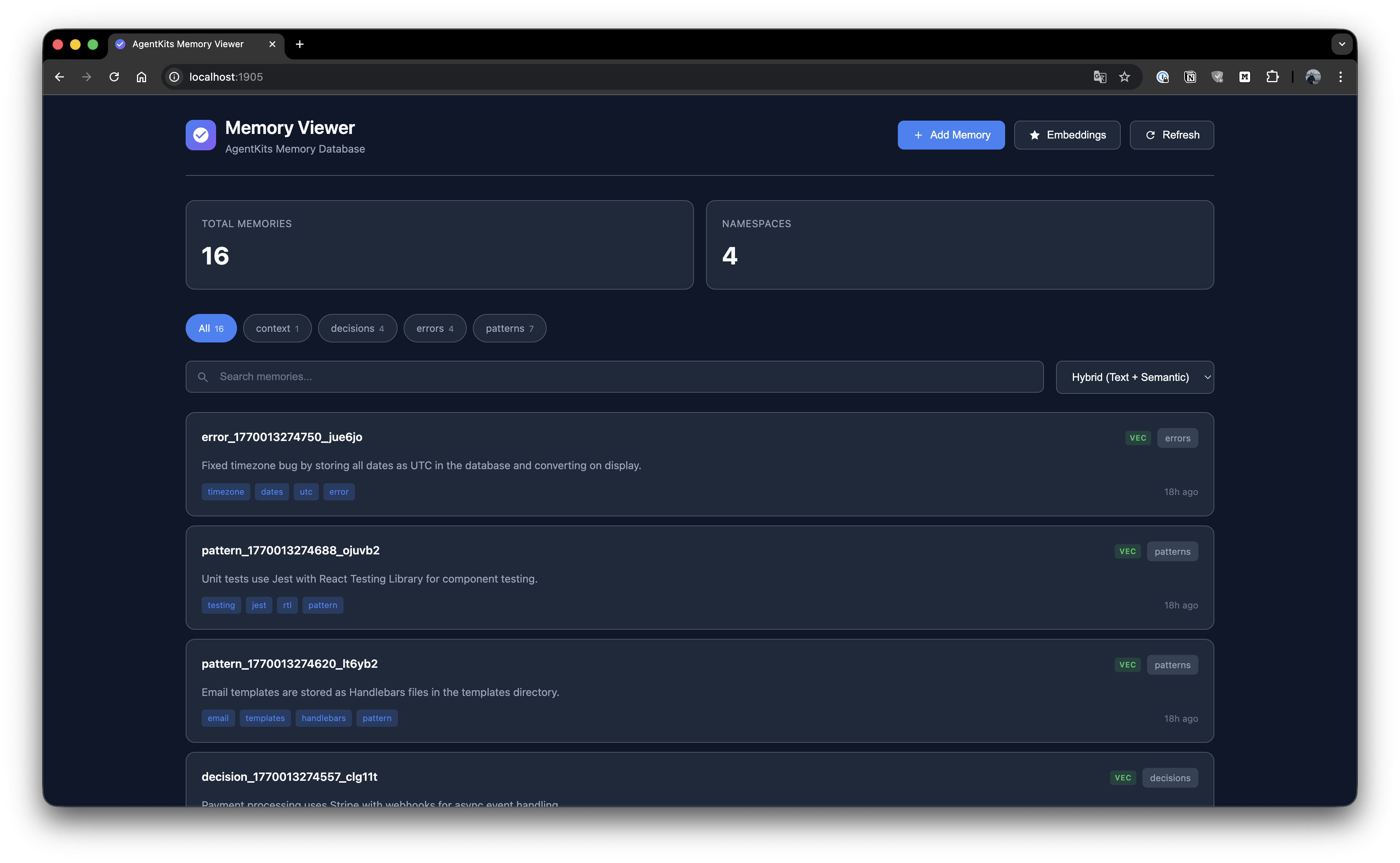 ### Add Memory Create new memories with key, namespace, type, content, and tags. 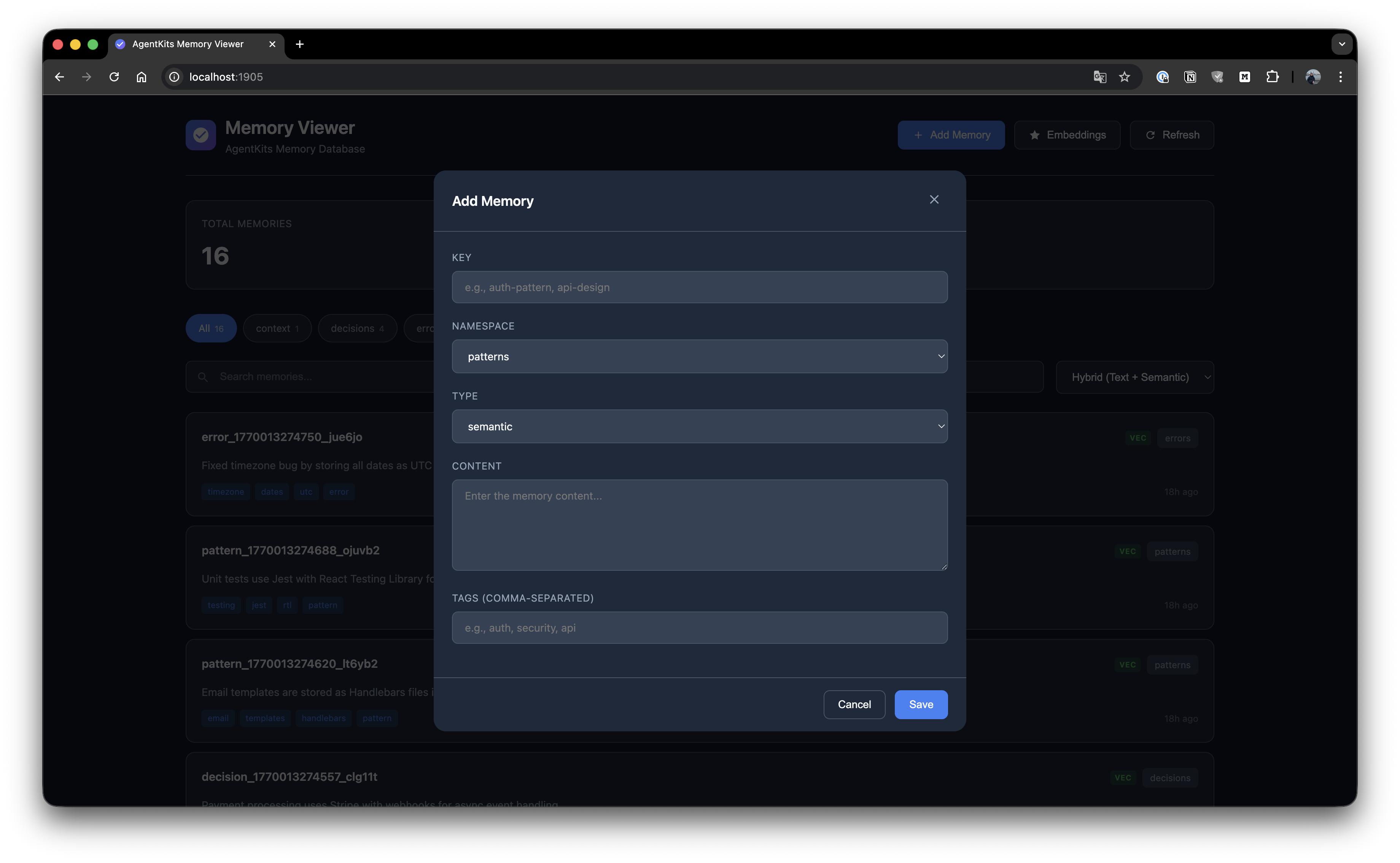 ### Memory Details View full memory details with edit and delete options. 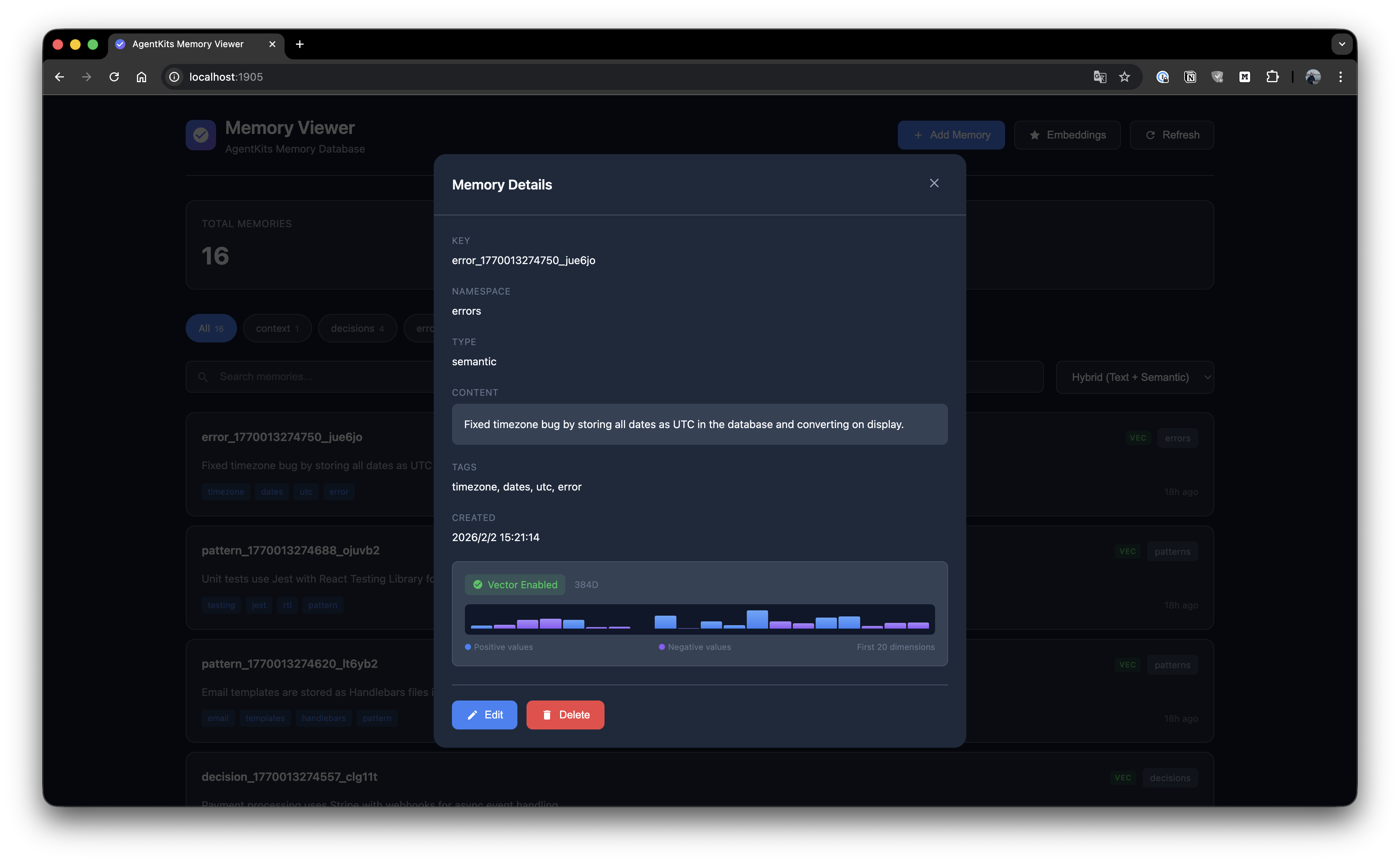 ### Manage Embeddings Generate and manage vector embeddings for semantic search. 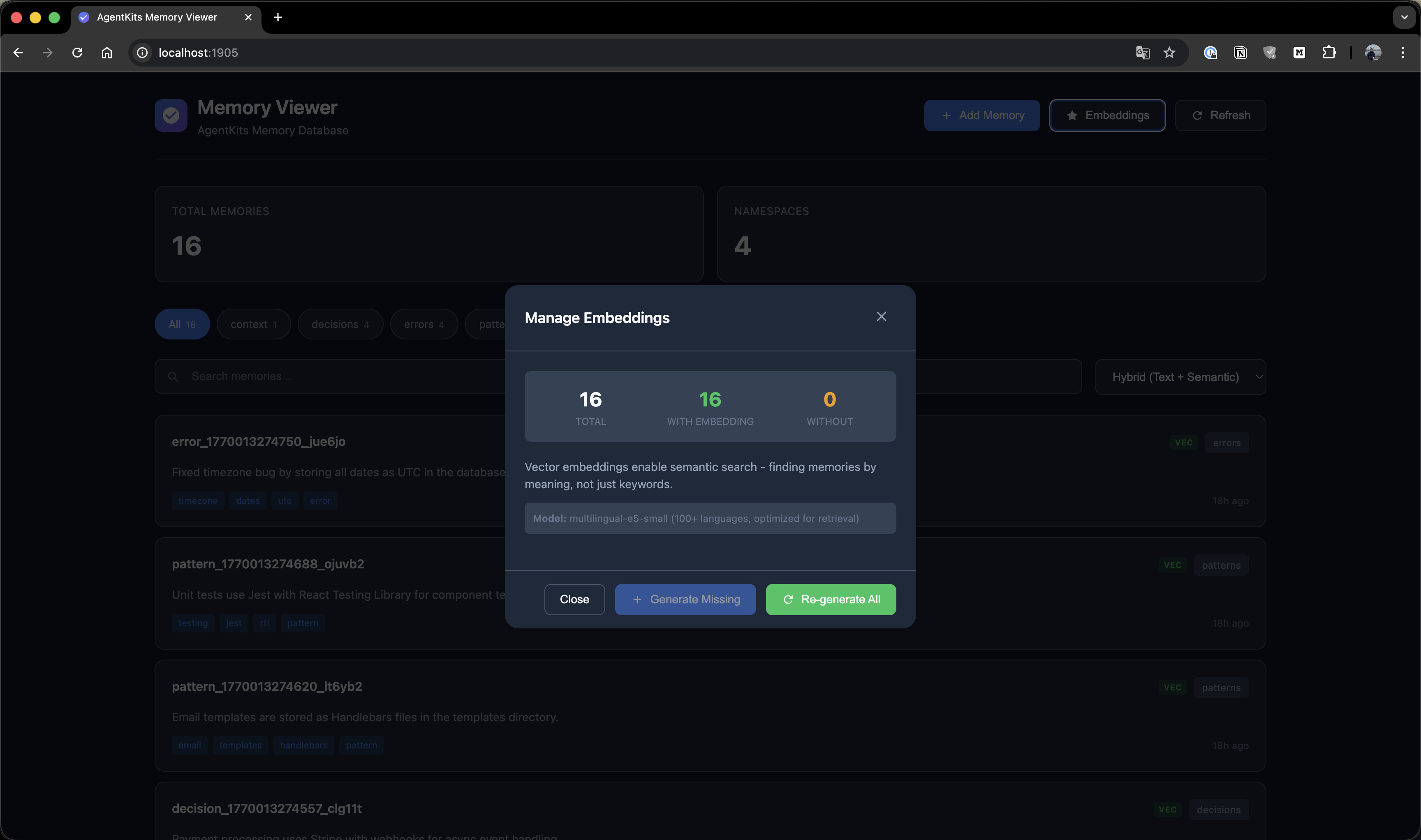 --- ## Quick Start ### Option 1: Claude Code Plugin Marketplace (Recommended for Claude Code) Install as a plugin with one command — no manual configuration needed: ```bash /plugin marketplace add aitytech/agentkits-memory /plugin install agentkits-memory@agentkits-memory ``` This installs hooks, MCP server, and memory workflow skill automatically. Restart Claude Code after installation. ### Option 2: Automated Setup (All Platforms) ```bash npx @aitytech/agentkits-memory ``` This auto-detects your platform and configures everything: MCP server, hooks (Claude Code/OpenCode), rules files (Cursor/Windsurf/Cline), and downloads the embedding model. **Target a specific platform:** ```bash npx @aitytech/agentkits-memory --platform=cursor npx @aitytech/agentkits-memory --platform=windsurf,cline npx @aitytech/agentkits-memory --platform=all ``` ### Option 3: Manual MCP Configuration If you prefer manual setup, add to your MCP config: ```json { "mcpServers": { "memory": { "command": "npx", "args": ["-y", "@aitytech/agentkits-memory", "server"] } } } ``` Config file locations: - **Claude Code**: `.claude/settings.json` (embedded in `mcpServers` key) - **Cursor**: `.cursor/mcp.json` - **Windsurf**: `.windsurf/mcp.json` - **Cline / OpenCode**: `.mcp.json` (project root) ### 3. MCP Tools Once configured, your AI assistant can use these tools: | Tool | Description | |------|-------------| | `memory_status` | Check memory system status (call first!) | | `memory_save` | Save decisions, patterns, errors, or context | | `memory_search` | **[Step 1]** Search index — lightweight IDs + titles (~50 tokens/result) | | `memory_timeline` | **[Step 2]** Get temporal context around a memory | | `memory_details` | **[Step 3]** Get full content for specific IDs | | `memory_recall` | Quick topic overview — grouped summary | | `memory_list` | List recent memories | | `memory_update` | Update existing memory content or tags | | `memory_delete` | Remove outdated memories | --- ## Progressive Disclosure (Token-Efficient Search) AgentKits Memory uses a **3-layer search pattern** that saves ~70% tokens compared to fetching full content upfront. ### How It Works ``` ┌─────────────────────────────────────────────────────────────┐ │ Step 1: memory_search │ │ Returns: IDs, titles, tags, scores (~50 tokens/item) │ │ → Review index, pick relevant memories │ └─────────────────────────────────────────────────────────────┘ ↓ ┌─────────────────────────────────────────────────────────────┐ │ Step 2: memory_timeline (optional) │ │ Returns: Context ±30 minutes around memory │ │ → Understand what happened before/after │ └─────────────────────────────────────────────────────────────┘ ↓ ┌─────────────────────────────────────────────────────────────┐ │ Step 3: memory_details │ │ Returns: Full content for selected IDs only │ │ → Fetch only what you actually need │ └─────────────────────────────────────────────────────────────┘ ``` ### Example Workflow ```typescript // Step 1: Search - get lightweight index memory_search({ query: "authentication" }) // → Returns: [{ id: "abc", title: "JWT pattern...", score: 85% }] // Step 2: (Optional) See temporal context memory_timeline({ anchor: "abc" }) // → Returns: What happened before/after this memory // Step 3: Get full content only for what you need memory_details({ ids: ["abc"] }) // → Returns: Full content for selected memory ``` ### Token Savings | Approach | Tokens Used | |----------|-------------| | **Old:** Fetch all content | ~500 tokens × 10 results = 5000 tokens | | **New:** Progressive disclosure | 50 × 10 + 500 × 2 = 1500 tokens | | **Savings** | **70% reduction** | --- ## CLI Commands ```bash # One-command setup (auto-detects platform) npx @aitytech/agentkits-memory npx @aitytech/agentkits-memory setup --platform=cursor # specific platform npx @aitytech/agentkits-memory setup --platform=all # all platforms npx @aitytech/agentkits-memory setup --force # re-install/update # Start MCP server npx @aitytech/agentkits-memory server # Web viewer (port 1905) npx @aitytech/agentkits-memory web # Terminal viewer npx @aitytech/agentkits-memory viewer npx @aitytech/agentkits-memory viewer --stats npx @aitytech/agentkits-memory viewer --json # Save from CLI npx @aitytech/agentkits-memory save "Use JWT with refresh tokens" --category pattern --tags auth,security # Settings npx @aitytech/agentkits-memory hook settings . npx @aitytech/agentkits-memory hook settings . --reset npx @aitytech/agentkits-memory hook settings . aiProvider.provider=openai aiProvider.apiKey=sk-... # Export / Import npx @aitytech/agentkits-memory hook export . my-project ./backup.json npx @aitytech/agentkits-memory hook import . ./backup.json # Lifecycle management npx @aitytech/agentkits-memory hook lifecycle . --compress-days=7 --archive-days=30 npx @aitytech/agentkits-memory hook lifecycle-stats . ``` --- ## Programmatic Usage ```typescript import { ProjectMemoryService } from '@aitytech/agentkits-memory'; const memory = new ProjectMemoryService({ baseDir: '.claude/memory', dbFilename: 'memory.db', }); await memory.initialize(); // Store a memory await memory.storeEntry({ key: 'auth-pattern', content: 'Use JWT with refresh tokens for authentication', namespace: 'patterns', tags: ['auth', 'security'], }); // Query memories const results = await memory.query({ type: 'hybrid', namespace: 'patterns', content: 'authentication', limit: 10, }); // Get by key const entry = await memory.getByKey('patterns', 'auth-pattern'); ``` --- ## Auto-Capture Hooks Hooks automatically capture your AI coding sessions (Claude Code and OpenCode only): | Hook | Trigger | Action | |------|---------|--------| | `context` | Session Start | Injects previous session context + memory status | | `session-init` | User Prompt | Initializes/resumes session, records prompts | | `observation` | After Tool Use | Captures tool usage with intent detection | | `summarize` | Session End | Generates structured session summary | | `user-message` | Session Start | Displays memory status to user (stderr) | Setup hooks: ```bash npx @aitytech/agentkits-memory ``` **What gets captured automatically:** - File reads/writes with paths - Code changes as structured diffs (before → after) - Developer intent (bugfix, feature, refactor, investigation, etc.) - Session summaries with decisions, errors, and next steps - Multi-prompt tracking within sessions --- ## Multi-Platform Support | Platform | MCP | Hooks | Rules File | Setup | |----------|-----|-------|------------|-------| | **Claude Code** | `.claude/settings.json` | ✅ Full | CLAUDE.md (skill) | `--platform=claude-code` | | **Cursor** | `.cursor/mcp.json` | — | `.cursorrules` | `--platform=cursor` | | **Windsurf** | `.windsurf/mcp.json` | — | `.windsurfrules` | `--platform=windsurf` | | **Cline** | `.mcp.json` | — | `.clinerules` | `--platform=cline` | | **OpenCode** | `.mcp.json` | ✅ Full | — | `--platform=opencode` | - **MCP Server** works with all platforms (memory tools via MCP protocol) - **Hooks** provide auto-capture on Claude Code and OpenCode - **Rules files** teach Cursor/Windsurf/Cline the memory workflow - **Memory data** always stored in `.claude/memory/` (single source of truth) --- ## Background Workers After each session, background workers process queued tasks: | Worker | Task | Description | |--------|------|-------------| | `embed-session` | Embeddings | Generate vector embeddings for semantic search | | `enrich-session` | AI Enrichment | Enrich observations with AI-generated summaries, facts, concepts | | `compress-session` | Compression | Compress old observations (10:1–25:1) and generate session digests (20:1–100:1) | Workers run automatically after session end. Each worker: - Processes up to 200 items per run - Uses lock files to prevent concurrent execution - Auto-terminates after 5 minutes (prevents zombies) - Retries failed tasks up to 3 times --- ## AI Provider Configuration AI enrichment uses pluggable providers. Default is `claude-cli` (no API key needed). | Provider | Type | Default Model | Notes | |----------|------|---------------|-------| | **Claude CLI** | `claude-cli` | `haiku` | Uses `claude --print`, no API key needed | | **OpenAI** | `openai` | `gpt-4o-mini` | Any OpenAI model | | **Google Gemini** | `gemini` | `gemini-2.0-flash` | Google AI Studio key | | **OpenRouter** | `openai` | any | Set `baseUrl` to `https://openrouter.ai/api/v1` | | **GLM (Zhipu)** | `openai` | any | Set `baseUrl` to `https://open.bigmodel.cn/api/paas/v4` | | **Ollama** | `openai` | any | Set `baseUrl` to `http://localhost:11434/v1` | ### Option 1: Environment Variables ```bash # OpenAI export AGENTKITS_AI_PROVIDER=openai export AGENTKITS_AI_API_KEY=sk-... # Google Gemini export AGENTKITS_AI_PROVIDER=gemini export AGENTKITS_AI_API_KEY=AIza... # OpenRouter (uses OpenAI-compatible format) export AGENTKITS_AI_PROVIDER=openai export AGENTKITS_AI_API_KEY=sk-or-... export AGENTKITS_AI_BASE_URL=https://openrouter.ai/api/v1 export AGENTKITS_AI_MODEL=anthropic/claude-3.5-haiku # Local Ollama (no API key needed) export AGENTKITS_AI_PROVIDER=openai export AGENTKITS_AI_BASE_URL=http://localhost:11434/v1 export AGENTKITS_AI_MODEL=llama3.2 # Disable AI enrichment entirely export AGENTKITS_AI_ENRICHMENT=false ``` ### Option 2: Persistent Settings ```bash # Saved to .claude/memory/settings.json — persists across sessions npx @aitytech/agentkits-memory hook settings . aiProvider.provider=openai aiProvider.apiKey=sk-... npx @aitytech/agentkits-memory hook settings . aiProvider.provider=gemini aiProvider.apiKey=AIza... npx @aitytech/agentkits-memory hook settings . aiProvider.baseUrl=https://openrouter.ai/api/v1 # View current settings npx @aitytech/agentkits-memory hook settings . # Reset to defaults npx @aitytech/agentkits-memory hook settings . --reset ``` > **Priority:** Environment variables override settings.json. Settings.json overrides defaults. --- ## Lifecycle Management Manage memory growth over time: ```bash # Compress observations older than 7 days, archive sessions older than 30 days npx @aitytech/agentkits-memory hook lifecycle . --compress-days=7 --archive-days=30 # Also auto-delete archived sessions older than 90 days npx @aitytech/agentkits-memory hook lifecycle . --compress-days=7 --archive-days=30 --delete --delete-days=90 # View lifecycle statistics npx @aitytech/agentkits-memory hook lifecycle-stats . ``` | Stage | What Happens | |-------|-------------| | **Compress** | AI-compresses observations, generates session digests | | **Archive** | Marks old sessions as archived (excluded from context) | | **Delete** | Removes archived sessions (opt-in, requires `--delete`) | --- ## Export / Import Backup and restore your project memories: ```bash # Export all sessions for a project npx @aitytech/agentkits-memory hook export . my-project ./backup.json # Import from backup (deduplicates automatically) npx @aitytech/agentkits-memory hook import . ./backup.json ``` Export format includes sessions, observations, prompts, and summaries. --- ## Memory Categories | Category | Use Case | |----------|----------| | `decision` | Architecture decisions, tech stack picks, trade-offs | | `pattern` | Coding conventions, project patterns, recurring approaches | | `error` | Bug fixes, error solutions, debugging insights | | `context` | Project background, team conventions, environment setup | | `observation` | Auto-captured session observations | --- ## Storage Memories are stored in `.claude/memory/` within your project directory. ``` .claude/memory/ ├── memory.db # SQLite database (all data) ├── memory.db-wal # Write-ahead log (temp) ├── settings.json # Persistent settings (AI provider, context config) └── embeddings-cache/ # Cached vector embeddings ``` --- ## CJK Language Support AgentKits Memory has **automatic CJK support** for Chinese, Japanese, and Korean text search. ### Zero Configuration When `better-sqlite3` is installed (default), CJK search works automatically: ```typescript import { ProjectMemoryService } from '@aitytech/agentkits-memory'; const memory = new ProjectMemoryService('.claude/memory'); await memory.initialize(); // Store CJK content await memory.storeEntry({ key: 'auth-pattern', content: '認証機能の実装パターン - JWT with refresh tokens', namespace: 'patterns', }); // Search in Japanese, Chinese, or Korean - it just works! const results = await memory.query({ type: 'hybrid', content: '認証機能', }); ``` ### How It Works - **Native SQLite**: Uses `better-sqlite3` for maximum performance - **Trigram tokenizer**: FTS5 with trigram creates 3-character sequences for CJK matching - **Smart fallback**: Short CJK queries (< 3 chars) automatically use LIKE search - **BM25 ranking**: Relevance scoring for search results ### Advanced: Japanese Word Segmentation For advanced Japanese with proper word segmentation, optionally use lindera: ```typescript import { createJapaneseOptimizedBackend } from '@aitytech/agentkits-memory'; const backend = createJapaneseOptimizedBackend({ databasePath: '.claude/memory/memory.db', linderaPath: './path/to/liblindera_sqlite.dylib', }); ``` Requires [lindera-sqlite](https://github.com/lindera/lindera-sqlite) build. --- ## API Reference ### ProjectMemoryService ```typescript interface ProjectMemoryConfig { baseDir: string; // Default: '.claude/memory' dbFilename: string; // Default: 'memory.db' enableVectorIndex: boolean; // Default: false dimensions: number; // Default: 384 embeddingGenerator?: EmbeddingGenerator; cacheEnabled: boolean; // Default: true cacheSize: number; // Default: 1000 cacheTtl: number; // Default: 300000 (5 min) } ``` ### Methods | Method | Description | |--------|-------------| | `initialize()` | Initialize the memory service | | `shutdown()` | Shutdown and persist changes | | `storeEntry(input)` | Store a memory entry | | `get(id)` | Get entry by ID | | `getByKey(namespace, key)` | Get entry by namespace and key | | `update(id, update)` | Update an entry | | `delete(id)` | Delete an entry | | `query(query)` | Query entries with filters | | `semanticSearch(content, k)` | Semantic similarity search | | `count(namespace?)` | Count entries | | `listNamespaces()` | List all namespaces | | `getStats()` | Get statistics | --- ## Code Quality AgentKits Memory is thoroughly tested with **970 unit tests** across 21 test suites. | Metric | Coverage | |--------|----------| | **Statements** | 90.29% | | **Branches** | 80.85% | | **Functions** | 90.54% | | **Lines** | 91.74% | ### Test Categories | Category | Tests | What's Covered | |----------|-------|----------------| | Core Memory Service | 56 | CRUD, search, pagination, categories, tags, import/export | | SQLite Backend | 65 | Schema, migrations, FTS5, transactions, error handling | | sqlite-vec Vector Index | 47 | Insert, search, delete, persistence, edge cases | | Hybrid Search | 44 | FTS + vector fusion, scoring, ranking, filters | | Token Economics | 27 | 3-layer search budgets, truncation, optimization | | Embedding System | 63 | Cache, subprocess, local models, CJK support | | Hook System | 502 | Context, session-init, observation, summarize, AI enrichment, service lifecycle, queue workers, adapters, types | | MCP Server | 48 | All 9 MCP tools, validation, error responses | | CLI | 34 | Platform detection, rules generation | | Integration | 84 | End-to-end flows, embedding integration, multi-session | ```bash # Run tests npm test # Run with coverage npm run test:coverage ``` --- ## Requirements - **Node.js LTS**: 18.x, 20.x, or 22.x (recommended) - MCP-compatible AI coding assistant ### Node.js Version Notes This package uses `better-sqlite3` which requires native binaries. **Prebuilt binaries are available for LTS versions only**. | Node Version | Status | Notes | |--------------|--------|-------| | 18.x LTS | ✅ Works | Prebuilt binaries | | 20.x LTS | ✅ Works | Prebuilt binaries | | 22.x LTS | ✅ Works | Prebuilt binaries | | 19.x, 21.x, 23.x | ⚠️ Requires build tools | No prebuilt binaries | ### Using Non-LTS Versions (Windows) If you must use a non-LTS version (19, 21, 23), install build tools first: **Option 1: Visual Studio Build Tools** ```powershell # Download and install from: # https://visualstudio.microsoft.com/visual-cpp-build-tools/ # Select "Desktop development with C++" workload ``` **Option 2: windows-build-tools (npm)** ```powershell npm install --global windows-build-tools ``` **Option 3: Chocolatey** ```powershell choco install visualstudio2022-workload-vctools ``` See [node-gyp Windows guide](https://github.com/nodejs/node-gyp#on-windows) for more details. --- ## AgentKits Ecosystem **AgentKits Memory** is part of the AgentKits ecosystem by AityTech - tools that make AI coding assistants smarter. | Product | Description | Link | |---------|-------------|------| | **AgentKits Engineer** | 28 specialized agents, 100+ skills, enterprise patterns | [GitHub](https://github.com/aitytech/agentkits-engineer) | | **AgentKits Marketing** | AI-powered marketing content generation | [GitHub](https://github.com/aitytech/agentkits-marketing) | | **AgentKits Memory** | Persistent memory for AI assistants (this package) | [npm](https://www.npmjs.com/package/@aitytech/agentkits-memory) |

Give your AI assistant memory that persists.
AgentKits Memory by AityTech
Star this repo if it helps your AI remember.