[](http://whereabouts.readthedocs.io/en/latest/?badge=latest)
[](https://pepy.tech/project/whereabouts)
[](https://github.com/ajl2718/whereabouts/issues)
# Whereabouts
A lightweight, fast geocoder for Python using DuckDB. Try it out online at [Hugging Face](https://huggingface.co/spaces/saunteringcat/whereabouts-geocoding).
## Description
Whereabouts is an open-source geocoding library for Python, allowing you to geocode and standardize address data all within your own environment.
Features:
- Two-line installation
- No additional database setup required — uses DuckDB to run all queries
- No need to send data to an external geocoding API
- Fast (geocode 1000s/sec depending on your setup)
- Robust to different errors (typographical, geographic, missing information)
## Performance
Whereabouts performs well compared with other geocoders. The charts below show the accuracy when calculated at apartment/unit, house, street, and suburb level, comparing Whereabouts with Google, Mapbox, and Nominatim on sets of residential and retail addresses.
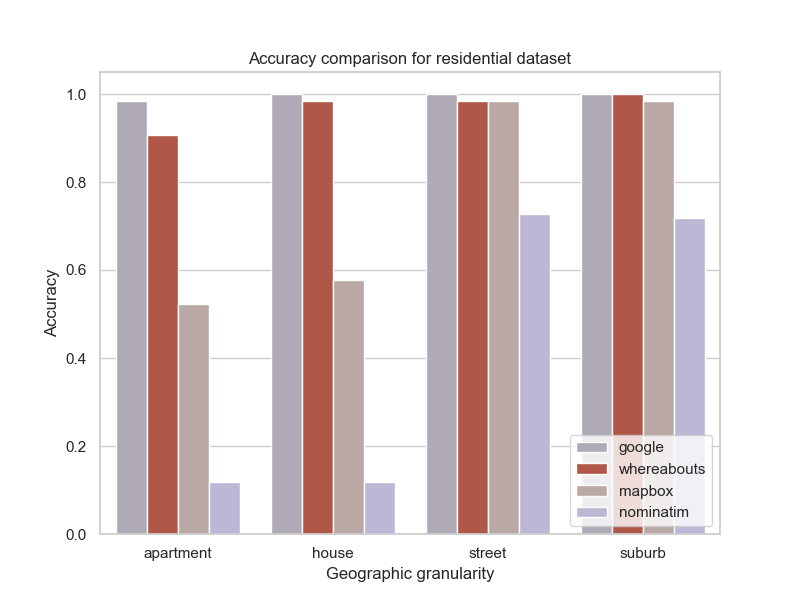
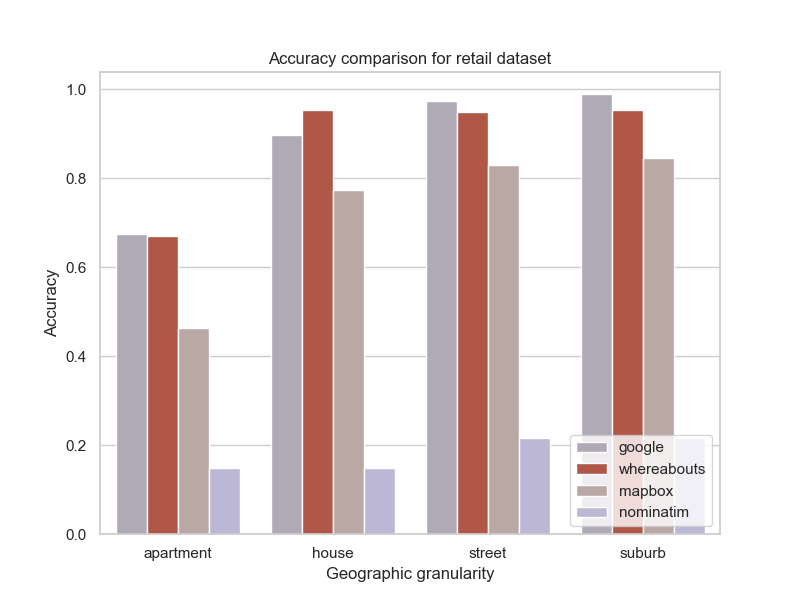
Code to produce these results is found in the [whereabouts_testing repo](https://github.com/ajl2718/whereabouts_testing).
## Requirements
- Python 3.12+
## Installation
Whereabouts can be installed using uv, pip, or conda:
```bash
uv add whereabouts
```
### Installation from source
Clone the repo:
```bash
git clone https://github.com/ajl2718/whereabouts.git
cd whereabouts
```
Then create a virtual environment and install dependencies:
```bash
uv venv
uv sync
```
## Download a geocoder database or create your own
You will need a geocoding database to match addresses against. You can either download a pre-built database or create your own using a dataset of high-quality reference addresses for a given country, state, or other geographic region.
### Option 1: Download a pre-built geocoder database
Pre-built geocoding databases are available from [Hugging Face](https://www.huggingface.co). The list of available databases can be found [here](https://huggingface.co/saunteringcat/whereabouts-db/tree/main).
As an example, to install the small-size geocoder database for Australia:
```bash
uv run python -m whereabouts download au_all_sm
```
### Option 2: Create a geocoder database
Rather than using a pre-built database, you can create your own geocoder database if you have your own address file. This file should be a single CSV or Parquet file with the following columns:
| Column name | Description | Data type |
| ----------- | ----------- | --------- |
| ADDRESS_DETAIL_PID | Unique identifier for address | int |
| FULL_ADDRESS | The full address | str |
| ADDRESS_SITE_NAME | Name of the site. This is usually null | str |
| LOCALITY_NAME | Name of the suburb or locality | str |
| POSTCODE | Postcode of address | int |
| STATE | The state, region or territory for the address | str |
| LATITUDE | Latitude of geocoded address | float |
| LONGITUDE | Longitude of geocoded address | float |
These fields should be specified in a `setup.yml` file, which is structured as follows:
```yaml
data:
db_name: au_vic_lg
folder: geodb
filepath: 'address_file.parquet'
sep: ","
geocoder:
matchers: [standard]
states: [VIC]
schema:
addr_id: ADDRESS_DETAIL_PID
full_address: ADDRESS_LABEL
address_site_name: ADDRESS_SITE_NAME
locality_name: LOCALITY_NAME
postcode: POSTCODE
state: STATE
latitude: LATITUDE
longitude: LONGITUDE
```
`addr_id` is a unique integer, `full_address` contains the full address string, while `locality_name`, `postcode`, and `state` are components of the address.
Once the `setup.yml` is created and a reference dataset is available, the geocoding database can be created:
```bash
uv run python -m whereabouts setup_geocoder setup.yml
```
An example `setup.yml` file is provided with this repo. Note that the state names listed are specific to Australia and should be changed according to the country's data you are working with.
## Geocoding examples
Geocode a list of addresses:
```python
from whereabouts.Matcher import Matcher
matcher = Matcher(db_name='au_all_sm')
matcher.geocode(addresslist, how='standard')
```
For more accurate geocoding you can use trigram phrases rather than token phrases. Note that you will need one of the large databases to use trigram geocoding:
```python
matcher.geocode(addresslist, how='trigram')
```
## Benchmarking
The matching accuracy of the geocoding algorithms is computed by providing a database, test set, and matching algorithm name. The test set is expected to have columns `input_address` and `best_match`.
The benchmarking can be run as:
```bash
uv run python -m whereabouts benchmark --how --threshold --output-csv
```
For example, for the `au_all_sm` Australian dataset:
```bash
uv run python -m whereabouts benchmark au_all_sm evaluation_data/test_set_au.csv --how standard --threshold 0.5 --output-csv whereabouts/benchmarking_results/benchmarking_results_050726.csv
```
## How the algorithm works
The algorithm employs simple record linkage techniques, making it suitable for implementation in around 10 lines of SQL. It is based on the following papers:
- https://arxiv.org/abs/1708.01402
- https://arxiv.org/abs/1712.09691
Additional changes have been made to the algorithm, including a different similarity function and changes to catch additional errors.
## Documentation
Work in progress: https://whereabouts.readthedocs.io/en/latest/
## License Disclaimer for Third-Party Data
Note that while the code from this package is licensed under the MIT license, the pre-built databases use data from data providers that may have restrictions for particular use cases:
- The Australian databases are built from the [Geocoded National Address File](https://data.gov.au/data/dataset/geocoded-national-address-file-g-naf) with conditions of use based on the [End User Licence Agreement](https://data.gov.au/dataset/ds-dga-e1a365fc-52f5-4798-8f0c-ed1d33d43b6d/distribution/dist-dga-0102be65-3781-42d9-9458-fdaf7170efed/details?q=previous%20gnaf).
- The US databases are still work-in-progress but are based on data from [OpenAddresses](https://openaddresses.io/) and so any work with whereabouts based on US address data should adhere to the [OpenAddresses license](https://github.com/openaddresses/openaddresses/blob/master/LICENSE).
Users of this software must comply with the terms and conditions of the respective data licenses, which may impose additional restrictions or requirements. By using this software, you agree to comply with the relevant licenses for any third-party data.
## Citing
To cite this repo, please use the following:
```bibtex
@software{whereabouts_2024,
author = {Alex Lee},
doi = {[10.5281/zenodo.1234](https://doi.org/10.5281/zenodo.13627073)},
month = {10},
title = {{Whereabouts}},
url = {https://github.com/ajl2718/whereabouts},
version = {0.3.14},
year = {2024}
}