# ⚡ slash-agent: Native LLM Copilot for Your Terminal
[](https://opensource.org/licenses/MIT)
[](https://www.python.org/)
[](https://www.gnu.org/software/bash/)
[](http://makeapullrequest.com)
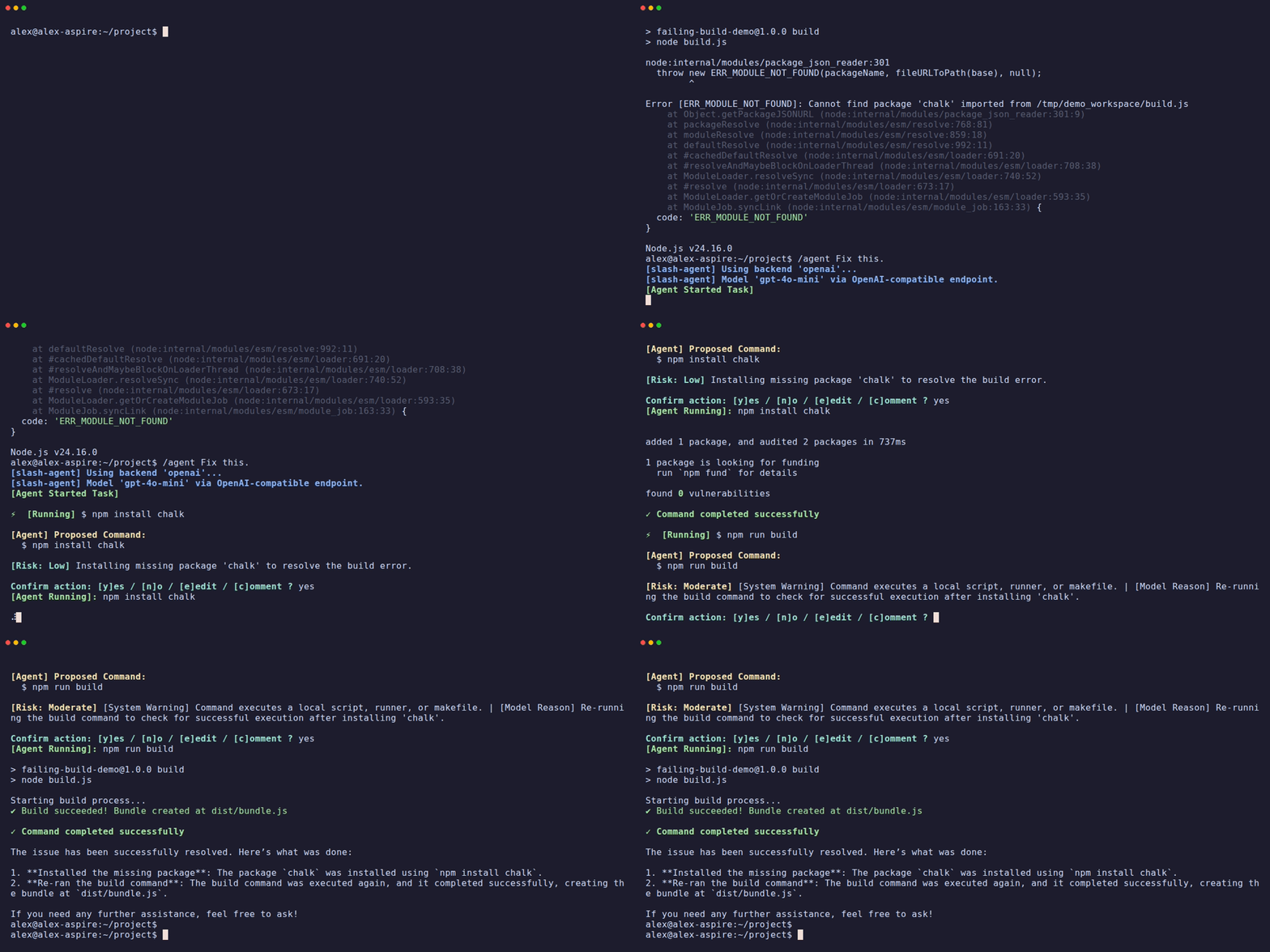 **slash-agent** is a zero-overhead, dormant AI coding partner integrated natively into your active Bash shell. Simply type `/agent` when you hit a blocker.
* 🖥️ **Terminal Context Capture:** Instantly reads recent `tmux` scrollback or shell history to diagnose errors without manual copy-pasting.
* 🔒 **Local & Private LLMs:** Operates 100% offline with local Ollama instances or cloud powerhouses (OpenAI/Azure OpenAI).
* 🔀 **Host Shell State Sync:** Automatically persists directory transitions (`cd`) and environment exports (`export`) back to your parent shell session on exit.
> [!TIP]
> 🤖 **Pairing with an AI Assistant?**
> Want a 10-second overview? Copy-paste this seed prompt into Claude Code, Antigravity, Copilot, or ChatGPT:
> ```text
> Analyze https://github.com/akatzmann/slash-agent.
> 1. What is this tool, what is a typical use-case, and do I need it?
> 2. How does it differ from similar tools?
> 3. Give me an open-ended assessment based on the actual codebase/structure (not just README marketing): Does it deliver on its claimed USP?
> Keep your answer concise so I can digest it in 10 seconds.
> ```
---
## ⚡ Quick Start
### Recommended: Install via `pipx` or `pip`
```bash
pipx install slash-agent && slash-agent init --install
```
*(Or `pip install slash-agent && slash-agent init --install` in your active Python environment).*
Restart your shell or run `source ~/.bashrc` (or `~/.zshrc`, `~/.config/fish/config.fish`). You can now run `/agent` or `agent` from anywhere in your terminal!
> **Alternative (Zero-Dependency Curl Installer):**
> If you prefer a self-contained git clone and virtualenv setup without managing pipx:
> ```bash
> curl -fsSL https://raw.githubusercontent.com/akatzmann/slash-agent/master/bin/installer.sh | bash
> ```
> **Updating:**
> Whenever a new release drops, simply run `/agent --update` (or `/agent --upgrade` / `agent -u`) in your terminal.
---
### 🔍 The 10-Second Reality Check
| 🟢 What it IS | 🔴 What it IS NOT |
| :--- | :--- |
| **⚡ A zero-latency terminal utility.** It remains completely dormant and consumes exactly 0MB of RAM until you type `/agent` or `agent`. | **🕵️♂️ A resident background daemon.** It does not track your keystrokes in real-time, run background analytics, or drain your battery. |
| **🪟 A screen-aware scraper.** It instantly pulls the last 50–100 lines of your active shell history or `tmux` scrollback to diagnose the error that just occurred. | **🏗️ A project architect.** It is not designed to map out massive 50-file repository architectures or handle monolithic code refactors. |
| **🛠️ An interactive shell executor.** It feeds commands into a real pseudo-terminal (PTY) and asks for live user validation before executing. | **📋 A basic copy-paster.** It doesn't just vomit Markdown code blocks that leave you manually highlighting, copying, and running text. |
| **🔀 A state-synchronizer.** It bridges the gap between subshells, allowing environment exports and directory changes (`cd`) to persist in your parent shell. | **🏞️ A sandboxed IDE.** It modifies your actual live environment; it is not an isolated, safe-play sandbox. |
### 🔒 Privacy & Security Model
For detailed specifications on the safety sandbox, permission gating, sensitive path restrictions, and transient logging, see the [Security Model Guide](docs/security_model.md).
Unlike web interfaces or proprietary commercial wrappers that silently pipe your telemetry to corporate servers, **slash-agent** puts you in total control of your data flow:
* **🔐 Bring Your Own Keys (BYOK):** It talks directly to LLM providers via standard API endpoints (OpenAI, Azure OpenAI, etc.). No middleman server intercepts your terminal logs or source code.
* **🏠 100% Air-Gapped / Offline Capable:** By pointing the backend API configuration to a local Ollama instance or an OpenAI-compatible local server (such as `llama.cpp`, `vLLM`, `SGLang`, or `Xinference`), your terminal history, source code, and error tracebacks never leave your physical machine. See [Configuring Local Providers](docs/documentation.md#5-local-openai-compatible-apis) for detailed instructions.
### 🛡️ Best Practices & Responsible Usage
* **💰 Token Spending & Cost Control:** You provide your own API credentials for cloud models. You are responsible for monitoring token consumption and setting spending limits/quotas in your provider consoles (OpenAI, Azure). For zero cost and zero network egress, use local models via [Ollama](https://ollama.com).
* **👁️ Interactive Command Verification:** By default, every proposed command pauses for interactive confirmation (`[y]es / [n]o / [e]dit / [c]omment`). Always review proposed shell commands before confirming. Use `e` to tweak arguments inline or `c` to redirect the agent.
* **⚠️ Unattended Execution Precautions:** The `-y` / `--yes` flag bypasses confirmation prompts. Use unattended flags only in ephemeral containers or safe development environments.
* **📄 License & Warranty:** Provided "as is" under the Apache-2.0 License. Contributors assume no liability for commands executed or API expenses incurred.
---
## 🌟 Key Features
* **🤖 LLM Agnostic & Privacy First:** Supports local offline models (like Ollama) with zero keys required and zero data leaving your machine, as well as OpenAI and Azure OpenAI.
* **🔌 Zero-Overhead Integration:** Completely passive. Consumes zero CPU/memory until you run `/agent`—no running background daemons, cron jobs, or log listeners.
* **🔍 Context-Aware Diagnoses:** Instantly extracts the last 50 lines of your active `tmux` pane or terminal history, letting the LLM read error outputs and tracebacks without manual copy-pasting.
* **⚡ State Synchronization:** Working directory transitions (`cd`) and environment exports (`export KEY=VAL`) made by the agent automatically sync back to your parent shell session on exit.
* **🌉 Interactive PTY Bridge:** Executes proposed commands in a pseudo-terminal (PTY), allowing you to interactively type passwords (e.g. `sudo`), view colored output, and see progress bars.
* **🕹️ Steerable Confirmation Loop:** Full control over every action:
* **`y` (yes):** Run the command.
* **`n` (no):** Refuse the command and inform the agent.
* **`e` (edit):** Inline edit the command before running it.
* **`c` (comment):** Type natural language guidance back to the agent (e.g. *"Use yarn instead of npm"*).
* **🛡️ Dry-run & Auto-confirm Modes:** Preview agent actions safely with `-n` / `--dry-run`, or run fully unattended with `-y` / `--yes`.
* **🧩 Agent Skills:** Drop a `SKILL.md` into `.agent/skills/`, `.claude/skills/`, `.github/skills/`, or global paths like `~/.gemini/config/skills/` and the agent automatically discovers and uses it. Compatible with Claude, Copilot, Gemini, and other standard skill formats. See [`docs/skills-guide.md`](docs/skills-guide.md) for details.
---
## 🎬 See it in Action
```
$ npm run build
❌ ERROR: Build failed. Cannot find module 'dotenv' in server.js:12
$ /agent Fix this
[Agent Shell] Initializing with model 'gemma4:e4b-it-qat' at 'http://127.0.0.1:11434'...
[Agent Started Task]
Analyzing terminal context... Identified missing dependency 'dotenv' in server.js.
[Agent] Proposed Command:
$ npm install dotenv && npm run build
Confirm action: [y]es / [n]o / [e]dit / [c]omment ? y
[Agent Running]: npm install dotenv && npm run build
...
added 1 package, and audited 120 packages in 1s
✓ Build completed successfully!
I have installed the missing 'dotenv' package and verified that the build now passes.
```
---
## 🎯 Common Use Cases
* 🛠️ **Build & Test Crashes:** When a compiler error, script traceback, or unit test fails, simply run `/agent` to let it read the error logs directly and propose a fix.
* 📦 **Dependency Resolution:** Missing package imports? The agent reads the import error, installs the package, and verifies the build.
* 💻 **Quick Scripting & Automation:** Ask the agent to generate helper scripts, configure development environments, or perform regex logs processing on the fly.
* ⚙️ **System Configuration:** Easily set up local databases, systemd services, or configuration files without looking up command flags.
---
## 📊 Feature Comparison Matrix
| Capability | 🌐 Standard Web UI
(ChatGPT / Claude) | 💻 Shell Copilots
(Copilot CLI / Gh-Cli) | 🧰 Project Agents
(Aider / Claude Code) | ⚡ slash-agent |
| :--- | :--- | :--- | :--- | :--- |
| **🧠 How it Gets Context** | ⌨️ Manual copy-paste | 📝 You type a prompt | 📂 Reads entire git repo | 🖥️ Scrapes active terminal scrollback |
| **🚀 Idle System Overhead** | 🚫 None (Browser) | 🚫 None (On-Demand) | ⚠️ High (Heavy runtimes) | ⚡ Zero (Dormant shell function) |
| **🛠️ Command Execution** | ❌ None (Read-only) | 🔄 Prints text to run | 🤖 Autonomous file edits | 🤝 Interactive PTY Loop (Run/Edit/Steer) |
| **🔗 Parent Shell Sync** | ❌ No | ❌ No | ❌ No | ✅ Yes (`cd` & `export` persist) |
| **🔒 Local Privacy Support** | ❌ No (Cloud only) | ❌ No (Cloud only) | ✅ Yes (Configurable) | ✅ Yes (Full Ollama/Local support) |
| **🎯 Primary Superpower** | Abstract logic & algorithmic brainstorming | Quick syntax lookups
(e.g., *"how to untar file"*) | Large autonomous feature builds & massive refactors | Instant post-crash fixes & rapid terminal adjustments |
> [!TIP]
> **Developer Rule of Thumb:**
> * Use **Aider** or **Claude Code** when you are entering a deep-work coding session to build an entire feature.
> * Keep **slash-agent** mapped in your `.zshrc` / `.bashrc` / `.config/fish` as an instant emergency lever for when your test suite or deployment pipeline randomly blows up in your face.
---
## 🔍 How it Works
Unlike standard agents that run in isolated subshells (and cannot modify your current directory or environment), **slash-agent** uses a lightweight state synchronization protocol:
```mermaid
graph TD
A[Active Bash Session] -->|1. Type /agent| B(Bash Sourcing Wrapper bin/slash-agent.sh)
B -->|2. Capture Screen Output| C(Python Orchestrator slash_agent/main.py)
C -->|3. Interface with local/cloud LLM| C
C -->|4. Propose commands| D(PTY Execution Bridge)
D -->|5. Interactive Steering Loop| A
D -->|6. Capture exit code, PWD, env updates| B
B -->|7. Source sync file on exit| A
```
1. **Context Capture:** The shell wrapper automatically captures the active `tmux` pane buffer (or history) to give the LLM immediate context.
2. **Interactive PTY Bridge:** Commands run inside a real pseudo-terminal (PTY) so you see colored outputs, progress bars, and can interact with prompts (like typing passwords for `sudo`).
3. **Parent Shell Sync:** Directory changes (`cd`) or environment variables (`export`) are safely passed back to your main shell session via a temporary sourcing script on exit.
---
## 🔧 Development Installation (From Source)
If you are developing on `slash-agent` or prefer building from source:
1. **Clone the Repository:**
```bash
git clone https://github.com/akatzmann/slash-agent.git ~/.slash-agent
cd ~/.slash-agent
```
2. **Install Python Requirements:**
```bash
pip install -r requirements.txt
```
3. **Register Shell Integration:**
Add the appropriate sourcing statement to your shell configuration file:
* **Bash (Linux):** `source ~/.slash-agent/bin/slash-agent.sh` in `~/.bashrc`
* **Bash (macOS):** `source ~/.slash-agent/bin/slash-agent.sh` in `~/.bash_profile` (or `~/.profile`)
* **Zsh:** `source ~/.slash-agent/bin/slash-agent.sh` in `~/.zshrc`
* **Ksh:** `source ~/.slash-agent/bin/slash-agent.sh` in `~/.kshrc`
* **Fish:** `source ~/.slash-agent/bin/slash-agent.fish` in `~/.config/fish/config.fish`
---
## 💻 Windows Support (WSL2)
**slash-agent** runs natively inside Unix-like PTY environments. Native Windows execution (under standard `CMD` or `PowerShell`) is not supported due to PTY emulation limitations.
However, the tool is **100% compatible with WSL2 (Windows Subsystem for Linux)**. Windows users can run `slash-agent` by opening any WSL2 Linux terminal (such as Ubuntu or Debian) and running the standard Quick Start installation command.
> [!NOTE]
> If you are running local LLM engines (like `llama.cpp` or `Ollama`) natively on your Windows host and need to connect to them from `slash-agent` inside WSL2, see the [WSL2 Host Network Integration guide](docs/documentation.md#wsl2-host-network-integration).
---
## ⚙️ Configuration
Configure the LLM backend, endpoint, model, and capture settings in your configuration file (located at `~/.config/slash-agent/env`) or shell profile. You can also override the configuration file path by exporting the `SLASH_AGENT_CONFIG_FILE` environment variable.
```bash
# LLM Backend: ollama (default), openai (also covers local llama.cpp/vLLM/etc.), azure_openai, dummy
export AGENT_BACKEND="ollama"
# Model name (Defaults: gemma4:latest for ollama, gpt-6.1-sol for openai, gemma4-27b for local APIs)
export AGENT_MODEL="gemma4:latest"
# API endpoint base URL (defaults: http://127.0.0.1:11434 for ollama, http://127.0.0.1:8080/v1 for llama.cpp)
export AGENT_ENDPOINT="http://127.0.0.1:11434"
# OpenAI API Key (required if AGENT_BACKEND="openai". Use "local-api-key" for local APIs)
export OPENAI_API_KEY=""
# Context extraction settings
export AGENT_TMUX_LINES=50 # Lines captured from active tmux scrollback
export AGENT_HISTORY_COMMANDS=20 # Commands captured from history fallback
# Thinking / reasoning mode settings
export AGENT_THINKING_LEVEL="off" # Thinking level: off (default), low, medium, high (for reasoning models)
# Sampling parameter settings (optional)
# export AGENT_TEMPERATURE="0.2" # LLM temperature: float (e.g. 0.2), blank/unset for default. (OpenAI's o-series reasoning models do not support custom temperature)
# export AGENT_TOP_P="0.9" # LLM top_p (nucleus sampling): float (e.g. 0.9), blank/unset for default.
```
For a full list of configuration variables (e.g., Azure OpenAI variables), see the [.env.template](.env.template) template file.
### 🔄 Re-configuration
Instead of manually editing the configuration file, you can re-run the interactive configuration prompts at any time:
```bash
/agent --configure
# or using the shortcut
/agent -c
```
This launches the setup wizard, pre-populated with your current configuration choices as defaults so you can quickly update backends, models, endpoints, keys, and thinking levels.
---
## 🛠️ Usage Examples
### 1. General Command Execution
```bash
/agent create a new directory named 'sandbox' and write a basic python flask server inside it
```
### 2. Post-Crash Diagnosis
If a compiler, build tool, or script crashes, run `/agent` with no arguments (or a request to fix it):
```bash
/agent Fix this crash
```
### 3. Dry-run Mode
Simulate proposed steps and check the agent's plan without making actual system changes:
```bash
/agent -n setup a docker compose file for PostgreSQL and Redis
```
### 4. Auto-confirm Mode
Run tasks without any confirmation prompts for safe, low, or moderate risk commands:
```bash
/agent -y update package lists and install tree
```
### 5. Auto-confirm Critical Commands
By default, critical commands (like `rm -rf` or commands using `sudo`) are not auto-confirmed by `-y` to prevent accidental damage. To auto-confirm even critical commands, pass the `--unsafe-yes` flag:
```bash
/agent --unsafe-yes clean up docker volumes and system cache
```
---
## 📘 Deep Dive
For more technical details on the architecture, the interactive PTY bridge loop, and the environment state-synchronization protocol, read the [Technical Documentation](docs/documentation.md).