# 🚀 ServerAsMcp
**The deployment MCP for agents that actually ships.**
Let your agent deploy to real Linux servers, configure DNS, and fix the deployment until it is live.
[](https://www.npmjs.com/package/serverasmcp)
[](https://pypi.org/project/serverasmcp/)
[](https://opensource.org/licenses/MIT)
[](https://modelcontextprotocol.io)
[](https://github.com/akillv/serverASmcp/stargazers)
[Quick Start](#-quick-start) · [Who It Is For](#-who-this-is-for) · [Security](#-security) · [Tools](#-tools) · [Deployment Skill](#-deployment-skill) · [Contributing](#-contributing)
---
## What is ServerAsMcp?
ServerAsMcp is an **agent-native deployment MCP** for real Linux servers.
Configure a server once. Then ask Codex, Claude, Cursor, or another MCP agent to deploy a repository, install dependencies, create a systemd service, update Cloudflare DNS, and verify the public HTTPS URL. If deployment fails, the agent can read logs, diagnose the issue, apply a fix, and retry until production is live.
> **⚠️ Trust boundary:** ServerAsMcp is deliberately unrestricted for single-operator environments. The configured agent can execute arbitrary commands as the configured SSH identity. Use SSH-key authentication, keep credentials local, and do not connect untrusted agents or shared multi-tenant systems.
## 🎯 Who this is for
- Solo founders and indie hackers who want a repo live without building CI/CD first
- Codex, Claude, and Cursor power users who want agent-native operations
- Self-hosters who prefer direct control of their VPSes
- Consultants managing several small customer servers
- Small teams that want production deployment without Kubernetes complexity
### Who this is not for
- Enterprises requiring centralized RBAC, policy engines, or zero-trust controls
- Multi-tenant platforms with untrusted agents
- Shared production fleets operated by large teams
## 🚦 Why use it?
| Without ServerAsMcp | With ServerAsMcp |
|---|---|
| Write deployment scripts or pipeline YAML | Ask the agent to deploy |
| SSH into each server separately | Let the agent target one or all servers |
| Manually create DNS records | Let the agent update Cloudflare DNS |
| Read logs and restart services yourself | Let the agent diagnose and self-heal |
| Hope the app is live | Verify `systemd`, localhost, and the public URL |
| Approach | Setup | Multi-server | DNS | Self-healing | Agent-native |
|---|---|---|---|---|---|
| Manual SSH | Low | Manual | Manual | No | No |
| Traditional CI/CD | High | Possible | Manual | Limited | No |
| Managed PaaS | Low | Often limited | Often built in | Some | Limited |
| **ServerAsMcp** | One MCP config | Unlimited by design | Cloudflare built in | Core workflow | Yes |
## 🎬 The 30-second workflow
1. Start with a VPS you control and configure SSH-key authentication.
2. Ask: `Deploy https://github.com/you/your-app to web-1 and make it live at app.example.com.`
3. The agent prepares the server, deploys the app, creates the service, and updates DNS.
4. If something fails, it reads logs, diagnoses the issue, applies a fix, and retries.
5. Finish with `systemctl`, localhost, and the public HTTPS URL all verified.
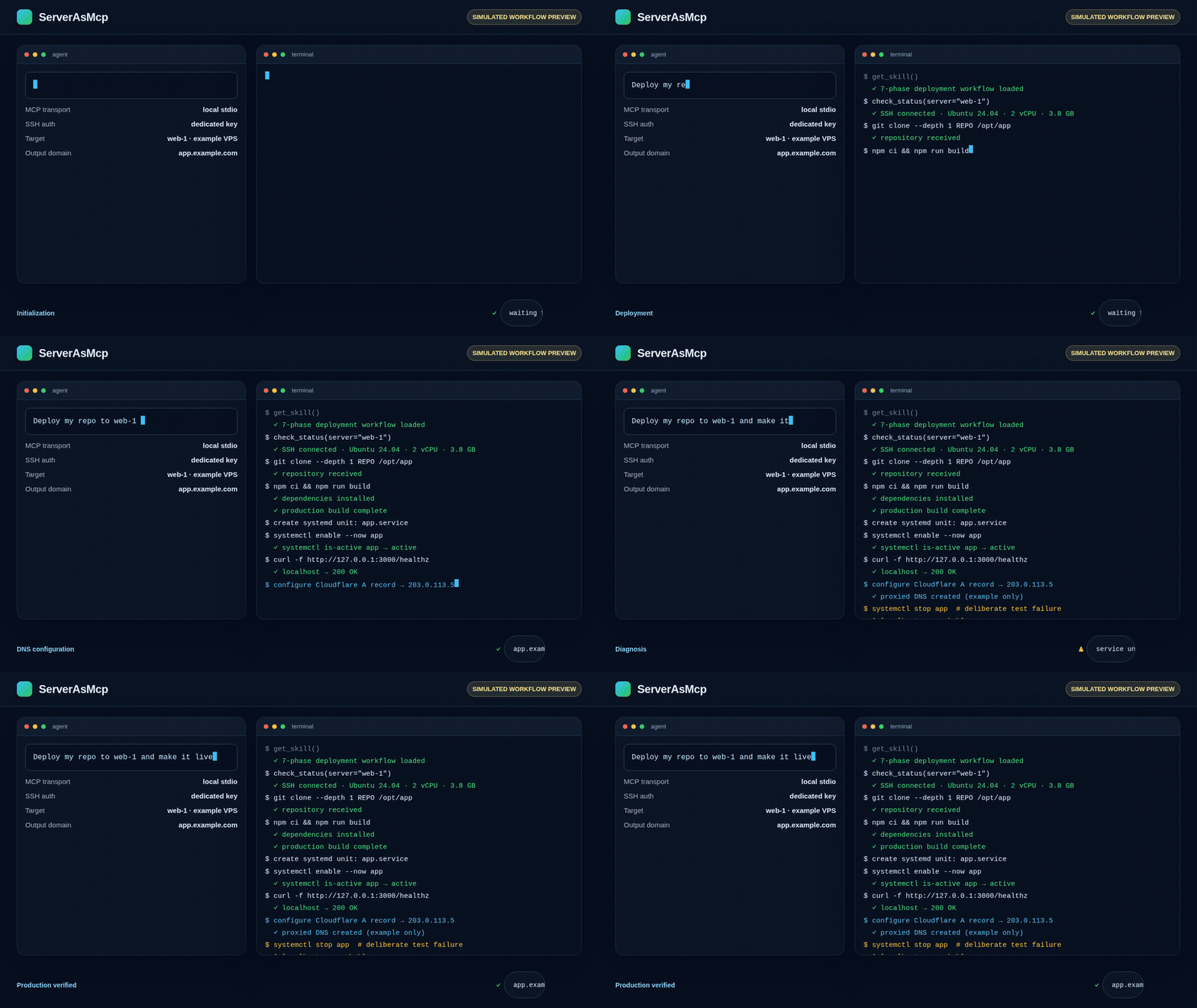
Simulated workflow preview.
Download the 30-second MP4 or see asset provenance.
## ⭐ Build with me
If you want production-ready examples for **Next.js, FastAPI, Docker Compose, static sites, and database-backed apps**, star the repository. Stars help me prioritize the next deployment workflow and make the project easier for other developers to find.
## ✨ Features
| | |
|---|---|
| **Multi-server** | Define unlimited servers via `SERVER_N_*` env vars or add at runtime |
| **Password + SSH key auth** | Both supported per-server |
| **Any command** | Zero restrictions — the agent runs literally anything |
| **File deployment** | Upload via SFTP, then run commands |
| **Built-in deployment skill** | Agent calls `get_skill` to learn the full 7-phase production workflow |
| **Cloudflare DNS integration** | Automatically create/update A records via API |
| **Self-healing loop** | Detects failures, reads logs, auto-fixes, retries up to 10 times |
| **Audit logging** | Every operation logged to `~/.mcp-deploy/audit.log` |
| **Dual runtime** | Available as `npx` (Node.js) and `uvx` (Python) |
| **Zero network listener** | Runs as stdio subprocess — no open ports, no attack surface |
---
## 🚀 Quick Start
### Option 1: SSH key auth (recommended)
```json
{
"mcpServers": {
"deploy": {
"command": "npx",
"args": ["-y", "serverasmcp"],
"env": {
"SERVER_1_NAME": "web-1",
"SERVER_1_HOST": "203.0.113.5",
"SERVER_1_USER": "root",
"SERVER_1_KEY_PATH": "/home/you/.ssh/id_rsa"
}
}
}
}
```
That's it. Your agent now has root access to all configured servers.
### Option 2: `npx` (Node.js)
Copy-paste into your MCP client config (Claude Desktop, Codex, Cursor, etc.):
```json
{
"mcpServers": {
"deploy": {
"command": "npx",
"args": ["-y", "serverasmcp"],
"env": {
"SERVER_1_NAME": "web-1",
"SERVER_1_HOST": "203.0.113.5",
"SERVER_1_USER": "root",
"SERVER_1_PASSWORD": "your-password-1",
"SERVER_2_NAME": "db-1",
"SERVER_2_HOST": "203.0.113.6",
"SERVER_2_USER": "root",
"SERVER_2_PASSWORD": "your-password-2"
}
}
}
}
```
### Option 3: `uvx` (Python / uv)
```json
{
"mcpServers": {
"deploy": {
"command": "uvx",
"args": ["serverasmcp"],
"env": {
"SERVER_1_NAME": "web-1",
"SERVER_1_HOST": "203.0.113.5",
"SERVER_1_USER": "root",
"SERVER_1_PASSWORD": "your-password-1"
}
}
}
}
```
---
## ⚙️ Configuration
### Environment variables per server
Add as many server blocks as you need — `SERVER_1_*`, `SERVER_2_*`, `SERVER_3_*`, etc.
| Variable | Required | Default | Description |
|----------|:--------:|---------|-------------|
| `SERVER_N_NAME` | No | `server-N` | Label the agent uses to reference this server |
| `SERVER_N_HOST` | ✅ | — | IP address or hostname |
| `SERVER_N_PORT` | No | `22` | SSH port |
| `SERVER_N_USER` | No | `root` | SSH username |
| `SERVER_N_PASSWORD` | One of | — | SSH password |
| `SERVER_N_KEY_PATH` | One of | — | Path to SSH private key file |
| `SERVER_N_KEY` | One of | — | SSH private key content (inline) |
> **Auth rule:** Each server needs exactly one of `SERVER_N_PASSWORD`, `SERVER_N_KEY_PATH`, or `SERVER_N_KEY`.
### Runtime server management
The agent can also add/remove servers at runtime using the `add_server` and `remove_server` tools. These are saved to `~/.mcp-deploy/servers.json` and persist across sessions.
### Storage
| File | Purpose |
|------|---------|
| `~/.mcp-deploy/servers.json` | Runtime-added servers |
| `~/.mcp-deploy/audit.log` | Append-only operation log |
---
## 🛠️ Tools
Your agent gets **8 tools**:
| Tool | Description |
|------|-------------|
| `get_skill` | Returns the full deployment skill — **the agent should call this first** |
| `list_servers` | Show all configured servers (env + runtime) |
| `run_command` | Execute **any** shell command on a specific server |
| `run_all` | Execute the same command on **all** servers simultaneously |
| `deploy_file` | Upload file(s) via SFTP + run commands after |
| `check_status` | Test SSH connectivity + get system info |
| `add_server` | Add a server at runtime |
| `remove_server` | Remove a runtime-added server |
### Tool examples
```
Agent: run_command(server: "web-1", command: "apt update && apt upgrade -y")
Agent: run_all(command: "df -h && free -m")
Agent: deploy_file(server: "web-1", files: [{content: "...", remotePath: "/opt/app/index.html"}], commands: ["systemctl restart nginx"])
Agent: check_status(server: "db-1")
```
---
## 📖 Deployment Skill
When your agent calls `get_skill`, it receives a complete production deployment workflow:
```
Phase 1: Server Registration
└── add_server → check_status (verify SSH connectivity)
Phase 2: Git Detection & Push
└── Check git remote → push latest → or ask user to set up Git
Phase 3: Server Preparation
└── Detect project type → install Node/Python/Docker/Git if missing
Phase 4: Deploy Application
└── git clone on server → npm install / pip install / docker compose up
Phase 5: Configure & Start Service
└── Create systemd service → start → verify locally
Phase 6: Cloudflare DNS Configuration
└── Get Zone ID → get server IP → create/update A record → enable proxy
Phase 7: Self-Healing Production Loop (up to 10 attempts)
├── Is service running? → restart if not
├── Is app responding on localhost? → read logs, diagnose, fix
├── Is public URL live? → wait for DNS, check SSL
└── Loop until confirmed: systemctl active + localhost 200 + public 200
```
### Error auto-fix reference
The skill includes a built-in error diagnosis table:
| Error | Auto-fix |
|-------|----------|
| `MODULE_NOT_FOUND` | `npm install` |
| `EADDRINUSE` | Kill process on port, restart |
| `SyntaxError` | Show code to user |
| `Permission denied` | Fix file permissions |
| Port blocked | `ufw allow ` |
| DNS not resolving | Wait for Cloudflare propagation |
| SSL errors | Fix Cloudflare SSL mode |
| `ECONNREFUSED` (DB) | Check database service status |
### Deployment summary
After a successful deployment, the agent produces:
```
══════════════════════════════════════════════════════
DEPLOYMENT SUMMARY
══════════════════════════════════════════════════════
Status: ✅ LIVE
Server: web-1 (203.0.113.5)
Git: main @ abc1234
App: /opt/app
Service: app.service (systemd, active)
Port: 3000
URL: https://app.mydomain.com
DNS: A record → 203.0.113.5 (Cloudflare proxied)
SSL: Cloudflare Full (strict)
Issues found & fixed:
1. Missing express → npm install
2. Port 3000 blocked → ufw allow 3000
Verified:
- systemctl is-active app → active
- curl localhost:3000 → 200 OK
- curl https://app.mydomain.com → 200 OK
══════════════════════════════════════════════════════
```
---
## 💬 Example Conversations
### Simple command execution
```
You: "Run apt update on web-1"
Agent: calls run_command(server: "web-1", command: "apt update")
Agent: "Exit code: 0. All packages updated."
You: "Check disk space on all servers"
Agent: calls run_all(command: "df -h /")
Agent: "web-1: 45% used. db-1: 78% used. cdn-1: 12% used."
```
### Full deployment
```
You: "Deploy my app from https://github.com/me/myapp to web-1 and make it live at app.mydomain.com"
Agent: calls get_skill → reads the full workflow
Agent: calls check_status(server: "web-1") → connected
Agent: calls run_command → git clone https://github.com/me/myapp /opt/app
Agent: calls run_command → npm install
Agent: calls deploy_file → creates systemd service
Agent: calls run_command → systemctl start app
Agent: calls run_command → Cloudflare API to create DNS record
Agent: calls run_command → curl https://app.mydomain.com → 200 OK
Agent: "✅ App is LIVE at https://app.mydomain.com"
```
### Self-healing in action
```
You: "Deploy my app to web-1"
Agent: calls run_command → npm install
Agent: "Error: Cannot find module 'express'"
Agent: calls run_command → npm install express
Agent: calls run_command → systemctl restart app
Agent: calls run_command → curl localhost:3000 → 200 OK
Agent: "Fixed missing dependency. App is now running."
```
---
## 🔒 Security
ServerAsMcp is **deliberately unrestricted for single-operator environments**. This is the product’s core tradeoff: the configured agent can execute arbitrary commands as the configured SSH identity, including commands that change or destroy server data.
### What this means
- There is no sandbox, allowlist, policy engine, RBAC, or multi-user authorization layer
- A compromised or misled agent can execute arbitrary commands on every configured server
- SSH credentials are stored in local MCP client configuration, or in `~/.mcp-deploy/servers.json` for runtime-added servers
### What the design does
| Property | How |
|-----------|-----|
| **Audit log** | Operations are logged locally to `~/.mcp-deploy/audit.log` with timestamp, tool, arguments, and result |
| **Local configuration** | Credentials belong in local MCP config, not source code or shared documents |
| **stdio transport** | The MCP server runs as a local subprocess and opens no network listener |
| **Explicit scope** | Only the operator chooses which servers and SSH identities are configured |
### Recommended setup
1. **Use SSH keys**, preferably a dedicated key with limited access
2. **Use a disposable or staging VPS first**
3. **Connect only trusted agents**—never use an untrusted or prompt-injection-prone agent as a production operator
4. **Review the audit log**: `cat ~/.mcp-deploy/audit.log`
5. **Rotate credentials immediately** if a client, agent, or key may be compromised
### Not suitable for
- Untrusted agents
- Multi-tenant platforms
- Shared production fleets operated by large teams
- Environments requiring centralized zero-trust policy enforcement
## 🏗️ Architecture
```
┌─────────────────────────────────────────────────────┐
│ MCP Client (Agent) │
│ Codex / Claude / Cursor / any MCP client │
└──────────────────────┬──────────────────────────────┘
│ stdio (JSON-RPC)
▼
┌─────────────────────────────────────────────────────┐
│ ServerAsMcp │
│ │
│ ┌───────────────────────────────────────────────┐ │
│ │ MCP Tools │ │
│ │ get_skill · list_servers · run_command │ │
│ │ run_all · deploy_file · check_status │ │
│ │ add_server · remove_server │ │
│ └──────────────────────┬────────────────────────┘ │
│ │ │
│ ┌──────────────────────▼────────────────────────┐ │
│ │ SSH Connection Pool (per server) │ │
│ │ • Password auth │ │
│ │ • Private key auth │ │
│ │ • SFTP file transfer │ │
│ │ • Exec channel │ │
│ └──────────────────────┬────────────────────────┘ │
│ │ │
│ ┌──────────────────────▼────────────────────────┐ │
│ │ Config Store │ │
│ │ • ~/.mcp-deploy/servers.json (runtime) │ │
│ │ • ~/.mcp-deploy/audit.log │ │
│ │ • Env vars (SERVER_N_*) │ │
│ └───────────────────────────────────────────────┘ │
└─────────────────────────────────────────────────────┘
│ │ │
▼ ▼ ▼
┌─────────────┐ ┌─────────────┐ ┌─────────────┐
│ web-1 │ │ db-1 │ │ cdn-1 │
│ (root SSH) │ │ (root SSH) │ │ (root SSH) │
└─────────────┘ └─────────────┘ └─────────────┘
```
---
## 📦 Installation
### From npm (Node.js)
```bash
npm install -g serverasmcp
# or use directly
npx -y serverasmcp
```
### From PyPI (Python)
```bash
pip install serverasmcp
# or use directly
uvx serverasmcp
```
### From source
```bash
git clone https://github.com/akillv/serverASmcp.git
cd serverASmcp
npm install && npm run build
node dist/index.js
```
---
## 🤝 Contributing
```bash
git clone https://github.com/akillv/serverASmcp.git
cd serverASmcp
npm install
npm run build
```
Run tests against a local SSH server:
```bash
# Start a test SSH server
mkdir -p /tmp/sshd-test
ssh-keygen -t ed25519 -f /tmp/sshd-test/ssh_host_ed25519_key -N ''
cat > /tmp/sshd-test/sshd_config << 'CONF'
Port 2222
HostKey /tmp/sshd-test/ssh_host_ed25519_key
PermitRootLogin yes
PasswordAuthentication yes
Subsystem sftp internal-sftp
CONF
/usr/sbin/sshd -f /tmp/sshd-test/sshd_config -D
# Run the MCP server
node dist/index.js
```
---
## 📄 License
[MIT](LICENSE)
---
**Built with** [MCP](https://modelcontextprotocol.io) · [ssh2](https://github.com/mscdex/ssh2) · [asyncssh](https://asyncssh.readthedocs.io)