

KittyTune Desktop is in active beta. Found a bug? Open an issue.
Looking for Android? KittyTune is also available on Android.
> [!NOTE]
> KittyTune Desktop is developed and tested primarily on Linux. Builds for Windows and especially macOS are experimental. If you hit bugs or rough edges on Windows or macOS, please report them in an issue or submit a pull request.
# About
KittyTune Desktop is a native desktop music player built with Kotlin and Compose Multiplatform, running directly in a JVM with zero Electron overhead.
Connect your SoundCloud account full two-way synchronization: your likes, playlists, reposts, followed artists, listening history, and in-app direct messages stay in sync. You can stream your entire collection with instant full-library shuffle and zero ads!
# Core features
| Feature | What it does | Details |
| :--- | :--- | :--- |
| Real SoundCloud sync | Connects to your actual SoundCloud account | OAuth PKCE syncs likes, playlists, reposts, stream feed, and in-app DMs |
| Lossless and protected HLS | Upgrades streams and decrypts protected audio | ISRC matching pulls studio masters (Qobuz, TIDAL, Deezer); native Widevine CDM on Linux and Windows |
| Audio Effects | Real-time audio transformations on any track | Independent pitch and speed shift, plus 34 DSP effects |
| Studio EQ and AutoEQ | 16-band graphic EQ paired with headphone tuning | 8,850+ measured AutoEQ profiles, peak limiting, spatial 8D audio, and lo-fi filters |
| Real-time lyrics | Syllable-level synchronized karaoke text | 14 providers, duet split, spring animations, and script translation |
| AI stem isolation | Separates vocals and instruments on your machine | HTDemucs v4 model accelerated by Vulkan GPU or ONNX Runtime |
| DJ Automix | Seamless transitions between tracks | Real-time beat tracking, Camelot wheel harmonic mixing, and bass ducking |
| Desktop companion | Ivy, an animated cat living on your screen | Reacts to playback mood and tempo; roams your desktop or docks in the app |
| Looping video canvas | Fullscreen video backgrounds and animated artwork | Plays Apple Music Canvas and TIDAL animated album art |
| Together rooms | Synchronized shared listening rooms | Real-time playback and shared queues over MQTT with invite codes |
| Native integrations | System-level desktop integration across platforms | Linux MPRIS v2, Windows SMTC, Discord Rich Presence, and Zapret proxy bypass |
Other notable features
| Area | Capabilities |
| :--- | :--- |
| Library management | Nested playlist folders, vibe filters, and playlist imports from Spotify, Apple Music, and Deezer |
| SoundCloud creator tools | Direct track uploader with cover art cropper, full artist discographies, and in-app direct messaging |
| Offline and local files | Offline track downloads, local folder media scanner, and full JSON library backup and restore |
| Music discovery | My Wave personalized endless radio, ShazamKit song recognition, and collectible Music Passport |
| Android & Desktop synchronized playback | Control your Music no matter where you go, completely wirelessly!
To synchronize playback between paired Android and desktop devices, see the [Connect guide](CONNECT.md).
# Screenshots
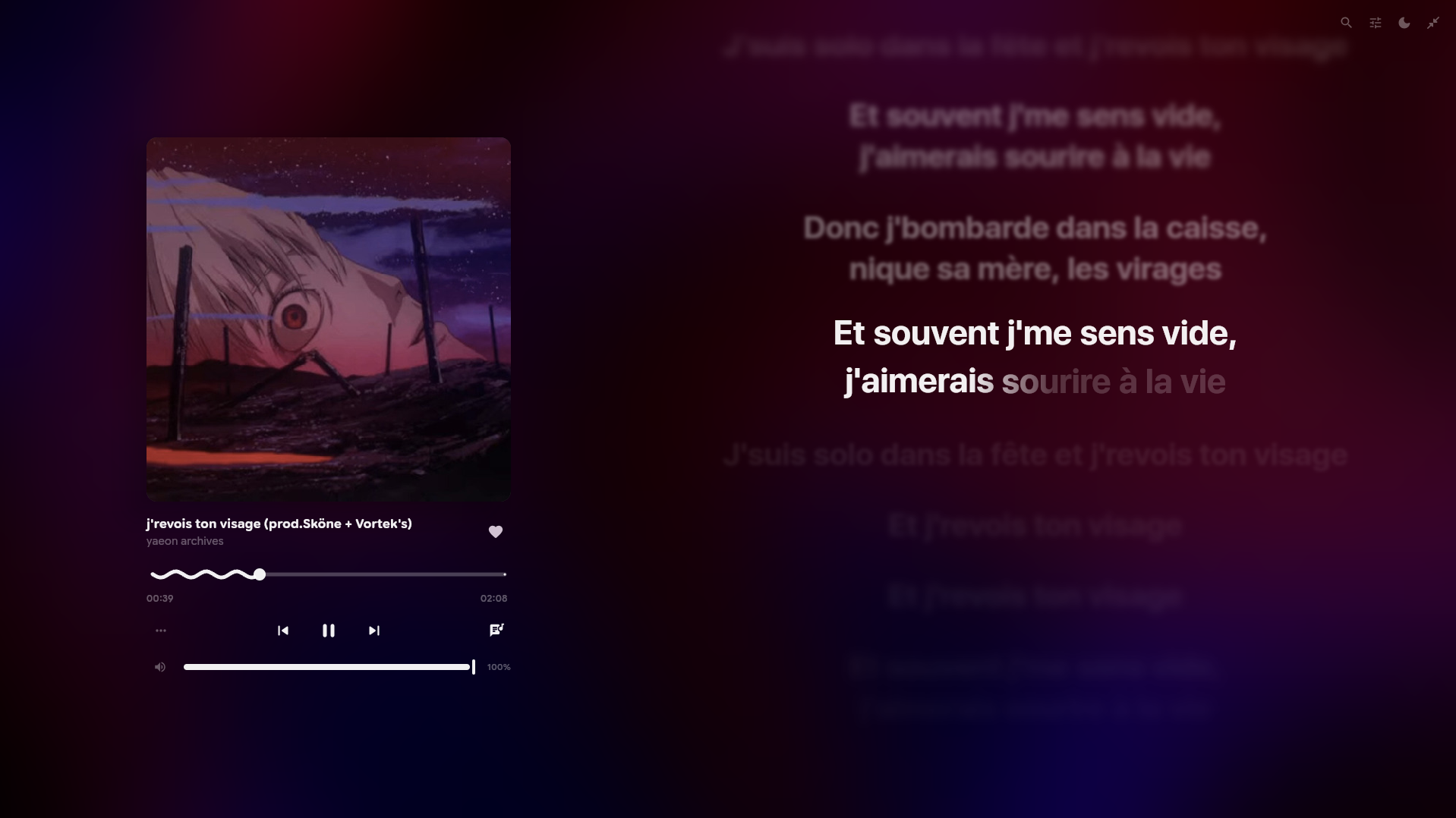
Fullscreen player with dynamic artwork canvas and expressive wavy slider.
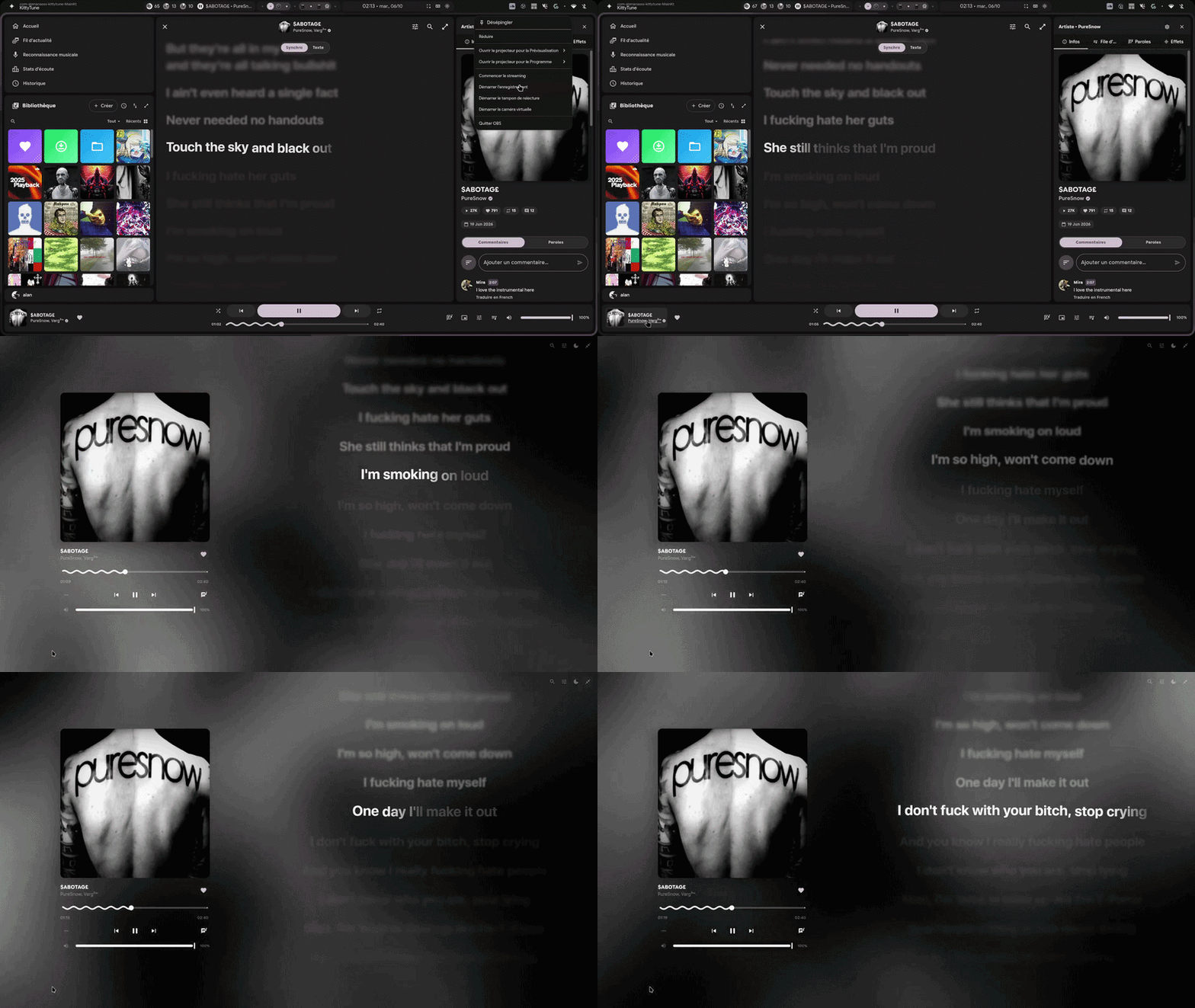
Synchronized lyrics with karaoke tracking, spring animations, and duet singer split.
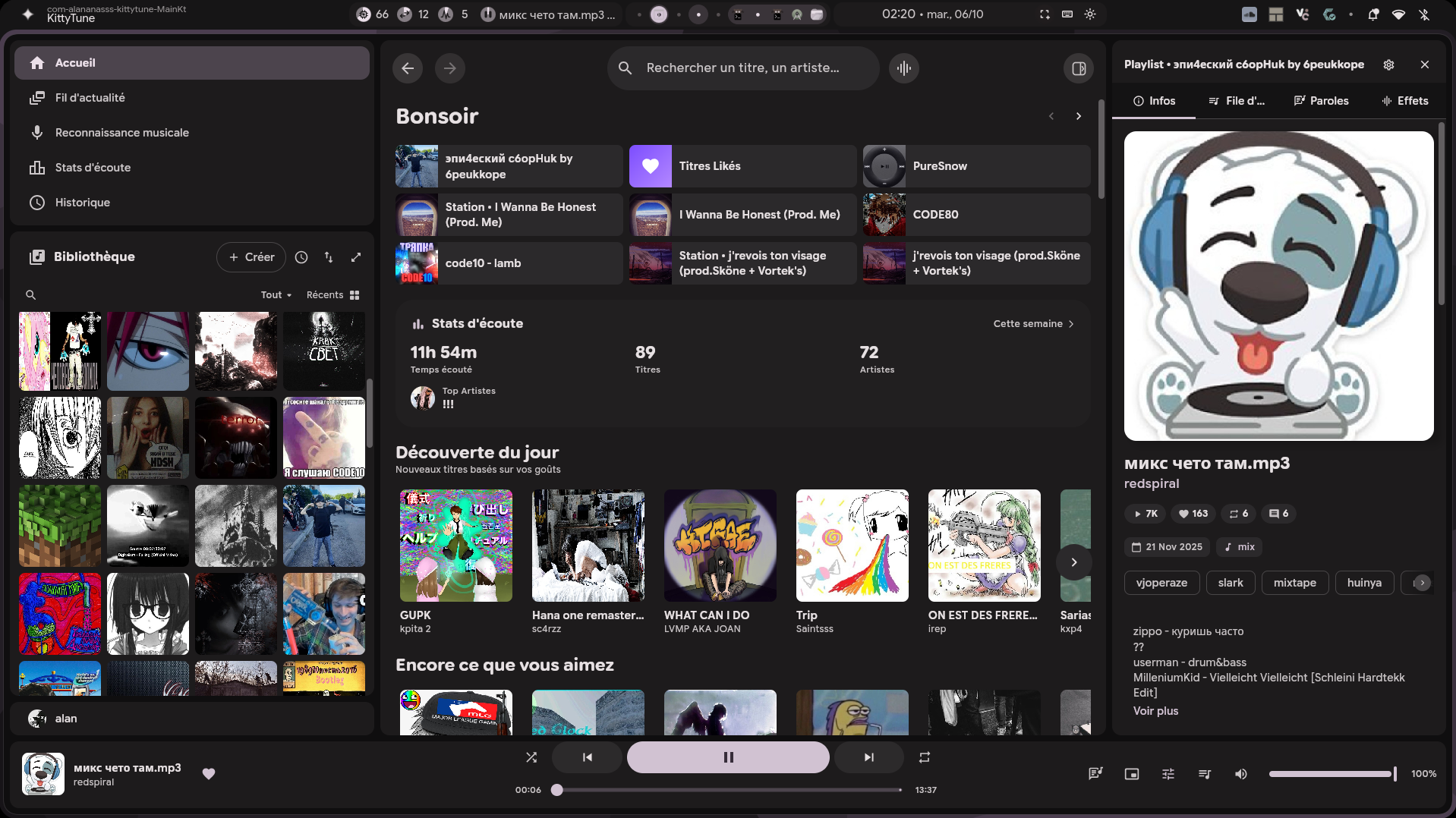
Home screen with SoundCloud stream, likes, playlists, and user library.
# What makes Kittytune better than Soundcloud?
| Capability | SoundCloud web | KittyTune Desktop |
| :--- | :--- | :--- |
| Application runtime | Browser tab | Native JVM desktop application |
| Account login and sync | Basic web session | Real OAuth PKCE sync: likes, playlists, reposts, and DMs |
| Playlist shuffle | Limited by lazy loading | Instant full-library shuffle without pagination |
| Audio quality upgrades | Standard 128 kbps MP3 or 256 kbps AAC | Lossless matching via Qobuz, TIDAL, Deezer |
| Protected stream playback (`ctr-encrypted-hls`) | Web player only | Native Widevine CDM on Linux and Windows with raw PCM routing |
| Audio Effects | None | Speed and pitch shift, 16-band EQ, 34 DSP effects |
| Advertisements | Audio and banner ads | Zero ads |
| Synchronized lyrics | None | Syllable-level tracking, duet split |
| Video canvas | None | Apple Music Canvas and TIDAL animated artwork |
| Headphone calibration | None | AutoEQ database with 8,850+ profiles |
| DJ Automix | None | Beat-matched transitions and harmonic mixing |
| AI tools | None | Stem isolation via Demucs and ArtifactNet detector |
| Offline downloads | None | Full track and playlist downloads |
| Desktop pet companion | None | Interactive reactive cat (Ivy) |
| Listen Together | None | Real-time synchronized listening rooms |
| Song recognition | None | Built-in ShazamKit music recognition |
| Operating system media controls | Basic browser media keys | Native MPRIS D-Bus (Linux) and SMTC (Windows) |
| Discord status | Third-party browser extension required | Native Discord Rich Presence |
| Network circumvention | None | Built-in HTTP and SOCKS5 proxy with Zapret DPI tools |
Keyboard shortcuts
### Playback and track controls
| Shortcut | Action |
| :--- | :--- |
| `Spacebar` | Play or pause |
| `Shift + Right` | Next track |
| `Shift + Left` | Previous track |
| `Right` | Seek forward 5 seconds |
| `Left` | Seek backward 5 seconds |
| `0` to `9` | Seek to percentage (0% to 90%) |
| `Shift + L` | Toggle repeat mode |
| `Shift + S` | Toggle shuffle mode |
| `L` | Like or unlike active track |
| `R` | Repost or un-repost active track |
### Volume and audio
| Shortcut | Action |
| :--- | :--- |
| `Shift + Up` | Increase volume |
| `Shift + Down` | Decrease volume |
| `M` | Mute or unmute |
### Navigation and panels
| Shortcut | Action |
| :--- | :--- |
| `S` | Open search |
| `P` | Open track details |
| `Q` | Toggle queue panel |
| `H` | Open keyboard shortcuts modal |
| `Escape` | Close overlay or navigate back |
| `Mouse Back / Forward` | Navigate history back or forward |
| `G` then `L` | Go to likes |
| `G` then `C` | Go to library |
| `G` then `H` | Go to history |
| `G` then `S` | Go to feed |
| `G` then `P` | Go to profile |
### Interface scaling
| Shortcut | Action |
| :--- | :--- |
| `Ctrl + +` / `Ctrl + =` | Zoom in |
| `Ctrl + -` | Zoom out |
| `Ctrl + 0` | Reset zoom to 100% |
# Download and installation
Pre-built binaries for Linux, Windows, and macOS are available on the [releases page](https://github.com/alan7383/KittyTuneDesktop/releases).
| Platform or distribution | Method | Package or command |
| :--- | :--- | :--- |
| Windows and macOS | Installer / DMG (Experimental) | [GitHub Releases](https://github.com/alan7383/KittyTuneDesktop/releases) |
| Portable Linux | Standalone AppImage | `chmod +x KittyTune-*.AppImage && ./KittyTune-*.AppImage` |
| Arch Linux | [AUR (kitty-tune-bin)](https://aur.archlinux.org/packages/kitty-tune-bin) | `yay -S kitty-tune-bin` |
| Arch Linux | Pacman package | `sudo pacman -U kitty-tune-*.pkg.tar.zst` |
| NixOS / Nix | Flake / Package | `nix run github:alan7383/KittyTuneDesktop` |
| Debian / Ubuntu / Mint | Debian package (`.deb`) | `sudo apt install ./kitty-tune_*_amd64.deb` |
| Fedora / RHEL | RPM package (`.rpm`) | `sudo dnf install ./kitty-tune-*.rpm` |
| openSUSE / SUSE | RPM package (`.rpm`) | `sudo zypper install ./kitty-tune-*.rpm` |
| Windows x64 | Portable ZIP with bundled Java runtime | [Windows guide](WINDOWS.md) |
## Windows and macOS
Click to expand
Download pre-compiled binaries from the [releases](https://github.com/alan7383/KittyTuneDesktop/releases) page:
* Windows: MSI installer or portable ZIP archive
* MacOS: DMG disk image
Detailed Windows build and runtime notes are available in the [Windows guide](WINDOWS.md).
## Portable Linux AppImage (Universal)
Click to expand
Download the standalone `.AppImage` from the [releases](https://github.com/alan7383/KittyTuneDesktop/releases) page:
```bash
chmod +x KittyTune-*.AppImage
./KittyTune-*.AppImage
```
## Debian, Ubuntu, and Linux Mint
Click to expand
Download the `.deb` file from the [releases](https://github.com/alan7383/KittyTuneDesktop/releases) page and install with apt:
```bash
sudo apt install ./kitty-tune_*_amd64.deb
```
## Fedora, openSUSE, and RHEL
Click to expand
Download the `.rpm` file from the [releases](https://github.com/alan7383/KittyTuneDesktop/releases) page and install with dnf:
```bash
sudo dnf install ./kitty-tune-*.rpm
```
On openSUSE/SUSE, use:
```bash
sudo zypper install ./kitty-tune-*.rpm
```
Choose the package for your CPU architecture (`x86_64`/`amd64` or `aarch64`/`arm64`). The in-app updater uses the distribution's `ID` and `ID_LIKE` metadata to choose the existing package family, including derivatives. It falls back to a compatible AppImage when that family's package is missing; native library requirements still apply.
## Arch Linux
Click to expand
* Option 1: AUR package
The package `kitty-tune-bin` is available on the [Arch User Repository](https://aur.archlinux.org/packages/kitty-tune-bin), maintained by Felitendo.
Install with yay:
```bash
yay -S kitty-tune-bin
```
Or with paru:
```bash
paru -S kitty-tune-bin
```
* Option 2: Pacman package
Download the latest `.pkg.tar.zst` archive directly from [releases](https://github.com/alan7383/KittyTuneDesktop/releases) page and install with pacman:
```bash
sudo pacman -U kitty-tune-*.pkg.tar.zst
```
## NixOS and Nix
Click to expand
KittyTune Desktop has Flake support, a package derivation, and a NixOS module.
Run directly without installing:
```bash
nix run github:alan7383/KittyTuneDesktop
```
Temporary shell:
```bash
nix shell github:alan7383/KittyTuneDesktop
```
Declarative NixOS configuration (Flake):
* Add KittyTune Desktop to your `flake.nix` inputs:
```nix
{
inputs = {
nixpkgs.url = "github:NixOS/nixpkgs/nixos-unstable";
kittytune.url = "github:alan7383/KittyTuneDesktop";
};
outputs = { self, nixpkgs, kittytune, ... }: {
nixosConfigurations.myhostname = nixpkgs.lib.nixosSystem {
system = "x86_64-linux";
modules = [
kittytune.nixosModules.default
{
programs.kittytune.enable = true;
}
];
};
};
}
```
Home Manager:
```nix
{ inputs, pkgs, ... }: {
home.packages = [
inputs.kittytune.packages.${pkgs.system}.default
];
}
```
Legacy Nix:
```bash
nix-build
./result/bin/kitty-tune
```
Development shell:
```bash
nix develop
./gradlew run
```
## Building from source
### Prerequisites
* JDK 21 or higher
* Git
```bash
git clone https://github.com/alan7383/KittyTuneDesktop.git
cd KittyTuneDesktop
# Run application
./gradlew run
# Package binary for your operating system
./gradlew packageDistributionForCurrentOS
```
# Credits and license
* Based on KittyTune for Android.
* Built with [Compose Multiplatform](https://github.com/JetBrains/compose-multiplatform), [MaterialKolor](https://github.com/jordond/MaterialKolor), and [FFmpeg](https://ffmpeg.org/).
* Together reactions use artwork by Twitter, Inc. and other Twemoji contributors. [Twemoji](https://github.com/jdecked/twemoji/tree/v17.0.3) · [CC BY 4.0](https://creativecommons.org/licenses/by/4.0/)
KittyTune Desktop is licensed under the GNU General Public License v3.0. See [LICENSE](LICENSE) for details.
## Contributors
Thanks to everyone who contributes to KittyTune Desktop!
[](https://github.com/alan7383/KittyTuneDesktop/graphs/contributors)
Maintained by alan7383.