# Dragon Ball Z: Ultimate Battle 22
[](https://github.com/Alexbeav/dragon-ball-z-ultimate-battle-22-recomp/releases)
[](https://github.com/Alexbeav/dragon-ball-z-ultimate-battle-22-recomp/releases/latest)
[](https://github.com/Alexbeav/dragon-ball-z-ultimate-battle-22-recomp/releases/latest)
Static recompilation of **Dragon Ball Z: Ultimate Battle 22** built on
[psxrecomp](https://github.com/mstan/psxrecomp) and
[recomp-ui](https://github.com/RetroPortingToolKit/recomp-ui).
This is an owned-input setup kit. You supply your own SLES-03736 disc image
and your own SCPH-5552 (Europe) BIOS dump; first-run setup generates and compiles the game on
your machine. The kit and its release archives contain no game disc, retail BIOS,
generated game code, or saved game.
| | |
|---|---|
| Region | Europe |
| Disc serial | SLES-03736 |
| Discs | 1 |
| Supported dump | Redump `Dragon Ball Z - Ultimate Battle 22 (Europe).cue` as CUE/BIN or CHD |
| BIOS | SCPH-5552 (Europe), 524288 bytes, SHA-256 `1faaa18fa820a0225e488d9f086296b8e6c46df739666093987ff7d8fd352c09` |
## Setup
1. Download the setup ZIP for your platform from [Releases](https://github.com/Alexbeav/dragon-ball-z-ultimate-battle-22-recomp/releases)
and extract it into a writable folder.
2. Start `Dragon_Ball_Z_Ultimate_Battle_22` (`.exe` on Windows).
3. In the setup wizard select your disc image (the Redump CUE, or a CHD of the
same dump) and your BIOS file.
4. Run Generate & rebuild and wait for the game to start. The first run compiles
the game and takes several minutes.
On Windows the wizard downloads the portable build tools (cmake-clang-v1) or uses
cmake/ninja already on PATH. On Linux and macOS install CMake, Ninja, Python 3,
and a C/C++ compiler first. Keep a CUE and every file it references together.
Setup produces both a normal and a diagnostic build; see *Diagnostic mode* below.
## Retro Launcher
You can run this title **standalone** (release zip + the built-in recomp-ui
Generate & Build flow), or manage installs, updates, ROM/BIOS wiring, and queued
builds more intuitively with
**[Retro Launcher](https://github.com/RetroPortingToolKit/Retro-Launcher)** —
the Retro Compilation Manager hub for self-compiling recomps.
[Downloads](https://github.com/RetroPortingToolKit/Retro-Launcher/releases) ·
[Full README & features](https://github.com/RetroPortingToolKit/Retro-Launcher#readme)
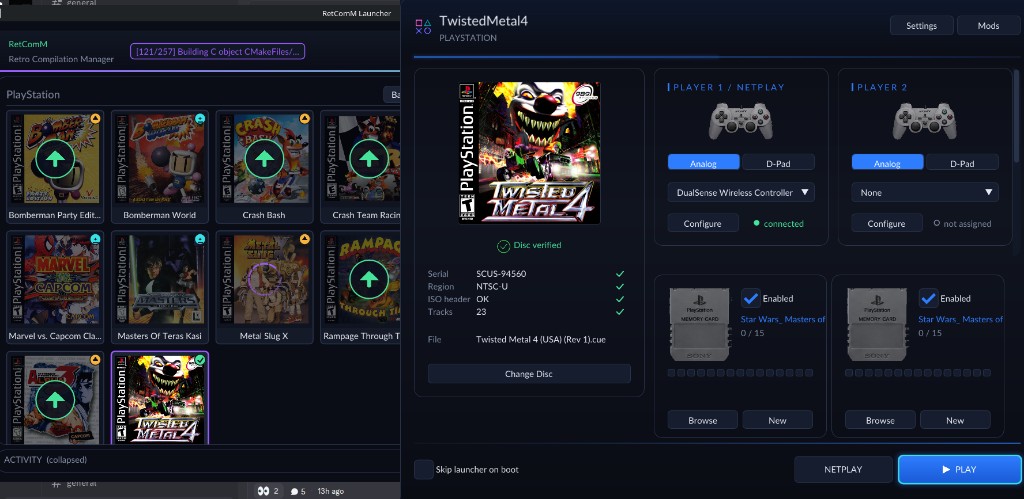
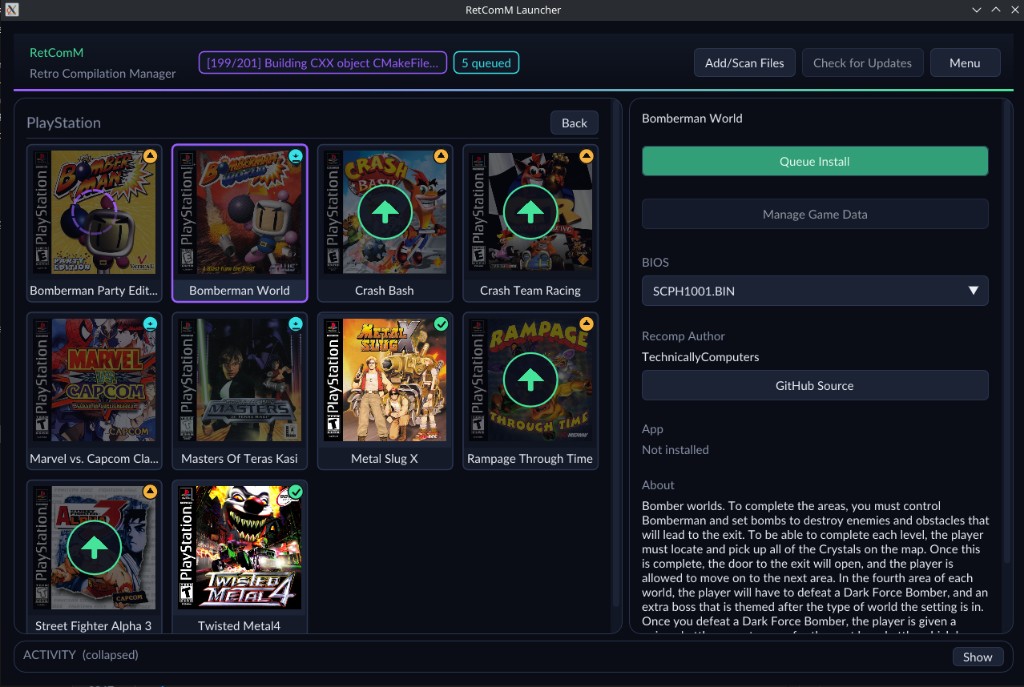
Retro checks for updates, rebuilds with existing build data when possible,
shares the portable toolchain used by per-title launchers, and automates
BIOS/ROM/save plumbing so you are not stuck repeating each game’s wizard by hand.
## Status
Version 0.1.0 release candidate.
- Windows: the exact setup package passed automated clean-extract setup,
generation, compilation, and a headless start check on the pinned framework.
- Windows play testing on the private build this kit derives from: Playable, but Build Up in the main menu crashed. The DMA node-limit correction is in the pinned framework and was accepted on a test candidate.
- Linux and macOS: packages are built by CI from the same recipe; native setup
and gameplay have not been verified.
Full-game completion, audio fidelity, and multiplayer are not claimed. Runtime
snapshots from older builds are not qualified compatible; ordinary memory-card
saves are preserved across updates.
## Known issues
- None recorded beyond the Status scope above.
## Diagnostic mode
If the game crashes, freezes, or misbehaves, switch to the diagnostic build
that first-run setup already produced (no recompiling): create an empty file
named `diagnostic-mode.txt` next to `Dragon_Ball_Z_Ultimate_Battle_22.exe` and start the game as
usual, or run `Dragon_Ball_Z_Ultimate_Battle_22.exe --diagnostic`. Reproduce the problem, quit, then
run `Dragon_Ball_Z_Ultimate_Battle_22.exe --collect-diagnostics`: it writes `diagnostics-.zip`
next to the exe. Attach that zip to a GitHub issue on this repository with a
short description of what you did. The zip holds only the runtime's report
files, never saves, BIOS, or disc images. Delete `diagnostic-mode.txt` to go
back to normal mode. Details: `psxrecomp/docs/DIAGNOSTIC_MODE.md`.
## Legal
You must own the original game. Disc images under `disc/` are gitignored and
must never be committed. Retail BIOS dumps are not redistributed and OpenBIOS is
not shipped: this title is retail-BIOS-only, so first-run Generate needs your own
legally dumped SCPH-5552 (European) image.
Default app icon: `assets/psxrecomp.ico` (and `.png` / `.svg`) — Retro-themed controller mark from `psxrecomp/assets/`. Windows builds embed it via `APP_ICON`.
Box art is not shipped in this kit or its repository. Redistribution permission for third-party cover images is unresolved, so the launcher runs without one.
## About this project
This project was developed with AI assistance. AI assists with code,
documentation, and investigation; Alex tests the game and makes release
decisions. Validation claims describe only the tests actually performed.
## Credits and licenses
Framework: [psxrecomp](https://github.com/mstan/psxrecomp), built from the
pinned fork commit named by the `psxrecomp` submodule. Launcher:
[recomp-ui](https://github.com/RetroPortingToolKit/recomp-ui), pinned by the
`recomp-ui` submodule. This kit's own files are under [LICENSE](LICENSE); third-party
notices are in [THIRD_PARTY_NOTICES.md](THIRD_PARTY_NOTICES.md), and the framework
and launcher licenses remain in their source directories. The original game and its
trademarks belong to their respective owners.
---
R.A.I.D. — Retro AI Development · a Discord for AI-assisted retro reverse-engineering, decomp & recomp
