 ## ☕ Support This Project
If you find **Calendar Card Pro** useful, consider supporting its development:
[](https://www.buymeacoffee.com/alexpfau)
[](https://github.com/sponsors/alexpfau)
## ☕ Support This Project
If you find **Calendar Card Pro** useful, consider supporting its development:
[](https://www.buymeacoffee.com/alexpfau)
[](https://github.com/sponsors/alexpfau)
## 📖 Documentation [](https://calendar-card-pro.alexpfau.com) This README covers installation and a quick start. **Everything else** — every configuration option, all features and worked examples — lives on the **[documentation site](https://calendar-card-pro.alexpfau.com)**, which is searchable and always matches the latest release. | | | | ------------------------------------------------------------------------------------------ | --------------------------------------------- | | 🚀 [Installation](https://calendar-card-pro.alexpfau.com/guide/installation) | Set the card up via HACS or manually | | 📌 [Usage](https://calendar-card-pro.alexpfau.com/guide/usage) | Add the card and configure it visually | | ✨ [Features & Configuration](https://calendar-card-pro.alexpfau.com/features/editor) | Weather, templates, layout, actions, and more | | 📚 [Configuration Options](https://calendar-card-pro.alexpfau.com/reference/configuration) | Complete reference for every option | | 💡 [Examples](https://calendar-card-pro.alexpfau.com/reference/examples) | Ready-made configurations to copy | | 🆕 [Release Notes](https://calendar-card-pro.alexpfau.com/RELEASE_NOTES) | Full history of every release |
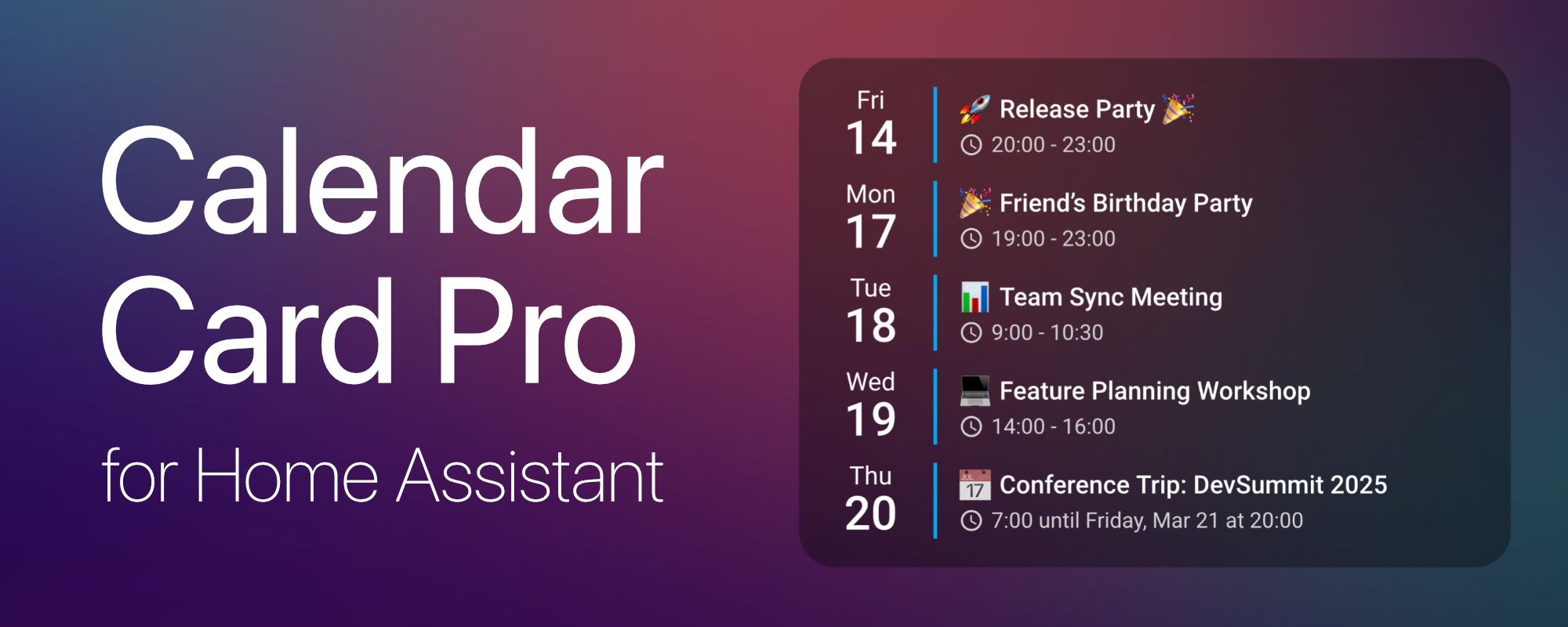
## 1️⃣ Overview ### 🔍 About **Calendar Card Pro** was inspired by a beautiful [calendar design using button-card and Hass calendar add-on](https://community.home-assistant.io/t/calendar-add-on-some-calendar-designs/385790) shared in the Home Assistant community. While the original design was visually stunning, implementing it with **button-card** and **card-mod** led to **performance issues**. This motivated me to create a **dedicated calendar card** that excels in one thing: **displaying upcoming events beautifully and efficiently**. Built with **performance in mind**, the card leverages **intelligent refresh mechanisms** and **smart caching** to ensure a **smooth experience**, even when multiple calendars are in use. ### ✨ Features - 🎨 **Sleek & Minimalist Design** – Clean, modern, and visually appealing layout. - ✅ **Multi-Calendar Support** – Display multiple calendars with unique styling. - 📅 **Compact & Expandable Views** – Adaptive views to suit different dashboard needs. - ⚙️ **Visual Configuration Editor** – Intuitive interface for effortless card setup. - 🔧 **Highly Customizable** – Fine-tune layout, colors, event details, and behavior. - 🌦️ **Weather Integration** – Display weather forecasts alongside your calendar events. - ⚡ **Optimized Performance** – Smart caching, progressive rendering, and minimal API calls. - 💡 **Deep Home Assistant Integration** – Theme-aware with native ripple effects. - 🌍 **Multi-Language Support** – [Available in 35 languages](https://calendar-card-pro.alexpfau.com/contributing#adding-translations), community contributions welcome! ### 🔗 Dependencies **Calendar Card Pro** requires at least **one calendar entity** in Home Assistant. It is compatible with any integration that generates `calendar.*` entities, with **CalDAV** and **Google Calendar** being the primary tested integrations. ⚠️ **Important:** Ensure you have at least **one calendar integration set up** in Home Assistant before using this card. ## 2️⃣ Installation ### 📦 HACS Installation (Recommended) The easiest way to install **Calendar Card Pro** is via **[HACS (Home Assistant Community Store)](https://hacs.xyz/)**. [](https://my.home-assistant.io/redirect/hacs_repository/?owner=alexpfau&repository=calendar-card-pro&category=plugin) #### Steps: 1. Ensure **[HACS](https://hacs.xyz/docs/setup/download)** is installed in Home Assistant. 2. Go to **HACS → Frontend → Custom Repositories**. 3. Add this repository: `https://github.com/alexpfau/calendar-card-pro` as type `Dashboard` 4. Install **Calendar Card Pro** from HACS. 5. **Clear your browser cache** and reload Home Assistant. ### 📂 Manual Installation
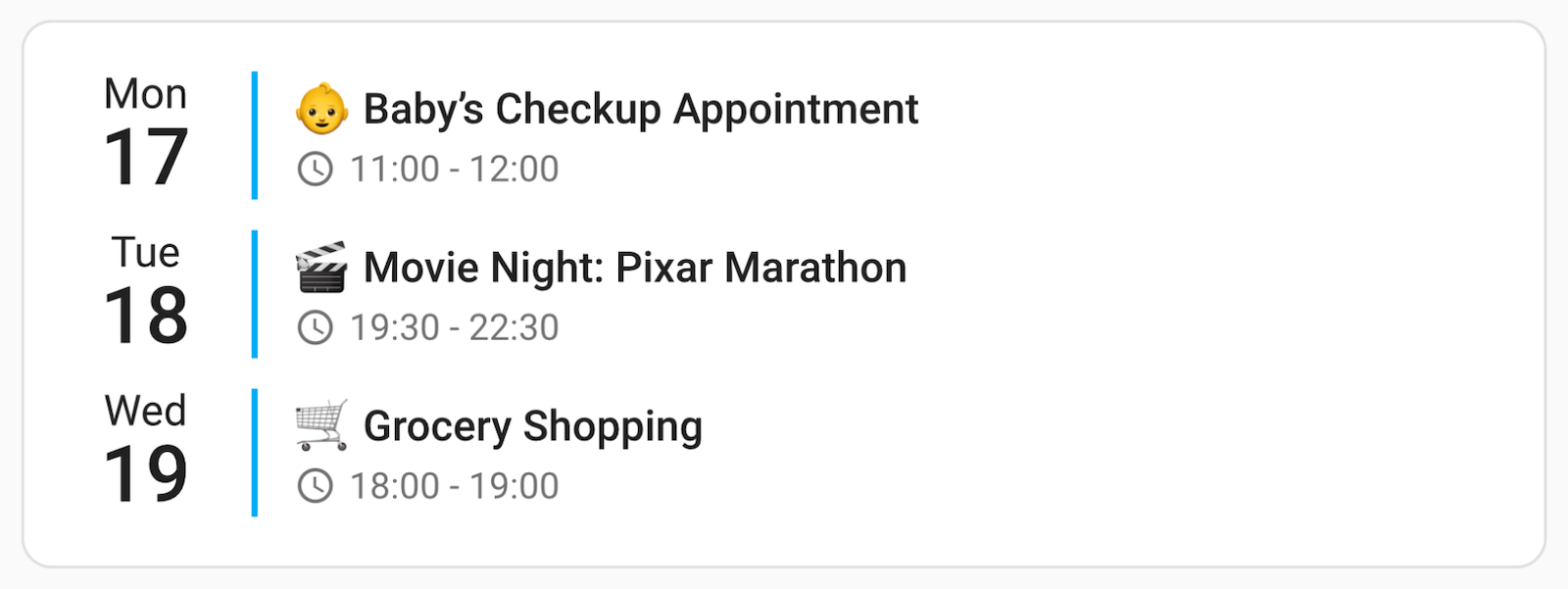 Swap `calendar.family` for one of your own `calendar.*` entities and you have a working card.
**➡️ From here, [Usage](https://calendar-card-pro.alexpfau.com/guide/usage) walks you through multiple calendars, per-calendar colors and compact mode. Every available option is listed in the [Configuration reference](https://calendar-card-pro.alexpfau.com/reference/configuration), and more ready-made setups are in [Examples](https://calendar-card-pro.alexpfau.com/reference/examples).**
## 4️⃣ What's New
**➡️ View the [Full Release Notes](https://calendar-card-pro.alexpfau.com/RELEASE_NOTES) for a complete list of features.**
### Latest Release: v4.2
- 🧑 **Shared Events, Clearly Marked**: Merged duplicates show [every contributing calendar's label](https://calendar-card-pro.alexpfau.com/features/core-settings#labeling-coloring-shared-events) instead of only the first; set `duplicate_accent_color` to give shared events a color of their own
- 🐛 **Countdowns Follow Calendar Dates**: [Countdowns](https://calendar-card-pro.alexpfau.com/features/event-content#countdown-display) now say "tomorrow" for the next date and stop skipping days between later dates; same-day starts keep clock countdowns, while distant dates retain natural month/year wording
- 🐛 **Allowlists & Blocklists Work Together**: [Combined filters](https://calendar-card-pro.alexpfau.com/features/core-settings#filtering-by-event-name) now keep only events that match the allowlist and escape the blocklist, rather than silently ignoring the blocklist
### v4.1
- 🏷️ **All-Day Events, as a Pill**: [`allday_badge`](https://calendar-card-pro.alexpfau.com/features/event-content#the-all-day-badge) draws a rounded pill in each calendar's own color, around the event title the way Google and Apple Calendar do, or beside the clock, `allday_badge_style` offers four shapes and `allday_badge_color` picks the color they are drawn in — each calendar's own, the row's own text color, or one you name. Off by default; try `allday_badge: title` first
- 🎨 **Follow Home Assistant's Calendar Colors and Icons**: Set `accent_color` to `home-assistant` and each calendar takes [the color Home Assistant holds for it](https://calendar-card-pro.alexpfau.com/features/core-settings). Set its `label` the same way for [that calendar's icon](https://calendar-card-pro.alexpfau.com/features/core-settings#following-the-icon-from-home-assistant)
- 🧑 **A Person's Photo in Front of Their Calendar**: Set a calendar's `label` to a person entity ID and the card shows [that person's picture](https://calendar-card-pro.alexpfau.com/features/core-settings#showing-a-persons-picture) — faces instead of words on a household dashboard
- 🗂️ **Split One Calendar by Event Type**: [`event_type`](https://calendar-card-pro.alexpfau.com/features/core-settings) takes `all`, `timed` or `all_day`, card-wide or per calendar — list one calendar twice for a color on each, and [**Duplicate** in the editor](https://calendar-card-pro.alexpfau.com/features/editor#per-calendar-panels-actions) builds it for you
- 🔍 **Two New Per-Calendar Filters**: [`allday_expires_at`](https://calendar-card-pro.alexpfau.com/features/core-settings#retiring-all-day-events-during-the-day) retires an all-day event partway through the day, so a bin collection stops sitting on the card until midnight, and [`days_of_week`](https://calendar-card-pro.alexpfau.com/features/core-settings#showing-a-calendar-on-weekdays-only) keeps one calendar to weekdays or weekends
- 🎂 **Ages on Birthdays, Counts on Anniversaries**: Write `YEAR=1976` in a birthday event's description and the card appends the age to the title — [nothing to configure](https://calendar-card-pro.alexpfau.com/features/event-content#birthday-ages-anniversary-counts), and it stays right every year
- ✏️ **Rewrite What an Event Says**: [`replace_pattern`, `replace_with` and `replace_field`](https://calendar-card-pro.alexpfau.com/features/core-settings#text-replacement) rewrite one field of a calendar's events as the card draws them, leaving the calendar untouched. [One Calendar, Many Purposes](https://calendar-card-pro.alexpfau.com/guide/one-calendar-many-purposes) puts this and three of the options above into a single card
### v4.0
- 🗓️ **Column View**: Lay the days [side by side, one column each](https://calendar-card-pro.alexpfau.com/features/column-view), instead of stacking them — the same agenda, rotated, with its own per-view overrides and a responsive fallback to the list layout
- ⚙️ **Rebuilt Visual Editor**: Nine panels built on Home Assistant's own form components, with a [search box that finds any setting by name or YAML key](https://calendar-card-pro.alexpfau.com/features/editor#search-customized-only), a customized-only filter, per-calendar settings, and [per-view exceptions](https://calendar-card-pro.alexpfau.com/features/editor#column-view-exceptions)
- ⚡ **41% Smaller to Download**: The editor moved into a file the card fetches only when you open it, taking it and all its translations off the path every dashboard pays for
- ⚡ **Fewer Round-Trips on Every Page Load**: One card load asked Home Assistant for the same events up to four times; requests are now deduplicated, and two display-only switches no longer discard a valid cache entry
- 🌍 **Eleven Editor Languages**: Nine newly translated in full — German, Estonian, Italian, Latvian, Lithuanian, Norwegian Bokmål, Polish, Slovak and Swedish — alongside US and British English, with per-string fallback so a partial translation still renders
- 🐛 **Dates, Clocks and Week Numbers**: [Week numbers](https://calendar-card-pro.alexpfau.com/features/layout-appearance#week-numbers-visual-separators) were wrong for one date in seven outside UTC, the clock format disagreed with Home Assistant's own locale data for 33 of its 64 languages, and `first_day_of_week: system` returned Monday to everyone
- ⚠️ **Breaking**: Manual installs now copy [two files](https://calendar-card-pro.alexpfau.com/guide/installation#manual-installation), `event_icon_vertical_alignment` defaults to `top`, and weather badges are styled through [custom properties](https://calendar-card-pro.alexpfau.com/features/theming#weather-custom-properties) instead of inline styles
### v3.6
- 📚 **A Documentation Site**: The full manual now lives at [calendar-card-pro.alexpfau.com](https://calendar-card-pro.alexpfau.com) — a page per feature, a [complete configuration reference](https://calendar-card-pro.alexpfau.com/reference/configuration), and [ready-made examples](https://calendar-card-pro.alexpfau.com/reference/examples)
- 🐛 **One Stray Line of YAML Broke the Card**: A bare `-` left in the `entities:` list replaced the whole calendar with a red error box; malformed entries are now discarded
- 🐛 **Per-Calendar Settings Applied Late**: Editing a per-calendar label, colour or toggle did nothing until the cache expired — edits now apply immediately
- 🐛 **Disappearing and Ellipsised Text**: Titles gained a `…` when nothing had been truncated, and long words in descriptions and locations were clipped mid-character with no warning
- 🐛 **Multi-Day Countdowns**: Each row of a [split multi-day event](https://calendar-card-pro.alexpfau.com/features/multi-day-events) counted differently; every row now counts whole calendar days to its own date
_Older releases are covered in the [Full Release Notes](https://calendar-card-pro.alexpfau.com/RELEASE_NOTES)._
## 5️⃣ Contributing
Want to improve **Calendar Card Pro**? I welcome contributions of all kinds — whether it's
**fixing bugs, improving performance, or adding new features**!
```sh
git clone https://github.com/alexpfau/calendar-card-pro.git
npm install
npm run dev
```
Then open a Pull Request against the `dev` branch.
- 📋 [Contributing guide](https://calendar-card-pro.alexpfau.com/contributing) — full workflow, coding standards, and how to add a translation
- 🏗️ [Architecture documentation](https://calendar-card-pro.alexpfau.com/architecture) — module responsibilities, data flow, and performance design
- 🌍 **Adding a translation?** The card speaks [35 languages](https://calendar-card-pro.alexpfau.com/contributing#adding-translations) and the visual editor 11 — new ones are always welcome.
💡 Got a feature request? **Open a GitHub Issue** or start a **discussion**!
### 🏆 Acknowledgements
- **Original design inspiration** from [Calendar Add-on & Calendar Designs](https://community.home-assistant.io/t/calendar-add-on-some-calendar-designs/385790) by **[@kdw2060](https://github.com/kdw2060)**.
- **Interaction patterns** inspired by Home Assistant's [Tile Card](https://github.com/home-assistant/frontend/blob/dev/src/panels/lovelace/cards/hui-tile-card.ts), which is licensed under the [Apache License 2.0](https://github.com/home-assistant/frontend/blob/dev/LICENSE.md).
- **Material Design ripple interactions**, originally by Google, used under the [Apache License 2.0](https://github.com/material-components/material-components-web/blob/master/LICENSE).
Calendar Card Pro is released under the [MIT License](./LICENSE). Full third-party attributions are listed in [NOTICE](./NOTICE).
[hacs-img]: https://img.shields.io/badge/HACS-Custom-orange.svg
[hacs-url]: https://github.com/alexpfau/calendar-card-pro/actions/workflows/hacs-validate.yml
[github-release-img]: https://img.shields.io/github/release/alexpfau/calendar-card-pro.svg
[github-downloads-img]: https://img.shields.io/github/downloads/alexpfau/calendar-card-pro/total.svg
[github-latest-downloads-img]: https://img.shields.io/github/downloads/alexpfau/calendar-card-pro/latest/total.svg
[github-release-url]: https://github.com/alexpfau/calendar-card-pro/releases
Swap `calendar.family` for one of your own `calendar.*` entities and you have a working card.
**➡️ From here, [Usage](https://calendar-card-pro.alexpfau.com/guide/usage) walks you through multiple calendars, per-calendar colors and compact mode. Every available option is listed in the [Configuration reference](https://calendar-card-pro.alexpfau.com/reference/configuration), and more ready-made setups are in [Examples](https://calendar-card-pro.alexpfau.com/reference/examples).**
## 4️⃣ What's New
**➡️ View the [Full Release Notes](https://calendar-card-pro.alexpfau.com/RELEASE_NOTES) for a complete list of features.**
### Latest Release: v4.2
- 🧑 **Shared Events, Clearly Marked**: Merged duplicates show [every contributing calendar's label](https://calendar-card-pro.alexpfau.com/features/core-settings#labeling-coloring-shared-events) instead of only the first; set `duplicate_accent_color` to give shared events a color of their own
- 🐛 **Countdowns Follow Calendar Dates**: [Countdowns](https://calendar-card-pro.alexpfau.com/features/event-content#countdown-display) now say "tomorrow" for the next date and stop skipping days between later dates; same-day starts keep clock countdowns, while distant dates retain natural month/year wording
- 🐛 **Allowlists & Blocklists Work Together**: [Combined filters](https://calendar-card-pro.alexpfau.com/features/core-settings#filtering-by-event-name) now keep only events that match the allowlist and escape the blocklist, rather than silently ignoring the blocklist
### v4.1
- 🏷️ **All-Day Events, as a Pill**: [`allday_badge`](https://calendar-card-pro.alexpfau.com/features/event-content#the-all-day-badge) draws a rounded pill in each calendar's own color, around the event title the way Google and Apple Calendar do, or beside the clock, `allday_badge_style` offers four shapes and `allday_badge_color` picks the color they are drawn in — each calendar's own, the row's own text color, or one you name. Off by default; try `allday_badge: title` first
- 🎨 **Follow Home Assistant's Calendar Colors and Icons**: Set `accent_color` to `home-assistant` and each calendar takes [the color Home Assistant holds for it](https://calendar-card-pro.alexpfau.com/features/core-settings). Set its `label` the same way for [that calendar's icon](https://calendar-card-pro.alexpfau.com/features/core-settings#following-the-icon-from-home-assistant)
- 🧑 **A Person's Photo in Front of Their Calendar**: Set a calendar's `label` to a person entity ID and the card shows [that person's picture](https://calendar-card-pro.alexpfau.com/features/core-settings#showing-a-persons-picture) — faces instead of words on a household dashboard
- 🗂️ **Split One Calendar by Event Type**: [`event_type`](https://calendar-card-pro.alexpfau.com/features/core-settings) takes `all`, `timed` or `all_day`, card-wide or per calendar — list one calendar twice for a color on each, and [**Duplicate** in the editor](https://calendar-card-pro.alexpfau.com/features/editor#per-calendar-panels-actions) builds it for you
- 🔍 **Two New Per-Calendar Filters**: [`allday_expires_at`](https://calendar-card-pro.alexpfau.com/features/core-settings#retiring-all-day-events-during-the-day) retires an all-day event partway through the day, so a bin collection stops sitting on the card until midnight, and [`days_of_week`](https://calendar-card-pro.alexpfau.com/features/core-settings#showing-a-calendar-on-weekdays-only) keeps one calendar to weekdays or weekends
- 🎂 **Ages on Birthdays, Counts on Anniversaries**: Write `YEAR=1976` in a birthday event's description and the card appends the age to the title — [nothing to configure](https://calendar-card-pro.alexpfau.com/features/event-content#birthday-ages-anniversary-counts), and it stays right every year
- ✏️ **Rewrite What an Event Says**: [`replace_pattern`, `replace_with` and `replace_field`](https://calendar-card-pro.alexpfau.com/features/core-settings#text-replacement) rewrite one field of a calendar's events as the card draws them, leaving the calendar untouched. [One Calendar, Many Purposes](https://calendar-card-pro.alexpfau.com/guide/one-calendar-many-purposes) puts this and three of the options above into a single card
### v4.0
- 🗓️ **Column View**: Lay the days [side by side, one column each](https://calendar-card-pro.alexpfau.com/features/column-view), instead of stacking them — the same agenda, rotated, with its own per-view overrides and a responsive fallback to the list layout
- ⚙️ **Rebuilt Visual Editor**: Nine panels built on Home Assistant's own form components, with a [search box that finds any setting by name or YAML key](https://calendar-card-pro.alexpfau.com/features/editor#search-customized-only), a customized-only filter, per-calendar settings, and [per-view exceptions](https://calendar-card-pro.alexpfau.com/features/editor#column-view-exceptions)
- ⚡ **41% Smaller to Download**: The editor moved into a file the card fetches only when you open it, taking it and all its translations off the path every dashboard pays for
- ⚡ **Fewer Round-Trips on Every Page Load**: One card load asked Home Assistant for the same events up to four times; requests are now deduplicated, and two display-only switches no longer discard a valid cache entry
- 🌍 **Eleven Editor Languages**: Nine newly translated in full — German, Estonian, Italian, Latvian, Lithuanian, Norwegian Bokmål, Polish, Slovak and Swedish — alongside US and British English, with per-string fallback so a partial translation still renders
- 🐛 **Dates, Clocks and Week Numbers**: [Week numbers](https://calendar-card-pro.alexpfau.com/features/layout-appearance#week-numbers-visual-separators) were wrong for one date in seven outside UTC, the clock format disagreed with Home Assistant's own locale data for 33 of its 64 languages, and `first_day_of_week: system` returned Monday to everyone
- ⚠️ **Breaking**: Manual installs now copy [two files](https://calendar-card-pro.alexpfau.com/guide/installation#manual-installation), `event_icon_vertical_alignment` defaults to `top`, and weather badges are styled through [custom properties](https://calendar-card-pro.alexpfau.com/features/theming#weather-custom-properties) instead of inline styles
### v3.6
- 📚 **A Documentation Site**: The full manual now lives at [calendar-card-pro.alexpfau.com](https://calendar-card-pro.alexpfau.com) — a page per feature, a [complete configuration reference](https://calendar-card-pro.alexpfau.com/reference/configuration), and [ready-made examples](https://calendar-card-pro.alexpfau.com/reference/examples)
- 🐛 **One Stray Line of YAML Broke the Card**: A bare `-` left in the `entities:` list replaced the whole calendar with a red error box; malformed entries are now discarded
- 🐛 **Per-Calendar Settings Applied Late**: Editing a per-calendar label, colour or toggle did nothing until the cache expired — edits now apply immediately
- 🐛 **Disappearing and Ellipsised Text**: Titles gained a `…` when nothing had been truncated, and long words in descriptions and locations were clipped mid-character with no warning
- 🐛 **Multi-Day Countdowns**: Each row of a [split multi-day event](https://calendar-card-pro.alexpfau.com/features/multi-day-events) counted differently; every row now counts whole calendar days to its own date
_Older releases are covered in the [Full Release Notes](https://calendar-card-pro.alexpfau.com/RELEASE_NOTES)._
## 5️⃣ Contributing
Want to improve **Calendar Card Pro**? I welcome contributions of all kinds — whether it's
**fixing bugs, improving performance, or adding new features**!
```sh
git clone https://github.com/alexpfau/calendar-card-pro.git
npm install
npm run dev
```
Then open a Pull Request against the `dev` branch.
- 📋 [Contributing guide](https://calendar-card-pro.alexpfau.com/contributing) — full workflow, coding standards, and how to add a translation
- 🏗️ [Architecture documentation](https://calendar-card-pro.alexpfau.com/architecture) — module responsibilities, data flow, and performance design
- 🌍 **Adding a translation?** The card speaks [35 languages](https://calendar-card-pro.alexpfau.com/contributing#adding-translations) and the visual editor 11 — new ones are always welcome.
💡 Got a feature request? **Open a GitHub Issue** or start a **discussion**!
### 🏆 Acknowledgements
- **Original design inspiration** from [Calendar Add-on & Calendar Designs](https://community.home-assistant.io/t/calendar-add-on-some-calendar-designs/385790) by **[@kdw2060](https://github.com/kdw2060)**.
- **Interaction patterns** inspired by Home Assistant's [Tile Card](https://github.com/home-assistant/frontend/blob/dev/src/panels/lovelace/cards/hui-tile-card.ts), which is licensed under the [Apache License 2.0](https://github.com/home-assistant/frontend/blob/dev/LICENSE.md).
- **Material Design ripple interactions**, originally by Google, used under the [Apache License 2.0](https://github.com/material-components/material-components-web/blob/master/LICENSE).
Calendar Card Pro is released under the [MIT License](./LICENSE). Full third-party attributions are listed in [NOTICE](./NOTICE).
[hacs-img]: https://img.shields.io/badge/HACS-Custom-orange.svg
[hacs-url]: https://github.com/alexpfau/calendar-card-pro/actions/workflows/hacs-validate.yml
[github-release-img]: https://img.shields.io/github/release/alexpfau/calendar-card-pro.svg
[github-downloads-img]: https://img.shields.io/github/downloads/alexpfau/calendar-card-pro/total.svg
[github-latest-downloads-img]: https://img.shields.io/github/downloads/alexpfau/calendar-card-pro/latest/total.svg
[github-release-url]: https://github.com/alexpfau/calendar-card-pro/releases