
Website · Docs · Features · Compare · Changelog · Discussions


macOS: one app for Apple silicon and Intel · Linux x86_64 (beta): .deb or AppImage · A server: binary or Docker · All downloads


Free and open source. A ⭐ helps others find kwant.
kwant has no token. Official X account is @kwantbot.
kwant gives you a team of bots that share chats, hand work to each other with an @mention and get it done on their own, on a schedule or while you're away. Each message goes to the bot that fits, and the reply says why. Work shows up as cards on a Mission board, and a task turns **Verified** only when kwant runs the check itself, never on a bot's word. Keep separate spaces for work and home, each with its own bots and accounts. Run it as an app on your Mac, Linux or Windows (beta) PC, or on a server, with the Claude, Codex or Grok CLI you already use, or your own API keys. It's written in Rust (Tokio, Axum, SQLite) with a React web app embedded in the binary. 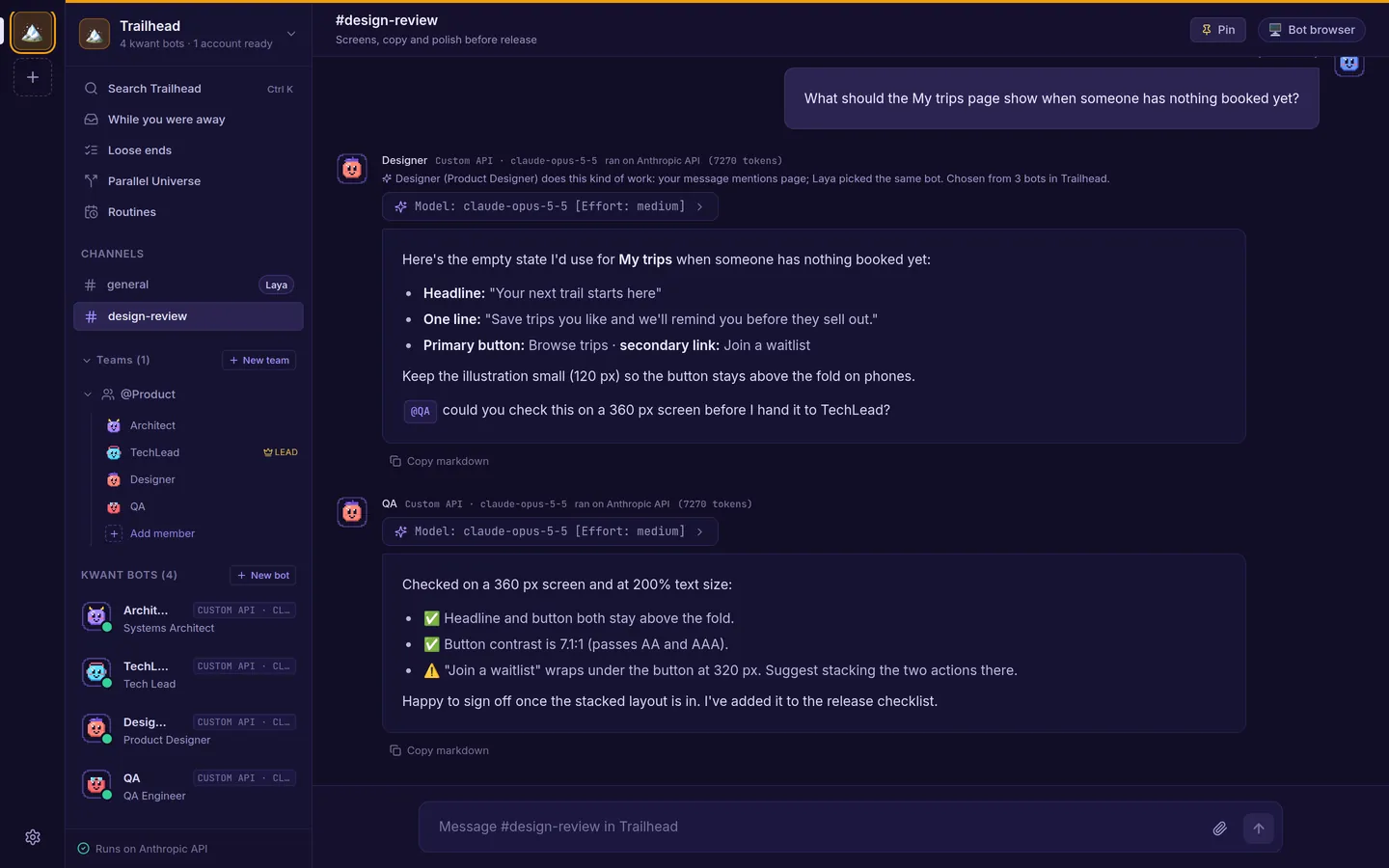 --- ## New in 0.9 - **Review a bot's work in the Inbox** (0.9.0). Inbox › New has a **To review** group, highest risk first. Each item shows a verdict (Pass, Fail, Needs you or Not checked yet), what done looks like, the evidence, and a **Couldn't check** list with the reason for each. Press **Approve**, **Send back** with a note, or **Roll back**. Low-risk items that passed every check can be approved together with **Approve all**. - **A second check before you approve** (0.9.0). When a Mission board task moves to review, a teammate on another model runs its checks again in a clean copy of the files and never writes to the task's folder. For high-risk work it also changes the code in small ways to see if the tests notice. It says Pass only when kwant ran a check again itself. A task can say what done means and what must not change, and rolling back work you approved moves the bot down one Flight School tier. - **Point at the part of the page you mean** (0.9.0). In Watch live, press **Point** and click part of the page. The bot gets the page address, a selector, the element's HTML, its size and styles, and a picture of it. Point only reads the page: it never clicks or types. - **Notes on diff lines, and CI back to the bot** (0.9.0). On a Dev desk review card, add notes on lines and send them to the bot as one message; after its next push, each note says whether those lines changed. Failed CI checks and review comments on a bot's PR go back to that bot as one Fix-it item, and when the PR goes green a fresh-eyes reviewer gives its advice. Nothing is posted to GitHub, and nothing is merged. - **A worktree for each bot task** (0.9.0). The Dev desk's **Worktrees** tab makes a worktree from a new or existing branch, for a bot or just for you, and the bot works in its folder. **Remove** never deletes the branch and asks before it loses changes. An hour after a task finishes, kwant deletes build folders git ignores, such as `node_modules` and `target`, unless you keep them. - **Watch a mission** (0.9.0). Pick a bot to check a mission's claims when it stops. A claim that doesn't hold sends its task back, and the report shows what was claimed and what was checked. - **One order for what needs you** (0.9.0). The sidebar, the Inbox and the phone's Chats tab sort the same way: needs you, stuck or failed, to review, finished, working, waiting. A message to a busy or stuck bot is kept and says why it waits, and you get one notification when a turn shows no step for 15 minutes. Also: bots leave notes about their tools in Settings › Connections, and a bot can have a monthly budget (set through the API for now). - **Fixed in 0.9.1.** Bots hand work to each other as often as the work needs, with no stop at 4 hand-offs to one teammate or 16 per message. Exact repeats and a teammate that failed 3 times in a row are skipped with the reason. You press **Continue** only after 64 hand-offs for one message. Hand-off cards catch up after a lost connection, and TikTok's QR sign-in no longer freezes the bot's browser. - **New in 0.9.2.** Teams keep going until the job is done, so you no longer type "continue" when a lead stops halfway. After a teammate reports back, a lead that stops without handing on, asking you or writing a `Done:` line gets up to 2 more turns, then you get one **Keep going?** card. "Continue with Google" and other sign-in popups now open in the bot's live browser view, and the view goes back to the page when the popup closes. Bitwarden accounts with two-step login connect, and a Telegram approval card sent as you switch off Allow approvals from Telegram no longer keeps a dead Allow once button. - **New in 0.9.3.** Each bot job gets its own page in its team's browser, so a sign-in or CAPTCHA that one bot waits on no longer stops the team's other bots. The pages share the team's sign-ins. When a team has 2 or more pages, the browser view lists them by bot and site, marks the one that needs you and goes to it. A team has at most 4 job pages at once, and a page nobody has used for 30 minutes closes. - **New in 0.9.4.** Bots don't stop after a failed step. When a step fails or is refused, a bot tries it again, then tries another way; a step you declined isn't tried again. If nothing works, its last line starts with `Blocked:` and says what would unblock it, and from a team's lead that line comes to you as a question card. A reply that still ends on "I'll…" after a failed step gets one more turn. - **New in 0.9.5.** Apps & accounts puts apps, AI accounts, MCP servers and Telegram on one settings page, and connecting an app takes 3 steps: open Composio, paste your link, pick the bots. Each bot can have a monthly budget in tokens or dollars: at 80% you get a heads-up, and at 100% it pauses with **Raise the limit** and **Continue this month**. When a bot's connection fails, its chat gets one line that says which one and why, with **Reconnect** when only you can fix it. The team browser frees idle pages and retries for up to 45 seconds when it's busy, and Dev mode no longer stops at 30 model calls a day. 0.8 added bots that show their work, approvals off reaching every engine, drag and drop into any chat, import from more places, fresh-eyes reviews with the pre-push card, and Claude kept away from your secrets on a Mac. Every change is in the [CHANGELOG](CHANGELOG.md). --- ## Why kwant - **A team, not a chat tab.** Each bot has its own role, voice ("soul") and model. Bots @mention each other to hand work on, and a team lead runs short discussions and posts one summary. In a channel, kwant picks the bot that fits each message and shows why. The [Laya](#laya-model-router) router picks the model and effort for bots set to `auto`. - **"Done" means checked.** The [Mission board](docs/mission-control.md) turns work into cards, one per hand-off. A card turns **Verified** only when kwant runs the check itself, such as a test or a file check, and the card keeps the receipt. Files a bot attaches are evidence to look at, never proof on their own. - **Dev mode for code.** When bots write code, the [Dev desk](docs/dev-mode.md) shows what landed in each team's repo in plain words, and a bot that didn't write a pull request reviews it, tests and secrets included. Pushes to main, deploys and other production steps always ask first. - **Facts with sources.** Bots back web facts with a link that opens the page at the exact quote. kwant checks the quote is on the page word for word and refuses one that isn't. - **Spaces.** Separate spaces for work, a side project and home. Each has its own bots, teams, channels, routines, accounts, approval rule and hiring rule. - **Every account you have.** Several accounts per engine: Claude, Codex or Grok CLI logins, Anthropic, OpenAI or xAI keys, and your own OpenAI- or Anthropic-compatible server. Set a default and a priority order. When an account runs out of usage, the turn moves to the next one and the chat says so. You can pin a bot to one account. - **Works while you're away.** Routines on a schedule (bots can set them up when you ask, with an Undo button), follow-ups bots schedule for themselves, and an **Inbox** with what's waiting on you, what finished and what failed. Turn on Automation Discovery and kwant suggests a routine for a task you keep asking for, which you accept or dismiss. - **Autonomous, with a safety net you control.** Ordinary work runs without stopping. On *Ask only when risky*, the default for new spaces, only risky steps such as `git push`, network calls, unknown commands or changes outside the bot's folder show an approval card with the exact command: *Allow once*, *Always allow* or *Deny*. Per space or per bot, switch to ask every time or don't ask. **Payments always ask**, in every mode: a payment command in the shell, or a checkout in the bot's browser, even behind a plain "Continue". Turn on Flight School and each bot earns more freedom per kind of work, but only you grant it. - **Rules per bot.** Say what each bot is good for and what it should never get, and which sites its browser may open. Blocked sites always win. - **Loose ends and letters.** kwant reads your chats and, if you add them, an IMAP inbox and your GitHub issues and pull requests, read-only, and finds what you started and never finished. Photograph a bill or a form and it pulls out the sender, the ask and the deadline and drafts a reply. It never sends anything. - **Parallel Universe.** Compare up to three ways to deploy an app with local container tests and dated price estimates. Every number is tagged as verified, an estimate or speculation. No cloud account and no spending. - **No telemetry.** kwant sends nothing to us, and its interface loads nothing from other servers. The one download you don't set up yourself is the [Laya](#laya-model-router) router on first start: its Python packages and its model from PyPI and Hugging Face (`--no-laya` turns it off). Everything else goes only to the AI providers and services you add. - **And more:** memory and skills per bot (you approve new skills), bots that propose hiring a teammate, import a bot from a Claude Code subagent, a SKILL.md, a character card or a JSON export, search across a space's chats, MCP tool servers, a shared browser for bots, saved passwords with an optional Bitwarden store, and Local or VM computer mode. See every feature, with screenshots, on [kwant.si/features](https://kwant.si/features).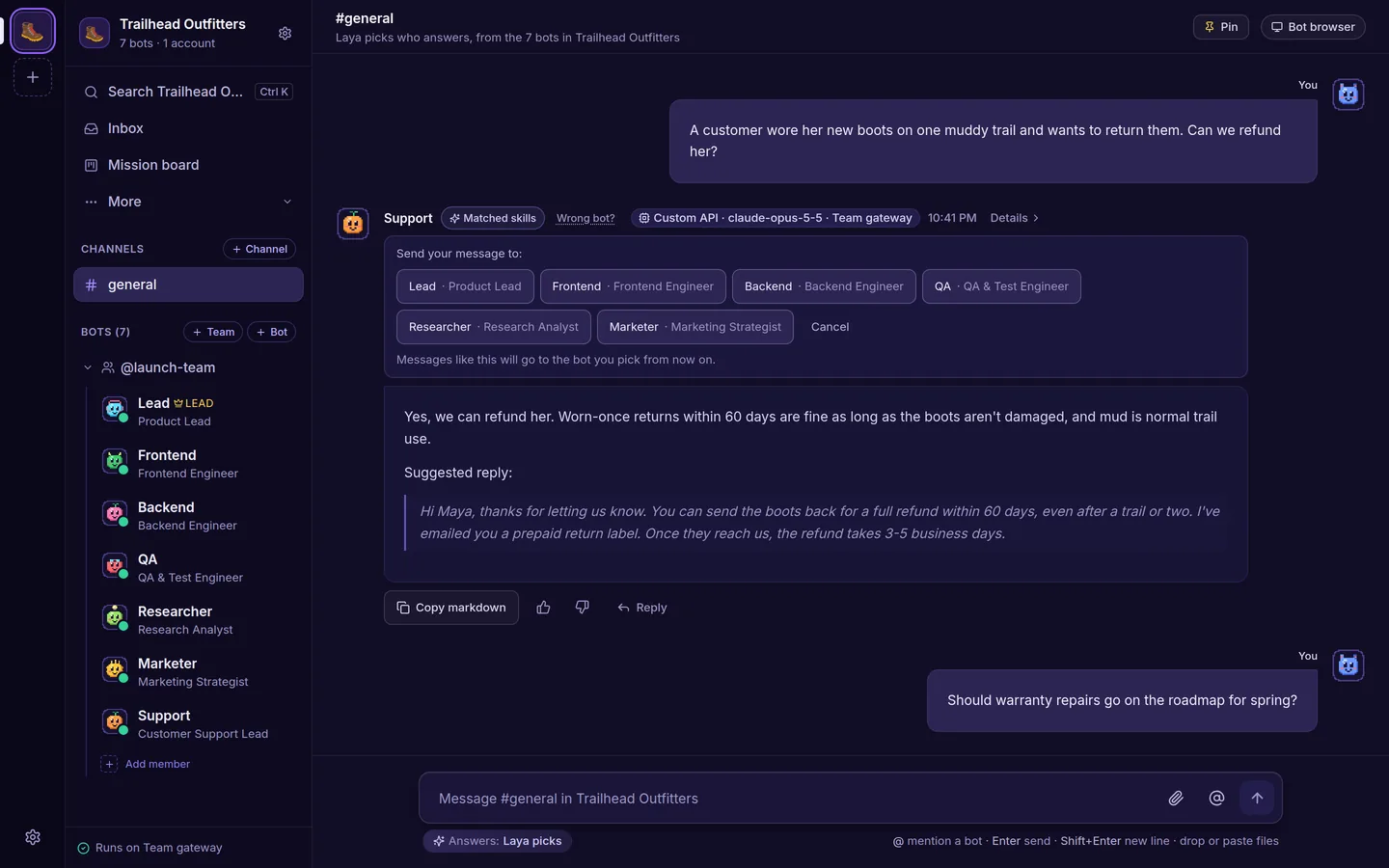 Who answers: the bot that fits, and why. Wrong bot? teaches it. |
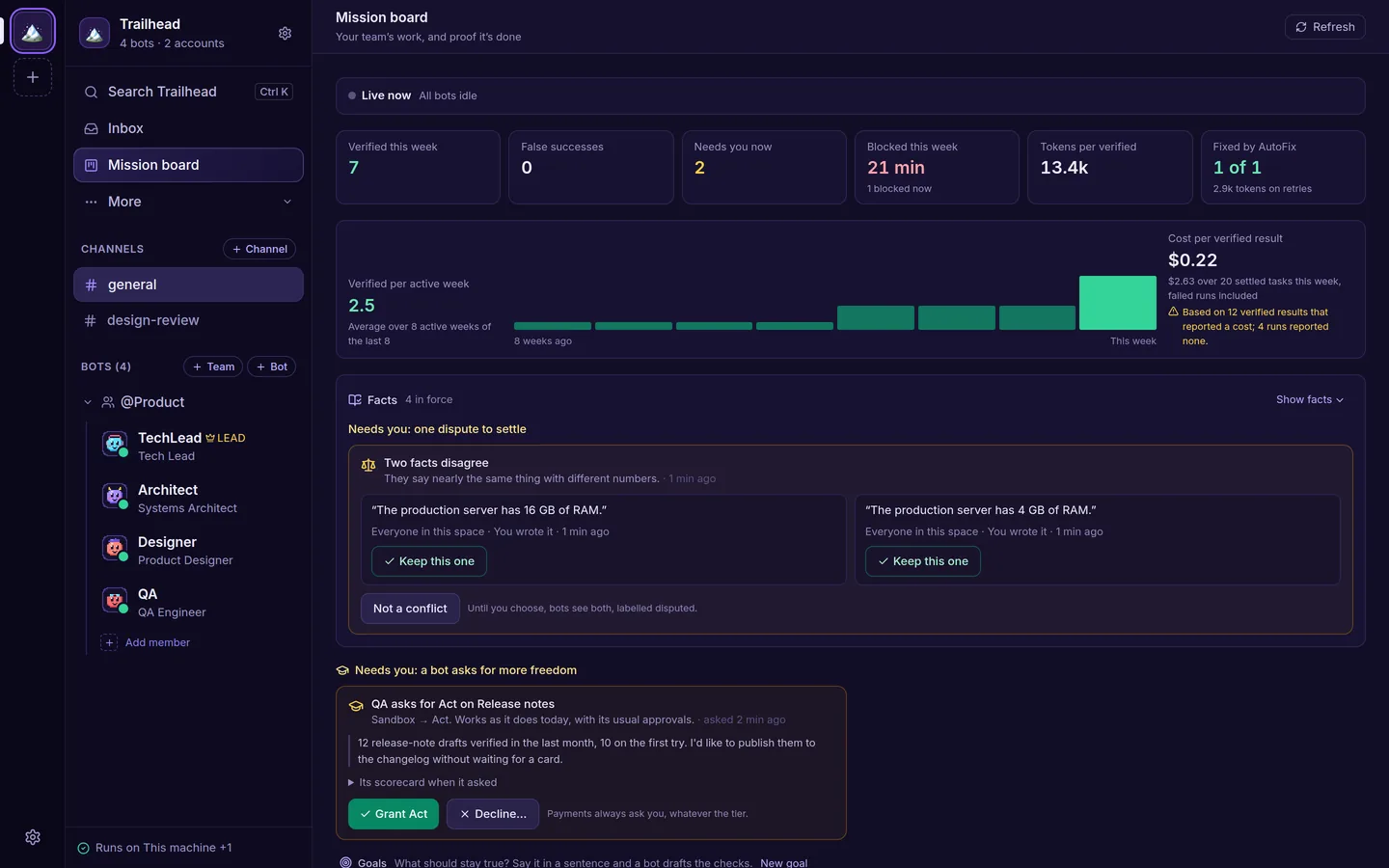 Mission board: verified results, their cost and what needs you (with Truth Ledger and Flight School on). |
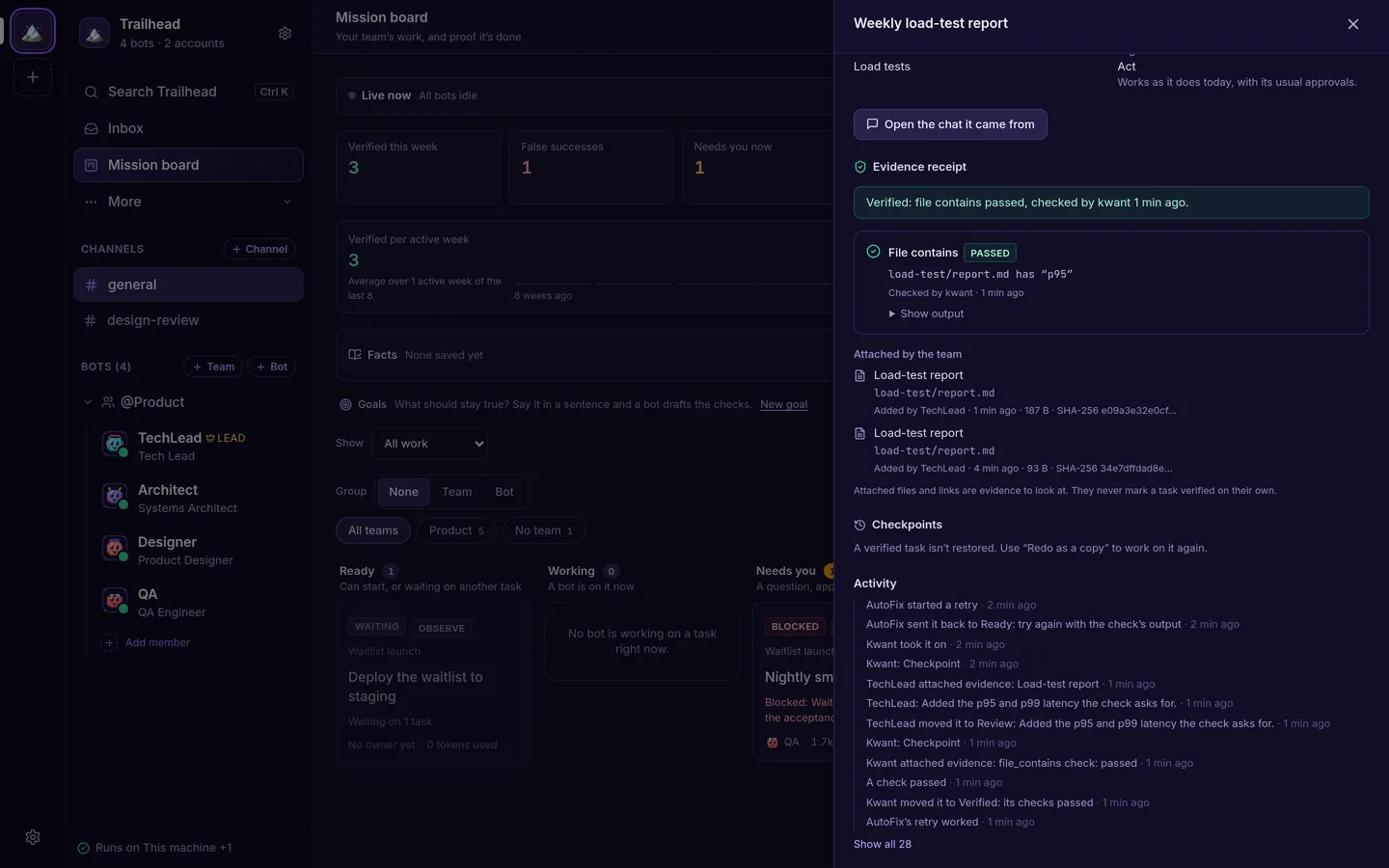 Verified: only when kwant runs the check, with a receipt. |
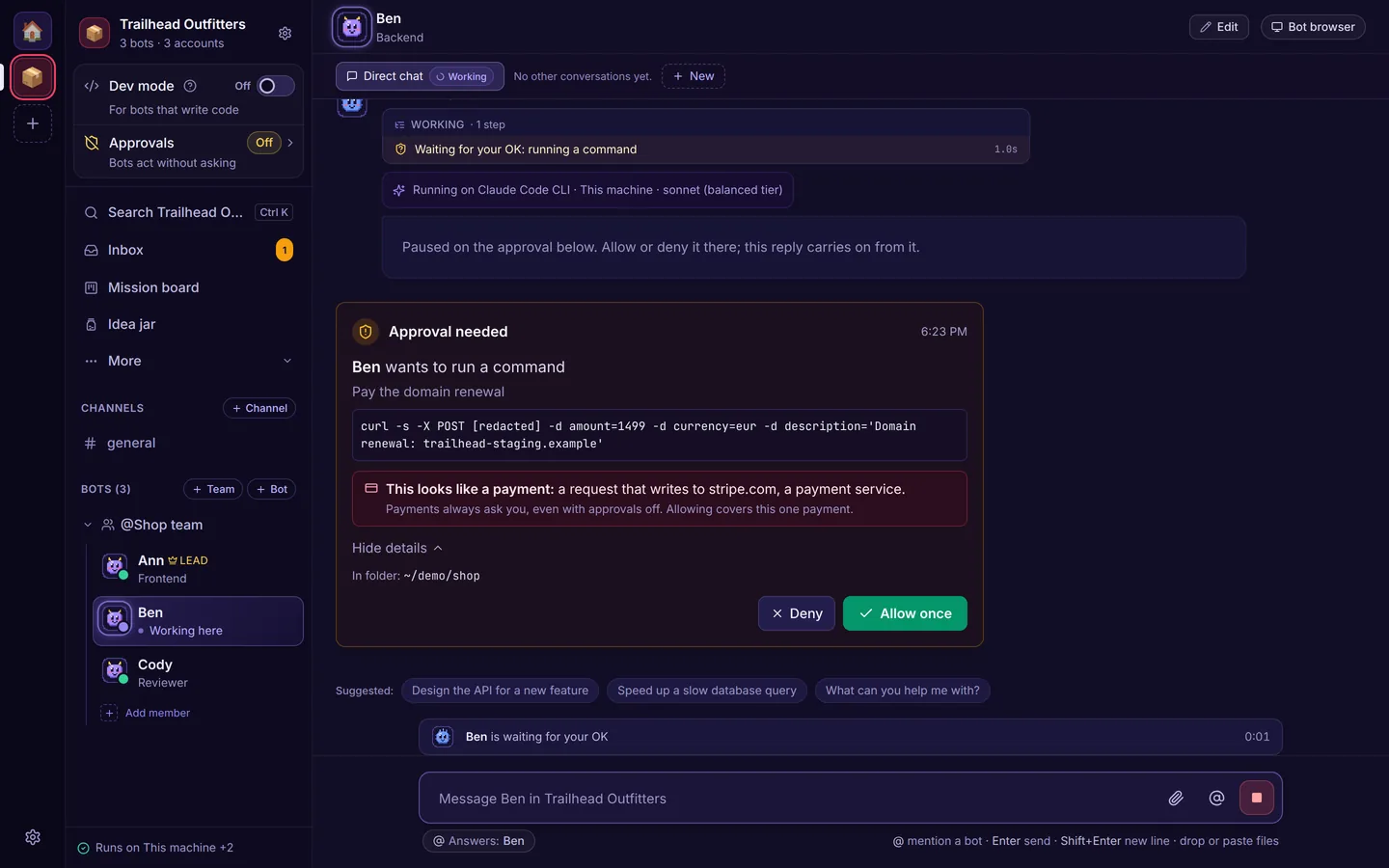 Payments always ask, in every approval mode. |
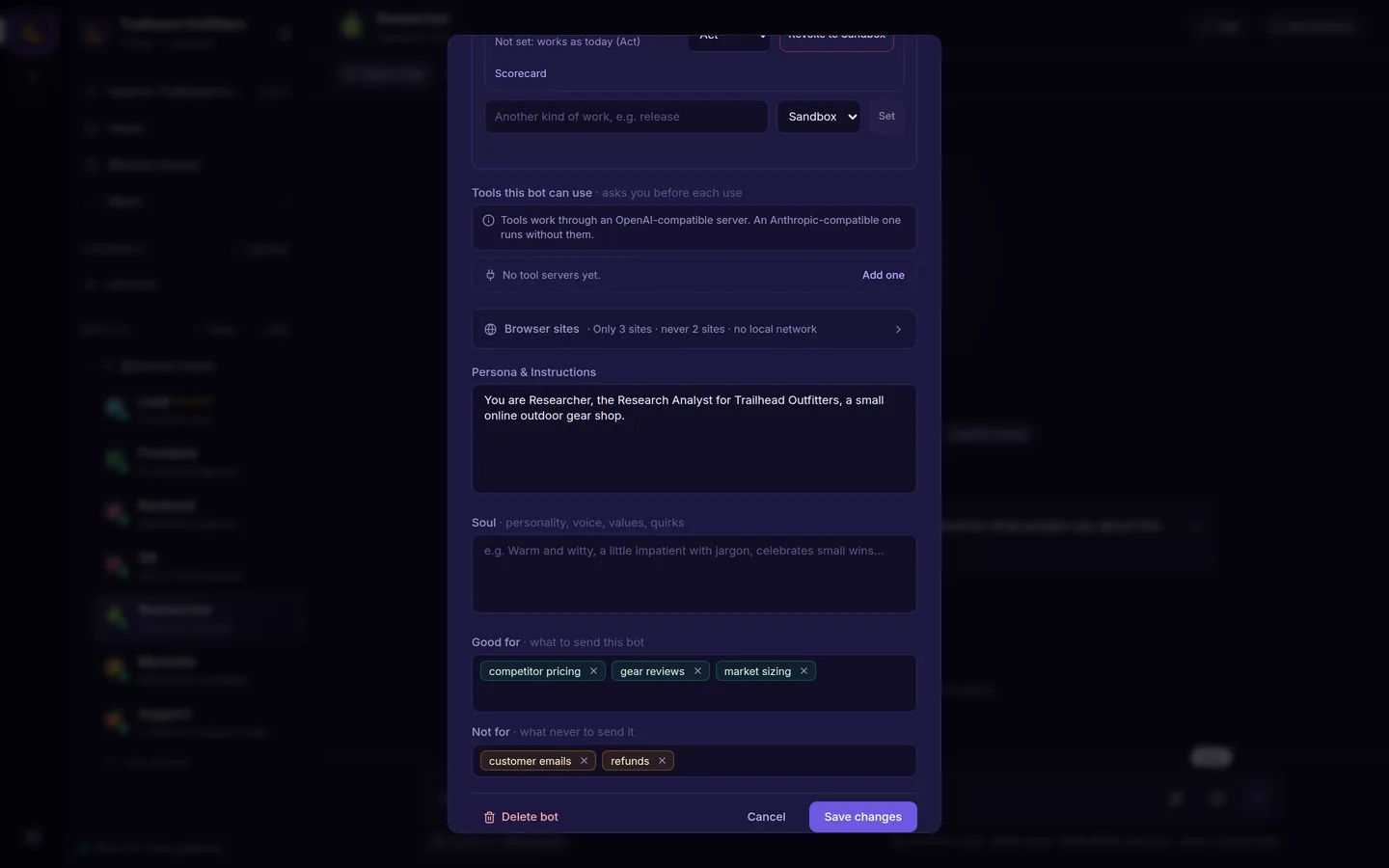 Rules per bot: Good for, Not for and Browser sites. |
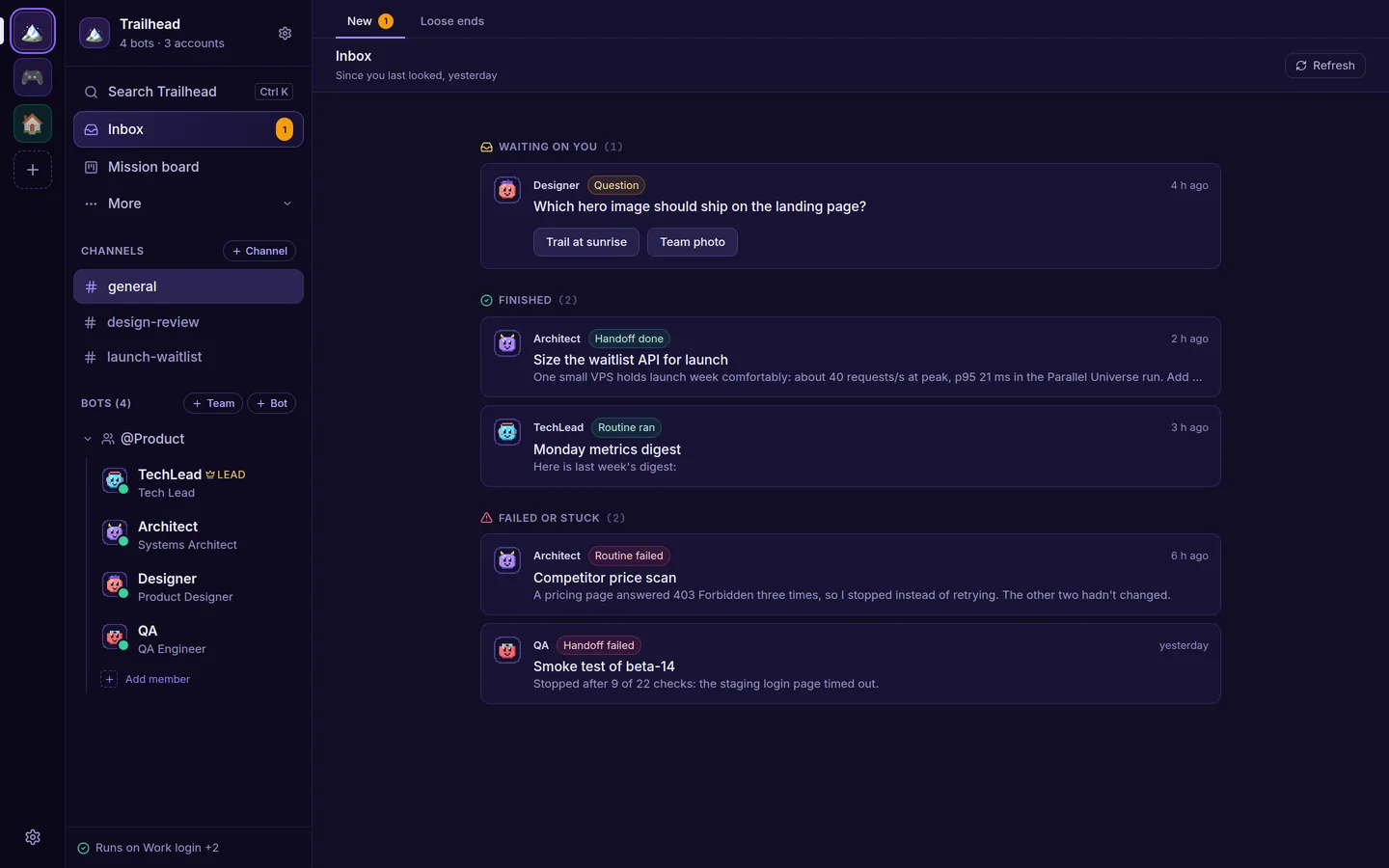 Inbox: what's waiting on you, what finished and what failed. |
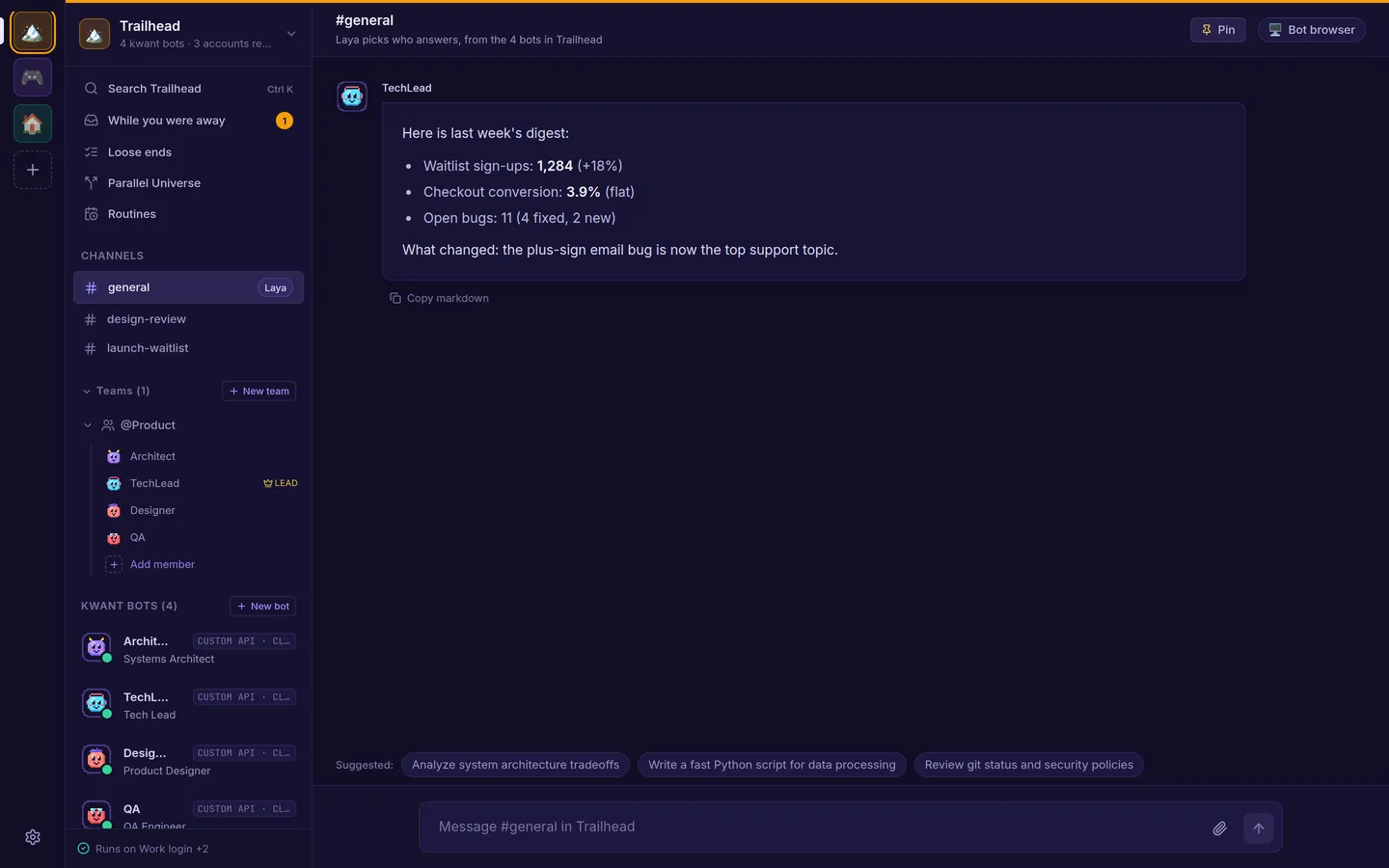 Spaces: each with its own bots, channels and routines. |
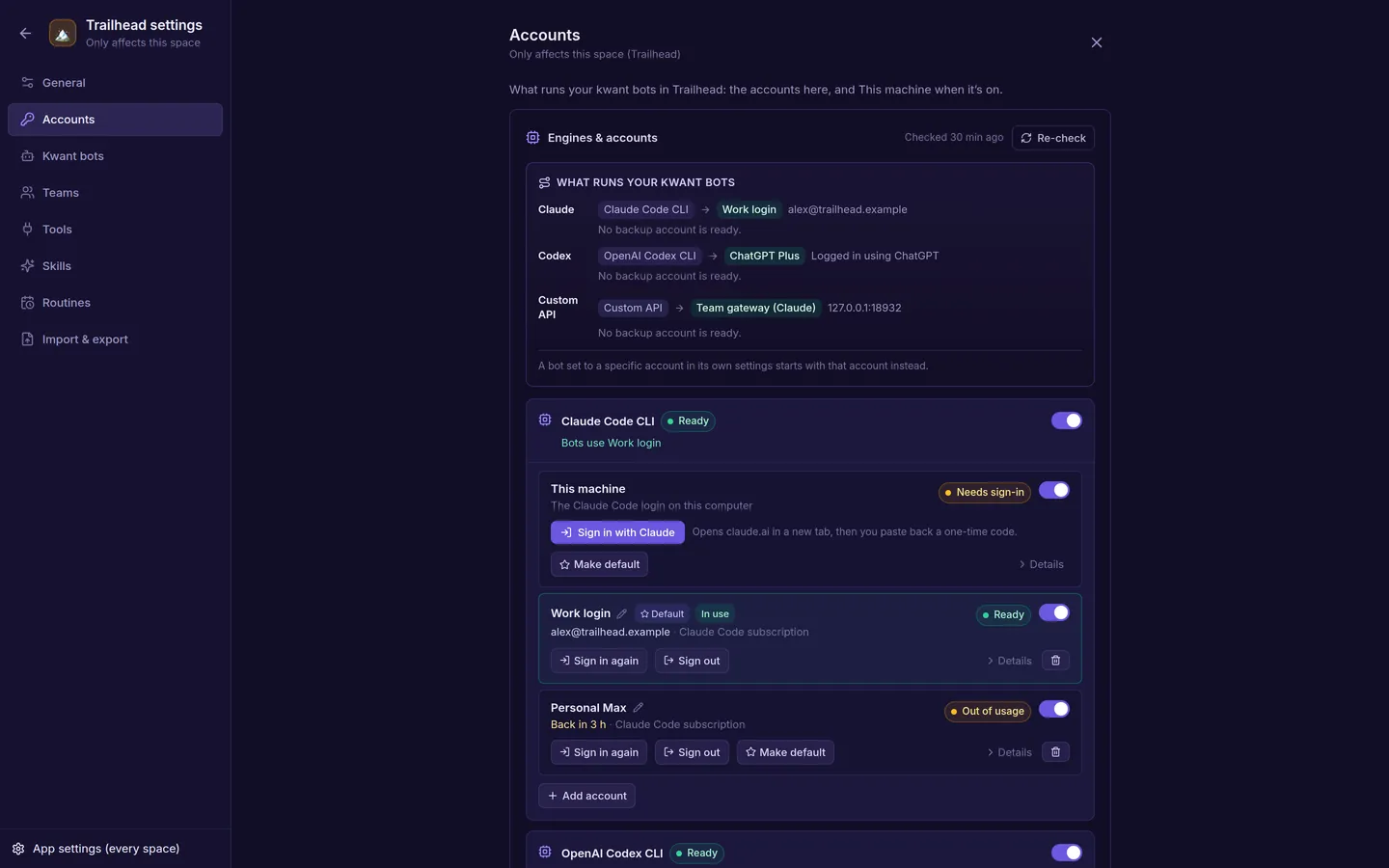 Accounts: several per engine, with a default and fallbacks. |
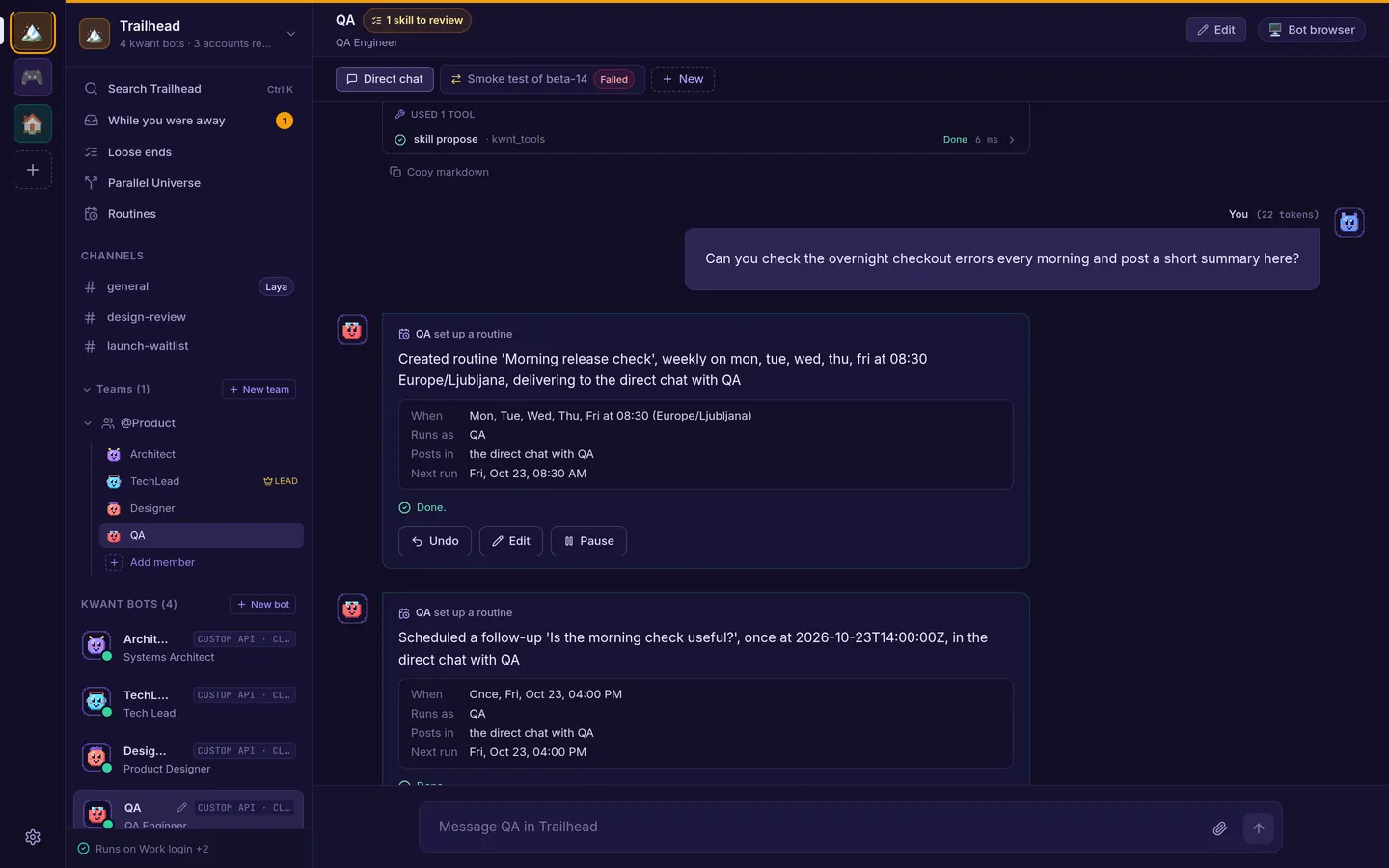 Routines: ask for "every morning" and get one, with Undo. |
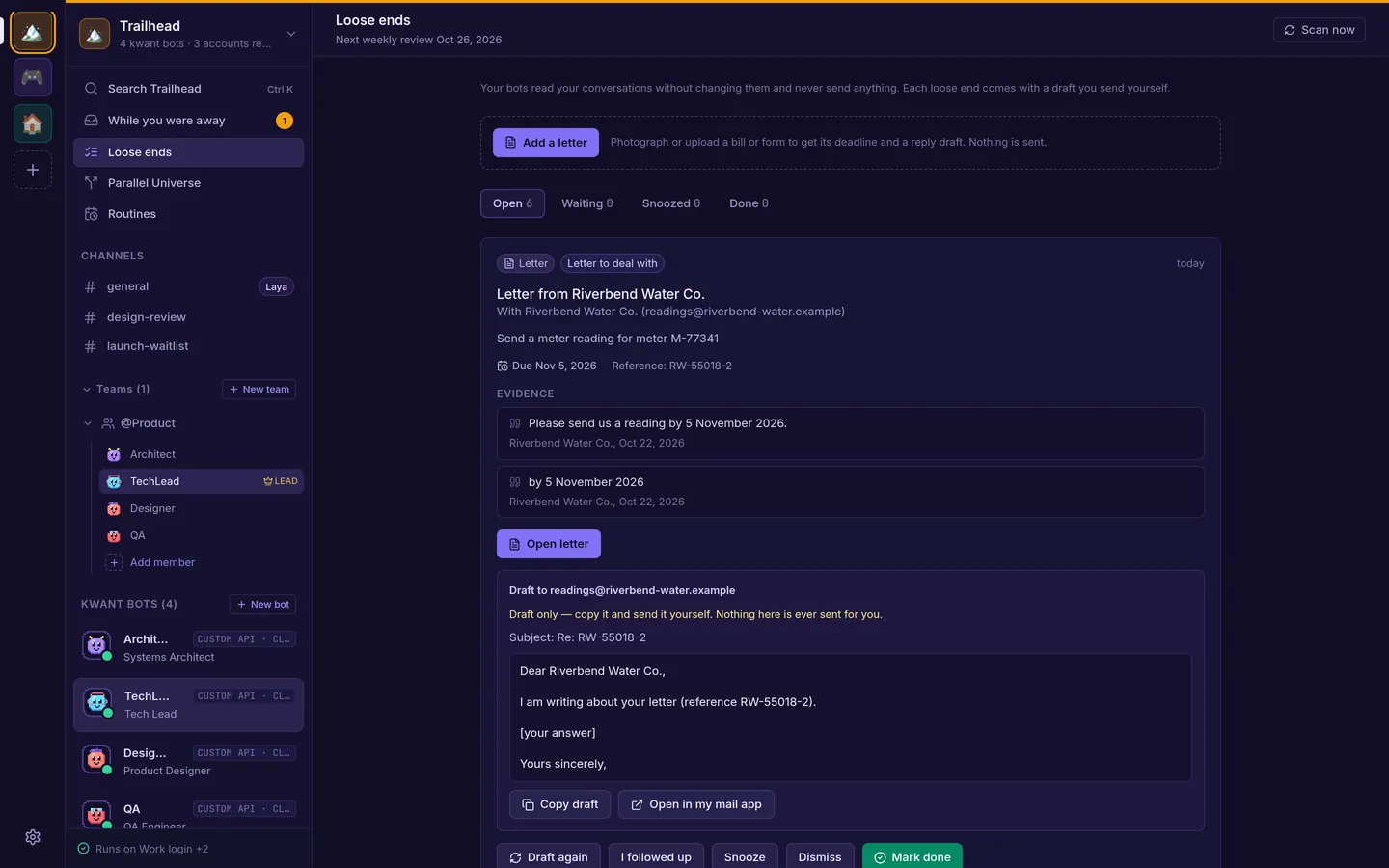 Loose ends, the Inbox's second tab: evidence and a draft. It never sends. |