FerroCrypt
ferrocrypt.app
[](https://github.com/alexylon/ferrocrypt/actions/workflows/rust.yml)
[](https://crates.io/crates/ferrocrypt/0.3.1)
[](https://docs.rs/ferrocrypt/0.3.1)

[](https://crates.io/crates/ferrocrypt-cli/0.3.1)
FerroCrypt encrypts files and folders into a single `.fcr` file. It is available
as a desktop app, a command-line tool, and a Rust library for Linux, macOS, and
Windows.
Choose how to protect your data:
- **Password:** use the same password to encrypt and decrypt. The command line
and library call this a *passphrase*.
- **Key pair:** encrypt with a recipient's public key. Decryption requires the
matching private key and its password. The command line and library can
encrypt one file for several recipients; any one of them can decrypt it.
Encryption leaves the original files in place. File contents are processed in
chunks, so an entire file does not need to fit in memory. Password processing
uses 1 GiB of memory by default, including when creating or unlocking a private
key.
## Contents
- [Installation](#installation)
- [Command-line usage](#command-line-usage)
- [Desktop app](#desktop-app)
- [Files and folders](#files-and-folders)
- [Troubleshooting](#troubleshooting)
- [Security](#security)
- [Compatibility](#compatibility)
- [Build from source](#build-from-source)
- [Technical reference](#technical-reference)
- [License and credits](#license-and-credits)
## Installation
Download the package for your system from [GitHub Releases](https://github.com/alexylon/ferrocrypt/releases).
| System | Command-line tool | Desktop app |
|---|---|---|
| macOS, Intel or Apple silicon | `.tar.gz` | `.zip` containing `FerroCrypt.app` |
| Linux, 64-bit Intel/AMD | `.tar.gz`, `gnu` or `musl` | `.deb` for Debian/Ubuntu |
| Linux, 64-bit ARM | `.tar.gz`, `musl` | Build from source |
| Windows, 64-bit Intel/AMD | `.zip` | `.msi` installer |
Extract a command-line download and place `ferrocrypt` (`ferrocrypt.exe` on
Windows) in a folder on your `PATH`. The Linux `gnu` build uses the system's C
library and needs a recent version of it. The `musl` builds need no shared
libraries, so they also work on older distributions, Alpine, and minimal
container images.
On macOS, extract the desktop app and move it to Applications. Neither the app
nor the command-line tool is notarized by Apple, so macOS may block each the
first time you run it. If it does, open **System Settings → Privacy &
Security**, click **Open Anyway**, then confirm **Open**. See
[Apple's instructions](https://support.apple.com/en-us/102445).
### Install the command-line tool with Cargo
Requires Rust 1.89 or later:
```bash
cargo install ferrocrypt-cli@0.3.1
```
The installed command is `ferrocrypt`.
### Add the Rust library
Requires Rust 1.87 or later:
```bash
cargo add ferrocrypt@0.3.1
```
The library handles files, folders, output naming, and encryption through
`Encryptor` and `Decryptor`. It also provides key generation, public-key
fingerprints, progress callbacks, configurable resource limits, and structured
`CryptoError` values. See the [API documentation and examples](https://docs.rs/ferrocrypt/latest/ferrocrypt/)
for password and public-key workflows.
Library operations are blocking. In an asynchronous application, run them on a
blocking worker. Services processing untrusted input also need explicit limits,
bounded concurrency, and a private work folder for each operation; see the
[deployment requirements](THREAT_MODEL.md#tm-16--process-and-resource-profiles).
## Command-line usage
| Command | Alias | Purpose |
|---|---|---|
| `encrypt` | `enc` | Encrypt a file or folder |
| `decrypt` | `dec` | Decrypt an encrypted file |
| `keygen` | `gen` | Create a public/private key pair |
| `fingerprint` | `fp` | Display a public key's fingerprint |
Use `ferrocrypt --help` or `ferrocrypt --help` for full options.
Create the output folders before encrypting or decrypting; only key generation
creates its folder if needed. FerroCrypt refuses an output name that already
exists. The examples below assume `secret.txt` and the folders `encrypted` and
`decrypted` already exist.
### Encrypt and decrypt with a password
```bash
ferrocrypt encrypt -i secret.txt -o ./encrypted
ferrocrypt decrypt -i ./encrypted/secret.fcr -o ./decrypted
```
Encryption asks for a passphrase and confirmation; decryption asks for the same
passphrase. Input is hidden. The result is `encrypted/secret.fcr`, and decryption
restores `decrypted/secret.txt`.
For a folder, use its path as the input. To choose the encrypted filename, use
`--save-as` instead of `--output-dir`:
```bash
ferrocrypt encrypt -i ./photos -s ./encrypted/photos-backup.fcr
```
Password encryption is the default when no public key or recipient string is
given. `--passphrase` (`-p`) selects it explicitly; the flag does not take a
password value.
### Encrypt and decrypt with a key pair
Create a key pair and choose a password for the private key:
```bash
ferrocrypt keygen -o ./keys
```
This creates `public.key` and a password-protected `private.key`. Share the
public key with anyone who needs to encrypt files for you. Keep the private key
and its password secret, and keep a backup of both.
Before encrypting for someone else, compare their public-key fingerprint over a
trusted channel, such as a phone call. `keygen` prints the fingerprint of each
new key pair; for an existing public key file, run:
```bash
ferrocrypt fingerprint ./keys/public.key
```
Encrypt with the public key, then decrypt with the matching private key:
```bash
ferrocrypt encrypt -i secret.txt -o ./encrypted -k ./keys/public.key
ferrocrypt decrypt -i ./encrypted/secret.fcr -o ./decrypted -K ./keys/private.key
```
`-k` selects a public key; `-K` selects a private key. Public-key encryption
needs no password. Decryption prompts for the private key's password. It detects
the encryption method from the file contents, even if the file was renamed.
To let several recipients decrypt the same file, repeat `-k`:
```bash
ferrocrypt encrypt -i secret.txt -s ./encrypted/shared.fcr \
-k ./alice/public.key -k ./bob/public.key
```
A public key can also be shared as a lowercase `fcr1...` recipient string,
which is the text stored in `public.key`. Use `-r` with the full string:
```bash
# Replace fcr1... with the recipient's complete string.
ferrocrypt encrypt -i secret.txt -s ./encrypted/recipient.fcr -r fcr1...
```
`-r` and `-k` can be repeated and combined. Password and public-key encryption
cannot be combined in one file.
### Interactive mode and scripts
Run `ferrocrypt` without arguments to open an interactive prompt. Enter commands
without the `ferrocrypt` prefix:
```text
ferrocrypt> encrypt -i secret.txt -o ./encrypted
ferrocrypt> quit
```
`quit`, `exit`, or Ctrl-D closes the prompt. Ctrl-C at the prompt cancels the
current line.
For scripts, supply the password through `FERROCRYPT_PASSPHRASE`. It takes
precedence over the prompt and skips confirmation. Passwords are never accepted
as command-line arguments or read from piped input. Without a terminal or this
variable, a command that needs a password fails instead of waiting for input.
Environment variables may be readable by other processes running as the same
user; prefer the hidden prompt when possible.
If an input already looks like a FerroCrypt file, `encrypt` asks for confirmation
in a terminal and refuses in a script. Use `--allow-double-encrypt` to permit it.
### Common options
| Option | Commands | Meaning |
|---|---|---|
| `-i, --input` | `encrypt`, `decrypt` | File or folder to encrypt; encrypted file to decrypt |
| `-o, --output-dir` | `encrypt`, `decrypt`, `keygen` | Destination folder |
| `-s, --save-as` | `encrypt` | Exact output file path; replaces `-o` |
| `-p, --passphrase` | `encrypt` | Select password encryption explicitly |
| `-k, --public-key` | `encrypt` | Public key file; repeatable |
| `-r, --recipient` | `encrypt` | Public recipient string; repeatable |
| `-K, --private-key` | `decrypt` | Private key file for public-key decryption |
| `--allow-double-encrypt` | `encrypt` | Allow encrypting an already encrypted file |
| `--keep-partial` | `decrypt` | Keep incomplete output after an error for inspection or recovery |
`fingerprint` takes the public key path directly, without `-i`.
### Resource limits
Archive limits stop a damaged or hostile file from using more memory or disk
than expected. Encryption and decryption apply the same limits, including to
single files. If your data exceeds a default, raise that limit on both sides.
| Option | What it limits | Default |
|---|---|---|
| `--max-archive-entries` | Files and folders, including the root | 250,000 |
| `--max-archive-size` | Combined file contents, in MiB | 65,536 (64 GiB) |
| `--max-archive-path-depth` | Path components, including the root | 64 |
| `--max-archive-path-bytes` | Each archived path, in UTF-8 bytes | 4,096 |
| `--max-archive-manifest` | The stored list of paths and metadata, in MiB | 64 |
Decryption also limits the password-processing cost requested by an encrypted
file or private key. Only raise these limits for a trusted source and within
your machine's resources.
| Option | What it limits | Default |
|---|---|---|
| `--max-kdf-memory` | Argon2id memory, in MiB | 1,024 (1 GiB) |
| `--max-kdf-time-cost` | Argon2id passes | 12 |
| `--max-kdf-lanes` | Argon2id parallelism | 8 |
| `--max-kdf-work` | Memory in KiB multiplied by passes | 4,194,304 |
These four flags apply only to `decrypt`. Raising the memory limit does not
raise the combined work limit. Lowering a limit does not make a file cheaper to
decrypt; it makes FerroCrypt refuse a file that exceeds it.
## Desktop app
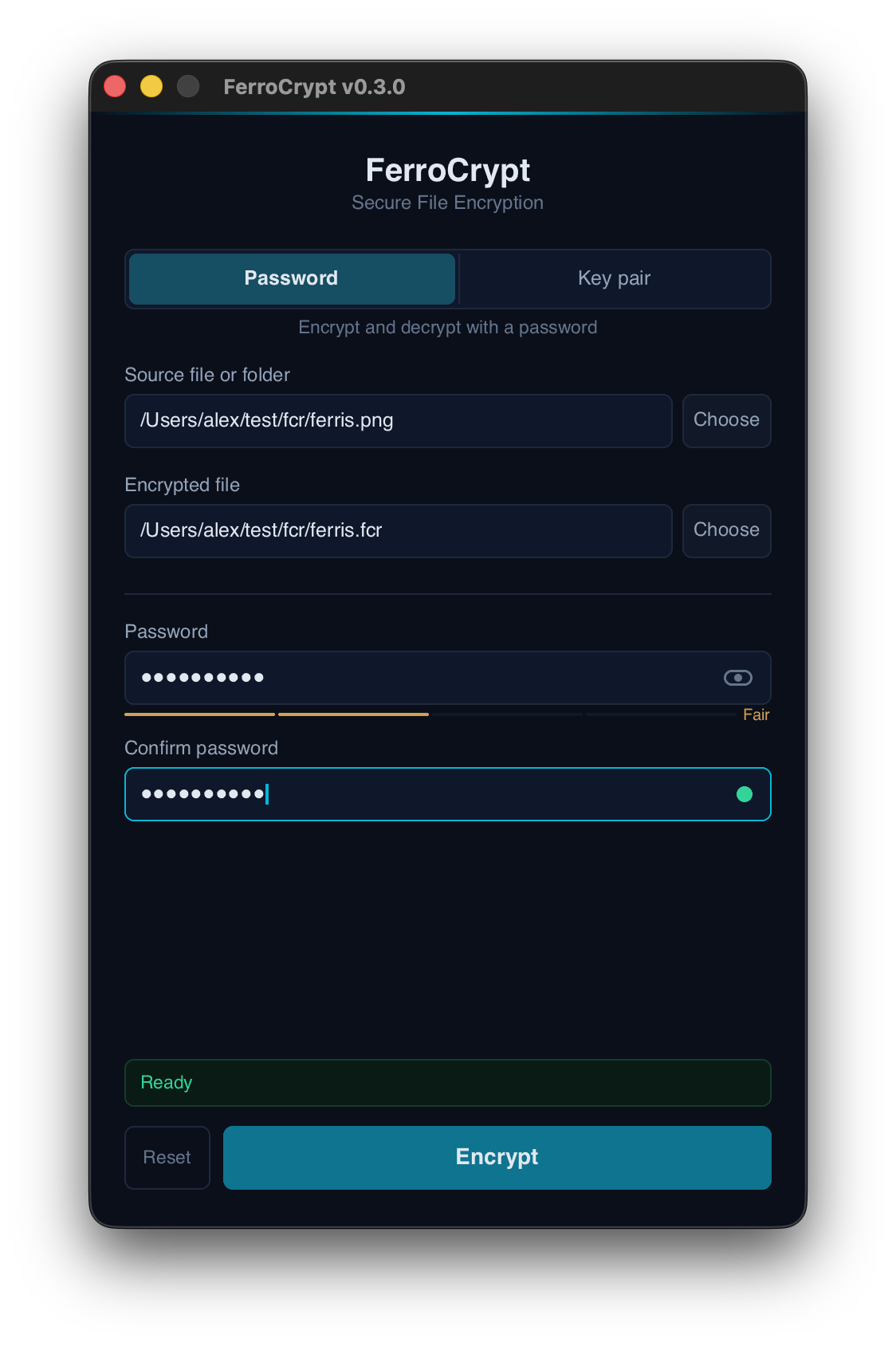
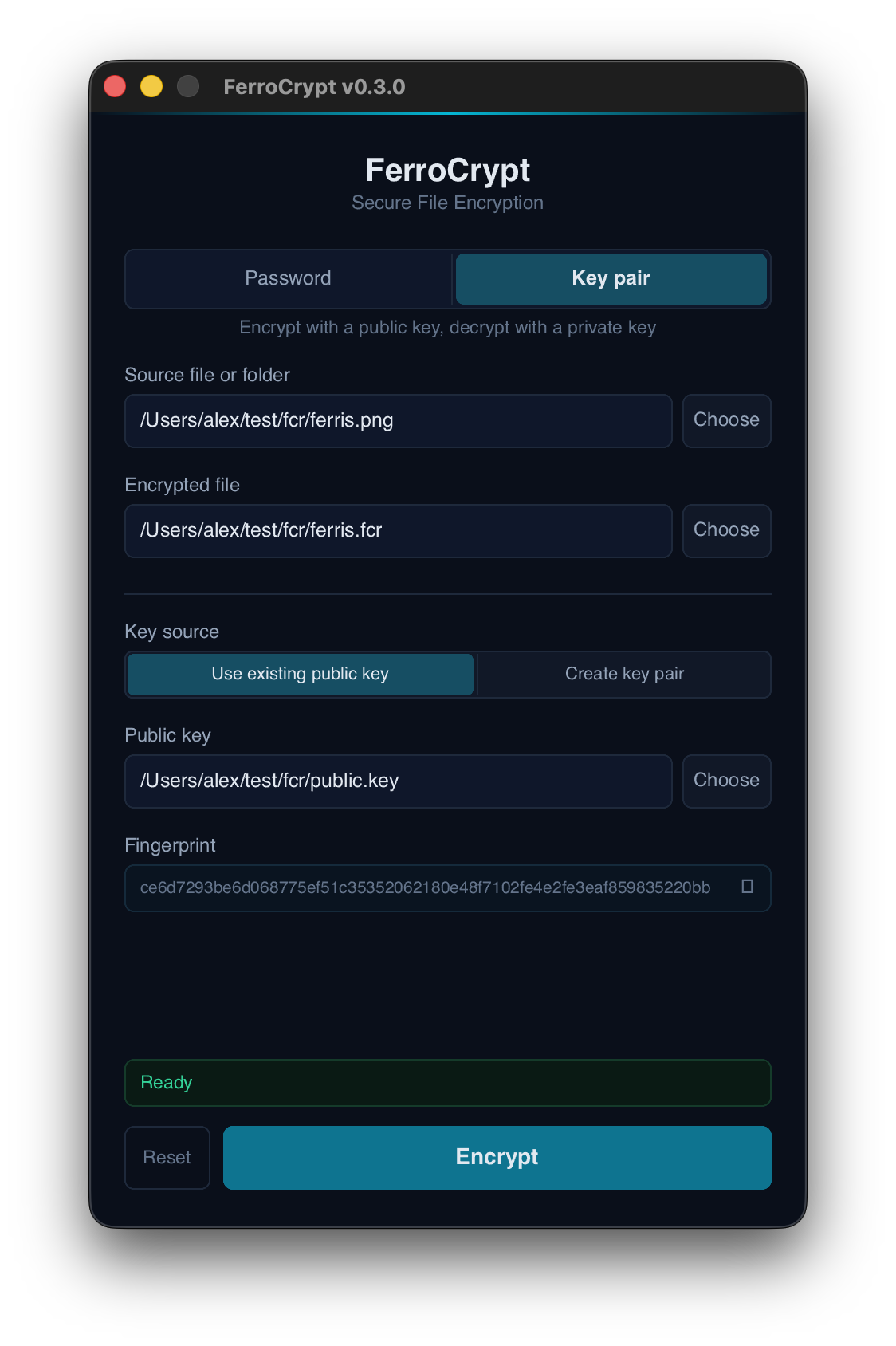
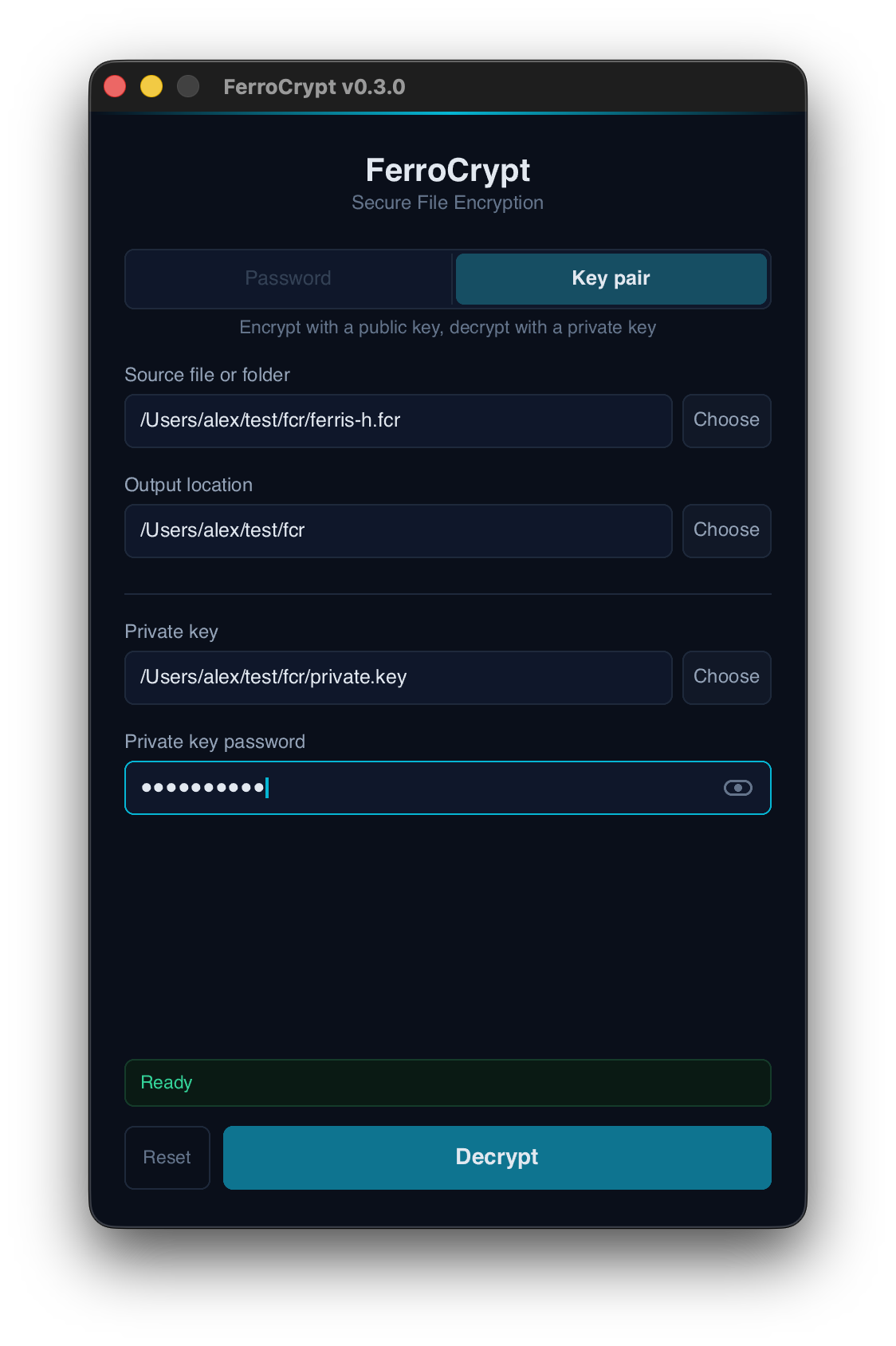
Select a file or folder, choose the destination, and use one of the two tabs:
- **Password:** encrypt and decrypt with a password.
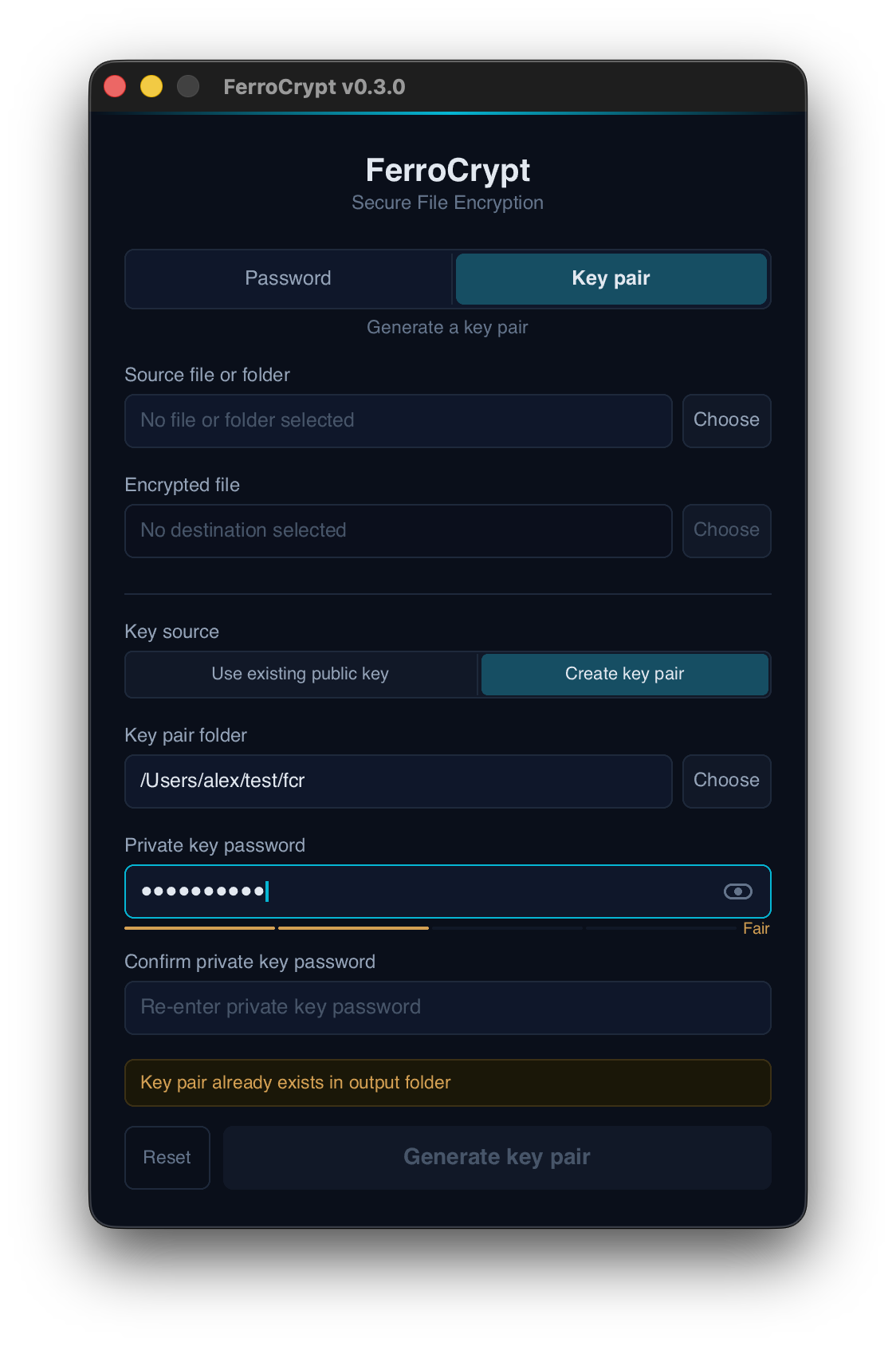
- **Key pair:** encrypt with a public key or decrypt with a private key and its
password. **Create key pair** generates keys within the app.
Selecting an encrypted file switches to the appropriate decryption mode. For
encryption, the app suggests an output filename; **Choose** beside the output
opens a Save As dialog. Selected key files are checked, and public-key
fingerprints are displayed for verification. A strength indicator helps when
choosing a password for encryption or a new private key.
The app encrypts for one public-key recipient at a time. It can decrypt a file
made for several recipients with any matching private key. Use the command
line or library to encrypt for several recipients, adjust resource limits, or
retain incomplete output after an error.
## Files and folders
- **Names:** a file named `secret.txt` becomes `secret.fcr`; a folder named
`my.photos` becomes `my.photos.fcr`. Decryption restores the original name
stored inside the file, regardless of the encrypted filename.
- **Contents:** regular files, empty folders, and folder structure are
preserved. Hard links are stored as separate files. Data is not compressed.
- **Permissions and metadata:** Unix read, write, and execute permissions are
stored and restored on Unix. Ownership, timestamps, access-control lists,
extended attributes, special permission bits, and other platform metadata
are not preserved. Windows does not restore Unix permissions.
- **Unsupported entries:** symbolic links, Windows junctions and other reparse
points, devices, pipes, and sockets are refused.
- **Portable names:** each file or folder name must be valid UTF-8 text, with
at most 244 bytes. Windows-reserved names and characters, trailing dots or
spaces, and certain invisible control characters are refused on every platform.
Duplicate paths, names differing only by ASCII letter case, and equivalent
Unicode spellings are also refused. See the [full naming rules](ferrocrypt-lib/FORMAT.md#96-path-grammar).
FerroCrypt is intended for file storage and transfer, not a complete system
backup. Keep source files unchanged while encryption runs; it does not take a
point-in-time snapshot.
## Troubleshooting
Errors distinguish credential problems, damaged files, unsupported data, and
resource limits. A wrong password and some forms of file modification cannot
be distinguished.
| Message or problem | What to check |
|---|---|
| `Private key unlock failed` | Check the private key's password and whether the key file is intact. |
| `wrong passphrase or modified file` | Check the file's password; if it is correct, try an intact copy of the encrypted file. |
| `no matching recipient or modified file` | Use a private key matching one of the intended recipients; also check the encrypted file. |
| `file header was modified or corrupted` / `file data was modified or corrupted` | Integrity verification failed. Obtain an intact copy. |
| `Not a FerroCrypt file`, too short, truncated, malformed, or unexpected trailing data | Check the input file and transfer, and whether it came from an [older release](#compatibility). |
| Unsupported version, recipient, or feature | Follow the message's guidance. A newer feature may need a newer release; old-format data needs migration. |
| Passphrase or archive limit exceeded | Raise the matching [resource limit](#resource-limits) only for data from a trusted source. |
| Header, recipient, or key-file limit exceeded | These additional limits are configurable through the library's `HeaderReadLimits` and `KeyReadLimits`. |
| `already exists` | Choose another destination or move the conflicting entry after checking it. |
| `No such file or directory` | Create the output folder first, or the folder of a `--save-as` path. |
### Incomplete output
Decryption writes a temporary plaintext file or folder named
`.incomplete`. It receives its final name only after all
encrypted content and archive checks pass.
By default, FerroCrypt removes its temporary output after a decryption error.
If removal fails or cannot be confirmed, the error names the working path and
says whether plaintext may remain. If decryption is interrupted, for example
with Ctrl-C, by closing the app, or by a power loss, the temporary output may
remain on disk and contain plaintext. A previous `.incomplete` entry is never
reused or automatically deleted; check it and move or remove it before retrying.
Encryption and key generation write to hidden temporary files named
`.ferrocrypt-…` and give a file its final name only once it is complete. An
interrupted run can leave such a file behind; it holds no plaintext and can be
deleted.
`decrypt --keep-partial` keeps incomplete output for recovery or inspection.
Recovered parts may pass integrity checks even when an attacker has deliberately
cut off the rest of the file. Do not treat a partial result as a successful
decryption. Library callers can use `IncompleteOutputPolicy::RetainOnError`.
A final filesystem check can fail after complete output has been written.
Such an error says that the output is complete; confirmed output is preserved,
and may remain under its final name, a moved name, or an additional hard link.
Read the full error before retrying. An error does not always mean that nothing
was written.
## Security
FerroCrypt uses only established, published algorithms from widely used Rust
libraries; the [technical reference](#technical-reference) lists them. The
`chacha20poly1305` library that encrypts file contents was
[audited by NCC Group](https://www.nccgroup.com/research/public-report-rustcrypto-aesgcm-and-chacha20pluspoly1305-implementation-review/),
and the `curve25519-dalek` library that X25519 key agreement is built on was
[audited by Quarkslab](https://blog.quarkslab.com/security-audit-of-dalek-libraries.html).
The file format is fully specified and has public
[test vectors](ferrocrypt-lib/testvectors/wire/README.md). The
[security policy](SECURITY.md) covers dependency review, known limitations, and
private vulnerability reporting. The [threat model](THREAT_MODEL.md) defines the
security guarantees and their assumptions.
- **Credentials:** use a strong password and protect your private keys.
FerroCrypt has no password reset. Public-key fingerprints need verification
through a trusted channel; a valid public key alone does not establish its
owner's identity.
- **Integrity and identity:** file headers are verified before decryption
releases any plaintext, and file contents are checked as they are decrypted.
This detects modification but does not prove who sent a file or whether it is
the latest copy. Use separate signatures or version records when needed.
- **Visible information:** file contents, internal names, folder structure, and
per-file sizes are encrypted. Total encrypted size, recipient count, and the
fact that a file is a FerroCrypt file remain visible. The default output name
can also reveal the source name; choose another with `--save-as` or the
desktop Save As dialog if needed.
- **Local access:** encryption cannot protect data from someone who controls
your running system. The desktop toolkit may leave password text in memory
until the app exits; the CLI's hidden prompt clears its own password buffers.
See the [memory and environment limitations](SECURITY.md#known-limitations).
- **Output folders:** decryption writes only inside the chosen output folder
and refuses unsafe paths stored in the encrypted file. Choose an output
folder that untrusted processes cannot modify, including its parent folders.
Existing output entries are refused. On Windows, folder decryption has a
brief final-rename gap in which another process could create an entry that
gets replaced; use a private output folder.
- **Filesystems:** full filesystem protections apply on Linux with ext4,
macOS with APFS, and Windows with NTFS. Other filesystems, such as exFAT or
network filesystems, may refuse operations or provide weaker permission,
concurrent-change, and power-loss protections. The encryption and file-format
checks still apply.
## Compatibility
The format compatibility promise begins with **stable 0.3.0**: files and key
pairs written by that release remain readable by every later release. Files
from alpha, beta, release-candidate, or untagged development builds are outside
that promise. See the [format compatibility policy](ferrocrypt-lib/FORMAT.md#114-compatibility-baselines).
Releases before the 0.3.0 series use incompatible file and key formats. Decrypt
older data with the release that created it, then re-encrypt it with the current
release. See the [changelog](CHANGELOG.md) for migration and release details.
The Rust API is pre-1.0: patch releases such as `0.3.x` preserve it; a minor
release such as `0.4.0` may change it. Stored-file compatibility is a separate
promise. The minimum Rust versions stated above are checked in CI and may rise
in a later release when a dependency or language change requires it.
## Build from source
From a repository checkout, build the command-line tool with Rust 1.89 or later:
```bash
cargo build --release
```
The binary is `target/release/ferrocrypt`, or `target\release\ferrocrypt.exe`
on Windows.
The desktop app builds separately. Use a current stable Rust toolchain. On
Debian/Ubuntu, install the system packages it needs first:
```bash
sudo apt install libfontconfig-dev libfreetype-dev libxcb-shape0-dev \
libxcb-xfixes0-dev libxkbcommon-dev libwayland-dev
```
Then, from the repository root:
```bash
cd ferrocrypt-desktop
cargo build --release
```
The binary is `ferrocrypt-desktop/target/release/ferrocrypt-desktop`, with
`.exe` on Windows. It does not need other files from the repository at runtime.
Build a desktop package
Run the commands for your platform from `ferrocrypt-desktop`. The packaging tool
also builds the binary.
```bash
# macOS: target/release/bundle/osx/FerroCrypt.app
cargo install cargo-bundle --version 0.11.0 --locked
cargo bundle --release --format osx
codesign --force --deep --sign - target/release/bundle/osx/FerroCrypt.app
# Debian/Ubuntu: target/release/bundle/deb/*.deb; cargo-bundle needs OpenSSL
sudo apt install libssl-dev
cargo install cargo-bundle --version 0.11.0 --locked
cargo bundle --release --format deb
sudo apt install ./target/release/bundle/deb/*.deb
# Windows: target\wix\*.msi; also requires WiX Toolset 3
cargo install cargo-wix
cargo wix
```
The macOS bundle can be opened from Finder. The Debian package installs the app
and adds it to the application menu.
See [Contributing](CONTRIBUTING.md) for the repository layout and development checks.
## Technical reference
The cryptographic implementation is written in Rust and does not depend on
OpenSSL. The library forbids `unsafe` code.
| Purpose | Algorithm or format |
|---|---|
| File encryption | XChaCha20-Poly1305 STREAM-BE32, in 64 KiB chunks |
| Password processing | Argon2id |
| Public-key agreement | X25519 |
| Key derivation | HKDF-SHA3-256 |
| Header integrity | HMAC-SHA3-256 |
| Public-key fingerprints | SHA3-256 |
| Public recipient strings | Bech32 with the `fcr` prefix |
| Files and folders inside the encrypted payload | FerroCrypt Archive (FCA) |
- [File format](ferrocrypt-lib/FORMAT.md): encrypted files, key files, archive
rules, and compatibility.
- [Library structure](ferrocrypt-lib/STRUCTURE.md): API boundaries and implementation.
- [Format test vectors](ferrocrypt-lib/testvectors/wire/README.md): fixed files
and expected results for checking an implementation against the format.
## License and credits
Licensed under [GPL-3.0-only](LICENSE).
The desktop app uses [Slint](https://slint.dev/). Password strength scoring is
adapted from [Proton Pass](https://github.com/protonpass/proton-pass-common) (GPLv3).
[](https://forthebadge.com)