# Pedals
Once PedalinoMini™ is connected to a WiFi network and you are connected to the web user interface it is time to configure which pedal is connected to each of the 6 available ports. Pedal 7, 8 and 9 (if present) are the on board buttons and they are fully configurable.
A pedal is a physical or virtual TRS port. Each TRS port can host different kinds of hardware: one switch (momentary or latch), two switches (momentary or latch), three momentary switches, an expression pedal, a mix of switches and expression, or more exotic devices such as jog wheels, ladder networks, ultrasonic sensors, or analog multiplexers.
Examples of external TRS pedals are Boss FS-5U, Boss FS-6, Digitech FS3X and TC Helicon Switch-6. They all use a TRS connector but they contain a different number of foot switches. PedalinoMini sees each switch as a separate button, so the same TRS port can represent one, two, three or six buttons depending on what you plug in.
Internal foot switches have no physical TRS connector, but they are wired exactly like external TRS pedals. For example, PedalinoMini 8 has four internal pedals (1-4), equivalent to four Boss FS-6 units, and each pedal exposes two buttons. Pedal 5 and Pedal 6 are the external TRS ports, and each port can be connected to any supported device type.
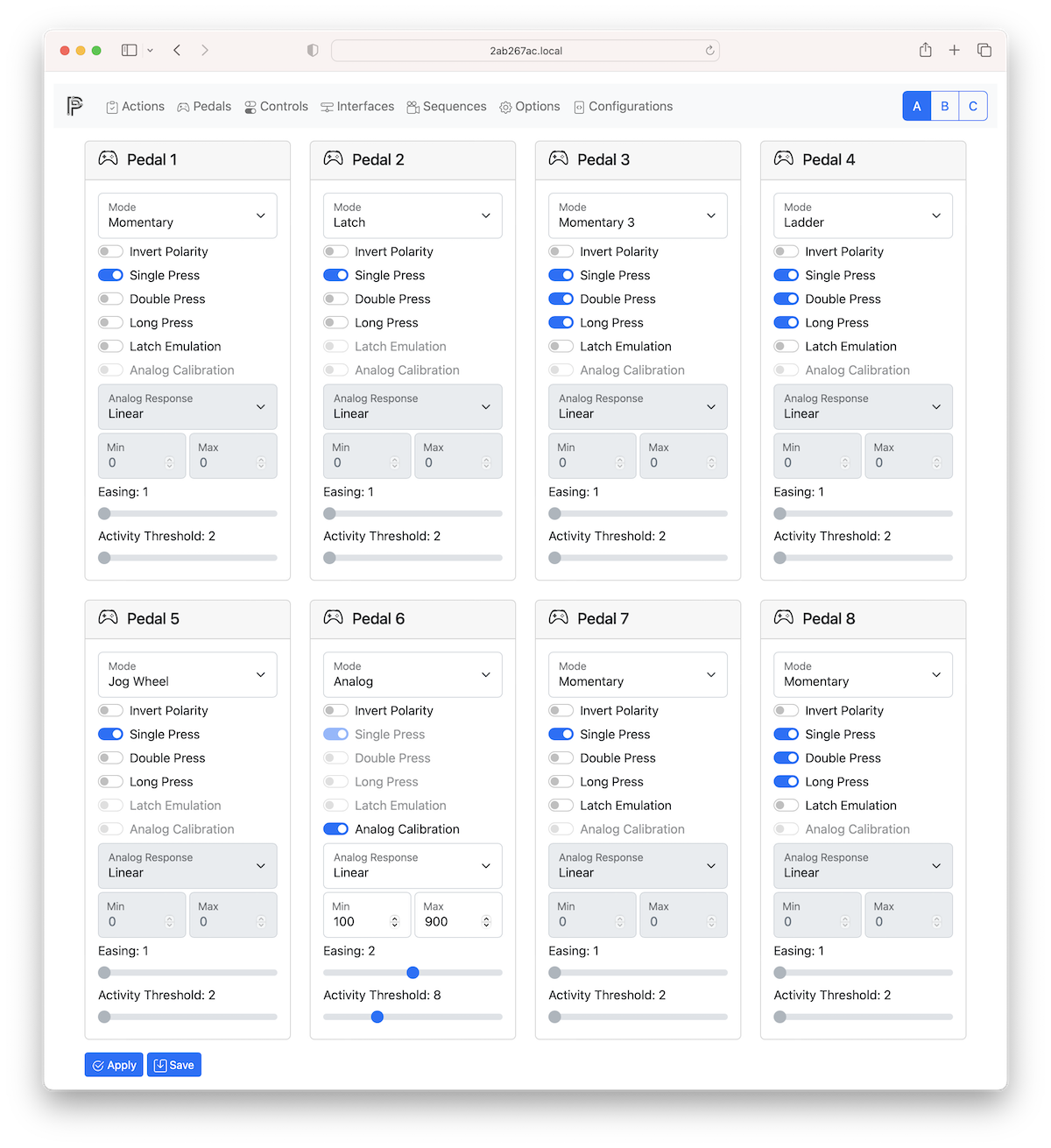
| ____________ | Description |
| :----------------- | :------------------------------------------------------------------------------------------------------------------------------------------------------------------------------------------------------------------------------------------------------------------------------------------------------------------------------------------------------------------------------------------------------------------------------------------------------------------------------------------------------------------------------------------------------------------------------------------ |
| Mode | Select one of the following: NONE, MOMENTARY, LATCH, ANALOG, JOG WHEEL, MOMENTARY 2, MOMENTARY 3, LATCH 2, LADDER, ULTRASONIC, ANALOG+MOMENTARY, ANALOG+LATCH. |
| Invert Polarity | Normally open (NO) and normally closed (NC) momentary switches are supported and configurable by software if the foot switch do not have a polarity switch. On analog pedal or ultrasonic ranging sensor it invert the range. |
| Singles Press | Select Enable/Disable here to enable/disable PRESS, RELEASE and CLICK events.
CLICK event is detected after a PRESS followed by a RELEASE event on momentary switches and on PRESS and on RELEASE on latch switches. |
| Double Press | Select Enable/Disable here to enable/disable DOUBLE CLICK events.
If double press is enabled CLICK event is postponed until double press timeout (by default 400ms). |
| Long Press | Select Enable/Disable here to enable/disable LONG PRESS, REPEAT PRESSED and LONG RELEASE events.
LONG PRESS event is detected after a PRESS event with no RELEASE event within the long press timeout (by default 500ms).
After a LONG PRESS event a REPEAT PRESSED event is triggered every repeat press timeout (by default 1000ms) until the button is keep pressed.
After a LONG PRESS event the RELEASE event is replaced by a LONG RELEASE event.
Two sequences of events are possible: PRESS and RELEASE or PRESS, LONG PRESS, REPEAT PRESS (optional) and LONG RELEASE. |
| Analog Calibration | Enable analog pedal continuous calibration. Min and Max values are managed by PedalinoMini™. After each power on cycle move the expression pedals to its full range and PedalinoMini™ will calibrate it. During the first full movement of the pedal MIDI events could be not precise because PedalinoMini™ is still learning the full range of the pedal. |
| Analog Response | Mapping between analog pedal movement and response. Accepted values: LINEAR (as is response), LOG (great acceleration but than flat), ANTILOG (start slow with a rapid increase). |
| Min | In ANALOG mode minumum digital value (after analog-to-digital conversion) that can reach the connected expression pedal.
In ULTRASONIC mode the minimum distance (250 is around 2cm and it is not recommended to go below). Acceptable values are from 0 to 1023 |
| Max | In ANALOG mode maximum digital value (after analog-to-digital conversion) that can reach the connected expression pedal.
In ULTRASONIC mode the maximum distance (1023 is around 18cm and it is far enough for the application). Acceptable values are from 0 to 1023. |
| Easing | It controls the amount of easing. Possible values are: 1, 2 or 3. Bigger value makes the responsive values more responsive: output value follows immediately the input value. Recommended values: 1 for ultrasonic sensor, 2 or 3 for potentiometer. |
| Activity Threshold | The amount of movement that must take place for it to register as activity and start moving the output value. Increase the value to suppress noisy potentiometer. Recommended values: 8 or 16 for potentiometer, 64 for ultrasonic sensor. |
## Controls
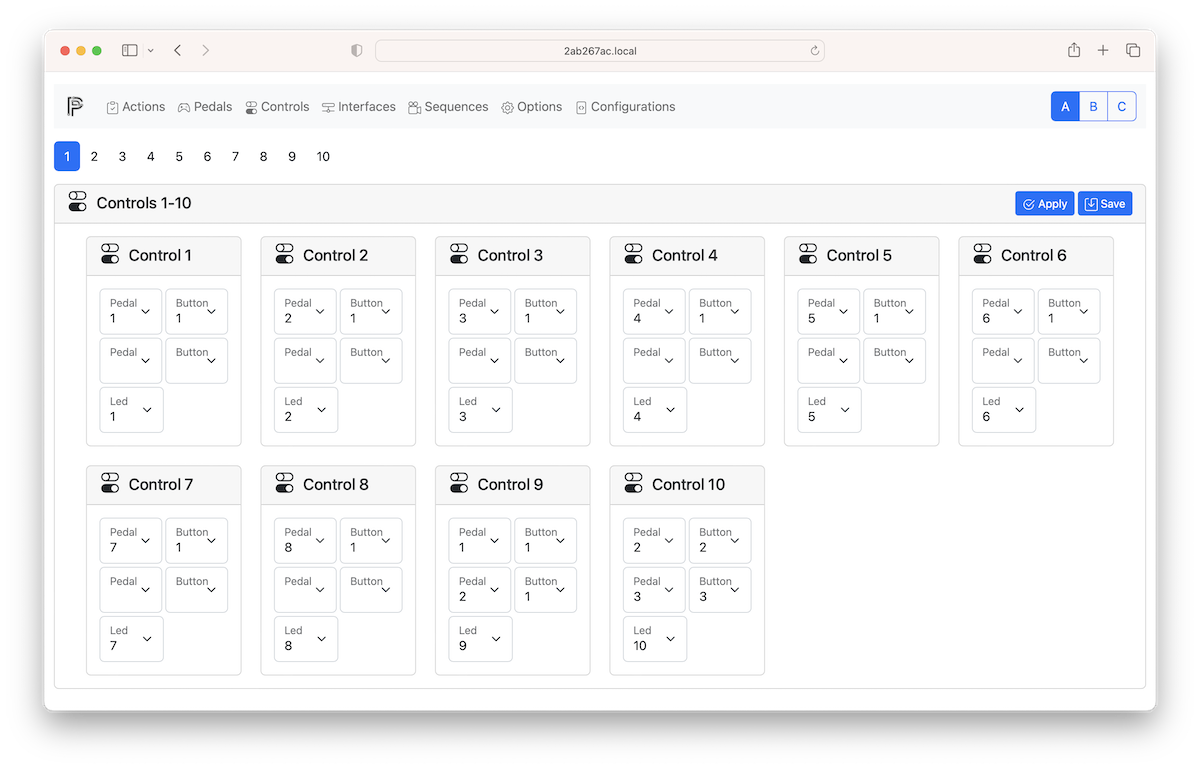
A control is a single switch of a pedal (e.g., button 2 of pedal 4) or a combination of 2 switches from any pedals pressed at the same time. Controls are used to logically group and hide the physical connection of switches, or to define a new control as a simultaneous press of two switches.
In short: a pedal is the port (physical or virtual) and the hardware connected to it; a control is a logical button built from one or more pedal switches, and is what you assign actions to.
For example, with the default configuration on PedalinoMini 8, the eight internal foot switches are called Control 1 through Control 8.
Actions are triggered by controls. As a consequence a control is needed also for analog, ultrasonic pedals, and so on.
Due to hardware limitation simultaneous press do not works with 2 switches of the same MOMENTARY 3, LATCH 3 and LADDER. Instead simultaneous press works well between one switch of a MOMENTARY 3/LATCH 3/LADDER pedal and any other switch of a different pedal of any type. Simultaneous press works well between the 2 switches of the same MOMENTARY 2 or LADDER 2 pedal.
For each control it is possible to define the default led number to be used in Actions. It helps to simply the hardware leds connections but keeping each led logically linked to a switch.
Of course the simultaneous release, double click and long press are supported too even if they are not so usefull.