[](https://github.com/algolia/instantsearch-ios/)
[](https://github.com/algolia/instantsearch-ios/)
[](https://swift.org/package-manager/)
[](https://developer.apple.com/documentation/xcode/creating_a_mac_version_of_your_ipad_app/)
[](https://opensource.org/licenses/Apache-2.0)
By [Algolia](http://algolia.com).
InstantSearch family: **InstantSearch iOS** | [InstantSearch Android][instantsearch-android-github] | [React InstantSearch][react-instantsearch-github] | [InstantSearch.js][instantsearch-js-github] | [Angular InstantSearch][instantsearch-angular-github] | [Vue InstantSearch][instantsearch-vue-github].
**InstantSearch iOS** is a framework providing components and helpers to help you build the best instant-search experience on iOS with Algolia. It is built on top of Algolia's [Swift API Client v9](https://github.com/algolia/algoliasearch-client-swift) library to provide you a high-level solution to quickly build various search interfaces.
## Structure
**InstantSearch iOS** consists of four products
- *[InstantSearch Insights](./Sources/InstantSearchInsights/README.md)* – library that allows developers to capture search-related events
- *InstantSearch Core* – the business logic modules of InstantSearch
- *InstantSearch* – the complete InstantSearch toolset including UIKit components
- *InstantSearch SwiftUI* – the set of SwiftUI data models and views to use on top of Core components
## Examples
You can see InstantSearch iOS in action in the [Examples project](/Examples). It contains search components ans experiences built with InstantSearch and written in Swift.
## Installation
### Swift Package Manager
The Swift Package Manager is a tool for managing the distribution of Swift code. It’s integrated with the Swift build system to automate the process of downloading, compiling, and linking dependencies.
Since the release of Swift 5 and Xcode 11, SPM is compatible with the iOS, macOS and tvOS build systems for creating apps.
To use SwiftPM, you should use Xcode 11 to open your project. Click `File` -> `Swift Packages` -> `Add Package Dependency`, enter [InstantSearch repo's URL](https://github.com/algolia/instantsearch-ios).
Next, select the products you consider to use in your project from the provided list.
If you're a framework author and use InstantSearch as a dependency, update your `Package.swift` file:
```swift
let package = Package(
// 8.0.0 ..< 9.0.0
dependencies: [
.package(url: "https://github.com/algolia/instantsearch-ios", from: "8.0.0")
],
// ...
)
```
### CocoaPods
[CocoaPods](https://cocoapods.org/) is a dependency manager for Cocoa projects.
To install InstantSearch, simply add the following line to your Podfile:
```ruby
pod 'InstantSearch', '~> 8.0'
# pod 'InstantSearch/Insights' for access to Insights library only
# pod 'InstantSearch/Core' for access business logic without UIKit components
# pod 'InstantSearch/SwiftUI' for access to SwiftUI components
```
Then, run the following command:
```bash
$ pod update
```
## Documentation
**You can start with the [Getting Started Guide](https://www.algolia.com/doc/guides/building-search-ui/getting-started/ios/).**
Learn more about instantSearch iOS in the [dedicated documentation website](https://www.algolia.com/doc/api-reference/widgets/ios/).
## Basic Usage
In your `ViewController.swift`:
```swift
import InstantSearch
struct Item: Codable {
let name: String
}
class SearchResultsViewController: UITableViewController, HitsController {
var hitsSource: HitsInteractor- ?
override func viewDidLoad() {
super.viewDidLoad()
tableView.register(UITableViewCell.self, forCellReuseIdentifier: "cell")
}
override func tableView(_ tableView: UITableView, numberOfRowsInSection section: Int) -> Int {
hitsSource?.numberOfHits() ?? 0
}
override func tableView(_ tableView: UITableView, cellForRowAt indexPath: IndexPath) -> UITableViewCell {
let cell = tableView.dequeueReusableCell(withIdentifier: "cell", for: indexPath)
cell.textLabel?.text = hitsSource?.hit(atIndex: indexPath.row)?.name
return cell
}
override func tableView(_ tableView: UITableView, didSelectRowAt indexPath: IndexPath) {
if let _ = hitsSource?.hit(atIndex: indexPath.row) {
// Handle hit selection
}
}
}
class ViewController: UIViewController {
lazy var searchController = UISearchController(searchResultsController: hitsViewController)
let hitsViewController = SearchResultsViewController()
let searcher = try! HitsSearcher(appID: "latency",
apiKey: "1f6fd3a6fb973cb08419fe7d288fa4db",
indexName: "bestbuy")
lazy var searchConnector = SearchConnector
- (searcher: searcher,
searchController: searchController,
hitsInteractor: .init(),
hitsController: hitsViewController)
override func viewDidLoad() {
super.viewDidLoad()
searchConnector.connect()
searcher.search()
setupUI()
}
override func viewDidAppear(_ animated: Bool) {
super.viewDidAppear(animated)
searchController.isActive = true
}
func setupUI() {
view.backgroundColor = .white
navigationItem.searchController = searchController
searchController.hidesNavigationBarDuringPresentation = false
searchController.showsSearchResultsController = true
searchController.automaticallyShowsCancelButton = false
}
}
```
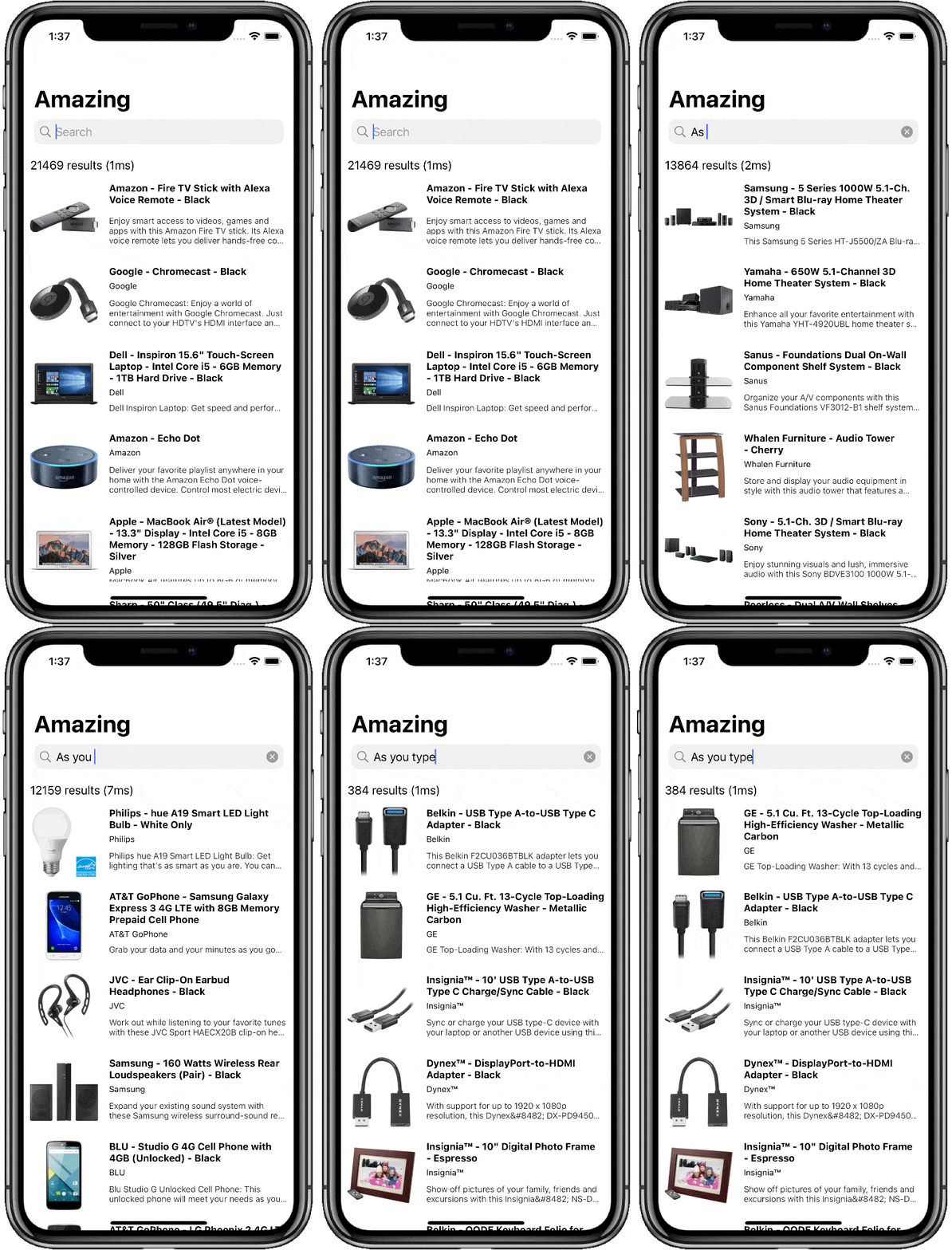
You can now build and run your application to see the basic search experience in action.
You should see that the results are changing on each key stroke.
To get a more meaningful search experience, please follow the [Getting Started Guide](https://www.algolia.com/doc/guides/building-search-ui/getting-started/ios/).
If you build a SwiftUI application, please check out the Getting [Started with SwiftUI guide](https://www.algolia.com/doc/guides/building-search-ui/getting-started/how-to/declarative/ios/)
If you only require business logic modules in your project and use `InstantSearchCore` framework, add `import InstantSearchCore` to your source files.
## Logs
There are 7 levels of logs severity produced by the library.
The default severity level is `.info`.
You can configure the logging level as follows:
```
Logs.logSeverityLevel = .debug
```
## Telemetry
InstantSearch iOS collects data points at runtime. This helps the InstantSearch team improve and prioritize future development.
Here's an exhaustive list of the collected data:
- InstantSearch version
- The name of the instantiated InstantSearch components, for example, `HitsSearcher`, `FilterState`
- The name of the components with custom parameters (overridden defaults). InstantSearch doesn't collect the values of those parameters. For example, the default of the `facets` value in `FacetListInteractor` is an empty list. If you instantiate it with a list of facets, then the telemetry tracks that the `facets` parameter received a custom value, but not the value itself.
InstantSearch doesn't collect any sensitive or personal data. However, you can still opt out of the telemetry collection with the following code:
```swift
InstantSearchTelemetry.shared.isEnabled = false
```
## Getting Help
- **Need help**? Ask a question to the [Algolia Community](https://discourse.algolia.com/) or on [Stack Overflow](http://stackoverflow.com/questions/tagged/algolia).
- **Encountering an issue?** Before reaching out to support, we recommend heading to our [FAQ](https://www.algolia.com/doc/guides/building-search-ui/troubleshooting/faq/ios/) where you will find answers for the most common issues and gotchas with the framework.
- **Found a bug?** You can open a [GitHub issue](https://github.com/algolia/algoliasearch-client-swift/issues).
- **Questions about Algolia?** You can search our [FAQ in our website](https://www.algolia.com/doc/faq/).
## Getting involved
* If you **want to contribute** please feel free to **submit pull requests**.
* If you **have a feature request** please **open an issue**.
* If you use **InstantSearch** in your app, we would love to hear about it! Drop us a line on [discourse](https://discourse.algolia.com/) or [twitter](https://twitter.com/algolia).
# License
InstantSearch iOS is [Apache 2.0 licensed](LICENSE.md).
[react-instantsearch-github]: https://github.com/algolia/react-instantsearch/
[instantsearch-android-github]: https://github.com/algolia/instantsearch-android
[instantsearch-js-github]: https://github.com/algolia/instantsearch.js
[instantsearch-vue-github]: https://github.com/algolia/vue-instantsearch
[instantsearch-angular-github]: https://github.com/algolia/angular-instantsearch