
The open source AI code review agent.



English | 简体中文
--- ## What is Open Code Review? Open Code Review is an AI-powered code review CLI tool. It originated as Alibaba Group's internal official AI code review assistant — over the past two years, it has served tens of thousands of developers and identified millions of code defects. After thorough validation at massive scale, we incubated it into an open source project for the community. Simply configure a model endpoint to get started. It reads Git diffs, sends changed files to a configurable LLM via an agent with tool-use capabilities, and generates structured review comments with line-level precision. The agent can read full file contents, search the codebase, inspect other changed files for context, and produce deep reviews — not just surface-level diff feedback. 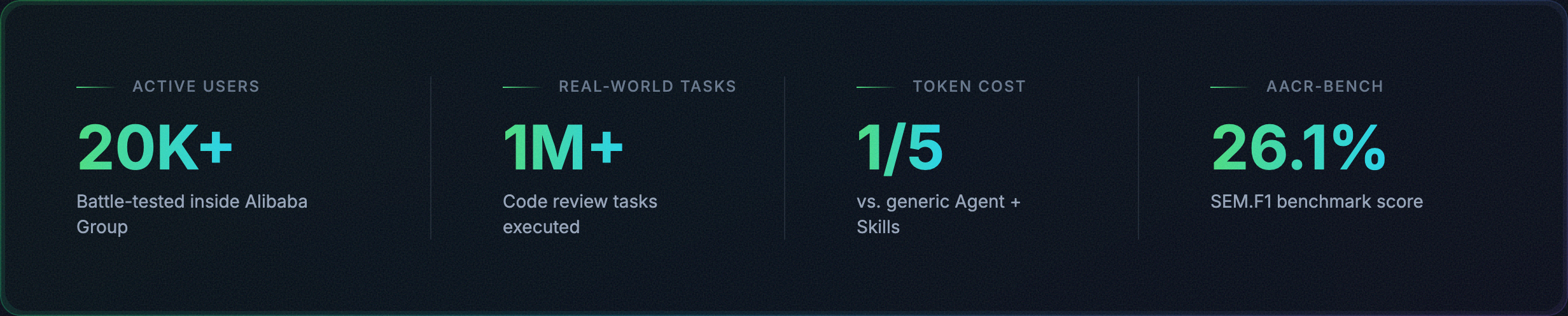 ## Why Open Code Review? ### The Problem with General-Purpose Agents If you've used general-purpose agents like Claude Code with Skills for code review, you've likely encountered these pain points: - **Incomplete coverage** — On larger changesets, agents tend to "cut corners," selectively reviewing only some files and missing others. - **Position drift** — Reported issues frequently don't match the actual code location, with line numbers or file references drifting off target. - **Unstable quality** — Natural-language-driven Skills are hard to debug, and review quality fluctuates significantly with minor prompt variations. The root cause: a purely language-driven architecture lacks hard constraints on the review process. ### Core Design: Deterministic Engineering × Agent Hybrid Open Code Review's core philosophy is to combine deterministic engineering with an agent, each handling what it does best. **Deterministic Engineering — Hard Constraints** For review steps that *must not go wrong*, engineering logic — not the language model — guarantees correctness: - **Precise file selection** — Determines exactly which files need review and which should be filtered, ensuring no important change is missed. - **Smart file bundling** — Groups related files into a single review unit (e.g., `message_en.properties` and `message_zh.properties` are bundled together). Each bundle runs as a sub-agent with isolated context — a divide-and-conquer strategy that stays stable on very large changesets and naturally supports concurrent review. - **Fine-grained rule matching** — Matches review rules to each file's characteristics, keeping the model's attention sharply focused and eliminating information noise at the source. Compared to purely language-driven rule guidance, template-engine-based rule matching is more stable and predictable. - **External positioning and reflection modules** — Independent comment-positioning and comment-reflection modules systematically improve both the location accuracy and content accuracy of AI feedback. **Agent — Dynamic Decision-Making** The agent's strengths are concentrated where they matter most — dynamic decisions and dynamic context retrieval: - **Scenario-tuned prompts** — Prompt templates deeply optimized for code review, improving effectiveness while reducing token consumption. - **Scenario-tuned toolset** — Distilled from deep analysis of tool-call traces in large-scale production data — including call frequency distributions, per-tool repetition rates, and the impact of new tools on the overall call chain — resulting in a purpose-built toolset that is more stable and predictable for code review than a generic agent toolkit. ## How to Use ### CLI #### Install **Via NPM (Recommended)** ```bash npm install -g @alibaba-group/open-code-review ``` After installation, the `ocr` command is available globally. **From GitHub Release** Download the latest binary from [GitHub Releases](https://github.com/alibaba/open-code-review/releases): ```bash # macOS (Apple Silicon) curl -Lo ocr https://github.com/alibaba/open-code-review/releases/latest/download/opencodereview-darwin-arm64 chmod +x ocr && sudo mv ocr /usr/local/bin/ocr # macOS (Intel) curl -Lo ocr https://github.com/alibaba/open-code-review/releases/latest/download/opencodereview-darwin-amd64 chmod +x ocr && sudo mv ocr /usr/local/bin/ocr # Linux (x86_64) curl -Lo ocr https://github.com/alibaba/open-code-review/releases/latest/download/opencodereview-linux-amd64 chmod +x ocr && sudo mv ocr /usr/local/bin/ocr # Linux (ARM64) curl -Lo ocr https://github.com/alibaba/open-code-review/releases/latest/download/opencodereview-linux-arm64 chmod +x ocr && sudo mv ocr /usr/local/bin/ocr # Windows (x86_64) — move ocr.exe to a directory in your PATH curl -Lo ocr.exe https://github.com/alibaba/open-code-review/releases/latest/download/opencodereview-windows-amd64.exe # Windows (ARM64) — move ocr.exe to a directory in your PATH curl -Lo ocr.exe https://github.com/alibaba/open-code-review/releases/latest/download/opencodereview-windows-arm64.exe ``` **From Source** ```bash git clone https://github.com/alibaba/open-code-review.git cd open-code-review make build sudo cp dist/opencodereview /usr/local/bin/ocr ``` #### Quick Start **1. Configure LLM** **You must configure an LLM before reviewing code.** ```bash # Option A: Interactive config ocr config set llm.url https://api.anthropic.com/v1/messages ocr config set llm.auth_token your-api-key-here ocr config set llm.model claude-opus-4-6 ocr config set llm.use_anthropic true # Option B: Environment variables (highest priority) export OCR_LLM_URL=https://api.anthropic.com/v1/messages export OCR_LLM_TOKEN=your-api-key-here export OCR_LLM_MODEL=claude-opus-4-6 export OCR_USE_ANTHROPIC=true ``` Config is stored in `~/.opencodereview/config.json`. It is also compatible with Claude Code environment variables (`ANTHROPIC_BASE_URL`, `ANTHROPIC_AUTH_TOKEN`, `ANTHROPIC_MODEL`) and parses `~/.zshrc` / `~/.bashrc` for those exports. **2. Test Connectivity** ```bash ocr llm test ``` **3. Review** ```bash cd your-project # Workspace mode — review all staged, unstaged, and untracked changes ocr review # Branch range — compare two refs ocr review --from main --to feature-branch # Single commit ocr review --commit abc123 ``` ### Integrate with Coding Agents OCR can be seamlessly integrated into AI coding agents as a slash command, enabling code review directly within your agent workflow. #### Option 1: Install as a Skill Use `npx` to install the OCR skill into your project: ```bash npx skills add alibaba/open-code-review --skill open-code-review ``` This installs the `open-code-review` skill from the [skills registry](skills/open-code-review/SKILL.md), which teaches your coding agent how to invoke `ocr` for code review, classify issues by priority, and optionally apply fixes. #### Option 2: Install as a Claude Code Plugin For [Claude Code](https://docs.anthropic.com/en/docs/claude-code), install the command plugin through the following command in Claude Code: ```bash /plugin marketplace add alibaba/open-code-review /plugin install open-code-review@open-code-review ``` This registers the `/open-code-review:review` slash command, which runs OCR and automatically filters and fixes issues. #### Option 3: Copy the Command File Directly For a quick setup without any package manager, simply copy the command file to use the `/open-code-review` slash command in Claude Code. **Project-level** (shared with team via git): ```bash mkdir -p .claude/commands curl -o .claude/commands/open-code-review.md \ https://raw.githubusercontent.com/alibaba/open-code-review/main/plugins/open-code-review/commands/review.md ``` **User-level** (personal global use across all projects): ```bash mkdir -p ~/.claude/commands curl -o ~/.claude/commands/open-code-review.md \ https://raw.githubusercontent.com/alibaba/open-code-review/main/plugins/open-code-review/commands/review.md ``` > **Prerequisite**: All integration methods require the `ocr` CLI to be installed and an LLM configured. See [Install](#install) and [Configure LLM](#1-configure-llm) above. ### CI/CD Integration OCR can be integrated into CI/CD pipelines to automate code review on Merge Requests / Pull Requests. The core command for CI integration: ```bash ocr review \ --from "origin/main" \ --to "origin/feature-branch" \ --format json ``` The `--format json` flag outputs machine-readable results suitable for parsing in CI scripts. See the [`examples/`](./examples/) directory for integration examples: - [`github_actions/`](./examples/github_actions/) — GitHub Actions integration example - [`gitlab_ci/`](./examples/gitlab_ci/) — GitLab CI integration example ## Commands | Command | Alias | Description | |---------|-------|-------------| | `ocr review` | `ocr r` | Start a code review | | `ocr rules check