/recall \
-H "Authorization: Bearer $(cat ~/.config/recallnest/gateway-token)" \
-H 'content-type: application/json' \
-d '{"query":"how did we fix that deploy issue","limit":3,"allScopes":true}'
```
Optional: set `RECALLNEST_GATEWAY_FILE_ROOTS="notes=/abs/path,wiki=/abs/path"` to add `GET /files/search`, a read-only ripgrep search over markdown directories you name (the query is passed as an argv element, never through a shell). Leave it unset and the route does not exist.
> The gateway also binds to `127.0.0.1` by default — exposing it is the tunnel's job. Evaluate that risk yourself.
This is how the author connected [OpenMinis](https://github.com/OpenMinis/OpenMinis) on an iPhone: the phone app reaches the gateway over a Tailscale Funnel and queries the same memory store. The interesting part is what it reads back — its own history. Those conversations get exported, flow back, and are indexed, so a phone agent that cold-starts every time ends up with memory that survives its sessions.
## Quick Start
### Option A: Claude Code Plugin (recommended)
```bash
/plugin marketplace add AliceLJY/recallnest
/plugin install recallnest@AliceLJY
```
RecallNest starts automatically with Claude Code. No manual MCP config needed.
Claude Code prompts for a Jina API key during installation. The key is stored through Claude Code's sensitive plugin configuration, while the generated config and LanceDB database live in the plugin's persistent data directory rather than the versioned plugin cache.
> The Claude Code plugin and npm package share one release version and are updated together.
>
> **Requires:** [Bun](https://bun.sh). Dependencies install on first start.
### Option B: npm install
```bash
npx recallnest --help # run directly
# or
npm install -g recallnest # install globally
recallnest doctor
```
Requires [Bun](https://bun.sh): RecallNest does not run on Node.js. The npm launcher only hands off to Bun, and exits with install instructions if `bun` is not on your PATH. No git clone needed.
### Option C: Manual setup
```bash
git clone https://github.com/AliceLJY/recallnest.git
cd recallnest
bun install
cp config.json.example config.json
cp .env.example .env
# Edit .env → add your JINA_API_KEY
```
### Start the server
```bash
bun run api
# → RecallNest API running at http://localhost:4318
```
### Try it
```bash
# Store a memory
curl -X POST http://localhost:4318/v1/store \
-H "Content-Type: application/json" \
-d '{"text": "User prefers dark mode", "category": "preferences"}'
# Recall memories
curl -X POST http://localhost:4318/v1/recall \
-H "Content-Type: application/json" \
-d '{"query": "user preferences"}'
# Check stats
curl http://localhost:4318/v1/stats
```
### Connect your terminals
```bash
bash integrations/claude-code/setup.sh
bash integrations/agy/setup.sh
bash integrations/codex/setup.sh
```
Each script installs MCP access and managed continuity rules, so `resume_context` fires automatically in fresh windows.
### Index existing conversations
```bash
bun run src/cli.ts ingest --source all
bun run seed:continuity
bun run src/cli.ts doctor
```
Since 2026-10-06, `ingest` does two things by default: it reconciles memory files
(`sources.memory`) and moves files from the Minis drop folder into `data/minis-archive`. The six
conversation sources (cc / codex / kimi / gemini / desktop / minis) are not chunked, embedded or
written. To index transcripts as well, set `RECALLNEST_TRANSCRIPT_INGEST=on` in the environment
that runs `ingest` (only the exact value `on` counts). Minis conversations archived while the
switch was off are not picked up automatically; copy them from `data/minis-archive` back into
the drop folder and run `ingest` again.
---
## Images: addressable, not embedded
Conversations contain images. A text memory layer does not. The usual answer is a
multimodal embedding model — encode every image into the same space as the text. That is
right for photo libraries. It is the wrong shape here, for a cheap reason: **in a
conversation an image almost never arrives alone.** It comes wrapped in "look at this
error", and the reply right after it usually describes what was in the picture. The words
around the image are already an index of it. What was missing was never semantic search
over pixels — it was knowing a picture is sitting there at all.
So RecallNest does not encode images. It records **how many images are in the session a
memory came from**, and lets you decide whether to open the original transcript. Meaning
is resolved on demand, by whatever model is asking, at the moment it matters.
The cost is worth stating plainly: **no multimodal model, no re-embedding, no image
storage, no change to any vector.** Backfilling 21,319 existing memories touched metadata
only.
Two design choices in it were not obvious, and both were wrong on the first attempt.
### Session-level, on purpose
The marker counts the whole session, not the turn — coarser than it first looks like it
should be, and the coarseness is the point.
A turn that is nothing but a pasted screenshot has almost no text, so it never cleared the
length gate and never entered the store. Measured on real transcripts, **12.5% of turns
containing a pasted image were dropped whole** — including the ones worth the most, like
seven screenshots with no caption, or "here are the steps" attached to a picture that *is*
the steps. A turn-level marker has nothing to attach to for exactly those. A session-level
marker lands on that session's *other* memories, which did get stored, and those are what
a search surfaces.
The trade-off is undisguised: every memory from a session carries the same count, so the
images may have nothing to do with the row you are looking at. The line says
`in this session`, not `in this memory`, for that reason.
### Two classes, because they answer different questions
| Bucket | What it is | The question it answers |
|---|---|---|
| user-pasted | Pictures a human put into a message | *Where is that screenshot I sent?* |
| agent-made | Everything else the session produced | *What did the page look like? What did I generate?* |
Keeping only the first is tempting — a person searching their own memory wants their own
screenshots. But an agent reconstructing its past work wants the other: the diagram it
drew, the rendering it captured, the illustration it made for a post. **Of 1,767 sessions
carrying images, 1,103 contain no human-pasted image at all.** Keep one bucket and those
sessions go silent — precisely the ones where the agent did visual work.
### The second bucket is a complement, not a list
The first implementation defined agent-made images by enumeration: inside `tool_result`,
inside `payload.output`, inside `tool.result`. Every location was real. The list was still
wrong, because **the set of ways an image can appear only grows**, and an enumeration
silently drops whatever it did not anticipate.
So the second bucket is a complement: count every image signal in the record, subtract the
ones positively identified as human-pasted, attribute the rest without asking where it came
from. Across 9,619 transcripts:
| | Enumerated | Complement |
|---|---|---|
| Agent-made images | 5,812 | **10,938** |
| Sessions with any image | 1,507 | **1,767** |
| Human-pasted images | 1,629 | 1,629 |
**The enumeration missed 5,126 images and 376 sessions** — nearly half. The largest class
it dropped was image *generation*, which lives in neither container the list knew about.
Human-pasted counts are identical under both definitions, which is the check that matters:
widening the second bucket did not contaminate the precise one. A regression test feeds the
parser an `image_generation_call` — a shape the source never names — and asserts it lands
in the second bucket; under the enumerated implementation that test fails.
One caveat: the complement counts *signals*, not certified pictures. A single generation can
leave both a call and a completion record and be counted twice. That direction was chosen
deliberately — the question is "is there anything here to look at", not "exactly how many".
## Interfaces
RecallNest serves two interfaces:
- **MCP (stdio)** — for any client that can launch a command: CLI agents (Claude Code, Codex, Kimi, Antigravity) and GUI apps that accept an MCP config (Doubao, Cherry Studio, ChatBox)
- **HTTP API** — for custom agents, SDK-based apps, and any HTTP client
### Agent framework examples
Examples live in [`integrations/examples/`](integrations/examples/):
| Framework | Example | Language |
|-----------|---------|----------|
| [Claude Agent SDK](integrations/examples/claude-agent-sdk/) | `memory-agent.ts` | TypeScript |
| [OpenAI Agents SDK](integrations/examples/openai-agents-sdk/) | `memory-agent.py` | Python |
| [LangChain](integrations/examples/langchain/) | `memory-chain.py` | Python |
---
MCP Tools (44 tools)
| Tool | Description |
|------|-------------|
| `workflow_observe` | Store an append-only workflow observation outside regular memory; accepts `idempotencyKey` for retry-safe writes |
| `workflow_health` | Inspect workflow observation health or show a degraded-workflow dashboard |
| `workflow_evidence` | Build an evidence pack for a workflow primitive |
| `store_memory` | Store a durable memory for future windows |
| `store_workflow_pattern` | Store a reusable workflow as durable `patterns` memory |
| `store_case` | Store a reusable problem-solution pair as durable `cases` memory |
| `promote_memory` | Explicitly promote evidence into durable memory |
| `promote_scan` | Scan recent evidence and auto-promote qualifying memories into durable storage |
| `promote_synthesis` | Scan dream-synthesized conclusions and promote the ones their own evidence set supports |
| `list_conflicts` | List or inspect promotion conflict candidates |
| `audit_conflicts` | Summarize stale/escalated conflict priorities |
| `escalate_conflicts` | Preview or apply conflict escalation metadata |
| `resolve_conflict` | Resolve a stored conflict candidate (keep / accept / merge) |
| `checkpoint_session` | Store the current active work state outside durable memory; accepts `idempotencyKey` for retry-safe writes |
| `latest_checkpoint` | Inspect the latest saved checkpoint by session or scope |
| `resume_context` | Compose startup context for a fresh window |
| `search_memory` | Proactive recall at task start |
| `explain_memory` | Explain why memories matched |
| `distill_memory` | Distill results into a compact briefing |
| `brief_memory` | Create a structured brief and re-index it |
| `pin_memory` | Promote a scoped memory into a pinned asset |
| `export_memory` | Export a distilled memory briefing to disk |
| `list_pins` | List pinned memories |
| `list_assets` | List all structured assets |
| `list_dirty_briefs` | Preview outdated brief assets created before the cleanup rules |
| `clean_dirty_briefs` | Archive dirty brief assets and remove their indexed rows |
| `memory_stats` | Show index statistics |
| `memory_drill_down` | Inspect a specific memory entry with full metadata and provenance |
| `auto_capture` | Heuristically extract and store memory signals from text (zero LLM calls) |
| `set_reminder` | Set a prospective memory reminder to surface in a future session |
| `consolidate_memories` | Cluster near-duplicate memories and merge them (dry-run by default) |
| `store_skill` | Store an executable skill with trigger conditions and verification |
| `retrieve_skill` | Retrieve matching executable skills by semantic similarity |
| `scan_skill_promotions` | Scan cases/patterns for promotion candidates to skills |
| `manage_alias` | Add, remove, list, or explain user query aliases for BM25 retrieval |
| `list_tools` | Discover available tools by tier (core/advanced/full) |
| `batch_store` | Store up to 20 memories in a single call with dedup |
| `distill_session` | Distill a conversation into structured knowledge via 3-layer pipeline |
| `import_conversations` | Import conversations from Claude Code, ChatGPT, Slack, and more |
| `data_checkup` | Run data quality health checks on the memory store |
| `dream` | Run offline memory consolidation (clustering, merging, pruning) |
| `memory_lint` | Run memory quality checks: contradictions, duplicates, stale entries, orphans |
| `forget_memory` | Delete a memory together with its KG triples, trigger rows and the indexed copies of pins made from it, archive the pin files, read back to confirm, and write an audit entry |
| `export_graph` | Export memories as an interactive HTML knowledge graph |
HTTP API (21 endpoints)
Base URL: `http://localhost:4318`
| Endpoint | Method | Description |
|----------|--------|-------------|
| `/v1/recall` | POST | Quick semantic search |
| `/v1/store` | POST | Store a new memory |
| `/v1/capture` | POST | Store multiple structured memories |
| `/v1/pattern` | POST | Store a structured workflow pattern |
| `/v1/case` | POST | Store a structured problem-solution case |
| `/v1/promote` | POST | Promote evidence into durable memory |
| `/v1/conflicts` | GET | List or inspect promotion conflict candidates |
| `/v1/conflicts/audit` | GET | Summarize stale/escalated conflict priorities |
| `/v1/conflicts/escalate` | POST | Preview or apply conflict escalation metadata |
| `/v1/conflicts/resolve` | POST | Resolve a stored conflict candidate (keep / accept / merge) |
| `/v1/checkpoint` | POST | Store the current work checkpoint |
| `/v1/workflow-observe` | POST | Store a workflow observation outside durable memory |
| `/v1/checkpoint/latest` | GET | Fetch the latest checkpoint by session or scope |
| `/v1/workflow-health` | GET | Inspect workflow health or return a degraded-workflow dashboard |
| `/v1/workflow-evidence` | GET | Build a workflow evidence pack from recent issue observations |
| `/v1/resume` | POST | Compose startup context for a fresh window |
| `/v1/search` | POST | Advanced search with full metadata |
| `/v1/stats` | GET | Memory statistics |
| `/v1/lint` | GET | Memory quality lint report |
| `/v1/health` | GET | Health check |
Full documentation: [`docs/api-reference.md`](docs/api-reference.md)
CLI Commands
```bash
# Search & explore
bun run src/cli.ts search "your query"
bun run src/cli.ts explain "your query" --profile debug
bun run src/cli.ts distill "topic" --profile writing
bun run src/cli.ts stats
# Workflow observation
bun run src/cli.ts workflow-observe resume_context "Fresh window skipped continuity recovery." --outcome missed --scope project:recallnest --idempotency-key smoke-2026-06-26
bun run src/cli.ts workflow-health resume_context --scope project:recallnest
bun run src/cli.ts workflow-evidence checkpoint_session --scope project:recallnest
# Conflict management
bun run src/cli.ts conflicts list
bun run src/cli.ts conflicts list --attention resolved
bun run src/cli.ts conflicts list --group-by cluster --attention resolved
bun run src/cli.ts conflicts audit
bun run src/cli.ts conflicts audit --export --format md
bun run src/cli.ts conflicts escalate --attention stale
bun run src/cli.ts conflicts show af70545a
bun run src/cli.ts conflicts resolve af70545a --keep-existing
bun run src/cli.ts conflicts resolve af70545a --merge
bun run src/cli.ts conflicts resolve --all --keep-existing --status open
# Memory health & visualization
bun run src/cli.ts lint # memory quality report
bun run src/cli.ts lint --scope project:myapp # lint a specific scope
bun run src/cli.ts graph --open # export & open knowledge graph
bun run src/cli.ts graph --max-nodes 50 # smaller graph
# Ingestion & diagnostics (transcripts are not ingested by default; see "Index existing conversations")
bun run src/cli.ts ingest --source all
bun run src/cli.ts doctor
```
---
## Web UI
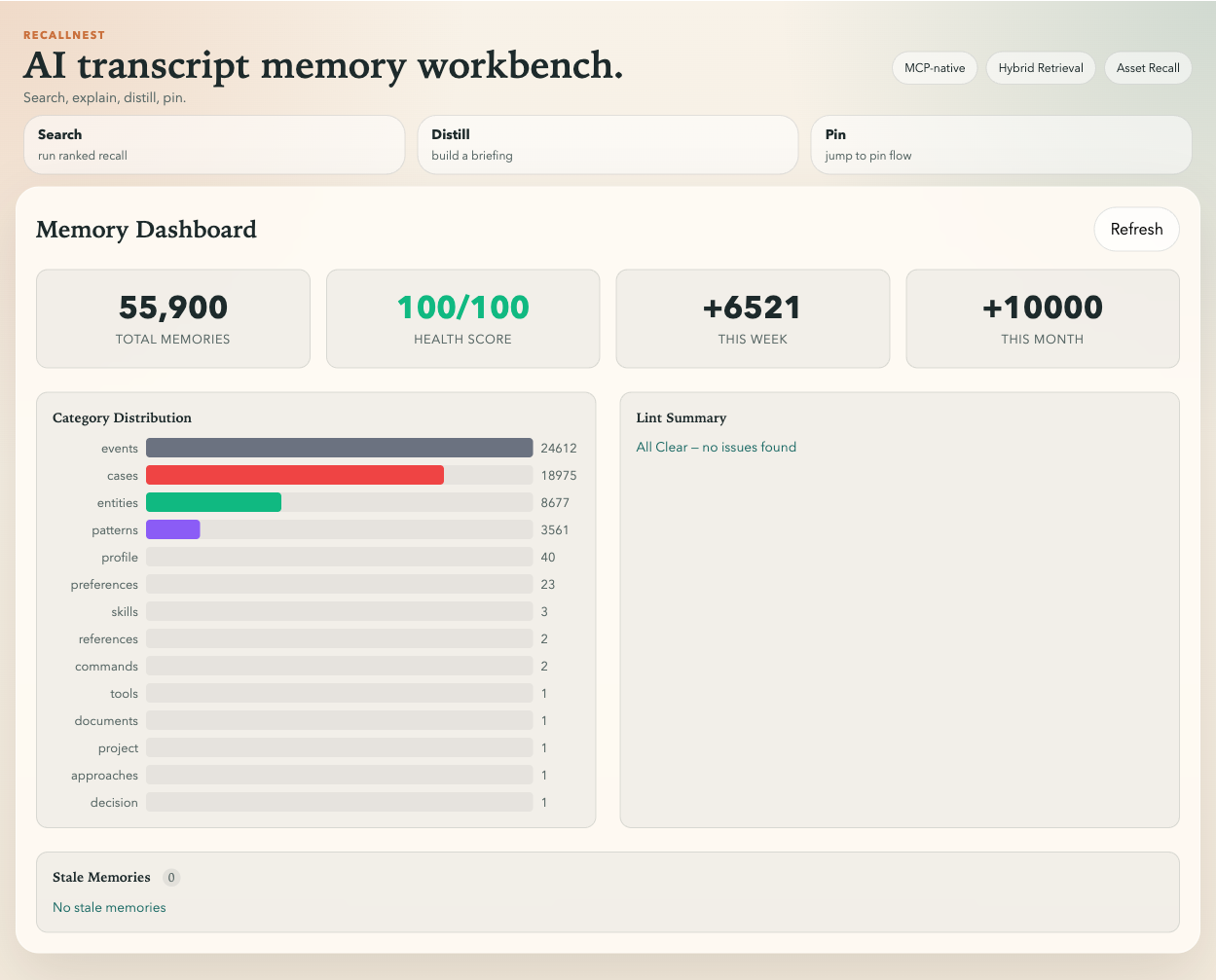
Dashboard — total count, category distribution, health score, and growth trends at a glance.
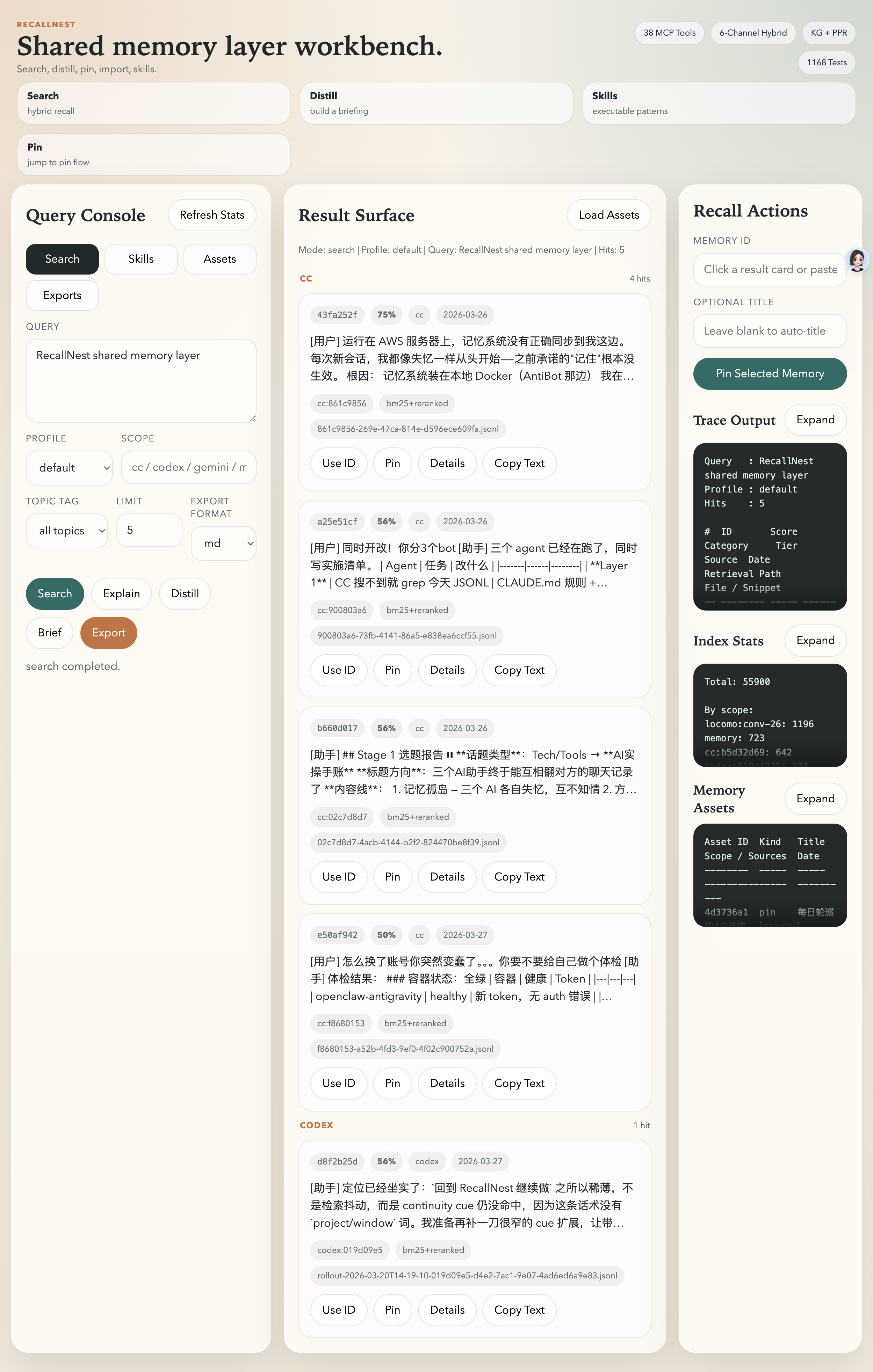
Search Workbench — hybrid search with topic tag filtering, 4 retrieval profiles, Skills browser, and asset management.
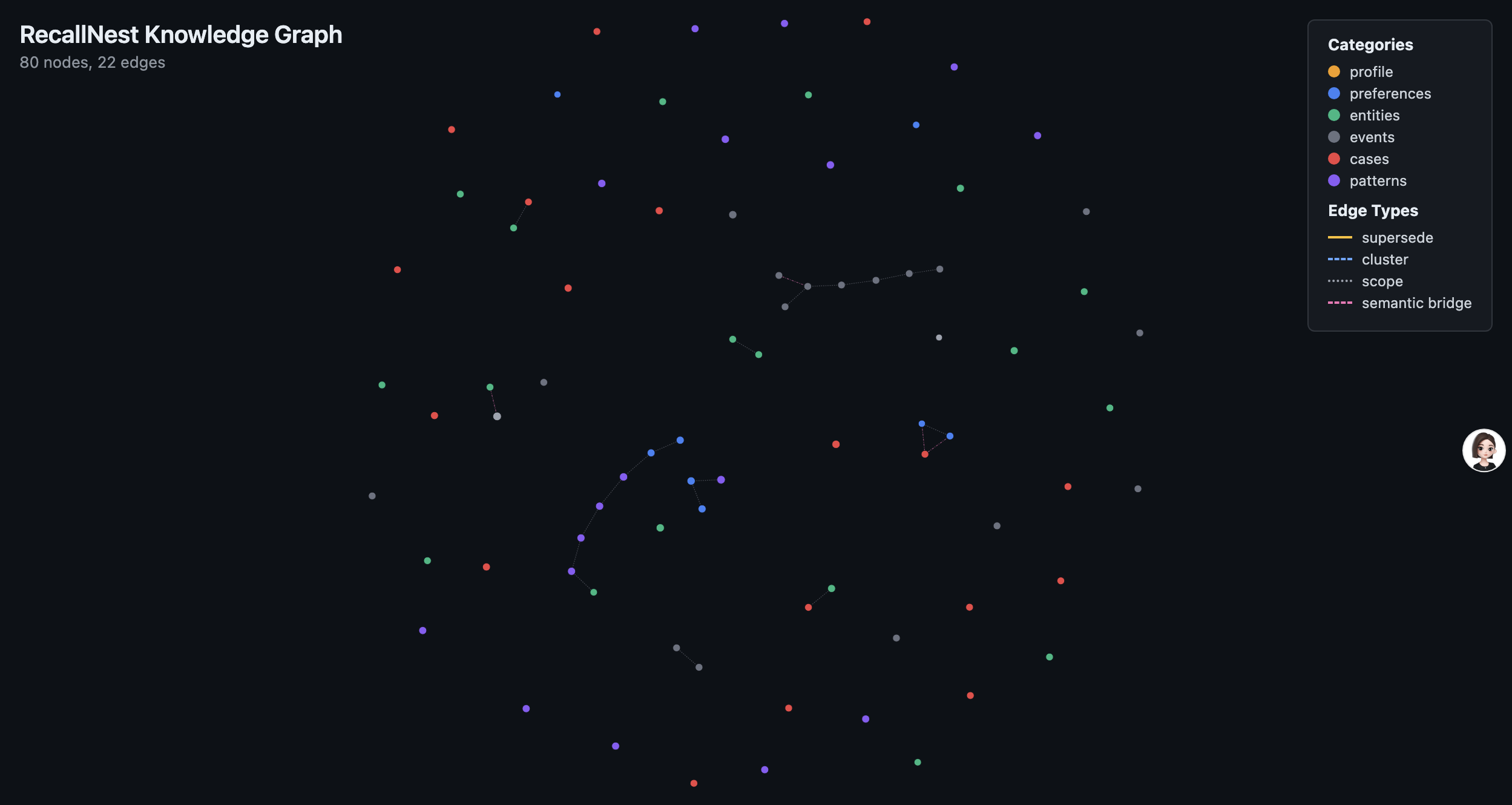
Knowledge Graph — interactive force-directed visualization with semantic bridges revealing cross-domain connections.
```bash
bun run src/ui-server.ts
# → http://localhost:4317
```
---
## What's new
**v4.0** runs on **Bun only** and hands its cross-process locks to the kernel. RecallNest
used to decide a lock file was stale from its pid and timestamp and then delete it — two
processes that saw the same stale file could both end up holding the lock (more than one
winner in up to 30 of 40 rounds of an eight-process race). Locks are now `flock(2)`: the
kernel releases them when a process exits or is killed, and a stress test that kills a
writer every 15–60 ms for six seconds never sees two writers inside.
The rest of the release fixes data that could go wrong quietly: a deleted memory written
back by a concurrent update, history rows left pointing at nothing, secrets kept in
metadata and sent to the embedding API inside triggers, explicit searches such as
`git push rules` or `#22` returning nothing, and write receipts that reported rejected
writes as stored.
**Upgrading:** install Bun, then stop every RecallNest process before starting v4 — old and
new lock code must not run together. A few defaults and HTTP replies changed; the list is
at the top of the v4.0.0 entry in the changelog. Existing LanceDB data opens in place.
**Full history — v4.0 through v1.0, with the upgrade notes for each — is in
[CHANGELOG.md](CHANGELOG.md).**
## Multilingual Support
RecallNest works out of the box with English. For multilingual memory (Chinese, Japanese, Thai, and 20+ more), install [babel-memory](https://github.com/AliceLJY/babel-memory) with the language packs you need:
```bash
# Chinese
npm install babel-memory jieba-wasm
# Japanese
npm install babel-memory @sglkc/kuromoji
# Thai
npm install babel-memory wordcut
# European languages (German, French, Spanish, Russian, etc.)
npm install babel-memory snowball-stemmers
# Multiple languages at once
npm install babel-memory jieba-wasm @sglkc/kuromoji snowball-stemmers
```
RecallNest auto-detects babel-memory at startup — no configuration needed. Without babel-memory, RecallNest still works perfectly with standard BM25 text search.
---
## Project Status & Roadmap
RecallNest is actively maintained. All major architecture phases are complete — see the full [Roadmap](ROADMAP.md) for current priorities and future plans.
Maintainers: see [Publishing RecallNest](https://github.com/AliceLJY/recallnest/blob/main/docs/releasing.md) for the npm Trusted Publishing, validation, and recovery process.
---
## Relationship to memory-lancedb-pro
RecallNest started as a fork of [memory-lancedb-pro](https://github.com/CortexReach/memory-lancedb-pro) and shares its core ideas around hybrid retrieval, decay modeling, and memory-as-engineering-system. The key difference:
- **memory-lancedb-pro** is an OpenClaw plugin — it adds long-term memory to a single OpenClaw agent.
- **RecallNest** is a standalone memory layer — it serves CLI agents, GUI chat apps and plain HTTP callers simultaneously through MCP + HTTP API, with session continuity, structured assets, and conflict management built in.
## Credit
| Source | Contribution |
|--------|-------------|
| [memory-lancedb-pro](https://github.com/CortexReach/memory-lancedb-pro) by [@win4r](https://github.com/win4r) | Fork base — hybrid retrieval, decay modeling, and memory architecture |
| Claude Code | Foundation and early project scaffolding |
| OpenAI Codex | Productization and MCP expansion |
Special thanks to Qin Chao ([@win4r](https://github.com/win4r)) and the [CortexReach](https://github.com/CortexReach) team for the foundational work.
Ecosystem
Part of the **小试AI** open-source AI workflow:
| Project | Description |
|---------|-------------|
| [babel-memory](https://github.com/AliceLJY/babel-memory) | Multilingual preprocessing for BM25 — 27+ languages, zero deps |
| cc-empire *(private)* | Hooks/rules/methodology — the connective tissue of the whole ecosystem |
| [telegram-ai-bridge](https://github.com/AliceLJY/telegram-ai-bridge) | Telegram bots for Claude, Codex, Agy, and Kimi |
| [tg-bridge-channel](https://github.com/AliceLJY/tg-bridge-channel) | Sister Telegram bridge using Claude Agent View background sessions |
| [wechat-ai-bridge](https://github.com/AliceLJY/wechat-ai-bridge) | Run Claude Code / Codex in WeChat with session management |
| [openclaw-tunnel](https://github.com/AliceLJY/openclaw-tunnel) | Docker ↔ host CLI bridge (maintenance mode — LanceDB test only) |
| [digital-clone-skill](https://github.com/AliceLJY/digital-clone-skill) | Build digital clones from corpus data |
| [claude-code-studio](https://github.com/AliceLJY/claude-code-studio) | Multi-session collaboration platform for Claude Code |
| [workflow-orchestrator](https://github.com/AliceLJY/workflow-orchestrator) | Natural-language pipeline orchestrator for Claude Code |
## License
MIT