# 🦁 WildBench: Benchmarking LLMs with Challenging Tasks from Real Users in the Wild (v2)
Banner
## Intro [📑 Paper](https://allenai.github.io/WildBench/WildBench_paper.pdf) | [🤗 Leaderboard](https://huggingface.co/spaces/allenai/WildBench) & [🤗 Dataset](https://huggingface.co/datasets/allenai/WildBench) ### Evaluation Framework
Click to expand ![img1](docs/wb_eval.png)
### Dataset Overview
Click to expand ![img1](docs/wb_table.png) ![img1](docs/wb_stat.png)
## Quick Start ```bash HF_MODEL_ID="Magpie-Align/Llama-3-8B-Magpie-Align-v0.1" # example model id MODEL_PRETTY_NAME="Llama-3-8B-Magpie-Align-v0.1" # example model name NUM_GPUS=4 # depending on your hardwares; # do inference on WildBench bash scripts/_common_vllm.sh $HF_MODEL_ID $MODEL_PRETTY_NAME $NUM_GPUS # submit to OpenAI for eval (WB-Score) bash evaluation/run_score_eval_batch.sh ${MODEL_PRETTY_NAME} # check the batch job status python src/openai_batch_eval/check_batch_status_with_model_name.py ${MODEL_PRETTY_NAME} # show the table bash leaderboard/show_eval.sh score_only ``` ## How to add a new model to 🦁 WildBench benchmark > [!NOTE] > If your model is on HuggingFace and/or it is supported by [vLLM](https://github.com/vllm-project/vllm), please add the chat template to the tokenizer config and follow the Shortcut below. If your model is not supported by vLLM, you can still create an Issue and let us know how to run your model. ### Installation
Click to expand ```bash conda create -n zeroeval python=3.10 conda activate zeroeval # pip install vllm -U # pip install -e vllm pip install vllm==0.5.1 pip install -r requirements.txt ```

🚨 Shortcut to run a model

```bash bash scripts/_common_vllm.sh [hf_model_id] [model_pretty_name] [num_gpus] # bash scripts/_common_vllm.sh m-a-p/neo_7b_instruct_v0.1 neo_7b_instruct_v0.1 4 # example # 1st arg is hf_name; 2nd is the pretty name; 3rd is the number of shards (gpus) ``` ### Longer versions ⬇️
Case 1: Models supported by vLLM You can take the files under `scripts` as a reference to add a new model to the benchmark, for example, to add `Yi-1.5-9B-Chat.sh` to the benchmark, you can follow the following steps: 1. Create a script named "Yi-1.5-9B-Chat.sh.py" under `scripts` folder. 2. Copy and paste the most similar existing script file to it, rename the file to the `[model_pretty_name].sh`. 3. Change the `model_name` and `model_pretty_name` to `01-ai/Yi-1.5-9B-Chat` and `Yi-1.5-9B-Chat.sh` respectively. Make sure that `model_name` is the same as the model name in the Hugging Face model hub, and the `model_pretty_name` is the same as the script name without the `.py` extension. 4. Specify the conversation template for this model by modifying the code in `src/fastchat_conversation.py` or setting the `--use_hf_conv_template` argument if your hugingface model contains a conversation template in tokenizer config. 5. Run your script to make sure it works. You can run the script by running `bash scripts/Yi-1.5-9B-Chat.sh` in the root folder. 6. Create a PR to add your script to the benchmark. For Step 3-5, you can also use the above shortcut common command to run the model if your model is supported by vLLM and has a conversation template on hf's tokenizer config.
Case 2: Models that are only supported by native HuggingFace API Some new models may not be supported by vLLM for now. You can do the same thing as above but use `--engine hf` in the script instead, and test your script. Note that some models may need more specific configurations, and you will need to read the code and modify them accordingly. In these cases, you should add name-checking conditions to ensure that the model-specific changes are only applied to the specific model.
Case 3: Private API-based Models You should change the code to add these APIs, for example, gemini, cohere, claude, and reka. You can refer to the `--engine openai` logic in the existing scripts to add your own API-based models. Please make sure that you do not expose your API keys in the code. If your model is on Together.AI platform, you can use the `--engine together` option to run your model, see `scripts/dbrx-instruct@together.sh` for an example.
## Evaluation > [!NOTE] > If you'd like to have your model results verified and published on our leaderboard, please create an issue telling us and we'll do the inference and evaluation for you.

🚨 Shortcut to evaluate a model with WB-Score and WB-Elo.

#### Individual Evaluate (OpenAI-Batch Mode) `bash evaluation/run_score_eval_batch.sh ${MODEL_PRETTY_NAME}` #### Show scores `bash leaderboard/show_eval.sh score_only` ### Metrics
How do you evaluate the performance of LLMs on WildBench? (V2 Updates)

Checklists

For each task in WildBench (v2), we generate a checklist of 5-10 questions by prompting GPT-4-turbo and Claude-3-Opus to comprehensively evaluate the responses of different models. The checklist is example-specific and is designed to be interpretable and easy to verify. We combine the responses of GPT-4-turbo and Claude-3-Opus to finalize the checklists to reduce the bias of a single evaluator. These checklists are used as part of the prompts for LLM judges to evaluate the responses of different models.

WB Score

To individually evaluate the performance of each model on WildBench, we prompt GPT-4-turbo to give a score form 1 to 10 for each model's response. The WB score is the average of the scores on 1024 examples, and re-scaled by (Y-5)*2, where Y is the original score outputted by GPT-4-turbo. Note that 5 represents that a response is boderline acceptable.

WB Reward

To evaluate two models (A and B) on a certain task of WildBench, we prompt GPT-4-turbo to choose the better response between two models. There are five choices: A is much/worse than B, A is slightly better/worse than B, and Tie. We define WB reward for Model A as follows: We use three reference models (GPT-4-turbo-0429, Claude-3-Haiku, and Llama-2-70B-chat) to compute the rewards for each model. The final WB Reward-Mix is the average of the three rewards on 1024 examples.

Mitigating Length Bias

As many studies have shown, LLM judges tend to prefer longer responses. To mitigate this bias, we propose a simple and customizable length penalty method. We convert Slightly Win/Lose to be a Tie if the winner is longer than the loser by a certain length threshold (K characters). Note that K= ∞ will disable the length penalty.
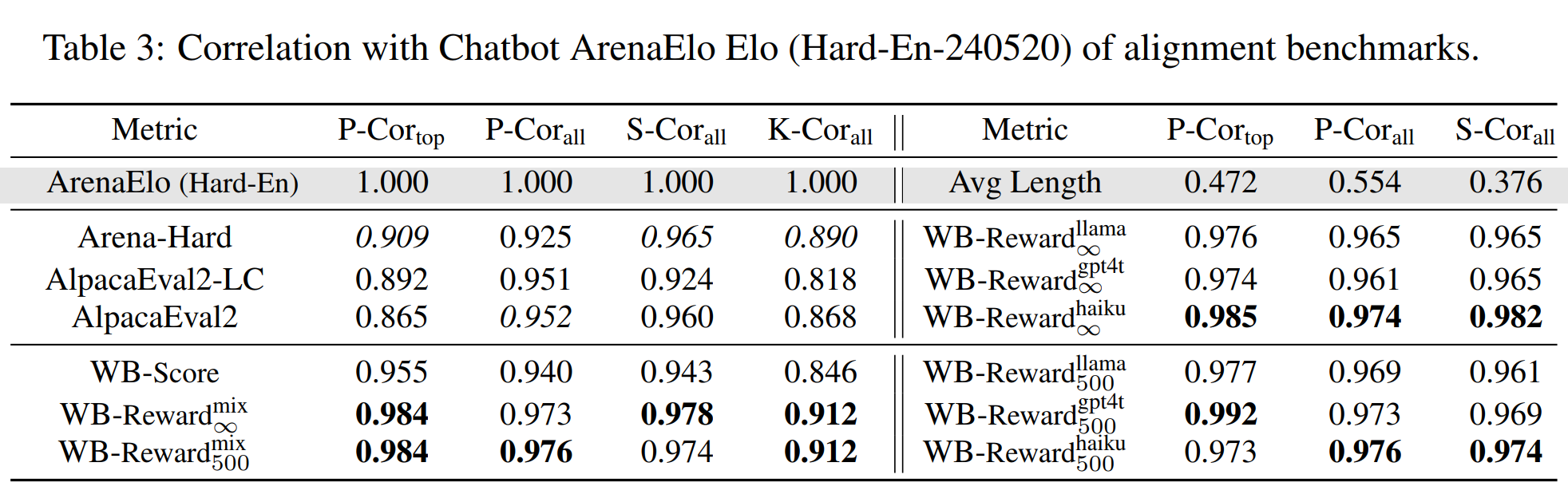
### ‼️ Run evaluation scripts We suggest to use OpenAI's [Batch Mode](https://platform.openai.com/docs/guides/batch) for evaluation, which is faster, cheaper and more reliable. You can: - 1. Run `bash evaluation/run_all_eval_batch.sh ${MODEL_PRETTY_NAME}`to submit the eval jobs.; Or if you only want to do scoring, running `bash evaluation/run_score_eval_batch.sh` to submit the eval jobs for only doing the WB Score. (about $5 per model) - 2. Run `python src/openai_batch_eval/check_batch_status_with_model_name.py ${MODEL_PRETTY_NAME}` to track the status of the batch jobs. - 3. Step 2 will download the results when batch jobs are finished, and then you can view the results (see next section). ***Remarks*** - `${MODEL_PRETTY_NAME}` should be the same as the script name without the `.sh` extension. - You can also track the progress of your batch jobs here: [https://platform.openai.com/batches](https://platform.openai.com/batches). The maximum turnaround time is 24 hours, but it is usually much faster depending on the queue and rate limits. - If you'd like to have more control on the evaluation methods, the detail steps are illustrated in [EVAL.md](EVAL.md). ### View the results When Step 3 in the above section is finished, you can view the results by running the following commands: ```bash bash leaderboard/show_eval.sh # run all and show the main leaderboard python leaderboard/show_table.py --mode main # (optional) to show the main leaderboard w/o recomputing python leaderboard/show_table.py --mode taskwise_score # (optional) to show the taskwise score ``` ## Correlation Analysis: How well does WildBench (v2) correlate with human preferences? To analyze the correlation between WildBench (v2) and human evaluation, we consider the correlation between different metrics and human-based Chatbot Arena Elo scores (until 2024-05-20 on Hard-English split). We find that the WB Reward-Mix has the highest correlation. Please find the pearson correlation coefficients below: - Top Models: `['gpt-4-turbo-2024-04-09', 'claude-3-opus-20240229', 'Meta-Llama-3-70B-Instruct', 'claude-3-sonnet-20240229', 'mistral-large-2402', 'Meta-Llama-3-8B-Instruct']` - All Models: `['gpt-4-turbo-2024-04-09', 'claude-3-opus-20240229', 'Meta-Llama-3-70B-Instruct', 'Qwen1.5-72B-Chat', 'claude-3-sonnet-20240229', 'mistral-large-2402', 'dbrx-instruct@together', 'Mixtral-8x7B-Instruct-v0.1', 'Meta-Llama-3-8B-Instruct', 'tulu-2-dpo-70b', 'Llama-2-70b-chat-hf', 'Llama-2-7b-chat-hf', 'gemma-7b-it', 'gemma-2b-it']` ## Todos ### Models pending to test - [ ] openchat/openchat-3.6-8b-20240522 - [ ] gemma-2 - [ ] SimPO-v0.2 - [ ] Qwen2-7B-Chat - [x] LLM360/K2-Chat - [x] DeepSeek-V2-Code - [x] Yi-large-preview - [x] THUDM/glm-4-9b-chat - [x] chujiezheng/neo_7b_instruct_v0.1-ExPO - [x] ZhangShenao/SELM-Llama-3-8B-Instruct-iter-3 - [x] m-a-p/neo_7b_instruct_v0.1 - [x] Reka Flash - [x] DeepSeekV2-Chat - [x] Reka Core - [x] Yi-Large (via OpenAI-like APIs) - [x] chujiezheng/Llama-3-Instruct-8B-SimPO-ExPO - [x] chujiezheng/Starling-LM-7B-beta-ExPO - [x] Gemini 1.5 series - [x] Qwen2-72B-Instruct - [x] ZhangShenao/SELM-Zephyr-7B-iter-3 - [x] NousResearch/Hermes-2-Theta-Llama-3-8B - [x] princeton-nlp/Llama-3-Instruct-8B-SimPO - [x] Command-R-plus - [x] Phi-3 series Create an Issue if you'd like to add a model that you wanna see on our leaderboard! ### Code updates - [ ] support models via openai-style apis ### Leadeboard updates - [ ] Show task categorized results ## Citation ```bibtex @misc{lin2024wildbench, title={WildBench: Benchmarking LLMs with Challenging Tasks from Real Users in the Wild}, author={Bill Yuchen Lin and Yuntian Deng and Khyathi Chandu and Faeze Brahman and Abhilasha Ravichander and Valentina Pyatkin and Nouha Dziri and Ronan Le Bras and Yejin Choi}, year={2024}, eprint={2406.04770}, archivePrefix={arXiv}, primaryClass={cs.CL}, url={https://arxiv.org/abs/2406.04770} } ```