
Entente
Provenance Engineering for Agent Teams
Every handoff carries a contract. Every result carries evidence.



Interactive hackathon report ·
Install ·
Replay demo ·
How to contribute ·
Design discussions
**Turn ambiguous handoffs between coding agents into scoped, verifiable work.** Entente's coordination core runs above agent runtimes such as Claude Code and Codex. It defines what must be delivered, checks the evidence, and requests targeted repair when a criterion fails.
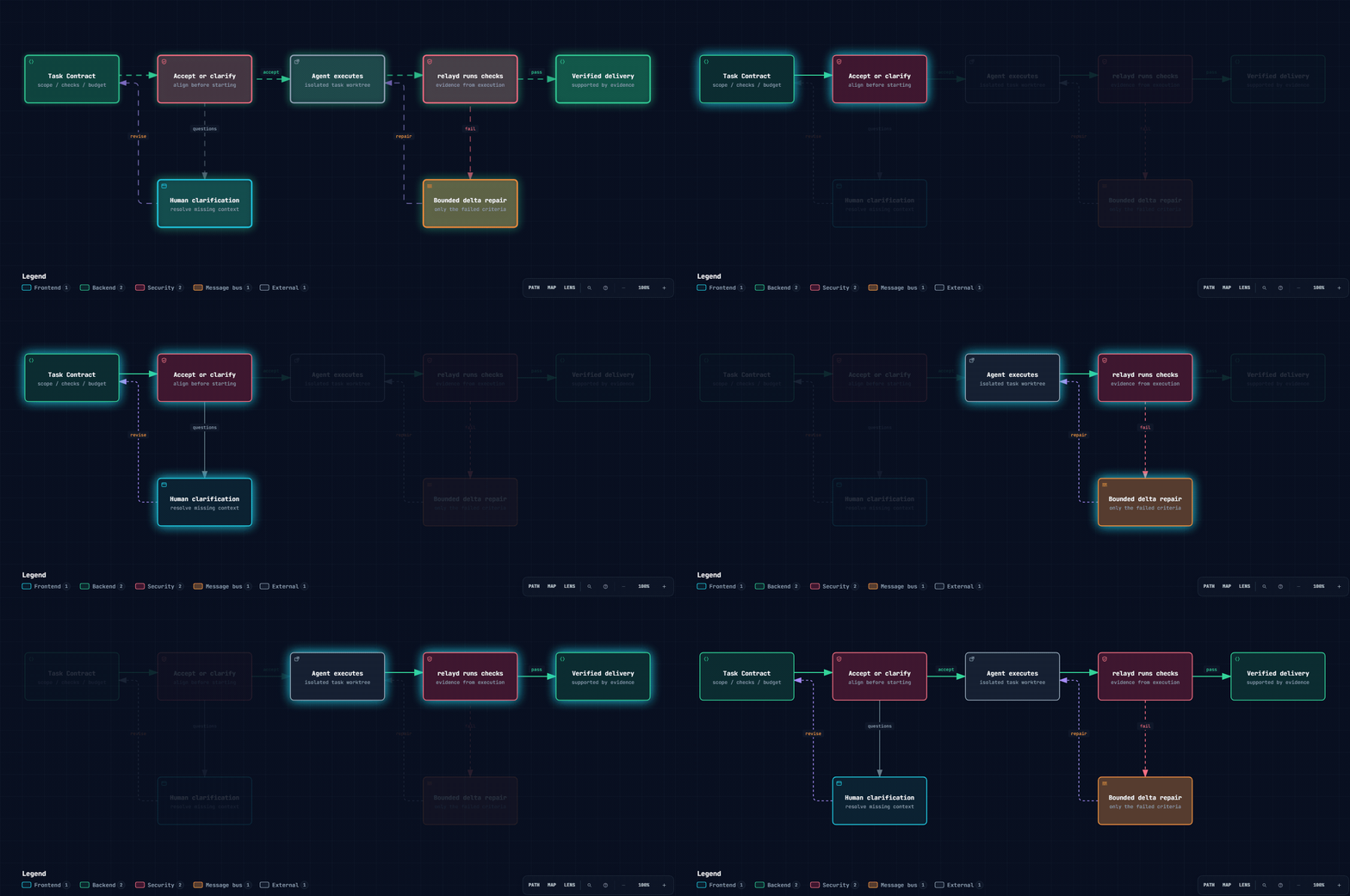
- **Clarify before execution** — the recipient accepts a Task Contract or asks material questions before starting work.
- **Check evidence, not just status** — relayd runs declared checks in the task worktree and records mismatches with the agent's self-report.
- **Repair the failed task** — a delta repair identifies the failed criteria and requested corrections, with an explicit repair budget.
- **Keep the delivery history** — contracts, checks, human decisions, and repairs become JSONL events that drive state, graph, and replay.
Built at the FUTUREMODE BUILDMODE Gen-AI Hackathon 2026.
## Our scope: from prompts to provenance
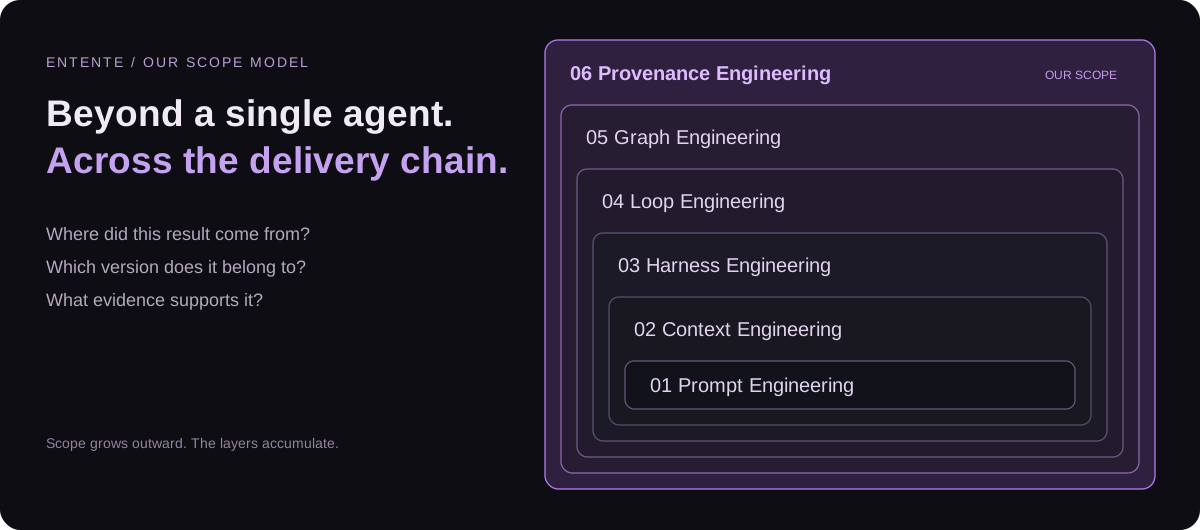
We propose **Provenance Engineering** as Entente's outermost scope: preserving where decisions and results came from, which version they concern, what verified them, and whether that evidence still applies. This is our product framing; the layers accumulate rather than replace one another.
| Scope, small → large | The question it addresses |
| --- | --- |
| Prompt Engineering | How do we express this instruction? |
| Context Engineering | What information does the agent need? |
| Harness Engineering | Which tools, permissions, and environment support one agent? |
| Loop Engineering | How does a task execute, receive feedback, repair, and stop? |
| Graph Engineering | How do agents, tasks, and dependencies coordinate? |
| **Provenance Engineering — our proposed scope** | **Where did this delivery come from, and what evidence supports it?** |
**Today:** Task Contracts, linting, daemon-executed checks, bounded repair, event replay, and Relay Terminal are implemented. Versioned context checkpoints and a delivery Passport are next-step proposals. A traceable log alone does not prove semantic correctness, and running a check separately does not make its test author independent.
## Install
On **macOS, Linux, or WSL**, install once:
```bash
curl -fsSL https://raw.githubusercontent.com/allenchenhan99/entente/main/install.sh | sh
```
Then open Entente from your own Git project:
```bash
cd my-project
entente
```
The installer downloads the original repository, builds the coordination daemon
and native terminal UI, and installs an `entente` command on your existing `PATH`.
The current directory is your project; installation files live separately under
`~/.local/share/entente`. Run the same installer again to update. A failed build
leaves the previous command working.
**Prerequisites:** Git, curl, tar, and a C compiler. On macOS, use
`xcode-select --install`; on Ubuntu/WSL, install `build-essential` and Git first.
An existing Node.js 22+ and Rust toolchain are reused. Missing Node.js and Rust
are installed privately for Entente. The first native build can take several
minutes. If no user-writable command directory is already on `PATH`, the installer
uses `sudo` only to place the launcher in `/usr/local/bin`, provided that directory
is on `PATH`. Otherwise, follow the user-owned directory example below.
Log in to Claude Code or Codex before starting a live agent. You can inspect the
installation without running an agent:
```bash
entente --help
entente status
entente down
```
Installation options
- `ENTENTE_INSTALL_DIR` chooses a dedicated, absolute application directory.
- `ENTENTE_BIN_DIR` chooses a writable command directory already on `PATH`.
- `ENTENTE_REF` selects a branch or tag instead of `main`.
- `sh install.sh --no-native` builds only the TypeScript daemon and Ink TUI.
For example, use a user-owned directory without `sudo`:
```bash
export PATH="$HOME/.local/bin:$PATH"
curl -fsSL https://raw.githubusercontent.com/allenchenhan99/entente/main/install.sh \
| ENTENTE_BIN_DIR="$HOME/.local/bin" sh
```
Keep that directory on your shell's `PATH` in future terminals. Windows users run
the `.sh` installer inside WSL.
## Quick start: no agent or API key
**Requirements:** Node.js 22+ and Git. The following replay path needs no agent login, daemon, or live model calls after dependencies are installed.
```bash
git clone https://github.com/allenchenhan99/entente.git
cd entente
npm ci
npx tsc -b
# Open a recorded run in the terminal UI. Press Ctrl+C to quit.
npx tsx apps/tui/src/index.tsx --replay fixtures/events-live-1.jsonl
```
Prefer a single command that prints and exits?
```bash
npx tsx apps/cli/src/index.ts explain planner --replay fixtures/events-live-4.jsonl
```
This prints a recorded mission, its six clarification answers, three planned tasks, and integration outcome. Explore the same history through the inbox, a contract, or a task:
```bash
npx tsx apps/cli/src/index.ts inbox --replay fixtures/events-live-4.jsonl
npx tsx apps/cli/src/index.ts explain contract:t-auth-routes --replay fixtures/events-live-4.jsonl
npx tsx apps/cli/src/index.ts story --replay fixtures/events-live-4.jsonl --task t-login-page
```
The completed `live-4` fixture has an empty inbox; that is expected. In a live mission, the inbox lists handoffs that need human attention.
**[Open the two-minute, seven-page report →](https://allenchenhan99.github.io/entente/?v=2#1)** Team Atrophied Intelligence presents the handoff problem, Contract and context design, terminal Demo, case results, contribution paths, and engineering scope. Diagrams animate automatically; the team Demo video is linked from the deck.
## How a handoff works
[](https://allenchenhan99.github.io/entente/diagrams/handoff.html)
**Clarify before work. Verify before delivery. Repair only what failed.**
17-second loop · [Open interactive diagram](https://allenchenhan99.github.io/entente/diagrams/handoff.html) · [View static SVG](docs/assets/handoff.svg) · [Diagram source](docs/diagrams/handoff.architecture.json)
A Task Contract defines the goal, inputs, constraints, non-goals, allowed paths, acceptance criteria, declared checks, and repair budget. Lint errors block spawning. Checks include `command`, `diff_scope`, `file_exists`, `human_review`, and `llm_judge`; their evidence should be interpreted according to how they were produced.
See [example contracts](examples), the [protocol reference](docs/protocol.md), and the [original product design](PRD.md). The [live-7 event log](fixtures/events-live-7.jsonl) records a scope-check failure, a self-report mismatch, a repair request, and eventual mission verification.
## Run a live mission
In addition to the quick-start dependencies, configure and log in to a supported runtime (`claude` and/or `codex`). Use a disposable demo repository. The commands below use a Bash-compatible shell; the demo initialization script and command checks depend on shell tools. On Windows, use a suitable Bash environment such as WSL for this path.
```bash
# Create the demo app as its own Git repository and install its dependencies.
bash demo-repo/scripts/init-demo.sh ../entente-demo
cd ../entente-demo
npm ci
cd ../entente
# Launch using the checked-out CLI; no global npm link is required.
node bin/entente.mjs --repo ../entente-demo
```
From another terminal in this checkout:
```bash
node bin/entente.mjs status --repo ../entente-demo
node bin/entente.mjs down --repo ../entente-demo
```
The launcher starts or reuses relayd, then opens the TUI. Entente hosts the agent terminals itself.
Native Relay Terminal, host selection, and runtime configuration
With a Rust toolchain, build the native terminal daemon and Ratatui client:
```bash
cargo build -p termd -p relay-tui
cargo run -p relay-tui -- --replay crates/relay-tui/tests/fixtures/live-7
```
The launcher selects `relayterm` when it finds `termd` and `rust` when it finds `relay-tui`; otherwise it uses the TypeScript `relay` host and Ink TUI. Override with `--host`, `--tui`, `RELAY_TERMD`, or `RELAY_TUI` as appropriate. The default daemon port is `7420`; use `--port N` to change it, `--dir ` to change local run storage, or `--no-spawn` to require an existing daemon.
| Terminal host | Implementation |
| --- | --- |
| `relay` | relayd hosts PTYs with node-pty and serves pane, PTY, and metrics routes in-process |
| `relayterm` | Rust `termd` hosts PTYs; relayd proxies the same routes |
`RELAY_CLAUDE_MODEL` and `RELAY_CODEX_MODEL` choose the model passed to spawned runtimes. Without an override, each runtime uses its configured default. Codex agents use an isolated `CODEX_HOME`, so the user's ordinary Codex configuration is not automatically inherited.
The MCP server is available at `/mcp`. Task-scoped bootstrap configuration provides the agent's credentials and lifecycle instructions. Recipient tools include `relay_get_contract`, `relay_respond_to_contract`, `relay_report_progress`, `relay_submit_evidence`, and `relay_await_verdict`; planner tools include `relay_propose_task`, `relay_revise_task`, and `relay_ask_human`.
## What we considered — and did not adopt
| Approach | Why we did not select it as the current design |
| --- | --- |
| Re-read and summarize all history at every delegation | Repeated work adds cost and handoff latency |
| One mutable rolling summary shared by all children | Unrelated context accumulates, and concurrent updates can overwrite one another |
| Entropy as the primary context selector | Information quantity does not establish task relevance; a short requirement can be decisive |
These are **design tradeoffs**, not claims of measured benchmark wins. The current context proposal prioritizes fixed versions, task-relevant handoffs, and end-to-end task validation before cost comparisons. Read [#4](https://github.com/allenchenhan99/entente/issues/4), the [consolidated earlier proposal #6](https://github.com/allenchenhan99/entente/issues/6), and [research discussion #7](https://github.com/allenchenhan99/entente/issues/7). Closing #6 consolidated the discussion; it did not mark the feature implemented.
## How to contribute
**You can make a useful first contribution without running a live agent.** Pick a small, reviewable change:
| Contribution | Start here | What a useful submission includes |
| --- | --- | --- |
| Improve onboarding | This README and [CONTRIBUTING.md](CONTRIBUTING.md) | The confusing step, environment, and corrected instructions |
| Report a reproducible bug | [Bug form](https://github.com/allenchenhan99/entente/issues/new?template=bug.md) | Command, expected/actual result, and a sanitized replay when possible |
| Add a lint rule | [Rule proposal](https://github.com/allenchenhan99/entente/issues/new?template=lint_rule_proposal.md), [`packages/protocol/src/lint/rules`](packages/protocol/src/lint/rules) | One passing contract and one failing contract |
| Add a demo scenario | [Scenario form](https://github.com/allenchenhan99/entente/issues/new?template=demo_scenario.md), [`examples`](examples) | A clear failure, expected clarification or repair, and replay evidence |
| Extend a runtime or terminal host | [Adapter request](https://github.com/allenchenhan99/entente/issues/new?template=adapter_request.md), [`ports.ts`](apps/relayd/src/ports.ts) | An adapter behind the existing port, with injected-fake tests |
1. Fork the repository and create a focused branch.
2. Describe the problem and expected behavior; discuss changes to protocol or product semantics before implementation.
3. Run the narrow relevant check, then the integration checks when behavior changes.
4. Open a PR with what changed, how you verified it, and any remaining limits.
```bash
# Example: work on contract linting without launching agents.
npx vitest run packages/protocol/src/lint/lint.test.ts
# TypeScript integration checks (also run by CI).
npx tsc -b
npx vitest run
```
**[Read the contribution guide →](CONTRIBUTING.md)** It maps changes to tests, explains fixtures and generated docs, and includes a first-PR checklist.
## Repository map
| Area | Responsibility |
| --- | --- |
| [`packages/protocol`](packages/protocol) | Zod contracts, events, reducer, graph model, lint rules, public schemas |
| [`apps/relayd`](apps/relayd) | Orchestration, MCP, HTTP/SSE, checks, repairs, worktrees, runtime and host adapters |
| [`apps/launcher`](apps/launcher), [`apps/cli`](apps/cli) | Launch Entente; inspect and operate missions |
| [`apps/tui`](apps/tui) | Ink terminal interface and live/replay clients |
| [`crates/termd`](crates/termd), [`crates/relay-tui`](crates/relay-tui) | Native PTY host and Ratatui terminal client |
| [`demo-repo`](demo-repo), [`examples`](examples), [`fixtures`](fixtures) | Demo application, task plans, replayable event logs |
| [`docs`](docs) | Protocol reference, implementation plans, and research |
The [Relay Terminal plan](docs/relay-terminal-plan.md) records the Phase 2 web-terminal work package; it is design context, not a claim that every planned UI is shipped.
## License
[MIT](LICENSE) — contributions and reproducible coordination failures are welcome.
See [third-party sources, licenses, and data provenance](THIRD_PARTY_NOTICES.md)
for dependency inventories, runtime terms, assets, and synthetic fixture data.