# Frequently Asked Questions
Here are some frequently asked questions. If you have a different question, please check if it was not already answered in the Q&A section of the [GitHub Discussions](https://github.com/alshedivat/al-folio/discussions/categories/q-a). If not, feel free to ask a new question there.
- [Frequently Asked Questions](#frequently-asked-questions)
- [After I create a new repository from this template and setup the repo, I get a deployment error. Isn't the website supposed to correctly deploy automatically?](#after-i-create-a-new-repository-from-this-template-and-setup-the-repo-i-get-a-deployment-error-isnt-the-website-supposed-to-correctly-deploy-automatically)
- [I am using a custom domain (e.g., foo.com). My custom domain becomes blank in the repository settings after each deployment. How do I fix that?](#i-am-using-a-custom-domain-eg-foocom-my-custom-domain-becomes-blank-in-the-repository-settings-after-each-deployment-how-do-i-fix-that)
- [My webpage works locally. But after deploying, it fails to build and throws Unknown tag 'toc'. How do I fix that?](#my-webpage-works-locally-but-after-deploying-it-fails-to-build-and-throws-unknown-tag-toc-how-do-i-fix-that)
- [My webpage works locally. But after deploying, it is not displayed correctly (CSS and JS are not loaded properly). How do I fix that?](#my-webpage-works-locally-but-after-deploying-it-is-not-displayed-correctly-css-and-js-are-not-loaded-properly-how-do-i-fix-that)
- [Atom feed doesn't work. Why?](#atom-feed-doesnt-work-why)
- [My site doesn't work when I enable related_blog_posts. Why?](#my-site-doesnt-work-when-i-enable-related_blog_posts-why)
- [When trying to deploy, it's asking for github login credentials, which github disabled password authentication and it exits with an error. How to fix?](#when-trying-to-deploy-its-asking-for-github-login-credentials-which-github-disabled-password-authentication-and-it-exits-with-an-error-how-to-fix)
- [When I manually run the Lighthouse Badger workflow, it fails with Error: Input required and not supplied: token. How do I fix that?](#when-i-manually-run-the-lighthouse-badger-workflow-it-fails-with-error-input-required-and-not-supplied-token-how-do-i-fix-that)
- [My code runs fine locally, but when I create a commit and submit it, it fails with prettier code formatter workflow run failed for main branch. How do I fix that?](#my-code-runs-fine-locally-but-when-i-create-a-commit-and-submit-it-it-fails-with-prettier-code-formatter-workflow-run-failed-for-main-branch-how-do-i-fix-that)
- [After I update my site with some new content, even a small change, the GitHub action throws an error or displays a warning. What happened?](#after-i-update-my-site-with-some-new-content-even-a-small-change-the-github-action-throws-an-error-or-displays-a-warning-what-happened)
- [How do I upgrade from al-folio v1.0 to v1.1+ with minimal friction?](#how-do-i-upgrade-from-al-folio-v10-to-v11-with-minimal-friction)
- [Do I need to fork every v1 gem to customize layouts and Liquid files?](#do-i-need-to-fork-every-v1-gem-to-customize-layouts-and-liquid-files)
- [How do I know when a local override is stale after a plugin update?](#how-do-i-know-when-a-local-override-is-stale-after-a-plugin-update)
- [Why does v1.x starter not have npm run build:css anymore?](#why-does-v1x-starter-not-have-npm-run-buildcss-anymore)
- [Jupyter posts are enabled, but my build says jupyter-nbconvert is missing. What are my options?](#jupyter-posts-are-enabled-but-my-build-says-jupyter-nbconvert-is-missing-what-are-my-options)
- [How do I handle legacy Bootstrap-marked pages on Tailwind-first v1.x?](#how-do-i-handle-legacy-bootstrap-marked-pages-on-tailwind-first-v1x)
- [How does sidebar table of contents work in v1.x?](#how-does-sidebar-table-of-contents-work-in-v1x)
- [Why does pretty_table: true still work when Bootstrap compatibility is disabled?](#why-does-pretty_table-true-still-work-when-bootstrap-compatibility-is-disabled)
- [Why does Lightbox2 work without jQuery in v1.x?](#why-does-lightbox2-work-without-jquery-in-v1x)
- [I am trying to deploy my site, but it fails with Could not find gem 'jekyll-diagrams' in locally installed gems. How do I fix that?](#i-am-trying-to-deploy-my-site-but-it-fails-with-could-not-find-gem-jekyll-diagrams-in-locally-installed-gems-how-do-i-fix-that)
- [How can I update icon library versions on the template](#how-can-i-update-icon-library-versions-on-the-template)
- [How should I name plugins in v1.x?](#how-should-i-name-plugins-in-v1x)
- [How can I propose featuring my plugin in al-folio?](#how-can-i-propose-featuring-my-plugin-in-al-folio)
- [Why does plugin integration use Gemfile + \_config.yml instead of a gemspec?](#why-does-plugin-integration-use-gemfile--_configyml-instead-of-a-gemspec)
- [What do all these GitHub actions/workflows mean?](#what-do-all-these-github-actionsworkflows-mean)
## After I create a new repository from this template and setup the repo, I get a deployment error. Isn't the website supposed to correctly deploy automatically?
Yes, if you are using release `v0.3.5` or later, the website will automatically and correctly re-deploy right after your first commit. Please make some changes (e.g., change your website info in `_config.yml`), commit, and push. Make sure to follow [deployment instructions](INSTALL.md#deployment). (Relevant issue: [209](https://github.com/alshedivat/al-folio/issues/209#issuecomment-798849211).)
## I am using a custom domain (e.g., `foo.com`). My custom domain becomes blank in the repository settings after each deployment. How do I fix that?
You need to add `CNAME` file to the `main` or `source` branch of your repository. The file should contain your custom domain name. (Relevant issue: [130](https://github.com/alshedivat/al-folio/issues/130).)
## My webpage works locally. But after deploying, it fails to build and throws `Unknown tag 'toc'`. How do I fix that?
Make sure you followed through the [deployment instructions](INSTALL.md#deployment) in `INSTALL.md`. You should have set the deployment branch to `gh-pages`. (Related issue: [1438](https://github.com/alshedivat/al-folio/issues/1438).)
## My webpage works locally. But after deploying, it is not displayed correctly (CSS and JS are not loaded properly). How do I fix that?
If the website does not load the theme, the layout looks weird, and all links are broken, being the main page displayed this way:
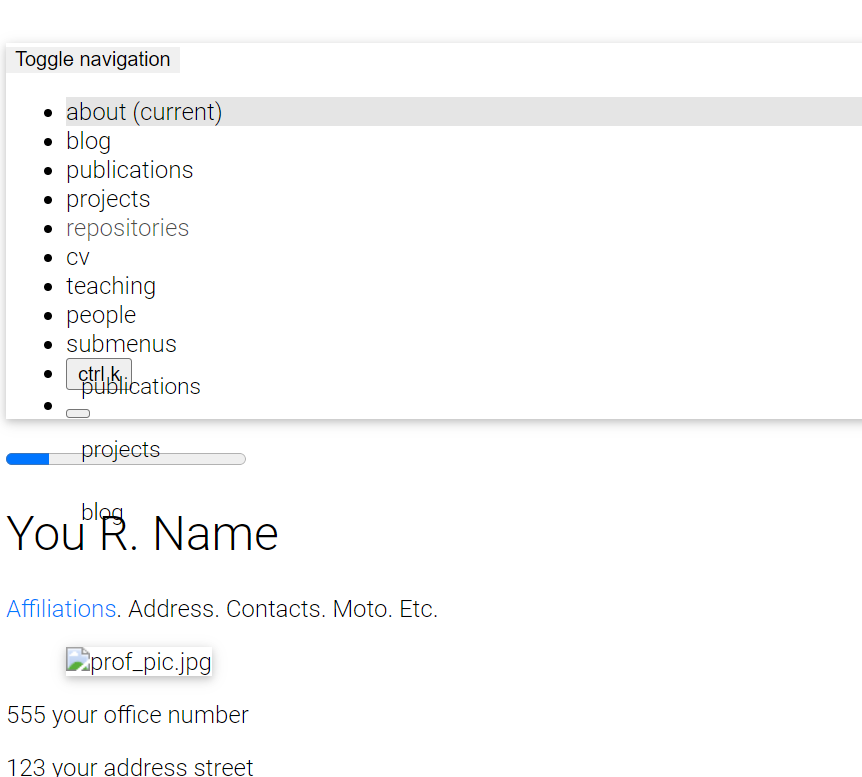 make sure to correctly specify the `url` and `baseurl` paths in `_config.yml`. Set `url` to `https://.github.io` or to `https://` if you are using a custom domain. If you are deploying a personal or organization website, leave `baseurl` **empty** (do **NOT** delete it). If you are deploying a project page, set `baseurl: //`. If all previous steps were done correctly, all is missing is for your browser to fetch again the site stylesheet. For this, you can:
- press [Shift + F5 on Chromium-based](https://support.google.com/chrome/answer/157179#zippy=%2Cwebpage-shortcuts) or [Ctrl + F5 on Firefox-based](https://support.mozilla.org/en-US/kb/keyboard-shortcuts-perform-firefox-tasks-quickly) browsers to reload the page ignoring cached content
- clean your browser history
- simply try it in a private session, here's how to do it in [Chrome](https://support.google.com/chrome/answer/95464) and [Firefox](https://support.mozilla.org/en-US/kb/private-browsing-use-firefox-without-history)
## Atom feed doesn't work. Why?
Make sure to correctly specify the `url` and `baseurl` paths in `_config.yml`. RSS Feed plugin works with these correctly set up fields: `title`, `url`, `description` and `author`. Make sure to fill them in an appropriate way and try again.
## My site doesn't work when I enable `related_blog_posts`. Why?
This is probably due to the [classifier reborn](https://github.com/jekyll/classifier-reborn) plugin, which is used to calculate related posts. If the error states `Liquid Exception: Zero vectors can not be normalized...` or `sqrt': Numerical argument is out of domain - "sqrt"`, it means that it could not calculate related posts for a specific post. This is usually caused by [empty or minimal blog posts](https://github.com/jekyll/classifier-reborn/issues/64) without meaningful words (i.e. only [stop words](https://en.wikipedia.org/wiki/Stop_words)) or even [specific characters](https://github.com/jekyll/classifier-reborn/issues/194) you used in your posts. Also, the calculus for similar posts are made for every `post`, which means every page that uses `layout: post`, including the announcements. To change this behavior, simply add `related_posts: false` to the front matter of the page you don't want to display related posts on. Another solution is to disable the lsi (latent semantic indexing) entirely by setting the `lsi` flag to `false` in `_config.yml`. Related issue: [#1828](https://github.com/alshedivat/al-folio/issues/1828).
## When trying to deploy, it's asking for github login credentials, which github disabled password authentication and it exits with an error. How to fix?
Open .git/config file using your preferred editor. Change the `https` portion of the `url` variable to `ssh`. Try deploying again.
## When I manually run the Lighthouse Badger workflow, it fails with `Error: Input required and not supplied: token`. How do I fix that?
You need to [create a personal access token](https://docs.github.com/en/authentication/keeping-your-account-and-data-secure/managing-your-personal-access-tokens#creating-a-fine-grained-personal-access-token) and [add it as a secret](https://docs.github.com/en/actions/security-guides/using-secrets-in-github-actions#creating-encrypted-secrets-for-a-repository) named `LIGHTHOUSE_BADGER_TOKEN` to your repository. For more information, check [lighthouse-badger documentation](https://github.com/MyActionWay/lighthouse-badger-workflows#lighthouse-badger-easyyml) on how to do this.
## My code runs fine locally, but when I create a commit and submit it, it fails with `prettier code formatter workflow run failed for main branch`. How do I fix that?
We implemented support for [Prettier code formatting](https://prettier.io/) in [#2048](https://github.com/alshedivat/al-folio/pull/2048). It basically ensures that your code is [well formatted](https://prettier.io/docs/en/). If you want to ensure your code is compliant with `Prettier`, you have a few options:
- if you are running locally with `Docker` and using [development containers](INSTALL.md#local-setup-with-development-containers), `Prettier` is already included
- if you don't use `Docker`, it is simple to integrate it with your preferred IDE using an [extension](https://prettier.io/docs/en/editors)
- if you want to run it manually, you can follow the first 2 steps in [this tutorial](https://george-gca.github.io/blog/2023/slidev_for_non_web_devs/) (`Installing node version manager (nvm)` and `Installing Node (latest version)`), then, install it using `npm install prettier` inside the project directory, or install it globally on your computer using `npm install -g prettier`. To run `Prettier` on your current directory use `npx prettier . --write`.
You can also disable it for your repo. For this, just delete the file [.github/workflows/prettier.yml](https://github.com/alshedivat/al-folio/blob/main/.github/workflows/prettier.yml).
## After I update my site with some new content, even a small change, the GitHub action throws an error or displays a warning. What happened?
Probably your GitHub workflow is throwing an error like this:
```bash
/opt/hostedtoolcache/Ruby/3.0.2/x64/lib/ruby/gems/3.0.0/gems/bundler-2.5.5/lib/bundler/runtime.rb:304:in `check_for_activated_spec!': You have already activated uri 0.10.1, but your Gemfile requires uri 0.13.0. Since uri is a default gem, you can either remove your dependency on it or try updating to a newer version of bundler that supports uri as a default gem. (Gem::LoadError)
```
or maybe displaying a warning like one of these:
```
Node.js 16 actions are deprecated. Please update the following actions to use Node.js 20: actions/checkout@v3. For more information see: https://github.blog/changelog/2023-09-22-github-actions-transitioning-from-node-16-to-node-20/.
Node.js 16 actions are deprecated. Please update the following actions to use Node.js 20: actions/checkout@v2, actions/cache@v2. For more information see: https://github.blog/changelog/2023-09-22-github-actions-transitioning-from-node-16-to-node-20/.
The following actions uses node12 which is deprecated and will be forced to run on node16: actions/checkout@v2, actions/cache@v2. For more info: https://github.blog/changelog/2023-06-13-github-actions-all-actions-will-run-on-node16-instead-of-node12-by-default/
The `set-output` command is deprecated and will be disabled soon. Please upgrade to using Environment Files. For more information see: https://github.blog/changelog/2022-10-11-github-actions-deprecating-save-state-and-set-output-commands/
```
If that's the case, you are using deprecated libraries/commands. This happens because you are using an old version of al-folio. Follow the [upgrade guide](INSTALL.md#upgrading-from-a-previous-version) and run the upgrade CLI:
```bash
bundle exec al-folio upgrade audit
bundle exec al-folio upgrade apply --safe
bundle exec al-folio upgrade report
```
Note that libraries tend to be deprecated and support for them dropped as they are no longer maintained, and keep using them involves security breaches. Also, some of these deprecations are enforced, for example, by GitHub itself, so there's so much we can do. We have also added tons of new functionality, as well as tidying things up and improving the overall speed and structure, so you could also benefit from these improvements.
## How do I upgrade from al-folio `v1.0` to `v1.1+` with minimal friction?
Use the SemVer migration flow:
1. `bundle update`
2. `bundle exec al-folio upgrade audit`
3. `bundle exec al-folio upgrade overrides audit`
4. `bundle exec al-folio upgrade apply --safe` (optional)
5. `bundle exec al-folio upgrade report`
Then resolve all **Blocking** findings in `al-folio-upgrade-report.md`. Non-blocking findings are deprecated patterns you can migrate incrementally.
For starter-based sites, keep `theme: al_folio_core` and avoid copying theme internals into your repo unless you intentionally need overrides.
## Do I need to fork every v1 gem to customize layouts and Liquid files?
No. In `v1.x`, gem-owned layouts/includes/assets provide the default runtime, but your site can still override a file locally by adding the same path in your starter repo, for example `_layouts/bib.liquid` or `_includes/repository/repo.liquid`.
Use this rule of thumb:
- Keep site-specific content, data, Sass, and intentional local overrides in your site repo.
- Remove old copied runtime files when v1 gems own them now, especially `_includes/head.liquid`, `_includes/scripts.liquid`, `assets/js/distillpub/**`, `assets/js/search/**`, and old citation/external-post helper plugins.
- Fork or pin a plugin only when you want to change plugin-owned behavior for every site using that plugin.
- Run `bundle exec al-folio upgrade overrides audit` after dependency updates to identify local overrides whose upstream plugin files changed.
- Commit `.al-folio-overrides.yml` after reviewing intentional overrides so future gem updates can flag stale copies explicitly.
## How do I know when a local override is stale after a plugin update?
Use the override audit workflow:
```bash
bundle exec al-folio upgrade overrides audit
bundle exec al-folio upgrade overrides diff _includes/repository/repo.liquid
bundle exec al-folio upgrade overrides accept _includes/repository/repo.liquid
```
The audit compares local overrides with files shipped by installed `al-*` gems. The acknowledgement file `.al-folio-overrides.yml` stores the upstream checksum you reviewed. When a future gem update changes that upstream file, the audit marks your local override as stale so you can reconcile it.
## Why does `v1.x` starter not have `npm run build:css` anymore?
`al-folio` is a thin starter in `v1.x`. Tailwind/runtime build ownership moved to gem repos (primarily `al_folio_core` and feature gems), so starter builds do not require local npm CSS build commands.
Use starter tests for:
- visual regression/parity checks
- cross-gem integration checks
Use gem repos for:
- component correctness/unit tests
- plugin/runtime asset contract tests
See [`BOUNDARIES.md`](BOUNDARIES.md) for the ownership contract.
## Jupyter posts are enabled, but my build says `jupyter-nbconvert` is missing. What are my options?
`jekyll-jupyter-notebook` depends on Python tooling (`jupyter` + `nbconvert`), and Bundler cannot install Python packages for you.
Recommended options:
1. Install Python deps locally:
```bash
./bin/setup-python-deps
```
2. Or install manually in your Python environment:
```bash
python3 -m pip install --user --break-system-packages jupyter nbconvert
```
3. If you do not need notebook rendering, disable/remove the plugin from `_config.yml`.
In `v1.x`, missing `jupyter-nbconvert` is treated as warn-and-continue; notebook rendering is skipped until deps are installed.
## How do I handle legacy Bootstrap-marked pages on Tailwind-first `v1.x`?
`v1.x` core is Tailwind-first. If your content still relies on Bootstrap-marked classes or `data-toggle` behavior, enable compatibility mode temporarily:
```yaml
al_folio:
compat:
bootstrap:
enabled: true
```
Compatibility timeline:
- Supported through `v1.2`
- Deprecated in `v1.3`
- Removed in `v2.0`
The compatibility runtime (`/assets/css/bootstrap-compat.css` and `/assets/js/bootstrap-compat.js`) is provided by the `al_folio_bootstrap_compat` gem when enabled.
## How does sidebar table of contents work in `v1.x`?
`v1.x` uses Tocbot for sidebar TOC rendering when page front matter includes:
```yaml
toc:
sidebar: left # or right
collapse: expanded # or auto
```
Tocbot runtime assets are loaded from pinned CDN entries in `_config.yml` under `third_party_libraries.tocbot`.
If needed, heading labels can be overridden using `data-toc-text` attributes.
Use `collapse: auto` to expand nested TOC branches as the active section changes during scrolling.
## Why does `pretty_table: true` still work when Bootstrap compatibility is disabled?
When `al_folio.compat.bootstrap.enabled: false`, `v1.x` uses a built-in vanilla Tailwind table engine for `table[data-toggle="table"]` markup.
It supports search, pagination, sortable columns, and click-to-select without requiring Bootstrap Table runtime.
When compatibility is enabled, Bootstrap Table remains available for legacy content.
## Why does Lightbox2 work without jQuery in `v1.x`?
In `v1.x`, `al_img_tools` provides a plugin-owned lightbox adapter for `data-lightbox` markup, so lightbox galleries no longer depend on jQuery.
Author-facing markup stays the same (`images.lightbox2: true` and `data-lightbox` links).
## I am trying to deploy my site, but it fails with `Could not find gem 'jekyll-diagrams' in locally installed gems`. How do I fix that?
`jekyll-diagrams` support was dropped in [#1992](https://github.com/alshedivat/al-folio/pull/1992) in favor of using `mermaid.js` directly. Simply [update your code](INSTALL.md#upgrading-from-a-previous-version) to get the latest changes.
## How can I update icon library versions on the template
In `v1.x`, icon runtime ownership is provided by `al_icons`, and icons are loaded from pinned CDN URLs configured in `_config.yml` under `third_party_libraries`.
Update flow:
1. Confirm `al_icons` is enabled in `plugins`.
2. Update version values in `_config.yml`:
- `third_party_libraries.fontawesome.version`
- `third_party_libraries.academicons.version`
- `third_party_libraries.scholar-icons.version`
3. Update corresponding `integrity.css` hashes.
4. Rebuild your site and verify icon rendering on pages with socials/publications.
Do not copy icon fonts into `assets/fonts/` or `assets/webfonts/` in the starter for `v1.x`; those local runtime assets are no longer starter-owned.
## How should I name plugins in `v1.x`?
Use the hybrid naming model:
- Theme-coupled plugins:
- repo: `al-folio-`
- gem/plugin id: `al_folio_`
- Reusable plugins:
- repo: `al-` or neutral name
- gem/plugin id aligned with plugin namespace
Third-party non-`al-*` plugins are still valid and can be featured.
## How can I propose featuring my plugin in `al-folio`?
Use the **Plugin Feature Proposal** issue template in this repo and include:
1. plugin repo URL
2. gem name and Jekyll plugin id
3. compatibility range (`al_folio_min` / `al_folio_max`)
4. owner/maintainer contact
5. demo page/post path
If maintainers decide to list it, update [`_data/featured_plugins.yml`](../_data/featured_plugins.yml) through a PR.
If maintainers decide to bundle it by default, that is a separate decision and requires wiring updates in [Gemfile](../Gemfile) and [\_config.yml](../_config.yml).
## Why does plugin integration use `Gemfile` + `_config.yml` instead of a gemspec?
`al-folio` starter currently does not have a gemspec. Plugin integration is controlled by:
- [Gemfile](../Gemfile) for dependency declarations
- [\_config.yml](../_config.yml) for Jekyll plugin activation/configuration
Any contribution guidance that references gemspec updates should be interpreted as starter wiring updates to those two files.
## What do all these GitHub actions/workflows mean?
GitHub actions are a way to automate tasks in the repository. They are defined in `.github/workflows/` directory. Each file in this directory is a workflow. Workflows are made up of one or more jobs, and each job runs on a virtual machine hosted by GitHub. You can see the status of the workflows in the `Actions` tab of your repository. For more information, check the [GitHub Actions documentation](https://docs.github.com/en/actions).
Currently we ship the following workflows.
Build and deployment:
- `deploy.yml`: builds the site and deploys it to GitHub Pages (the `gh-pages` branch)
- `render-cv.yml`: regenerates your CV PDF with [RenderCV](https://github.com/rendercv/rendercv) when `_data/cv.yml` or the files under `assets/rendercv/` change
- `update-citations.yml`: runs `bin/update_scholar_citations.py` on a schedule to refresh `_data/citations.yml` with Google Scholar citation counts. See [Setting up a Personal Access Token (PAT) for Google Scholar Citation Updates](CUSTOMIZE.md#setting-up-a-personal-access-token-pat-for-google-scholar-citation-updates)
- `update-tocs.yml`: regenerates the `…` table of contents blocks in changed Markdown files
- [Frequently Asked Questions](#frequently-asked-questions)
- [After I create a new repository from this template and setup the repo, I get a deployment error. Isn't the website supposed to correctly deploy automatically?](#after-i-create-a-new-repository-from-this-template-and-setup-the-repo-i-get-a-deployment-error-isnt-the-website-supposed-to-correctly-deploy-automatically)
- [I am using a custom domain (e.g., foo.com). My custom domain becomes blank in the repository settings after each deployment. How do I fix that?](#i-am-using-a-custom-domain-eg-foocom-my-custom-domain-becomes-blank-in-the-repository-settings-after-each-deployment-how-do-i-fix-that)
- [My webpage works locally. But after deploying, it fails to build and throws Unknown tag 'toc'. How do I fix that?](#my-webpage-works-locally-but-after-deploying-it-fails-to-build-and-throws-unknown-tag-toc-how-do-i-fix-that)
- [My webpage works locally. But after deploying, it is not displayed correctly (CSS and JS are not loaded properly). How do I fix that?](#my-webpage-works-locally-but-after-deploying-it-is-not-displayed-correctly-css-and-js-are-not-loaded-properly-how-do-i-fix-that)
- [Atom feed doesn't work. Why?](#atom-feed-doesnt-work-why)
- [My site doesn't work when I enable related_blog_posts. Why?](#my-site-doesnt-work-when-i-enable-related_blog_posts-why)
- [When trying to deploy, it's asking for github login credentials, which github disabled password authentication and it exits with an error. How to fix?](#when-trying-to-deploy-its-asking-for-github-login-credentials-which-github-disabled-password-authentication-and-it-exits-with-an-error-how-to-fix)
- [When I manually run the Lighthouse Badger workflow, it fails with Error: Input required and not supplied: token. How do I fix that?](#when-i-manually-run-the-lighthouse-badger-workflow-it-fails-with-error-input-required-and-not-supplied-token-how-do-i-fix-that)
- [My code runs fine locally, but when I create a commit and submit it, it fails with prettier code formatter workflow run failed for main branch. How do I fix that?](#my-code-runs-fine-locally-but-when-i-create-a-commit-and-submit-it-it-fails-with-prettier-code-formatter-workflow-run-failed-for-main-branch-how-do-i-fix-that)
- [After I update my site with some new content, even a small change, the GitHub action throws an error or displays a warning. What happened?](#after-i-update-my-site-with-some-new-content-even-a-small-change-the-github-action-throws-an-error-or-displays-a-warning-what-happened)
- [How do I upgrade from al-folio v1.0 to v1.1+ with minimal friction?](#how-do-i-upgrade-from-al-folio-v10-to-v11-with-minimal-friction)
- [Do I need to fork every v1 gem to customize layouts and Liquid files?](#do-i-need-to-fork-every-v1-gem-to-customize-layouts-and-liquid-files)
- [How do I know when a local override is stale after a plugin update?](#how-do-i-know-when-a-local-override-is-stale-after-a-plugin-update)
- [Why does v1.x starter not have npm run build:css anymore?](#why-does-v1x-starter-not-have-npm-run-buildcss-anymore)
- [Jupyter posts are enabled, but my build says jupyter-nbconvert is missing. What are my options?](#jupyter-posts-are-enabled-but-my-build-says-jupyter-nbconvert-is-missing-what-are-my-options)
- [How do I handle legacy Bootstrap-marked pages on Tailwind-first v1.x?](#how-do-i-handle-legacy-bootstrap-marked-pages-on-tailwind-first-v1x)
- [How does sidebar table of contents work in v1.x?](#how-does-sidebar-table-of-contents-work-in-v1x)
- [Why does pretty_table: true still work when Bootstrap compatibility is disabled?](#why-does-pretty_table-true-still-work-when-bootstrap-compatibility-is-disabled)
- [Why does Lightbox2 work without jQuery in v1.x?](#why-does-lightbox2-work-without-jquery-in-v1x)
- [I am trying to deploy my site, but it fails with Could not find gem 'jekyll-diagrams' in locally installed gems. How do I fix that?](#i-am-trying-to-deploy-my-site-but-it-fails-with-could-not-find-gem-jekyll-diagrams-in-locally-installed-gems-how-do-i-fix-that)
- [How can I update icon library versions on the template](#how-can-i-update-icon-library-versions-on-the-template)
- [How should I name plugins in v1.x?](#how-should-i-name-plugins-in-v1x)
- [How can I propose featuring my plugin in al-folio?](#how-can-i-propose-featuring-my-plugin-in-al-folio)
- [Why does plugin integration use Gemfile + \_config.yml instead of a gemspec?](#why-does-plugin-integration-use-gemfile--_configyml-instead-of-a-gemspec)
- [What do all these GitHub actions/workflows mean?](#what-do-all-these-github-actionsworkflows-mean)
make sure to correctly specify the `url` and `baseurl` paths in `_config.yml`. Set `url` to `https://.github.io` or to `https://` if you are using a custom domain. If you are deploying a personal or organization website, leave `baseurl` **empty** (do **NOT** delete it). If you are deploying a project page, set `baseurl: //`. If all previous steps were done correctly, all is missing is for your browser to fetch again the site stylesheet. For this, you can:
- press [Shift + F5 on Chromium-based](https://support.google.com/chrome/answer/157179#zippy=%2Cwebpage-shortcuts) or [Ctrl + F5 on Firefox-based](https://support.mozilla.org/en-US/kb/keyboard-shortcuts-perform-firefox-tasks-quickly) browsers to reload the page ignoring cached content
- clean your browser history
- simply try it in a private session, here's how to do it in [Chrome](https://support.google.com/chrome/answer/95464) and [Firefox](https://support.mozilla.org/en-US/kb/private-browsing-use-firefox-without-history)
## Atom feed doesn't work. Why?
Make sure to correctly specify the `url` and `baseurl` paths in `_config.yml`. RSS Feed plugin works with these correctly set up fields: `title`, `url`, `description` and `author`. Make sure to fill them in an appropriate way and try again.
## My site doesn't work when I enable `related_blog_posts`. Why?
This is probably due to the [classifier reborn](https://github.com/jekyll/classifier-reborn) plugin, which is used to calculate related posts. If the error states `Liquid Exception: Zero vectors can not be normalized...` or `sqrt': Numerical argument is out of domain - "sqrt"`, it means that it could not calculate related posts for a specific post. This is usually caused by [empty or minimal blog posts](https://github.com/jekyll/classifier-reborn/issues/64) without meaningful words (i.e. only [stop words](https://en.wikipedia.org/wiki/Stop_words)) or even [specific characters](https://github.com/jekyll/classifier-reborn/issues/194) you used in your posts. Also, the calculus for similar posts are made for every `post`, which means every page that uses `layout: post`, including the announcements. To change this behavior, simply add `related_posts: false` to the front matter of the page you don't want to display related posts on. Another solution is to disable the lsi (latent semantic indexing) entirely by setting the `lsi` flag to `false` in `_config.yml`. Related issue: [#1828](https://github.com/alshedivat/al-folio/issues/1828).
## When trying to deploy, it's asking for github login credentials, which github disabled password authentication and it exits with an error. How to fix?
Open .git/config file using your preferred editor. Change the `https` portion of the `url` variable to `ssh`. Try deploying again.
## When I manually run the Lighthouse Badger workflow, it fails with `Error: Input required and not supplied: token`. How do I fix that?
You need to [create a personal access token](https://docs.github.com/en/authentication/keeping-your-account-and-data-secure/managing-your-personal-access-tokens#creating-a-fine-grained-personal-access-token) and [add it as a secret](https://docs.github.com/en/actions/security-guides/using-secrets-in-github-actions#creating-encrypted-secrets-for-a-repository) named `LIGHTHOUSE_BADGER_TOKEN` to your repository. For more information, check [lighthouse-badger documentation](https://github.com/MyActionWay/lighthouse-badger-workflows#lighthouse-badger-easyyml) on how to do this.
## My code runs fine locally, but when I create a commit and submit it, it fails with `prettier code formatter workflow run failed for main branch`. How do I fix that?
We implemented support for [Prettier code formatting](https://prettier.io/) in [#2048](https://github.com/alshedivat/al-folio/pull/2048). It basically ensures that your code is [well formatted](https://prettier.io/docs/en/). If you want to ensure your code is compliant with `Prettier`, you have a few options:
- if you are running locally with `Docker` and using [development containers](INSTALL.md#local-setup-with-development-containers), `Prettier` is already included
- if you don't use `Docker`, it is simple to integrate it with your preferred IDE using an [extension](https://prettier.io/docs/en/editors)
- if you want to run it manually, you can follow the first 2 steps in [this tutorial](https://george-gca.github.io/blog/2023/slidev_for_non_web_devs/) (`Installing node version manager (nvm)` and `Installing Node (latest version)`), then, install it using `npm install prettier` inside the project directory, or install it globally on your computer using `npm install -g prettier`. To run `Prettier` on your current directory use `npx prettier . --write`.
You can also disable it for your repo. For this, just delete the file [.github/workflows/prettier.yml](https://github.com/alshedivat/al-folio/blob/main/.github/workflows/prettier.yml).
## After I update my site with some new content, even a small change, the GitHub action throws an error or displays a warning. What happened?
Probably your GitHub workflow is throwing an error like this:
```bash
/opt/hostedtoolcache/Ruby/3.0.2/x64/lib/ruby/gems/3.0.0/gems/bundler-2.5.5/lib/bundler/runtime.rb:304:in `check_for_activated_spec!': You have already activated uri 0.10.1, but your Gemfile requires uri 0.13.0. Since uri is a default gem, you can either remove your dependency on it or try updating to a newer version of bundler that supports uri as a default gem. (Gem::LoadError)
```
or maybe displaying a warning like one of these:
```
Node.js 16 actions are deprecated. Please update the following actions to use Node.js 20: actions/checkout@v3. For more information see: https://github.blog/changelog/2023-09-22-github-actions-transitioning-from-node-16-to-node-20/.
Node.js 16 actions are deprecated. Please update the following actions to use Node.js 20: actions/checkout@v2, actions/cache@v2. For more information see: https://github.blog/changelog/2023-09-22-github-actions-transitioning-from-node-16-to-node-20/.
The following actions uses node12 which is deprecated and will be forced to run on node16: actions/checkout@v2, actions/cache@v2. For more info: https://github.blog/changelog/2023-06-13-github-actions-all-actions-will-run-on-node16-instead-of-node12-by-default/
The `set-output` command is deprecated and will be disabled soon. Please upgrade to using Environment Files. For more information see: https://github.blog/changelog/2022-10-11-github-actions-deprecating-save-state-and-set-output-commands/
```
If that's the case, you are using deprecated libraries/commands. This happens because you are using an old version of al-folio. Follow the [upgrade guide](INSTALL.md#upgrading-from-a-previous-version) and run the upgrade CLI:
```bash
bundle exec al-folio upgrade audit
bundle exec al-folio upgrade apply --safe
bundle exec al-folio upgrade report
```
Note that libraries tend to be deprecated and support for them dropped as they are no longer maintained, and keep using them involves security breaches. Also, some of these deprecations are enforced, for example, by GitHub itself, so there's so much we can do. We have also added tons of new functionality, as well as tidying things up and improving the overall speed and structure, so you could also benefit from these improvements.
## How do I upgrade from al-folio `v1.0` to `v1.1+` with minimal friction?
Use the SemVer migration flow:
1. `bundle update`
2. `bundle exec al-folio upgrade audit`
3. `bundle exec al-folio upgrade overrides audit`
4. `bundle exec al-folio upgrade apply --safe` (optional)
5. `bundle exec al-folio upgrade report`
Then resolve all **Blocking** findings in `al-folio-upgrade-report.md`. Non-blocking findings are deprecated patterns you can migrate incrementally.
For starter-based sites, keep `theme: al_folio_core` and avoid copying theme internals into your repo unless you intentionally need overrides.
## Do I need to fork every v1 gem to customize layouts and Liquid files?
No. In `v1.x`, gem-owned layouts/includes/assets provide the default runtime, but your site can still override a file locally by adding the same path in your starter repo, for example `_layouts/bib.liquid` or `_includes/repository/repo.liquid`.
Use this rule of thumb:
- Keep site-specific content, data, Sass, and intentional local overrides in your site repo.
- Remove old copied runtime files when v1 gems own them now, especially `_includes/head.liquid`, `_includes/scripts.liquid`, `assets/js/distillpub/**`, `assets/js/search/**`, and old citation/external-post helper plugins.
- Fork or pin a plugin only when you want to change plugin-owned behavior for every site using that plugin.
- Run `bundle exec al-folio upgrade overrides audit` after dependency updates to identify local overrides whose upstream plugin files changed.
- Commit `.al-folio-overrides.yml` after reviewing intentional overrides so future gem updates can flag stale copies explicitly.
## How do I know when a local override is stale after a plugin update?
Use the override audit workflow:
```bash
bundle exec al-folio upgrade overrides audit
bundle exec al-folio upgrade overrides diff _includes/repository/repo.liquid
bundle exec al-folio upgrade overrides accept _includes/repository/repo.liquid
```
The audit compares local overrides with files shipped by installed `al-*` gems. The acknowledgement file `.al-folio-overrides.yml` stores the upstream checksum you reviewed. When a future gem update changes that upstream file, the audit marks your local override as stale so you can reconcile it.
## Why does `v1.x` starter not have `npm run build:css` anymore?
`al-folio` is a thin starter in `v1.x`. Tailwind/runtime build ownership moved to gem repos (primarily `al_folio_core` and feature gems), so starter builds do not require local npm CSS build commands.
Use starter tests for:
- visual regression/parity checks
- cross-gem integration checks
Use gem repos for:
- component correctness/unit tests
- plugin/runtime asset contract tests
See [`BOUNDARIES.md`](BOUNDARIES.md) for the ownership contract.
## Jupyter posts are enabled, but my build says `jupyter-nbconvert` is missing. What are my options?
`jekyll-jupyter-notebook` depends on Python tooling (`jupyter` + `nbconvert`), and Bundler cannot install Python packages for you.
Recommended options:
1. Install Python deps locally:
```bash
./bin/setup-python-deps
```
2. Or install manually in your Python environment:
```bash
python3 -m pip install --user --break-system-packages jupyter nbconvert
```
3. If you do not need notebook rendering, disable/remove the plugin from `_config.yml`.
In `v1.x`, missing `jupyter-nbconvert` is treated as warn-and-continue; notebook rendering is skipped until deps are installed.
## How do I handle legacy Bootstrap-marked pages on Tailwind-first `v1.x`?
`v1.x` core is Tailwind-first. If your content still relies on Bootstrap-marked classes or `data-toggle` behavior, enable compatibility mode temporarily:
```yaml
al_folio:
compat:
bootstrap:
enabled: true
```
Compatibility timeline:
- Supported through `v1.2`
- Deprecated in `v1.3`
- Removed in `v2.0`
The compatibility runtime (`/assets/css/bootstrap-compat.css` and `/assets/js/bootstrap-compat.js`) is provided by the `al_folio_bootstrap_compat` gem when enabled.
## How does sidebar table of contents work in `v1.x`?
`v1.x` uses Tocbot for sidebar TOC rendering when page front matter includes:
```yaml
toc:
sidebar: left # or right
collapse: expanded # or auto
```
Tocbot runtime assets are loaded from pinned CDN entries in `_config.yml` under `third_party_libraries.tocbot`.
If needed, heading labels can be overridden using `data-toc-text` attributes.
Use `collapse: auto` to expand nested TOC branches as the active section changes during scrolling.
## Why does `pretty_table: true` still work when Bootstrap compatibility is disabled?
When `al_folio.compat.bootstrap.enabled: false`, `v1.x` uses a built-in vanilla Tailwind table engine for `table[data-toggle="table"]` markup.
It supports search, pagination, sortable columns, and click-to-select without requiring Bootstrap Table runtime.
When compatibility is enabled, Bootstrap Table remains available for legacy content.
## Why does Lightbox2 work without jQuery in `v1.x`?
In `v1.x`, `al_img_tools` provides a plugin-owned lightbox adapter for `data-lightbox` markup, so lightbox galleries no longer depend on jQuery.
Author-facing markup stays the same (`images.lightbox2: true` and `data-lightbox` links).
## I am trying to deploy my site, but it fails with `Could not find gem 'jekyll-diagrams' in locally installed gems`. How do I fix that?
`jekyll-diagrams` support was dropped in [#1992](https://github.com/alshedivat/al-folio/pull/1992) in favor of using `mermaid.js` directly. Simply [update your code](INSTALL.md#upgrading-from-a-previous-version) to get the latest changes.
## How can I update icon library versions on the template
In `v1.x`, icon runtime ownership is provided by `al_icons`, and icons are loaded from pinned CDN URLs configured in `_config.yml` under `third_party_libraries`.
Update flow:
1. Confirm `al_icons` is enabled in `plugins`.
2. Update version values in `_config.yml`:
- `third_party_libraries.fontawesome.version`
- `third_party_libraries.academicons.version`
- `third_party_libraries.scholar-icons.version`
3. Update corresponding `integrity.css` hashes.
4. Rebuild your site and verify icon rendering on pages with socials/publications.
Do not copy icon fonts into `assets/fonts/` or `assets/webfonts/` in the starter for `v1.x`; those local runtime assets are no longer starter-owned.
## How should I name plugins in `v1.x`?
Use the hybrid naming model:
- Theme-coupled plugins:
- repo: `al-folio-`
- gem/plugin id: `al_folio_`
- Reusable plugins:
- repo: `al-` or neutral name
- gem/plugin id aligned with plugin namespace
Third-party non-`al-*` plugins are still valid and can be featured.
## How can I propose featuring my plugin in `al-folio`?
Use the **Plugin Feature Proposal** issue template in this repo and include:
1. plugin repo URL
2. gem name and Jekyll plugin id
3. compatibility range (`al_folio_min` / `al_folio_max`)
4. owner/maintainer contact
5. demo page/post path
If maintainers decide to list it, update [`_data/featured_plugins.yml`](../_data/featured_plugins.yml) through a PR.
If maintainers decide to bundle it by default, that is a separate decision and requires wiring updates in [Gemfile](../Gemfile) and [\_config.yml](../_config.yml).
## Why does plugin integration use `Gemfile` + `_config.yml` instead of a gemspec?
`al-folio` starter currently does not have a gemspec. Plugin integration is controlled by:
- [Gemfile](../Gemfile) for dependency declarations
- [\_config.yml](../_config.yml) for Jekyll plugin activation/configuration
Any contribution guidance that references gemspec updates should be interpreted as starter wiring updates to those two files.
## What do all these GitHub actions/workflows mean?
GitHub actions are a way to automate tasks in the repository. They are defined in `.github/workflows/` directory. Each file in this directory is a workflow. Workflows are made up of one or more jobs, and each job runs on a virtual machine hosted by GitHub. You can see the status of the workflows in the `Actions` tab of your repository. For more information, check the [GitHub Actions documentation](https://docs.github.com/en/actions).
Currently we ship the following workflows.
Build and deployment:
- `deploy.yml`: builds the site and deploys it to GitHub Pages (the `gh-pages` branch)
- `render-cv.yml`: regenerates your CV PDF with [RenderCV](https://github.com/rendercv/rendercv) when `_data/cv.yml` or the files under `assets/rendercv/` change
- `update-citations.yml`: runs `bin/update_scholar_citations.py` on a schedule to refresh `_data/citations.yml` with Google Scholar citation counts. See [Setting up a Personal Access Token (PAT) for Google Scholar Citation Updates](CUSTOMIZE.md#setting-up-a-personal-access-token-pat-for-google-scholar-citation-updates)
- `update-tocs.yml`: regenerates the `…` table of contents blocks in changed Markdown files
- [Frequently Asked Questions](#frequently-asked-questions)
- [After I create a new repository from this template and setup the repo, I get a deployment error. Isn't the website supposed to correctly deploy automatically?](#after-i-create-a-new-repository-from-this-template-and-setup-the-repo-i-get-a-deployment-error-isnt-the-website-supposed-to-correctly-deploy-automatically)
- [I am using a custom domain (e.g., foo.com). My custom domain becomes blank in the repository settings after each deployment. How do I fix that?](#i-am-using-a-custom-domain-eg-foocom-my-custom-domain-becomes-blank-in-the-repository-settings-after-each-deployment-how-do-i-fix-that)
- [My webpage works locally. But after deploying, it fails to build and throws Unknown tag 'toc'. How do I fix that?](#my-webpage-works-locally-but-after-deploying-it-fails-to-build-and-throws-unknown-tag-toc-how-do-i-fix-that)
- [My webpage works locally. But after deploying, it is not displayed correctly (CSS and JS are not loaded properly). How do I fix that?](#my-webpage-works-locally-but-after-deploying-it-is-not-displayed-correctly-css-and-js-are-not-loaded-properly-how-do-i-fix-that)
- [Atom feed doesn't work. Why?](#atom-feed-doesnt-work-why)
- [My site doesn't work when I enable related_blog_posts. Why?](#my-site-doesnt-work-when-i-enable-related_blog_posts-why)
- [When trying to deploy, it's asking for github login credentials, which github disabled password authentication and it exits with an error. How to fix?](#when-trying-to-deploy-its-asking-for-github-login-credentials-which-github-disabled-password-authentication-and-it-exits-with-an-error-how-to-fix)
- [When I manually run the Lighthouse Badger workflow, it fails with Error: Input required and not supplied: token. How do I fix that?](#when-i-manually-run-the-lighthouse-badger-workflow-it-fails-with-error-input-required-and-not-supplied-token-how-do-i-fix-that)
- [My code runs fine locally, but when I create a commit and submit it, it fails with prettier code formatter workflow run failed for main branch. How do I fix that?](#my-code-runs-fine-locally-but-when-i-create-a-commit-and-submit-it-it-fails-with-prettier-code-formatter-workflow-run-failed-for-main-branch-how-do-i-fix-that)
- [After I update my site with some new content, even a small change, the GitHub action throws an error or displays a warning. What happened?](#after-i-update-my-site-with-some-new-content-even-a-small-change-the-github-action-throws-an-error-or-displays-a-warning-what-happened)
- [How do I upgrade from al-folio v1.0 to v1.1+ with minimal friction?](#how-do-i-upgrade-from-al-folio-v10-to-v11-with-minimal-friction)
- [Do I need to fork every v1 gem to customize layouts and Liquid files?](#do-i-need-to-fork-every-v1-gem-to-customize-layouts-and-liquid-files)
- [How do I know when a local override is stale after a plugin update?](#how-do-i-know-when-a-local-override-is-stale-after-a-plugin-update)
- [Why does v1.x starter not have npm run build:css anymore?](#why-does-v1x-starter-not-have-npm-run-buildcss-anymore)
- [Jupyter posts are enabled, but my build says jupyter-nbconvert is missing. What are my options?](#jupyter-posts-are-enabled-but-my-build-says-jupyter-nbconvert-is-missing-what-are-my-options)
- [How do I handle legacy Bootstrap-marked pages on Tailwind-first v1.x?](#how-do-i-handle-legacy-bootstrap-marked-pages-on-tailwind-first-v1x)
- [How does sidebar table of contents work in v1.x?](#how-does-sidebar-table-of-contents-work-in-v1x)
- [Why does pretty_table: true still work when Bootstrap compatibility is disabled?](#why-does-pretty_table-true-still-work-when-bootstrap-compatibility-is-disabled)
- [Why does Lightbox2 work without jQuery in v1.x?](#why-does-lightbox2-work-without-jquery-in-v1x)
- [I am trying to deploy my site, but it fails with Could not find gem 'jekyll-diagrams' in locally installed gems. How do I fix that?](#i-am-trying-to-deploy-my-site-but-it-fails-with-could-not-find-gem-jekyll-diagrams-in-locally-installed-gems-how-do-i-fix-that)
- [How can I update icon library versions on the template](#how-can-i-update-icon-library-versions-on-the-template)
- [How should I name plugins in v1.x?](#how-should-i-name-plugins-in-v1x)
- [How can I propose featuring my plugin in al-folio?](#how-can-i-propose-featuring-my-plugin-in-al-folio)
- [Why does plugin integration use Gemfile + \_config.yml instead of a gemspec?](#why-does-plugin-integration-use-gemfile--_configyml-instead-of-a-gemspec)
- [What do all these GitHub actions/workflows mean?](#what-do-all-these-github-actionsworkflows-mean)