# FluidVoice
[](https://github.com/altic-dev/FluidVoice/stargazers)
[](https://github.com/sponsors/altic-dev)
[](https://huggingface.co/nvidia/parakeet_realtime_eou_120m-v1)
Open source voice-to-text dictation app for macOS with on-device AI enhancement.
**Install with Homebrew:** `brew install --cask fluidvoice`
**Manual download:** [latest release](https://github.com/altic-dev/FluidVoice/releases/latest)
> [!IMPORTANT]
> This project is free and open source under GPLv3. If FluidVoice is useful to you, please star the repository — it helps visibility and keeps development going.
---
## Support FluidVoice
If FluidVoice helps you, you can support continued development and future platform work for iOS and Windows on [GitHub Sponsors](https://github.com/sponsors/altic-dev).
---
## What's New in 1.6.0
- **Insanely fast Parakeet** — rebuilt Parakeet implementation with pretty much zero delay between speaking and seeing words on screen
- **Fluid Intelligence** — fully local AI model for on-device dictation enhancement. No cloud, no API keys, no data leaving your Mac
- **Better Theming** — adaptive light/dark theme with a compact toolbar switcher
- **Refreshed Onboarding** — language-first voice engine setup, real dictation tryout, and AI enhancement setup in one clean pass
> [!WARNING]
> Based on early feedback, Fluid Intelligence may cause you to unsubscribe from other dictation apps and save money. You've been warned.
## Fluid Intelligence
FluidVoice is fully open source under GPLv3. **Fluid Intelligence** is a separate, privately maintained local AI runtime that powers advanced on-device dictation enhancement — smart formatting, context-aware capitalization, and post-processing — all running locally on your Mac.
The app works great on its own with any supported speech model and optional cloud AI providers. Fluid Intelligence adds a fully local, private AI layer for users who want on-device enhancement without sending data anywhere.
We're keeping Fluid Intelligence private for now so we can sustainably offer the core dictation experience for free. This may change in the future.
---
## Star History
---
## Fluid Intelligence Sneak Peek
Email Template
Flowers
Change Time & Name
Emoji
Hyphens & Numbers
## Demo
### Command Mode — Take any action on your Mac using FluidVoice
https://github.com/user-attachments/assets/ffb47afd-1621-432a-bdca-baa4b8526301
### Write Mode — Write or rewrite text in any text box in any app
https://github.com/user-attachments/assets/c57ef6d5-f0a1-4a3f-a121-637533442c24
## Screenshots
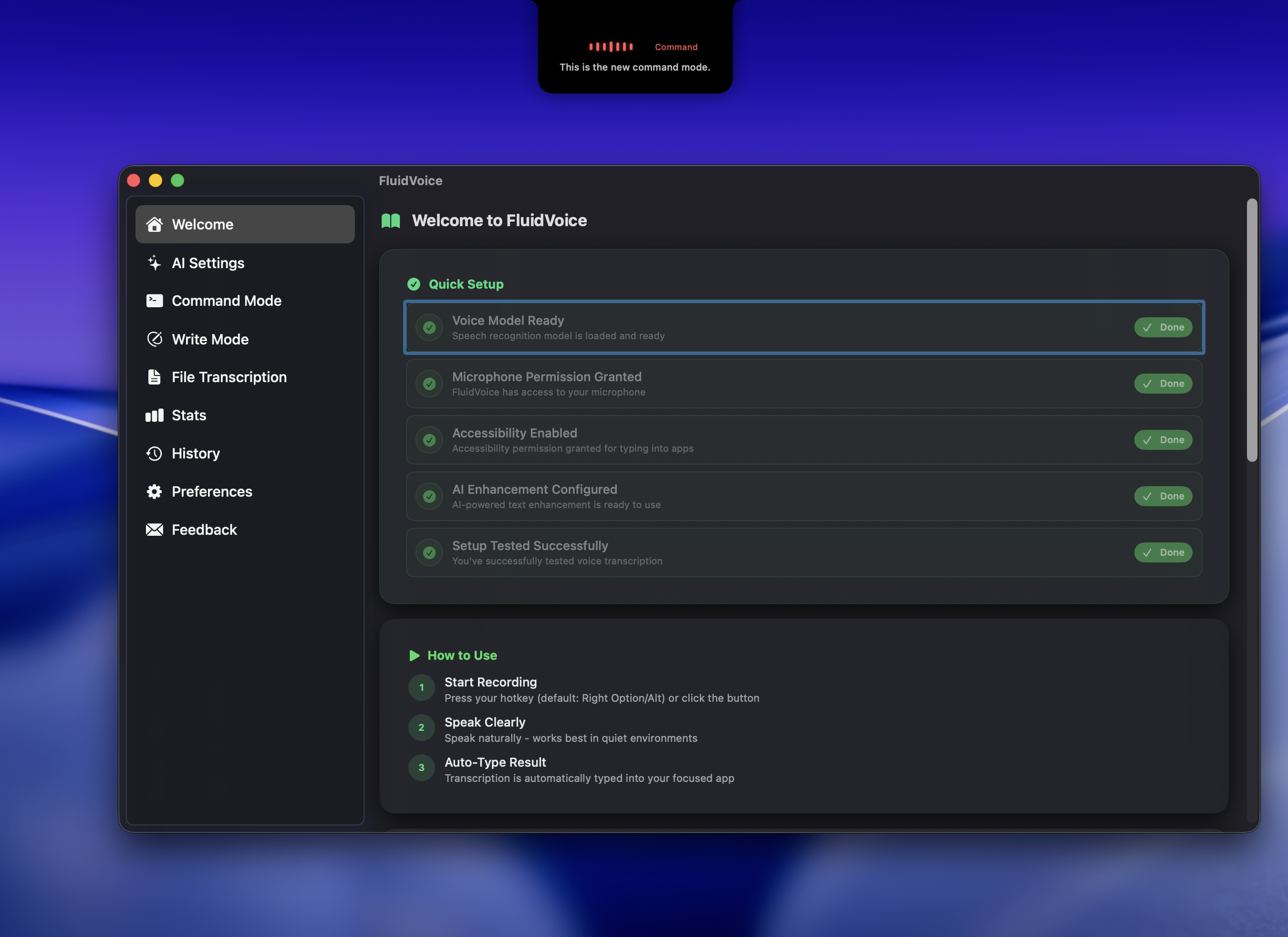
### Command Mode
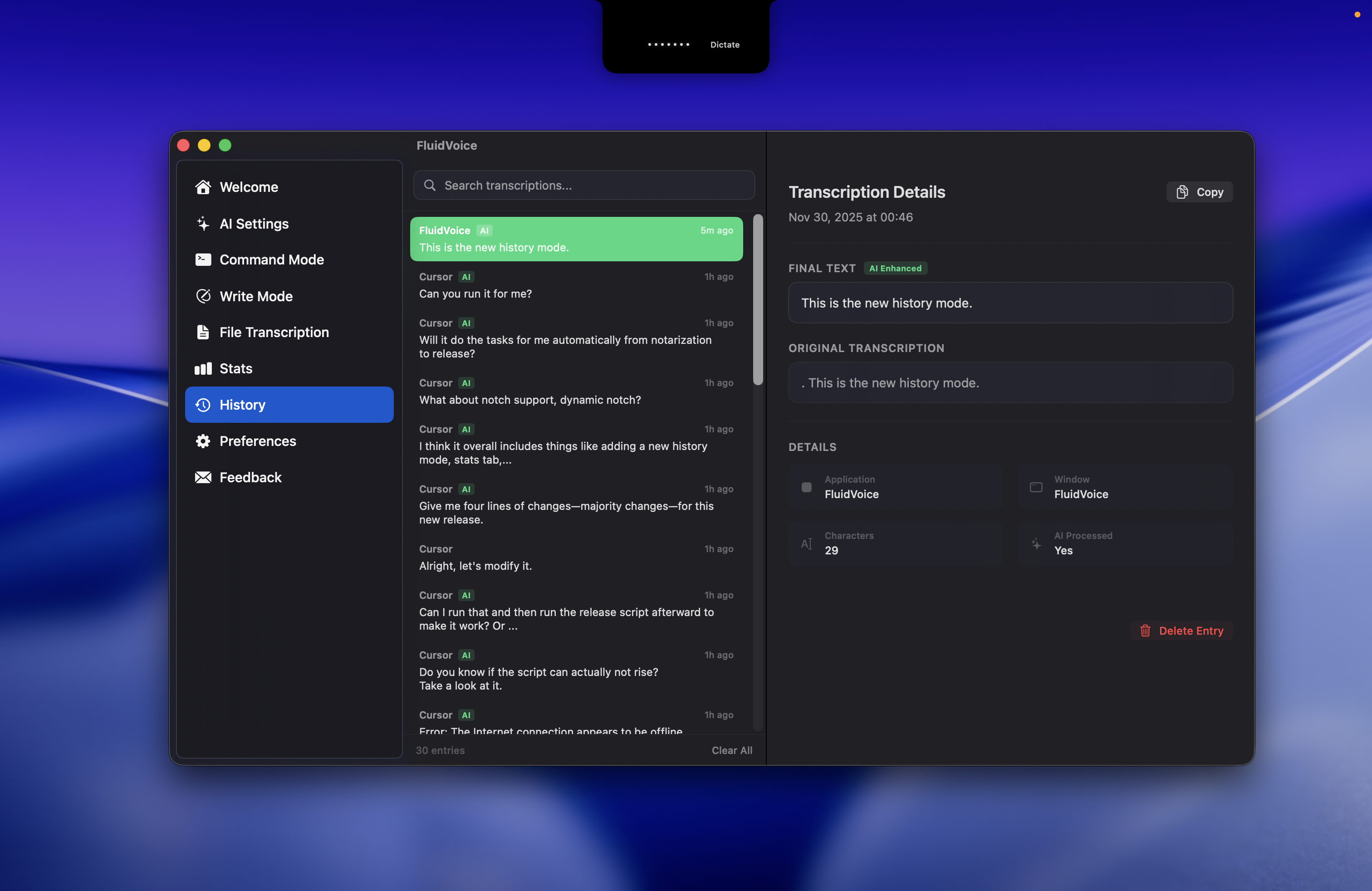
### History & Stats
---
## Features
- **Fluid Intelligence** — on-device AI enhancement for smart formatting, context-aware capitalization, and post-processing, all running locally on your Mac with zero data leaving your machine
- **Command Mode** — control your Mac by voice: launch apps, run shortcuts, trigger system actions, and automate workflows without touching the keyboard
- **Write Mode** — write or rewrite text directly in any text field across any app. Select text and rewrite it, or dictate new content inline
- **Live Preview** — real-time transcription overlay with notch support, so you see words appear as you speak
- **Multiple Speech Models** — Nemotron Speech 3.5, Parakeet Flash, Parakeet TDT v3 & v2, Cohere Transcribe, Apple Speech, and Whisper. Pick the model that fits your language and latency needs
- **AI Enhancement** — optional post-processing via OpenAI, Groq, custom providers, or local Fluid Intelligence for cleaner, more accurate transcripts
- **Audio History** — optional local recording history with budget controls and ZIP export, so you can review past dictations without cloud storage
- **Today-Usage Stats** — daily usage tracking at a glance with a stats header card and toolbar pill
- **Adaptive Theming** — light/dark theme that follows your system, with a compact toolbar switcher
- **Global Hotkey** — instant voice capture from anywhere, no app switching needed
- **Smart Typing** — direct insertion into any app via accessibility APIs for reliable, app-independent text entry
- **Menu Bar Integration** — quick access, status, and settings from the menu bar
- **Auto-Updates** — seamless updates with an optional beta channel for early previews
- **Per-App Configuration** — assign different prompt sets to different apps, so your dictation adapts to whatever you're working in. Fully optional
- **Notch-Aware Overlay** — transcription overlay that fits cleanly around the MacBook notch, or use a standard overlay if your Mac doesn't have one
- **Local-First** — your voice and text never leave your machine unless you opt in to a cloud AI provider
- **Fastest Parakeet on Mac** — one of the fastest native implementations of Parakeet on macOS, with near-instant transcription and minimal latency
- **Configurable Overlay** — choose from pill-shaped to large overlay sizes to show live preview, or keep it minimal. Everything is optional
- **Everything is Optional** — AI enhancement, Fluid Intelligence, audio history, analytics, and beta builds are all opt-in. The core dictation experience works out of the box with zero configuration beyond permissions and a hotkey
---
## Supported Models
| Model | Best for | Language support | Download size | Hardware |
| --- | --- | --- | --- | --- |
| Nemotron Speech 3.5 — Ultra Fast Low Latency | Streaming-capable multilingual dictation | ~40 languages | ~670 MB | Apple Silicon |
| Nemotron 3.5 Multilingual | Higher-accuracy multilingual dictation | ~40 languages | ~530 MB | Apple Silicon |
| [Parakeet Flash (Beta)](https://huggingface.co/nvidia/parakeet_realtime_eou_120m-v1) | Lowest-latency live English dictation | English | ~250 MB | Apple Silicon |
| Parakeet TDT v3 | Fast default multilingual dictation | [25 languages](#parakeet-tdt-v3-languages) | ~500 MB | Apple Silicon |
| Parakeet TDT v2 | Fastest English-only dictation | [English](#parakeet-tdt-v2-languages) | ~500 MB | Apple Silicon |
| Cohere Transcribe | High-accuracy multilingual dictation | [14 languages](#cohere-transcribe-languages) | ~1.4 GB | Apple Silicon |
| Apple Speech | Zero-download native macOS speech | [System languages](#apple-speech-languages) | Built-in | Apple Silicon + Intel |
| Whisper Tiny / Base / Small / Medium / Large | Broad compatibility, including Intel Macs | [99 languages](#whisper-language-support) | ~75 MB to ~2.9 GB | Apple Silicon + Intel |
### Parakeet TDT v3 Languages
Bulgarian, Croatian, Czech, Danish, Dutch, English, Estonian, Finnish, French, German, Greek, Hungarian, Italian, Latvian, Lithuanian, Maltese, Polish, Portuguese, Romanian, Russian, Slovak, Slovenian, Spanish, Swedish, and Ukrainian.
### Parakeet TDT v2 Languages
English.
### Cohere Transcribe Languages
English, French, German, Italian, Spanish, Portuguese, Greek, Dutch, Polish, Mandarin, Japanese, Korean, Vietnamese, and Arabic.
### Apple Speech Languages
System language support depends on the macOS speech recognition languages available on your machine.
### Whisper Language Support
Whisper supports up to 99 languages, depending on the model size you choose.
---
## Quick Start
1. **Install** with Homebrew:
```bash
brew install --cask fluidvoice
```
Or download the [latest release](https://github.com/altic-dev/FluidVoice/releases/latest).
2. **Grant permissions** — FluidVoice will ask for microphone and accessibility access. Both are required for dictation and typing into other apps.
3. **Set your hotkey** — pick a global hotkey in settings that triggers voice capture from anywhere.
4. **Go through onboarding** — choose your voice model based on your language and latency needs. Models range from zero-download Apple Speech to high-accuracy Nemotron and Whisper.
5. **(Optional) Enable Fluid Intelligence** — download the local AI model during onboarding for on-device dictation enhancement. Everything runs locally, no data leaves your Mac.
6. **(Optional) Bring your own AI provider** — add an OpenAI, Groq, or custom provider API key for cloud-based enhancement. Keys are stored securely in macOS Keychain. Select "Always allow" for key access.
7. **(Optional) Opt in to beta builds** — `Settings → Automatic Updates → Beta Releases` for early access to new features.
---
## Requirements
- macOS 15.0 (Sequoia) or later
- Apple Silicon Mac for all models
- Intel Macs supported via Whisper models (from 1.5.1+)
- ~1 GB disk space for a voice model
- ~3.5 GB disk space for the Fluid Intelligence model (optional)
- Microphone access
- Accessibility permissions for typing
---
## Building from Source
```bash
git clone https://github.com/altic-dev/FluidVoice.git
cd FluidVoice
open Fluid.xcodeproj
```
Build and run in Xcode. All dependencies are managed via Swift Package Manager.
### Build Only (No Signing)
```bash
xcodebuild -project Fluid.xcodeproj -scheme Fluid -destination 'platform=macOS' build CODE_SIGNING_ALLOWED=NO
```
---
## Contributing
Contributions are welcome! Please create an issue first to discuss major changes before submitting a pull request.
### Development Setup
1. Clone and open in Xcode as above.
2. **Signing:** `FluidVoice → Signing & Capabilities → Automatically manage signing → pick your Team` (Personal Team is fine). Stored in `xcuserdata/` (gitignored).
3. Build and run — SPM handles dependencies.
4. **(Optional) Pre-commit hook** to prevent accidental team ID commits:
```bash
cp scripts/check-team-id.sh .git/hooks/pre-commit
chmod +x .git/hooks/pre-commit
```
### Pull Request Guidelines
- **One feature or fix per PR** — keep changes focused and atomic
- **Create an issue first** so work is trackable before review
- **Discuss non-trivial changes** before opening a PR
- **Follow the PR template**
- **Test thoroughly** on your machine
- **Never commit personal team IDs or API keys**
- **Check `git diff`** before committing
---
## Run Integration Tests
```bash
xcodebuild test -project Fluid.xcodeproj -scheme Fluid -destination 'platform=macOS'
```
CI uses unsigned builds:
```bash
xcodebuild test -project Fluid.xcodeproj -scheme Fluid -destination 'platform=macOS' CODE_SIGNING_REQUIRED=NO CODE_SIGNING_ALLOWED=NO
```
---
## Privacy & Analytics
FluidVoice is **local-first**. Your voice, audio, and transcribed text never leave your machine unless you explicitly opt in to a cloud AI provider.
### What's Collected (Opt-In)
Anonymous analytics are enabled by default to track app health and feature usage. You can disable at any time from `Settings → Share Anonymous Analytics`.
**Collected:**
- App version, build, macOS version
- Low-cardinality feature/config flags (e.g. app mode, major settings)
- Approximate usage ranges (not exact values)
- High-level success/error outcomes
**Not Collected:**
- Voice, raw audio, or transcribed text
- Selected text, prompts, or AI responses
- Terminal commands, window titles, file paths, clipboard, or typed content
- Any personal or private information
---
## Community
Join our Discord: https://discord.gg/VUPHaKSvYV
Follow development on X: [@ALTIC_DEV](https://x.com/ALTIC_DEV)
---
## License
From 2026-02-23 onward, this project is licensed under the [GNU General Public License, Version 3.0 (GPLv3)](LICENSE).
Versions published before this date were licensed under Apache License 2.0.