
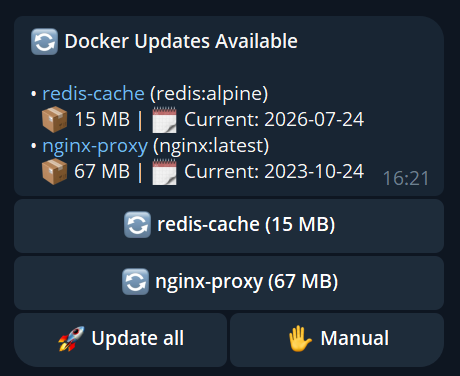
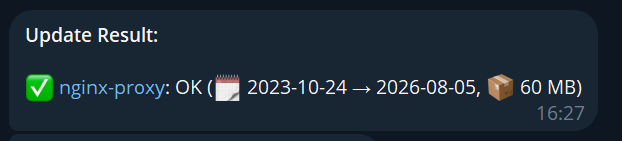
Watches Docker and Podman containers for new images and updates them, rolling back automatically when the new container fails its healthcheck. One instance manages several hosts over ssh:// or tcp://; container groups keep a stack's update order, including containers that share a VPN sidecar's network; and update policy, major-version confirmation, update windows and pinning are set per container. When something dies you get the exit code from the live event stream, host memory and load, what each container was using at that moment, and whether the kernel OOM-killed it. Web UI, Telegram bot, Discord bot, /metrics and a read-only JSON API all drive the same update engine — 16 languages, and Telegram is optional: it runs fully headless.




` | Switch language |
| `/settings` | Show current configuration |
| `/testchannel` | Send a test notification to every channel |
| `/help` | Show all commands |
> Partial name matching: `/pin ngi` matches `nginx`.
> Per-command help: append `-?` to any command for its detailed help — `/protect -?` is the same as `/help protect`.
> **On Discord** the same commands take named options rather than positional words: `/status container:nginx`, `/check host:nas`. Both fields suggest values while you type, so you don't have to know them in advance — the container list follows whichever host you picked, and the machine Docksentry itself runs on is called `local`. `/hosts` lists them all. Setting the bot up is a trip through Discord's developer portal — [docs/discord-bot.md](docs/discord-bot.md) walks it screenshot by screenshot.
## Container labels (GitOps)
For GitOps-style setups where you keep all container config in one place, Docksentry reads a few `docksentry.*` labels straight off your containers. A label, when present, **overrides** the equivalent bot/Web-UI toggle — so your compose file stays the source of truth.
```yaml
services:
myapp:
image: ghcr.io/me/myapp:latest
labels:
- "docksentry.auto=true" # auto-update this container without touching the Web UI
- "docksentry.protect=true" # refuse /stop for this container (#38-style protection)
- "docksentry.ask-major=true" # pause auto-updates on major version bumps until confirmed
- "docksentry.link=https://github.com/me/myapp/releases" # repo / changelog link
```
| Label | Effect |
|-------|--------|
| `docksentry.enable=false` | Take the container out of Docksentry's scope entirely (not checked, not listed) |
| `docksentry.exclude=true` | Same as `docksentry.enable=false` |
| `docksentry.pin=true` | Freeze the container — never listed as an update, never updated (twin of `/pin`) |
| `docksentry.auto=true` / `=false` | Opt in to / out of auto-updates **(auto-updating your other containers, not Docksentry itself)**. `=false` keeps a container manual **even with `AUTO_UPDATE_ALL=true`**; `=true` opts it in without the per-container toggle |
| `docksentry.protect=true` | Protect from `/stop` (a `=false` label force-unprotects, overriding the toggle) |
| `docksentry.ask-major=true` / `=false` | Require / skip the major-version confirmation gate for auto-updates |
| `docksentry.policy=all` / `minor` / `patch` | Cap **auto-updates** by semver bump level: `all` applies every bump (default), `minor` applies minor+patch but holds back majors, `patch` applies patch only. Manual `/update` and the Bulk "Update all" button always apply regardless. An update whose version can't be classified is allowed. Overrides the global `UPDATE_POLICY`. |
| `docksentry.trust-running=true` | Accept "running" as healthy after updates, even if the healthcheck stays unhealthy (#9 behaviour) |
| `docksentry.monitor=false` | Exclude the container from state monitoring (health/exit/OOM notifications) |
| `docksentry.monitor-only=true` | Watch and report it, never update it. For containers something else owns — quadlets, Portainer stacks, anything from Ansible or GitOps, where a recreate fights the tool that put them there. Unlike `docksentry.enable=false` it stays visible and still reports updates |
| `docksentry.min-age=7` | Don't auto-update to an image younger than this many days. **Auto path only** — pressing the button yourself always works, and the update stays pending so it applies by itself once the image has aged. Overrides the global `MIN_IMAGE_AGE_DAYS` |
| `docksentry.link=` | Repo / changelog URL for the container — wrapped around its name in update notifications, shown as `🔗` in the Web UI status table and on the detail page, and used by `/changelog `. Beats both `/setlink` and the Web UI field (which is disabled while the label is set). Must be a complete `http://` or `https://` URL; anything else is ignored and the next source in the chain applies. Resolution order: this label → `/setlink` value → `org.opencontainers.image.source` → `org.opencontainers.image.url` → registry overview page guessed from the image name |
Booleans accept `true`/`1`/`yes`/`on` (case-insensitive). Precedence everywhere: **label wins over the stored bot/Web-UI toggle; no label → toggle applies.** The Web UI status table shows the *effective* state (label included) for Pin and Auto — note that clicking a UI toggle cannot override a label; remove the label from your compose file instead.
## Configuration
At least one of `BOT_TOKEN`+`CHAT_ID`, `WEB_UI=true`, `DISCORD_WEBHOOK`, `WEBHOOK_URL`, or e-mail (`SMTP_HOST`+`SMTP_FROM`+`SMTP_TO`) must be configured — otherwise Docksentry has no way to notify or be controlled.
These are the ones worth knowing on the first day. **[Every variable, with its default and the full explanation, is in `docs/configuration.md`](docs/configuration.md)** — 86 of them, and you will not need most.
| Variable | Default | What it is for |
|----------|---------|----------------|
| `WEB_UI` | `false` | Turn the web interface on. Set this and you can do everything from a browser. |
| `WEB_PORT` | `8080` | Port it listens on. |
| `WEB_PASSWORD` | | Password for the web interface. Empty means no login — fine on a trusted LAN, not otherwise. |
| `TZ` | `Europe/Berlin` | Your timezone. Worth setting: every time Docksentry prints is this clock. |
| `CRON_SCHEDULE` | `0 18 * * *` | When it checks for updates. |
| `LANGUAGE` | `en` | One of 16. |
| `EXCLUDE_CONTAINERS` | | Containers to leave alone entirely, comma-separated. |
| `AUTO_SELFUPDATE` | `false` | Whether Docksentry updates *itself* unattended. Other containers are opted in individually. |
| `BOT_TOKEN` | | Telegram bot token — optional, set together with `CHAT_ID`. |
| `CHAT_ID` | | Telegram chat ID — optional, set together with `BOT_TOKEN`. |
| `DISCORD_WEBHOOK` | | Discord webhook URL, if you would rather be told there. |
| `WEBHOOK_URL` | | Generic webhook, for anything else. |
| `DOCKER_HOST` | | Point at a socket proxy or another daemon instead of the local socket. |
> **Quoting env values in `docker-compose.yml`**: Docker Compose passes env values literally, so `BOT_TOKEN="abc123"` lands as the string `"abc123"` (quotes included) — which breaks Telegram API calls, `int()` parsing on `WEB_PORT`, and more. Docksentry strips matching outer quote pairs since v1.19.1, but the cleanest fix is to leave them off: `BOT_TOKEN=abc123`.
> **Synology / NAS users:** If Docksentry shows 0 containers, add `DOCKER_API_VERSION=1.43` to your environment variables.
> **Settings saved in the Web UI win over the environment.** Roughly half of these are stored in `settings.json` in the [data directory](docs/configuration.md#where-the-data-lives) once saved, and the saved file is applied on top of the environment on every start — so changing the compose file afterwards does nothing. Docksentry says so at startup when it happens. [The full list and both ways out are in the reference.](docs/configuration.md)
### Group / Topic setup
If you want to use Docksentry in a Telegram **group** (so multiple people see the notifications) instead of a private chat:
> ⚠️ **Make sure it's a Group, not a Channel.** Telegram's "New Channel" creates a broadcast-only chat — admins post, members read, nobody can send `/commands`. The bot will happily post its startup message there but `getUpdates` always returns empty because there are no incoming messages. Use **New Group** in the Telegram app (not New Channel). A working group ID is negative — typically `-100…` for supergroups or shorter negatives (`-52…` etc.) for basic groups; both work.
1. **CHAT_ID is the group ID**, not your personal user ID. Find it by sending a message in the group and visiting `https://api.telegram.org/bot/getUpdates`.
2. **Add the bot to the group** with permission to post and read messages. Disable group privacy in [@BotFather](https://t.me/BotFather) → `/setprivacy` → `Disable`, otherwise the bot only sees messages that mention it directly — so commands like `/status` won't trigger.
> 💡 **`/setprivacy` is per-chat-membership cached.** If you toggle it in BotFather *after* the bot is already in the group, the new setting doesn't apply to that existing membership — `docker compose down/up` of Docksentry **does not** clear it. You have to **kick the bot from the group and add it again**. This trips most people up on first setup.
3. **Topics (Forum groups):** if the group has topics enabled, set `TELEGRAM_TOPIC_ID` to the topic where the bot should post. The ID is the integer after the last slash in a topic URL (right-click a topic → Copy link).
4. **Restrict who can control the bot** (optional but recommended for shared groups): set `TELEGRAM_ALLOWED_USERS` to a comma-separated list of personal user IDs. Without it, *any* group member can click "Update all". Find user IDs the same way as the chat ID — `from.id` in the `getUpdates` response.
```yaml
environment:
- BOT_TOKEN=123456:abc...
- CHAT_ID=-1001234567890 # the group ID
- TELEGRAM_TOPIC_ID=42 # only needed for Forum groups
- TELEGRAM_ALLOWED_USERS=11111111,22222222 # only these users can issue commands
```
### Multi-bot setup (one group, multiple hosts)
If you have several Docker hosts (different boxes, VMs, Proxmox LXCs, …), the way to do it is `DOCKER_HOSTS` — see [Real multi-host](#real-multi-host) below. What follows is the older approach, still useful when you want each host to stay a separate install: several instances in a **single Telegram group** by running one Docksentry per host, **each with its own bot token from [@BotFather](https://t.me/BotFather)**, labelling each instance with `BOT_LABEL`:
> **Why a separate token per host?** Telegram allows exactly **one polling consumer per bot token** — two instances sharing the same token fight over `getUpdates` and one of them gets evicted with a 409 Conflict every poll. `BOT_LABEL` is only a visual prefix in messages; it doesn't change the underlying bot identity (the token is the identity). Create one bot per host with `/newbot` in @BotFather and use a distinct token per instance.
```yaml
# Host pve1
environment:
- BOT_TOKEN=...token-for-bot-1...
- CHAT_ID=-1001234567890 # shared group ID, same for all hosts
- TELEGRAM_ALLOWED_USERS=11111111 # your own user ID — lock down control
- BOT_LABEL=🖥 pve1 # prefixes every notification
```
```yaml
# Host pve2
environment:
- BOT_TOKEN=...token-for-bot-2...
- CHAT_ID=-1001234567890 # same group
- TELEGRAM_ALLOWED_USERS=11111111
- BOT_LABEL=🖥 pve2
```
Issue `/status` in the shared group and each bot replies with its label prefix:
```
🖥 pve1 · *Container Status:* …
🖥 pve2 · *Container Status:* …
🖥 pve3 · *Container Status:* …
```
The label also flows into Discord embeds (added to title + footer) and the generic webhook payload (`bot_label` field), so downstream automations can route per-host.
**Targeting one bot vs. broadcasting to all:**
In the same group you can choose whether a command hits *all* bots or just *one* by including or omitting the bot's Telegram `@username`:
| Form | Behaviour |
|---|---|
| `/check` | All bots respond (broadcast) |
| `/check@pve1-bot` | Only the bot whose Telegram username is `pve1-bot` responds; the others silently ignore |
Common pattern: broadcast `/selfupdate` so all hosts update together; target `/status@pve2-bot jellyfin` when you want a quick check on just one host without three bots' worth of "not found" noise. The bot's `@username` is what you set in BotFather when you created it (separate from `BOT_LABEL`, which is purely the visual prefix in messages).
**Setup checklist:**
1. In [@BotFather](https://t.me/BotFather), run `/newbot` **once per host** — each Docksentry instance needs its **own bot token**. `BOT_LABEL` alone is not enough; sharing one token across instances causes a Telegram 409 Conflict.
2. Create a private Telegram group, add yourself and **all bots** (one per host).
3. For **each** bot, in @BotFather → `/setprivacy` → **Disable**, so bots see `/commands` in groups (groups have privacy mode on by default, which restricts bots to messages that mention them directly).
4. Find the group ID (send a message in the group, visit `https://api.telegram.org/bot/getUpdates`, look for `chat.id`).
5. Configure each Docksentry instance with: a **distinct** `BOT_TOKEN` (from step 1), the **same** `CHAT_ID` (the group ID), and a **distinct** `BOT_LABEL`.
**Security note — please read:**
- **Set `TELEGRAM_ALLOWED_USERS` to your own user ID.** Without it, any group member can trigger `/cleanup`, `/selfupdate`, "Update all", etc. against every host — accidentally adding a colleague to the group would hand them control over everything.
- **Keep the group private.** Disable invite links or rotate them, and audit membership occasionally. The group is now a single point of trust.
- **Be aware: privacy-mode off means each bot sees every human message in the group.** Don't use the same group for casual chat — keep it ops-only.
- Telegram's own Bot API filters out bot-to-bot communication, so bots can't accidentally trigger each other's commands.
Note what this costs: N bot tokens, N Docksentry containers, N updates. One instance with `DOCKER_HOSTS` does the same job with one of each — the section below. This one earns its keep only when the hosts have to stay separate installs.
### Real multi-host
*New in v1.62.0. Since v2.0.0 the transports are driven for real rather than asserted — measured against a `docker:dind` over loopback and a real sshd with the socket mounted. What hasn't happened is anyone but me running it across several machines; [#7](https://github.com/amayer1983/docksentry/issues/7) is the place to say how it went. Leave `DOCKER_HOSTS` unset and nothing about your install changes.*
One Docksentry, several hosts. Point it at the others with `DOCKER_HOSTS`:
```yaml
environment:
# ssh:// is encrypted and authenticated by your key. A plain tcp://
# endpoint is neither, so only use one on a network Docksentry alone
# can reach — see docs/security.md.
- DOCKER_HOSTS=pve1:ssh://root@pve1, nas:ssh://root@nas
```
Each entry is `name:endpoint`, and the endpoint is whatever the container CLI takes for `-H`. A **TCP socket / [socket proxy](docs/security.md) is the simplest option** — the same pattern you'd use locally, no keys to manage. SSH endpoints work too and lean on the CLI's own SSH handling, so key-based login has to already succeed non-interactively for the user Docksentry runs as.
**A TLS-protected daemon works, and needs no flag from here.**
Docksentry drives the container CLI, and the CLI takes the certificates
from either a saved context (`context://nas`, with `~/.docker` mounted
in) or from `DOCKER_TLS_VERIFY` plus `DOCKER_CERT_PATH` on the
Docksentry container. Both measured against a TLS `docker:dind`; the
recipes are in [docs/security.md](docs/security.md#tls-client-certificates-on-2376).
What does *not* work is pointing a bare `tcp://host:2376` at it with no
certificates anywhere — and the pre-flight now says that is what
happened, instead of reporting "nothing answered".
An endpoint may also be `context://`, meaning "the endpoint this machine already has saved under that name" — `docker --context ` / `podman --connection `. On Podman that is the *only* way to give each remote host its own SSH key, because `podman --url ssh://…` ignores `~/.ssh/config` and borrows whichever stored connection happens to be the default one. Measured, and written up in [docs/podman.md](docs/podman.md#ssh-endpoints-podmans-key-handling-is-not-dockers).
The machine Docksentry runs on is always managed and is **not** listed. Leave `DOCKER_HOSTS` unset and everything behaves exactly as a single-host install — no host column, no `@` anywhere.
**Try an endpoint before you add it** — `/hosts check ` in Telegram, `/hosts check:` on Discord:
```
/hosts check ssh://root@nas
🔎 Pre-flight for `ssh://root@nas`
• docker 27.1.1 answered
• Containers can be listed: 14 found
• A container can be inspected (`jellyfin`)
• Ready: `ssh://root@nas` can be read in full. …
```
It asks, in order, whether the scheme is one Docksentry speaks, whether anything answers, which engine it is, and whether containers can be listed and one inspected — then names the question that failed instead of returning a bare no. It writes nothing and works before the endpoint is in `DOCKER_HOSTS`, which is the point: you find out now rather than when an update fails. An `ssh://` host that refuses gets the explanation too — keys live on *your* machine, and the container has its own filesystem.
Two limits worth knowing. Every question it asks is a **read**: updating also needs to pull an image and recreate a container, and nothing short of doing it proves those are allowed — so a socket proxy that permits `GET` and refuses `POST` passes the whole check and fails the first update with a 403. And the endpoint is whatever you type, so anyone who can command the bot can point it at an address on your network and see what answers — including up to 300 characters of the other side's own error text, which for an `ssh://` host carries the user name and the path it looked for a key in. `TELEGRAM_ALLOWED_USERS` limits **who may ask**, not who sees the answer: Telegram replies go to `CHAT_ID`, so everyone in that group reads it. Discord replies are private to whoever typed the command unless you set `DISCORD_PUBLIC_REPLIES=true`.
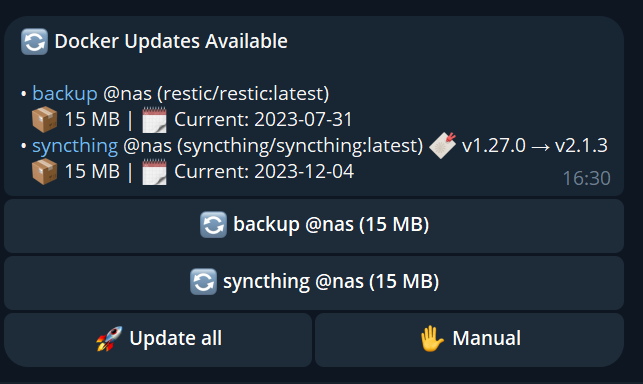
**Aiming a command at a host** — append `@`:
```
/check @pve1 check just that host
/update sonarr @nas update sonarr on nas
/update * @all update everywhere, deliberately
```
The default when you *don't* say `@`:
| | without `@` | why |
|---|---|---|
| **Looking** — `/check`, `/status`, `/updates` | every host | you almost always want the whole picture |
| **Changing** — `/update`, `/start`, `/stop`, `/restart` | local host only | so a habit from single-host days can't restart something three boxes away |
A write command that stayed local says so in its reply and points at `@` / `@all`, so the rule is visible without reading this.
**Limitations worth knowing:** Compose-managed containers on a remote host are recreated from their inspect data rather than through `docker compose` — the compose file lives on that host's filesystem and `docker compose -f` would parse a *local* path, so at best it wouldn't find the file and at worst it would deploy your local file's definition onto the other box. The standalone recreate preserves almost everything (see [Compose-managed containers](#compose-managed-containers)) but loses compose-only metadata. Beyond that: self-update is local-only by design — Docksentry updates the instance it runs in, not the ones on your other boxes. A host that can't be reached is reported and skipped rather than taking the run down — every call to a host is time-bounded, so an unresponsive box costs a short wait on that host, not the others.
## Web UI
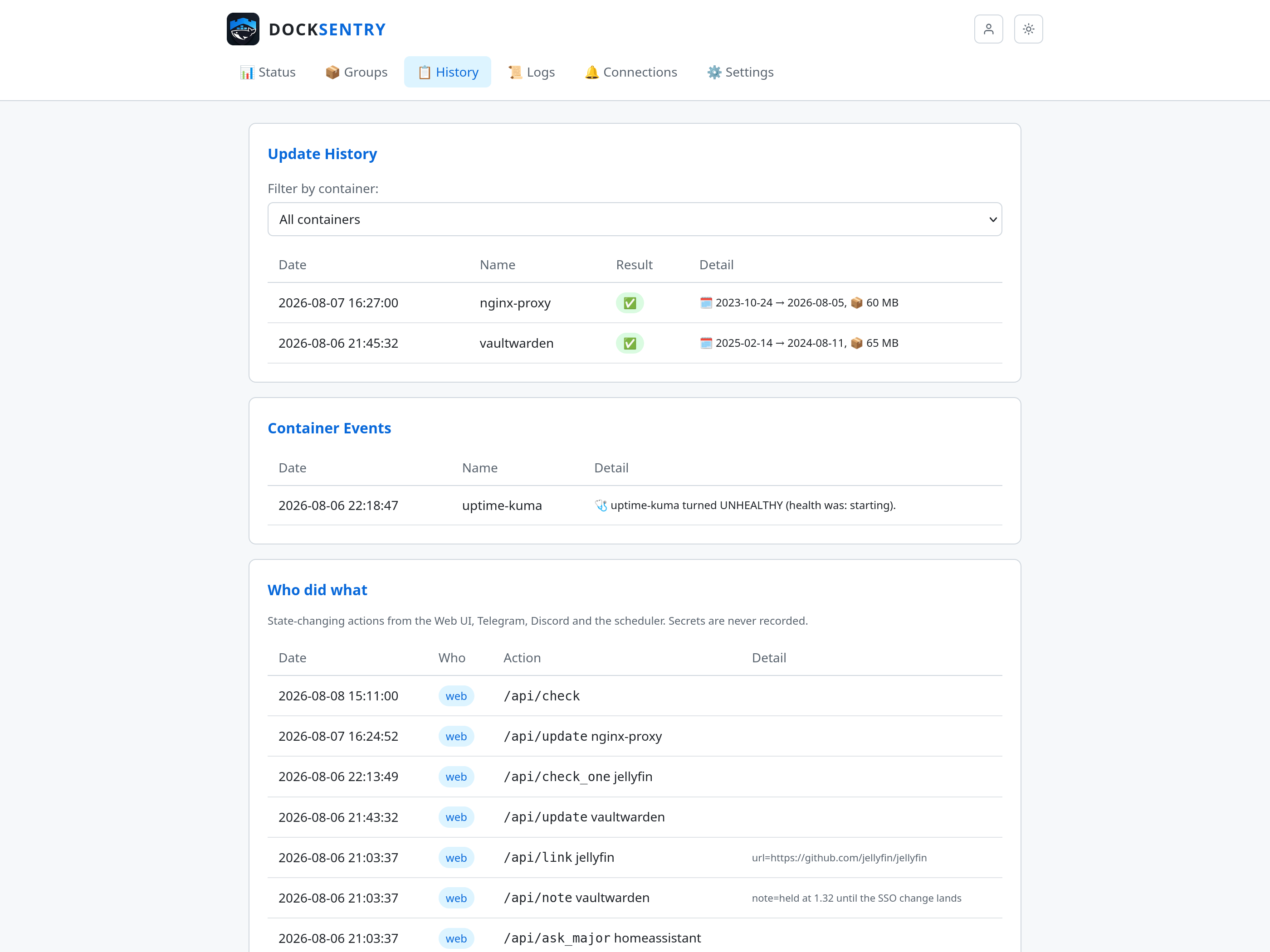
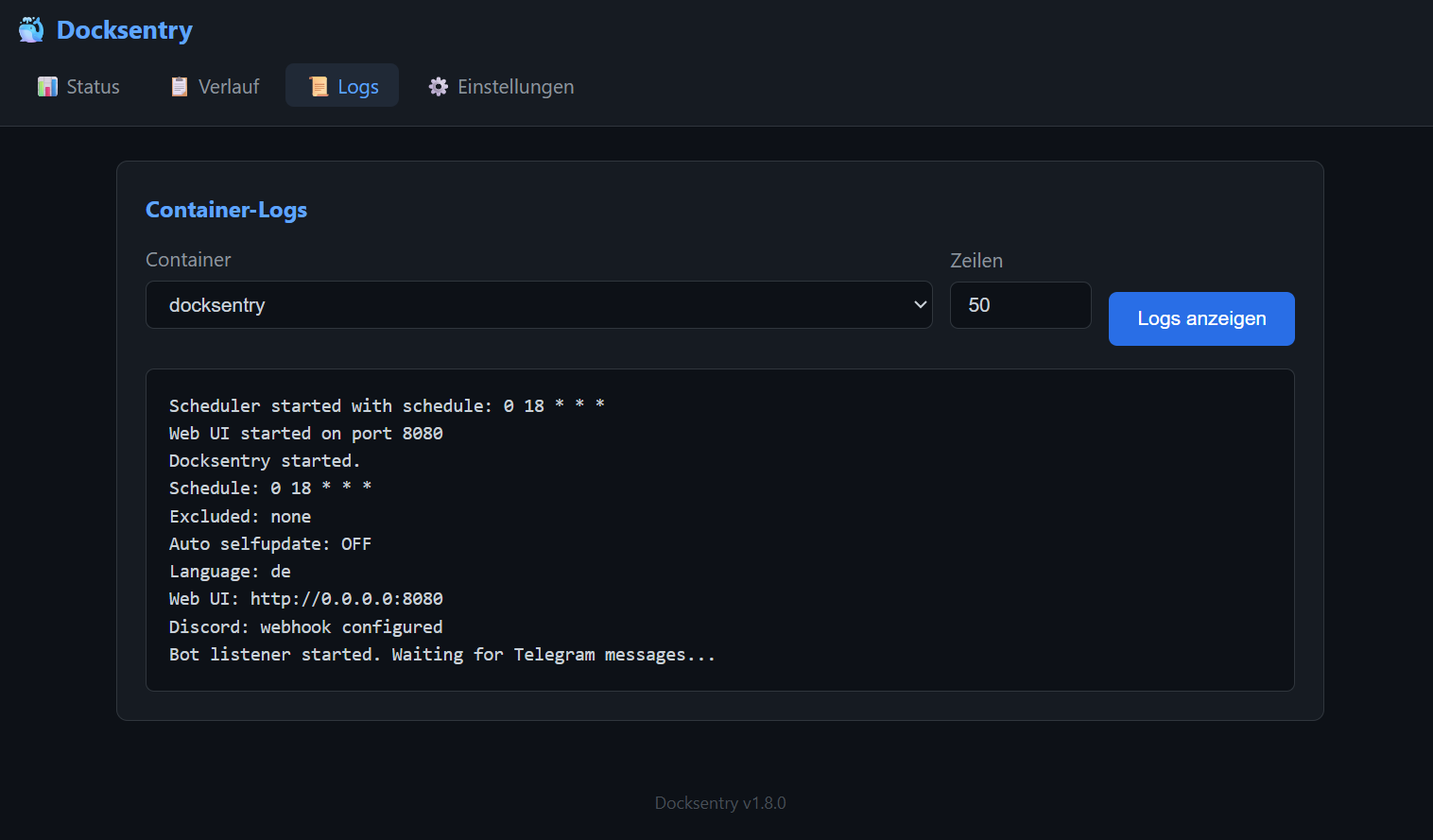
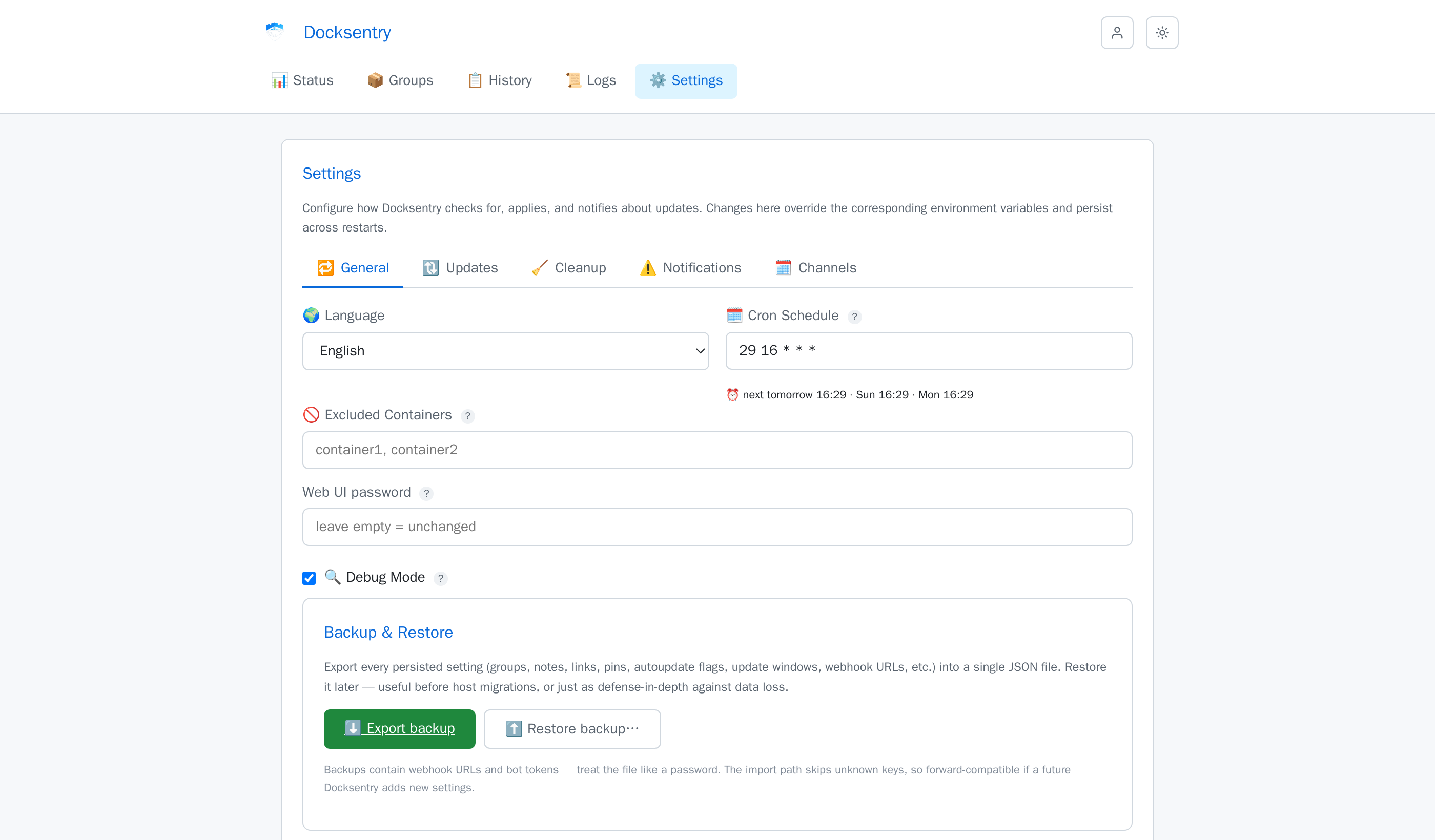
Enable with `WEB_UI=true`. Provides status dashboard, container logs, update history, a Container Events history (the same crash/OOM/health-flip log you get from `/events`), an audit trail of who did what, and full settings management. The theme follows your system's light/dark preference and there's a toggle in the header; the screenshots below are the light one.
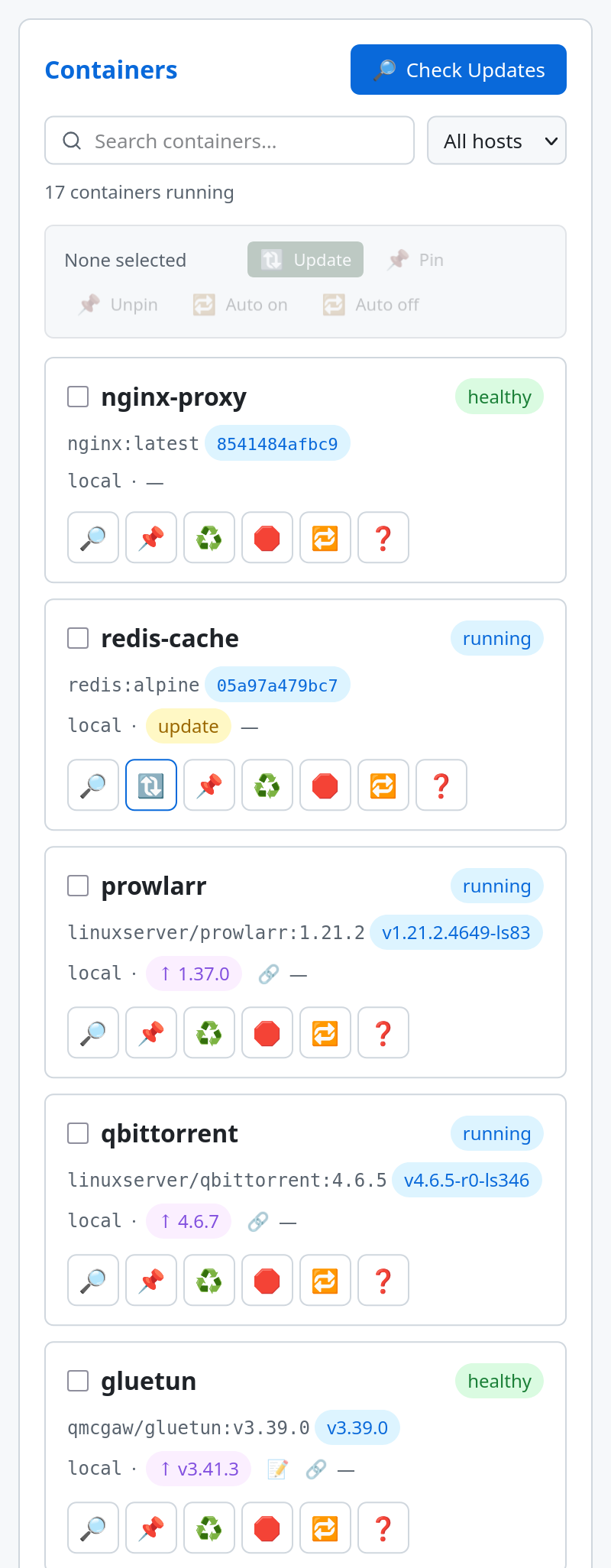
**Checking for updates.** The **Check Updates** button above the container table runs the same check as `/check` and the cron schedule: every container, results in the pending list. Each row also has its own 🔎 button that checks just that container and tells you the outcome right there — handy when you only care about one image and don't want to wait for a full sweep, and the only way to get feedback at all if you run without Telegram or a webhook. Both refuse to start while an update is in progress, and while a check is already running, so a double-click can't produce two competing results. With `DEBUG=true` the per-container check also writes its full registry log — request URLs, status codes, redirects, full digests, resolved versions — to the browser console.
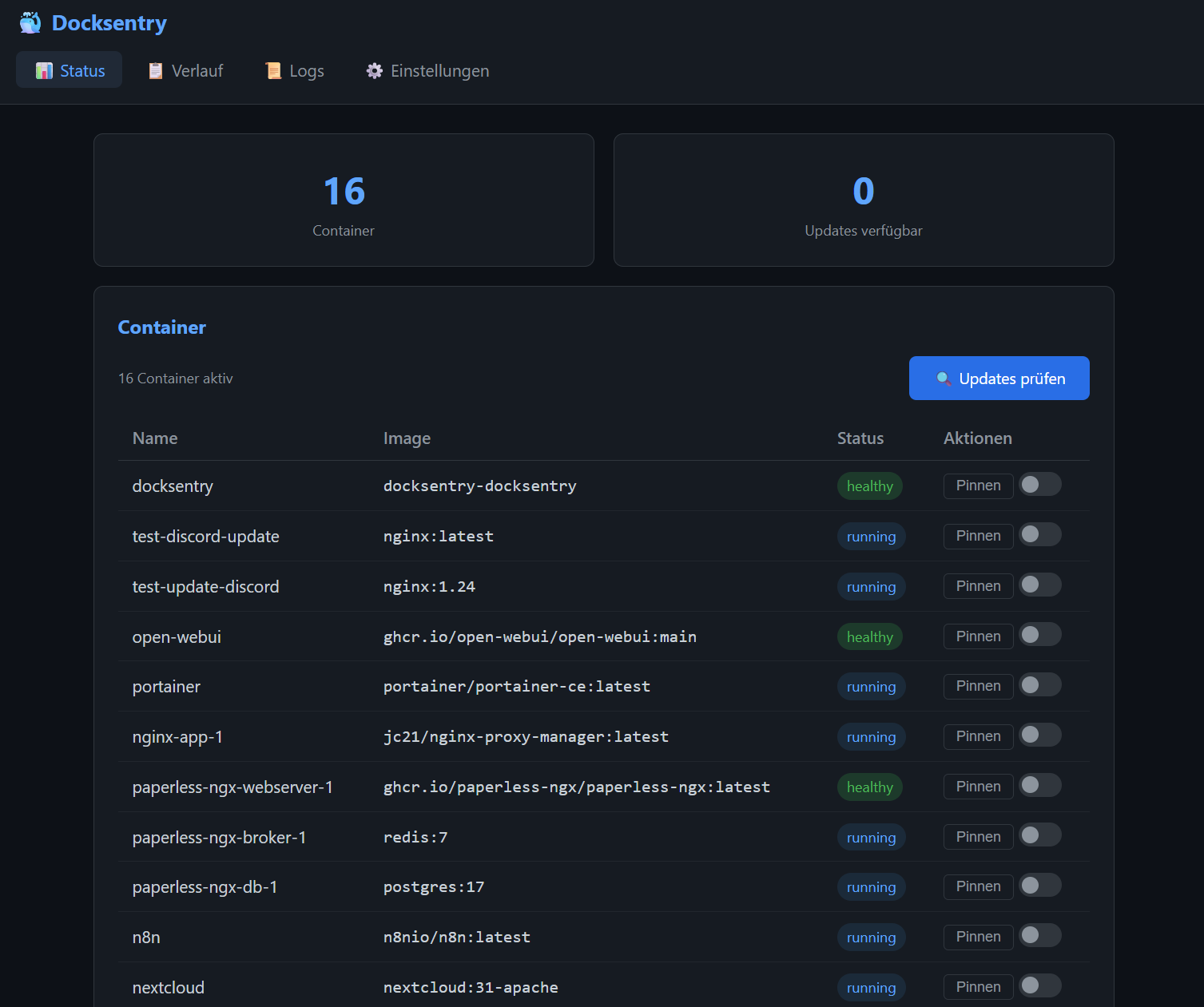
The `↑` badges are version advisories on pinned tags — a newer version exists, and Docksentry is telling you rather than acting on it. The `Host` column and the host filter only appear once `DOCKER_HOSTS` is set.
Below 700px the container table becomes cards, so the actions are on screen instead of behind a sideways swipe:
See [Web UI Documentation](docs/web-ui.md) for details.
## Healthcheck
Docksentry ships with its own `HEALTHCHECK` baked into the image since v1.16.1. It runs every 60 seconds and checks **whichever surface(s) you have configured**, in priority order:
1. **Web UI socket** — when `WEB_UI=true`, a successful TCP connect to `127.0.0.1:` is sufficient (the listener being up implies the scheduler thread is alive). This is the cheapest and most deterministic check.
2. **Telegram Bot API** — when `BOT_TOKEN` + `CHAT_ID` are set but Web UI is off, the healthcheck calls `getMe` against `api.telegram.org` to confirm the bot can still reach upstream.
3. **Webhook-only / headless** — when only `DISCORD_WEBHOOK` or `WEBHOOK_URL` is set, there's nothing local to probe; the healthcheck exits 0 (Docker's normal process supervision is the actual signal).
4. **Misconfigured** — no surface configured → exit 1 (matches `main.py`'s startup refusal).
Verify on your host:
```bash
docker inspect docksentry | jq '.[0].State.Health'
docker ps # should show "(healthy)" after ~3 minutes of uptime
```
> **Podman caveat (#31):** some Podman versions don't auto-execute image-defined HEALTHCHECK directives. If `podman ps` doesn't show `(healthy)` for Docksentry but does for other containers, your Podman is one of them. Workaround: add `--health-cmd "python3 /app/healthcheck.py"` to your `podman run` / compose-equivalent. The script is bundled inside the image at that path.
## Notification Channels
| Channel | Updates | Results | Interactive |
|---------|:-:|:-:|:-:|
| **Telegram** | buttons | detailed | 35 commands |
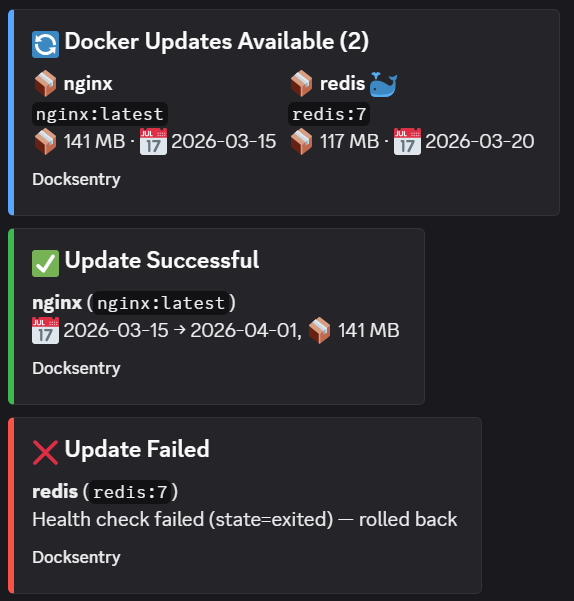
| **Discord bot** | rich embeds | rich embeds | 35 slash commands |
| **Discord webhook** | rich embeds | rich embeds | — |
| **E-mail (SMTP)** | text | text | — |
| **ntfy** | text | text | — |
| **Gotify** | text | text | — |
| **Matrix** | text | text | — |
| **Apprise** | text | text | — |
| **Webhook** | JSON | JSON | — |
Everything but the two bots is notify-only. Details and setup for each:
[docs/notifications.md](docs/notifications.md).
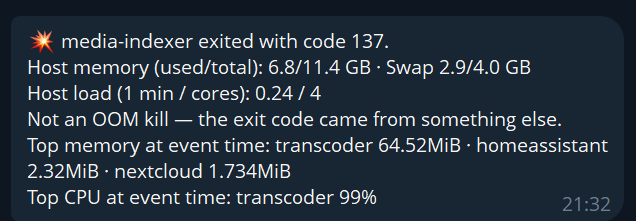
Updates are only half of what arrives. A container that dies gets an alert with the exit code, the host's memory and load, which container was consuming what at that moment, and — when the event stream saw it — whether the kernel was the one that killed it:
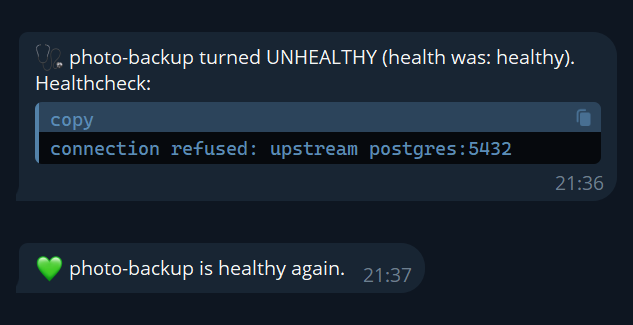
Health flips are reported the same way, in both directions, and the unhealthy message quotes what the healthcheck itself said — usually the fastest way to the cause:
See [Notification Setup](docs/notifications.md) for Discord and Webhook configuration, [the Discord bot guide](docs/discord-bot.md) if you want slash commands as well, and [Container Monitoring](docs/monitoring.md) for what triggers each alert.
## Documentation
| Topic | Link |
|-------|------|
| **Configuration reference** — every env var | [docs/configuration.md](docs/configuration.md) |
| Update Workflow & Rollback | [docs/updates.md](docs/updates.md) |
| Container Monitoring | [docs/monitoring.md](docs/monitoring.md) |
| Web UI | [docs/web-ui.md](docs/web-ui.md) |
| Notification Channels | [docs/notifications.md](docs/notifications.md) |
| Discord bot — the portal, step by step | [docs/discord-bot.md](docs/discord-bot.md) |
| Docker Compose Support | [docs/compose.md](docs/compose.md) |
| Podman — CLI, socket activation, remote hosts | [docs/podman.md](docs/podman.md) |
| Security & Socket Proxy | [docs/security.md](docs/security.md) |
| Multi-Language | [docs/languages.md](docs/languages.md) |
## Roadmap
Docksentry is actively developed — see the [CHANGELOG](CHANGELOG.md) for what shipped in each release.
**v1.x — ongoing.** Continued bug fixes and smaller features driven by user feedback in [#2](https://github.com/amayer1983/docksentry/issues/2). Recent: container groups, maintenance mode, container notes, group/topic auth, restart-dependents for VPN-sidecar stacks.
**Shipped since — both of the items that used to sit under "v2.0, ahead":**
- **Multi-host management** — one instance managing several Docker or Podman hosts (`DOCKER_HOSTS=name:endpoint`, TCP or SSH), with per-host pending queues, host-prefixed notifications, a host selector in the Web UI, and `@host` / `@all` command targeting. Landed in v1.62.0.
- **Interactive Discord bot** — 35 slash-commands, confirmation buttons and the same control surface the Telegram bot offers, driven by the same update engine so the three front-ends cannot drift apart. Landed in v1.63.0.
**Shipped since:** an audit-free read-only surface — `/metrics` in Prometheus format and `GET /api/status` as JSON, both behind `API_TOKENS` so a scraper never needs the Web UI password. Plus `MONITOR_ONLY_CONTAINERS` for containers another tool owns, `MIN_IMAGE_AGE_DAYS` so you need not be first to pull a new release, registry mirrors for lookups, and the audit trail of who did what across the front ends — that one landed in v2.0.0 and lives on the Web UI History page.
**Next.** Notification templates with per-channel routing — the one thing every comparable project's users ask for that Docksentry still builds in code. And per-container resource figures on the status page, loaded after the page renders rather than making every load wait on `docker stats`.
Wishlist input and "+1"s welcome on [#2](https://github.com/amayer1983/docksentry/issues/2).
## Contributing
- **Feature ideas?** Open an [Issue](https://github.com/amayer1983/docksentry/issues) with the label `enhancement`
- **Found a bug?** Open an [Issue](https://github.com/amayer1983/docksentry/issues) with steps to reproduce
- **Translations?** Submit a PR for `app/lang/*.json`
- **Vote on the roadmap:** [Community Roadmap (Issue #2)](https://github.com/amayer1983/docksentry/issues/2)
## Support the project
Docksentry is free and open source. If it saves you time and you'd like to support continued development, you can sponsor the project on GitHub:
[](https://github.com/sponsors/amayer1983)
Sponsorships fund: faster bug-fixes, more registry integrations, multi-host support, and keeping the lights on. No feature is paywalled — Docksentry stays free.
## License
MIT License - see [LICENSE](LICENSE)