






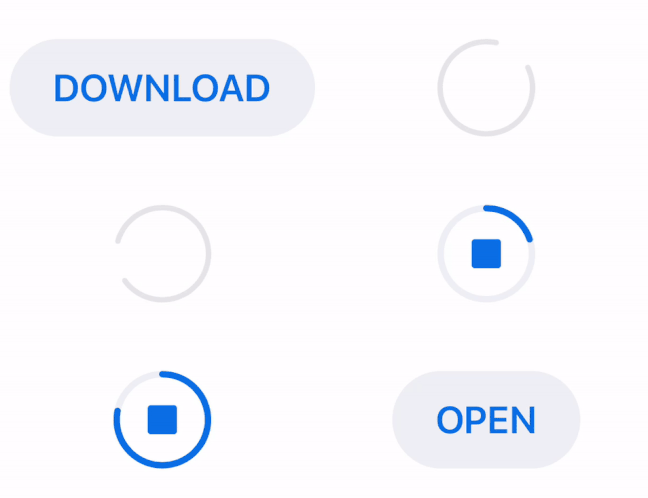
**AHDownloadButton** is a customizable download button similar to the download button in the latest version of Apple's App Store app (since iOS 11).
It features download progress animation as well as animated transitions between download states: start download, pending, downloading and downloaded. [You can find more details about the implementation on my blog](https://amerhukic.com/replicating-app-store-download-button).
## Requirements
- iOS 8.0+
- Xcode 10.2+
- Swift 5.0+
## Usage
### Code
To use `AHDownloadButton` in code, you simply create a new instance and add it as a subview to your desired view:
```swift
let downloadButton = AHDownloadButton()
downloadButton.frame = CGRect(origin: origin, size: size)
view.addSubview(downloadButton)
```
The button can have 4 different states:
- `startDownload` - initial state before downloading
- `pending` - state for preparing for download
- `downloading` - state when the user is downloading
- `downloaded` - state when the user finished downloading
The state of the button can be changed through its `state` property.
### Delegate
You can use the `AHDownloadButtonDelegate` to monitor taps on the button and update button's state if needed. To update the current download progress, use the `progress` property. Here is an example how it could be implemented:
```swift
extension DownloadViewController: AHDownloadButtonDelegate {
func downloadButton(_ downloadButton: AHDownloadButton, tappedWithState state: AHDownloadButton.State)
switch state {
case .startDownload:
// set the download progress to 0
downloadButton.progress = 0
// change state to pending and wait for download to start
downloadButton.state = .pending
// initiate download and update state to .downloading
startDownloadingFile()
case .pending:
// button tapped while in pending state
break
case .downloading:
// button tapped while in downloading state - stop downloading
downloadButton.progress = 0
downloadButton.state = .startDownload
case .downloaded:
// file is downloaded and can be opened
openDownloadedFile()
}
}
}
```
You can also use closures instead of the `AHDownloadButtonDelegate` by setting the `didTapDownloadButtonAction` and `downloadButtonStateChangedAction` properties.
### Customisation
`AHDownloadButton` can be customized. These are the properties that can be used for customizing the button:
1. Use the custom initializer `init(alignment: HorizontalAlignment)` to set the horizontal alignment property. `HorizontalAlignment` determines the position of the pending and downloading circles. The position can either be `center` , `left` or `right`. The default value is `center`.
2. Customization properties when button is in `startDownload` state:
- `startDownloadButtonTitle` - button's title
- `startDownloadButtonTitleFont` - button's title font
- `startDownloadButtonTitleSidePadding` - padding for left and right side of button's title
- `startDownloadButtonHighlightedBackgroundColor` - background color for the button when it's in highlighted state (when the user presses the button)
- `startDownloadButtonNonhighlightedBackgroundColor` - background color for the button when it's in nonhighlighted state (when the button is not pressed)
- `startDownloadButtonHighlightedTitleColor` - title color for the button when it's in highlighted state (when the user presses the button)
- `startDownloadButtonNonhighlightedTitleColor` - title color for the button when it's in nonhighlighted state (when the button is not pressed)
3. Customization properties when button is in `pending` state:
- `pendingCircleColor` - color of the pending circle
- `pendingCircleLineWidth` - width of the pending circle
4. Customization properties when button is in `downloading` state:
- `downloadingButtonHighlightedTrackCircleColor` - color for the track circle when it's in highlighted state (when the user presses the button)
- `downloadingButtonNonhighlightedTrackCircleColor` - color for the track circle when it's in nonhighlighted state (when the button is not pressed)
- `downloadingButtonHighlightedProgressCircleColor` - color for the progress circle when it's in highlighted state (when the user presses the button)
- `downloadingButtonNonhighlightedProgressCircleColor` - color for the progress circle when it's in nonhighlighted state (when the button is not pressed)
- `downloadingButtonHighlightedStopViewColor` - color for the stop view in the middle of the progress circle when it's in highlighted state (when the user presses the button)
- `downloadingButtonNonhighlightedStopViewColor` - color for the stop view in the middle of the progress circle when it's in nonhighlighted state (when the button is not pressed)
- `downloadingButtonCircleLineWidth` - width of the downloading circle
5. Customization properties when button is in `downloaded` state:
- `downloadedButtonTitle` - button's title
- `downloadedButtonTitleFont` - button's title font
- `downloadedButtonTitleSidePadding` - padding for left and right side of button's title
- `downloadedButtonHighlightedBackgroundColor` - background color for the button when it's in highlighted state (when the user presses the button)
- `downloadedButtonNonhighlightedBackgroundColor` - background color for the button when it's in nonhighlighted state (when the button is not pressed)
- `downloadedButtonHighlightedTitleColor` - title color for the button when it's in highlighted state (when the user presses the button)
- `downloadedButtonNonhighlightedTitleColor` - title color for the button when it's in nonhighlighted state (when the button is not pressed)
6. `transitionAnimationDuration` - animation duration between the different states of the button
### Special note
`AHDownloadButton` in `startDownload` and `downloaded` states calculates its width based on **button title**. Use the `startDownloadButtonTitleSidePadding` and `downloadedButtonTitleSidePadding` properties to customise the width when the button is in the aforementioned states.
## Example
To run the example project, clone the repo, and run `pod install` from the Example directory first.
## Installation
### CocoaPods
[CocoaPods](https://cocoapods.org) is a dependency manager for Cocoa projects. You can install it with the following command:
```bash
$ gem install cocoapods
```
To integrate AHDownloadButton into your Xcode project using CocoaPods, specify it in your `Podfile`:
```ruby
source 'https://github.com/CocoaPods/Specs.git'
platform :ios, '8.0'
use_frameworks!
target '' do
pod 'AHDownloadButton'
end
```
Then, run the following command:
```bash
$ pod install
```
### Carthage
[Carthage](https://github.com/Carthage/Carthage) is a decentralized dependency manager that builds your dependencies and provides you with binary frameworks. To integrate AHDownloadButton into your Xcode project using Carthage, specify it in your `Cartfile`:
```ogdl
github "amerhukic/AHDownloadButton" ~> 1.3.0
```
### Swift Package Manager
The [Swift Package Manager](https://swift.org/package-manager/) is a tool for automating the distribution of Swift code and is integrated into the `swift` compiler.
Once you have your Swift package set up, adding AHDownloadButton as a dependency is as easy as adding it to the `dependencies` value of your `Package.swift`.
```swift
dependencies: [
.package(url: "https://github.com/amerhukic/AHDownloadButton", .upToNextMajor(from: "1.3.0"))
]
```
## Author
[Amer Hukić](https://amerhukic.com)
## License
AHDownloadButton is licensed under the MIT license. Check the [LICENSE](LICENSE) file for details.