
# Flare.Net
[](https://github.com/aminparsa18/Flare.Net/actions/workflows/ci.yml)
[](https://github.com/aminparsa18/Flare.Net/actions/workflows/docker-publish.yml)
[](https://github.com/aminparsa18/Flare.Net/actions/workflows/docs-links.yml)
[](LICENSE)
[](https://www.nuget.org/packages/Flare.Hosting.Aspire)
[](https://www.nuget.org/packages/Flare.Cli)
[](https://www.npmjs.com/package/@apardev/flare-cli)
[](https://github.com/aminparsa18/Flare.Net/releases/latest)
[](https://github.com/aminparsa18/Flare.Net/actions/workflows/helm-lint.yml)
[](https://hub.docker.com/u/apardev)
[](https://www.nuget.org/packages/Flare.Hosting.Aspire)
[](https://dotnet.microsoft.com/)
[](https://opentelemetry.io/)
[](https://github.com/aminparsa18/Flare.Net/stargazers)
[](https://github.com/aminparsa18/Flare.Net/commits/main)
**Languages:** [English](README.md) | [简体中文](README.zh-CN.md) | [Русский](README.ru.md) | [Français](README.fr.md)
A self-hosted, OpenTelemetry-native observability platform for .NET — logs, traces, and metrics as first-class citizens, correlated in one place, with threshold/query-based alert rules that notify webhook/Slack, Telegram, or email on breach.
**Think Seq or Datadog — but fully open source (MIT), self-hosted, and OTLP straight in with no proprietary agent or SDK to install.**
## OpenTelemetry first
Your application → **OTLP** → Flare. That's the whole ingestion story — no proprietary wire format, no agent daemon. If you're already instrumented with OpenTelemetry, Flare can consume it directly.
**[Try the live demo →](https://demo.flarenet.live)** — a running Flare with a sample shop sending it logs, traces and metrics.
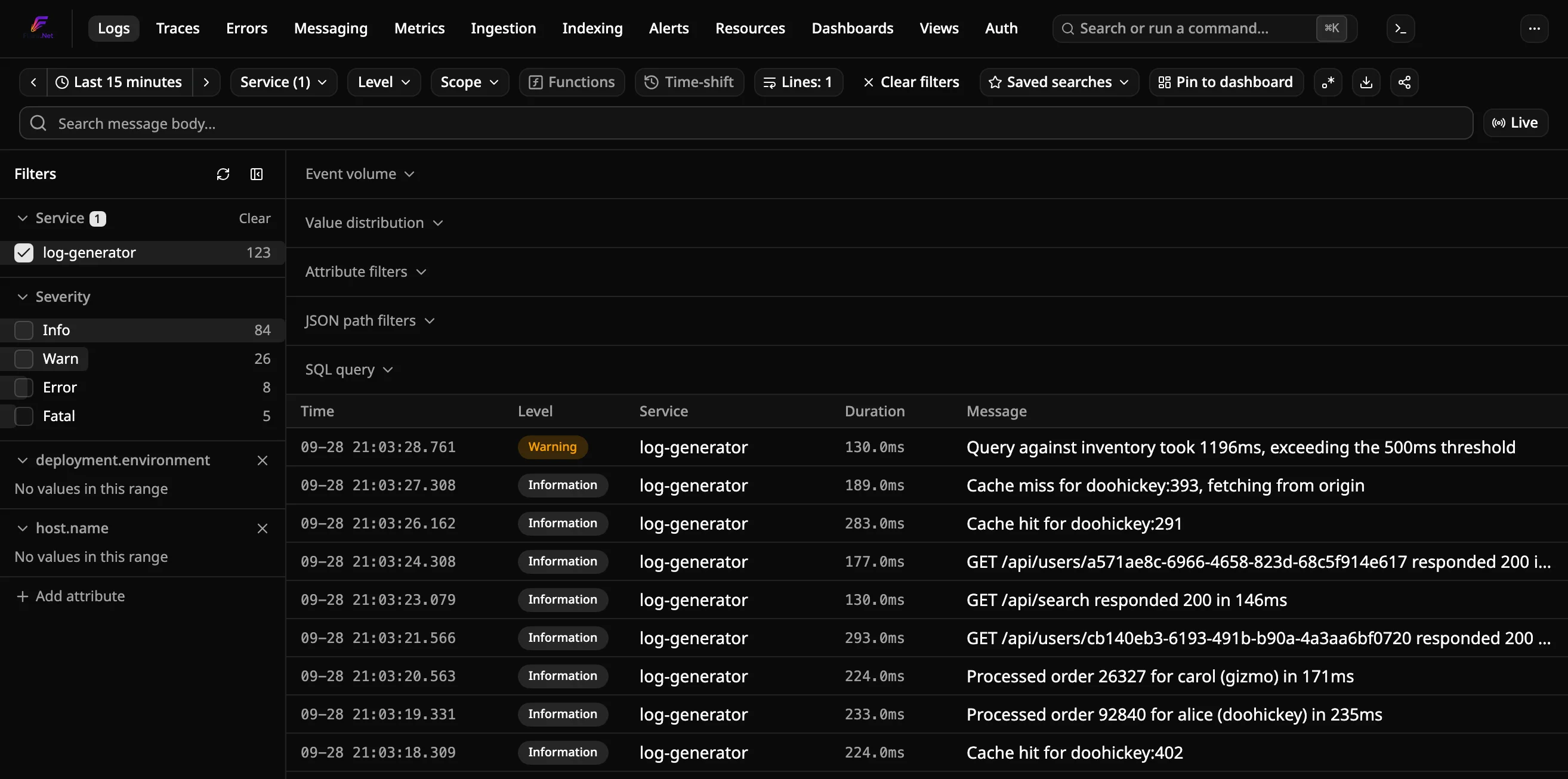
## What Flare provides
| | |
|---|---|
| **Logs** | Search, filtering, live tail, structured properties |
| **Traces** | Distributed tracing with log/trace correlation |
| **Metrics** | Explore OpenTelemetry metrics alongside logs and traces |
| **Alerts** | Threshold/query-based rules with webhook, Slack, Telegram, and email |
| **Ingestion** | OTLP receiver and pipeline health |
| **Indexing** | ClickHouse index and query/storage diagnostics |
| **Auth** | Local accounts, Entra ID, Active Directory/LDAP, OIDC, and reverse-proxy trusted headers |
| **Views** | Saved searches and reusable views |
| **AI assistants** | Read-only MCP server (`flare mcp`) so Claude Code, Cursor and VS Code can query logs, traces, metrics and alerts |
## Why Flare?
- **OpenTelemetry-native** — no proprietary ingestion protocol; send standard OTLP telemetry directly.
- **Self-hosted** — your telemetry stays in your infrastructure.
- **Built for .NET** — first-class .NET/Aspire integration without requiring a separate agent ecosystem.
- **One place for telemetry** — logs, traces, and metrics are correlated rather than treated as separate products.
- **Simple deployment** — run it through Aspire, Docker Compose, or the Flare CLI.
## Getting started
What differs is how you run Flare itself. Pick one:
- **Already using .NET Aspire?**
```csharp
// AppHost
var flare = builder.AddFlare("flare");
builder.AddProject("myapi").WithReference(flare).WaitForFlare(flare);
```
`dotnet add package Flare.Hosting.Aspire` — Flare joins your AppHost as a resource, so it starts, stops, and gets discovered by your other resources the same way everything else in your graph does. Details: [docs/how-to/deploy/run-with-aspire.md](docs/how-to/deploy/run-with-aspire.md).
- **Not using Aspire, want it running standalone?**
```sh
docker compose up
```
at the repo root, with working defaults for every port and credential (copy [.env.example](.env.example) to `.env` to change any). Details: [docs/how-to/deploy/run-standalone.md](docs/how-to/deploy/run-standalone.md).
- **Just evaluating — no repo cloned, no .NET SDK?**
```sh
curl -fsSL https://raw.githubusercontent.com/aminparsa18/Flare.Net/main/scripts/install.sh | bash
```
Installs Docker if it's missing, then pulls and starts the same standalone stack from the published images. Details: [docs/how-to/deploy/run-standalone.md#zero-prerequisite-quick-install](docs/how-to/deploy/run-standalone.md#zero-prerequisite-quick-install).
- **Want one standing instance shared across several unrelated local projects?**
```sh
dotnet tool install --global Flare.Cli
flare start
```
A global CLI that manages the same Docker stack from anywhere, no repo checkout required. No .NET SDK? `npm install --global @apardev/flare-cli` installs the same command. Details: [docs/how-to/deploy/run-with-cli.md](docs/how-to/deploy/run-with-cli.md).
Whichever path you pick, the dashboard comes up at [http://localhost:7777](http://localhost:7777). Authentication is **off by default** — the Logs page is open the moment it's up. Turn sign-in on (local accounts, Microsoft Entra ID, Active Directory, OpenID Connect, or reverse-proxy trusted headers) from the `/auth` page whenever you're ready; see [docs/how-to/admin/configure-authentication.md](docs/how-to/admin/configure-authentication.md).
Then point a logger at it — copy-paste OTLP snippets for Serilog, NLog, ZLogger, and `Microsoft.Extensions.Logging` live in [docs/how-to/deploy/run-standalone.md](docs/how-to/deploy/run-standalone.md#point-your-logger-at-it) (or [docs/how-to/deploy/run-with-aspire.md](docs/how-to/deploy/run-with-aspire.md#2-point-your-logger-at-it) on Aspire). For anything else — Python, Node.js, Java, Go, Kubernetes, DevOps pipelines, a log shipper, or Prometheus scrape — the dashboard's own **Data sources** page (nav dropdown, or the Logs page's empty state) has the same kind of copy-paste snippets; see the [architecture tour](docs/explanation/architecture.md#data-sources) for a preview.
Outgrowing a single ClickHouse node? There's an opt-in multi-node cluster setup — see [docs/how-to/deploy/run-cluster-mode.md](docs/how-to/deploy/run-cluster-mode.md).
Want your AI assistant to read your telemetry? `flare mcp` is a read-only [MCP](https://modelcontextprotocol.io) server — see [docs/how-to/integrations/connect-ai-assistants.md](docs/how-to/integrations/connect-ai-assistants.md).
### Send telemetry from your .NET app
Not running under Aspire? [`Flare.OpenTelemetry`](src/Flare.OpenTelemetry) (preview, not yet on NuGet) is one call, `builder.AddFlareTelemetry("http://localhost:4317")`: an OTLP exporter for logs, traces and metrics, ASP.NET Core and `HttpClient` instrumentation, runtime metrics and an optional trace sampler — see [docs/how-to/instrument/send-dotnet-telemetry.md](docs/how-to/instrument/send-dotnet-telemetry.md).
### Mobile apps (.NET MAUI)
Building a mobile app? [`Flare.Maui`](src/Flare.Maui) (preview, not yet on NuGet) adds `builder.UseFlare(...)` to a .NET MAUI app: OTLP/HTTP export with an offline queue, device and session attributes, `HttpClient` and Shell navigation spans, and unhandled-exception capture — see [docs/how-to/instrument/send-maui-telemetry.md](docs/how-to/instrument/send-maui-telemetry.md).
## Local development
Standalone Docker isn't the dev-inner-loop story — see [Flare.AppHost](src/Flare.AppHost) (.NET Aspire) for that, and each project's own README (e.g. [src/dashboard/README.md](src/dashboard/README.md)) for running it individually.
## Status
Flare is actively developed and currently provides:
- Logs
- Traces
- Metrics
- Alerts
- OTLP ingestion
- Pipeline health
- Indexing diagnostics
- Saved searches
- Authentication
- Aspire integration
- Docker deployment
- Flare CLI
- .NET MAUI client (preview)
### Next
See [docs-internal/planning/roadmap.md](docs-internal/planning/roadmap.md)
for what's currently open — retention/cold storage to S3-compatible
object storage chief among it.
Full architecture: [docs/explanation/architecture.md](docs/explanation/architecture.md). Design decisions: [docs-internal/adr/](docs-internal/adr/).
## Contributing
See [CONTRIBUTING.md](CONTRIBUTING.md).
## License
[MIT](LICENSE)
## Support
If Flare is useful to you, you can support its development with a donation via [PayPal](https://www.paypal.com/paypalme/aminparsa18).