AgentGate
Human-in-the-loop approval system for AI agents.
Agents request. Policies decide. Humans approve.
Keep humans in control of what AI agents can do.



---

Your AI agent wants to send an email, delete a file, or deploy to production.
**Should it?** AgentGate lets you define policies that auto-approve safe actions,
auto-deny dangerous ones, and route everything else to a human — via dashboard, Slack, Discord, or email.
### ✨ Highlights
- 🛡️ **Policy engine** — auto-approve, auto-deny, or route to humans based on rules
- 👥 **Multi-channel approvals** — Slack, Discord, email, or web dashboard
- 🔌 **TypeScript SDK + MCP** — works with any agent framework or Claude Desktop
- 🪝 **Webhooks with retry** — real-time notifications with exponential backoff
- 📝 **Full audit trail** — every request, decision, and action logged, each policy decision tagged with the **OWASP LLM Top-10** risk it mitigates (compliance evidence)
- 🐳 **Docker-ready** — one `docker-compose up` for the full stack
- 🔐 **Production-hardened** — SSRF protection, ReDoS defense, structured logging, graceful shutdown
- 🔗 **One-click decision links** — approve or deny directly from notification emails and webhooks
- ♿ **Accessible UI** — keyboard-navigable approval modals, focus trapping, ARIA labels
- 💀 **Skeleton loading** — smooth loading states across every dashboard page
- ⚡ **Fast & lightweight** — Hono server, SQLite or PostgreSQL
## Quickstart
```bash
# Self-host the full stack (server + dashboard + Postgres):
docker compose up
# …or from source:
pnpm install && pnpm --filter @agentkitai/agentgate-server db:migrate && pnpm --filter @agentkitai/agentgate-server bootstrap && pnpm dev
```
Drop AgentGate into an MCP client (Claude Desktop / Cursor / VS Code) — point it at the gateway:
```jsonc
{ "mcpServers": { "agentgate": { "command": "npx", "args": ["@agentkitai/agentgate-mcp"] } } }
```
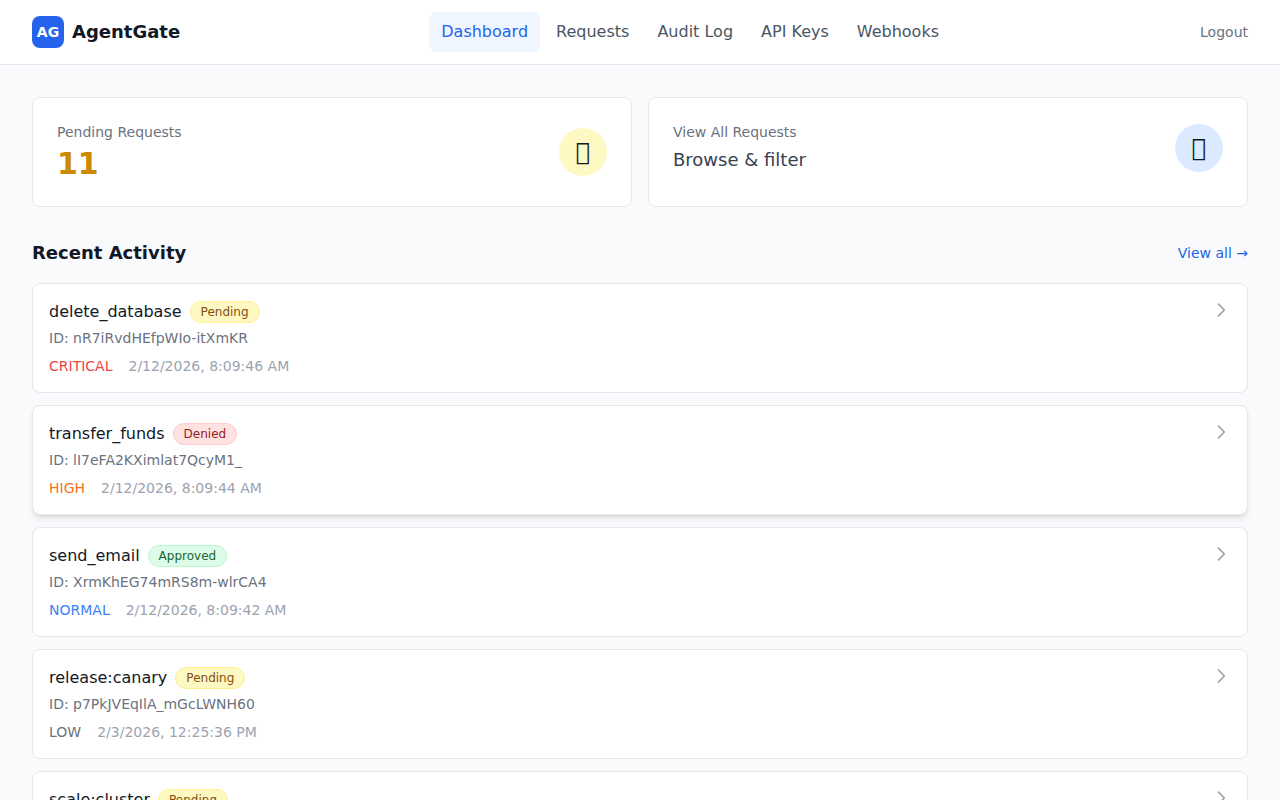
#### Dashboard
See all pending requests at a glance, color-coded by urgency so you know what needs attention first.
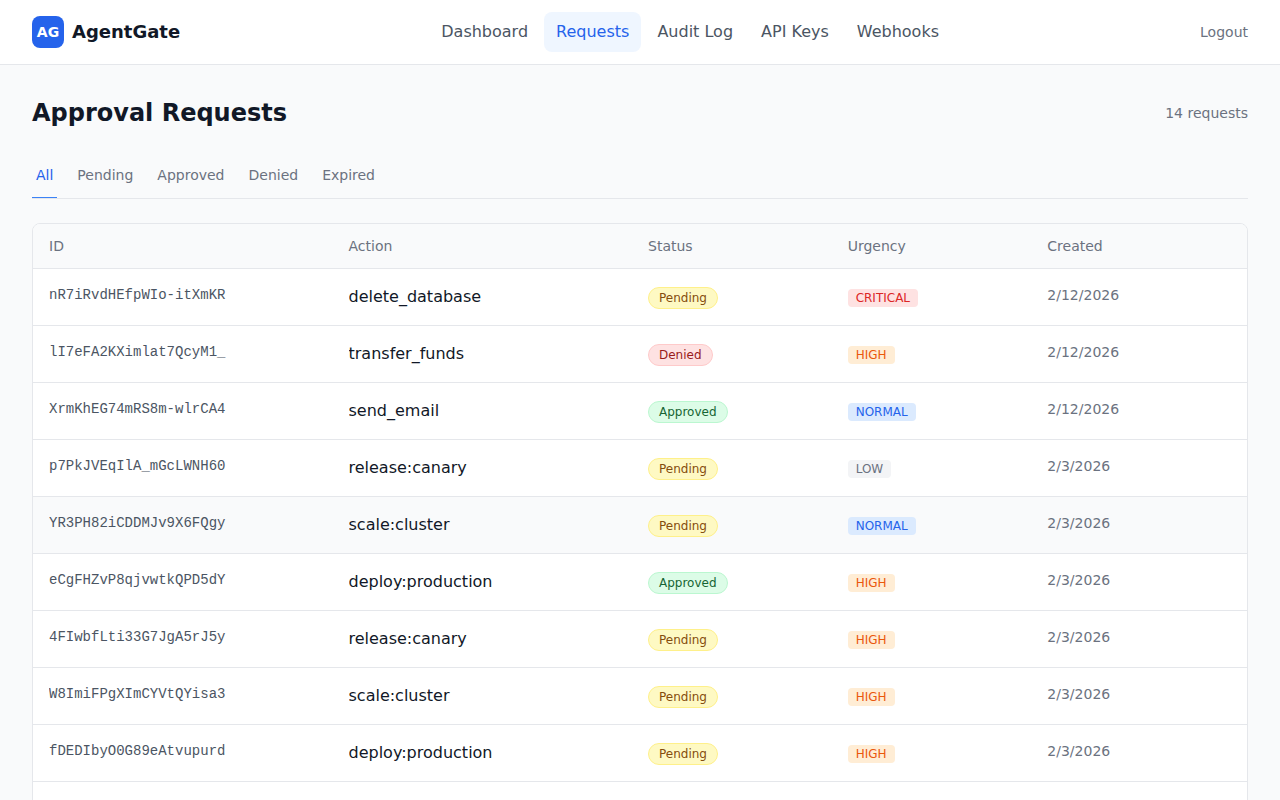
#### Approval Requests
Review, approve, or deny requests — filter by status to focus on what matters.
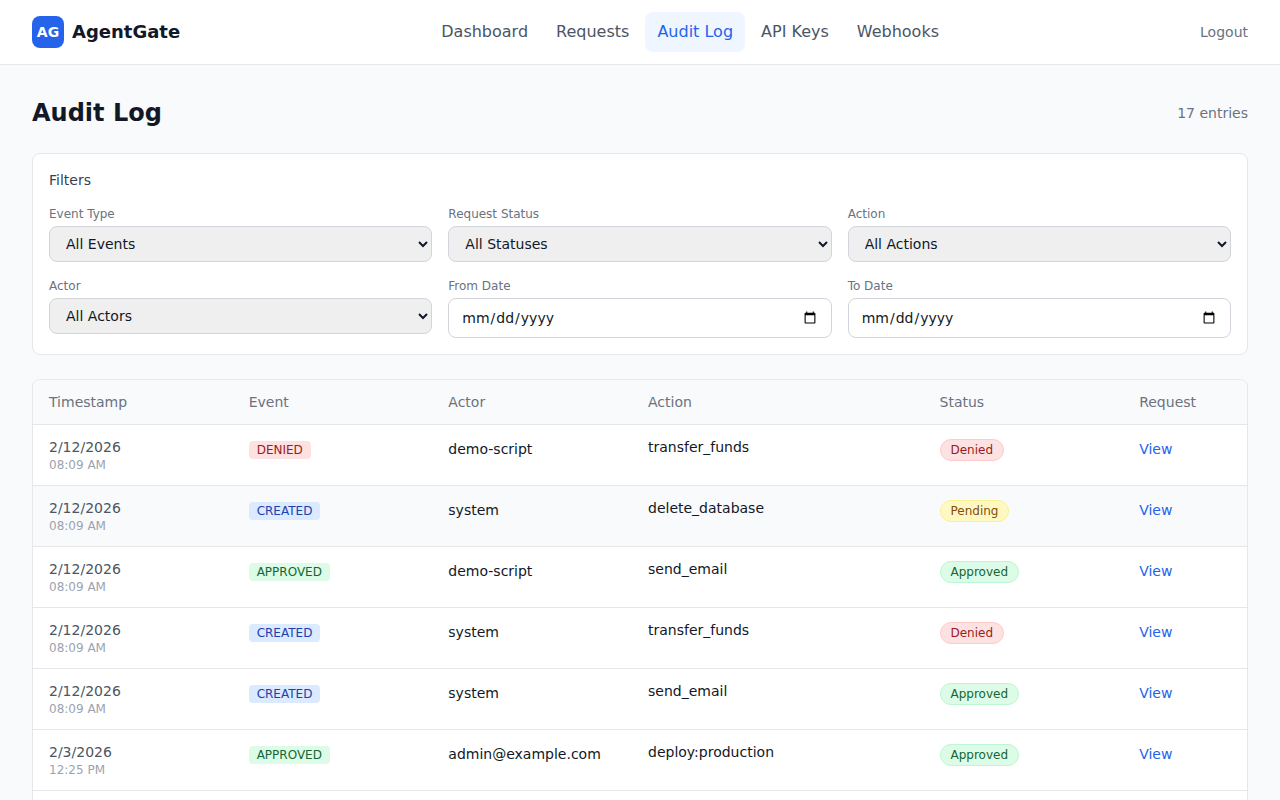
#### Audit Log
Search through every decision with filters for event type, action, actor, and date range.
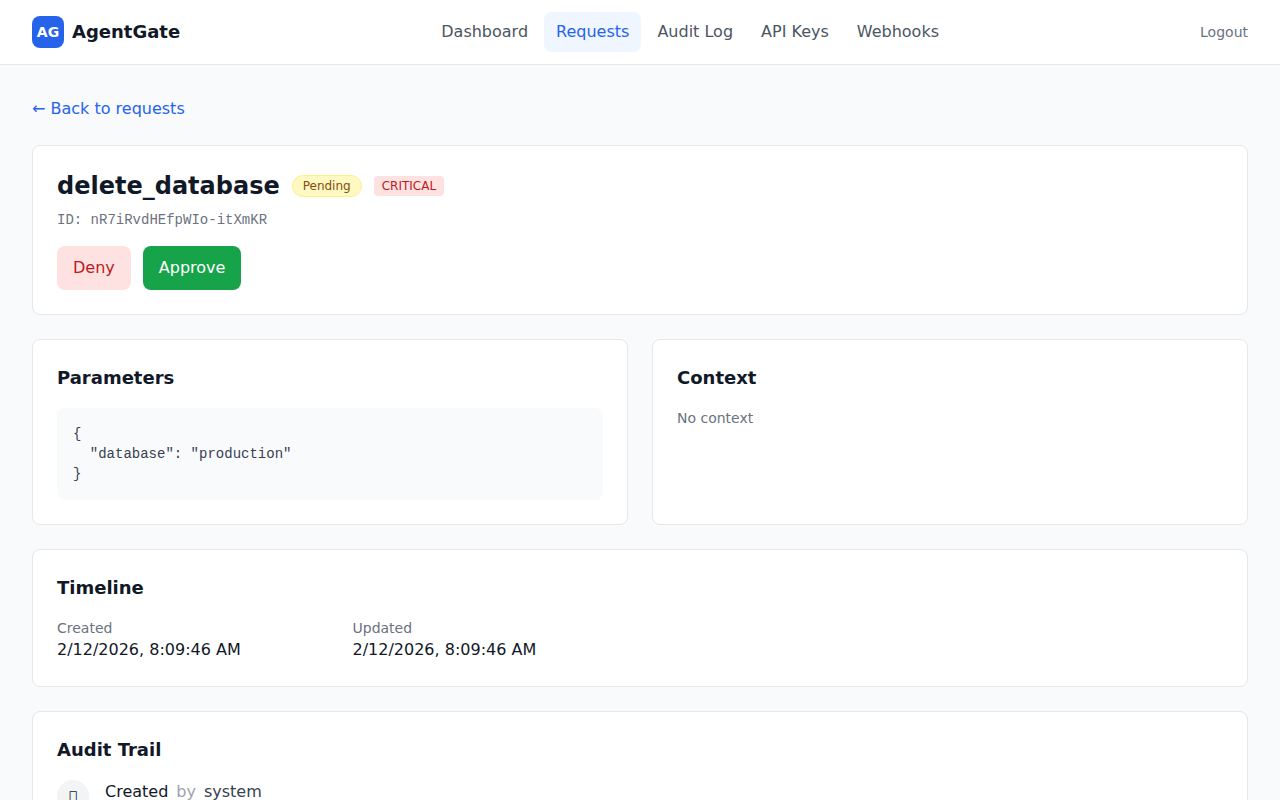
#### Request Detail
Drill into any request to see parameters, context, timeline, and audit trail — with one-click Approve/Deny buttons.
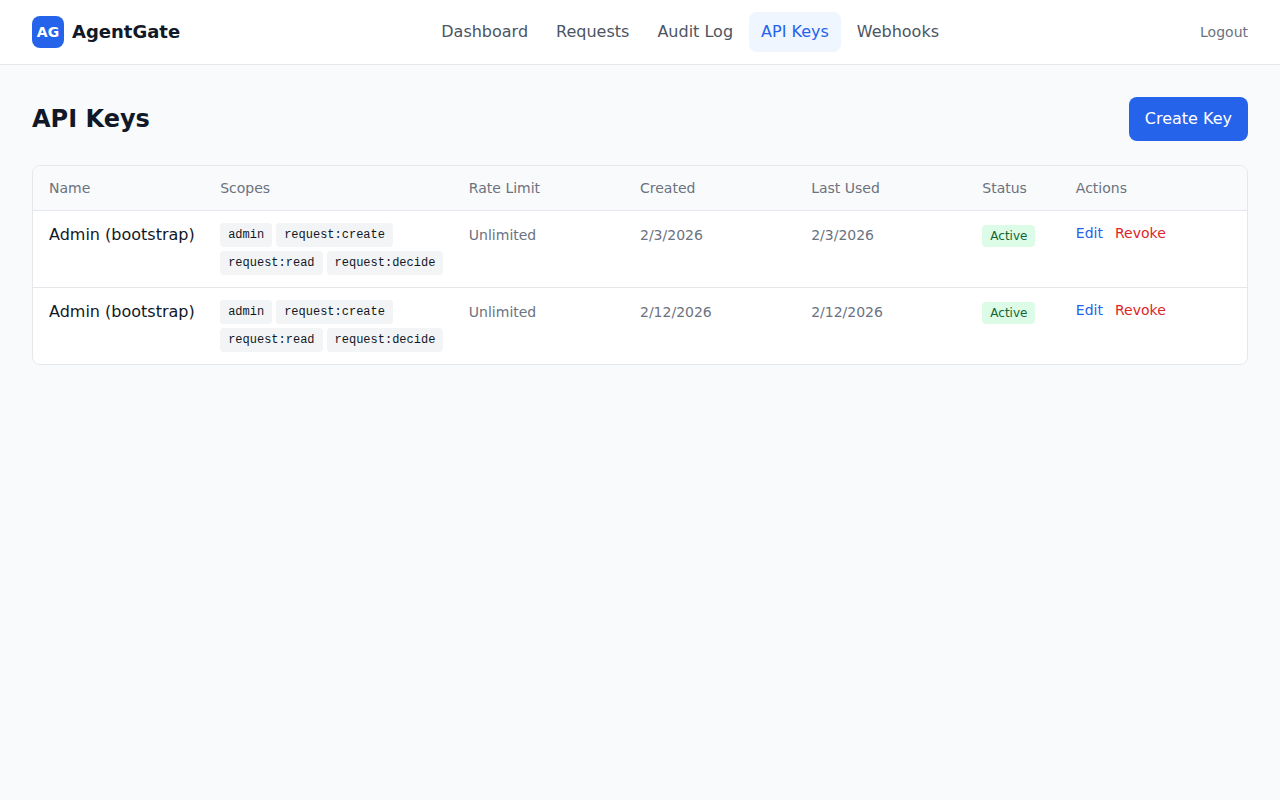
#### API Keys
Manage API keys with fine-grained scopes, rate limits, and usage tracking. Create, edit, or revoke keys from the dashboard.
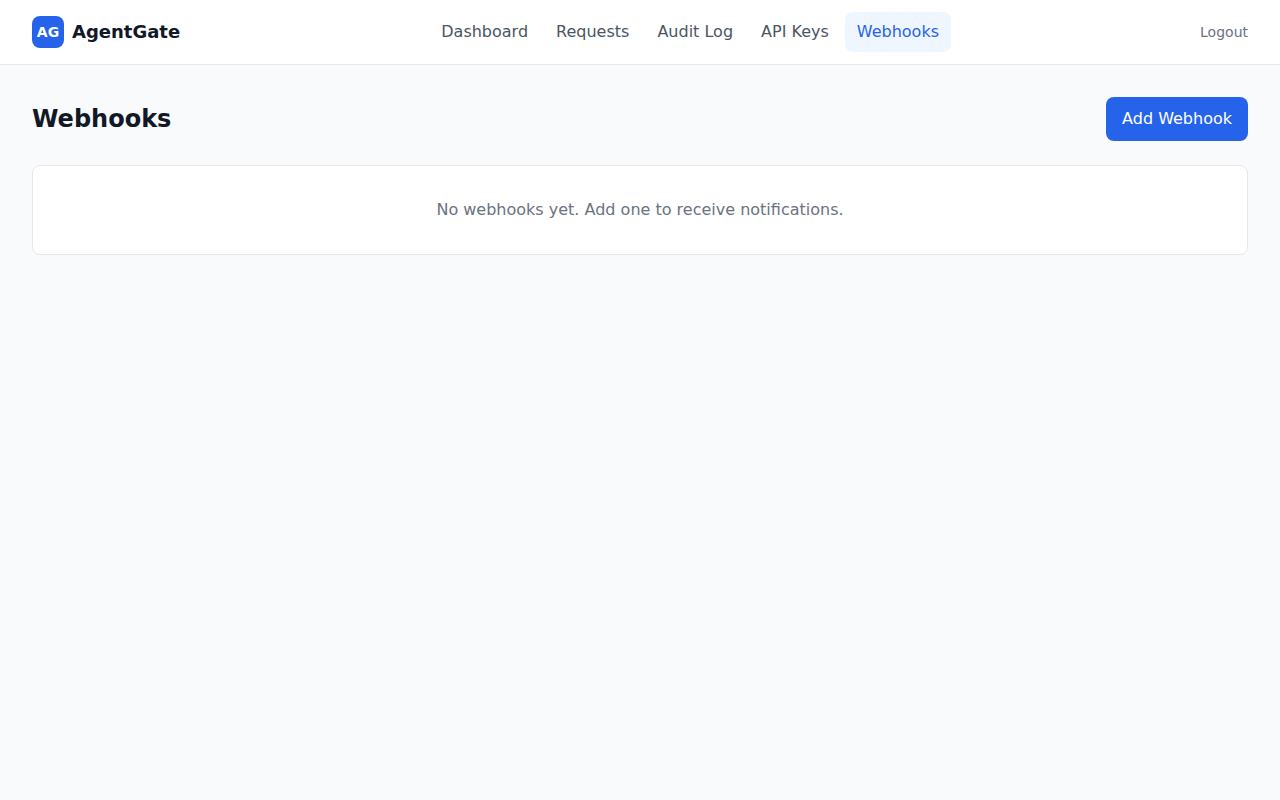
#### Webhooks
Configure webhook endpoints for real-time notifications. Add URLs, pick events, and let AgentGate handle retries automatically.
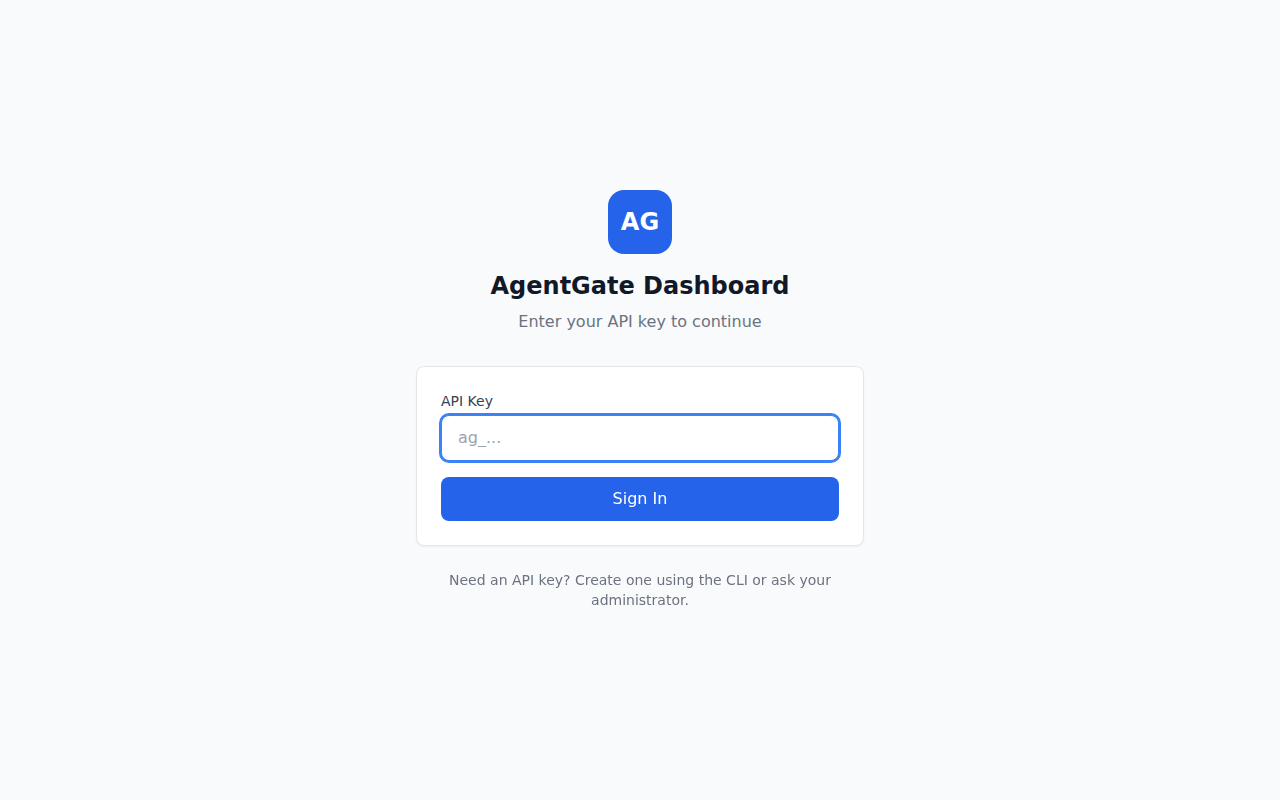
#### Login
Sign in with your API key — create one via the CLI or ask your admin.
---
## Table of Contents
- [Quick Start](#quick-start)
- [Architecture](#architecture)
- [Packages](#packages)
- [SDK Usage](#sdk-usage)
- [CLI](#cli)
- [MCP Integration](#mcp-integration)
- [Authentication](#authentication)
- [API Endpoints](#api-endpoints)
- [Rate Limiting](#rate-limiting)
- [Webhooks](#webhooks)
- [Configuration](#configuration)
- [Docker Deployment](#docker-deployment)
- [Development](#development)
- [Troubleshooting](docs/troubleshooting.md)
- [Contributing](#contributing)
- [License](#license)
---
## Quick Start
### 1. Install dependencies
```bash
pnpm install
```
### 2. Run database migrations
```bash
pnpm --filter @agentkitai/agentgate-server db:migrate
```
### 3. Bootstrap (create admin API key)
```bash
pnpm --filter @agentkitai/agentgate-server bootstrap
```
**Save the API key** - it's shown once only! Set it in your environment:
```bash
export AGENTGATE_API_KEY="agk_..."
```
### 4. Start the development environment
```bash
# Start server (port 3000) and dashboard (port 5173)
pnpm dev
```
### 5. Run the demo
In a new terminal (with API key set):
```bash
export AGENTGATE_API_KEY="agk_..."
pnpm demo
```
### 6. Open the dashboard
Visit **http://localhost:5173** to view and manage approval requests.
## Architecture
```
┌─────────────────────────────────────────────────────────────────┐
│ AI Agents │
│ (use @agentkitai/agentgate-sdk or MCP to request approvals) │
└───────────────────────────┬─────────────────────────────────────┘
│ HTTP API (authenticated)
▼
┌─────────────────────────────────────────────────────────────────┐
│ AgentGate Server │
│ ┌──────────────┐ ┌──────────────┐ ┌──────────────┐ │
│ │ Policy Engine│ │ Request Store│ │ Audit Logger │ │
│ ├──────────────┤ ├──────────────┤ ├──────────────┤ │
│ │ API Keys │ │ Webhooks │ │ MCP Server │ │
│ └──────────────┘ └──────────────┘ └──────────────┘ │
└───────────────────────────┬─────────────────────────────────────┘
│
┌─────────────┼─────────────┐
▼ ▼ ▼
┌────────────────┐ ┌────────────────┐ ┌────────────────┐
│ Web Dashboard │ │ Slack Bot │ │ Discord Bot │
│(React+Tailwind)│ │(approve in DM) │ │(approve in ch) │
└────────────────┘ └────────────────┘ └────────────────┘
│ │ │
└─────────────┼─────────────┘
▼
┌──────────┐
│ Humans │
└──────────┘
```
## Packages
| Package | Description | Docs |
|---------|-------------|------|
| [`@agentkitai/agentgate-core`](./packages/core) | Types, schemas, policy engine | - |
| [`@agentkitai/agentgate-server`](./packages/server) | Hono API server | - |
| [`@agentkitai/agentgate-sdk`](./packages/sdk) | TypeScript SDK for agents | [README](./packages/sdk/README.md) |
| [`@agentkitai/agentgate-cli`](./packages/cli) | Command-line interface | - |
| [`@agentkitai/agentgate-mcp`](./packages/mcp) | MCP server for Claude Desktop | - |
| [`@agentkitai/agentgate-slack`](./packages/slack) | Slack bot integration | [README](./packages/slack/README.md) |
| [`@agentkitai/agentgate-discord`](./packages/discord) | Discord bot integration | [README](./packages/discord/README.md) |
| [`@agentkitai/agentgate-dashboard`](./packages/dashboard) | React web dashboard | - |
## SDK Usage
```typescript
import { AgentGateClient } from '@agentkitai/agentgate-sdk';
// Create client with API key
const client = new AgentGateClient({
baseUrl: 'http://localhost:3000',
apiKey: process.env.AGENTGATE_API_KEY,
});
// Request approval
const request = await client.request({
action: 'send_email',
params: {
to: 'customer@example.com',
subject: 'Order shipped!',
},
urgency: 'normal',
});
// Wait for human decision
const decided = await client.waitForDecision(request.id, {
timeout: 60000, // 1 minute
});
if (decided.status === 'approved') {
// Execute the action
await sendEmail(decided.params);
} else {
console.log('Action denied:', decided.decisionReason);
}
```
## CLI
AgentGate includes a command-line interface for managing approval requests.
### Installation
```bash
# From the monorepo
pnpm --filter @agentkitai/agentgate-cli build
# Or install globally (when published)
npm install -g @agentkitai/agentgate-cli
```
### Configuration
Configure the CLI with your server URL and API key:
```bash
# Set server URL
agentgate config set serverUrl http://localhost:3000
# Set API key
agentgate config set apiKey agk_your_api_key
# View current config
agentgate config show
```
Configuration is stored in `~/.agentgate/config.json`. You can also use environment variables:
```bash
export AGENTGATE_URL=http://localhost:3000
export AGENTGATE_API_KEY=agk_...
```
### Commands
| Command | Description |
|---------|-------------|
| `agentgate config show` | Show current configuration |
| `agentgate config set ` | Set a configuration value |
| `agentgate request ` | Create a new approval request |
| `agentgate status ` | Get status of a request |
| `agentgate list` | List approval requests |
| `agentgate approve ` | Approve a pending request |
| `agentgate deny ` | Deny a pending request |
### Examples
```bash
# Create a request
agentgate request send_email \
--params '{"to": "user@example.com", "subject": "Hello"}' \
--urgency high
# List pending requests
agentgate list --status pending
# Approve a request
agentgate approve req_abc123 --reason "Looks good"
# Deny a request
agentgate deny req_abc123 --reason "Not authorized"
# Output as JSON
agentgate list --json
```
## MCP Integration
AgentGate includes a Model Context Protocol (MCP) server for integration with Claude Desktop and other MCP-compatible clients.
### Claude Desktop Configuration
Add to your `claude_desktop_config.json`:
```json
{
"mcpServers": {
"agentgate": {
"command": "npx",
"args": ["@agentkitai/agentgate-mcp"],
"env": {
"AGENTGATE_URL": "http://localhost:3000",
"AGENTGATE_API_KEY": "agk_..."
}
}
}
}
```
### Available MCP Tools
| Tool | Description |
|------|-------------|
| `agentgate_request` | Submit a new approval request |
| `agentgate_get` | Get the status of an approval request by ID |
| `agentgate_list` | List approval requests with optional filters |
| `agentgate_decide` | Approve or deny a pending request |
| `agentgate_list_policies` | List all policies ordered by priority |
| `agentgate_create_policy` | Create a new policy with rules |
| `agentgate_update_policy` | Replace an existing policy |
| `agentgate_delete_policy` | Delete a policy by ID |
| `agentgate_list_audit_logs` | List audit log entries with filters and pagination |
| `agentgate_get_audit_actors` | Get unique actor values from audit logs |
## Authentication
AgentGate uses API keys for authentication. All API requests (except `/health`) require a valid API key.
### API Key Scopes
| Scope | Description |
|-------|-------------|
| `admin` | Full access to all operations |
| `request:create` | Create new approval requests |
| `request:read` | Read approval requests |
| `request:decide` | Approve or deny requests |
| `webhook:manage` | Create/update/delete webhooks |
### Using API Keys
**HTTP Header:**
```bash
curl -H "Authorization: Bearer agk_..." http://localhost:3000/api/requests
```
**SDK:**
```typescript
const client = new AgentGateClient({
baseUrl: 'http://localhost:3000',
apiKey: process.env.AGENTGATE_API_KEY,
});
```
### Creating Additional API Keys
```typescript
// Via API (requires admin scope)
POST /api/api-keys
{
"name": "My Agent",
"scopes": ["request:create", "request:read"]
}
```
## API Endpoints
| Method | Endpoint | Description | Required Scope |
|--------|----------|-------------|----------------|
| `POST` | `/api/requests` | Create approval request | `request:create` |
| `GET` | `/api/requests` | List requests (with filters) | `request:read` |
| `GET` | `/api/requests/:id` | Get request by ID | `request:read` |
| `POST` | `/api/requests/:id/decide` | Submit approval/denial | `request:decide` |
| `GET` | `/api/requests/:id/audit` | Get audit trail | `request:read` |
| `GET` | `/api/policies` | List policies | `admin` |
| `POST` | `/api/policies` | Create policy | `admin` |
| `PUT` | `/api/policies/:id` | Update policy | `admin` |
| `DELETE` | `/api/policies/:id` | Delete policy | `admin` |
| `POST` | `/api/api-keys` | Create API key | `admin` |
| `GET` | `/api/api-keys` | List API keys | `admin` |
| `PATCH` | `/api/api-keys/:id` | Update API key | `admin` |
| `DELETE` | `/api/api-keys/:id` | Revoke API key | `admin` |
| `GET` | `/api/webhooks` | List webhooks | `webhook:manage` |
| `POST` | `/api/webhooks` | Create webhook | `webhook:manage` |
| `DELETE` | `/api/webhooks/:id` | Delete webhook | `webhook:manage` |
| `GET` | `/health` | Health check | (none) |
## Rate Limiting
AgentGate supports per-API-key rate limiting to prevent abuse and ensure fair usage.
### How It Works
- Rate limits use a **sliding window algorithm** (requests per minute)
- Limits are configured per API key
- When exceeded, requests return `429 Too Many Requests`
- Rate limit headers are included in all authenticated responses
### Rate Limit Headers
| Header | Description |
|--------|-------------|
| `X-RateLimit-Limit` | Maximum requests per minute |
| `X-RateLimit-Remaining` | Remaining requests in current window |
| `X-RateLimit-Reset` | Seconds until window resets |
### Configuring Rate Limits
Set rate limits when creating or updating API keys:
```typescript
// Via API (requires admin scope)
POST /api/api-keys
{
"name": "My Agent",
"scopes": ["request:create", "request:read"],
"rateLimit": 60 // 60 requests per minute
}
// null = unlimited
{
"name": "Internal Service",
"scopes": ["admin"],
"rateLimit": null
}
```
### Dashboard
Rate limits can also be managed from the web dashboard under **Settings → API Keys**.
## Webhooks
AgentGate can notify external systems when request events occur.
### Setting Up Webhooks
```typescript
// Create a webhook via API
POST /api/webhooks
{
"url": "https://your-server.com/webhook",
"events": ["request.created", "request.decided"],
"secret": "optional-signing-secret"
}
```
### Webhook Events
| Event | Description |
|-------|-------------|
| `request.created` | A new approval request was created |
| `request.decided` | A request was approved or denied |
| `request.expired` | A request expired without decision |
### Webhook Payload
```json
{
"event": "request.decided",
"timestamp": "2024-01-15T10:30:00Z",
"data": {
"id": "abc123",
"action": "send_email",
"status": "approved",
"decidedBy": "admin@example.com"
}
}
```
### Webhook Signatures
If you provide a `secret`, requests are signed with HMAC-SHA256:
```
X-AgentGate-Signature: sha256=...
```
Verify by computing `HMAC-SHA256(secret, body)` and comparing.
### Webhook Retry
Failed webhook deliveries are retried automatically with exponential backoff. The server scans for pending deliveries and retries them with increasing delays (`2^attempts * 1000ms`) until successful or the maximum retry count is reached.
## Configuration
### Environment Variables
| Variable | Default | Description |
|----------|---------|-------------|
| `PORT` | `3000` | Server port |
| `DATABASE_URL` | `./data/agentgate.db` | SQLite database path |
| `AGENTGATE_API_KEY` | - | API key for SDK/CLI |
| `SLACK_BOT_TOKEN` | - | Slack bot token (for Slack integration) |
| `SLACK_SIGNING_SECRET` | - | Slack signing secret |
| `DISCORD_BOT_TOKEN` | - | Discord bot token (for Discord integration) |
| `DISCORD_DEFAULT_CHANNEL` | - | Default Discord channel for notifications |
### File-Based Secrets (`_FILE` suffix)
For Docker secrets or Kubernetes secret mounts, AgentGate supports a `_FILE` suffix convention. Instead of setting a secret directly in an environment variable, point to a file containing the value:
| Variable | Reads secret from file |
|----------|----------------------|
| `ADMIN_API_KEY_FILE` | Sets `ADMIN_API_KEY` |
| `JWT_SECRET_FILE` | Sets `JWT_SECRET` |
| `DATABASE_URL_FILE` | Sets `DATABASE_URL` |
| `REDIS_URL_FILE` | Sets `REDIS_URL` |
| `SLACK_BOT_TOKEN_FILE` | Sets `SLACK_BOT_TOKEN` |
| `SLACK_SIGNING_SECRET_FILE` | Sets `SLACK_SIGNING_SECRET` |
| `DISCORD_BOT_TOKEN_FILE` | Sets `DISCORD_BOT_TOKEN` |
| `SMTP_PASS_FILE` | Sets `SMTP_PASS` |
**Behavior:**
- File contents are trimmed of leading/trailing whitespace
- If both the env var and the `_FILE` variant are set, the explicit env var takes precedence
- Missing or unreadable files produce a warning but do not crash the server
Example with Docker Compose:
```yaml
services:
agentgate:
environment:
ADMIN_API_KEY_FILE: /run/secrets/admin_api_key
JWT_SECRET_FILE: /run/secrets/jwt_secret
secrets:
- admin_api_key
- jwt_secret
secrets:
admin_api_key:
file: ./secrets/admin_api_key.txt
jwt_secret:
file: ./secrets/jwt_secret.txt
```
### Policy Configuration
Policies are stored in the database and can be managed via API:
```typescript
// Example: Auto-approve low-risk emails
{
name: "auto-approve-emails",
priority: 10,
enabled: true,
rules: [
{
match: { action: "send_email" },
decision: "auto_approve"
}
]
}
```
## Docker Deployment
AgentGate provides Docker images for easy self-hosted deployments.
### Quick Start
1. **Copy the example environment file:**
```bash
cp .env.example .env
```
2. **Generate secure credentials:**
```bash
# Generate admin API key (required)
echo "ADMIN_API_KEY=$(openssl rand -hex 32)" >> .env
# Generate JWT secret (recommended for production)
echo "JWT_SECRET=$(openssl rand -hex 32)" >> .env
```
3. **Start all services:**
```bash
docker-compose up -d
```
4. **Access the services:**
- **Dashboard:** http://localhost:3003
- **API Server:** http://localhost:3002
- **Health Check:** http://localhost:3002/health
> Host ports are configurable via `SERVER_PORT` (default `3002`) and `DASHBOARD_PORT` (default `3003`); both map to the container's internal port 3000/80.
### Services
| Service | Description | Host Port |
|---------|-------------|------|
| `server` | AgentGate API server | 3002 |
| `dashboard` | Web dashboard (nginx) | 3003 |
| `postgres` | PostgreSQL database | internal only* |
| `redis` | Redis (rate limiting, queues) | internal only* |
> \* PostgreSQL and Redis are on an internal Docker network (`agentgate-internal`) and are **not exposed to the host** by default. During development, `docker-compose.override.yml` is auto-loaded and exposes them on ports 5432/6379. For production, run `docker-compose -f docker-compose.yml up -d` to skip the override.
### With Slack or Discord Bots
To include the bot services, use the `bots` profile:
```bash
# Set required bot credentials in .env first
docker-compose --profile bots up -d
```
### Configuration
All configuration is done via environment variables. See `.env.example` for all options.
**Required variables:**
- `ADMIN_API_KEY` — Admin API key (min 16 characters)
**Recommended for production:**
- `JWT_SECRET` — JWT signing secret (min 32 characters)
- `CORS_ALLOWED_ORIGINS` — Restrict to your domain(s)
- `POSTGRES_PASSWORD` — Use a strong password
### Building Images
Build all images locally:
```bash
docker-compose build
```
Build a specific service:
```bash
docker-compose build server
docker-compose build dashboard
```
### Database Migrations
Migrations run automatically when the server starts. For manual control:
```bash
# Run migrations inside the container
docker-compose exec server node -e "
import('./dist/db/migrate.js').then(m => m.runMigrations())
"
```
### Viewing Logs
```bash
# All services
docker-compose logs -f
# Specific service
docker-compose logs -f server
# Last 100 lines
docker-compose logs --tail=100 server
```
### Stopping Services
```bash
# Stop all
docker-compose down
# Stop and remove volumes (WARNING: deletes data)
docker-compose down -v
```
### Production Considerations
1. **Use a reverse proxy** (nginx, Caddy, Traefik) for TLS termination
2. **Set strong passwords** for PostgreSQL
3. **Restrict CORS origins** to your domain
4. **Use Docker secrets** for sensitive values in production
5. **Set up backups** for PostgreSQL data volume
6. **Monitor health endpoints** for uptime checks
## Development
```bash
# Install dependencies
pnpm install
# Run migrations
pnpm --filter @agentkitai/agentgate-server db:migrate
# Bootstrap (create admin key)
pnpm --filter @agentkitai/agentgate-server bootstrap
# Start development (server + dashboard)
pnpm dev
```
### Testing
AgentGate uses [Vitest](https://vitest.dev/) for testing across all packages.
```bash
# Run all tests
pnpm test
# Run tests with coverage report
pnpm test:coverage
# Run tests in watch mode (single package)
pnpm --filter @agentkitai/agentgate-server test:watch
# Run a specific test file
pnpm --filter @agentkitai/agentgate-server test -- src/__tests__/integration.test.ts
```
Coverage reports are generated per-package and include line, branch, and function coverage.
### Code Quality
```bash
# Build all packages
pnpm build
# Type checking
pnpm typecheck
# Lint (ESLint)
pnpm lint
# Fix lint issues
pnpm lint:fix
# Format code (Prettier)
pnpm format
# Check formatting
pnpm format:check
```
## Project Structure
```
agentgate/
├── packages/
│ ├── core/ # Shared types, schemas, policy engine
│ ├── server/ # Hono API server
│ ├── sdk/ # TypeScript SDK
│ ├── cli/ # Command-line interface
│ ├── mcp/ # MCP server for Claude Desktop
│ ├── slack/ # Slack bot
│ ├── discord/ # Discord bot
│ └── dashboard/ # React dashboard
├── apps/
│ └── demo/ # Demo application
├── docker-compose.yml # Docker deployment
└── package.json # Monorepo root
```
## Contributing
Contributions are welcome! To get started:
1. Fork the repository
2. Clone and install dependencies (`pnpm install`)
3. Follow the [Development](#development) section above to set up your local environment
4. Create a feature branch and make your changes
5. Run `pnpm build && pnpm test` to verify everything works
6. Open a pull request
Please make sure all tests pass and code is formatted (`pnpm format:check && pnpm lint`) before submitting.
## 🧰 AgentKit Ecosystem
| Project | Description | |
|---------|-------------|-|
| [AgentLens](https://github.com/agentkitai/agentlens) | Observability & audit trail for AI agents | |
| [Lore](https://github.com/agentkitai/lore) | Cross-agent memory and lesson sharing | |
| **AgentGate** | Human-in-the-loop approval gateway | ⬅️ you are here |
| [FormBridge](https://github.com/agentkitai/formbridge) | Agent-human mixed-mode forms | |
| [AgentEval](https://github.com/agentkitai/agenteval) | Testing & evaluation framework | |
| [agentkit-cli](https://github.com/agentkitai/agentkit-cli) | Unified CLI orchestrator | |
## License
MIT