
An Apple Silicon recompilation of Catherine (Atlus, 2011, Xbox 360) · work in progress
---
> **No game code or game data is included here.** You need your own copy of
> *Catherine* (USA, Xbox 360). The recompiled code is generated on **your** Mac,
> from **your** files, when you run the setup.
This project uses the [ReXGlue SDK](https://github.com/rexglue/rexglue-sdk) to
statically recompile the game's PowerPC code to ARM64, so the game logic runs
natively on Apple Silicon.
**This is not a native port.** Graphics are still emulated: the Xbox 360 GPU
(Xenos) runs through the SDK's Xenia-derived emulation layer, on Metal via
Vulkan/MoltenVK. That layer is behind what current emulators like Xenia Canary
offer, so expect rough edges. It's a work in progress.
## What you get
- **Catherine.app** — a normal Mac app, built on your machine.
- **A settings menu in the game's style** (press **Esc**, or **Back + Start** on
a controller): display mode, window size, render resolution (up to 2160p),
V-Sync, upscaling filter, audio options, controls, pause behaviour and more.
The game pauses while it's open.
- **Fixes on top of the SDK**, including the black screen at gameplay start,
keyboard support for in-game dialogs, a working pause, and much cleaner audio
(removes decoder crackles and dropouts).
- Keyboard & mouse or any controller macOS supports.
## Screenshots
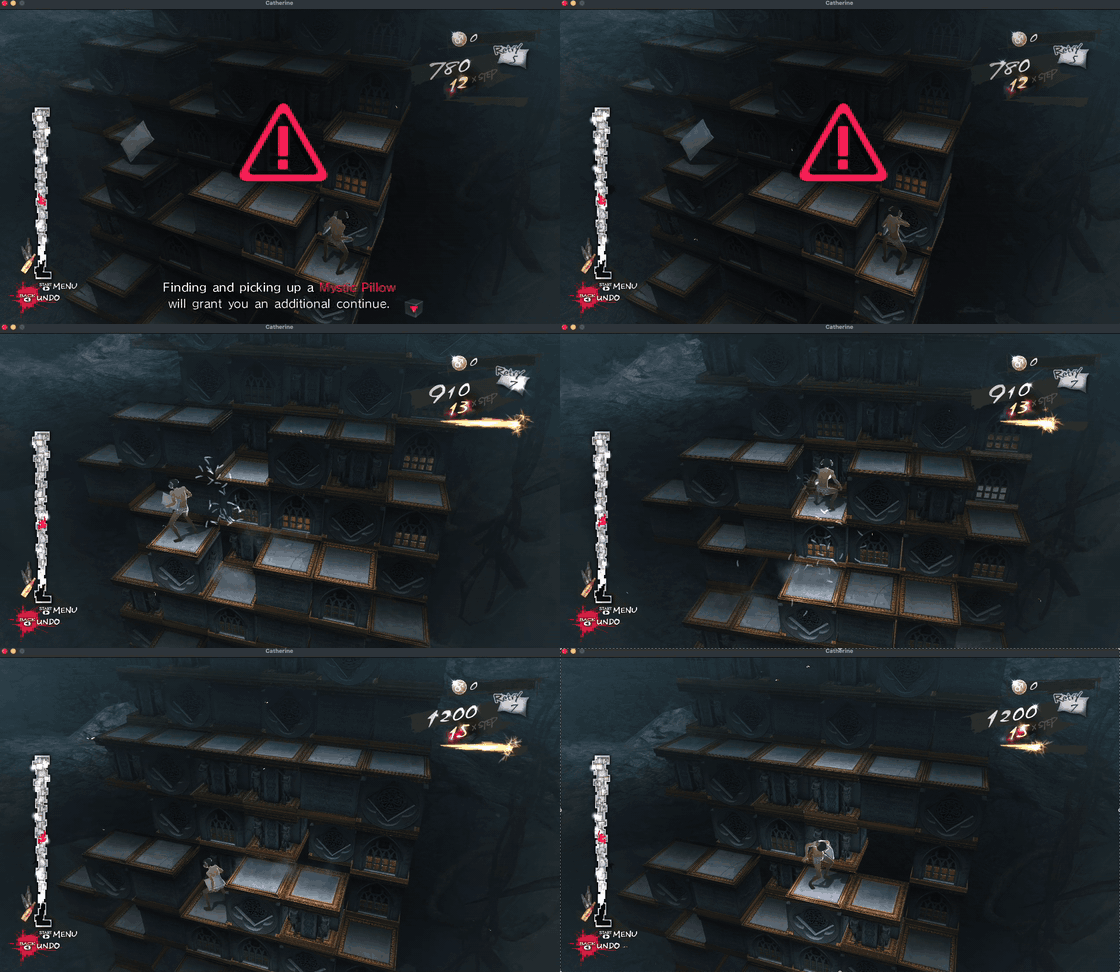
Gameplay (shown at 3× speed) |
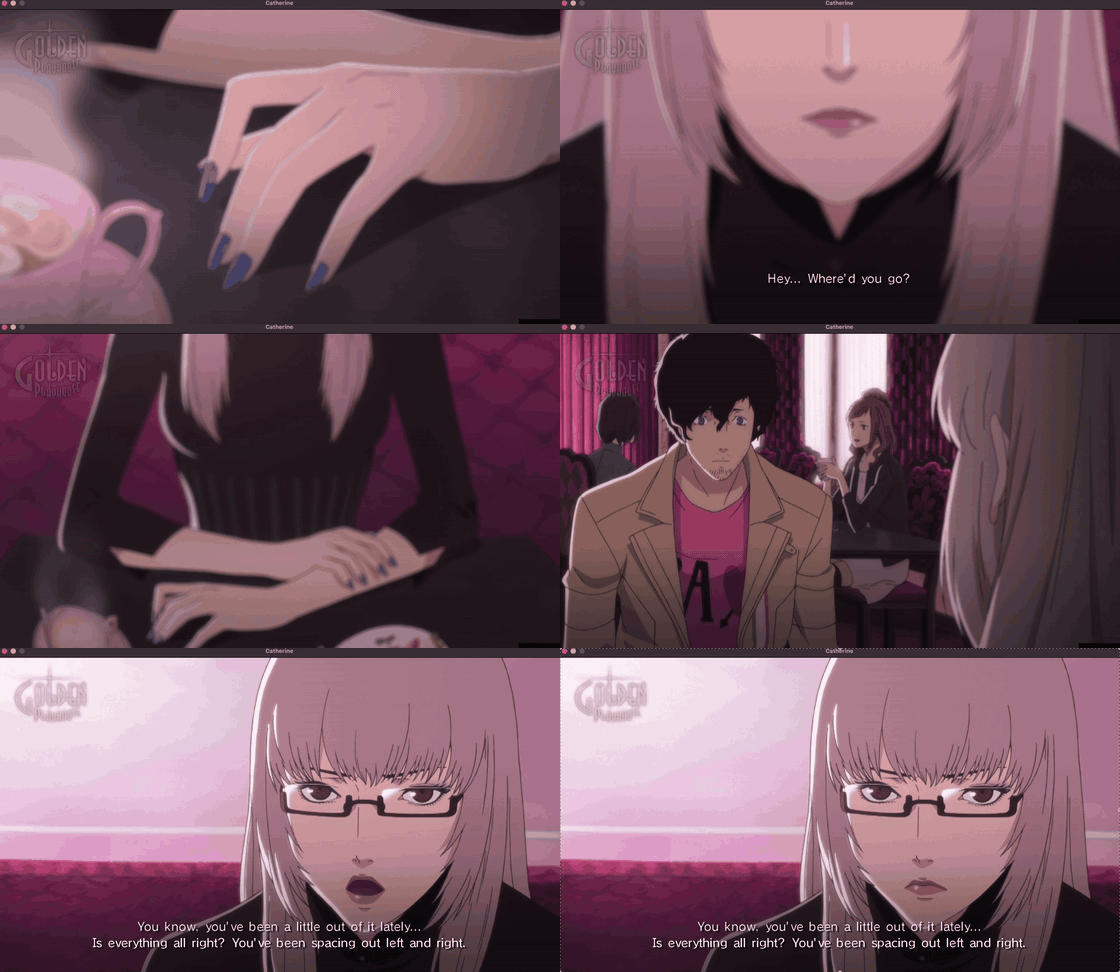
Cutscene (shown at 2× speed) |
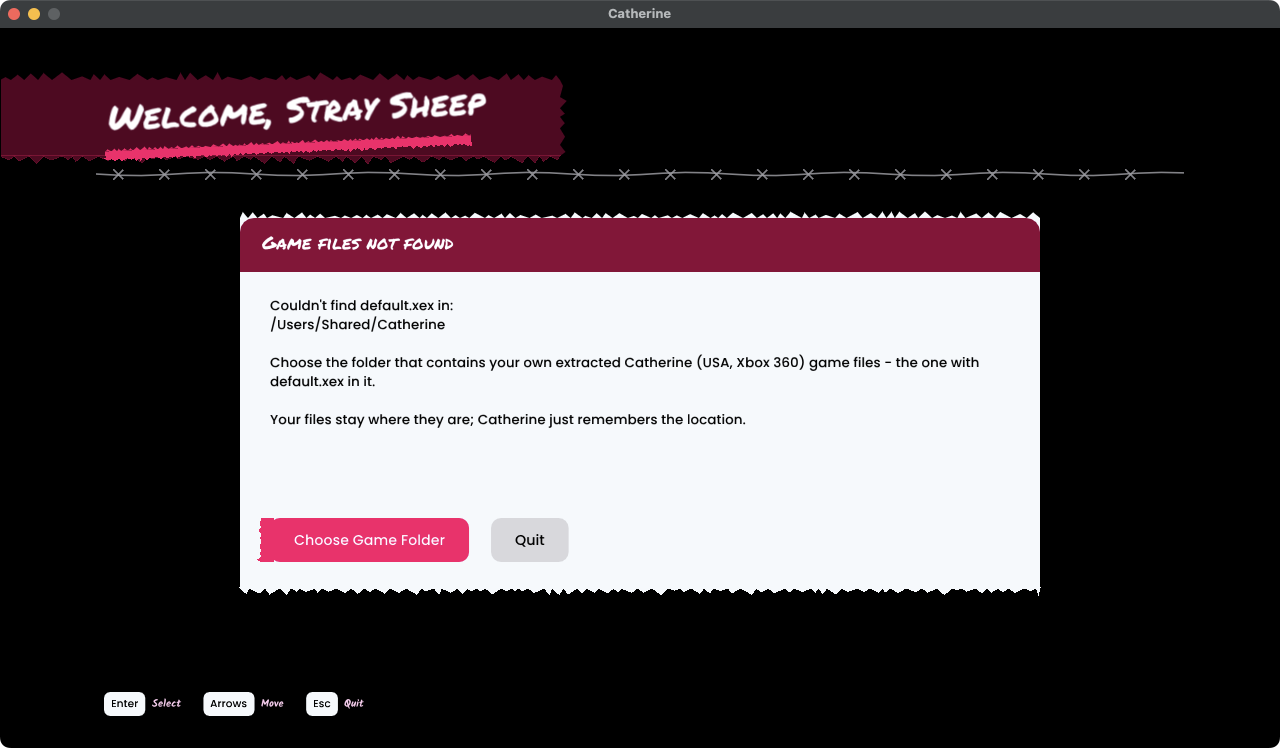
First-run setup screen |
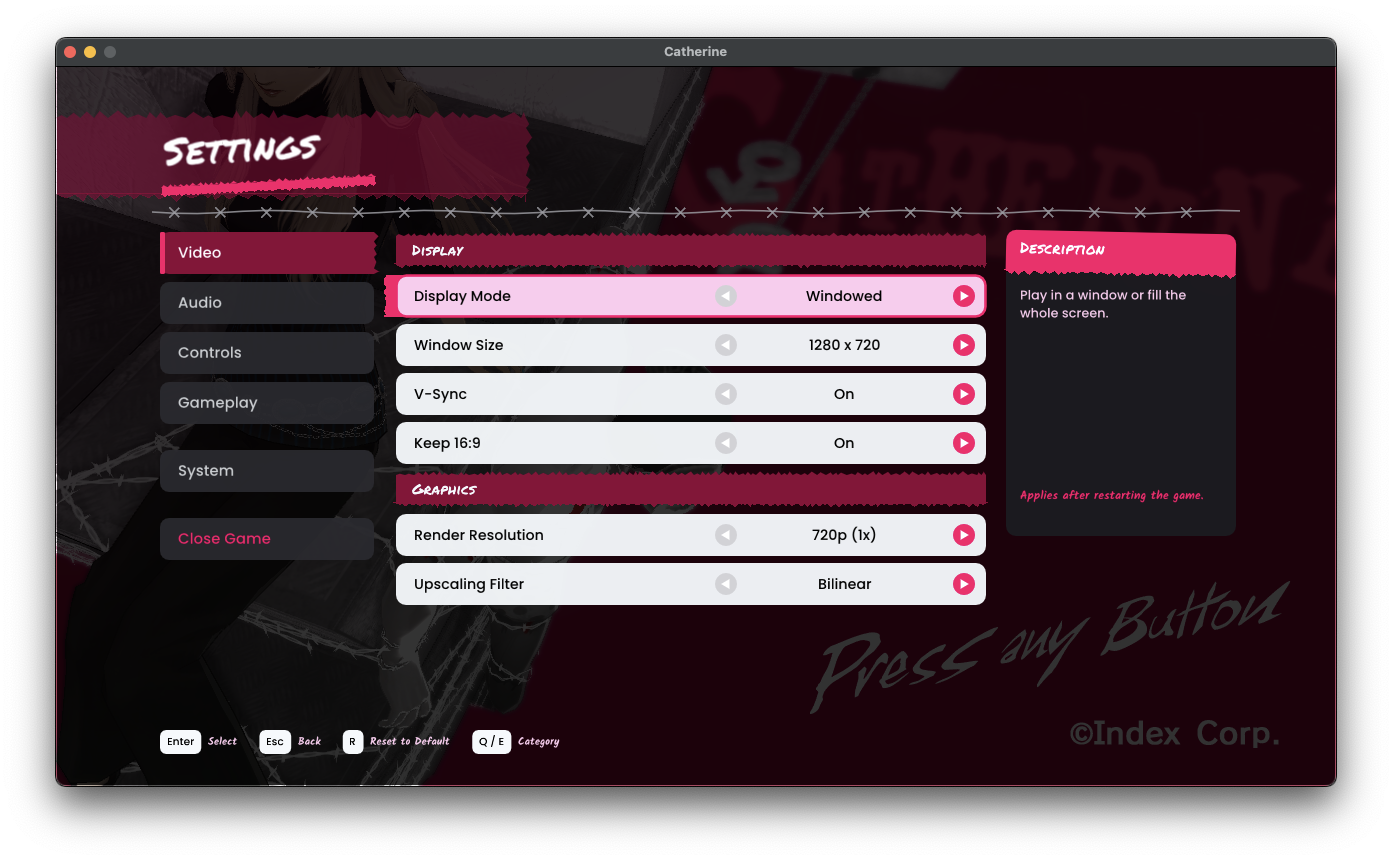
Settings menu (press Esc) |
## Requirements
- An Apple Silicon Mac (M1 or newer), macOS 15 or later
- About 5 GB of free space
- [Homebrew](https://brew.sh) and Apple's Command Line Tools (setup offers to install what's missing)
- Your own extracted **Catherine (USA)** Xbox 360 game folder, containing `default.xex`
(only this exact release is supported; setup checks it)
## Install
```sh
git clone https://github.com/ammocache/catherine-macos.git catherine-project/rex-retail
cd catherine-project/rex-retail
./setup.sh
```
`setup.sh` walks you through everything: it checks your Mac, downloads the
ReXGlue SDK (v0.10.0) and applies this project's fixes, asks for your game
folder and verifies it, recompiles the game (about 10 minutes on an M4 MacBook Pro, longer on older Macs) and
offers to put **Catherine.app** in your Applications folder.
Options: `./setup.sh --game /path/to/game/folder --yes` runs without questions.
If you move your game files later, Catherine shows a setup screen at launch and
lets you pick the new folder.
## Playing
| | Keyboard | Controller |
|---|---|---|
| Settings menu | Esc | Back + Start |
| Move | W A S D | Left stick |
| Camera | Arrow keys | Right stick |
| Confirm / Back | Space / Backspace | A / B |
| Pause (in game) | Enter or X | Start |
Settings are saved in `~/Library/Application Support/Catherine/catherine.toml`.
## Troubleshooting
**Setup says the game is a different version.** Only the retail *Catherine (USA)* Xbox 360
release is supported. Setup checks `default.xex` and stops on anything else.
**Setup says "No default.xex in ...".** Choose the extracted game folder itself, the one
that directly contains `default.xex`.
**Setup asks to copy your game files.** Your game folder is in Downloads, Documents or
Desktop, which macOS protects, so Catherine would ask for permission after every rebuild.
Copying is optional, and your original is left untouched.
**Command Line Tools or Homebrew are missing.** Setup tells you which one. Install it, then
run `./setup.sh` again.
**"A fix didn't apply cleanly" or "The SDK ... has local changes".** The downloaded SDK was
changed. Reset it with `git -C ../tools/rexglue-sdk checkout .` and run `./setup.sh` again.
**The build failed.** The last lines of `out/setup.log` in the project folder usually say why.
If they don't help, [open an issue](https://github.com/ammocache/catherine-macos/issues/new/choose)
and attach that file.
**Catherine shows the "Welcome, Stray Sheep" screen.** It can't find your game files,
usually because the folder moved. Pick the new folder there.
**A display setting didn't change.** Display mode and window size apply after a restart;
the settings menu has a *Restart Now* button.
**Reporting a game problem.** Start the game from Terminal with `scripts/play.sh` (in the
project folder), reproduce the problem, then attach `out/play.log` to your
[bug report](https://github.com/ammocache/catherine-macos/issues/new/choose).
Never attach game files.
## Status
Playable: boots, menus, cutscenes and gameplay work, at a steady 30 fps on a
base M4 MacBook Pro (16 GB, macOS 15) at the original 720p. That is the only
hardware it has been tested on so far.
**Why 30 fps, and why not 60?** V1 targets a stable, V-Sync-locked 30 fps, the
speed the game was made for. Unlocking the frame rate is not just a setting: the
game's logic is expected to be tied to 30 fps timing (this is how many 360
games work, and is not yet verified in detail for Catherine), so 60 fps would
need game-logic fixes, as other recompilation projects have had to do.
Known issues:
- Switching display mode or window size applies after a restart
(the menu has a *Restart Now* button).
- Higher render resolutions are GPU-heavy: 2x runs ~20 fps on a base M4. The
cost comes from how the Xbox 360's EDRAM is emulated (many small render
passes per frame), not from the shaders; details in
[docs/PERFORMANCE_NOTES.md](docs/PERFORMANCE_NOTES.md).
- Faint outlines around some menu text, occasional HUD glitch bars.
- A little low-frequency audio roughness can remain.
## Roadmap
- Cut the cost of the emulated render-target passes so 2x runs at a stable 30 fps.
- Investigate a ground-up native renderer (no EDRAM emulation, Xenos shaders
converted ahead of time, as in Unleashed Recompiled's
[XenosRecomp](https://github.com/hedge-dev/XenosRecomp)) for higher
resolutions. This is exploratory and a large amount of work; there is no
promise or date for it.
- Game-logic fixes for frame rates above 30 fps.
- More menu polish (FPS counter, volume slider, key remapping, popup styling).
## How it works
1. The ReXGlue code generator translates the game's PowerPC code into C++
(`generated/`, created on your machine and never committed).
2. That code is compiled together with the ReXGlue runtime (kernel, audio,
input, and the emulated Xenos→Vulkan graphics backend) into a Mac app.
3. `patches/` holds this project's fixes to the SDK; `src/` holds the app
(settings menu, setup screen, defaults).
## Credits & licenses
This project's own code (settings menu, setup screen, scripts, patches) is
released under the [MIT License](LICENSE). The license does not cover the game
or the icon, banner, screenshots and clips, which use ATLUS / SEGA material.
- [ReXGlue SDK](https://github.com/rexglue/rexglue-sdk) (BSD 3-Clause), which builds on [Xenia](https://xenia.jp).
- Fonts: Permanent Marker (Apache 2.0), Kalam, Poppins, Nunito (SIL OFL 1.1) — see `assets/fonts/`.
- App icon: an image of the curtain block from *Catherine*, © ATLUS / SEGA, used
here as a fan-project icon only. It is not covered by this project's license.
- Banner: made by the project author using artwork from *Catherine*, © ATLUS / SEGA, used
here as fan-project artwork only. It is not covered by this project's license.
- Screenshots and clips: captured from this project running on a Mac; the game's visuals are
© ATLUS / SEGA, shown here to illustrate the fan project. Not covered by this project's license.
- See [THIRD_PARTY_NOTICES.md](THIRD_PARTY_NOTICES.md).
*Catherine* is © ATLUS / SEGA. This is an unofficial fan project, not affiliated
with or endorsed by Atlus or SEGA. It does not include or distribute any of
their code, art, audio or other assets.