
LCU
Codex computer use, decoupled from the Codex app.
https://github.com/user-attachments/assets/bd9d0809-8a6c-4931-a51c-b98daf05cb5f
LCU exposes Codex's original computer-use runtime to your harness without requiring Codex authentication. The official ChatGPT desktop app must still be installed locally: it supplies the runtime and instructions, while LCU handles setup and harness integration.
## Quick start
Copy this into your agent:
```text
Install and configure LCU for this harness using the latest release.
Follow https://raw.githubusercontent.com/amontlabs/lcu/main/docs/INSTALLATION.md
Check my OS, architecture, and prerequisites, then guide me through any required permissions.
```
In Claude Code on an Apple Silicon Mac, two commands do the same through its plugin manager; see [Claude Code plugin](docs/INSTALLATION.md#claude-code-plugin):
```sh
claude plugin marketplace add amontlabs/lcu
claude plugin install lcu@lcu
```
## Features
- **Desktop apps:** read windows, click, type, and take screenshots.
- **Chrome, when enabled:** read and control tabs through the official extension, with site approval.
- **In your harness:** adapters are available for Pi, Codex CLI, and Claude Code, with experimental Oh My Pi and Hermes integrations. See [setup and verification limits](docs/ADAPTERS.md).
## Approve apps from Claude, natively
The first time an agent controls an app (Zed, Notes, Safari), the computer-use runtime asks you to allow it. The Claude app's Code tab used to fail that request with "Computer Use was not approved". `lcu setup --agent claude-code` now installs a small Claude Code mod, `lcu-approve`, that asks the question natively: as a question card in the Claude app, which flags the session as needing input, and as a **Computer use approval** pane in the terminal.
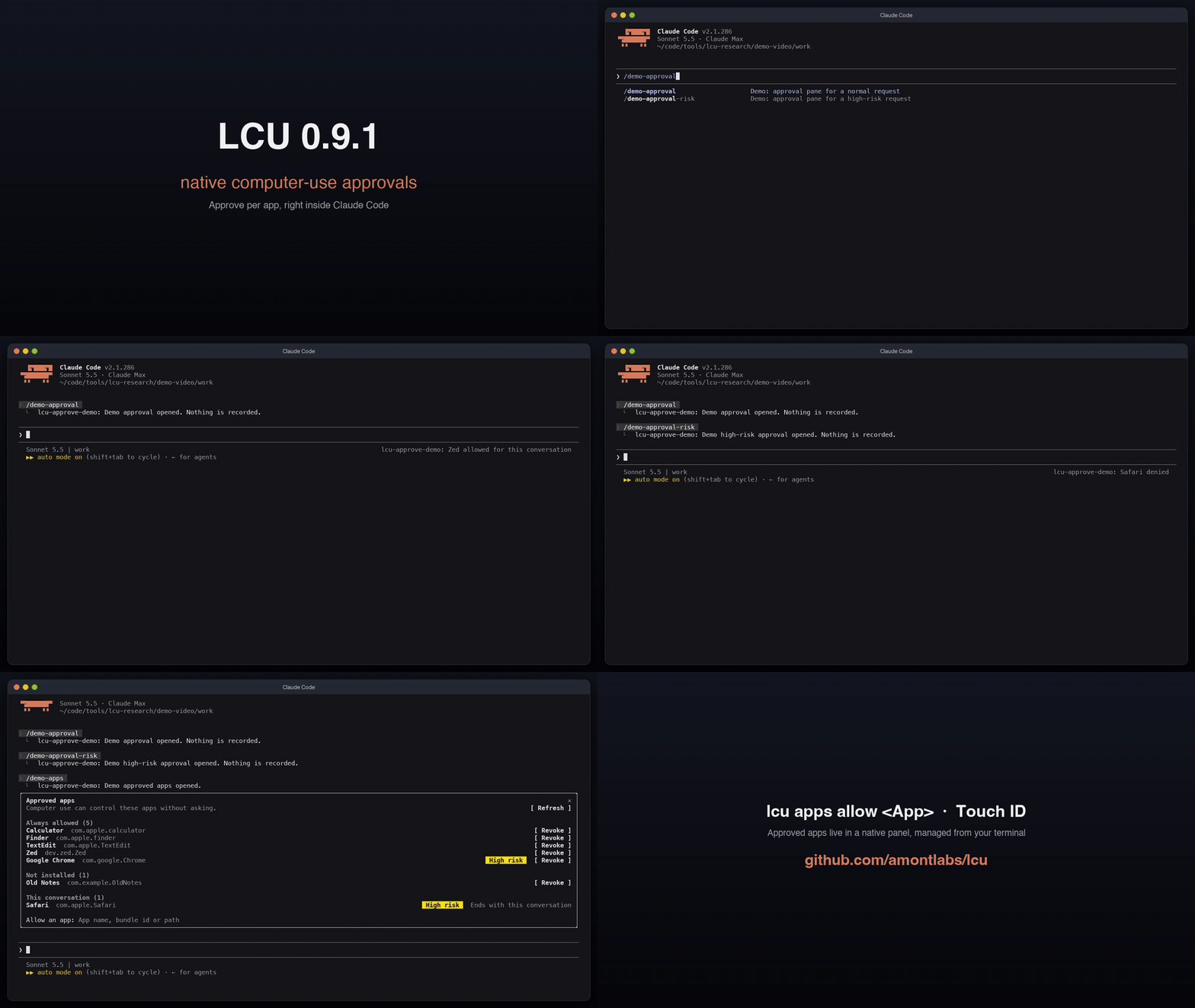
- **Allow this conversation** for the current chat only.
- **Always allow** to remember the app (offered only when the runtime allows it).
- **Deny** to refuse.
The `/computer-use-apps` command opens an **Approved apps** panel in the same place: one line per always-allowed app with Revoke (macOS asks for Touch ID or your password), apps that are no longer installed grouped below, this conversation's grants, and an Allow field.
Only you can answer: the model cannot see, press or fake the pane. High-risk apps show the runtime's own warning (reworded to say "computer use" and "the agent"), and the app hosting the agent is never approved. Needs the Claude app or Claude Code 2.1.287+. [How it works](docs/ADAPTERS.md#native-app-approvals-in-claude-code-and-the-claude-app), [how to remove it](docs/INSTALLATION.md#uninstall).
In the Claude app, register LCU through Claude Code (`lcu setup --agent claude-code`), not through Settings > Connectors; see [installation](docs/INSTALLATION.md#native-approvals-in-the-claude-app).
## Manage approved apps with Touch ID
"Always allow" is remembered. Review and change that list from the terminal (macOS), without opening the Codex app:
```sh
lcu apps # what is always allowed today
lcu apps allow Zed # Touch ID (or your password), then Zed is allowed
lcu apps revoke Zed # take it back
```
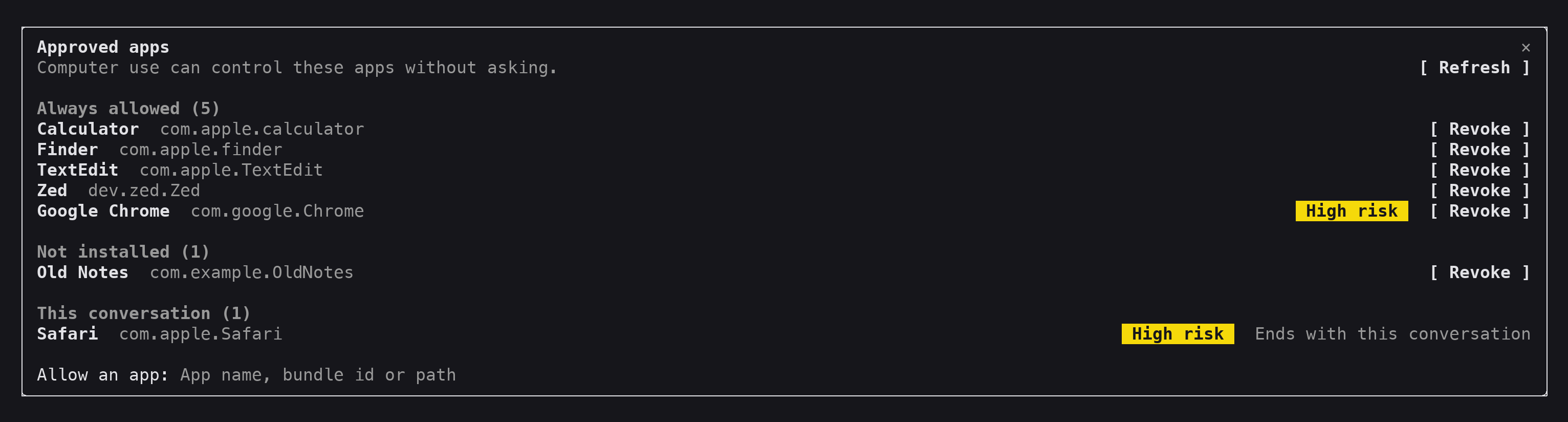
- Pass an app name, a bundle identifier or an `.app` path.
- Listing is free; `allow` and `revoke` need you at the machine, so an agent running them is stopped by the prompt.
- Running sessions pick the change up immediately.
- Browsers, password managers and other high-risk apps come with a warning; apps Computer Use refuses outright (Terminal, iTerm2) are declined.
[Details](docs/INSTALLATION.md#manage-approved-apps).
## Keep Computer Use across turns (Claude Code)
In Claude Code, Computer Use normally ends with the turn that started it. A background subagent still working after that turn ended, or a turn that reuses an ended turn id, is told "Computer Use is unavailable because the current turn ended." An opt-in setting keeps it available for every turn of the session:
```sh
lcu cross-turn # status
lcu cross-turn on # Touch ID (or your password) on macOS
lcu cross-turn off # no prompt
```
- Off by default. `lcu setup --cross-turn on|off` sets it too; interactive setup asks once.
- It affects only the Claude Code relay; Codex, Pi, Oh My Pi and Hermes ignore it. Per-app approvals (macOS and Windows) and your harness's tool approvals still apply.
- A foreground subagent finishing no longer ends the parent's Computer Use, with the setting on or off.
- A guard against accidents, not a security boundary: anything running as your account can edit the file or pass `--unattended` (for disposable sandbox machines, where nobody can answer the prompt).
[Details](docs/INSTALLATION.md#cross-turn-computer-use).
## Permissions
Your harness decides whether the agent may call LCU's tools (Claude's "don't ask again" on the first card, Codex's tool approval, and so on). LCU decides, per app, whether that agent may touch it, in every permission mode. `lcu setup --approval auto` is optional and meant for unattended machines (VMs, CI): it pre-allows LCU's two model tools in the harness, and leaves per-app approval in force. See [approval mode](docs/INSTALLATION.md#approval-mode).
## Requirements
Install [the official ChatGPT desktop app](https://chatgpt.com/download/) and your harness first. LCU needs nothing else: no Python on any platform. It runs on the Node that ships inside the app, checks the installed app for compatibility and uses its original runtime. For Codex CLI, [update before setup](docs/ADAPTERS.md#codex-cli) to get the required hook support.
| Platform | Requirements |
| --- | --- |
| Linux ARM64 or x86-64 | Ubuntu 24.04-compatible glibc system, an active X11 desktop, and D-Bus |
| macOS on Apple Silicon | The signed ChatGPT app, with Accessibility and screen-recording permissions approved during first use |
Windows 11 x64 remains a [candidate](docs/INSTALLATION.md#windows-11-x64-candidate-deferred-from-this-delivery). Intel Macs, native Wayland, and musl Linux are unsupported. See [verification and limits](docs/PARITY-STATUS.md) for tested behavior.
## Install manually
Download the archive and matching `.sha256` file from the [latest release](https://github.com/amontlabs/lcu/releases/latest):
| Platform | Archive |
| --- | --- |
| macOS on Apple Silicon | `lcu--darwin-arm64.tar.gz` |
| Linux ARM64 | `lcu--linux-arm64.tar.gz` |
| Linux x86-64 | `lcu--linux-x64.tar.gz` |
Follow the [installation guide](docs/INSTALLATION.md) to verify the checksum, extract the archive, and register LCU in your harness. Setup offers an agent chooser and desktop-readiness guidance. Chrome and computer-audio recording are opt-in.
For development, see [building from source](docs/DEVELOPMENT.md#building-from-source).
## Enable Chrome
Ask your agent:
```text
Enable Chrome control in my LCU setup using the installation guide:
https://raw.githubusercontent.com/amontlabs/lcu/main/docs/INSTALLATION.md#desktop-and-browser
```
Enable the official extension in your Chrome profile and restart your harness. Then restart Chrome, or turn the ChatGPT extension off and on in `chrome://extensions`; an extension that was already connected keeps the original native host until it reconnects. Then ask your agent to use LCU to list Chrome tabs. Sites still require approval. Claude Code's Chrome support remains experimental because some interruptions do not trigger tab cleanup; see [adapter limitations](docs/ADAPTERS.md). If Chrome calls fail with `requires caller identity`, see [Chrome troubleshooting](docs/INSTALLATION.md#chrome-extension-fails-with-requires-caller-identity).
## Enable computer-audio recording
Pass `--audio` when setting up a maintained harness, for example:
```sh
~/.local/share/lcu/current/bin/lcu setup --agent pi --audio
```
The installer does not add `lcu` to your `PATH`; run its installed path (`/opt/lcu/current/bin/lcu` on Linux). See [the `lcu` command](docs/INSTALLATION.md#the-lcu-command).
This enables the installed original runtime's optional computer-audio recording API and its original approval flow. LCU does not add audio-specific instructions, and a saved recording is not audio delivered to the model. See the [audio opt-in verification record](docs/verification/audio-opt-in-2026-09-27.md).
## Pi commands
In interactive Pi, `/lcu stop` requests original Computer Use Stop for a selected app during the active LCU turn (macOS only). `/lcu pick` selects an original app or browser target and appends it to the editor draft while Pi is idle; review and submit the draft yourself. See [adapter command behavior and limits](docs/ADAPTERS.md#pi-extension).
## Documentation
- [Installation](docs/INSTALLATION.md): downloads, harness setup, permissions, sessions, and upgrades. Update with `lcu update`; [update notices](docs/INSTALLATION.md#update-notices) can be turned off with `LCU_NO_UPDATE_CHECK=1`.
- [Harness adapters](docs/ADAPTERS.md): custom clients, approvals, lifecycle, and result handling.
- [Verification](docs/PARITY-STATUS.md): tested behavior and remaining gaps.
- [Development](docs/DEVELOPMENT.md): source builds and isolated desktop tests.
LCU is [MIT licensed](LICENSE). Release archives contain LCU and third-party setup dependencies. The OpenAI app and its instructions come from your local installation and retain their own terms; see [dependency provenance](docs/PROVENANCE.md).