# HomeAssistant - Stellantis Vehicles [![Active installations](https://img.shields.io/badge/active_installations-8879-%2318BCF2?style=for-the-badge&logo=homeassistant)](#) [![Last version](https://img.shields.io/github/v/release/andreadegiovine/homeassistant-stellantis-vehicles?style=for-the-badge&logo=github&label=last%20version&color=green)](#) - [Requirements](#requirements) - [Features](#features) - [Installation](#installation) - [Screenshot](#screenshot) - [OAuth2 Code](#oauth2-code) - [Commands](#commands) - [Battery capacity / residual sensors](#battery-capacity--residual-sensors) - [Card: Stellantis Vehicles](#card-stellantis-vehicles) - [Global preferences](#global-preferences) - [Errors](#errors) - [OTP error - NOK:MAXNBTOOLS](#otp-error---nokmaxnbtools) - [OTP error - NOK:NOK_BLOCKED](#otp-error---noknok_blocked) - [Get oauth code error](#get-oauth-code-error) - [Command status 901 and 300 - Wakeup timeout](#command-status-901-and-300---wakeup-timeout) - [ABRP - A Better Routeplanner](#abrp---a-better-routeplanner) - [Support the project](#support-the-project) > Currently only PSA vehicles are compatibile. | Peugeot | Citroën | DS | Opel | Vauxhall | |--------------------------------------|--------------------------------------|----------------------------|--------------------------------|----------------------------------------| | ![MyPeugeot](./images/MyPeugeot.png) | ![MyCitroen](./images/MyCitroen.png) | ![MyDS](./images/MyDS.png) | ![MyOpel](./images/MyOpel.png) | ![MyVauxhall](./images/MyVauxhall.png) | **Inspired by [PSA Car Controller](https://github.com/flobz/psa_car_controller) (OTP step its a fork). Thanks to [Florian BEZANNIER](https://github.com/flobz) for his great work** ## Requirements Get status: - **Vehicle native mobile app** installed and active; - **Use a pc for autentication**; Send remote commands: - Get status requirements; - **Remote service** actived (E-remote or Connect Plus); > Currently Stellantis not provide B2C api credentials, this integration use the mobile apps api credentials and login flow. ## Features | | Electric / Hybrid | Thermic | E-remote control | Remote control | Connect Plus | |----------------------------|:-----------------:|:-------:|:----------------:|:---------------:|:------------:| | Get status | ✔️ | ✔️ | ✔️ | | ✔️ | | Wake up | ✔️ | ✔️ | ✔️ | | ✔️ | | ABRP sync | ✔️ | ✔️ | ✔️ | | ✔️ | | Preconditioning start/stop | ✔️ | ✔️ | ✔️ | | ✔️ | | Doors open/close | ✔️ | ✔️ | | ✔️ | ✔️ | | Flash lights | ✔️ | ✔️ | | ✔️ | ✔️ | | Honk the horn | ✔️ | ✔️ | | ✔️ | ✔️ | | Charging start/stop | ✔️ | | ✔️ | | ✔️ | | Charging limit | ✔️ | | ✔️ | | ✔️ | ## Installation

Using HACS 1. Go to [HACS](https://hacs.xyz/) section; 2. Search and install **Stellantis Vehicles** from the HACS integration list; 3. Add this integration from the **Home Assistant** integrations.
Manually 1. Download this repository; 2. Copy the directory **custom_components/stellantis_vehicles** on your Home Assistant **config/custom_components/stellantis_vehicles**; 3. Restart HomeAssistant; 4. Add this integration from the **Home Assistant** integrations.
## Screenshot ### Entities ![Controls](./images/controls.png) ![Sensors](./images/sensors.png) ### Vehicle Card ![Card](./images/card.png) Documented on [Card: Stellantis Vehicles](#card-stellantis-vehicles) section. ## OAuth2 Code ### Remote service This **[remote service](https://github.com/andreadegiovine/homeassistant-stellantis-vehicles-worker-v2)** simulates a browser login session on the official website to authenticate your account. **Your credentials are neither stored nor shared** The service is provided by Render.com on a free tier, with performance limitations. > If you want to support the project and extend these limits, become a hero and join our **monthly [supporters club](#support-the-project)**! If you'd rather not depend on the shared Render.com instance, you can self-host the [worker](https://github.com/andreadegiovine/homeassistant-stellantis-vehicles-worker-v2) and enter its URL in the "Login service URL" field of the config flow's remote-login step instead of the default one. ### Manual
Using browser console As described on config flow, please get the right code from the mobile app redirect like this example (Chrome browser): ![Oauth2](./images/oauth2-code.png)

Using python tool Thanks to [@benbox69](https://github.com/benbox69) for creating this awesome Python tool to fetch oauth code without using browser console: [stellantis-oauth-helper](https://github.com/benbox69/stellantis-oauth-helper)
Using external service Thanks to [@benbox69](https://github.com/benbox69) for creating this awesome external service to fetch oauth code without using browser console: [OAuth Code Extractor](https://github.com/andreadegiovine/homeassistant-stellantis-vehicles/discussions/378)
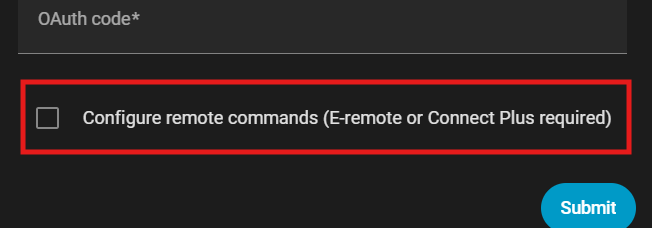
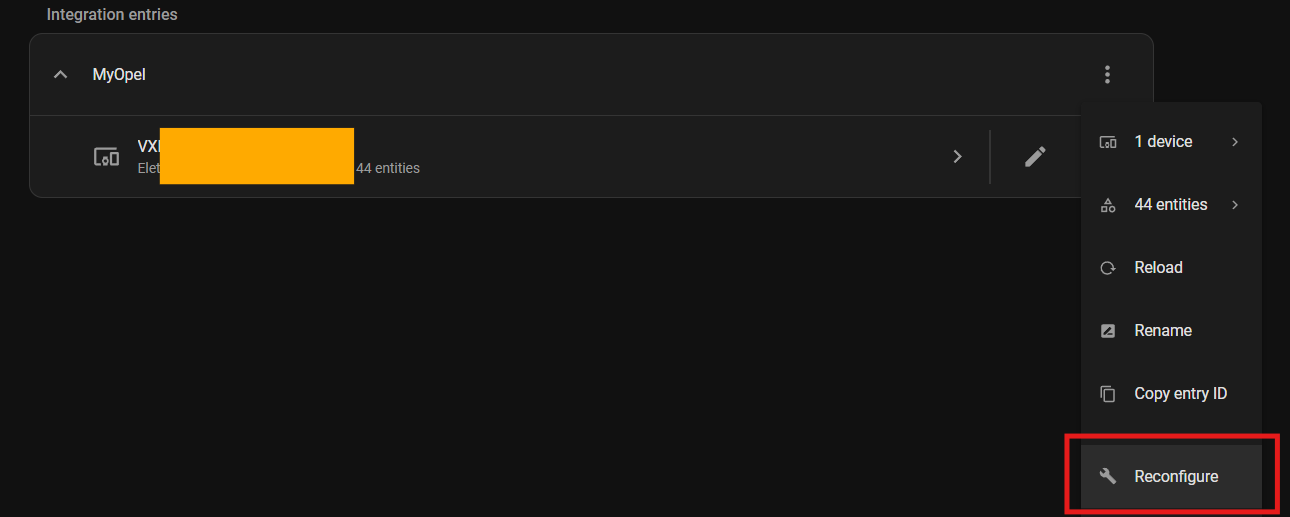
## Commands To use remote commands, the "E-remote" or "Connect Plus" service must be activated and configured in the vehicle. How to complete the OTP step and activate remote commands:
New configuration ![Enable remote commands](./images/remote-commands-1.png)
Existing configuration ![Enable remote commands](./images/remote-commands-2.png)
### WakeUp For some vehicles no updates are received a few minutes after the engine is turned off. Use automations like these to schedule the vehicle wake up: ```yaml - id: "standby_wakeup" alias: Vehicle standby WakeUp (every 1 hour) description: "" mode: single triggers: - trigger: time_pattern hours: /1 conditions: - condition: state entity_id: binary_sensor.#####VIN#####_battery_charging state: "off" actions: - action: button.press metadata: {} data: {} target: entity_id: button.#####VIN#####_wakeup ``` ```yaml - id: "charging_wakeup" alias: Vehicle charging WakeUp (every 5 minutes) description: "" mode: single triggers: - trigger: time_pattern minutes: /5 conditions: - condition: state entity_id: binary_sensor.#####VIN#####_battery_charging state: "on" actions: - action: button.press metadata: {} data: {} target: entity_id: button.#####VIN#####_wakeup ``` \* the entity names above are in english, please use your language entity names. **Some users report that performing too many wakeups drains the service battery, making some features unavailable (such as keyless entry)**. ### Air conditioning Start/Stop As described in the Stellantis apps, the command is enabled when: 1. The vehicle engine is off; 2. The vehicle doors are locked; 3. The battery level is at least ~~50% (20% for hybrids)~~ 20% or in charging ([#226](https://github.com/andreadegiovine/homeassistant-stellantis-vehicles/issues/226)); ## Battery capacity / residual sensors Thanks to the community ([#272](https://github.com/andreadegiovine/homeassistant-stellantis-vehicles/issues/272)), it seems that for some vehicles **Stellantis provides incorrect values**. The **switch.battery_values_correction** entity (in your language) applies a correction if active. \*currently only to the battery_residual sensor ## Card: Stellantis Vehicles A new custom card is available to manage the vehicle, the card is configurable from the visual editor or via yaml: ``` type: custom:stellantis-vehicle-card entity: device_tracker.#####VIN#####_vehicle hide_features: false features_icons_size: 20 features: - binary_sensor.#####VIN#####_remote_commands - sensor.#####VIN#####_battery hide_content: false content_icons_size: 14 content: - sensor.#####VIN#####_temperature - sensor.#####VIN#####_last_trip hide_actions: false actions: - button.#####VIN#####_wakeup - button.#####VIN#####_charge_start hide_charging_limit: false hide_charging_start: false hide_map: false hide_last_trip: false hide_last_charge: false ``` \* the entity names above are in english, please use your language entity names. Some users report bugs during first use or after page refresh ([#440](https://github.com/andreadegiovine/homeassistant-stellantis-vehicles/issues/440), [#441](https://github.com/andreadegiovine/homeassistant-stellantis-vehicles/issues/441)), it seems like a browser or mobile app cache issue. To reset mobile app cache try: **Settings > app settings > Problem solving > Reset frontend cache** ## Global preferences These initial choices can be changed in the **Reconfigure** flow under **Global preferences**: - Enable persistent notifications - Anonymize personal data on logs Thanks to the community ([#414](https://github.com/andreadegiovine/homeassistant-stellantis-vehicles/issues/414)), it seems that for some hardware, the "Anonymize personal data on logs" feature makes the environment unstable. It is recommended to disable this feature and enable it only when you need to share logs. ## Errors Before any issue request, please check the integration log and look for solution below. ### OTP error - NOK:MAXNBTOOLS It seems that this error is due to reaching the limit of associated devices / SMS received. Restore your Stellantis account and try again: [Follow this procedure from Peugeot community](https://peugeot.my-customerportal.com/peugeot/s/article/AP-I-have-problems-with-the-pin-safety-code-or-I-want-to-change-it-What-can-I-do?language=en_GB). **This operation removes the devices connected to your vehicle, no vehicle data will be lost**. ### OTP error - NOK:NOK_BLOCKED It seems that this error is due to reaching the limit of wrong PIN used. Re-authenticate the integration. ### Get oauth code error As described in the "OAuth2 Code > [Remote service](#remote-service)" section, this free service has usage limitations. If you've hit these limits, please wait and try again. If the problem persists or is unrelated to usage limits, please use "OAuth2 Code > [Manual](#manual)" mode. ### Command status 901 and 300 - Wakeup timeout **901 (Wakeup Vehicle)** is the wakeup command being forwarded from the Stellantis backend to your vehicle, it doesn't say anything about the vehicle's state by itself. If it's followed by **300 (Timeout)** instead of **0 (Complete)**, the vehicle didn't respond, which means it's in a deep sleep. Stellantis disables connectivity to protect the 12V battery, the vehicle apps explain it like this: > Your vehicle has not been used for more than 15 consecutive minutes in the last 7 days. To preserve your 12V battery, connectivity is disabled. This is tracked per vehicle, not per integration: any trip shorter than 15 minutes doesn't count, no matter how close it gets. If all your trips in the last 7 days were under 15 minutes, connectivity gets disabled and every wakeup times out until a trip passes the threshold again. To avoid repeated timeouts, take at least one trip longer than 15 minutes every 7 days. ## ABRP - A Better Routeplanner Get a token from [ABRP](https://abetterrouteplanner.com/): 1. Login to your account; 2. Navigate to vehicle settings; 3. Navigate to real time data; 4. Navigate to edit connections; 5. Generate a token using "Generic" method; Use the generated token in **abrp_token sensor** and enable **abrp_sync switch** to send updates. ## Contributors & Translations Start from the "**develop**" branch and submit PRs in that branch. Commit messages are included as release notes, please keep them short and understandable. Before each PR please test: - New installation; - Reconfiguration; - Commands; - Sensors; - 1 week without errors in logs; If the checklist is complete, the PR will be merged and will be released a BETA version, if no issues are reported the changes will included on next stable release. Thanks to all users who contribute to this integration by updating translations and reporting issues. ### Special thanks: - [@MoellerDi](https://github.com/MoellerDi) for the great work and big support; - [@benbox69](https://github.com/benbox69) for the python oauth2 helper tool; - [@khenderick](https://github.com/khenderick) for the great work and big support; Thanks to everyone for the issues, especially to: - [@chmtc94](https://github.com/chmtc94); - [@FrankTub](https://github.com/FrankTub); - [@Jordan87](https://github.com/Jordan87); ## Support the project **The latest heroes who believe in this project** 👇 **🏆 MONTHLY BEERS** Harald **🥈 10 BEERS** Rüdiger Andrea Donno Fabian **🥉 5 BEERS** Someone Dieter SA Energy *and other heroes* **⭐ 4 BEERS** Al **⭐ 3 BEERS** Adam Szczerba Hubert Someone *and other heroes* **⭐ 2 BEERS** Ludvik Liam Kristian *and other heroes* **⭐ 1 BEERS** Harald Someone RapH *and other heroes* ### Want to join the Club? [!["Buy Me A Coffee"](https://www.buymeacoffee.com/assets/img/custom_images/orange_img.png)](https://www.buymeacoffee.com/andreatito) [![ko-fi](https://ko-fi.com/img/githubbutton_sm.svg)](https://ko-fi.com/W7W11C9QJ7)