
[](http://www.cocoapods.org/?q=amscrollingnavbar)

[](https://github.com/Carthage/Carthage)

[](https://gitter.im/andreamazz/AMScrollingNavbar?utm_source=badge&utm_medium=badge&utm_campaign=pr-badge&utm_content=badge)
[](https://www.paypal.com/cgi-bin/webscr?cmd=_s-xclick&hosted_button_id=46FNZD4PDVNRU)
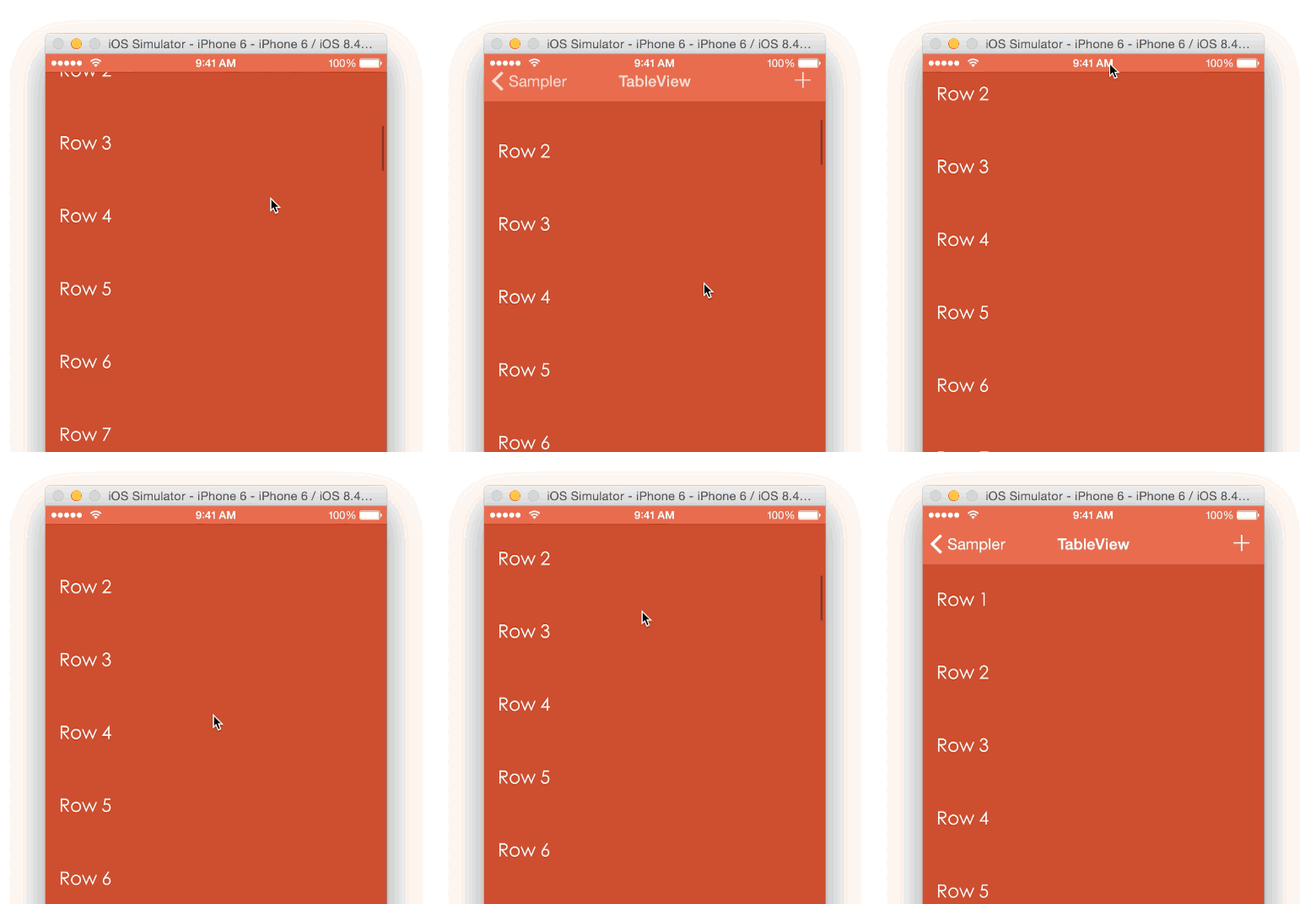
A custom UINavigationController that enables the scrolling of the navigation bar alongside the
scrolling of an observed content view

### Versioning notes
- Version `2.x` is written as a subclass of `UINavigationController`, in Swift.
- Version `2.0.0` introduced Swift 2.0 syntax.
- Version `3.0.0` introduced Swift 3.0 syntax.
- Version `4.0.0` introduced Swift 4.0 syntax.
- Version `5.1.0` introduced Swift 4.2 syntax.
If you are looking for the category implementation in Objective-C, make sure to checkout version `1.x` and prior, although the `2.x` is recomended.
# Screenshot
# Setup with CocoaPods
```
pod 'AMScrollingNavbar'
use_frameworks!
```
# Setup with Carthage
```
github "andreamazz/AMScrollingNavbar"
```
## Usage
Make sure to use `ScrollingNavigationController` instead of the standard `UINavigationController`. Either set the class of your `UINavigationController` in your storyboard, or create programmatically a `ScrollingNavigationController` instance in your code.
Use `followScrollView(_: delay:)` to start following the scrolling of a scrollable view (e.g.: a `UIScrollView` or `UITableView`).
#### Swift
```swift
override func viewWillAppear(_ animated: Bool) {
super.viewWillAppear(animated)
if let navigationController = navigationController as? ScrollingNavigationController {
navigationController.followScrollView(tableView, delay: 50.0)
}
}
```
#### Objective-C
```objc
- (void)viewWillAppear:(BOOL)animated {
[super viewWillAppear:animated];
[(ScrollingNavigationController *)self.navigationController followScrollView:self.tableView delay:0 scrollSpeedFactor:1 collapseDirection:NavigationBarCollapseDirectionScrollDown followers:nil];
}
```
Use `stopFollowingScrollview()` to stop the behaviour. Remember to call this function on disappear:
```swift
override func viewDidDisappear(_ animated: Bool) {
super.viewDidDisappear(animated)
if let navigationController = navigationController as? ScrollingNavigationController {
navigationController.stopFollowingScrollView()
}
}
```
## ScrollingNavigationViewController
To DRY things up you can let your view controller subclass `ScrollingNavigationViewController`, which provides the base setup implementation. You will just need to call `followScrollView(_: delay:)`:
```swift
override func viewWillAppear(_ animated: Bool) {
super.viewWillAppear(animated)
if let navigationController = navigationController as? ScrollingNavigationController {
navigationController.followScrollView(tableView, delay: 50.0)
}
}
```
## Followers
To move another view, like a toolbar, alongside the navigation bar you can provide the view or multiple views as the `followers` parameter. Since you might want to have the follower up or down, you'll have to specify the scroll direction of the view once it starts to follow the navigation bar:
```swift
if let navigationController = navigationController as? ScrollingNavigationController {
navigationController.followScrollView(tableView, delay: 50.0, followers: [NavigationBarFollower(view: customFooter, direction: .scrollDown)])
}
```
Note that when navigating away from the controller the followers might keep the scroll offset. Refer to [Handling navigation](https://github.com/andreamazz/AMScrollingNavbar#handling-navigation) for proper setup.
## Additional scroll
If you want to furhter scroll the navigation bar out of the way, you can use the optional parameter `additionalOffset` in the `followScrollView` call.
## Scrolling the TabBar
You can also pass a `UITabBar` in the `followers` array:
```swift
if let navigationController = navigationController as? ScrollingNavigationController {
navigationController.followScrollView(tableView, delay: 50.0, followers: [tabBarController.tabBar])
}
```
## ScrollingNavigationControllerDelegate
You can set a delegate to receive a call when the state of the navigation bar changes:
```swift
if let navigationController = navigationController as? ScrollingNavigationController {
navigationController.scrollingNavbarDelegate = self
}
```
Delegate function:
```swift
func scrollingNavigationController(_ controller: ScrollingNavigationController, didChangeState state: NavigationBarState) {
switch state {
case .collapsed:
print("navbar collapsed")
case .expanded:
print("navbar expanded")
case .scrolling:
print("navbar is moving")
}
}
```
## Handling navigation
If the view controller with the scroll view pushes new controllers, you should call `showNavbar(animated:)` in your `viewWillDisappear(animated:)`:
```swift
override func viewWillDisappear(_ animated: Bool) {
super.viewWillDisappear(animated)
if let navigationController = navigationController as? ScrollingNavigationController {
navigationController.showNavbar(animated: true)
}
}
```
## Scrolling to top
When the user taps the status bar, by default a scrollable view scrolls to the top of its content. If you want to also show the navigation bar, make sure to include this in your controller:
```swift
func scrollViewShouldScrollToTop(_ scrollView: UIScrollView) -> Bool {
if let navigationController = navigationController as? ScrollingNavigationController {
navigationController.showNavbar(animated: true, scrollToTop: true)
}
return true
}
```
## Scroll speed
You can control the speed of the scrolling using the `scrollSpeedFactor` optional parameter:
```swift
controller.followScrollView(view, delay: 0, scrollSpeedFactor: 2)
```
Check out the sample project for more details.
## Changing UINavigationBar.tintColor
AMScrollingNavBar maintains its own copy of the UINavigationBar's `tintColor` property. You need to notify the AMScrollingNavBar of a tint change by calling `navBarTintUpdated()`:
```swift
navigationBar.tintColor = UIColor.red
controller.navBarTintUpdated()
```
Check out the sample project for more details.
# Author
[Andrea Mazzini](https://twitter.com/theandreamazz). I'm available for freelance work, feel free to contact me.
Want to support the development of [these free libraries](https://cocoapods.org/owners/734)? Buy me a coffee ☕️ via [Paypal](https://www.paypal.com/cgi-bin/webscr?cmd=_s-xclick&hosted_button_id=46FNZD4PDVNRU).
# Contributors
[Syo Ikeda](https://github.com/ikesyo) and [everyone](https://github.com/andreamazz/AMScrollingNavbar/graphs/contributors) kind enough to submit a pull request.
# MIT License
The MIT License (MIT)
Copyright (c) 2014-2019 Andrea Mazzini
Permission is hereby granted, free of charge, to any person obtaining a copy of
this software and associated documentation files (the "Software"), to deal in
the Software without restriction, including without limitation the rights to
use, copy, modify, merge, publish, distribute, sublicense, and/or sell copies of
the Software, and to permit persons to whom the Software is furnished to do so,
subject to the following conditions:
The above copyright notice and this permission notice shall be included in all
copies or substantial portions of the Software.
THE SOFTWARE IS PROVIDED "AS IS", WITHOUT WARRANTY OF ANY KIND, EXPRESS OR
IMPLIED, INCLUDING BUT NOT LIMITED TO THE WARRANTIES OF MERCHANTABILITY, FITNESS
FOR A PARTICULAR PURPOSE AND NONINFRINGEMENT. IN NO EVENT SHALL THE AUTHORS OR
COPYRIGHT HOLDERS BE LIABLE FOR ANY CLAIM, DAMAGES OR OTHER LIABILITY, WHETHER
IN AN ACTION OF CONTRACT, TORT OR OTHERWISE, ARISING FROM, OUT OF OR IN
CONNECTION WITH THE SOFTWARE OR THE USE OR OTHER DEALINGS IN THE SOFTWARE.