
[](http://cocoapods.org/?q=subtlevolume)
[](https://github.com/Carthage/Carthage)

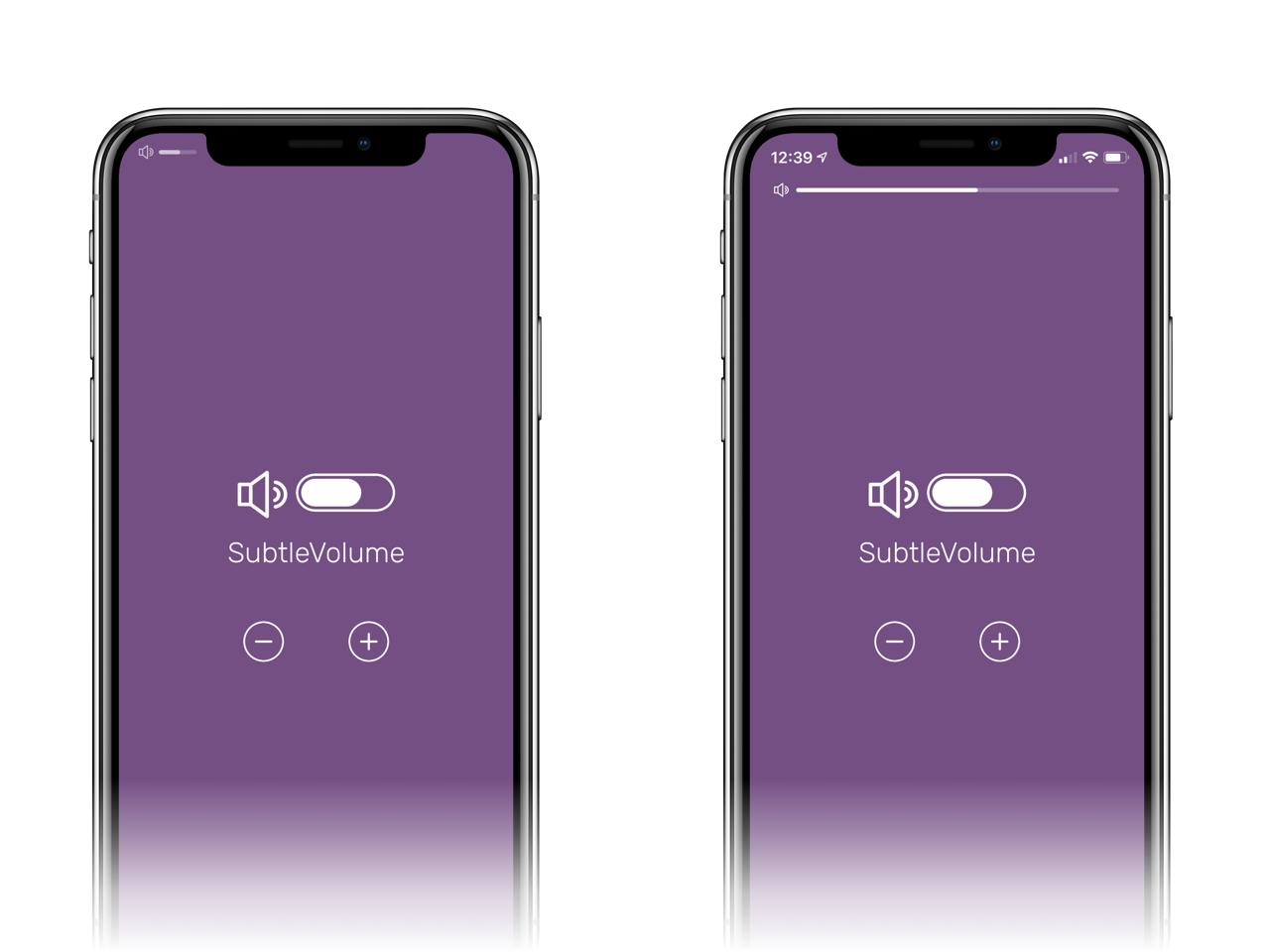
Replace the volume popup with a more subtle way to display the volume when the user changes it with the volume rocker.
# Why and how
The iOS default popover showing the volume status that appears when the user clicks the volume rocker is a big obtrusive glossy view that covers the content shown. This library offers a way to show a more subtle indicator.
To make sure that the popover is not shown there are two conditions that need to be satisfied:
- An `AVAudioSession` needs to be active
- An `MPVolumeView` needs to be in the current view's hierarchy, and its alpha needs to be greater than 0
Once a `SubtleVolume` is added to your view, an audio session is automatically started, and the view's alpha is set to `0.0001` in the hidden state.
# Getting Started
Create an instance of `SubtleVolume` with one of its convenience initializers, and set its position (you can either set the frame or let autolayout handle it):
```swift
let volume = SubtleVolume(style: .plain)
volume.frame = CGRect(x: 0, y: 10, width: UIScreen.main.bounds.width, height: 4) // or wherever you like
```
Set the barTintColor property:
```swift
volume.barTintColor = .red
```
Set the animation type if needed (no animation will result in the indicator being always visible):
```swift
volume.animation = .slideDown
```
Add the view to your hierarchy:
```swift
view.addSubview(volume)
```
To change the volume programmatically:
```swift
try? volume.setVolumeLevel(0.5)
```
Or use the convenience methods:
```swift
try? volume.decreaseVolume(by: 0.2, animated: true)
try? volume.increaseVolume(by: 0.2, animated: true)
```
### Accessory image
You can provide an accessory image that will be shown to the bar's left. See the delegate method:
```swift
func subtleVolume(_ subtleVolume: SubtleVolume, accessoryFor value: Double) -> UIImage? {
return value > 0 ? #imageLiteral(resourceName: "volume-on.pdf") : #imageLiteral(resourceName: "volume-off.pdf")
}
```
### iPhone X(S/R) support
Want to be fancy and show the volume bar in the notch area? Check out the demo project. The main gist is this:
```swift
class ViewController: UIViewController {
let volume = SubtleVolume(style: .rounded)
var statusBarVisible = true
// ...
override func viewDidLayoutSubviews() {
super.viewDidLayoutSubviews()
if view.safeAreaInsets.top > 0 {
volume.padding = CGSize(width: 2, height: 8)
volume.frame = CGRect(x: 16, y: 8, width: 60, height: 20)
} else {
// older phones here
}
}
override var preferredStatusBarStyle: UIStatusBarStyle {
return .lightContent
}
override var preferredStatusBarUpdateAnimation: UIStatusBarAnimation {
return .slide
}
override var prefersStatusBarHidden: Bool {
return !statusBarVisible
}
}
extension ViewController: SubtleVolumeDelegate {
func subtleVolume(_ subtleVolume: SubtleVolume, didChange value: Double) {
if !subtleVolume.isAnimating && view.safeAreaInsets.top > 0 {
statusBarVisible = true
UIView.animate(withDuration: 0.1) {
self.setNeedsStatusBarAppearanceUpdate()
}
}
}
func subtleVolume(_ subtleVolume: SubtleVolume, willChange value: Double) {
if !subtleVolume.isAnimating && view.safeAreaInsets.top > 0 {
statusBarVisible = false
UIView.animate(withDuration: 0.1) {
self.setNeedsStatusBarAppearanceUpdate()
}
}
}
}
```
# Handle the background state
Once your app goes in background, you'll need to resume the session when it becomes active:
```swift
NotificationCenter.default.addObserver(volume, selector: #selector(SubtleVolume.resume), name: NSNotification.Name.UIApplicationDidBecomeActive, object: nil)
```
SubtleVolume automatically removes the observer on deinit.
# Hire us
Written by [Andrea Mazzini](https://twitter.com/theandreamazz). We're available for freelance work, feel free to contact us [here](https://www.fancypixel.it/contact/).
Want to support the development of [these free libraries](https://cocoapods.org/owners/734)? Buy me a coffee ☕️ via [Paypal](https://www.paypal.com/cgi-bin/webscr?cmd=_s-xclick&hosted_button_id=46FNZD4PDVNRU).
# MIT License
Copyright (c) 2017-2018 Andrea Mazzini. All rights reserved.
Permission is hereby granted, free of charge, to any person obtaining a
copy of this software and associated documentation files (the "Software"),
to deal in the Software without restriction, including
without limitation the rights to use, copy, modify, merge, publish,
distribute, sublicense, and/or sell copies of the Software, and to
permit persons to whom the Software is furnished to do so, subject to
the following conditions:
The above copyright notice and this permission notice shall be included
in all copies or substantial portions of the Software.
THE SOFTWARE IS PROVIDED "AS IS", WITHOUT WARRANTY OF ANY KIND, EXPRESS
OR IMPLIED, INCLUDING BUT NOT LIMITED TO THE WARRANTIES OF
MERCHANTABILITY, FITNESS FOR A PARTICULAR PURPOSE AND NONINFRINGEMENT.
IN NO EVENT SHALL THE AUTHORS OR COPYRIGHT HOLDERS BE LIABLE FOR ANY
CLAIM, DAMAGES OR OTHER LIABILITY, WHETHER IN AN ACTION OF CONTRACT,
TORT OR OTHERWISE, ARISING FROM, OUT OF OR IN CONNECTION WITH THE
SOFTWARE OR THE USE OR OTHER DEALINGS IN THE SOFTWARE.