# Codex Delegate
**Stop burning your frontier agent's limits on boilerplate.**
Delegate implementation to the **OpenAI Codex CLI** — your agent writes the brief and reviews the diff.
[](https://www.npmjs.com/package/codex-delegate-mcp)
[](https://www.npmjs.com/package/codex-delegate-mcp)
[](https://registry.modelcontextprotocol.io/v0/servers?search=codex-delegate)
[](https://glama.ai/mcp/servers/andreilungeanu/codex-delegate-mcp)
[](https://nodejs.org)
[](LICENSE)
[](https://github.com/andreilungeanu/codex-delegate-mcp/actions/workflows/test.yml)
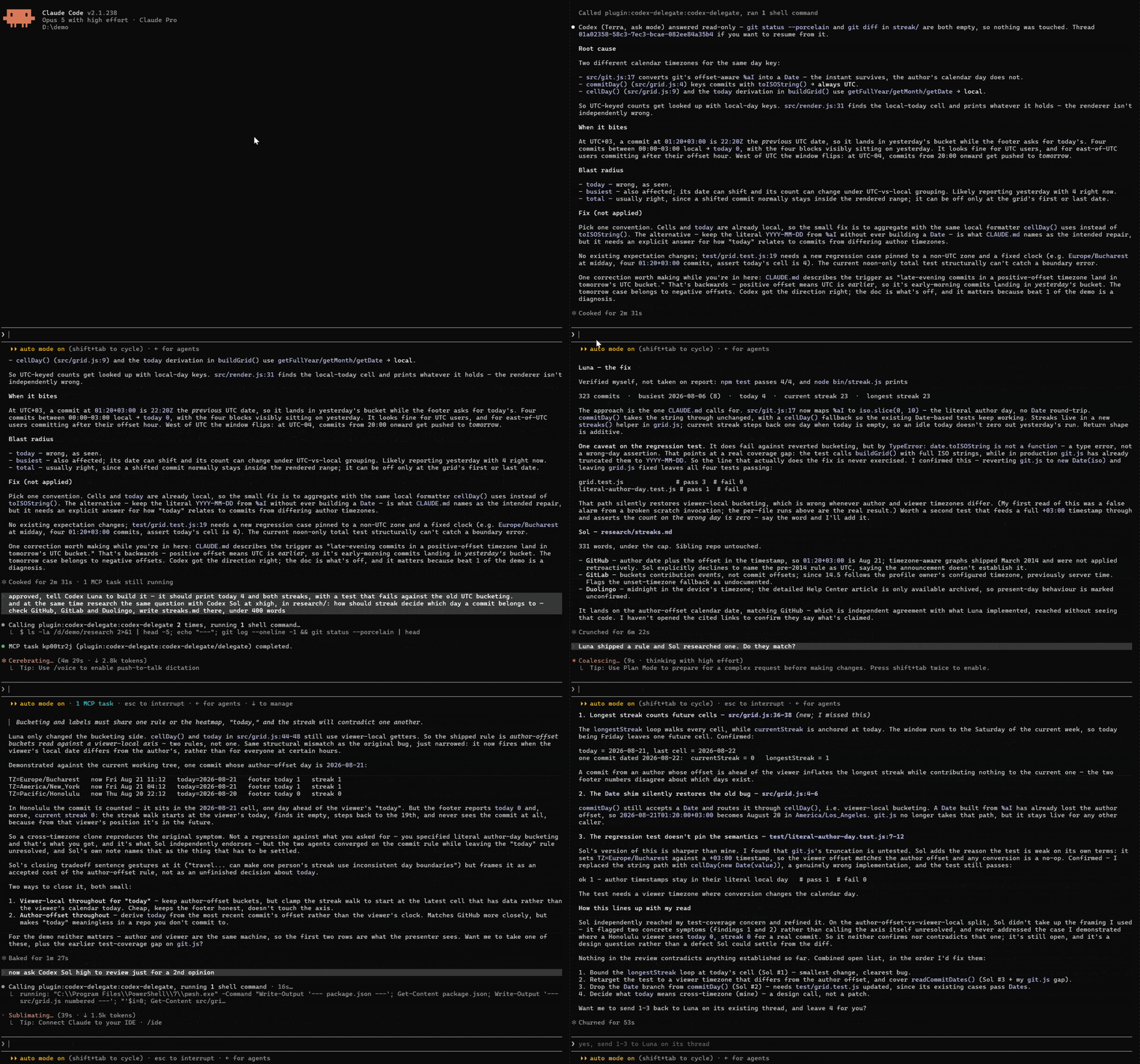
 Use your best coding agent where its judgment matters most: understanding the task, shaping the plan, and reviewing the result.
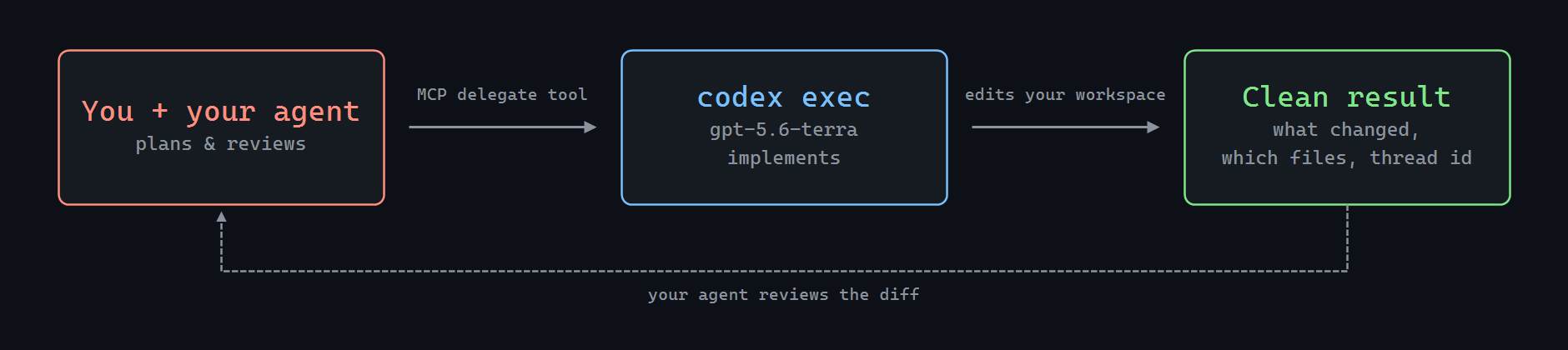
Codex Delegate is the MCP bridge that lets Claude Code, Cursor, Copilot — or any MCP client — hand implementation to the **OpenAI Codex CLI**, then get a clean, structured result back for review.
Use your best coding agent where its judgment matters most: understanding the task, shaping the plan, and reviewing the result.
Codex Delegate is the MCP bridge that lets Claude Code, Cursor, Copilot — or any MCP client — hand implementation to the **OpenAI Codex CLI**, then get a clean, structured result back for review.
## 🧠 Frontier quality, kept
Your assistant does what frontier models are actually for: understands the task, writes a precise brief, reviews the finished diff. Codex holds its own as the implementer — guided and checked by a smarter orchestrator. The result reads like frontier work, because a frontier model planned it and signed off on it.
## ⚡ Done faster
Codex tears through multi-file edits while a frontier chat model would still be streaming the first file. You delegate, keep working with your assistant, and the diff shows up done.
## 🔋 Your limits stop being the bottleneck
Delegated work runs on the **OpenAI Codex CLI** and its own usage — separate from your orchestrator's chat quota, though the Codex side still bills its own way. Your Claude, Cursor, or Copilot subscription spends tokens on the brief and the review; Codex does the grinding. On API? That's the per-token grind moved off your main bill.
#
## Features
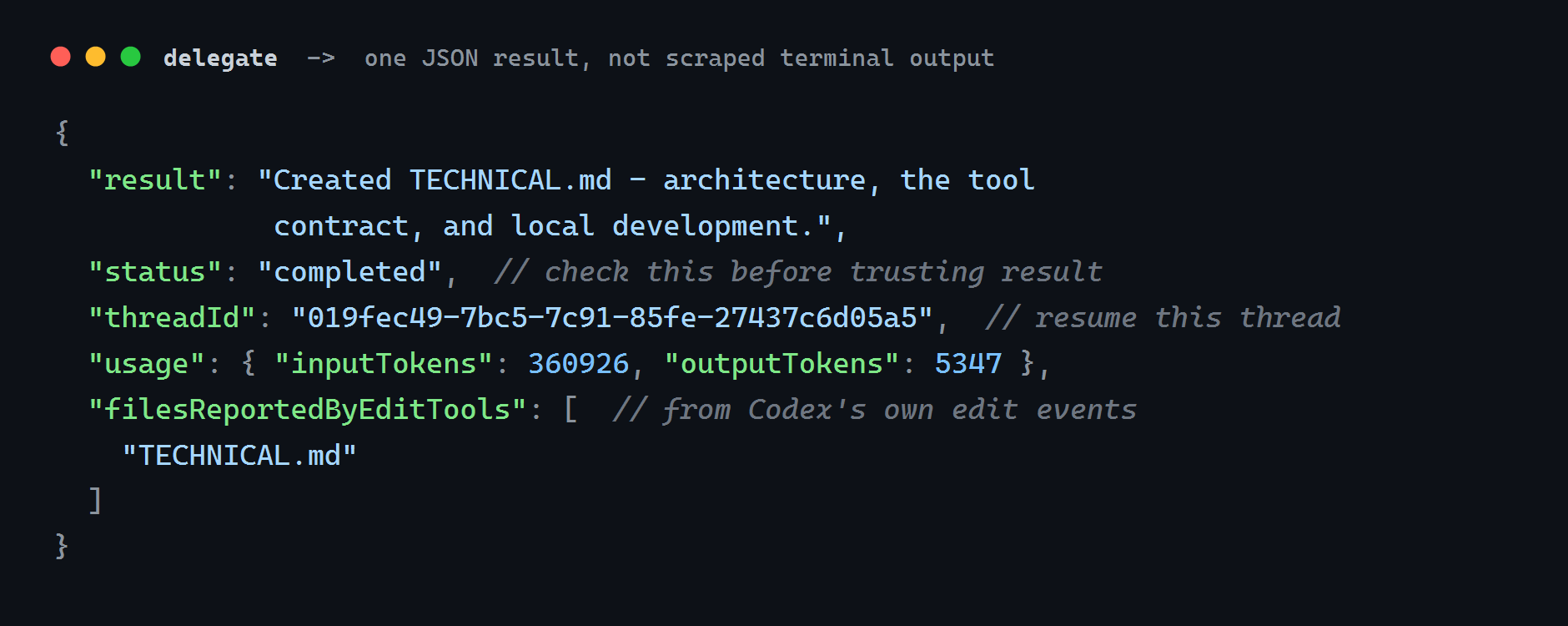
- 📦 **One result you can review** — a compact JSON block: the final answer, `status`, the files Codex's edit tools reported changing, cumulative thread token counts, and the `threadId` to continue from. Fields that carry no signal are omitted.
- 📋 **Plan first, then build it on the same thread** — `plan` returns schema-validated steps for you to approve, and `agent` implements them. `ask` answers questions. `review` runs Codex's own reviewer over uncommitted work, a base branch, or a single commit.
- 🧵 **Resume** — continue a Codex thread with `resumeThreadId`. `resumed: false` tells you the context did not carry over.
- 🧑🤝🧑 **Run several, cancel cleanly** — the same question across models, or independent workers on independent directories. `cancel` waits for the exit and warns when a process outlives the kill deadline.
- 🤝 **One-command install** — Claude Code and GitHub Copilot CLI take it as a plugin, with a skill that teaches your agent how to delegate well. Cursor, VS Code, JetBrains, Windsurf and Visual Studio add the stdio server in settings.
- 🩺 **`doctor`** — tells you exactly what's missing if setup isn't right.
## Install
You need [Node.js 20+](https://nodejs.org/) and the [OpenAI Codex CLI](https://github.com/openai/codex), already logged in (`codex login`).
### Claude Code
```shell
/plugin marketplace add andreilungeanu/codex-delegate-mcp
/plugin install codex-delegate@codex-delegate-mcp
```
Then just ask:
> Delegate to Codex: migrate src/api from callbacks to async/await and update the tests, then walk me through what changed.
That's the whole loop — Claude writes the brief, Codex grinds through the files, Claude walks you through the diff.
### Cursor
Add an MCP server in **Cursor Settings → MCP** (or project `.cursor/mcp.json`):
```json
{
"mcpServers": {
"codex-delegate": {
"command": "npx",
"args": ["-y", "codex-delegate-mcp"]
}
}
}
```
Then ask Cursor to delegate implementation to Codex the same way.
### GitHub Copilot CLI
```shell
copilot plugin install andreilungeanu/codex-delegate-mcp
```
### More clients
VS Code — one-click install, or .vscode/mcp.json
[](https://vscode.dev/redirect/mcp/install?name=codex-delegate&config=%7B%22type%22%3A%22stdio%22%2C%22command%22%3A%22npx%22%2C%22args%22%3A%5B%22-y%22%2C%22codex-delegate-mcp%22%5D%7D)
[](https://insiders.vscode.dev/redirect/mcp/install?name=codex-delegate&config=%7B%22type%22%3A%22stdio%22%2C%22command%22%3A%22npx%22%2C%22args%22%3A%5B%22-y%22%2C%22codex-delegate-mcp%22%5D%7D&quality=insiders)
```json
{
"servers": {
"codex-delegate": {
"type": "stdio",
"command": "npx",
"args": ["-y", "codex-delegate-mcp"]
}
}
}
```
Or run **Chat: Install Plugin From Source** with this repository's URL.
JetBrains AI Assistant — Settings → Tools → AI Assistant → MCP
Under **Settings → Tools → AI Assistant → Model Context Protocol (MCP)**, add a server with command `npx` and arguments `-y codex-delegate-mcp`.
Windsurf — ~/.codeium/windsurf/mcp_config.json
```json
{
"mcpServers": {
"codex-delegate": {
"command": "npx",
"args": ["-y", "codex-delegate-mcp"]
}
}
}
```
Heads-up: Cascade caps you at 100 tools across all servers.
Visual Studio 2022 — %USERPROFILE%\.mcp.json
```json
{
"servers": {
"codex-delegate": {
"type": "stdio",
"command": "npx",
"args": ["-y", "codex-delegate-mcp"]
}
}
}
```
Requires 17.14+. Note the top-level key is `servers`, not `mcpServers`.
OpenCode — ~/.config/opencode/opencode.json or project opencode.json
OpenCode does **not** use `mcpServers`. Local servers go under `mcp`, with `type: "local"` and `command` as one array:
```json
{
"$schema": "https://opencode.ai/config.json",
"mcp": {
"codex-delegate": {
"type": "local",
"command": ["npx", "-y", "codex-delegate-mcp"],
"enabled": true
}
}
}
```
Google Antigravity — ~/.gemini/config/mcp_config.json or workspace .agents/mcp_config.json
```json
{
"mcpServers": {
"codex-delegate": {
"command": "npx",
"args": ["-y", "codex-delegate-mcp"]
}
}
}
```
In the IDE: **…** on the agent panel → **MCP Servers** → **Manage MCP Servers** → **View raw config**. Antigravity 2.0, IDE, and CLI share the Gemini config file. You may need to approve the server's tools on first run.
Kilo Code — kilo.jsonc (mcp key, not mcpServers)
Same shape as OpenCode: `type: "local"` and `command` as one array.
```json
{
"mcp": {
"codex-delegate": {
"type": "local",
"command": ["npx", "-y", "codex-delegate-mcp"],
"enabled": true
}
}
}
```
In the VS Code extension: **Settings → MCP → Add Server → Local (stdio)**. On Windows, if `npx` is not found, use command `cmd` with arguments `/c`, `npx`, `-y`, `codex-delegate-mcp`.
Zed — Settings → AI → MCP Servers, or context_servers in Zed settings
```json
{
"context_servers": {
"codex-delegate": {
"command": "npx",
"args": ["-y", "codex-delegate-mcp"],
"env": {}
}
}
}
```
Zed's native agent uses this. External ACP agents in Zed read their own MCP config unless you forward Zed's servers.
### Kiro and any other MCP client
Add the following server to the client's MCP config:
```json
{
"mcpServers": {
"codex-delegate": {
"command": "npx",
"args": ["-y", "codex-delegate-mcp"]
}
}
}
```
MIT © [Andrei Lungeanu](https://github.com/andreilungeanu)
[Configuration](CONFIGURATION.md) · [Security](SECURITY.md) · [Privacy](PRIVACY.md) · [Terms](TERMS.md) · [Changelog](CHANGELOG.md)