







|

|

|

|

|

|

|

|
 ### **Popescu Filimon Andrei Cosmin** (middle)
**Age:** 18
### **Popescu Filimon Andrei Cosmin** (middle)
**Age:** 18  |
|  |
|----------------------------------|-------------------------------------|
|
|
|----------------------------------|-------------------------------------|
| Top
|Bottom
| | |
|  |
|-----------------------------------|------------------------------------|
|
|
|-----------------------------------|------------------------------------|
| Left
|Right
| | |
|  |
|------------------------------------|-----------------------------------|
|
|
|------------------------------------|-----------------------------------|
| Front
|Back
| Robot Specifications: | Parameter | Value | |---|---| | Robot Length | ~145 mm | | Robot Width | ~65 mm | | Robot Height | ~55 mm | | Total Weight | ~200 g | | Wheelbase | ~65 mm | | Ground Clearance | ~6 mm | | Main Controller | Arduino Nano ESP32 | | Vision System | OpenMV RT1062 | | Drive System | Rear differential drive | | Steering System | Parallel steering | | Drive Motor | Pololu 30:1 HPCB Gearmotor | | Steering Servo | MG90S | | Downforce System | 10000KV BLDC Impeller | | Battery | 2S Li-Po 300mAh | | Maximum Stable Speed | ~3 m/s | | Camera Processing Speed | ~40 FPS | | Maximum Steering Angle | ~85° | | Peak Current Consumption | ~7 A | | Communication Protocols | UART, I2C, PWM | | Chassis Type | Custom PCB chassis | | Wheel Material | Cast silicone tires | The robot was designed to prioritize stability, fast steering response, and compact packaging. A lightweight PCB chassis combined with silicone tires and an active downforce system allows the robot to maintain traction and consistency during high-speed autonomous runs. --- ## 📊 Performance Metrics The robot was tested extensively on full-scale WRO-inspired tracks to evaluate stability, obstacle handling, and parking consistency. Multiple runs were performed under different lighting conditions and track layouts to validate reliability and repeatability. | Metric | Result | |---|---:| | Maximum stable speed | 3 m/s | | Average lap time | 11-12 s | | Parking success rate | 90% | | Obstacle avoidance success rate | 95% | | Average steering correction delay | <10 ms | | Camera processing speed | ~40 FPS | | Maximum steering angle | 85° | | Full system peak current | ~7 A | The final tuning focused on balancing speed and stability rather than maximizing raw speed alone. Particular attention was given to repeatable obstacle avoidance and consistent parking performance. --- ## ⚖️ Engineering Trade-Offs Throughout the development process, every major design choice had to balance speed, stability, reliability, weight, and ease of debugging. The goal was not only to build a fast robot, but to create a compact autonomous vehicle that can perform consistently across different WRO field layouts, lighting conditions, obstacle positions, and parking scenarios. | Decision | Chosen Solution | Reason | |---|---|---| | Main controller | Arduino Nano ESP32 | Compact board with enough processing power for real-time control, integrated wireless features for debugging, and good compatibility with our sensors and actuators | | Vision system | OpenMV RT1062 | Lower latency, lower power consumption, and easier real-time color processing compared to a Raspberry Pi-based system | | Chassis structure | PCB chassis | Reduces wiring, improves rigidity, saves space, and makes the robot easier to assemble and reproduce | | Steering system | Parallel steering | Simpler, lighter, and more compact than Ackermann steering, while still giving predictable steering response | | Navigation | Gyro-based PD control | More stable heading correction than relying only on encoder movement, especially during long straights and after obstacle avoidance | | Tires | Cast silicone tires | Provide high grip and predictable handling on smooth WRO surfaces | | Downforce system | Impeller | Increases traction during acceleration, braking, and cornering without adding static weight | | Obstacle detection | Camera-based detection | Allows flexible detection of randomized red and green traffic signs, track lines, and parking elements | The final robot design focuses on reliable autonomous behavior in a compact and lightweight structure. Instead of optimizing only one area, such as maximum speed, we designed the mechanical, electrical, and software systems to support each other. The chassis keeps the robot rigid, the tires and impeller improve grip, the camera provides high-level field information, and the gyro helps maintain stable heading control. ### Main Engineering Constraints During development, several constraints directly influenced the final design. These constraints helped us decide which solutions were practical, reliable, and suitable for competition use. | Constraint | Design Challenge | Final Solution | |---|---|---| | Limited robot size | The robot had to remain small enough for tight turns, obstacle avoidance, and parking | Short wheelbase, compact drivetrain, PCB chassis, and low component stacking | | Low weight target | Extra weight reduces acceleration, braking performance, and steering response | Lightweight PCB chassis, compact electronics, and 3D-printed structural parts | | High current peaks | The impeller, drive motor, and steering servo can create sudden voltage drops | 2S Li-Po battery, dedicated voltage regulation, short power traces, and clean PCB routing | | Camera latency | Delayed detection can cause late turns or incorrect obstacle avoidance | OpenMV RT1062 used for fast image processing and direct UART communication with the controller | | Steering precision | Small steering errors can accumulate over multiple laps and affect parking accuracy | Servo-based steering combined with gyro correction and camera-based decisions | | Mechanical stability | Vibration and chassis flex can affect camera view, sensor readings, and steering accuracy | Rigid PCB chassis, fixed component mounting, and compact mechanical structure | These constraints shaped the robot as a complete system. The mechanical design provides grip, rigidity, and compact packaging. The power system keeps the electronics stable during current peaks. The sensors give the software reliable information about the track, obstacles, and robot heading. The software then combines this data to make safe and repeatable autonomous decisions. Because of this, the final design is not just a collection of selected components, but a system where each subsystem was chosen to support the others and improve consistency during full autonomous runs. --- ## 🔬 Testing & Iterations During development, multiple robot revisions were designed and tested to improve steering precision, reliability, and overall track performance. The robot was developed through several iterations. Each version was tested on the main tasks required by the WRO Future Engineers challenge: stable driving, obstacle handling, cornering, and parking. | Version | Main problem found | Change made | Result | |---|---|---|---| | V1 | The chassis was too large and the steering response was slow | Reduced the chassis size and changed the mechanical layout | Better turning response | | V2 | The robot was reliable on straight sections but less stable during parking | Moved the side sensors closer to the PCB and improved rear distance sensing | More stable parking approach | | V3 | Obstacle handling needed smoother recovery after passing traffic signs | Added clearer software states for cube following, avoidance, and recovery | More consistent obstacle challenge behavior | ### 📊 Quantitative testing | Test | Runs | Success rate | Main failure observed | Improvement made | |---|---:|---:|---|---| | Open Challenge full lap driving | 20 | 18/20 | Small steering oscillation near corners | Tuned gyro correction and steering gain | | Three-lap Open Challenge | 10 | 8/10 | Occasional wide corner exit | Reduced speed during corner entry | | Red traffic sign passing | 20 | 18/20 | Late detection in low light | Adjusted OpenMV threshold and ROI | | Green traffic sign passing | 20 | 18/20 | Camera noise on reflective surface | Added color filtering and distance confirmation | | Obstacle recovery after passing sign | 20 | 17/20 | Robot returned too sharply to the lane | Added smoother recovery state | | Parking approach | 20 | 16/20 | Rear alignment sometimes too close to boundary | Adjusted rear sensor stopping distance | | Full Obstacle Challenge with parking | 10 | 8/10 | Parking was the least consistent part | Added rear distance correction and slower final movement | These tests showed that the robot was mechanically capable of completing the challenge, but reliability depended strongly on software tuning and sensor placement. The largest improvements came from reducing steering oscillation, improving camera threshold stability and using the rear distance sensor during parking to not hit any of the parking walls. --- ## 🚗 Mobility Management The robot's mobility is controlled through **a fully PCB chassis, a servo-based steering system, and a drivetrain featuring a custom differential and axes**. These components work together to ensure smooth, **precise movement with optimized traction, stability, and efficient power management**. ## ⚙️ **Drivebase** ### 🔧 **Drivetrain** The drivetrain uses a custom micro-RC differential at the rear, driven by a **Pololu 30:1 HPCB micro gearmotor** through a **3D printed gear** → **differential input gear**. The motor is held in a 3D-printed support with the battery mounted above, keeping the center of mass centered and low. Rear outputs rotate in bearings seated inside a printed part that contains 4 bearings for the wheel axles, this attachment is mounted using M2 screws to the PCB chassis, minimizing friction and parts count. At the front, the wheels are fully 3D-printed and each wheel runs on two bearings (inner + outer) for a rigid, wobble-free hub that steers precisely. To maximize grip on the track without adding mass, we use a **downforce impeller (10000KV BLDC motor)** that pulls air from under the robot, increasing the normal force. The impeller is PWM-controlled via an **EMAX Bullet 20A ESC**. The drive motor is controlled by an **IFX9201SG driver (PWM + DIR)** with an active brake pulse for precise stopping, while the encoder on the gearmotor provides odometry for short, accurate moves (e.g., avoidance hops, parking nudges).
### ⚙️ **Motor – 30:1 Micro Metal Pololu Gearmotor HPCB**
Following past testing, we selected **a high-power 30:1 Micro Metal Gearmotor (6V)** for the drive system. This motor provides an **optimal balance of speed and torque**, allowing the robot to maintain stability while navigating turns.
|
To maximize grip on the track without adding mass, we use a **downforce impeller (10000KV BLDC motor)** that pulls air from under the robot, increasing the normal force. The impeller is PWM-controlled via an **EMAX Bullet 20A ESC**. The drive motor is controlled by an **IFX9201SG driver (PWM + DIR)** with an active brake pulse for precise stopping, while the encoder on the gearmotor provides odometry for short, accurate moves (e.g., avoidance hops, parking nudges).
### ⚙️ **Motor – 30:1 Micro Metal Pololu Gearmotor HPCB**
Following past testing, we selected **a high-power 30:1 Micro Metal Gearmotor (6V)** for the drive system. This motor provides an **optimal balance of speed and torque**, allowing the robot to maintain stability while navigating turns.
| 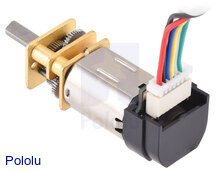 | **Specifications** |
|------------------------------|------------------------------|
| **Model:** 30:1 HPCB | **Voltage:** 6V |
| **No-load Speed:** 1000 RPM | **No-load Current:** 120mA |
| **Stall Torque:** ~0.45 kg·cm | **Stall Current:** 1.6A |
| 🔗 **[Buy Here](https://www.pololu.com/product/5184)** | **Function:** Drives the robot |
**Why We Chose This Motor?**
**- Gear ratio provides sufficient torque** without sacrificing efficiency.
**- Compact and lightweight design**, allowing integration into a lightweight robot.
### 🛞 Wheels & Tires (Silicone)
Our robot uses cast silicone tires on 3D-printed hubs. Silicone provides high, repeatable static friction on painted boards and vinyl, which pairs perfectly with the rear differential and downforce impeller—more grip when we need it, without adding mass.
| **Specifications** |
|------------------------------|------------------------------|
| **Model:** 30:1 HPCB | **Voltage:** 6V |
| **No-load Speed:** 1000 RPM | **No-load Current:** 120mA |
| **Stall Torque:** ~0.45 kg·cm | **Stall Current:** 1.6A |
| 🔗 **[Buy Here](https://www.pololu.com/product/5184)** | **Function:** Drives the robot |
**Why We Chose This Motor?**
**- Gear ratio provides sufficient torque** without sacrificing efficiency.
**- Compact and lightweight design**, allowing integration into a lightweight robot.
### 🛞 Wheels & Tires (Silicone)
Our robot uses cast silicone tires on 3D-printed hubs. Silicone provides high, repeatable static friction on painted boards and vinyl, which pairs perfectly with the rear differential and downforce impeller—more grip when we need it, without adding mass.
 **Why silicone?**
- Grip & consistency: Strong adhesion on smooth surfaces → faster exits and shorter braking distances.
- Low wear on the map: Softer compound grips without scratching.
- Stable handling: Predictable breakaway, so PD/PID steering stays smooth.
**Construction:**
- Rims: 3D-printed hubs with dual bearings (inner + outer) for a rigid, wobble-free wheel.
- Tire: Cast silicone ring fitted onto a mechanical bead on the rim (no harsh solvents needed).
- Fit: Rear wheels mount directly to the diff axle outputs; fronts ride on steering hubs for low friction.
#### ⚙️ **Torque and Speed Reasoning**
The 30:1 Pololu HPCB gearmotor was selected because it provides a good balance between speed and usable torque. A lower gear ratio would increase the maximum speed, but the robot would lose acceleration and braking control. A higher gear ratio would give more torque, but the robot would become slower on long straight sections.
The goal was not to choose the fastest possible motor, but the fastest motor that could still:
- accelerate smoothly without wheel slip,
- brake before turns and obstacles,
- recover from small steering errors,
- perform short controlled movements during parking,
- keep enough torque when the impeller increases downforce.
- be reliable and not burn
Because the robot uses silicone tires and an active downforce impeller, the wheels can transfer more force to the ground. This means the drivetrain needs enough torque to use the extra grip without stalling or overheating. The 30:1 gear ratio gave the best compromise during testing, especially for repeated starts, obstacle avoidance movements, and parking corrections.
| Option Considered | Advantage | Disadvantage | Decision |
|---|---|---|---|
| Lower gear ratio motor | Higher theoretical top speed | Less torque, weaker braking, harder parking control | Rejected |
| Higher gear ratio motor | More torque and easier low-speed control | Lower speed on long straights | Rejected |
| 30:1 HPCB gearmotor | Good speed, enough torque, compact size | Needs careful speed control | Selected |
This choice improved the robot’s consistency because the car could drive fast while still keeping predictable control during turns and obstacle sections.
### 🔌 **IFX9201SG Motor Driver**
The **IFX9201SG** motor driver is used to control the robot’s high-performance drive or impeller motor with precision and efficiency. It supports PWM-based speed control and direction control while integrating advanced protection features, making it ideal for demanding robotics applications. The IFX9201SG is directly integrated into our PCB, ensuring compact design and reliable communication with the Arduino Nano ESP32.
|
**Why silicone?**
- Grip & consistency: Strong adhesion on smooth surfaces → faster exits and shorter braking distances.
- Low wear on the map: Softer compound grips without scratching.
- Stable handling: Predictable breakaway, so PD/PID steering stays smooth.
**Construction:**
- Rims: 3D-printed hubs with dual bearings (inner + outer) for a rigid, wobble-free wheel.
- Tire: Cast silicone ring fitted onto a mechanical bead on the rim (no harsh solvents needed).
- Fit: Rear wheels mount directly to the diff axle outputs; fronts ride on steering hubs for low friction.
#### ⚙️ **Torque and Speed Reasoning**
The 30:1 Pololu HPCB gearmotor was selected because it provides a good balance between speed and usable torque. A lower gear ratio would increase the maximum speed, but the robot would lose acceleration and braking control. A higher gear ratio would give more torque, but the robot would become slower on long straight sections.
The goal was not to choose the fastest possible motor, but the fastest motor that could still:
- accelerate smoothly without wheel slip,
- brake before turns and obstacles,
- recover from small steering errors,
- perform short controlled movements during parking,
- keep enough torque when the impeller increases downforce.
- be reliable and not burn
Because the robot uses silicone tires and an active downforce impeller, the wheels can transfer more force to the ground. This means the drivetrain needs enough torque to use the extra grip without stalling or overheating. The 30:1 gear ratio gave the best compromise during testing, especially for repeated starts, obstacle avoidance movements, and parking corrections.
| Option Considered | Advantage | Disadvantage | Decision |
|---|---|---|---|
| Lower gear ratio motor | Higher theoretical top speed | Less torque, weaker braking, harder parking control | Rejected |
| Higher gear ratio motor | More torque and easier low-speed control | Lower speed on long straights | Rejected |
| 30:1 HPCB gearmotor | Good speed, enough torque, compact size | Needs careful speed control | Selected |
This choice improved the robot’s consistency because the car could drive fast while still keeping predictable control during turns and obstacle sections.
### 🔌 **IFX9201SG Motor Driver**
The **IFX9201SG** motor driver is used to control the robot’s high-performance drive or impeller motor with precision and efficiency. It supports PWM-based speed control and direction control while integrating advanced protection features, making it ideal for demanding robotics applications. The IFX9201SG is directly integrated into our PCB, ensuring compact design and reliable communication with the Arduino Nano ESP32.
|  | **Specifications** |
|------------------------------|------------------------------|
| **Model:** IFX9201SG | **Operating Voltage:** 5.5V – 45V |
| **Logic Voltage:** 3.3V / 5V compatible | **PWM Frequency:** Up to 20 kHz |
| **Max Continuous Current:** 5A | **Max Peak Current:** 8A per channel |
| **Control Interface:** PWM + Direction pins | **Built-in Protections:** Overtemperature, Overcurrent, Undervoltage, Short-to-GND/Battery |
| 🔗 **[Buy Here](https://www.lcsc.com/product-image/C112633.html)** | **Function:** Controls drive motors |
### **⚙️ Impeller for downforce**
The **impeller** generates downforce to improve the robot’s grip on the track at high speeds. Powered by a **BLDC motor**, it delivers extremely high RPM with minimal weight, making it ideal for competitive line follower and robotracer builds. Its low rotor inertia ensures instant acceleration, while the compact size allows for easy integration.
| **Specifications** |
|------------------------------|------------------------------|
| **Model:** IFX9201SG | **Operating Voltage:** 5.5V – 45V |
| **Logic Voltage:** 3.3V / 5V compatible | **PWM Frequency:** Up to 20 kHz |
| **Max Continuous Current:** 5A | **Max Peak Current:** 8A per channel |
| **Control Interface:** PWM + Direction pins | **Built-in Protections:** Overtemperature, Overcurrent, Undervoltage, Short-to-GND/Battery |
| 🔗 **[Buy Here](https://www.lcsc.com/product-image/C112633.html)** | **Function:** Controls drive motors |
### **⚙️ Impeller for downforce**
The **impeller** generates downforce to improve the robot’s grip on the track at high speeds. Powered by a **BLDC motor**, it delivers extremely high RPM with minimal weight, making it ideal for competitive line follower and robotracer builds. Its low rotor inertia ensures instant acceleration, while the compact size allows for easy integration.
 |
|  | **Specifications** |
|------------------------------|------------------------------|
| **Type:** BLDC Motor | **Model:** 10000KV |
| **Voltage:** 2–3S | **Shaft Diameter:** 1.0mm |
| **No-Load Speed:** ~85,000 RPM @ 7.4V | ** Weight:** ~4.5g |
| **Current Draw (Avg):** ~1A @ 7.4V | **Peak Current:** ~2.5A |
| 🔗 **[Buy Here](https://www.aliexpress.com/item/1005010313915123.html)** | **Function:** Drives the downforce impeller |
---
### **⚙️ ESC Controller for impleller**
**The EMAX D-SHOT Bullet 20A ESC controls the BLDC motor that drives the impeller. In this project, it uses a simple servo-style PWM signal, making it easy to interface with the main controller while providing smooth and reliable speed control in a compact, lightweight package.**
|
| **Specifications** |
|------------------------------|------------------------------|
| **Type:** BLDC Motor | **Model:** 10000KV |
| **Voltage:** 2–3S | **Shaft Diameter:** 1.0mm |
| **No-Load Speed:** ~85,000 RPM @ 7.4V | ** Weight:** ~4.5g |
| **Current Draw (Avg):** ~1A @ 7.4V | **Peak Current:** ~2.5A |
| 🔗 **[Buy Here](https://www.aliexpress.com/item/1005010313915123.html)** | **Function:** Drives the downforce impeller |
---
### **⚙️ ESC Controller for impleller**
**The EMAX D-SHOT Bullet 20A ESC controls the BLDC motor that drives the impeller. In this project, it uses a simple servo-style PWM signal, making it easy to interface with the main controller while providing smooth and reliable speed control in a compact, lightweight package.**
| 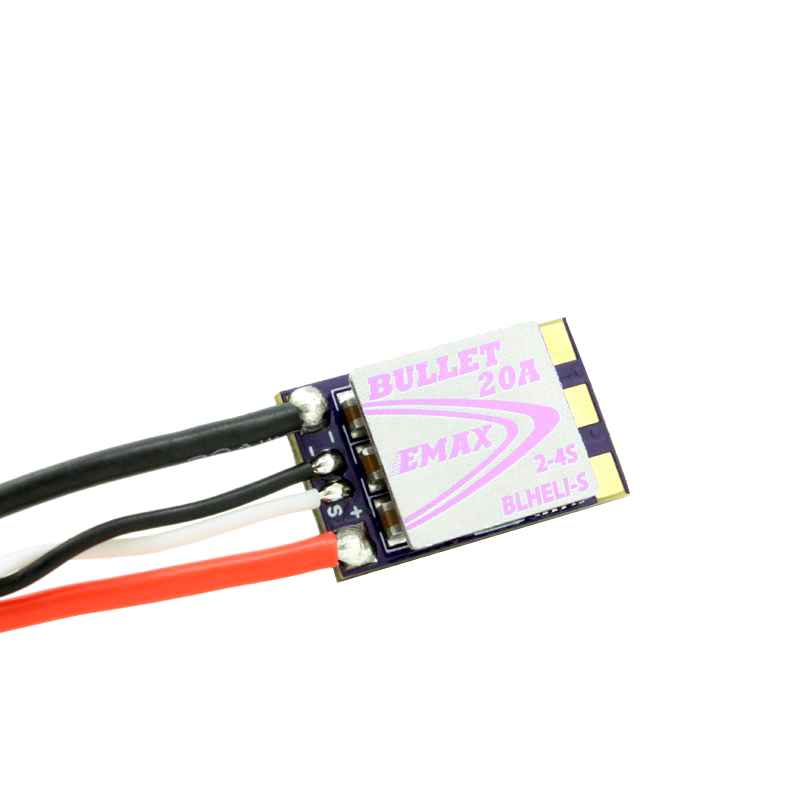 | **Specifications** |
|------------------------------|------------------------------|
| **Type:** ESC For BLDC Motors | **Model:** EMAX D-SHOT |
| **Voltage:** 2–4S | **Protections:** Shortcircuit protection & stall protection |
| **Dimensions (LxW):** 11.9x19.6 mm | **Weight(W/O Wires):** ~3.5g |
| **Burst Max Current** : ~30A | **Max Current:** ~20A |
| 🔗 **[Buy Here](https://emaxmodel.com/products/emax-d-shot-bullet-series-20a-2-4s-blheli_s-esc-3-5g-support-onshot42-multishot?_pos=5&_sid=e68307242&_ss=r)** | **Function:** Drives the downforce BLDC |
---
## 🔄 **Steering**
The **steering system** is a critical part of the robot, ensuring precise maneuverability and smooth turns. Our design is based on a **parallelogram steering mechanism**, where both front wheels turn at the same angle through a single servo-controlled linkage. This setup provides predictable and stable steering, making it easy to use for an autonomous vehicle. Instead of using an **Ackermann steering system**, which requires more complex calculations and linkages, we opted for a **simpler and more lightweight solution** that offers consistent control. Our steering system allows for a maximum turning angle of 80 degrees in both the left and right directions. This range provides precise maneuverability, enabling the robot to navigate sharp turns efficiently while maintaining stability.
| **Specifications** |
|------------------------------|------------------------------|
| **Type:** ESC For BLDC Motors | **Model:** EMAX D-SHOT |
| **Voltage:** 2–4S | **Protections:** Shortcircuit protection & stall protection |
| **Dimensions (LxW):** 11.9x19.6 mm | **Weight(W/O Wires):** ~3.5g |
| **Burst Max Current** : ~30A | **Max Current:** ~20A |
| 🔗 **[Buy Here](https://emaxmodel.com/products/emax-d-shot-bullet-series-20a-2-4s-blheli_s-esc-3-5g-support-onshot42-multishot?_pos=5&_sid=e68307242&_ss=r)** | **Function:** Drives the downforce BLDC |
---
## 🔄 **Steering**
The **steering system** is a critical part of the robot, ensuring precise maneuverability and smooth turns. Our design is based on a **parallelogram steering mechanism**, where both front wheels turn at the same angle through a single servo-controlled linkage. This setup provides predictable and stable steering, making it easy to use for an autonomous vehicle. Instead of using an **Ackermann steering system**, which requires more complex calculations and linkages, we opted for a **simpler and more lightweight solution** that offers consistent control. Our steering system allows for a maximum turning angle of 80 degrees in both the left and right directions. This range provides precise maneuverability, enabling the robot to navigate sharp turns efficiently while maintaining stability.
 Our **steering arm is directly connected to the servo**, which moves the two front wheels simultaneously. This ensures that the turning response is immediate and proportional to the servo's motion. The **wheels are mounted on special mounts hubs**, allowing for smooth and precise movement without excessive friction. To ensure **structural integrity and long-term reliability**, the steering system is **assembled using M2 screws on which the hubs can turn**.


 ---
### **🔄 Steering Servo – MG90S**
To control the steering system, we use an **MG90S micro servo**, known for its high torque and fast response. This servo enables quick and precise adjustments while maintaining a compact and lightweight design. Featuring **metal gears**, it ensures durability and reliability over extended use. The servo is securely mounted onto the chassis with two screws, and the steering arm is directly attached to its output shaft, providing smooth and efficient motion transfer for accurate steering.
|
---
### **🔄 Steering Servo – MG90S**
To control the steering system, we use an **MG90S micro servo**, known for its high torque and fast response. This servo enables quick and precise adjustments while maintaining a compact and lightweight design. Featuring **metal gears**, it ensures durability and reliability over extended use. The servo is securely mounted onto the chassis with two screws, and the steering arm is directly attached to its output shaft, providing smooth and efficient motion transfer for accurate steering.
| 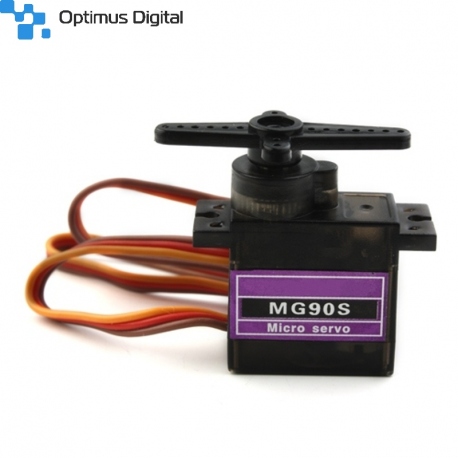 | **Specifications** |
|------------------------------|------------------------------|
| **Model:** MG90S | **Voltage:** 5V |
| **Torque:** 2.2kg/cm | **Signal Type:** PWM |
| **Current Draw (Avg):** 120mA | **Peak Current:** 500mA |
| **Weight:** ~13.4g | **Gears:** Plastic |
| 🔗 **[Buy Here](https://www.optimusdigital.ro/ro/motoare-servomotoare/271-servomotor-mg90s.html?srsltid=AfmBOooTrDsx2UoJ3Px8J26kkCbcuYhlpKYmuIYkivK_5ZSzPJx0ZNo8)** | **Function:** Controls steering |
---
## 📡 Sensor Placement Reasoning Using Field Geometry
The front camera is placed at the front of the robot because it must detect traffic signs before the vehicle reaches them. This gives the software enough time to decide whether the robot must pass the object on the left or on the right. The camera is used mainly for color and position detection, while the laser distance sensors are used for distance stability and alignment.
The front laser sensor is placed near the camera because both sensors observe the same forward driving area. The camera gives the color and horizontal position of the obstacle, while the laser gives distance information. This combination reduces false decisions because the robot does not rely only on color detection.
The side laser sensors are placed closer to the PCB and slightly behind the front axle. This position was selected because side distance correction is more stable after the robot begins steering. If the side sensors are placed too far forward, they react too early and can create steering oscillations. If they are placed too far back, the robot reacts too late near corners and parking boundaries. The selected position gives a better balance between early detection and stable correction.
The rear sensor is used mainly during parking. During parallel parking, the robot needs to know when the back of the vehicle is close to the parking limitation. A rear-facing distance sensor gives a direct measurement of this distance and allows the robot to stop before touching the parking lot boundaries.
Each laser sensor has an approximate field of view of 40 degrees. Because of this, the sensors are angled so that their detection cones cover the useful areas around the robot without crossing too much into blind or irrelevant zones. The side sensors cover the lateral wall area, the front sensor covers the forward path, and the rear sensor covers the parking alignment zone.
### Sensor placement trade-offs
| Placement option | Advantage | Problem | Final decision |
|---|---|---|---|
| Front-only sensors | Simple wiring and early detection | Weak parking and side alignment | Not used alone |
| Side sensors very far forward | Detects walls early | Causes oscillation in corners | Rejected |
| Side sensors close to PCB | Stable correction and easier wiring | Slightly later detection | Selected |
| Rear sensor removed | Lower weight and simpler wiring | Parking becomes less reliable | Rejected |
| Camera-only obstacle detection | Detects color and position | Distance estimation is weaker | Combined with laser sensor |
You can see the placement belod:
| **Specifications** |
|------------------------------|------------------------------|
| **Model:** MG90S | **Voltage:** 5V |
| **Torque:** 2.2kg/cm | **Signal Type:** PWM |
| **Current Draw (Avg):** 120mA | **Peak Current:** 500mA |
| **Weight:** ~13.4g | **Gears:** Plastic |
| 🔗 **[Buy Here](https://www.optimusdigital.ro/ro/motoare-servomotoare/271-servomotor-mg90s.html?srsltid=AfmBOooTrDsx2UoJ3Px8J26kkCbcuYhlpKYmuIYkivK_5ZSzPJx0ZNo8)** | **Function:** Controls steering |
---
## 📡 Sensor Placement Reasoning Using Field Geometry
The front camera is placed at the front of the robot because it must detect traffic signs before the vehicle reaches them. This gives the software enough time to decide whether the robot must pass the object on the left or on the right. The camera is used mainly for color and position detection, while the laser distance sensors are used for distance stability and alignment.
The front laser sensor is placed near the camera because both sensors observe the same forward driving area. The camera gives the color and horizontal position of the obstacle, while the laser gives distance information. This combination reduces false decisions because the robot does not rely only on color detection.
The side laser sensors are placed closer to the PCB and slightly behind the front axle. This position was selected because side distance correction is more stable after the robot begins steering. If the side sensors are placed too far forward, they react too early and can create steering oscillations. If they are placed too far back, the robot reacts too late near corners and parking boundaries. The selected position gives a better balance between early detection and stable correction.
The rear sensor is used mainly during parking. During parallel parking, the robot needs to know when the back of the vehicle is close to the parking limitation. A rear-facing distance sensor gives a direct measurement of this distance and allows the robot to stop before touching the parking lot boundaries.
Each laser sensor has an approximate field of view of 40 degrees. Because of this, the sensors are angled so that their detection cones cover the useful areas around the robot without crossing too much into blind or irrelevant zones. The side sensors cover the lateral wall area, the front sensor covers the forward path, and the rear sensor covers the parking alignment zone.
### Sensor placement trade-offs
| Placement option | Advantage | Problem | Final decision |
|---|---|---|---|
| Front-only sensors | Simple wiring and early detection | Weak parking and side alignment | Not used alone |
| Side sensors very far forward | Detects walls early | Causes oscillation in corners | Rejected |
| Side sensors close to PCB | Stable correction and easier wiring | Slightly later detection | Selected |
| Rear sensor removed | Lower weight and simpler wiring | Parking becomes less reliable | Rejected |
| Camera-only obstacle detection | Detects color and position | Distance estimation is weaker | Combined with laser sensor |
You can see the placement belod:
 ---
## 🏎️ **Chassis & Component Mounting**
The chassis of our robot is built around a custom PCB structure, which acts both as the electrical base and as the main mechanical frame. This design helps reduce unnecessary wiring, saves space, improves rigidity, and keeps the robot compact enough for fast movement inside the track.
Instead of using a fully 3D-printed frame, we chose a PCB chassis because it gives better precision for mounting electronic components and keeps the wiring much cleaner. The main controller, motor driver, voltage regulator, connectors, IMU, and sensor connections are all integrated directly into the board. This reduces the risk of loose wires during testing and makes the robot easier to repair or debug.
The mechanical parts are mounted directly onto the PCB using M2 screws, nuts, and small 3D-printed supports. Each printed part was designed to match the exact position of the robot components, so the drivetrain, steering system, battery, impeller, and sensors stay fixed during high-speed runs. The drive motor is mounted in a 3D-printed support at the rear of the robot. It transfers motion to the rear differential through a small gear system. The rear axle assembly is supported with bearings to reduce friction and improve stability. This setup allows the rear wheels to rotate smoothly while keeping the drivetrain compact. The steering system is placed at the front of the robot. The MG90S servo is mounted securely on a 3D printed mount that also holds the camera, and its arm controls both front wheels through a parallelogram steering linkage. The front hubs rotate on M2 screws and bearings, allowing the wheels to steer with low friction and good precision.
---
## 🏎️ **Chassis & Component Mounting**
The chassis of our robot is built around a custom PCB structure, which acts both as the electrical base and as the main mechanical frame. This design helps reduce unnecessary wiring, saves space, improves rigidity, and keeps the robot compact enough for fast movement inside the track.
Instead of using a fully 3D-printed frame, we chose a PCB chassis because it gives better precision for mounting electronic components and keeps the wiring much cleaner. The main controller, motor driver, voltage regulator, connectors, IMU, and sensor connections are all integrated directly into the board. This reduces the risk of loose wires during testing and makes the robot easier to repair or debug.
The mechanical parts are mounted directly onto the PCB using M2 screws, nuts, and small 3D-printed supports. Each printed part was designed to match the exact position of the robot components, so the drivetrain, steering system, battery, impeller, and sensors stay fixed during high-speed runs. The drive motor is mounted in a 3D-printed support at the rear of the robot. It transfers motion to the rear differential through a small gear system. The rear axle assembly is supported with bearings to reduce friction and improve stability. This setup allows the rear wheels to rotate smoothly while keeping the drivetrain compact. The steering system is placed at the front of the robot. The MG90S servo is mounted securely on a 3D printed mount that also holds the camera, and its arm controls both front wheels through a parallelogram steering linkage. The front hubs rotate on M2 screws and bearings, allowing the wheels to steer with low friction and good precision.
_technical-drawing.png) The battery is mounted close to the center of the robot to keep the center of mass balanced. This helps the robot stay stable when accelerating, braking, or turning. The OpenMV camera is mounted at the front side of the robot via same 3D printed mounting parts used for the steering servo, positioned to clearly detect colored cubes, walls, and track markings. Distance sensors are placed around the robot to assist with wall detection, parking, and starting direction.
The battery is mounted close to the center of the robot to keep the center of mass balanced. This helps the robot stay stable when accelerating, braking, or turning. The OpenMV camera is mounted at the front side of the robot via same 3D printed mounting parts used for the steering servo, positioned to clearly detect colored cubes, walls, and track markings. Distance sensors are placed around the robot to assist with wall detection, parking, and starting direction.
 The impeller is mounted in the central area of the chassis so it can pull air from under the robot and generate downforce evenly. This improves grip without adding extra weight, which is important for maintaining speed and control during the run.
Overall, the chassis and mounting system were designed to be lightweight, rigid, compact, and easy to maintain. Every component has a fixed position, making the robot more reliable during repeated tests and competition runs.
---
## 🔧 Assembly Process
🔗 **[Click here to watch the assembly video on YouTube](https://youtu.be/HSzWATB6nWQ)**
The assembly process was planned so that every subsystem could be mounted and tested step by step. This helped us avoid wiring problems, mechanical misalignment, and difficult debugging later in the build.
---
### 2: Assemble the Chassis & Components
#### 🔧 **Main Assembly Steps**
**1. Prepare the PCB Chassis**
The first step is to inspect the custom PCB chassis and make sure all soldered components, connectors, and mounting holes are clean and correctly placed. Before installing mechanical parts, we check the power rails, continuity, and main connector pins to make sure there are no shorts or soldering problems.
The impeller is mounted in the central area of the chassis so it can pull air from under the robot and generate downforce evenly. This improves grip without adding extra weight, which is important for maintaining speed and control during the run.
Overall, the chassis and mounting system were designed to be lightweight, rigid, compact, and easy to maintain. Every component has a fixed position, making the robot more reliable during repeated tests and competition runs.
---
## 🔧 Assembly Process
🔗 **[Click here to watch the assembly video on YouTube](https://youtu.be/HSzWATB6nWQ)**
The assembly process was planned so that every subsystem could be mounted and tested step by step. This helped us avoid wiring problems, mechanical misalignment, and difficult debugging later in the build.
---
### 2: Assemble the Chassis & Components
#### 🔧 **Main Assembly Steps**
**1. Prepare the PCB Chassis**
The first step is to inspect the custom PCB chassis and make sure all soldered components, connectors, and mounting holes are clean and correctly placed. Before installing mechanical parts, we check the power rails, continuity, and main connector pins to make sure there are no shorts or soldering problems.
 **2. Mount the Rear Drivetrain**
The rear drivetrain is assembled by installing the Pololu 30:1 HPCB gearmotor into its 3D-printed motor support. The motor gear is aligned with the differential input gear, making sure the gears mesh smoothly without too much pressure or backlash.
After that, the rear differential and axle support are mounted to the PCB chassis using M2 screws. Bearings are inserted into the rear support to reduce friction and keep the wheel axles stable during movement.
**2. Mount the Rear Drivetrain**
The rear drivetrain is assembled by installing the Pololu 30:1 HPCB gearmotor into its 3D-printed motor support. The motor gear is aligned with the differential input gear, making sure the gears mesh smoothly without too much pressure or backlash.
After that, the rear differential and axle support are mounted to the PCB chassis using M2 screws. Bearings are inserted into the rear support to reduce friction and keep the wheel axles stable during movement.
 **3. Install the Rear Wheels**
The rear wheels are mounted onto the differential outputs. Each wheel is checked to make sure it spins freely and does not wobble. Proper wheel alignment is important because even small friction or imbalance can affect the robot’s stability at high speed.
**4. Assemble the Front Steering System**
The front steering hubs are mounted onto the chassis using M2 screws and bearings. The front wheels are then installed on the hubs and checked for smooth rotation.
The MG90S servo is mounted in its fixed position on the chassis 3D printet part. The steering linkage is connected between the servo arm and both front hubs. Before final tightening, the servo is centered in software, then the wheels are aligned straight. This ensures that the robot drives forward correctly when the servo is at its center position.
**5. Mount the Battery Holder**
The battery support is installed on top of the motor mount, near the middle of the robot to keep the weight balanced. The 2S Li-Po battery is placed securely so it cannot move during acceleration, braking, or sudden turns.
**6. Install the Impeller System**
The impeller base is mounted in the central area of the chassis. The BLDC motor and fan are installed inside the impeller base, making sure the fan spins freely without touching the PCB.
The ESC or MOSFET control wires are connected carefully to the PCB. The impeller is tested at low power first to check vibration, airflow, and stability.
**7. Mount the Camera**
The OpenMV RT1062 camera is mounted at the front side of the robot. Its angle is fixed but already adjusted so it can clearly see the colored cubes, track lines, and wall areas. After mounting, the camera view is tested through the OpenMV IDE to make sure the region of interest matches the physical track.
**8. Install the Distance Sensors**
The Pololu PWM distance sensors are mounted around the robot according to their function: front, back, left, and right. Their position is important for parking, wall detection, and starting direction detection.
Each sensor is mounted via a soldered 3 pin header, so it won't be affected by any vibrations.
**3. Install the Rear Wheels**
The rear wheels are mounted onto the differential outputs. Each wheel is checked to make sure it spins freely and does not wobble. Proper wheel alignment is important because even small friction or imbalance can affect the robot’s stability at high speed.
**4. Assemble the Front Steering System**
The front steering hubs are mounted onto the chassis using M2 screws and bearings. The front wheels are then installed on the hubs and checked for smooth rotation.
The MG90S servo is mounted in its fixed position on the chassis 3D printet part. The steering linkage is connected between the servo arm and both front hubs. Before final tightening, the servo is centered in software, then the wheels are aligned straight. This ensures that the robot drives forward correctly when the servo is at its center position.
**5. Mount the Battery Holder**
The battery support is installed on top of the motor mount, near the middle of the robot to keep the weight balanced. The 2S Li-Po battery is placed securely so it cannot move during acceleration, braking, or sudden turns.
**6. Install the Impeller System**
The impeller base is mounted in the central area of the chassis. The BLDC motor and fan are installed inside the impeller base, making sure the fan spins freely without touching the PCB.
The ESC or MOSFET control wires are connected carefully to the PCB. The impeller is tested at low power first to check vibration, airflow, and stability.
**7. Mount the Camera**
The OpenMV RT1062 camera is mounted at the front side of the robot. Its angle is fixed but already adjusted so it can clearly see the colored cubes, track lines, and wall areas. After mounting, the camera view is tested through the OpenMV IDE to make sure the region of interest matches the physical track.
**8. Install the Distance Sensors**
The Pololu PWM distance sensors are mounted around the robot according to their function: front, back, left, and right. Their position is important for parking, wall detection, and starting direction detection.
Each sensor is mounted via a soldered 3 pin header, so it won't be affected by any vibrations.
 **9. Connect Electronics**
After all mechanical parts are mounted, the electronic connections are completed. This includes the motor, encoder, servo, impeller control, OpenMV UART lines, IMU, distance sensors, and battery input. Before powering the full system, we verify polarity and check that the 5V regulator output is stable.
**10. Upload and Test Basic Firmware**
The first firmware test checks each subsystem separately:
- Drive motor forward and reverse
- Steering servo left, right, and center
- Impeller speed control
- Distance sensor readings
- IMU data
- OpenMV UART communication
Testing each part separately makes debugging easier and prevents one faulty subsystem from affecting the whole robot.
**9. Connect Electronics**
After all mechanical parts are mounted, the electronic connections are completed. This includes the motor, encoder, servo, impeller control, OpenMV UART lines, IMU, distance sensors, and battery input. Before powering the full system, we verify polarity and check that the 5V regulator output is stable.
**10. Upload and Test Basic Firmware**
The first firmware test checks each subsystem separately:
- Drive motor forward and reverse
- Steering servo left, right, and center
- Impeller speed control
- Distance sensor readings
- IMU data
- OpenMV UART communication
Testing each part separately makes debugging easier and prevents one faulty subsystem from affecting the whole robot.
 **11. Final Mechanical Check**
Before running the robot on the track, we check that all screws are tight, the wheels spin freely, the steering moves smoothly, and the battery is fixed properly. We also check that no wires can touch the gears, wheels, or impeller.
**Note:** Small changes are made after each test run until the robot behaves consistently and reliably.
---
## 🛠️ Power and Sense Management
The robot's **power and sensing system** is designed for **efficiency, precision, and adaptability**. It consists of an **Arduino Nano ESP32, a Li-Po battery, custom BMI088 IMU, OpenMV RT1062 Camera, motors(drive motor and servo motor), and a voltage regulator**, all working together to ensure **stable operation and accurate navigation**.
Each component has been carefully selected to provide **optimal performance**, minimize power consumption, and ensure **reliability in competition environments**.
---
### **🔋 Li-Po Battery – 2S 300mAh**
The **Li-Po battery** provides a **compact, lightweight, and high-discharge** power source, making it ideal for our robot. The **7.4V output** is suitable for running our **motors and voltage regulator**, ensuring stable power delivery.
|
**11. Final Mechanical Check**
Before running the robot on the track, we check that all screws are tight, the wheels spin freely, the steering moves smoothly, and the battery is fixed properly. We also check that no wires can touch the gears, wheels, or impeller.
**Note:** Small changes are made after each test run until the robot behaves consistently and reliably.
---
## 🛠️ Power and Sense Management
The robot's **power and sensing system** is designed for **efficiency, precision, and adaptability**. It consists of an **Arduino Nano ESP32, a Li-Po battery, custom BMI088 IMU, OpenMV RT1062 Camera, motors(drive motor and servo motor), and a voltage regulator**, all working together to ensure **stable operation and accurate navigation**.
Each component has been carefully selected to provide **optimal performance**, minimize power consumption, and ensure **reliability in competition environments**.
---
### **🔋 Li-Po Battery – 2S 300mAh**
The **Li-Po battery** provides a **compact, lightweight, and high-discharge** power source, making it ideal for our robot. The **7.4V output** is suitable for running our **motors and voltage regulator**, ensuring stable power delivery.
| _1800x.jpeg?w=1000&h=1000) | **Specifications** |
|------------------------------|------------------------------|
| **Model:** 2S Li-Po | **Capacity:** 300mAh |
| **Voltage:** 7.4V | **Discharge Rate:** 60C |
| **Weight:** 12g | **Size:** 13.8 x 12 x 52.5mm |
| **Output Current:** Varies by load | **Connector Type:** JST |
| 🔗 **[Buy Here](https://www.gaoneng.shop/products/gaoneng-gnb-lihv-2s-7.6v-300mah-60c-jst-lipo-battery)** | **Function:** Powers the entire robot |
---
### **🖥️ Arduino Nano ESP32 – Main Controller**
The **Arduino Nano ESP32** provides **high-speed processing, built-in Wi-Fi and Bluetooth, and extensive GPIO capabilities** in a **compact form**. This allows it to handle **sensor data, motor control, and vision processing efficiently**.
|
| **Specifications** |
|------------------------------|------------------------------|
| **Model:** 2S Li-Po | **Capacity:** 300mAh |
| **Voltage:** 7.4V | **Discharge Rate:** 60C |
| **Weight:** 12g | **Size:** 13.8 x 12 x 52.5mm |
| **Output Current:** Varies by load | **Connector Type:** JST |
| 🔗 **[Buy Here](https://www.gaoneng.shop/products/gaoneng-gnb-lihv-2s-7.6v-300mah-60c-jst-lipo-battery)** | **Function:** Powers the entire robot |
---
### **🖥️ Arduino Nano ESP32 – Main Controller**
The **Arduino Nano ESP32** provides **high-speed processing, built-in Wi-Fi and Bluetooth, and extensive GPIO capabilities** in a **compact form**. This allows it to handle **sensor data, motor control, and vision processing efficiently**.
|  | **Specifications** |
|------------------------------|------------------------------|
| **Microcontroller:** ESP32 | **Flash Memory:** 4MB |
| **SRAM:** 520KB | **Frequency:** 240MHz |
| **Pins:** 22 | **Input Voltage:** 5V |
| **Current Draw (Avg):** 200mA | **Peak Current:** 500mA |
| 🔗 **[Buy Here](https://store.arduino.cc/en-ro/products/nano-esp32)** | **Function:** Controls all robot components |
---
### 🧭 Custom IMU Sensor – BMI088
The **Custom BMI088 IMU** is used to **measure the robot's angular velocity and acceleration**, helping it maintain **stability and precise movement control**. It is essential for **calculating turns and avoiding drift**. We decided to customize it to be able to make it more compact.
|
| **Specifications** |
|------------------------------|------------------------------|
| **Microcontroller:** ESP32 | **Flash Memory:** 4MB |
| **SRAM:** 520KB | **Frequency:** 240MHz |
| **Pins:** 22 | **Input Voltage:** 5V |
| **Current Draw (Avg):** 200mA | **Peak Current:** 500mA |
| 🔗 **[Buy Here](https://store.arduino.cc/en-ro/products/nano-esp32)** | **Function:** Controls all robot components |
---
### 🧭 Custom IMU Sensor – BMI088
The **Custom BMI088 IMU** is used to **measure the robot's angular velocity and acceleration**, helping it maintain **stability and precise movement control**. It is essential for **calculating turns and avoiding drift**. We decided to customize it to be able to make it more compact.
|  | **Specifications** |
|------------------------------|------------------------------|
| **Gyroscope Range:** ±2000°/s | **Accelerometer Range:** ±24g |
| **Interface:** I2C | **Supply Voltage:** 3.0V – 3.6V |
| **Current Draw:** ~3.2mA | **Weight:** ~1g |
| 🔗 [View Open Source Project Here](https://oshwlab.com/bicicleta11/bmi088-gyro-module) | **Function:** Tracks orientation & motion |
---
### **📷 OpenMV RT1062 Camera – Vision Processing**
The **OpenMV Cam RT1062** handles **traffic sign recognition, lane detection, color tracking, and other visual cues** in real time. It includes its own high-performance microcontroller, so the Arduino can focus mainly on movement control while the camera processes images independently.
|
| **Specifications** |
|------------------------------|------------------------------|
| **Gyroscope Range:** ±2000°/s | **Accelerometer Range:** ±24g |
| **Interface:** I2C | **Supply Voltage:** 3.0V – 3.6V |
| **Current Draw:** ~3.2mA | **Weight:** ~1g |
| 🔗 [View Open Source Project Here](https://oshwlab.com/bicicleta11/bmi088-gyro-module) | **Function:** Tracks orientation & motion |
---
### **📷 OpenMV RT1062 Camera – Vision Processing**
The **OpenMV Cam RT1062** handles **traffic sign recognition, lane detection, color tracking, and other visual cues** in real time. It includes its own high-performance microcontroller, so the Arduino can focus mainly on movement control while the camera processes images independently.
| 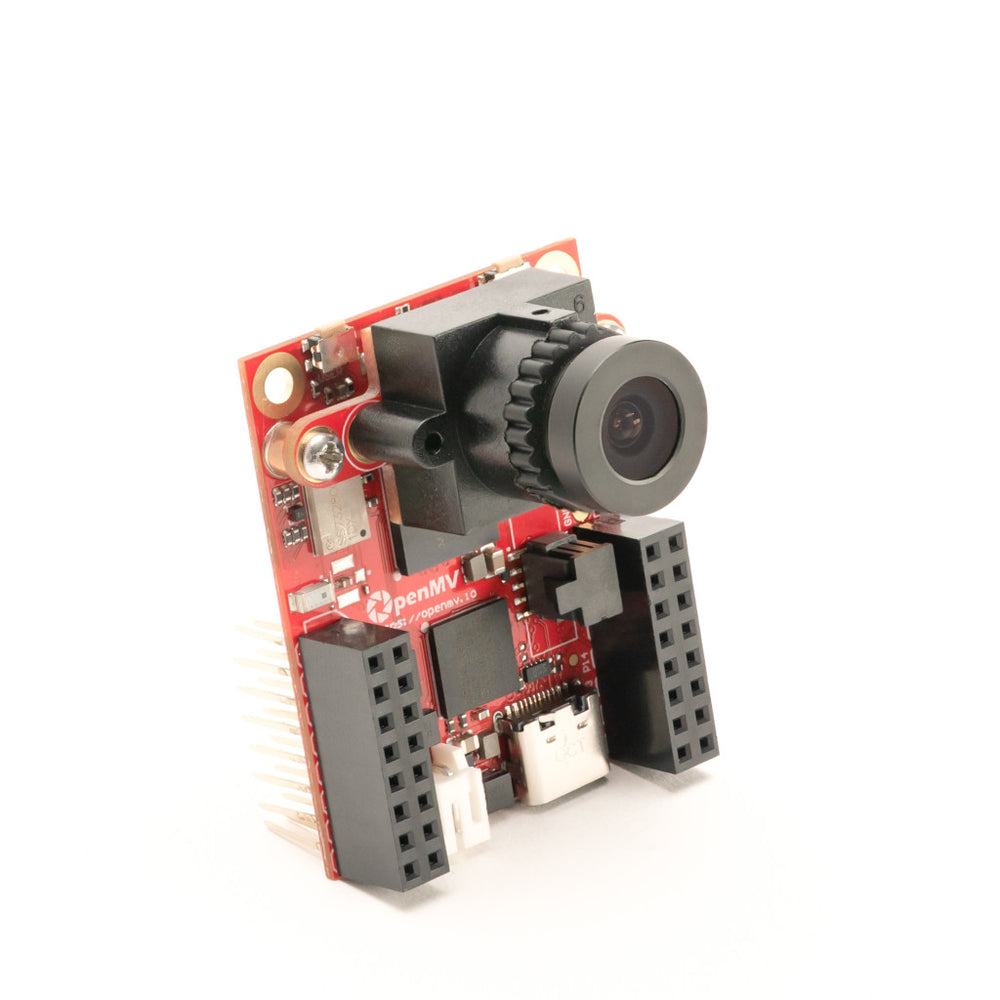 | **Specifications** |
|------------------------------|------------------------------|
| **Processor:** NXP i.MX RT1062 Cortex-M7 | **Frequency:** 600 MHz |
| **RAM:** 32 MB SDRAM + 1 MB SRAM | **Flash Memory:** 16 MB QSPI Flash |
| **Camera Sensor:** OV5640 | **Resolution:** 2592 × 1944, 5 MP |
| **Typical Vision Speed:** ~40 FPS at QVGA | **Interfaces:** UART, I2C, SPI, CAN, USB-C |
| **Connectivity:** Wi-Fi, Bluetooth 5.1, Ethernet | **I/O Voltage:** 3.3 V only |
| 🔗 **[Buy Here](https://openmv.io/collections/cameras/products/openmv-cam-rt?variant=42269003743326)** | **Function:** Detects traffic signs, lanes, and visual markers |
---
### **⚙️ Drive Motor – 30:1 Micro Metal Gearmotor HPCB 6V with Encoder**
The **drive motor is responsible for propelling the robot forward**. The **30:1 gearbox** provides an excellent **balance of speed and torque**, while the **built-in encoder** allows for **precise speed control**.
| | **Specifications** |
|------------------------------|------------------------------|
| **Model:** 30:1 HPCB | **Voltage:** 6V |
| **No-load Speed:** 1000 RPM | **No-load Current:** 120mA |
| **Stall Torque:** ~0.45 kg·cm | **Stall Current:** 1.6A |
| 🔗 **[Buy Here](https://www.pololu.com/product/5184)** | **Function:** Drives the robot |
---
### **⚙️ IFX9201SG Motor Driver**
The **IFX9201SG** motor driver is used to control the robot’s high-performance drive or impeller motor with precision and efficiency. It supports PWM-based speed control and direction control while integrating advanced protection features, making it ideal for demanding robotics applications. The IFX9201SG is directly integrated into our PCB, ensuring compact design and reliable communication with the Arduino Nano ESP32.
| | **Specifications** |
|------------------------------|------------------------------|
| **Model:** IFX9201SG | **Operating Voltage:** 5.5V – 45V |
| **Logic Voltage:** 3.3V / 5V compatible | **PWM Frequency:** Up to 20 kHz |
| **Max Continuous Current:** 5A | **Max Peak Current:** 8A per channel |
| **Control Interface:** PWM + Direction pins | **Built-in Protections:** Overtemperature, Overcurrent, Undervoltage, Short-to-GND/Battery |
| 🔗 **[Buy Here](https://www.lcsc.com/product-image/C112633.html)** | **Function:** Controls drive motors |
---
### **🔄 Steering Servo – MG90S**
The **MG90S servo is used for precise steering control**, enabling the robot to **navigate turns with accuracy**. It provides **high torque output in a compact size**.
| | **Specifications** |
|------------------------------|------------------------------|
| **Model:** MG90S | **Voltage:** 5V |
| **Torque:** 2.2kg/cm | **Signal Type:** PWM |
| **Current Draw (Avg):** 120mA | **Peak Current:** 500mA |
| **Weight:** ~13.4g | **Gears:** Plastic |
| 🔗 **[Buy Here](https://www.optimusdigital.ro/ro/motoare-servomotoare/271-servomotor-mg90s.html?srsltid=AfmBOooTrDsx2UoJ3Px8J26kkCbcuYhlpKYmuIYkivK_5ZSzPJx0ZNo8)** | **Function:** Controls steering |
---
### **⚙️ Impeller for downforce**
The **impeller** generates downforce to improve the robot’s grip on the track at high speeds. Powered by a **BLDC motor**, it delivers extremely high RPM with minimal weight, making it ideal for competitive line follower and robotracer builds. Its low rotor inertia ensures instant acceleration, while the compact size allows for easy integration.
| | **Specifications** |
|------------------------------|------------------------------|
| **Type:** BLDC Motor | **Model:** 10000KV |
| **Voltage:** 2–3S | **Shaft Diameter:** 1.0mm |
| **No-Load Speed:** ~85,000 RPM @ 7.4V | ** Weight:** ~4.5g |
| **Current Draw (Avg):** ~1A @ 7.4V | **Peak Current:** ~2.5A |
| 🔗 **[Buy Here](https://www.aliexpress.com/item/1005010313915123.html)** | **Function:** Drives the downforce impeller |
---
### **⚙️ ESC Controller for impleller**
**The EMAX D-SHOT Bullet 20A ESC controls the BLDC motor that drives the impeller. In this project, it uses a simple servo-style PWM signal, making it easy to interface with the main controller while providing smooth and reliable speed control in a compact, lightweight package.**
| | **Specifications** |
|------------------------------|------------------------------|
| **Type:** ESC For BLDC Motors | **Model:** EMAX D-SHOT |
| **Voltage:** 2–4S | **Protections:** Shortcircuit protection & stall protection |
| **Dimensions (LxW):** 11.9x19.6 mm | **Weight(W/O Wires):** ~3.5g |
| **Burst Max Current** : ~30A | **Max Current:** ~20A |
| 🔗 **[Buy Here](https://emaxmodel.com/products/emax-d-shot-bullet-series-20a-2-4s-blheli_s-esc-3-5g-support-onshot42-multishot?_pos=5&_sid=e68307242&_ss=r)** | **Function:** Drives the downforce BLDC |
---
### 📏 Distance Sensor – Pololu PWM Distance Sensor
The **Pololu Digital Distance Sensor (PW output, 300 cm max)** uses a short-range lidar module and reports distance as the width of a digital pulse (similar to a hobby-servo signal). It’s ideal for reliable, fast obstacle detection and gives you an actual distance reading (3 mm resolution), perfect for lap direction detection at start and for close-range wall sensing.
|
| **Specifications** |
|------------------------------|------------------------------|
| **Processor:** NXP i.MX RT1062 Cortex-M7 | **Frequency:** 600 MHz |
| **RAM:** 32 MB SDRAM + 1 MB SRAM | **Flash Memory:** 16 MB QSPI Flash |
| **Camera Sensor:** OV5640 | **Resolution:** 2592 × 1944, 5 MP |
| **Typical Vision Speed:** ~40 FPS at QVGA | **Interfaces:** UART, I2C, SPI, CAN, USB-C |
| **Connectivity:** Wi-Fi, Bluetooth 5.1, Ethernet | **I/O Voltage:** 3.3 V only |
| 🔗 **[Buy Here](https://openmv.io/collections/cameras/products/openmv-cam-rt?variant=42269003743326)** | **Function:** Detects traffic signs, lanes, and visual markers |
---
### **⚙️ Drive Motor – 30:1 Micro Metal Gearmotor HPCB 6V with Encoder**
The **drive motor is responsible for propelling the robot forward**. The **30:1 gearbox** provides an excellent **balance of speed and torque**, while the **built-in encoder** allows for **precise speed control**.
| | **Specifications** |
|------------------------------|------------------------------|
| **Model:** 30:1 HPCB | **Voltage:** 6V |
| **No-load Speed:** 1000 RPM | **No-load Current:** 120mA |
| **Stall Torque:** ~0.45 kg·cm | **Stall Current:** 1.6A |
| 🔗 **[Buy Here](https://www.pololu.com/product/5184)** | **Function:** Drives the robot |
---
### **⚙️ IFX9201SG Motor Driver**
The **IFX9201SG** motor driver is used to control the robot’s high-performance drive or impeller motor with precision and efficiency. It supports PWM-based speed control and direction control while integrating advanced protection features, making it ideal for demanding robotics applications. The IFX9201SG is directly integrated into our PCB, ensuring compact design and reliable communication with the Arduino Nano ESP32.
| | **Specifications** |
|------------------------------|------------------------------|
| **Model:** IFX9201SG | **Operating Voltage:** 5.5V – 45V |
| **Logic Voltage:** 3.3V / 5V compatible | **PWM Frequency:** Up to 20 kHz |
| **Max Continuous Current:** 5A | **Max Peak Current:** 8A per channel |
| **Control Interface:** PWM + Direction pins | **Built-in Protections:** Overtemperature, Overcurrent, Undervoltage, Short-to-GND/Battery |
| 🔗 **[Buy Here](https://www.lcsc.com/product-image/C112633.html)** | **Function:** Controls drive motors |
---
### **🔄 Steering Servo – MG90S**
The **MG90S servo is used for precise steering control**, enabling the robot to **navigate turns with accuracy**. It provides **high torque output in a compact size**.
| | **Specifications** |
|------------------------------|------------------------------|
| **Model:** MG90S | **Voltage:** 5V |
| **Torque:** 2.2kg/cm | **Signal Type:** PWM |
| **Current Draw (Avg):** 120mA | **Peak Current:** 500mA |
| **Weight:** ~13.4g | **Gears:** Plastic |
| 🔗 **[Buy Here](https://www.optimusdigital.ro/ro/motoare-servomotoare/271-servomotor-mg90s.html?srsltid=AfmBOooTrDsx2UoJ3Px8J26kkCbcuYhlpKYmuIYkivK_5ZSzPJx0ZNo8)** | **Function:** Controls steering |
---
### **⚙️ Impeller for downforce**
The **impeller** generates downforce to improve the robot’s grip on the track at high speeds. Powered by a **BLDC motor**, it delivers extremely high RPM with minimal weight, making it ideal for competitive line follower and robotracer builds. Its low rotor inertia ensures instant acceleration, while the compact size allows for easy integration.
| | **Specifications** |
|------------------------------|------------------------------|
| **Type:** BLDC Motor | **Model:** 10000KV |
| **Voltage:** 2–3S | **Shaft Diameter:** 1.0mm |
| **No-Load Speed:** ~85,000 RPM @ 7.4V | ** Weight:** ~4.5g |
| **Current Draw (Avg):** ~1A @ 7.4V | **Peak Current:** ~2.5A |
| 🔗 **[Buy Here](https://www.aliexpress.com/item/1005010313915123.html)** | **Function:** Drives the downforce impeller |
---
### **⚙️ ESC Controller for impleller**
**The EMAX D-SHOT Bullet 20A ESC controls the BLDC motor that drives the impeller. In this project, it uses a simple servo-style PWM signal, making it easy to interface with the main controller while providing smooth and reliable speed control in a compact, lightweight package.**
| | **Specifications** |
|------------------------------|------------------------------|
| **Type:** ESC For BLDC Motors | **Model:** EMAX D-SHOT |
| **Voltage:** 2–4S | **Protections:** Shortcircuit protection & stall protection |
| **Dimensions (LxW):** 11.9x19.6 mm | **Weight(W/O Wires):** ~3.5g |
| **Burst Max Current** : ~30A | **Max Current:** ~20A |
| 🔗 **[Buy Here](https://emaxmodel.com/products/emax-d-shot-bullet-series-20a-2-4s-blheli_s-esc-3-5g-support-onshot42-multishot?_pos=5&_sid=e68307242&_ss=r)** | **Function:** Drives the downforce BLDC |
---
### 📏 Distance Sensor – Pololu PWM Distance Sensor
The **Pololu Digital Distance Sensor (PW output, 300 cm max)** uses a short-range lidar module and reports distance as the width of a digital pulse (similar to a hobby-servo signal). It’s ideal for reliable, fast obstacle detection and gives you an actual distance reading (3 mm resolution), perfect for lap direction detection at start and for close-range wall sensing.
| 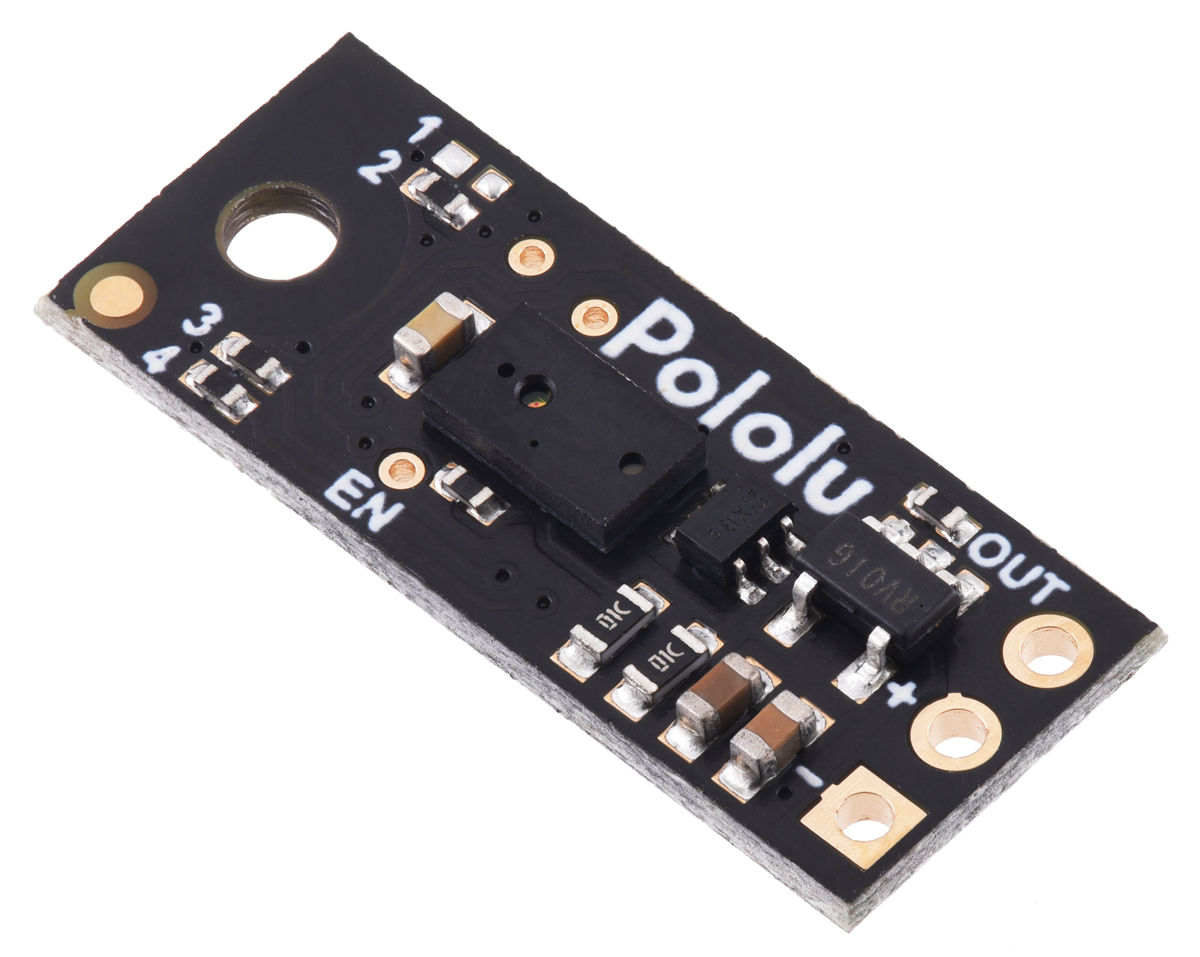 | **Specifications** |
|------------------------------|------------------------------|
| **Detection Range:** 300 cm (depends on surface) | **Type:** Digital pulse width (HIGH-time encodes distance) |
| **Voltage Supply:** 3.0V – 5.5V | **Current Draw:** ~30 mA enabled, ~0.4 mA disabled (EN low) |
| **Resolution:** 3 mm (≈ 4 µs per 3 mm) | **Update Rate:** ~50–110 Hz (period ~20–9 ms) |
| **Dimensions:** 21.6mm × 8.9mm × 3.1mm | **Weight:** 1g |
| 🔗 [Buy Here](https://www.pololu.com/product/4064) | **Use Case:** Start-line lap direction & close-range obstacle sensing for parking |
Here is the positioning and viewing angle of the sensors.
| **Specifications** |
|------------------------------|------------------------------|
| **Detection Range:** 300 cm (depends on surface) | **Type:** Digital pulse width (HIGH-time encodes distance) |
| **Voltage Supply:** 3.0V – 5.5V | **Current Draw:** ~30 mA enabled, ~0.4 mA disabled (EN low) |
| **Resolution:** 3 mm (≈ 4 µs per 3 mm) | **Update Rate:** ~50–110 Hz (period ~20–9 ms) |
| **Dimensions:** 21.6mm × 8.9mm × 3.1mm | **Weight:** 1g |
| 🔗 [Buy Here](https://www.pololu.com/product/4064) | **Use Case:** Start-line lap direction & close-range obstacle sensing for parking |
Here is the positioning and viewing angle of the sensors.
 ---
### **🔌 D24V50F5 Voltage Regulator – Power Management**
The **D24V50F5** regulates the **7.4V Li-Po battery output** to a **stable 5V**, ensuring **safe power delivery** to the **Arduino, sensors, and camera**. It prevents **overvoltage damage** and includes **thermal & short-circuit protection** for reliability.
|
---
### **🔌 D24V50F5 Voltage Regulator – Power Management**
The **D24V50F5** regulates the **7.4V Li-Po battery output** to a **stable 5V**, ensuring **safe power delivery** to the **Arduino, sensors, and camera**. It prevents **overvoltage damage** and includes **thermal & short-circuit protection** for reliability.
| 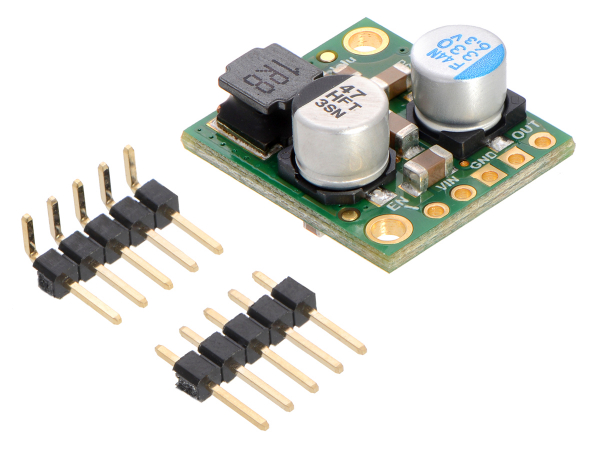 | **Specifications** |
|------------------------------|------------------------------|
| **Model:** D24V50F5 | **Input Voltage:** 6V – 38V |
| **Output Voltage:** 5V | **Output Current:** 5A |
| **Efficiency:** Buck Converter (Step-down) | **Dropout Voltage:** ~2V |
| **Protection:** Short-circuit & thermal shutdown | **Mounting Type:** Pins |
| 🔗 **[Buy Here](https://www.pololu.com/product/2851)** | **Function:** Converts battery voltage to 5V |
---
### **🛠️ PCB Design & Electrical Architecture**
| **Electrical Schematics** | **PCB Copper Traces** | **Final PCB Chassis** |
|---------------------------|---------------------------|---------------------------|
|
| **Specifications** |
|------------------------------|------------------------------|
| **Model:** D24V50F5 | **Input Voltage:** 6V – 38V |
| **Output Voltage:** 5V | **Output Current:** 5A |
| **Efficiency:** Buck Converter (Step-down) | **Dropout Voltage:** ~2V |
| **Protection:** Short-circuit & thermal shutdown | **Mounting Type:** Pins |
| 🔗 **[Buy Here](https://www.pololu.com/product/2851)** | **Function:** Converts battery voltage to 5V |
---
### **🛠️ PCB Design & Electrical Architecture**
| **Electrical Schematics** | **PCB Copper Traces** | **Final PCB Chassis** |
|---------------------------|---------------------------|---------------------------|
|  |
|  |
|  |
|
 The robot uses a fully custom PCB chassis designed to combine both the electrical system and the structural frame into a single compact platform. This approach reduced weight, improved rigidity, and increased overall reliability during high-speed autonomous runs.
### **Advantages of the Custom PCB Chassis**
- Cleaner construction with fewer wires and connectors
- More stable power delivery for motors and sensors
- Better reliability during high-speed runs
- Compact design with improved weight distribution
- Reduced electrical interference on communication lines
- Stronger and more rigid compared to multi-part printed structures
### **🔧 Engineering Decisions**
The PCB was designed with separated high-current and logic-power areas to reduce electrical noise generated by the motors and impeller system. Large copper pours were also used to improve current handling and passive heat dissipation.
Several PCB revisions were tested before the final version, improving:
- Motor power routing
- Sensor stability
- Weight distribution
- Connector accessibility
- Mechanical resistance
---
### **⚡ Power Consumption Summary**
| Item / Designators | Part | Supply | Typical Current | Peak Current | Notes |
|------------------------------------|-------------------------------|----------------|------------------|----------------|---------------------------------------------|
| Main Controller | Arduino Nano ESP32 | 5V | ~200mA | ~500mA | Main processing unit |
| Vision Processing | OpenMV Cam RT1062 | 5V | ~300mA | ~500mA | Traffic sign & lane detection |
| Gyroscope / IMU | Custom BMI088 Module | 3.3V | ~3.2mA | ~5mA | Orientation and angular velocity |
| Drive Motor | Pololu 30:1 HPCB Gearmotor | 6V | ~120mA | ~1.6A | Peak occurs during acceleration/stall |
| Steering System | MG90S Servo | 5V | ~120mA | ~500mA | High peaks during fast steering |
| Downforce System | 10000KV BLDC Impeller + ESC | 7.4V | ~1.5A | ~4A | Generates aerodynamic downforce |
| Distance Sensor #1 | Pololu PWM Distance Sensor | 5V | ~30mA | ~35mA | Front obstacle detection |
| Distance Sensor #2 | Pololu PWM Distance Sensor | 5V | ~30mA | ~35mA | Side obstacle detection |
| Motor Driver | IFX9201SG | 5V Logic / VBAT | ~10mA | ~20mA | Logic current only |
| Voltage Regulator | D24V50F5 | 7.4V → 5V | Depends on load | Depends on load | Powers 5V electronics |
| Total Estimated Consumption | Entire Robot | 7.4V Battery | ~2.3A | ~7A | Worst-case peaks during acceleration |
The robot was designed with power efficiency and peak-current stability in mind. High-current systems such as the impeller and drive motor are electrically separated from sensitive logic components to reduce electrical noise and voltage drops during acceleration. Large copper pours and short power paths on the PCB help improve current handling and thermal dissipation.
---
## 🔋 Power and Sensor Validation
To make sure that the robot is reliable during a full run, we tested the complete power system under several operating conditions. The robot uses a 2S Li-Po battery as the main power source. The drive motor and impeller are powered from the battery side, while the logic electronics are powered through the D24V50F5 5V regulator.
The goal of this architecture is to separate high-current discharge loads from sensitive logic components such as the ESP32, OpenMV camera, IMU, and distance sensors. This reduces the risk of voltage drops, camera resets, IMU instability, and wrong sensor readings during acceleration or steering corrections.
| Test condition | 5V rail measured value | Result |
|---|---:|---|
| Robot idle, electronics only | 5.03V | Stable |
| Servo moving left/right continuously | 4.96V | No ESP32 reset |
| Camera running with UART active | 5.00V | Stable image processing |
| Drive motor accelerating | 4.92V | No brownout |
| Impeller ramping up | 4.89V | No ESC reset |
| Full system active during driving | 4.87V to 5.05V | Stable |
The lowest measured voltage on the 5V rail was above the safe operating range for the ESP32, OpenMV, IMU, and sensors. During testing, no controller reset was observed. This confirms that the regulator has enough current margin for the logic side of the robot. We also tested the robot with the impeller starting instantly and with ramp-up. Instant start produced larger voltage drops and mechanical instability, so we used a controlled ramp-up in software. This gives the robot smoother acceleration and avoids sudden current spikes.
### ⚠️ Power failure points and mitigation
| Possible failure | Cause | Mitigation |
|---|---|---|
| ESP32 reset | 5V voltage drop during motor acceleration | Logic powered through D24V50F5 regulator |
| Camera frame instability | Electrical noise or unstable supply | Separate regulated 5V line and common ground |
| Servo jitter | Current peaks during steering | Short power path and stable regulator output |
| Wrong distance readings | Voltage fluctuation or sensor noise | Sensor filtering and repeated readings |
| Impeller current spike | BLDC startup load | Software ramp-up instead of instant full power |
This testing showed that the power architecture is reliable under realistic competition loads.
---
## 💻 Components coding
### 🧠 Software Architecture
This diagram below, shows how the main software modules interact during a run. The OpenMV RT1062 handles image processing and sends compact commands through UART, while the Arduino Nano ESP32 manages motion control, state logic, steering, motor speed, and parking.
The software is split into independent modules so each subsystem can be tested separately. Vision data is used by the obstacle and parking logic, while the gyro PID keeps the robot stable between decisions. Final movement commands are sent to the steering servo and IFX9201SG motor driver.
7
The robot uses a fully custom PCB chassis designed to combine both the electrical system and the structural frame into a single compact platform. This approach reduced weight, improved rigidity, and increased overall reliability during high-speed autonomous runs.
### **Advantages of the Custom PCB Chassis**
- Cleaner construction with fewer wires and connectors
- More stable power delivery for motors and sensors
- Better reliability during high-speed runs
- Compact design with improved weight distribution
- Reduced electrical interference on communication lines
- Stronger and more rigid compared to multi-part printed structures
### **🔧 Engineering Decisions**
The PCB was designed with separated high-current and logic-power areas to reduce electrical noise generated by the motors and impeller system. Large copper pours were also used to improve current handling and passive heat dissipation.
Several PCB revisions were tested before the final version, improving:
- Motor power routing
- Sensor stability
- Weight distribution
- Connector accessibility
- Mechanical resistance
---
### **⚡ Power Consumption Summary**
| Item / Designators | Part | Supply | Typical Current | Peak Current | Notes |
|------------------------------------|-------------------------------|----------------|------------------|----------------|---------------------------------------------|
| Main Controller | Arduino Nano ESP32 | 5V | ~200mA | ~500mA | Main processing unit |
| Vision Processing | OpenMV Cam RT1062 | 5V | ~300mA | ~500mA | Traffic sign & lane detection |
| Gyroscope / IMU | Custom BMI088 Module | 3.3V | ~3.2mA | ~5mA | Orientation and angular velocity |
| Drive Motor | Pololu 30:1 HPCB Gearmotor | 6V | ~120mA | ~1.6A | Peak occurs during acceleration/stall |
| Steering System | MG90S Servo | 5V | ~120mA | ~500mA | High peaks during fast steering |
| Downforce System | 10000KV BLDC Impeller + ESC | 7.4V | ~1.5A | ~4A | Generates aerodynamic downforce |
| Distance Sensor #1 | Pololu PWM Distance Sensor | 5V | ~30mA | ~35mA | Front obstacle detection |
| Distance Sensor #2 | Pololu PWM Distance Sensor | 5V | ~30mA | ~35mA | Side obstacle detection |
| Motor Driver | IFX9201SG | 5V Logic / VBAT | ~10mA | ~20mA | Logic current only |
| Voltage Regulator | D24V50F5 | 7.4V → 5V | Depends on load | Depends on load | Powers 5V electronics |
| Total Estimated Consumption | Entire Robot | 7.4V Battery | ~2.3A | ~7A | Worst-case peaks during acceleration |
The robot was designed with power efficiency and peak-current stability in mind. High-current systems such as the impeller and drive motor are electrically separated from sensitive logic components to reduce electrical noise and voltage drops during acceleration. Large copper pours and short power paths on the PCB help improve current handling and thermal dissipation.
---
## 🔋 Power and Sensor Validation
To make sure that the robot is reliable during a full run, we tested the complete power system under several operating conditions. The robot uses a 2S Li-Po battery as the main power source. The drive motor and impeller are powered from the battery side, while the logic electronics are powered through the D24V50F5 5V regulator.
The goal of this architecture is to separate high-current discharge loads from sensitive logic components such as the ESP32, OpenMV camera, IMU, and distance sensors. This reduces the risk of voltage drops, camera resets, IMU instability, and wrong sensor readings during acceleration or steering corrections.
| Test condition | 5V rail measured value | Result |
|---|---:|---|
| Robot idle, electronics only | 5.03V | Stable |
| Servo moving left/right continuously | 4.96V | No ESP32 reset |
| Camera running with UART active | 5.00V | Stable image processing |
| Drive motor accelerating | 4.92V | No brownout |
| Impeller ramping up | 4.89V | No ESC reset |
| Full system active during driving | 4.87V to 5.05V | Stable |
The lowest measured voltage on the 5V rail was above the safe operating range for the ESP32, OpenMV, IMU, and sensors. During testing, no controller reset was observed. This confirms that the regulator has enough current margin for the logic side of the robot. We also tested the robot with the impeller starting instantly and with ramp-up. Instant start produced larger voltage drops and mechanical instability, so we used a controlled ramp-up in software. This gives the robot smoother acceleration and avoids sudden current spikes.
### ⚠️ Power failure points and mitigation
| Possible failure | Cause | Mitigation |
|---|---|---|
| ESP32 reset | 5V voltage drop during motor acceleration | Logic powered through D24V50F5 regulator |
| Camera frame instability | Electrical noise or unstable supply | Separate regulated 5V line and common ground |
| Servo jitter | Current peaks during steering | Short power path and stable regulator output |
| Wrong distance readings | Voltage fluctuation or sensor noise | Sensor filtering and repeated readings |
| Impeller current spike | BLDC startup load | Software ramp-up instead of instant full power |
This testing showed that the power architecture is reliable under realistic competition loads.
---
## 💻 Components coding
### 🧠 Software Architecture
This diagram below, shows how the main software modules interact during a run. The OpenMV RT1062 handles image processing and sends compact commands through UART, while the Arduino Nano ESP32 manages motion control, state logic, steering, motor speed, and parking.
The software is split into independent modules so each subsystem can be tested separately. Vision data is used by the obstacle and parking logic, while the gyro PID keeps the robot stable between decisions. Final movement commands are sent to the steering servo and IFX9201SG motor driver.
7
 ### 🔄 Robot State Machine
 The robot software is organized as a state machine. Each state has a specific role, and transitions happen only when a clear sensor event or timing condition is detected. This makes the robot easier to debug, safer during runs, and more reliable in the randomized WRO track.
| State | Purpose | Main Inputs | Output |
|---|---|---|---|
| `WAIT_START` | Keeps the robot stopped before the round begins | Start button | Starts autonomous run |
| `PID_DRIVE` | Drives straight using gyro-based PD correction | Gyro, camera line/wall signals | Steering + motor speed |
| `FOLLOW_CUBE` | Follows the detected red/green cube before avoidance | OpenMV `S±value` command | Servo correction toward cube |
| `AVOID_CUBE` | Passes the cube on the correct side based on color | OpenMV `RED` / `GREEN` command | Fixed avoidance maneuver |
| `AFTER_CUBE` | Realigns the robot after avoiding a cube | Gyro angle, timeout | Returns to stable driving |
| `TURN_90` | Performs a 90° turn when a corner is detected | Black wall signal, turn direction | Updates target gyro angle |
| `PARKING` | Executes the final parallel parking routine | Distance sensors, gyro | Parks inside the parking area |
| `STOP` | Ends the run safely | Parking complete | Motor off, steering centered |
Some behaviors shown in the high-level software diagram are not implemented as separate `RobotState` enum values because they are simple control phases, not long-running robot modes. For example, the start procedure is implemented as a blocking wait before the main loop starts:
```cpp
while (digitalRead(START_BUTTON) == HIGH) {
// wait for start signal
}
```
Using a state machine prevents different behaviors from interfering with each other. For example, while the robot is parking, camera commands are ignored, and while it is avoiding a cube, the normal driving PID is temporarily paused. This makes the behavior more predictable and easier to test during repeated runs.
### ⚡ Drive motor
The motor driver is based on the **Infineon IFX9201SG**, which allows us to directly manage the motor with only two control signals: a **PWM** pin that regulates speed, and a direction pin that selects forward or reverse rotation. Thanks to this chip’s integrated design, no external library was required for motor control.
We implemented a set of functions within our control system: one to initialize the driver, one to control motor velocity, and another to stop it effectively using an active braking routine. The function **move(int speed)** takes an input in the range **−255** to **+255**. The absolute value of the input is written to the **PWM channel**, while the sign determines the motor’s rotation direction. A dedicated **stop_motor()** function applies a short reverse torque pulse before setting the PWM duty cycle to zero, ensuring the robot stops quickly without uncontrolled coasting.
Since the robot is powered by an **ESP32**, **PWM** signals must be generated using the **LEDC** hardware utility, which provides stable and precise duty cycles.
```cpp
void motor_driver_setup() {
pinMode(PWMA, OUTPUT);
pinMode(DIRA, OUTPUT);
ledcSetup(PWM_MOTOR_CHANNEL, PWM_MOTOR_FREQ, PWM_MOTOR_RESOLUTION);
ledcAttachPin(PWMA, PWM_MOTOR_CHANNEL);
move(0);
}
void move(int speed) {
ledcWrite(PWM_MOTOR_CHANNEL, abs(speed));
digitalWrite(DIRA, speed > 0 ? LOW : HIGH);
}
void stop_motor() {
move(-3);
delay(100);
move(0);
}
```
For odometry, the motor includes an encoder. We implemented an interrupt-based approach to count ticks in real time, avoiding the need for a dedicated library. The encoder setup attaches an interrupt on the rising edge of channel A, and the distance traveled is computed from tick counts.
In this configuration, the encoder provides 12 counts per revolution, and by applying the gear ratio, wheel diameter, and π, we obtain a conversion factor of `MM_PER_TICK = 1.8326`. This enables the robot to measure traveled distance with centimeter-level accuracy, which is crucial for precise maneuvers during navigation.
```cpp
void encoder_setup() {
// Enable pull-ups so A/B never float
pinMode(ENCODER_A, INPUT_PULLUP);
pinMode(ENCODER_B, INPUT_PULLUP);
// Attach only A’s rising edge:
attachInterrupt(digitalPinToInterrupt(ENCODER_A), encoderISR, RISING);
encoder_ticks = 0;
}
float read_cm() {
noInterrupts();
int32_t t = encoder_ticks;
interrupts();
float dist_mm = t * MM_PER_TICK;
float dist_cm = dist_mm / 10.0f;
//Serial.printf("ticks=%ld dist_cm=%.2f\n", t, dist_cm);
return dist_cm;
}
```
### 🌪️ Impeller
The impeller is responsible for generating downforce, which increases stability and traction when the robot operates at high speed. To control it, we use an **EMAX BULLET ESC**, wired as a low-side switch. This **ESC** can safely handle the high current required by the impeller, while allowing speed control via **PWM** modulation.
Only a single PWM pin from the ESP32 is needed to drive the ESC. The PWM duty cycle determines how much power is applied to the impeller:
```
0 = off
255 = full speed
```
Two functions were implemented for simplicity: one for initializing the PWM channel and one for setting the impeller speed.
```cpp
void impeller_setup() {
pinMode(PWM_IMPELLER, OUTPUT);
ledcSetup(PWM_IMPELLER_CHANNEL, PWM_IMPELLER_FREQ, PWM_IMPELLER_RESOLUTION);
ledcAttachPin(PWM_IMPELLER, PWM_IMPELLER_CHANNEL);
}
void setImpeller(int _pwm) {
ledcWrite(PWM_IMPELLER_CHANNEL, constrain(_pwm, 0, 255));
}
```
### 🎮 Servo motor
The steering system is controlled by a **MG90S servo**, which adjusts the angle of the front wheels. This enables the robot to follow precise paths while maintaining stability during turns.
The servo is connected directly to the **ESP32** and driven using the `ESP32Servo.h` library interface. To ensure consistent and safe motion, we defined three reference positions:
```
STEERING_LEFT = 140
STEERING_CENTER = 85
STEERING_RIGHT = 40
```
These values were experimentally calibrated to match the geometry of the steering mechanism.
The function `steering_servo_setup()` attaches the servo to its pin, performs a left–right sweep to verify operation, and finally centers it. This ensures that the robot always starts in a straight-line configuration.
The function `steer(double steering_angle)` accepts an input in the range `[-1, 1]`, representing normalized steering:
```
-1 = maximum right
0 = centered
+1 = maximum left
```
The input is first clamped to stay within the allowed range, then mapped to the calibrated servo values using **map_double**. This abstraction allows higher-level controllers (such as PID) to provide normalized outputs without directly worrying about servo limits.
```cpp
void steering_servo_setup() {
steeringServo.attach(STEERING_SERVO);
delay(100);
steeringServo.write(STEERING_LEFT);
delay(300);
steeringServo.write(STEERING_RIGHT);
delay(300);
steeringServo.write(STEERING_CENTER);
delay(300);
}
void steer(double steering_angle) {
// Clamp input between -1 and 1
if (steering_angle > 1) steering_angle = 1;
if (steering_angle < -1) steering_angle = -1;
// Map to servo range
steering_angle = map_double(steering_angle, -1, 1, STEERING_LEFT, STEERING_RIGHT);
steeringServo.write(steering_angle);
}
```
### 🧭 IMU
To keep the robot on a straight path and execute precise turns, we rely on the **Bosch BMI088 Inertial Measurement Unit (IMU)**. This sensor combines a high-resolution accelerometer and gyroscope, and in our case we primarily use the **Z-axis** gyroscope for yaw angle estimation.
During initialization, the function `gyro_setup()` configures the BMI088 via **I²C** communication. The accelerometer is set to a **±6 g** range at **200 Hz**, while the gyroscope is set to **±2000 °/s** at **400 Hz** with a **47 Hz bandwidth**. These parameters provide a good balance between responsiveness and noise filtering.
A key challenge with gyroscopes is drift — the tendency of small measurement errors to accumulate over time. To correct this, the setup function performs a calibration routine: for a predefined duration **(DRIFT_TEST_TIME)**, the sensor’s output is averaged while the robot is stationary. The resulting bias **(drifts_z)** is subtracted from all subsequent readings.
```cpp
void gyro_setup() {
// 1) Wire + basic init
Wire.begin();
imu.initialize();
imu.setAccScaleRange(RANGE_6G);
imu.setAccOutputDataRate(ODR_200); // 200 Hz accel
imu.setAccPoweMode(ACC_ACTIVE);
imu.setGyroScaleRange(RANGE_2000);
imu.setGyroOutputDataRate(ODR_400_BW_47); // 400 Hz, BW=47 Hz
imu.setGyroPoweMode(GYRO_NORMAL);
if (!imu.isConnection()) {
if (debugGyro) {
Serial.println("BMI088 connection failed!");
}
return;
}
if (debugGyro) Serial.println("Starting gyro drift calculation...");
double start = millis();
gyro_last_read_time = start;
gz = 0;
while (millis() - start < DRIFT_TEST_TIME * 1000) {
double now = millis();
double dt = (now - gyro_last_read_time) * 0.001; // s
float rate = imu.getGyroscopeZ(); // °/s
gz += rate * dt; // accumulate degrees
gyro_last_read_time = now;
}
drifts_z = gz / DRIFT_TEST_TIME; // average °/s
if (debugGyro) {
Serial.print("Drift test done! drifts_z = ");
Serial.print(drifts_z, 6);
Serial.println(" °/s");
}
// reset integration
gz = 0;
gyro_last_read_time = millis();
}
```
The function `read_gyro_data()` must be called continuously in the control loop. It computes the elapsed time **dt**, reads the current angular rate from the **BMI088**, subtracts the drift offset, and integrates the result into **gz**, which represents the robot’s absolute yaw angle in degrees. This value is used directly in the **PID controller** for heading correction.
```cpp
void read_gyro_data() {
// call this frequently (e.g. every loop)
double now = millis();
double dt = (now - gyro_last_read_time) * 0.001; // s
float rate = imu.getGyroscopeZ(); // °/s
double corrected = rate - drifts_z; // drift-compensated
gz += corrected * dt; // integrate to degrees
gyro_last_read_time = now;
if (debugGyro) {
Serial.print("Gyro angle (°): ");
Serial.println(gz, 4);
}
}
```
### 📡 Distance sensors
The robot integrates four **Pololu PWM distance sensors**, placed on the **front, back, left, and right sides** of the chassis. Each sensor outputs a pulse width signal, where the duration is proportional to the measured distance. This gives us precise range data without requiring complex communication protocols.
The function `distanceSensorPin(DistanceDir d)` maps each logical direction (FRONT_DIR, LEFT_DIR, RIGHT_DIR, BACK_DIR) to its corresponding analog pin. Using `pulseIn()`, we measure the pulse width, and the helper function `pulseToMM()` converts it into millimeters based on the calibration constants:
```
PW_OFFSET_US – offset at ~0 mm (typically ~1000 µs)
PW_US_PER_MM – scaling factor (1 µs per mm)
PULSE_TIMEOUT_US – maximum waiting time for a valid pulse (30 ms)
```
If no valid pulse is received, the function returns **-1** to indicate a timeout.
```cpp
// ======= Pololu PWM Distance Sensor Settings =======
static const float PW_OFFSET_US = 1000.0f; // microseconds offset at ~0 mm
static const float PW_US_PER_MM = 1.0f; // microseconds per millimeter
static const unsigned long PULSE_TIMEOUT_US = 30000UL; // 30 ms timeout
// ======= Map direction to the correct pin =======
static inline int distanceSensorPin(DistanceDir d) {
switch (d) {
case FRONT_DIR: return PWM_DIST_FRONT; // A0
case LEFT_DIR: return PWM_DIST_LEFT; // A3
case RIGHT_DIR: return PWM_DIST_RIGHT; // A1
case BACK_DIR: return PWM_DIST_BACK; // A2
}
return PWM_DIST_FRONT;
}
// ======= Read pulse in microseconds =======
static inline unsigned long readPulseUS(int pin) {
pinMode(pin, INPUT);
return pulseIn(pin, HIGH, PULSE_TIMEOUT_US);
}
// ======= Convert pulse width to millimeters =======
static inline float pulseToMM(unsigned long pw_us) {
if (pw_us == 0) return -1.0f; // timeout
float mm = (float(pw_us) - PW_OFFSET_US) / PW_US_PER_MM;
if (mm < 0) mm = 0;
return mm;
}
```
Below you can see where the laser sensors and camera view fields are:
### 📷 Camera
Once the robot can move and steer, it also needs to see and react to the environment. For this, we use an **OpenMV camera module**, connected via **UART protocol**. This allows the camera to handle the heavy work of image processing and only send compact messages (like colors, cubes, or angles) to the **ESP32**.
The camera is wired to the **ESP32** as follows:
- Camera TX (P4) → ESP32 RX (D0)
- Camera RX (P5) → ESP32 TX (D1)
Both devices must share the same baud rate **(19200)**. On the **ESP32** side, we use `Serial0` for communication, while on the camera side, `UART(3, 19200)` is initialized.
**Arduino code:**
```cpp
// UART to OpenMV (SoftwareSerial on D0/D1)
String receivedMessage;
void comm_setup() {
Serial.begin(9600);
Serial0.begin(19200); // must match OpenMV baudrate
receivedMessage = "";
// (optional) small flush
while (Serial0.available()) Serial0.read();
}
void loop() {
// ... control loop stuff ...
// Execute pending commands from camera
while (Serial0.available() > 0) {
char c = Serial0.read();
if (c == '\n') {
// Optionally skip commands while parking
if (CASE != PARK) {
execute_command(receivedMessage); // handle "S
The robot software is organized as a state machine. Each state has a specific role, and transitions happen only when a clear sensor event or timing condition is detected. This makes the robot easier to debug, safer during runs, and more reliable in the randomized WRO track.
| State | Purpose | Main Inputs | Output |
|---|---|---|---|
| `WAIT_START` | Keeps the robot stopped before the round begins | Start button | Starts autonomous run |
| `PID_DRIVE` | Drives straight using gyro-based PD correction | Gyro, camera line/wall signals | Steering + motor speed |
| `FOLLOW_CUBE` | Follows the detected red/green cube before avoidance | OpenMV `S±value` command | Servo correction toward cube |
| `AVOID_CUBE` | Passes the cube on the correct side based on color | OpenMV `RED` / `GREEN` command | Fixed avoidance maneuver |
| `AFTER_CUBE` | Realigns the robot after avoiding a cube | Gyro angle, timeout | Returns to stable driving |
| `TURN_90` | Performs a 90° turn when a corner is detected | Black wall signal, turn direction | Updates target gyro angle |
| `PARKING` | Executes the final parallel parking routine | Distance sensors, gyro | Parks inside the parking area |
| `STOP` | Ends the run safely | Parking complete | Motor off, steering centered |
Some behaviors shown in the high-level software diagram are not implemented as separate `RobotState` enum values because they are simple control phases, not long-running robot modes. For example, the start procedure is implemented as a blocking wait before the main loop starts:
```cpp
while (digitalRead(START_BUTTON) == HIGH) {
// wait for start signal
}
```
Using a state machine prevents different behaviors from interfering with each other. For example, while the robot is parking, camera commands are ignored, and while it is avoiding a cube, the normal driving PID is temporarily paused. This makes the behavior more predictable and easier to test during repeated runs.
### ⚡ Drive motor
The motor driver is based on the **Infineon IFX9201SG**, which allows us to directly manage the motor with only two control signals: a **PWM** pin that regulates speed, and a direction pin that selects forward or reverse rotation. Thanks to this chip’s integrated design, no external library was required for motor control.
We implemented a set of functions within our control system: one to initialize the driver, one to control motor velocity, and another to stop it effectively using an active braking routine. The function **move(int speed)** takes an input in the range **−255** to **+255**. The absolute value of the input is written to the **PWM channel**, while the sign determines the motor’s rotation direction. A dedicated **stop_motor()** function applies a short reverse torque pulse before setting the PWM duty cycle to zero, ensuring the robot stops quickly without uncontrolled coasting.
Since the robot is powered by an **ESP32**, **PWM** signals must be generated using the **LEDC** hardware utility, which provides stable and precise duty cycles.
```cpp
void motor_driver_setup() {
pinMode(PWMA, OUTPUT);
pinMode(DIRA, OUTPUT);
ledcSetup(PWM_MOTOR_CHANNEL, PWM_MOTOR_FREQ, PWM_MOTOR_RESOLUTION);
ledcAttachPin(PWMA, PWM_MOTOR_CHANNEL);
move(0);
}
void move(int speed) {
ledcWrite(PWM_MOTOR_CHANNEL, abs(speed));
digitalWrite(DIRA, speed > 0 ? LOW : HIGH);
}
void stop_motor() {
move(-3);
delay(100);
move(0);
}
```
For odometry, the motor includes an encoder. We implemented an interrupt-based approach to count ticks in real time, avoiding the need for a dedicated library. The encoder setup attaches an interrupt on the rising edge of channel A, and the distance traveled is computed from tick counts.
In this configuration, the encoder provides 12 counts per revolution, and by applying the gear ratio, wheel diameter, and π, we obtain a conversion factor of `MM_PER_TICK = 1.8326`. This enables the robot to measure traveled distance with centimeter-level accuracy, which is crucial for precise maneuvers during navigation.
```cpp
void encoder_setup() {
// Enable pull-ups so A/B never float
pinMode(ENCODER_A, INPUT_PULLUP);
pinMode(ENCODER_B, INPUT_PULLUP);
// Attach only A’s rising edge:
attachInterrupt(digitalPinToInterrupt(ENCODER_A), encoderISR, RISING);
encoder_ticks = 0;
}
float read_cm() {
noInterrupts();
int32_t t = encoder_ticks;
interrupts();
float dist_mm = t * MM_PER_TICK;
float dist_cm = dist_mm / 10.0f;
//Serial.printf("ticks=%ld dist_cm=%.2f\n", t, dist_cm);
return dist_cm;
}
```
### 🌪️ Impeller
The impeller is responsible for generating downforce, which increases stability and traction when the robot operates at high speed. To control it, we use an **EMAX BULLET ESC**, wired as a low-side switch. This **ESC** can safely handle the high current required by the impeller, while allowing speed control via **PWM** modulation.
Only a single PWM pin from the ESP32 is needed to drive the ESC. The PWM duty cycle determines how much power is applied to the impeller:
```
0 = off
255 = full speed
```
Two functions were implemented for simplicity: one for initializing the PWM channel and one for setting the impeller speed.
```cpp
void impeller_setup() {
pinMode(PWM_IMPELLER, OUTPUT);
ledcSetup(PWM_IMPELLER_CHANNEL, PWM_IMPELLER_FREQ, PWM_IMPELLER_RESOLUTION);
ledcAttachPin(PWM_IMPELLER, PWM_IMPELLER_CHANNEL);
}
void setImpeller(int _pwm) {
ledcWrite(PWM_IMPELLER_CHANNEL, constrain(_pwm, 0, 255));
}
```
### 🎮 Servo motor
The steering system is controlled by a **MG90S servo**, which adjusts the angle of the front wheels. This enables the robot to follow precise paths while maintaining stability during turns.
The servo is connected directly to the **ESP32** and driven using the `ESP32Servo.h` library interface. To ensure consistent and safe motion, we defined three reference positions:
```
STEERING_LEFT = 140
STEERING_CENTER = 85
STEERING_RIGHT = 40
```
These values were experimentally calibrated to match the geometry of the steering mechanism.
The function `steering_servo_setup()` attaches the servo to its pin, performs a left–right sweep to verify operation, and finally centers it. This ensures that the robot always starts in a straight-line configuration.
The function `steer(double steering_angle)` accepts an input in the range `[-1, 1]`, representing normalized steering:
```
-1 = maximum right
0 = centered
+1 = maximum left
```
The input is first clamped to stay within the allowed range, then mapped to the calibrated servo values using **map_double**. This abstraction allows higher-level controllers (such as PID) to provide normalized outputs without directly worrying about servo limits.
```cpp
void steering_servo_setup() {
steeringServo.attach(STEERING_SERVO);
delay(100);
steeringServo.write(STEERING_LEFT);
delay(300);
steeringServo.write(STEERING_RIGHT);
delay(300);
steeringServo.write(STEERING_CENTER);
delay(300);
}
void steer(double steering_angle) {
// Clamp input between -1 and 1
if (steering_angle > 1) steering_angle = 1;
if (steering_angle < -1) steering_angle = -1;
// Map to servo range
steering_angle = map_double(steering_angle, -1, 1, STEERING_LEFT, STEERING_RIGHT);
steeringServo.write(steering_angle);
}
```
### 🧭 IMU
To keep the robot on a straight path and execute precise turns, we rely on the **Bosch BMI088 Inertial Measurement Unit (IMU)**. This sensor combines a high-resolution accelerometer and gyroscope, and in our case we primarily use the **Z-axis** gyroscope for yaw angle estimation.
During initialization, the function `gyro_setup()` configures the BMI088 via **I²C** communication. The accelerometer is set to a **±6 g** range at **200 Hz**, while the gyroscope is set to **±2000 °/s** at **400 Hz** with a **47 Hz bandwidth**. These parameters provide a good balance between responsiveness and noise filtering.
A key challenge with gyroscopes is drift — the tendency of small measurement errors to accumulate over time. To correct this, the setup function performs a calibration routine: for a predefined duration **(DRIFT_TEST_TIME)**, the sensor’s output is averaged while the robot is stationary. The resulting bias **(drifts_z)** is subtracted from all subsequent readings.
```cpp
void gyro_setup() {
// 1) Wire + basic init
Wire.begin();
imu.initialize();
imu.setAccScaleRange(RANGE_6G);
imu.setAccOutputDataRate(ODR_200); // 200 Hz accel
imu.setAccPoweMode(ACC_ACTIVE);
imu.setGyroScaleRange(RANGE_2000);
imu.setGyroOutputDataRate(ODR_400_BW_47); // 400 Hz, BW=47 Hz
imu.setGyroPoweMode(GYRO_NORMAL);
if (!imu.isConnection()) {
if (debugGyro) {
Serial.println("BMI088 connection failed!");
}
return;
}
if (debugGyro) Serial.println("Starting gyro drift calculation...");
double start = millis();
gyro_last_read_time = start;
gz = 0;
while (millis() - start < DRIFT_TEST_TIME * 1000) {
double now = millis();
double dt = (now - gyro_last_read_time) * 0.001; // s
float rate = imu.getGyroscopeZ(); // °/s
gz += rate * dt; // accumulate degrees
gyro_last_read_time = now;
}
drifts_z = gz / DRIFT_TEST_TIME; // average °/s
if (debugGyro) {
Serial.print("Drift test done! drifts_z = ");
Serial.print(drifts_z, 6);
Serial.println(" °/s");
}
// reset integration
gz = 0;
gyro_last_read_time = millis();
}
```
The function `read_gyro_data()` must be called continuously in the control loop. It computes the elapsed time **dt**, reads the current angular rate from the **BMI088**, subtracts the drift offset, and integrates the result into **gz**, which represents the robot’s absolute yaw angle in degrees. This value is used directly in the **PID controller** for heading correction.
```cpp
void read_gyro_data() {
// call this frequently (e.g. every loop)
double now = millis();
double dt = (now - gyro_last_read_time) * 0.001; // s
float rate = imu.getGyroscopeZ(); // °/s
double corrected = rate - drifts_z; // drift-compensated
gz += corrected * dt; // integrate to degrees
gyro_last_read_time = now;
if (debugGyro) {
Serial.print("Gyro angle (°): ");
Serial.println(gz, 4);
}
}
```
### 📡 Distance sensors
The robot integrates four **Pololu PWM distance sensors**, placed on the **front, back, left, and right sides** of the chassis. Each sensor outputs a pulse width signal, where the duration is proportional to the measured distance. This gives us precise range data without requiring complex communication protocols.
The function `distanceSensorPin(DistanceDir d)` maps each logical direction (FRONT_DIR, LEFT_DIR, RIGHT_DIR, BACK_DIR) to its corresponding analog pin. Using `pulseIn()`, we measure the pulse width, and the helper function `pulseToMM()` converts it into millimeters based on the calibration constants:
```
PW_OFFSET_US – offset at ~0 mm (typically ~1000 µs)
PW_US_PER_MM – scaling factor (1 µs per mm)
PULSE_TIMEOUT_US – maximum waiting time for a valid pulse (30 ms)
```
If no valid pulse is received, the function returns **-1** to indicate a timeout.
```cpp
// ======= Pololu PWM Distance Sensor Settings =======
static const float PW_OFFSET_US = 1000.0f; // microseconds offset at ~0 mm
static const float PW_US_PER_MM = 1.0f; // microseconds per millimeter
static const unsigned long PULSE_TIMEOUT_US = 30000UL; // 30 ms timeout
// ======= Map direction to the correct pin =======
static inline int distanceSensorPin(DistanceDir d) {
switch (d) {
case FRONT_DIR: return PWM_DIST_FRONT; // A0
case LEFT_DIR: return PWM_DIST_LEFT; // A3
case RIGHT_DIR: return PWM_DIST_RIGHT; // A1
case BACK_DIR: return PWM_DIST_BACK; // A2
}
return PWM_DIST_FRONT;
}
// ======= Read pulse in microseconds =======
static inline unsigned long readPulseUS(int pin) {
pinMode(pin, INPUT);
return pulseIn(pin, HIGH, PULSE_TIMEOUT_US);
}
// ======= Convert pulse width to millimeters =======
static inline float pulseToMM(unsigned long pw_us) {
if (pw_us == 0) return -1.0f; // timeout
float mm = (float(pw_us) - PW_OFFSET_US) / PW_US_PER_MM;
if (mm < 0) mm = 0;
return mm;
}
```
Below you can see where the laser sensors and camera view fields are:
### 📷 Camera
Once the robot can move and steer, it also needs to see and react to the environment. For this, we use an **OpenMV camera module**, connected via **UART protocol**. This allows the camera to handle the heavy work of image processing and only send compact messages (like colors, cubes, or angles) to the **ESP32**.
The camera is wired to the **ESP32** as follows:
- Camera TX (P4) → ESP32 RX (D0)
- Camera RX (P5) → ESP32 TX (D1)
Both devices must share the same baud rate **(19200)**. On the **ESP32** side, we use `Serial0` for communication, while on the camera side, `UART(3, 19200)` is initialized.
**Arduino code:**
```cpp
// UART to OpenMV (SoftwareSerial on D0/D1)
String receivedMessage;
void comm_setup() {
Serial.begin(9600);
Serial0.begin(19200); // must match OpenMV baudrate
receivedMessage = "";
// (optional) small flush
while (Serial0.available()) Serial0.read();
}
void loop() {
// ... control loop stuff ...
// Execute pending commands from camera
while (Serial0.available() > 0) {
char c = Serial0.read();
if (c == '\n') {
// Optionally skip commands while parking
if (CASE != PARK) {
execute_command(receivedMessage); // handle "S
 ### 🅿️ Starting from Parking
At the start of the round, our robot is placed in the designated parking zone (the parking zone is 1.5x robot lenght). To determine the direction of the first lap (clockwise or counterclockwise), we use the 2 distance sensors placed on left and right side of our robot, the one that sees the wall further away will be the side to exit and do the laps.
Once the direction is determined, the robot performs an initial steering exit maneuver (to left or right) using our custom PD-based turning function:
```cpp
// Start from parking
if (RUN_MODE == 1) {
if (readDistanceMM(LEFT_DIR, 3) < readDistanceMM(RIGHT_DIR, 3)) { // exit right
move_until_angle_max(exit_speed, 75);
move(65);
delay(100);
turn_direction = 1;
move_until_angle_max(exit_speed, 0);
move_straight_on_gyro(-robot_speed, 900); // allign the robot to be able to pass cubes
} else { // exit left
move_until_angle_max(exit_speed, -70);
move(65);
delay(100);
turn_direction = -1;
move_until_angle_max(exit_speed, 0);
move_straight_on_gyro(-robot_speed, 1800); // allign the robot to be able to pass cubes
}
}
```
The robot turns ~75° toward the main track depending on the detected direction. Following this parking exit, the robot enters its standard operating state:
- If it detects a cube, it enters **FOLLOW_CUBE** mode, where it tries to center itself on the cube using a PD algorithm.
- If the cube gets **too** close, it enters **AVOID_CUBE** mode, passing the cube left or right based on its color.
- After **AVOID_CUBE**, it automatically enters **AFTER_CUBE**, where it centers itself on the center of the track to prepare for searching the next cube.
- When no cube is detected, it enters **PID** mode, in which it simply navigates straight using the gyro—just as in qualification runs.
### 🅿️ Parking
At the end of the run, once the robot has completed **12 turns in RUN\_MODE 1** (final run mode), it transitions into the **parallel parking sequence**. This routine is fully deterministic and relies on both **front and back distance sensors** together with the **gyro angle** to achieve a repeatable and precise result. The sequence consists of four main phases:
**1. Front-Wall Alignment**
The robot first drives forward until it reaches a **target offset from the front wall**, ensuring a consistent starting position for the parking maneuver.
* **Left course:** 470 mm from the front wall
* **Right course:** 460 mm from the front wall
This distance lock guarantees that the robot always starts the parking procedure at the same longitudinal reference point.
**2. Lane Reorientation**
Next, the robot performs a **90° snap turn** into the parking lane:
* **Heading update:** `current_angle_gyro += turn_direction * 90`
* **Correction:** On left courses, an additional `-3°` trim is applied for drift compensation.
This ensures the chassis is now parallel to the parking lane wall.
**3. Lane Squaring & Staging**
The robot then stabilizes its position inside the lane using a two-step process:
* Moves forward **200 mm** while holding the new heading (gyro-straight).
* Aligns on the **rear wall** by driving backwards until the back sensor reads **300 mm**.
Finally, it advances to a **staging distance** inside the lane, preparing for the parking maneuver:
* **Left course:** 900 mm from the front wall
* **Right course:** 1590 mm from the front wall
This places the robot in the correct position to start the 3-move parallel park.
**4. Three-Maneuver Parallel Parking**
The actual parallel parking is executed as three steering sweeps:
* **Left Course (`turn_direction = -1`)**
1. **Reverse Arc:** Turn at `-75°` relative to prking spot.
2. **Straighten Backwards:** Reduce angle to `-5°`.
3. **Forward Tuck:** Correct forward sweep to `+5°`.
* **Right Course (`turn_direction = +1`)**
1. **Reverse Arc:** Turn at `+75°` relative to parking spot.
2. **Straighten Backwards:** Reduce angle to `+5°`.
3. **Forward Tuck:** Correct forward sweep to `-2°`.
This sequence positions the robot in the parking zone, parallel to the wall and within the designated area.
**5. Final Stop**
Once the three-step maneuver is complete, the robot:
* Centers the steering servo.
* Cuts motor power (`move(0)`).
* Enters a **20-second idle state**, ending the run.
Code (for both lap directions):
```cpp
...
if (turn_count == 12 && RUN_MODE == 1) {
move_straight_on_gyro(robot_speed, 500);
if (turn_direction == -1) {
move_to_distance(FRONT_DIR, 470.0f, 10.0f, 55, current_angle_gyro);
current_angle_gyro += turn_direction * 90;
current_angle_gyro -= 3;
move_until_angle_max(60, current_angle_gyro);
move_straight_on_gyro(robot_speed, 200);
move_to_distance(BACK_DIR, 300.0f, 10.0f, -55, current_angle_gyro);
move_to_distance(FRONT_DIR, 900.0f, 10.0f, 55, current_angle_gyro);
// sensu de stanga
move_until_angle_max(-60, (current_angle_gyro) - 75);
move_until_angle_max(-60, (current_angle_gyro) - 5);
move_until_angle_max(60, (current_angle_gyro) + 5);
} else {
move_to_distance(FRONT_DIR, 460.0f, 10.0f, 55, current_angle_gyro);
current_angle_gyro += turn_direction * 90;
move_until_angle_max(60, current_angle_gyro);
move_straight_on_gyro(robot_speed, 200);
move_to_distance(BACK_DIR, 300.0f, 10.0f, -55, current_angle_gyro);
move_to_distance(FRONT_DIR, 1590.0f, 10.0f, 55, current_angle_gyro);
move_until_angle_max(-63, (current_angle_gyro)+75);
move_until_angle_max(-63, (current_angle_gyro)+5);
move_until_angle_max(60, (current_angle_gyro)-2);
}
steeringServo.write(STEERING_CENTER);
delay(300);
move(0);
delay(20000);
}
...
```
Parking Sequence flowchart:
```txt
Detect Parking Area
↓
Align To Front Wall
↓
Reverse With Steering
↓
Align Parallel
↓
Stop Inside Parking
```
---
### ⚠️ Edge Cases and Failure Handling
During testing, several failure cases were identified and handled in software. These protections make the robot more reliable because the program does not depend on every sensor reading being perfect.
| Failure Case | Possible Cause | Software Response |
|---|---|---|
| Cube temporarily lost from camera view | Motion blur, lighting, cube outside ROI | Return from FOLLOW_CUBE to PID after timeout |
| Repeated black line detection | Camera sees the same turn marker multiple times | Cooldown timer prevents repeated 90° turns |
| Wrong color detection | Reflections or lighting variation | LAB threshold tuning and ROI filtering |
| Robot drifts after avoidance | Uneven floor, steering error, gyro drift | AFTER_CUBE state re-aligns heading before normal PID |
| Parking zone not detected immediately | Camera angle, sensors angle or object position | Continue searching after completing required laps |
| Sudden voltage drop | Impeller or servo current spike | Impeller ramp-up and separated power strategy |
---
## 📽️ Performance Video
🔗 **[Click here to watch the video on YouTube](https://www.youtube.com/watch?v=bg92ulHXomw)**
---
## 💰 Cost Analysis
We optimized the robot for a balance between **high performance, reliability, and cost efficiency**. The total cost includes electronics, motors, sensors, PCB manufacturing, 3D printed parts, and mechanical hardware used during both development and the final competition-ready version.
### 📦 **Components Costs**
**Note:** Many of the components used in this project were provided through sponsorships and partnerships. The prices listed above represent the standard market prices without sponsor discounts, in order to reflect the real estimated value of the robot.
>
| Component | Quantity | Unit Price ($) | Total ($) |
|---------------------------------------------|----------|----------------|-------------|
| Arduino Nano ESP32 | 1 | 21.42 | 21.42 |
| Drive Motor 6V (30:1 HPCB) | 1 | 22.45 | 22.45 |
| IFX9201SG Motor Driver | 1 | 4.62 | 4.62 |
| Steering Servo (MG90S) | 1 | 4.05 | 4.05 |
| OpenMV RT1062 Camera | 1 | 80.00 | 140.00 |
| Gyroscope (BMI088) | 1 | 8.50 | 8.50 |
| Pololu Distance Sensor | 4 | 17.95 | 71.80 |
| LiPo Battery (2S 300mAh) | 1 | 5.60 | 5.60 |
| D24V50F5 Voltage Regulator | 1 | 29.95 | 29.95 |
| Custom Silicone Wheels | 4 | 9.24 | 36.96 |
| RC Differential | 1 | 19.00 | 19.00 |
| Experimental Parts | - | 35.00 | 35.00 |
| **TOTAL COMPONENT COST** | - | **-** | **363.35** |
### 🧪 Experimental Parts & Development Iterations
During development, multiple experimental parts and prototype versions were tested before reaching the final design. These included:
- Different wheel compounds and tire designs
- Alternative PCB revisions
- Various motor ratios and steering geometries
- Prototype chassis parts and sensor mounts
These parts were mainly used for testing and optimization and are not included in the final competition robot cost.
---
### **🔌 PCB Cost (Manufactured via JLCPCB)**
| PCB Component | Board | Quantity | Unit Price ($) | Total ($) |
|--------------------------------|-------------|----------|----------------|--------------|
| **PCB Manufacturing (JLCPCB)** | Main | 5 | **1.3** | **6.5** |
| | IMU | 5 | **6.644** | **33.22** |
| **PCB Assembly (JLCPCB)** | Main | 5 | **0.82** | **4.10** |
| | IMU | 5 | **21.826** | **109.13** |
| **TOTAL PCB COST** | ALL | 5*2=10 | **30.59** | **152.95** |
---
### **🖨️ 3D Printing Cost Breakdown**
For 3D Printing we used Anycubic Kobra S1 Printer, and as well for some high quality resing printing we used the 3DP service from JLC.
| 3D Printed Parts | Quantity | Unit Price ($) | Total ($) |
|-------------------------------------------|----------|----------------|---------------|
| **1000g Anycubic PLA+ filament** | 1 | **16.99** | **16.99** |
| **1000g Anycubic ABS filament** | 1 | **21.99** | **21.99** |
| **TOTAL 3D PRINTING COST** | | | **38.98** |
---
### **🔩 Other Materials (Screws, Nuts, and Miscellaneous)**
| Material | Quantity | Unit Price ($) | Total ($) |
|--------------------------------|----------|--------------|---------------|
| **M2/M3 Screws & Nuts** | - | **-** | **10.00** |
| **Wiring & Connectors** | - | **-** | **10.00** |
| **TOTAL OTHER MATERIALS COST** | | | **20.00** |
---
### **💵 TOTAL**
| Category | Total Cost ($) |
|-------------------------------|----------------|
| **Components** | **363.35** |
| **PCB (JLCPCB + Components)** | **30.59** |
| **3D Printing** | **38.98** |
| **Other Materials** | **20.00** |
| **TOTAL PROJECT COST** | **452.92** |
**Prices are approximate, based on current market prices.*
---
## 🔁 Reproducibility Guide
Another team or person should be able to rebuild the robot by following the files and documentation in this repository.
### 1. Mechanical Build
1. Print the parts from the `3D-models` folder.
2. Use the technical drawings from `technical-draws` to check dimensions and orientation.
3. Assemble the rear drivetrain, differential, motor mount, and wheel hubs.
4. Mount the steering servo and front steering hubs.
5. Install the silicone tires on the wheels.
6. Mount the impeller and make sure the airflow path is not blocked.
### 2. Electronics Assembly
1. Use the wiring files from `electrical-schematics`.
2. Connect the Arduino Nano ESP32, OpenMV camera, motor driver, servo, IMU, distance sensors, and voltage regulator.
3. Check power polarity before connecting the Li-Po battery.
4. Test the regulated voltage before connecting sensitive components.
5. Confirm UART communication between the OpenMV camera and Arduino.
### 3. Software Upload
1. Upload the Arduino code from the `src` folder to the Arduino Nano ESP32.
2. Upload the OpenMV Python script to the OpenMV RT1062 camera.
3. Open serial debug during first tests to verify sensor messages.
4. Calibrate camera thresholds for the current lighting.
5. Reset IMU heading before the first autonomous run.
### 4. First Test Run
1. Test steering center without driving.
2. Test drive motor direction and braking.
3. Test camera detection for orange, blue, red, green, black, and magenta.
4. Test gyro-based 90° turns.
5. Test cube following and avoidance at low speed.
6. Test parking only after lane following and obstacle logic are stable.
---
## 🎲 Randomizer
To make testing more realistic and closer to the official WRO Future Engineers format, we built our own custom **WRO Future Engineers Randomizer**.
🔗 **Available here:** [https://wro-fe-randomizer.hyperlinerobotics.com/](https://wro-fe-randomizer.hyperlinerobotics.com/)
The randomizer helps us quickly generate valid challenge layouts for both practice and robot testing. Instead of manually choosing cube positions, parking walls, starting positions, and field elements, the tool automatically creates randomized configurations based on the competition rules.
This is useful during development because the robot must be able to adapt to many possible field layouts, not only one fixed setup. By using the randomizer, we can test different cases repeatedly and improve the reliability of our algorithms for:
* Open Challenge starting positions
* Final Round cube placement
* Repeated full-run practice under randomized conditions
The randomizer became an important part of our testing workflow because it allows us to train and debug the robot in conditions that are much closer to the real competition environment.
---
## 📂 Resources
Below is a compact list of **external images** used in this repository.
| Category | Resources |
|---|---|
| Social Badges | [Website](https://img.shields.io/badge/Website-000?style=for-the-badge&logo=google-chrome&logoColor=white), [YouTube](https://img.shields.io/badge/YouTube-FF0000?style=for-the-badge&logo=youtube&logoColor=white), [Instagram](https://img.shields.io/badge/Instagram-E4405F?style=for-the-badge&logo=instagram&logoColor=white), [X](https://img.shields.io/badge/X-000000?style=for-the-badge&logo=x&logoColor=white), [Facebook](https://img.shields.io/badge/Facebook-1877F2?style=for-the-badge&logo=facebook&logoColor=white), [GitHub](https://img.shields.io/badge/GitHub-181717?style=for-the-badge&logo=github&logoColor=white), [OSHWLab](https://img.shields.io/badge/OSHWLab-0A7DFF?style=for-the-badge&logo=opensourcehardware&logoColor=white) |
| Sponsor Logos | [OpenMV](https://hyperlinerobotics.com/assets/images/sponsors/openmv.avif), [EasyEDA](https://hyperlinerobotics.com/assets/images/sponsors/EasyEDA_logo.png), [OSHWLab](https://hyperlinerobotics.com/assets/images/sponsors/OSHWLab.png), [LCSC](https://static.lcsc.com/feassets/pc/images/headIcons/logo-s.png), [ING](https://hyperlinerobotics.com/assets/images/sponsors/ING.png), [Fundația Comunitară București](https://hyperlinerobotics.com/assets/images/sponsors/FundatiaComunitaraBucuresti.png), [SoBotz](https://hyperlinerobotics.com/assets/images/sponsors/SoBotz-white.png), [JSumo](https://jsumo.com/Data/EditorFiles/jsumo-robot-parts-logo.png), [Evergreen](https://hyperlinerobotics.com/assets/images/sponsors/evergreen.png), [FAE Drones](https://fae-drones.com/wp-content/uploads/2022/08/logo-vertical-ro.png) |
| Robot Parts | [Pololu Gearmotor](https://a.pololu-files.com/picture/0J12418.220.jpg?8f026fe1675b1109ea574290d3d26081), [IFX9201SG Driver](https://assets.lcsc.com/images/lcsc/900x900/20230316_Infineon-Technologies-IFX9201SG_C112633_front.jpg), [MG90S Servo](https://static.optimusdigital.ro/20565-large_default/mg90s-servomotor.jpg), [Li-Po Battery](https://img-va.myshopline.com/image/store/2000408386/1640672930478/GNB3002S60AHV-(4)_1800x.jpeg?w=1000&h=1000), [Arduino Nano ESP32](https://store.arduino.cc/cdn/shop/files/ABX00092_01.iso_804x603.jpg?v=1727101612), [OpenMV RT1062](https://openmv.io/cdn/shop/files/cam-v5-front-hero-2-web_1000x.jpg?v=1699323324), [Pololu Distance Sensor](https://a.pololu-files.com/picture/0J11135.1200.jpg?1910ced553e34153046a4c95021a93b3), [Voltage Regulator](https://gomagcdn.ro/domains/robofun.ro/files/product/large/pololu-5v-5a-step-down-voltage-regulator-d24v50f5-633511-832-442353.jpg) |
**Note:** All external images are credited to their original owners and are used only for documentation and component reference purposes.
---
## 📜 License
```
MIT License
Copyright (c) 2026 Popescu Filimon Andrei Cosmin
Permission is hereby granted, free of charge, to any person obtaining a copy
of this software and associated documentation files (the "Software"), to use,
copy, modify, merge, publish, distribute, sublicense, and/or sell copies of
the Software, subject to the following conditions:
The above copyright notice and this permission notice shall be included in all
copies or substantial portions of the Software.
Competition Fair Use Notice
This project was created for the 2026 WRO Future Engineers competition season.
You may use this repository for learning, testing, studying, and educational
experimentation. However, you are not allowed to copy, submit, or use this work
as your own competition solution during the same competition year for which it
was created, namely 2026.
Using this project to directly compete against the original team in the same
competition season, without major original modifications and without proper
credit, is considered unfair use and goes against the spirit of open-source
sharing, fair play, and engineering ethics.
THE SOFTWARE IS PROVIDED "AS IS", WITHOUT WARRANTY OF ANY KIND, EXPRESS OR
IMPLIED, INCLUDING BUT NOT LIMITED TO THE WARRANTIES OF MERCHANTABILITY,
FITNESS FOR A PARTICULAR PURPOSE AND NONINFRINGEMENT. IN NO EVENT SHALL THE
AUTHORS OR COPYRIGHT HOLDERS BE LIABLE FOR ANY CLAIM, DAMAGES OR OTHER
LIABILITY, WHETHER IN AN ACTION OF CONTRACT, TORT OR OTHERWISE, ARISING FROM,
OUT OF OR IN CONNECTION WITH THE SOFTWARE OR THE USE OR OTHER DEALINGS IN THE
SOFTWARE.
```
### 🅿️ Starting from Parking
At the start of the round, our robot is placed in the designated parking zone (the parking zone is 1.5x robot lenght). To determine the direction of the first lap (clockwise or counterclockwise), we use the 2 distance sensors placed on left and right side of our robot, the one that sees the wall further away will be the side to exit and do the laps.
Once the direction is determined, the robot performs an initial steering exit maneuver (to left or right) using our custom PD-based turning function:
```cpp
// Start from parking
if (RUN_MODE == 1) {
if (readDistanceMM(LEFT_DIR, 3) < readDistanceMM(RIGHT_DIR, 3)) { // exit right
move_until_angle_max(exit_speed, 75);
move(65);
delay(100);
turn_direction = 1;
move_until_angle_max(exit_speed, 0);
move_straight_on_gyro(-robot_speed, 900); // allign the robot to be able to pass cubes
} else { // exit left
move_until_angle_max(exit_speed, -70);
move(65);
delay(100);
turn_direction = -1;
move_until_angle_max(exit_speed, 0);
move_straight_on_gyro(-robot_speed, 1800); // allign the robot to be able to pass cubes
}
}
```
The robot turns ~75° toward the main track depending on the detected direction. Following this parking exit, the robot enters its standard operating state:
- If it detects a cube, it enters **FOLLOW_CUBE** mode, where it tries to center itself on the cube using a PD algorithm.
- If the cube gets **too** close, it enters **AVOID_CUBE** mode, passing the cube left or right based on its color.
- After **AVOID_CUBE**, it automatically enters **AFTER_CUBE**, where it centers itself on the center of the track to prepare for searching the next cube.
- When no cube is detected, it enters **PID** mode, in which it simply navigates straight using the gyro—just as in qualification runs.
### 🅿️ Parking
At the end of the run, once the robot has completed **12 turns in RUN\_MODE 1** (final run mode), it transitions into the **parallel parking sequence**. This routine is fully deterministic and relies on both **front and back distance sensors** together with the **gyro angle** to achieve a repeatable and precise result. The sequence consists of four main phases:
**1. Front-Wall Alignment**
The robot first drives forward until it reaches a **target offset from the front wall**, ensuring a consistent starting position for the parking maneuver.
* **Left course:** 470 mm from the front wall
* **Right course:** 460 mm from the front wall
This distance lock guarantees that the robot always starts the parking procedure at the same longitudinal reference point.
**2. Lane Reorientation**
Next, the robot performs a **90° snap turn** into the parking lane:
* **Heading update:** `current_angle_gyro += turn_direction * 90`
* **Correction:** On left courses, an additional `-3°` trim is applied for drift compensation.
This ensures the chassis is now parallel to the parking lane wall.
**3. Lane Squaring & Staging**
The robot then stabilizes its position inside the lane using a two-step process:
* Moves forward **200 mm** while holding the new heading (gyro-straight).
* Aligns on the **rear wall** by driving backwards until the back sensor reads **300 mm**.
Finally, it advances to a **staging distance** inside the lane, preparing for the parking maneuver:
* **Left course:** 900 mm from the front wall
* **Right course:** 1590 mm from the front wall
This places the robot in the correct position to start the 3-move parallel park.
**4. Three-Maneuver Parallel Parking**
The actual parallel parking is executed as three steering sweeps:
* **Left Course (`turn_direction = -1`)**
1. **Reverse Arc:** Turn at `-75°` relative to prking spot.
2. **Straighten Backwards:** Reduce angle to `-5°`.
3. **Forward Tuck:** Correct forward sweep to `+5°`.
* **Right Course (`turn_direction = +1`)**
1. **Reverse Arc:** Turn at `+75°` relative to parking spot.
2. **Straighten Backwards:** Reduce angle to `+5°`.
3. **Forward Tuck:** Correct forward sweep to `-2°`.
This sequence positions the robot in the parking zone, parallel to the wall and within the designated area.
**5. Final Stop**
Once the three-step maneuver is complete, the robot:
* Centers the steering servo.
* Cuts motor power (`move(0)`).
* Enters a **20-second idle state**, ending the run.
Code (for both lap directions):
```cpp
...
if (turn_count == 12 && RUN_MODE == 1) {
move_straight_on_gyro(robot_speed, 500);
if (turn_direction == -1) {
move_to_distance(FRONT_DIR, 470.0f, 10.0f, 55, current_angle_gyro);
current_angle_gyro += turn_direction * 90;
current_angle_gyro -= 3;
move_until_angle_max(60, current_angle_gyro);
move_straight_on_gyro(robot_speed, 200);
move_to_distance(BACK_DIR, 300.0f, 10.0f, -55, current_angle_gyro);
move_to_distance(FRONT_DIR, 900.0f, 10.0f, 55, current_angle_gyro);
// sensu de stanga
move_until_angle_max(-60, (current_angle_gyro) - 75);
move_until_angle_max(-60, (current_angle_gyro) - 5);
move_until_angle_max(60, (current_angle_gyro) + 5);
} else {
move_to_distance(FRONT_DIR, 460.0f, 10.0f, 55, current_angle_gyro);
current_angle_gyro += turn_direction * 90;
move_until_angle_max(60, current_angle_gyro);
move_straight_on_gyro(robot_speed, 200);
move_to_distance(BACK_DIR, 300.0f, 10.0f, -55, current_angle_gyro);
move_to_distance(FRONT_DIR, 1590.0f, 10.0f, 55, current_angle_gyro);
move_until_angle_max(-63, (current_angle_gyro)+75);
move_until_angle_max(-63, (current_angle_gyro)+5);
move_until_angle_max(60, (current_angle_gyro)-2);
}
steeringServo.write(STEERING_CENTER);
delay(300);
move(0);
delay(20000);
}
...
```
Parking Sequence flowchart:
```txt
Detect Parking Area
↓
Align To Front Wall
↓
Reverse With Steering
↓
Align Parallel
↓
Stop Inside Parking
```
---
### ⚠️ Edge Cases and Failure Handling
During testing, several failure cases were identified and handled in software. These protections make the robot more reliable because the program does not depend on every sensor reading being perfect.
| Failure Case | Possible Cause | Software Response |
|---|---|---|
| Cube temporarily lost from camera view | Motion blur, lighting, cube outside ROI | Return from FOLLOW_CUBE to PID after timeout |
| Repeated black line detection | Camera sees the same turn marker multiple times | Cooldown timer prevents repeated 90° turns |
| Wrong color detection | Reflections or lighting variation | LAB threshold tuning and ROI filtering |
| Robot drifts after avoidance | Uneven floor, steering error, gyro drift | AFTER_CUBE state re-aligns heading before normal PID |
| Parking zone not detected immediately | Camera angle, sensors angle or object position | Continue searching after completing required laps |
| Sudden voltage drop | Impeller or servo current spike | Impeller ramp-up and separated power strategy |
---
## 📽️ Performance Video
🔗 **[Click here to watch the video on YouTube](https://www.youtube.com/watch?v=bg92ulHXomw)**
---
## 💰 Cost Analysis
We optimized the robot for a balance between **high performance, reliability, and cost efficiency**. The total cost includes electronics, motors, sensors, PCB manufacturing, 3D printed parts, and mechanical hardware used during both development and the final competition-ready version.
### 📦 **Components Costs**
**Note:** Many of the components used in this project were provided through sponsorships and partnerships. The prices listed above represent the standard market prices without sponsor discounts, in order to reflect the real estimated value of the robot.
>
| Component | Quantity | Unit Price ($) | Total ($) |
|---------------------------------------------|----------|----------------|-------------|
| Arduino Nano ESP32 | 1 | 21.42 | 21.42 |
| Drive Motor 6V (30:1 HPCB) | 1 | 22.45 | 22.45 |
| IFX9201SG Motor Driver | 1 | 4.62 | 4.62 |
| Steering Servo (MG90S) | 1 | 4.05 | 4.05 |
| OpenMV RT1062 Camera | 1 | 80.00 | 140.00 |
| Gyroscope (BMI088) | 1 | 8.50 | 8.50 |
| Pololu Distance Sensor | 4 | 17.95 | 71.80 |
| LiPo Battery (2S 300mAh) | 1 | 5.60 | 5.60 |
| D24V50F5 Voltage Regulator | 1 | 29.95 | 29.95 |
| Custom Silicone Wheels | 4 | 9.24 | 36.96 |
| RC Differential | 1 | 19.00 | 19.00 |
| Experimental Parts | - | 35.00 | 35.00 |
| **TOTAL COMPONENT COST** | - | **-** | **363.35** |
### 🧪 Experimental Parts & Development Iterations
During development, multiple experimental parts and prototype versions were tested before reaching the final design. These included:
- Different wheel compounds and tire designs
- Alternative PCB revisions
- Various motor ratios and steering geometries
- Prototype chassis parts and sensor mounts
These parts were mainly used for testing and optimization and are not included in the final competition robot cost.
---
### **🔌 PCB Cost (Manufactured via JLCPCB)**
| PCB Component | Board | Quantity | Unit Price ($) | Total ($) |
|--------------------------------|-------------|----------|----------------|--------------|
| **PCB Manufacturing (JLCPCB)** | Main | 5 | **1.3** | **6.5** |
| | IMU | 5 | **6.644** | **33.22** |
| **PCB Assembly (JLCPCB)** | Main | 5 | **0.82** | **4.10** |
| | IMU | 5 | **21.826** | **109.13** |
| **TOTAL PCB COST** | ALL | 5*2=10 | **30.59** | **152.95** |
---
### **🖨️ 3D Printing Cost Breakdown**
For 3D Printing we used Anycubic Kobra S1 Printer, and as well for some high quality resing printing we used the 3DP service from JLC.
| 3D Printed Parts | Quantity | Unit Price ($) | Total ($) |
|-------------------------------------------|----------|----------------|---------------|
| **1000g Anycubic PLA+ filament** | 1 | **16.99** | **16.99** |
| **1000g Anycubic ABS filament** | 1 | **21.99** | **21.99** |
| **TOTAL 3D PRINTING COST** | | | **38.98** |
---
### **🔩 Other Materials (Screws, Nuts, and Miscellaneous)**
| Material | Quantity | Unit Price ($) | Total ($) |
|--------------------------------|----------|--------------|---------------|
| **M2/M3 Screws & Nuts** | - | **-** | **10.00** |
| **Wiring & Connectors** | - | **-** | **10.00** |
| **TOTAL OTHER MATERIALS COST** | | | **20.00** |
---
### **💵 TOTAL**
| Category | Total Cost ($) |
|-------------------------------|----------------|
| **Components** | **363.35** |
| **PCB (JLCPCB + Components)** | **30.59** |
| **3D Printing** | **38.98** |
| **Other Materials** | **20.00** |
| **TOTAL PROJECT COST** | **452.92** |
**Prices are approximate, based on current market prices.*
---
## 🔁 Reproducibility Guide
Another team or person should be able to rebuild the robot by following the files and documentation in this repository.
### 1. Mechanical Build
1. Print the parts from the `3D-models` folder.
2. Use the technical drawings from `technical-draws` to check dimensions and orientation.
3. Assemble the rear drivetrain, differential, motor mount, and wheel hubs.
4. Mount the steering servo and front steering hubs.
5. Install the silicone tires on the wheels.
6. Mount the impeller and make sure the airflow path is not blocked.
### 2. Electronics Assembly
1. Use the wiring files from `electrical-schematics`.
2. Connect the Arduino Nano ESP32, OpenMV camera, motor driver, servo, IMU, distance sensors, and voltage regulator.
3. Check power polarity before connecting the Li-Po battery.
4. Test the regulated voltage before connecting sensitive components.
5. Confirm UART communication between the OpenMV camera and Arduino.
### 3. Software Upload
1. Upload the Arduino code from the `src` folder to the Arduino Nano ESP32.
2. Upload the OpenMV Python script to the OpenMV RT1062 camera.
3. Open serial debug during first tests to verify sensor messages.
4. Calibrate camera thresholds for the current lighting.
5. Reset IMU heading before the first autonomous run.
### 4. First Test Run
1. Test steering center without driving.
2. Test drive motor direction and braking.
3. Test camera detection for orange, blue, red, green, black, and magenta.
4. Test gyro-based 90° turns.
5. Test cube following and avoidance at low speed.
6. Test parking only after lane following and obstacle logic are stable.
---
## 🎲 Randomizer
To make testing more realistic and closer to the official WRO Future Engineers format, we built our own custom **WRO Future Engineers Randomizer**.
🔗 **Available here:** [https://wro-fe-randomizer.hyperlinerobotics.com/](https://wro-fe-randomizer.hyperlinerobotics.com/)
The randomizer helps us quickly generate valid challenge layouts for both practice and robot testing. Instead of manually choosing cube positions, parking walls, starting positions, and field elements, the tool automatically creates randomized configurations based on the competition rules.
This is useful during development because the robot must be able to adapt to many possible field layouts, not only one fixed setup. By using the randomizer, we can test different cases repeatedly and improve the reliability of our algorithms for:
* Open Challenge starting positions
* Final Round cube placement
* Repeated full-run practice under randomized conditions
The randomizer became an important part of our testing workflow because it allows us to train and debug the robot in conditions that are much closer to the real competition environment.
---
## 📂 Resources
Below is a compact list of **external images** used in this repository.
| Category | Resources |
|---|---|
| Social Badges | [Website](https://img.shields.io/badge/Website-000?style=for-the-badge&logo=google-chrome&logoColor=white), [YouTube](https://img.shields.io/badge/YouTube-FF0000?style=for-the-badge&logo=youtube&logoColor=white), [Instagram](https://img.shields.io/badge/Instagram-E4405F?style=for-the-badge&logo=instagram&logoColor=white), [X](https://img.shields.io/badge/X-000000?style=for-the-badge&logo=x&logoColor=white), [Facebook](https://img.shields.io/badge/Facebook-1877F2?style=for-the-badge&logo=facebook&logoColor=white), [GitHub](https://img.shields.io/badge/GitHub-181717?style=for-the-badge&logo=github&logoColor=white), [OSHWLab](https://img.shields.io/badge/OSHWLab-0A7DFF?style=for-the-badge&logo=opensourcehardware&logoColor=white) |
| Sponsor Logos | [OpenMV](https://hyperlinerobotics.com/assets/images/sponsors/openmv.avif), [EasyEDA](https://hyperlinerobotics.com/assets/images/sponsors/EasyEDA_logo.png), [OSHWLab](https://hyperlinerobotics.com/assets/images/sponsors/OSHWLab.png), [LCSC](https://static.lcsc.com/feassets/pc/images/headIcons/logo-s.png), [ING](https://hyperlinerobotics.com/assets/images/sponsors/ING.png), [Fundația Comunitară București](https://hyperlinerobotics.com/assets/images/sponsors/FundatiaComunitaraBucuresti.png), [SoBotz](https://hyperlinerobotics.com/assets/images/sponsors/SoBotz-white.png), [JSumo](https://jsumo.com/Data/EditorFiles/jsumo-robot-parts-logo.png), [Evergreen](https://hyperlinerobotics.com/assets/images/sponsors/evergreen.png), [FAE Drones](https://fae-drones.com/wp-content/uploads/2022/08/logo-vertical-ro.png) |
| Robot Parts | [Pololu Gearmotor](https://a.pololu-files.com/picture/0J12418.220.jpg?8f026fe1675b1109ea574290d3d26081), [IFX9201SG Driver](https://assets.lcsc.com/images/lcsc/900x900/20230316_Infineon-Technologies-IFX9201SG_C112633_front.jpg), [MG90S Servo](https://static.optimusdigital.ro/20565-large_default/mg90s-servomotor.jpg), [Li-Po Battery](https://img-va.myshopline.com/image/store/2000408386/1640672930478/GNB3002S60AHV-(4)_1800x.jpeg?w=1000&h=1000), [Arduino Nano ESP32](https://store.arduino.cc/cdn/shop/files/ABX00092_01.iso_804x603.jpg?v=1727101612), [OpenMV RT1062](https://openmv.io/cdn/shop/files/cam-v5-front-hero-2-web_1000x.jpg?v=1699323324), [Pololu Distance Sensor](https://a.pololu-files.com/picture/0J11135.1200.jpg?1910ced553e34153046a4c95021a93b3), [Voltage Regulator](https://gomagcdn.ro/domains/robofun.ro/files/product/large/pololu-5v-5a-step-down-voltage-regulator-d24v50f5-633511-832-442353.jpg) |
**Note:** All external images are credited to their original owners and are used only for documentation and component reference purposes.
---
## 📜 License
```
MIT License
Copyright (c) 2026 Popescu Filimon Andrei Cosmin
Permission is hereby granted, free of charge, to any person obtaining a copy
of this software and associated documentation files (the "Software"), to use,
copy, modify, merge, publish, distribute, sublicense, and/or sell copies of
the Software, subject to the following conditions:
The above copyright notice and this permission notice shall be included in all
copies or substantial portions of the Software.
Competition Fair Use Notice
This project was created for the 2026 WRO Future Engineers competition season.
You may use this repository for learning, testing, studying, and educational
experimentation. However, you are not allowed to copy, submit, or use this work
as your own competition solution during the same competition year for which it
was created, namely 2026.
Using this project to directly compete against the original team in the same
competition season, without major original modifications and without proper
credit, is considered unfair use and goes against the spirit of open-source
sharing, fair play, and engineering ethics.
THE SOFTWARE IS PROVIDED "AS IS", WITHOUT WARRANTY OF ANY KIND, EXPRESS OR
IMPLIED, INCLUDING BUT NOT LIMITED TO THE WARRANTIES OF MERCHANTABILITY,
FITNESS FOR A PARTICULAR PURPOSE AND NONINFRINGEMENT. IN NO EVENT SHALL THE
AUTHORS OR COPYRIGHT HOLDERS BE LIABLE FOR ANY CLAIM, DAMAGES OR OTHER
LIABILITY, WHETHER IN AN ACTION OF CONTRACT, TORT OR OTHERWISE, ARISING FROM,
OUT OF OR IN CONNECTION WITH THE SOFTWARE OR THE USE OR OTHER DEALINGS IN THE
SOFTWARE.
```