## What you can do
- **Inspect PostgreSQL** — discover tables, indexes and query plans; read bounded rows.
- **Explore MongoDB** — discover collections, infer sampled schemas and run bounded reads.
- **Reuse your connections** — import from DBeaver, Docker Compose or MongoDB Compass.
- **Connect your coding agent** — install a project/environment-pinned MCP entry.
- **Keep control** — local stdio, project policy, external secrets and audit metadata.
## Roadmap
> [!NOTE]
> **Coming soon: Snowflake support.**
>
> We’re planning a dedicated, read-only Snowflake backend with the same
> fail-closed approach used for supported databases. Initial scope will focus on
> bounded SQL reads and schema discovery; Snowflake is not supported yet.
> [!IMPORTANT]
> Read-only applies to SafeSelect's database tools, not to an agent's shell,
> other MCP servers or direct credentials. Start with development data or a
> sanitized replica and use least-privilege database users. Review the
> [threat model and limits](docs/security-proof.md) before connecting sensitive data.
## See it in action
### Complete onboarding: from Homebrew to a protected agent
Install SafeSelect from Homebrew, import an SSH-backed DBeaver connection,
keep the password in macOS Keychain, install the OpenCode integration, and see
the agent read a paid order and explain why deleting an unpaid order is
unavailable through SafeSelect's read-only tools. Focused
agent and backend clips remain in the [complete demo gallery](demo/README.md).
**Linux onboarding:** [Watch current-source Compass → password-authenticated bastion → check](demo/README.md#linux-onboarding-with-environment-password-references),
using environment references for both passwords, with hidden input and no secrets stored in TOML.
## Quick Start
Run setup from your repository root. You will need a PostgreSQL or MongoDB
connection and a **Java 17+ runtime** for database commands.
### 1. Install
On macOS with Homebrew:
```bash
brew install antonillos/tap/safeselect
```
Other installation methods: prebuilt binaries and asdf
### Prebuilt binaries (macOS & glibc Linux)
Download a platform-specific, prebuilt binary for macOS or glibc-based Linux
from the [latest GitHub release](https://github.com/antonillos/safeselect/releases/latest).
The verified installer selects the matching macOS or glibc Linux architecture,
checks the published SHA-256 digest, and installs to `~/.local/bin`:
```bash
curl -fsSL https://raw.githubusercontent.com/antonillos/safeselect/main/packaging/install/install-release.sh | sh
```
Set `PREFIX` to choose another installation directory. SafeSelect still needs
a Java 17+ runtime at execution time.
### asdf (macOS & Linux)
```bash
asdf plugin add safeselect https://github.com/antonillos/asdf-safeselect.git
asdf install safeselect latest
SAFESELECT_VERSION="$(asdf latest safeselect | sed -n '$p')"
asdf set -u safeselect "${SAFESELECT_VERSION}"
asdf reshim safeselect "${SAFESELECT_VERSION}"
```
SafeSelect uses any available Java 17+ runtime rather than requiring a specific
package-manager formula. If Java is missing or too old, install or select a
Java 17+ runtime before running database commands. On macOS with Homebrew, you
can install one with `brew install openjdk@17`.
### 2. Import one connection source
Choose the source you already use; you do not need to run all three:
| Connection source | Command |
|---|---|
| DBeaver export | `safeselect import-dbeaver ~/Downloads/dbeaver-export.zip` |
| PostgreSQL in Docker Compose | `safeselect import-compose` |
| MongoDB Compass | `safeselect import-compass --path "$HOME/.config/MongoDB Compass"` |
Use your actual export or Compass directory. Follow the importer's next steps
for driver and password setup before continuing. Keep secrets out of project
files. For an SSH-backed walkthrough, see [DBeaver → Codex](docs/guides/dbeaver-codex.md).
### 3. Check and connect your agent
```bash
# Check configured environments; this can open SSH tunnels and contact databases.
safeselect check
# Install for OpenCode (replace with codex for OpenAI Codex).
safeselect agent install opencode
# Inspect the installed MCP entry and its configuration location.
safeselect agent status
```
**Multiple environments?** Use `safeselect check --environment ` to avoid
checking unrelated databases, and add `--environment ` to
`agent install` to select the intended target. Installation infers the name only
when there is one environment.
Open or restart your agent and approve the MCP server if prompted. Installation
uses user scope by default; see [supported agents](#supported-agents) and the
[client setup guide](docs/agents.md) for project scope and client-specific steps.
### 4. Try a first read
Ask your agent:
> Use SafeSelect to identify the connected backend and discover its available
> tables or collections. Describe one, then stop before querying row or document
> contents. Follow next suggestions only within that discovery-only scope.
**Success looks like:** the agent calls `database_info`, uses the matching
schema-discovery tools, and reports the structure it found. No write tools or
database passwords are needed in the conversation.
**Stuck?** Run `safeselect doctor --environment ` for concise diagnostics
(this can contact the database), then follow the reported next step. Do not
relax policy to get past a rejection. See [agent recovery](docs/agents.md#agent-recovery-flow).
Connection diagnostics distinguish SSH authentication, host-key, forwarding and
network failures from database authentication, driver, TLS, timeout and network
failures. JDBC startup errors retain a valid SQLSTATE (for example `28P01` for
authentication rejection) without printing exception details. An exited SSH
process stops tunnel polling promptly.
SafeSelect keeps the SSH process in the foreground while supervising tunnel
startup, overriding `ForkAfterAuthentication`. Released binaries extract the
embedded sidecar under a SHA-256-specific filename and verify its contents, so
updates use the matching sidecar without replacing a running older version.
If a database endpoint already responds, diagnostics report its reuse; that
response does not verify the remote destination behind an existing tunnel.
Multiple databases can share one bastion while keeping separate destinations,
local ports and database credentials. A warning identifies the selected bastion
when duplicate definitions of the same SSH host, port and username use different
credential references. Review those references and any environment override;
SafeSelect does not merge definitions or replace secrets automatically.
The interactive `config set-password` and `config set-ssh-password` prompts
reject empty input before completion and allow another attempt. The completion
label `[hidden]` does not indicate password length.
What gets installed? MCP configuration and scope
The generated MCP name defaults to `safeselect--`.
The generated MCP entry is a stdio server scoped to one project and environment:
```json
{
"mcpServers": {
"safeselect-myapp-testing": {
"command": "safeselect",
"args": ["serve", "--project", "/path/to/myapp", "--environment", "testing"]
}
}
}
```
SafeSelect uses each client's official MCP configuration contract, pins the
absolute repository path, and defaults to user scope. Add `--local` for a
project-scoped entry where the client supports it. See
[AI agent integration](docs/agents.md) for exact paths, scopes, and manual
configuration.
## Documentation
| I want to… | Start here |
|---|---|
| Choose a client or configure MCP manually | [AI agent integration](docs/agents.md) |
| Import an SSH-backed DBeaver connection | [DBeaver → Codex walkthrough](docs/guides/dbeaver-codex.md) |
| Watch other clients and backends | [Demo gallery](demo/README.md) |
| Understand the boundary and its limits | [Security proof and threat model](docs/security-proof.md) |
| Compare database MCP approaches | [Comparison](docs/compare.md) |
| Find a command or tool | [CLI essentials](#cli-essentials) · [Visual command gallery](#visual-command-gallery) · [MCP tools](#mcp-tools) |
| Build or contribute | [Contributing](CONTRIBUTING.md) |
## Where It Helps
- Debug an application against realistic data without exposing mutation tools.
- Let an agent inspect schemas, indexes, query plans, and bounded rows during development.
- Explore MongoDB collections through bounded reads and sampled schema inference.
- Reuse existing DBeaver, Docker Compose, or MongoDB Compass connections.
- Give coding agents database context while keeping policy, limits, secrets, and audit under your control.
## Why SafeSelect?
SafeSelect is intentionally narrower than general-purpose database MCP servers. It is not a tool builder, SQL workbench, or remote database gateway. It is a local safety boundary for agents that need database visibility, not database power.
| SafeSelect prioritizes | What this means |
|---|---|
| Local stdio transport | No network listener or open MCP port |
| Read-only tools | Agents do not receive write-capable database tools |
| Credential-independent safety | Even DBA credentials are constrained to SafeSelect's read-only tool surface |
| Fail-closed enforcement | Serious security attempts terminate the process; ordinary policy rejections return errors |
| Secret isolation | Passwords stay in Keychain or environment variables |
| Project-scoped policy | Each repository defines its own allowed data surface |
| Embedded sidecar | One installed binary reaches JDBC and MongoDB drivers behind Rust policy |
## What Makes It Different?
The combination matters: PostgreSQL **and** MongoDB inspection, a fixed database
read surface, local stdio, project policy, connection import and reproducible
security evidence. Read-only modes and layered controls also exist in other
projects; they are not exclusive to SafeSelect.
See the [dated comparison](docs/compare.md) for DBHub, MongoDB MCP Server,
Postgres MCP Pro and SchemaBrain—including when each is a better fit.
**Agents can look, but they cannot mutate through SafeSelect's database tools.**
This boundary does not cover a shell, another MCP server or direct credentials
also available to the agent. Use least-privilege database users and review the
[threat model and limits](docs/security-proof.md).
## Backend Support
| Backend | Status | Tools |
|---|---|---|
| PostgreSQL | Supported | Discovery, indexes/statistics, `select`, and `explain` |
| MongoDB | Supported | Discovery, find, aggregation, distinct/count, explain, profiling, schema inference, and anonymized fixtures |
## Architecture
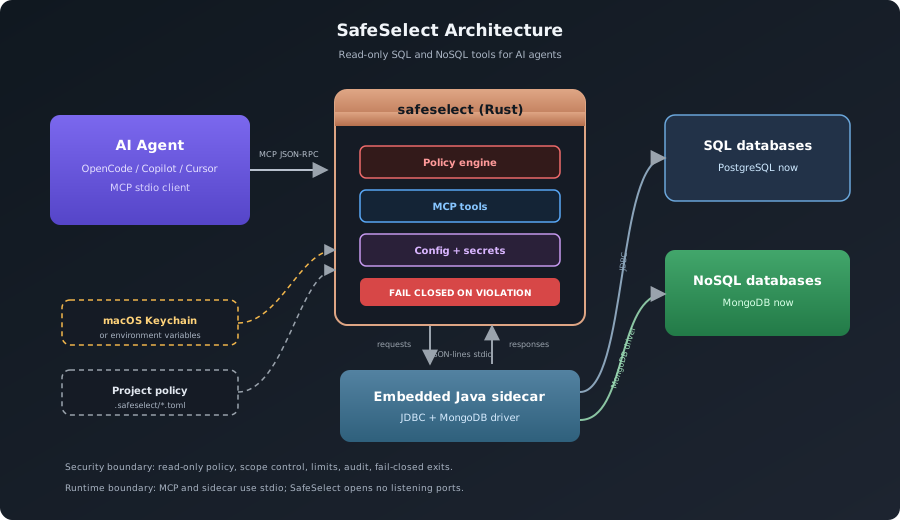
The agent talks to SafeSelect through MCP stdio. SafeSelect enforces policy in Rust, stores secrets outside project files, and reaches databases through an embedded Java sidecar: JDBC for SQL backends and the MongoDB driver for MongoDB. The Rust to Java channel is JSON-lines over stdin/stdout: no sockets, no open ports.
## Guided MCP Context
Clients that support MCP prompts can invoke `read_only_database_debugging` for a
safe investigation checklist. Clients can also read
`safeselect://guide/read-only-database-debugging` for the same static workflow
and boundary notes. Neither capability exposes database data, credentials, or
write access; use the database tools below for discovery and bounded reads.
## Agent Workflow
Agents should use SafeSelect in this order:
1. `database_info`
2. `list_tables` then `describe_table`; inspect `list_table_indexes` or bounded statistics when useful for SQL
3. `list_databases`, `list_collections`, then `discover_document_schema` for NoSQL
4. `select` / `explain`, or the bounded MongoDB read tool that matches the task
5. `check`, `connect`, or `reconnect` when connectivity is stale
MCP `check` verifies the backend used by the current session (`SELECT 1` for
PostgreSQL, a database ping for MongoDB). An existing usable connection or tunnel
does not require a separate successful bastion probe. Sidecar startup and response
reads have deadlines; stalled or malformed responses invalidate the sidecar
without closing the MCP session. For a stale connection, call `reconnect` once,
then `check`, without reopening the client. A startup or configuration failure
still requires fixing its cause before retrying; do not loop on reconnection.
Agents must discover relation or collection structure before querying unfamiliar data and use each discovery response's `next_suggestion` instead of guessing column or field names. SQL descriptions are catalog metadata; MongoDB schemas are inferred from a bounded, non-exhaustive sample.
MongoDB query documents must remain complete nested JSON values. Clients that
flatten nested tool arguments can pass `filter`, `projection`, and `sort` as
JSON-encoded object strings and `pipeline` as a JSON-encoded array string.
`redact_fields` also accepts a JSON-encoded string array. Flattened keys are
rejected so a lost filter or redaction can never become a less constrained
fallback.
MongoDB server-side JavaScript is never available: `$where`, `$function`, and
`$accumulator` are rejected recursively in filters, projections, sorts, and
aggregation pipelines before the MongoDB driver receives them. When rejected,
rebuild the request with declarative MQL operators; SafeSelect has no setting
that enables JavaScript.
Query responses include `row_count`, `byte_count`, `elapsed_ms`, and a human-readable `elapsed` value so agents can reason about result size and latency.
Every MCP success and error includes one contextual `next_suggestion`. Agents
should follow that single safe action, never blindly repeat an invalid request,
and stop when the suggestion is terminal. For clients that only show an MCP
error summary, SafeSelect also includes the trusted next suggestion in that
summary without exposing database-derived detail.
## Security Model
- **Fail closed**: serious security attempts and internal validation or audit failures terminate the MCP process. Ordinary policy rejections return errors without executing and keep the session available.
- **Read only**: SQL allows `SELECT`, `EXPLAIN`, and `WITH`; NoSQL backends allow discovery and read-only document reads.
- **No server-side JavaScript**: MongoDB `$where`, `$function`, and `$accumulator` are rejected in Rust and again in the Java sidecar.
- **Scoped access**: schemas, relations, databases, and collections can be allowed or denied.
- **Hard limits**: row count, result bytes, and timeouts are enforced; MongoDB read commands receive the same timeout as `maxTimeMS`.
- **Secret isolation**: passwords live in macOS Keychain or environment variables, never in project config.
- **Driver verification**: JDBC drivers are checked by SHA-256 before use.
- **Audit trail**: query text is hashed before being recorded; the current session exposes bounded audit metadata through `audit_status` and `audit_recent`.
See the [rejection and shutdown policy](docs/security.md#6-fail-closed) for
recoverable errors, serious SQL attempts, examples, MCP responses and recovery.
### Deliberate Limits
- SafeSelect does not expose database writes, migrations, administration, or arbitrary command execution.
- PostgreSQL and MongoDB are the supported backends today; broad connector count is not the goal.
- MCP transport is local stdio. SafeSelect is not a remote database gateway.
- MongoDB schema discovery is sampled and bounded, not an exhaustive schema guarantee.
- SafeSelect complements database-native least privilege; it does not replace it.
## MCP Tools
| Area | Tools |
|---|---|
| SQL | `list_tables`, `describe_table`, `list_table_indexes`, `list_table_partitions`, `get_database_stats`, `get_table_stats`, `get_maintenance_diagnostics`, `select`, `explain` |
| MongoDB reads | `list_databases`, `list_collections`, `find_documents`, `aggregate_documents`, `distinct_documents`, `count_documents`, `explain_documents` |
| MongoDB analysis | `profile_document_field`, `discover_document_schema`, `generate_document_fixture`, `list_collection_indexes`, `get_database_stats`, `get_collection_stats` |
| Connection | `database_info`, `check`, `connect`, `disconnect`, `reconnect` |
| Audit | `audit_status`, `audit_recent` |
| Config | `config_validate`, `config_show`, `config_set_password`, `config_rename_environment`, `config_delete_environment`, `config_reset` |
| Setup | `import_compose`, `driver_list`, `driver_add`, `driver_download`, `agent_detect`, `agent_install`, `agent_status`, `agent_uninstall` |
`get_maintenance_diagnostics` supports PostgreSQL 15, 16, 17, and 18.
When no `.safeselect/` directory exists, `safeselect serve` scans for PostgreSQL
Compose services. If found, it enters setup mode automatically: it imports them,
writes project configuration, and starts a setup-only MCP server. Otherwise it
prints setup instructions and exits.
An existing but empty or invalid configuration is rejected, not replaced by setup.
> [!IMPORTANT]
> Setup mode does not expose query tools. Agents can help import and validate configuration before any database inspection tools become available.
## CLI Essentials
Use `safeselect --help` or `safeselect --help` for help organized into
DESCRIPTION, USAGE, ARGUMENTS, FLAGS, GLOBAL FLAGS and SUBCOMMANDS as applicable.
Terminal help uses green flag names, lilac usage/subcommands and gray placeholders;
redirected output and `NO_COLOR=1` use plain text. Nested commands share the same
layout, including `safeselect help config set-password`.
| Command | Purpose |
|---|---|
| `safeselect serve [--environment ]` | Start the MCP server |
| `safeselect check [--environment ]` | Verify config, secrets, tunnels, sidecar, and backend connectivity for all environments by default |
| `safeselect doctor [--environment ]` | Print concise findings with stable codes for every environment by default |
| `safeselect posture [--environment ]` | Inspect PostgreSQL posture for every environment by default |
| `safeselect import-dbeaver ` | Import DBeaver connections |
| `safeselect import-compose [--path ]` | Import from docker-compose |
| `safeselect import-compass [--path ]` | Import MongoDB Compass connections |
| `safeselect agent install [--environment ]` | Install an MCP entry |
| `safeselect config set-password [--environment ]` | Store the database password |
| `safeselect config set-ssh-password [--environment ]` | Store the SSH password |
| `safeselect uninstall` | Remove installed binaries, global state, audit data, and Keychain entries |
| `safeselect uninstall --binary-only` | Remove only user-local binaries and preserve configuration |
### Visual command gallery
The CLI is easier to scan by task than as one long list. The [web command gallery](https://antonillos.github.io/safeselect/commands/) uses the same synthetic-demo captures. `query` is kept separate because it is a direct SQL workflow; agents should normally discover schema first through MCP tools.
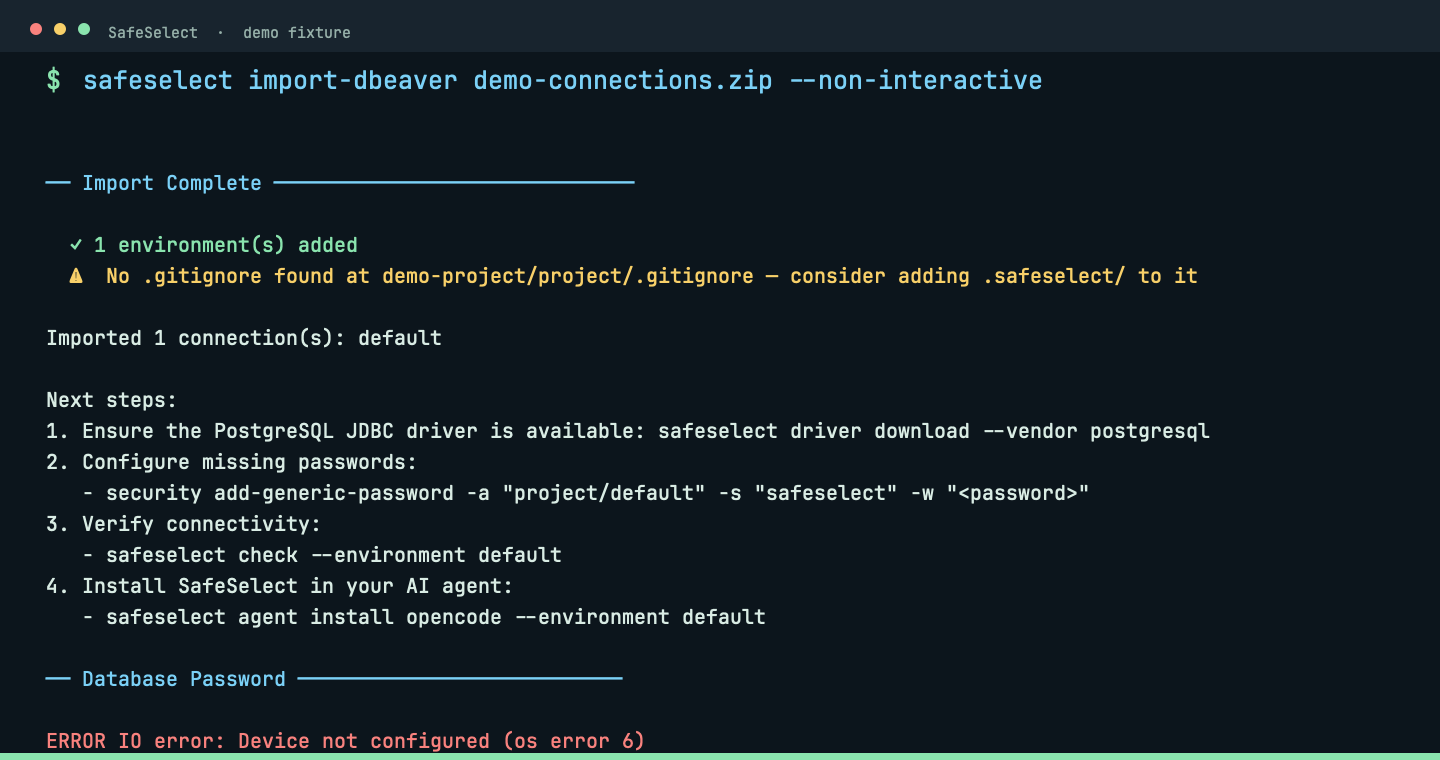
Import connections — Bring an existing DBeaver, Docker Compose or MongoDB Compass connection into the project.
#### `import-dbeaver`
Import a DBeaver export into .safeselect/.
```bash
safeselect import-dbeaver ~/Downloads/connections.zip
```
_The importer keeps the connection shape while leaving passwords outside project files._
DBeaver uses the same interactive workflow as Compass: choose environments,
update/create/skip on reimport, and choose the database and SSH password sources.
Passwords can be kept in macOS Keychain, referenced through an exported variable,
or configured later; literal session-only passwords do not survive the import.
Updates preserve existing TLS, limits and password sources unless changed explicitly,
and never silently change shared bastion definitions. Connection checks are optional.
The local `.safeselect/dbeaver-imports.toml` index recognizes custom environment
names with password-independent fingerprints. Existing matching JDBC environments
are also recognized without an index.
With `--non-interactive`, imports never prompt, store exported passwords, overwrite
existing matching environments, or connect to databases. Distinct connections with
colliding names get unique names. Export the configured password variables before
connecting. The source SSL mode is preserved both with and without an SSH tunnel.
#### `import-compose`
Discover PostgreSQL services from Docker Compose.
Invalid YAML and duplicate keys are rejected. YAML errors omit source snippets
to avoid displaying nearby credentials.
```bash
safeselect import-compose --path .
```
_Compose discovery turns an existing local service into a project environment._
#### `import-compass`
Import MongoDB Compass connections.
```bash
safeselect import-compass --path ~/.config/MongoDB Compass
```
_Compass imports preserve MongoDB connection details without exposing credentials._
Interactive import uses the same password choices for the database and SSH
bastion: keep the existing source, use a password present in the export, enter a
password with hidden input, reference an exported variable, or configure it later.
Imported passwords are always literal values, never interpreted as references.
Before accepting a literal password, SafeSelect asks where to keep it: macOS
Keychain or an environment variable available **only during that import process**.
Session-only passwords are not saved and cannot be exported to the parent shell;
future CLI/MCP commands need the variable exported by their launching shell.
No plaintext password is written to TOML, logs or terminal commands.
Suggested database variables include the project and environment, for example
`MYAPP_STAGING_DB_PASSWORD`. Bastion variables use only the environment, for
example `STAGING_SSH_PASSWORD`, so projects can share a bastion password reference.
Names are editable; existing references are not renamed. When sharing a launching
shell, choose distinct database prefixes for projects with identical or normalized
names, and distinct bastion variable names when their passwords differ.
Reimporting offers **update existing**, **create new**, or **skip**. Updates retain
password sources by default, preserve TLS and limits, and do not silently mutate
shared bastions. A local `.safeselect/compass-imports.toml` index recognizes custom
names from previous imports using password-independent connection fingerprints.
Non-interactive import skips existing connections and configures environment
references without automatically storing exported passwords. Connectivity checks
require confirmation after interactive import.
See the [synthetic Compass UX VHS](demo/compass-import-ux/README.md).
Prepare the project — Validate local policy, install drivers and connect an AI client without repeating configuration flags.
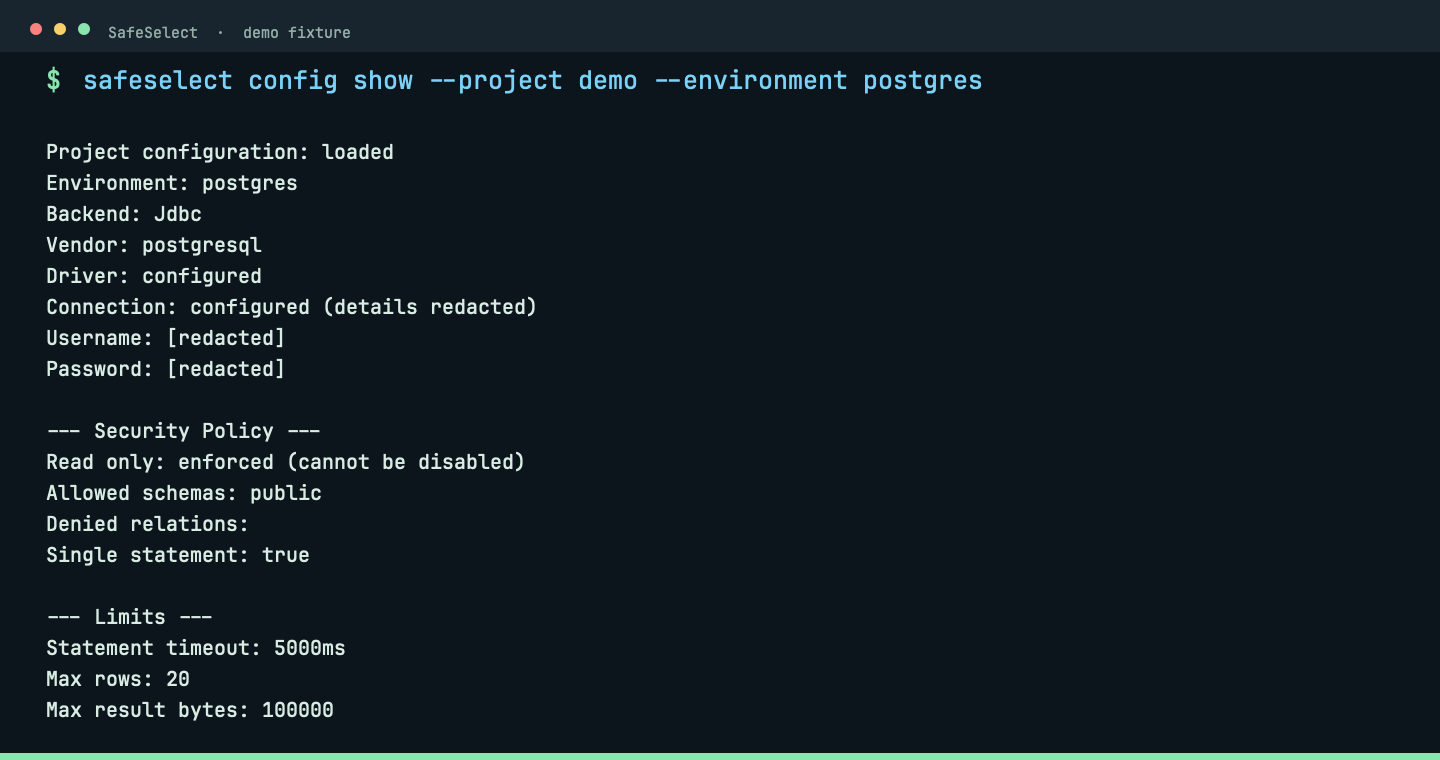
#### `config`
Validate, inspect and maintain project configuration.
```bash
safeselect config show --project demo --environment postgres
```
_Configuration show reports a safe, redacted policy summary before the server starts._
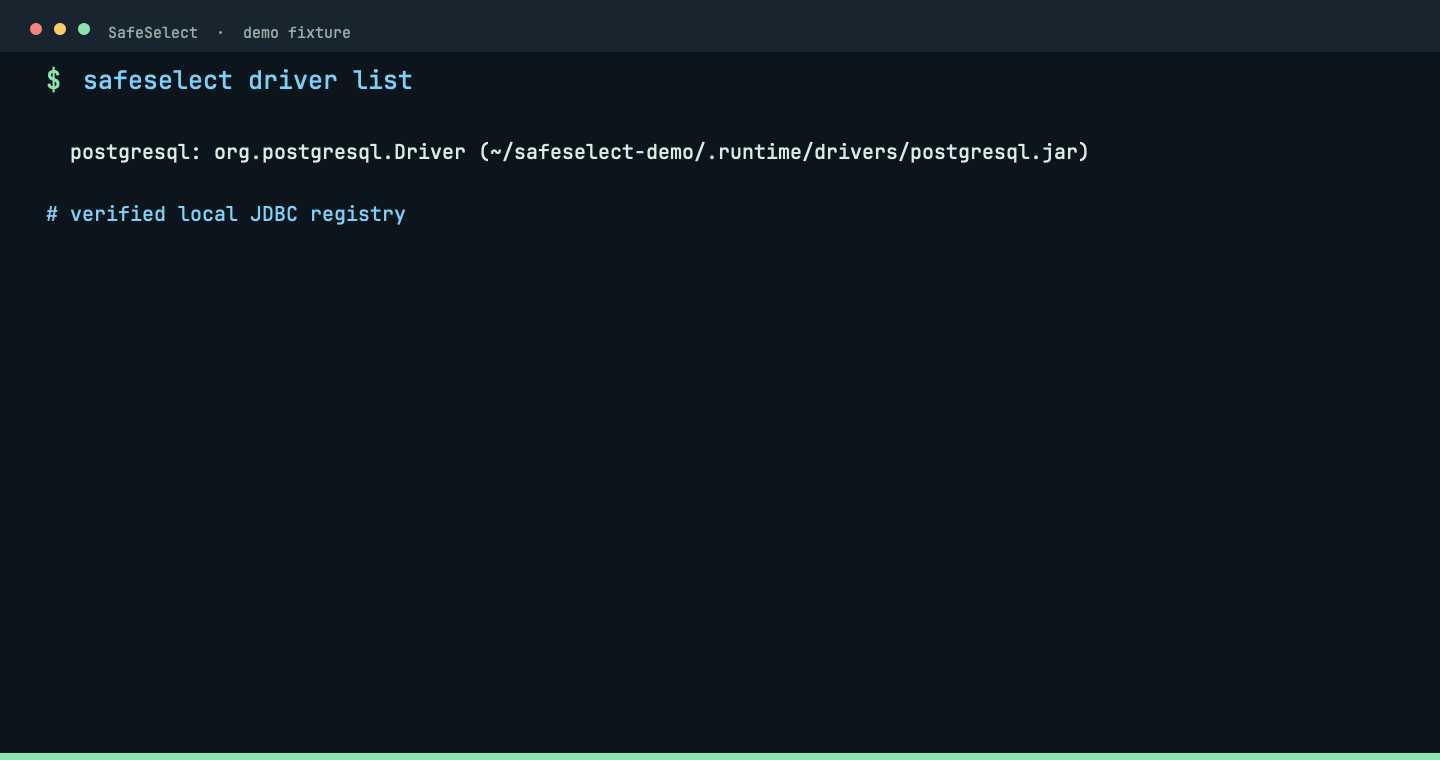
#### `driver`
Register and verify JDBC drivers.
```bash
safeselect driver list
```
_The driver registry shows the vendor and local verified artifact._
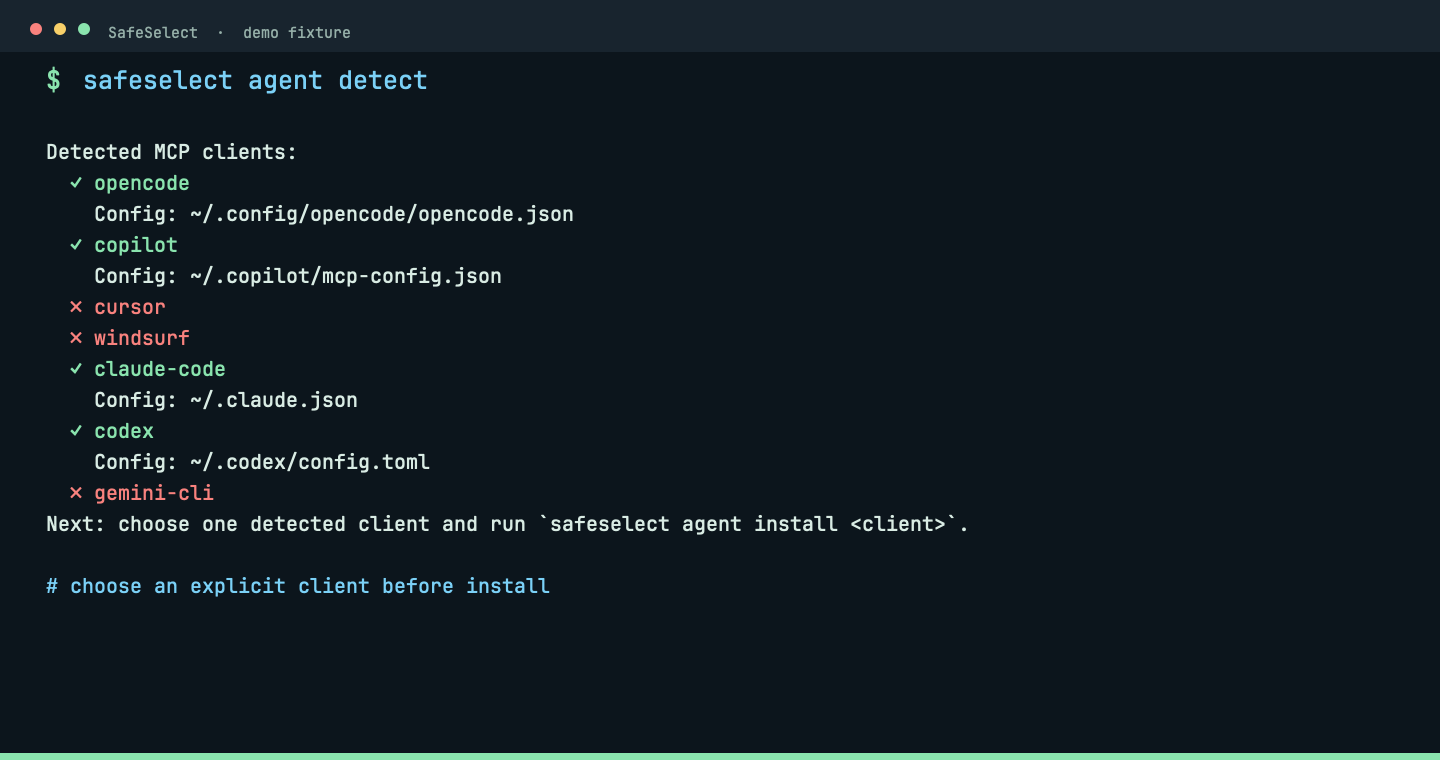
#### `agent`
Detect clients and install their MCP entry.
```bash
safeselect agent detect
```
_Detection lists available clients before an explicit project-scoped MCP install._
Verify and diagnose — Check the complete path from project policy to the database, then inspect the effective PostgreSQL posture.
#### `check`
Test configuration, secrets, tunnels, sidecar and backend connectivity.
```bash
safeselect check
```
_Checks follow convention and inspect every environment unless one is selected deliberately._
#### `doctor`
Print concise findings with stable diagnostic codes.
```bash
safeselect doctor
```
_Doctor turns a failed connection into a short next action instead of a log wall._
#### `posture`
Inspect the effective PostgreSQL security posture.
```bash
safeselect posture --strict
```
_Posture shows the effective read-only policy, limits and database posture before agent use._
Manage a connection — Start the local MCP server or exercise the temporary connection lifecycle directly.
#### `serve`
Start the local MCP server for a project environment.
```bash
safeselect serve
```
_The server speaks local stdio: the MCP initialize response exposes SafeSelect capabilities, not a network listener._
#### `connect`
Test a temporary JDBC connection.
```bash
safeselect connect
```
_Connect verifies the temporary JDBC sidecar against the live fixture without taking over an active MCP session._
#### `disconnect`
Close a temporary JDBC connection.
```bash
safeselect disconnect
```
_Disconnect cleanly closes the temporary JDBC sidecar and reports the completed lifecycle step._
#### `reconnect`
Restart the sidecar and verify connectivity.
```bash
safeselect reconnect
```
_Reconnect restarts the sidecar and verifies the live fixture instead of hiding a stale database._
Explore SQL: discover, inspect and diagnose — Use query when you already know the bounded SQL you want to inspect. Agents should normally discover schema first through MCP tools.
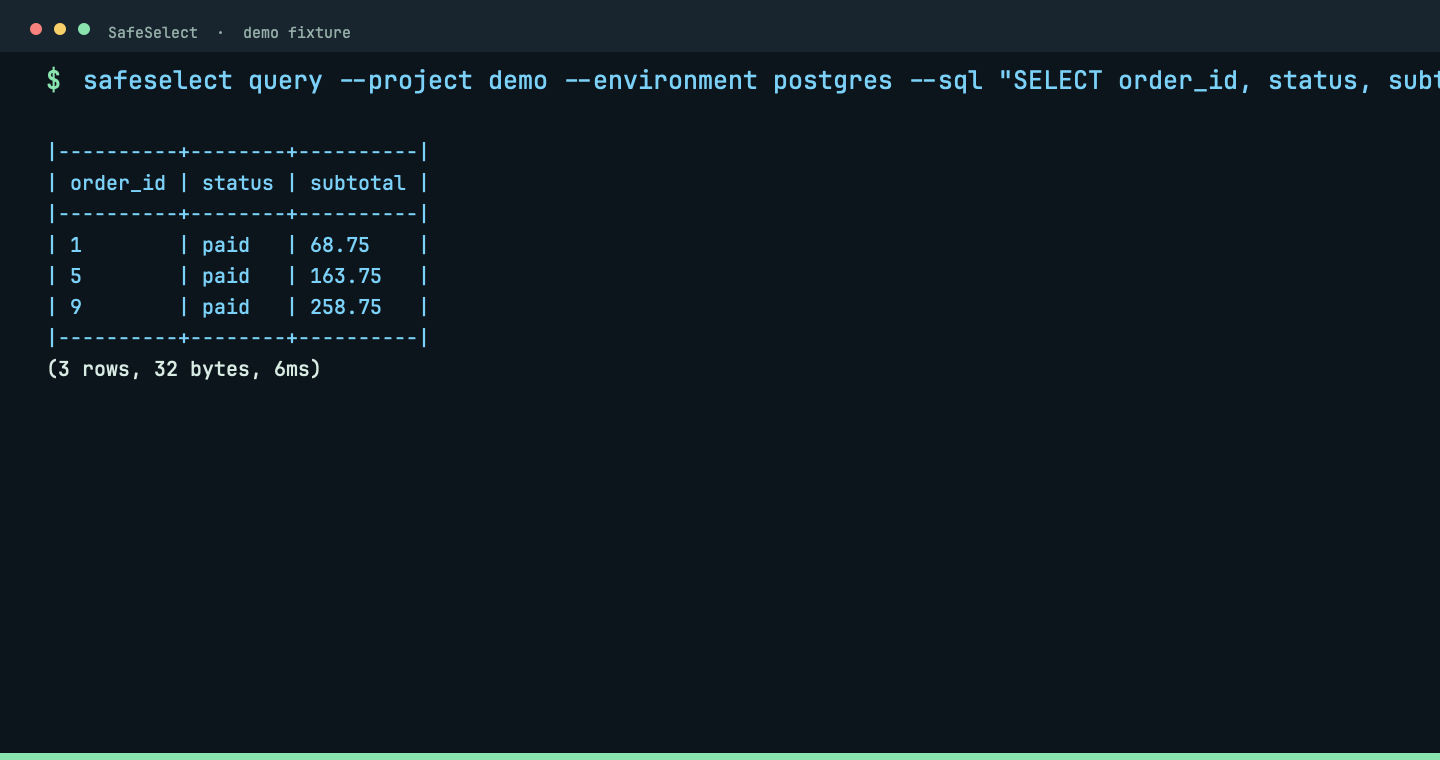
#### `query`
Execute one bounded read-only SQL statement and display its results.
```bash
safeselect query --sql "SELECT order_id, status, subtotal FROM public.demo_orders WHERE status = 'paid' LIMIT 3"
```
_The bounded SQL request returns three synthetic fixture rows with row and byte counts; writes remain rejected._
#### `list_tables` (MCP)
Discover PostgreSQL tables through MCP.
```text
list_tables({"schema":"public"})
```
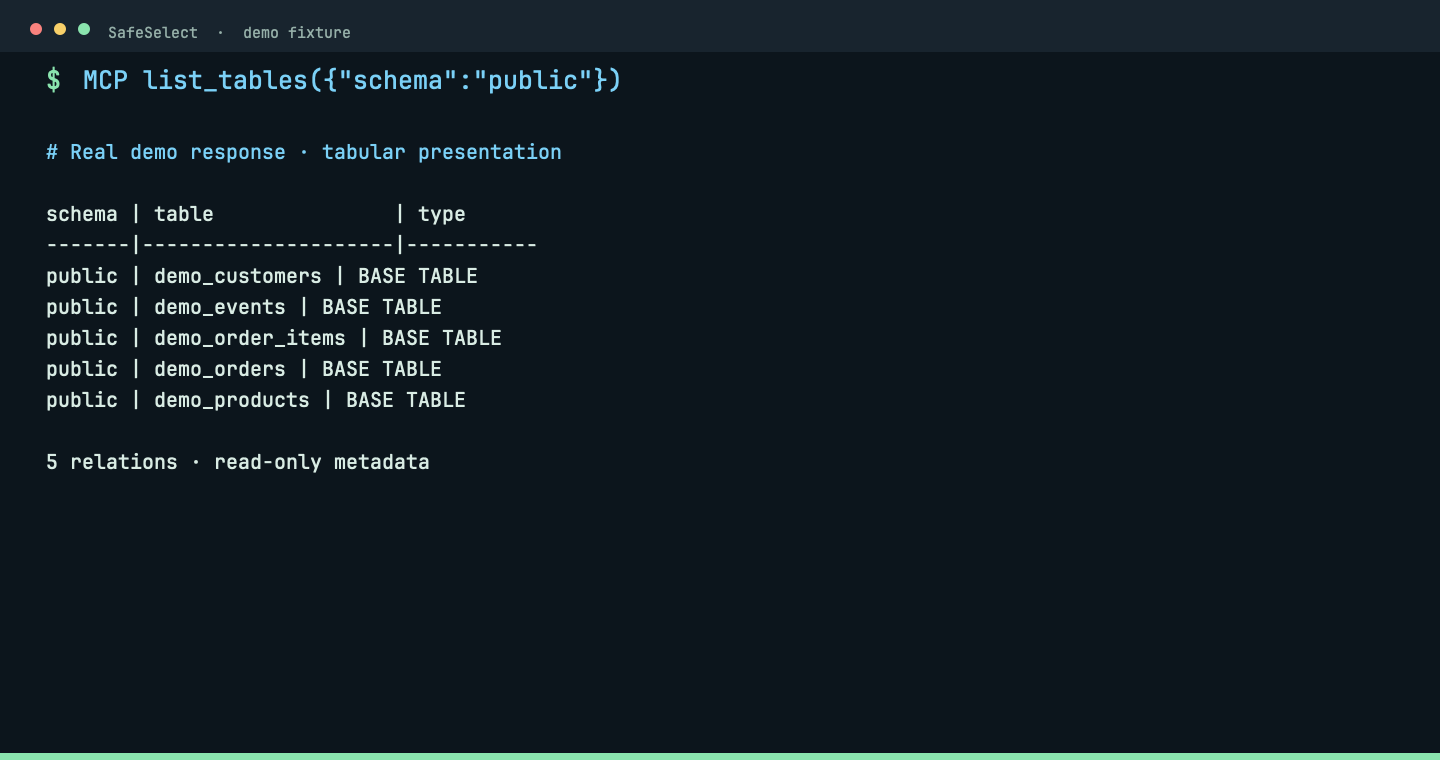
Real MCP response, formatted as a table: five synthetic relations in public. Discover exact names before inspecting columns.
#### `describe_table` (MCP)
Inspect column names, types and nullability through MCP.
```text
describe_table({"schema":"public","table":"demo_orders"})
```
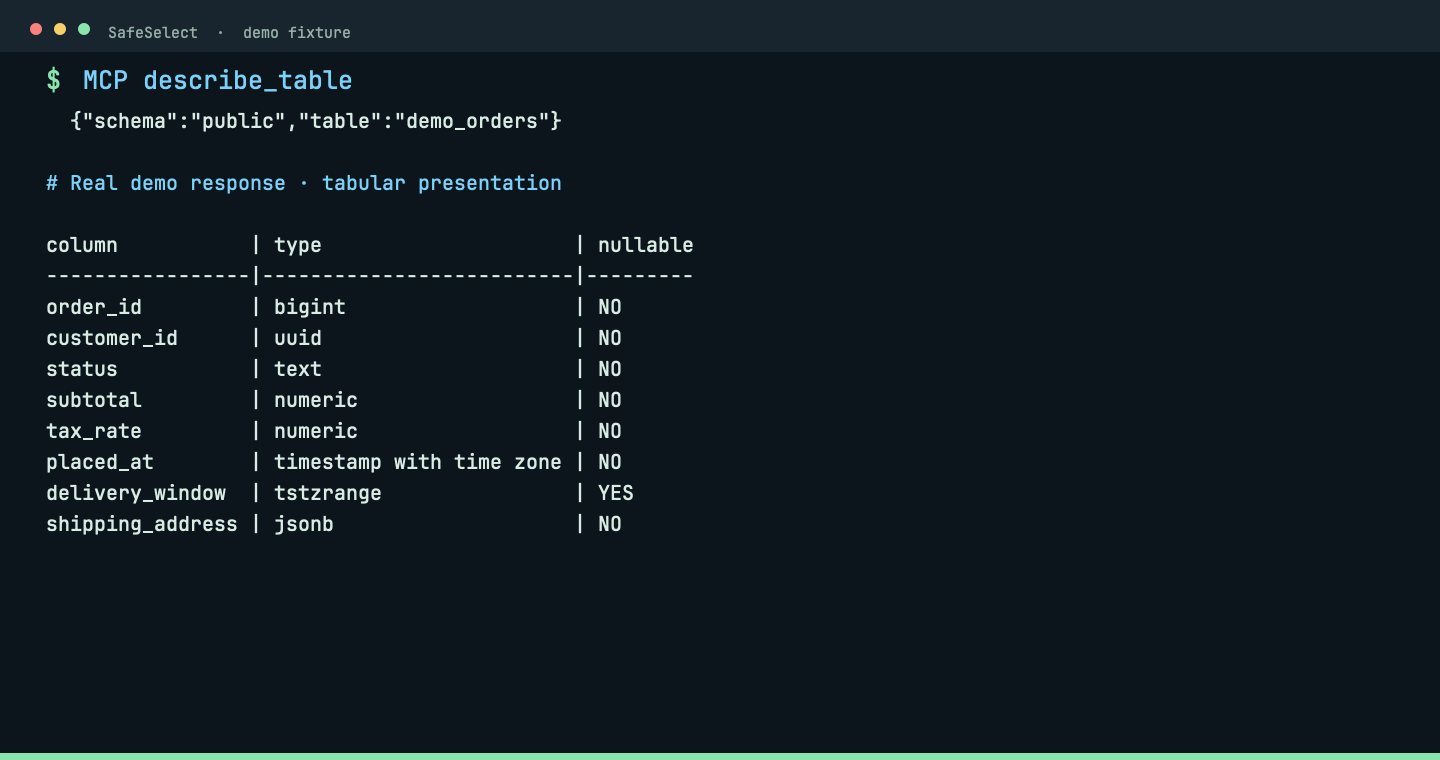
Real MCP response, formatted as a table: eight columns including UUID, JSONB and a timestamp range. No data rows are queried.
#### `get_maintenance_diagnostics` (MCP)
Inspect ANALYZE and VACUUM signals without running maintenance.
```text
get_maintenance_diagnostics({"schema":"public"})
```
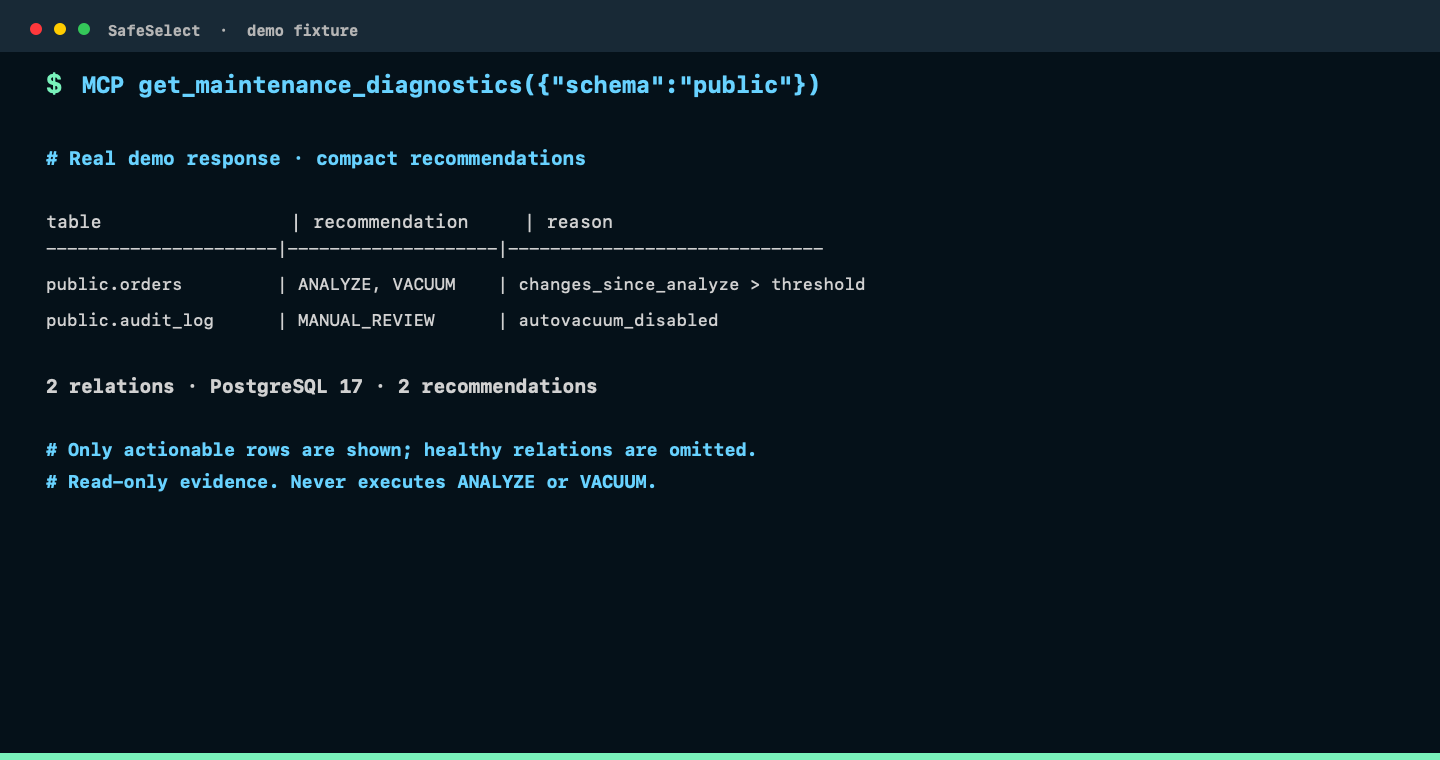
Real MCP response: a compact table containing only relations with an ANALYZE, VACUUM, or manual-review recommendation, plus summary counts. This read-only diagnostic never executes maintenance.
Explore NoSQL: discover, infer and read — Follow MongoDB discovery from databases to bounded documents, with sampled schema inference before reads.
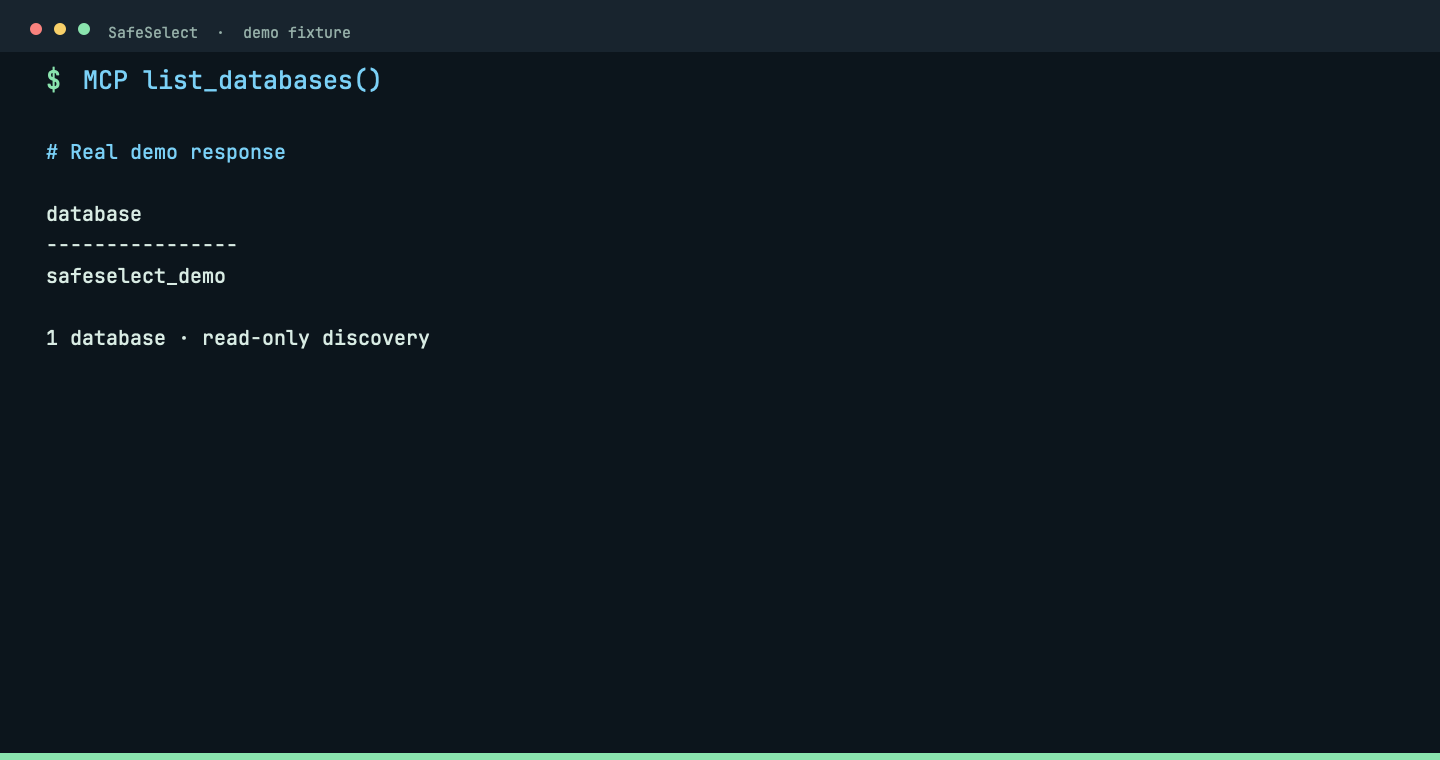
#### `list_databases` (MCP)
Discover MongoDB databases through MCP.
```text
list_databases()
```
_Real MCP response: the isolated demo exposes one allowed database. Choose it before discovering collections._
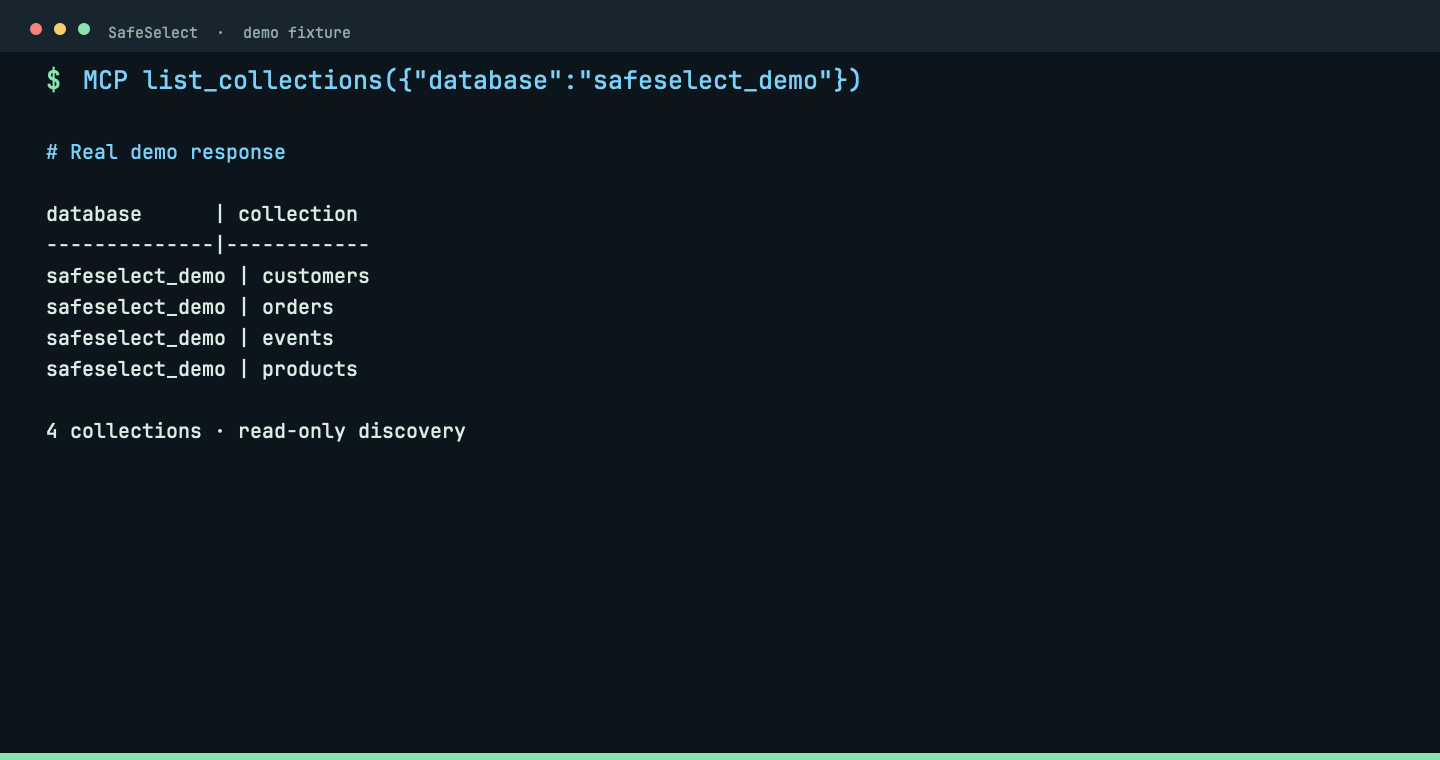
#### `list_collections` (MCP)
Discover collections in an allowed MongoDB database.
```text
list_collections({"database":"safeselect_demo"})
```
_Real MCP response: four synthetic collections are listed without reading documents._
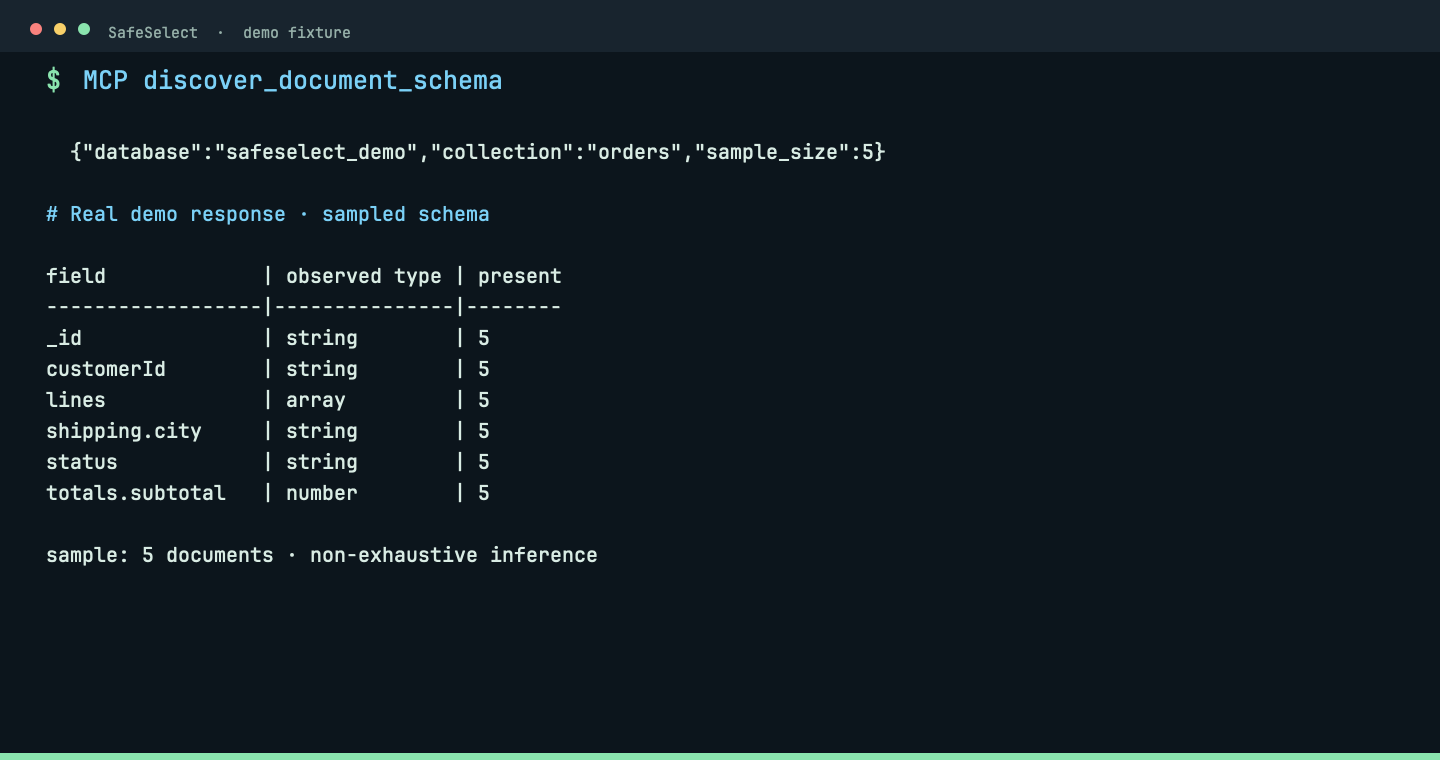
#### `discover_document_schema` (MCP)
Infer frequent fields and types from a bounded MongoDB sample.
```text
discover_document_schema({"database":"safeselect_demo","collection":"orders","sample_size":5})
```
_Real MCP response: sampled fields and observed types guide the next bounded read; inference is explicitly non-exhaustive._
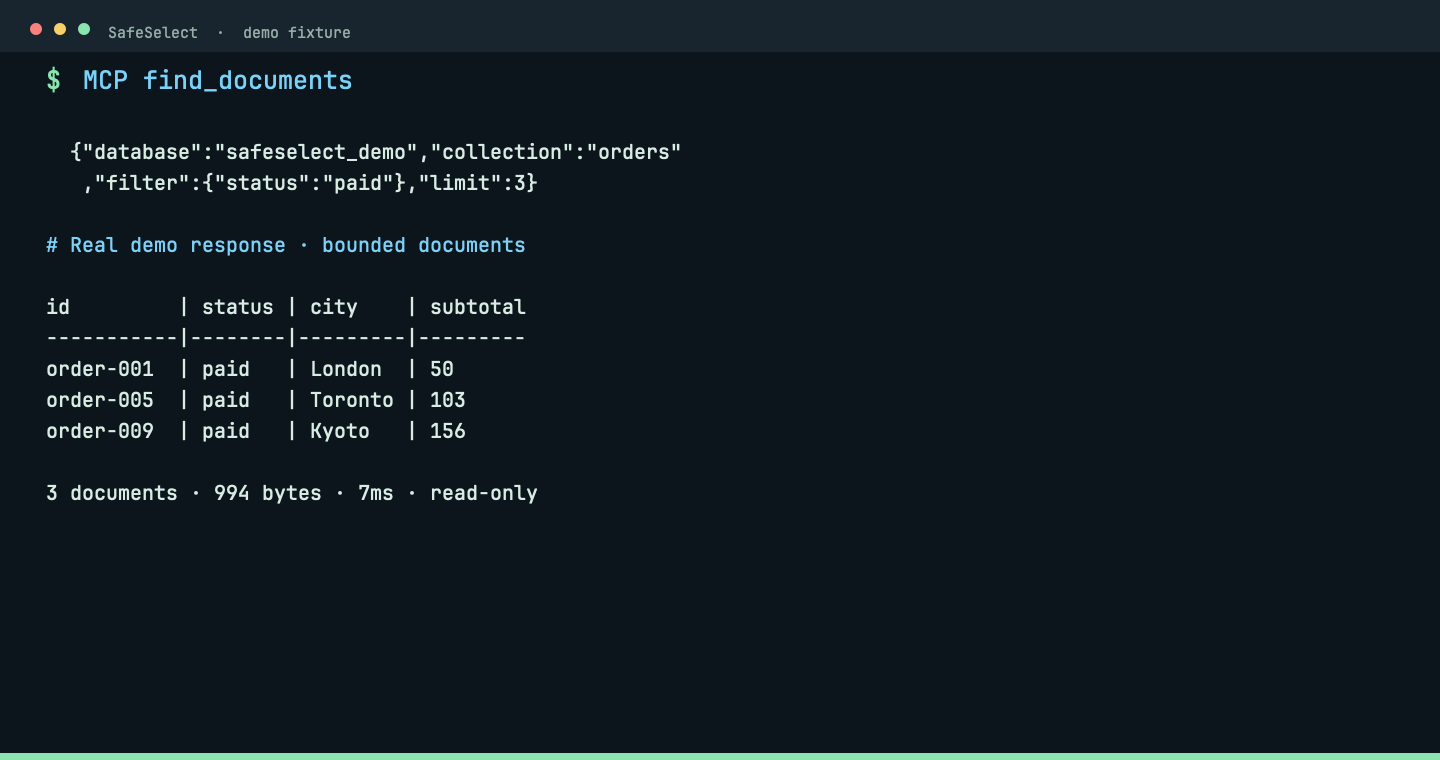
#### `find_documents` (MCP)
Read bounded MongoDB documents with an explicit filter.
```text
find_documents({"database":"safeselect_demo","collection":"orders","filter":{"status":"paid"},"limit":3})
```
_Real MCP response: three paid orders, 994 bytes, returned in 7ms. The filter and limit keep the read bounded._
Use `safeselect --help` or a command-specific `--help` for the full CLI.
Uninstall checks both release-installer and Cargo binary locations.
MongoDB Compass imports support SSH-tunneled `mongodb+srv://` connections by resolving
the SRV target and rewriting the local endpoint with the required TLS and direct-connection
options.
## Configuration
Global state lives in `~/.config/safeselect/` by default. Project policy lives in `.safeselect/` at the repository root:
```text
/
└── .safeselect/
├── project.toml
└── environments/
└── .toml
```
SafeSelect walks upward from the current directory to find `.safeselect/`. Use `--project ` when an agent or script should target a specific repository.
### Convention before configuration
From inside a configured repository, commands infer the project from the nearest
`.safeselect/` directory and infer the environment when exactly one
`environments/*.toml` file exists. For example, `safeselect serve`,
`safeselect check`, `safeselect query --sql "SELECT 1"`, and
`safeselect config show` need no project or environment flags in a
single-environment project. `--project` and `--environment` remain available
for scripts, other working directories, and deliberate selection. If multiple
environments exist, commands that act on one fail rather than guess and tell
you to pass `--environment `.
The defaults differ by operation:
- `serve`, `query`, `connect`, `disconnect`, `config show`, and password
commands require one explicit or uniquely inferred environment. With no
environments they fail; `serve` has the separate first-run behavior above.
- `check`, `doctor`, `posture`, `reconnect`, and `config validate` inspect or
process all environments when the flag is omitted. Checks are not offline:
they can resolve secrets, establish SSH tunnels, and contact databases. Use
`--environment ` to avoid touching unrelated or production environments.
- `query` supports JDBC environments only and still needs SQL through `--sql`
or stdin (interactive stdin waits for EOF). Selecting a MongoDB environment
does not turn it into a MongoDB query command.
- CLI `connect` and `disconnect` operate on a new, temporary JDBC sidecar and
shut it down before exiting. They do not control an already-running MCP
session; use that session's MCP connection tools instead.
- Password commands modify local Keychain/configuration, not the database
password itself. `config set-ssh-password` switches SSH authentication to
password and clears the configured identity-file reference.
### Password references on all platforms
Use OpenCode-style **`{env:NAME}`** references for database and SSH passwords on
macOS, Linux and WSL. These commands save only the variable name; they do not
read its value or store the password:
```bash
safeselect config set-password --environment staging --password '{env:DB_PASSWORD}'
safeselect config set-ssh-password --environment staging --password '{env:BASTION_PASSWORD}'
```
Enter the values without putting passwords in shell history (Bash):
```bash
read -rsp 'Database password: ' DB_PASSWORD; echo; export DB_PASSWORD
read -rsp 'Bastion password: ' BASTION_PASSWORD; echo; export BASTION_PASSWORD
safeselect check --environment staging
```
The variables must be exported in the process that launches SafeSelect or the
MCP client. A missing or empty required variable fails closed. No Python helper,
`.env` auto-loading, shell evaluation, `{file:...}` reading or general TOML
interpolation is performed. Password-based SSH tunnels still require `sshpass` and do not fall back to
SSH-agent/key authentication.
The saved configuration uses the existing `database.secret.source = "env"`
and `variable` fields, and SSH `secret_variable`; no new password field is needed.
On macOS, secure password prompts also accept `{env:NAME}`; ordinary passwords
continue to use Keychain. Linux/WSL SSH import prompts accept either `NAME` or
`{env:NAME}`. Use `config set-password` after import to select a short database
variable name instead of the generated default. `config_set_password` through
MCP accepts the same reference; prefer references rather than sending raw
passwords through an agent.
References must occupy the entire input and use a valid shell variable name.
Imported credentials are opaque passwords, not expressions. If a literal macOS
password happens to look like a reference, use the secure literal prompt:
```bash
safeselect config set-password --environment staging --literal-password
# or: safeselect config set-ssh-password --environment staging --literal-password
```
Avoid supplying real literal passwords with `--password`: command arguments can
appear in shell history and process listings. Existing Keychain and environment
references remain valid. Custom variable names are preserved when renaming an
environment; changing a source does not delete the old Keychain entry.
### SSH passwords on Linux and WSL
SSH password imports use macOS Keychain only on macOS. On Linux/WSL, the
Compass and DBeaver import prompts ask for an **environment variable name**,
not the password. The generated default uses `SAFESELECT_SSH_PASSWORD__`,
where `` namespaces the canonical project directory and
`` encodes the complete SSH account's UTF-8 bytes (project, environment
and `/ssh`) without lossy normalization. Distinct account names therefore have
distinct defaults; existing and explicitly selected references stay unchanged.
SafeSelect saves that reference as `secret_variable` in the SSH configuration
(including shared bastions), never the password itself:
```toml
[ssh]
enabled = true
auth_type = "PASSWORD"
secret_variable = "SAFESELECT_SSH_PASSWORD_DEMO"
```
Export the password in the shell that launches SafeSelect or the MCP client.
For Bash in WSL, this avoids putting the password in shell history:
```bash
read -rsp 'SSH password: ' SAFESELECT_SSH_PASSWORD_DEMO; echo
export SAFESELECT_SSH_PASSWORD_DEMO
```
Password-based tunnels also require `sshpass`. Missing or empty secrets fail
closed; SafeSelect does not fall back to a different secret source. Do not set
both `secret_account` (macOS Keychain) and `secret_variable`.
For an existing Linux/WSL environment, run `safeselect config set-ssh-password
--environment ` without `--password` to configure an environment reference,
then export the variable it prints. The command cannot export into its parent
shell. Restart a running MCP client after changing its environment.
Newly imported database passwords use
`SAFESELECT_PASSWORD__` on Linux/WSL. The project component
is the SHA-256 of the canonical project directory (without exposing its path);
the environment component encodes the environment name's UTF-8 bytes. This produces shell-valid, distinct references even for names like
`qa.eu` and `qa-eu`. The printed setup guidance uses the exact generated reference;
existing saved references are not renamed, including when moving a checkout.
Imports defer automatic verification while a required database or SSH variable
is unset or empty. Export that variable
separately before checking the imported connection; credentials from the
export are removed from the saved MongoDB URI rather than written to TOML.
Generated MCP entries deliberately pin both project and environment. Keep those
arguments in client configuration and unattended scripts: inference is a CLI
convenience, not a persistent default environment.
## Supported Agents
| Client | User scope | Project scope | Integration |
|---|---:|---:|---|
| OpenCode | Yes | Yes | JSON/JSONC `mcp` |
| OpenAI Codex | Yes | Yes | lossless TOML `mcp_servers` |
| Claude Code | Yes | Yes | native `claude mcp` scopes |
| Cursor | Yes | Yes | `.cursor/mcp.json` |
| Windsurf | Yes | No | global Windsurf MCP config |
| GitHub Copilot | Yes | Yes | `servers` in MCP JSON |
| Gemini CLI | Yes | Yes | `.gemini/settings.json` |
SafeSelect never silently falls back to a broader scope. In particular,
`--local` for Windsurf fails with a clear correction because Windsurf does not
document a project-scoped MCP configuration.
## Build From Source
```bash
# Installs makevn through Homebrew or asdf only when it is missing.
./install.sh --install-makevn
"$HOME/.local/bin/safeselect" --version
```
Requirements: Rust 1.89+, Java 17+, and makevn 0.1.14+. The bootstrap requires
Homebrew or asdf; otherwise install `makevn` first. `sshpass` is optional for
password-based SSH tunnels. Add `~/.local/bin` to your `PATH` before invoking
`safeselect` without its full path.
The installer runs `makevn doctor --compact`, then `makevn init --force` to
refresh generated initialization while preserving local configuration, before
`makevn test package`. A makevn failure stops the build without replacing the
installed binary.
## Documentation
- [Installation guide](docs/install.md)
- [AI agent integration](docs/agents.md)
- [On-demand Codex code review](docs/code-review.md)
- [Security model](docs/security.md)
- [Security Proof](docs/security-proof.md)
- [Security test suite](docs/security-test-suite.md)
- [Security policy](SECURITY.md)
- [Distribution](docs/distribution.md)
- [Changelog](CHANGELOG.md)
Release notes are generated from `CHANGELOG.md`.
## Ecosystem
Directory listings
[](https://mcpservers.org/servers/antonillos/safeselect)
[](https://www.tensorblock.co/mcp/servers/github-antonillos-safeselect-4c99dff4)
[](https://lobehub.com/mcp/antonillos-safeselect)
Runtime and distribution
[]()
[]()
[]()
[]()
[](https://github.com/antonillos/homebrew-tap)
[](https://github.com/antonillos/asdf-safeselect)
## License
MIT - see [LICENSE](LICENSE).
When using an Azure Bastion tunnel, open it before running SafeSelect and set
its SSH host and port to the local listener (for example `127.0.0.1:2222`).
The SSH connectivity diagnostic reports the configured endpoint and the actual
TCP connection or name resolution error; TCP success does not validate SSH
credentials. Run the Azure CLI tunnel in the same WSL distribution as SafeSelect,
or ensure that its Windows listener is accessible from WSL.
On SSH connectivity failure, SafeSelect also prints a safely quoted TCP probe
command for the configured endpoint, using Bash and `timeout` on Linux/WSL;
neither `nc` nor `telnet` is required. Run it from the same terminal environment
as SafeSelect. A successful TCP probe does not verify SSH or database authentication.
If an SSH tunnel cannot bind its local forwarding port, check for an existing
listener or stale SSH tunnel. A bastion restart can release an old SSH session
and its local listener, but TCP reachability alone cannot identify the cause.
MCP `connect` and `reconnect` report the recognized SSH failure category without
including endpoint or credential details.
When an existing database endpoint responds, `check` and `doctor` report its
reuse as information while still verifying the backend connection.





![Terminal capture for safeselect import-compose [--path <path>]](docs/recordings/cli/import-compose.png)
![Terminal capture for safeselect import-compass [--path <path>]](docs/recordings/cli/import-compass.png)
![Terminal capture for safeselect check [--environment <env>]](docs/recordings/cli/check.png)
![Terminal capture for safeselect doctor [--environment <env>]](docs/recordings/cli/doctor.png)
![Terminal capture for safeselect posture [--environment <env>]](docs/recordings/cli/posture.png)
![Terminal capture for safeselect serve [--environment <env>]](docs/recordings/cli/serve.png)
![Terminal capture for safeselect connect [--environment <env>]](docs/recordings/cli/connect.png)
![Terminal capture for safeselect disconnect [--environment <env>]](docs/recordings/cli/disconnect.png)
![Terminal capture for safeselect reconnect [--environment <env>]](docs/recordings/cli/reconnect.png)