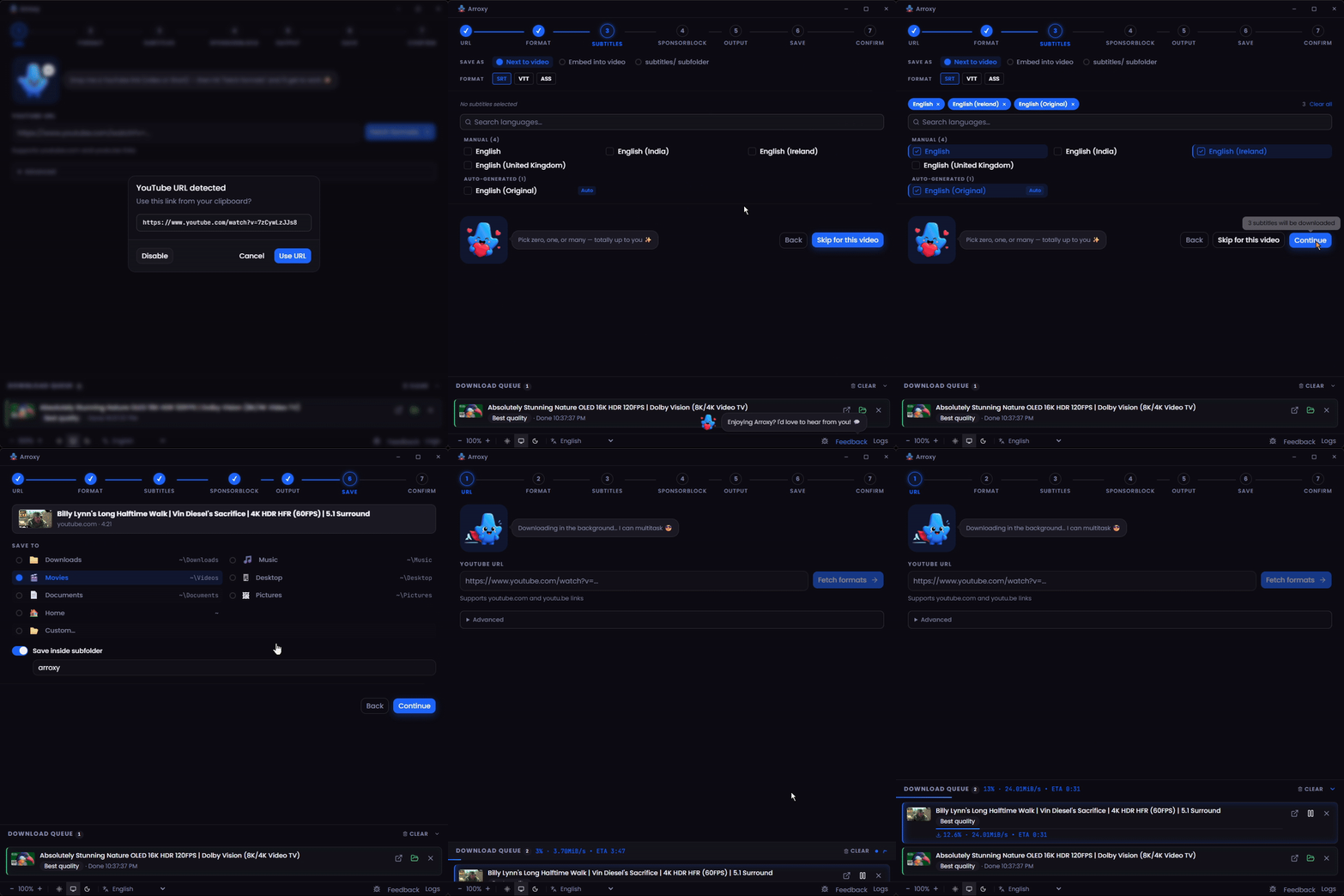
Arroxy mascot # Arroxy — Free Open-Source YouTube (+ 2000 sites) Downloader for Windows, macOS & Linux **4K · 1080p60 · HDR · Surround/Dolby audio · Playlists · MP3 · Shorts · Music · Channels · Subtitles · SponsorBlock · +2000 sites** **Read in:** [Afaan Oromoo](README.om.md) · [Bahasa Indonesia](README.id.md) · [Deutsch](README.de.md) · **English** · [Español](README.es.md) · [Français](README.fr.md) · [Kiswahili](README.sw.md) · [O'zbekcha](README.uz.md) · [Tiếng Việt](README.vi.md) · [Türkçe](README.tr.md) · [አማርኛ](README.am.md) · [العربية](README.ar.md) · [اردو](README.ur.md) · [پښتو](README.ps.md) · [বাংলা](README.bn.md) · [हिन्दी](README.hi.md) · [မြန်မာဘာသာ](README.my.md) · [Ελληνικά](README.el.md) · [Русский](README.ru.md) · [Српски](README.sr.md) · [Українська](README.uk.md) · [中文](README.zh.md) · [日本語](README.ja.md) [![Release](https://img.shields.io/github/v/release/antonio-orionus/Arroxy?label=Release&color=blueviolet)](https://github.com/antonio-orionus/Arroxy/releases/latest) [![Build](https://img.shields.io/github/actions/workflow/status/antonio-orionus/Arroxy/release.yml?label=Build)](https://github.com/antonio-orionus/Arroxy/actions/workflows/release.yml) [![Website](https://img.shields.io/badge/website-arroxy.orionus.dev-blueviolet)](https://arroxy.orionus.dev/) ![License](https://img.shields.io/badge/license-MIT-green) ![Platforms](https://img.shields.io/badge/platform-cross--platform-1f2937?logo=github&logoColor=white) ![Languages](https://img.shields.io/badge/i18n-23_languages-blue) Download videos, Shorts, music, channels, podcasts, or audio tracks from **YouTube and 2000+ supported sites** — up to 4K HDR at 60 fps, or as MP3 / AAC / Opus. Runs locally on Windows, macOS, and Linux. **No ads, no bloat, no upsells.** [**↓ Install Latest Release**](#install)  ·  [**Website**](https://arroxy.orionus.dev/)  ·  [Windows first launch](#windows-first-launch) · [macOS first launch](#macos-first-launch) · [Linux first launch](#linux-first-launch) [![Join the Discord Community](https://img.shields.io/badge/Join%20the%20Discord%20Community-5865F2?style=for-the-badge&logo=discord&logoColor=white)](https://discord.gg/ueGvXwQH8y) Arroxy demo Arroxy — Quick Download home If Arroxy saves you time, a ⭐ helps others find it.


> **What is Arroxy?** Arroxy is a free, open-source desktop GUI that downloads videos, audio, playlists, and subtitles from YouTube and 2000+ other [yt-dlp](https://github.com/yt-dlp/yt-dlp)-supported sites. It runs on Windows 10/11, macOS 11+ (Intel + Apple Silicon), and Linux (AppImage, Flatpak, tar.gz). MIT licensed. No account, no ads, no usage limits. Distributed via [Winget](https://winget.run/pkg/AntonioOrionus/Arroxy), [Scoop](https://github.com/antonio-orionus/scoop-bucket), [Homebrew Cask](https://github.com/antonio-orionus/homebrew-arroxy), Flatpak, AppImage, and direct download. > > _Last updated: 2026-06-17._ --- ## Contents - [Install and first launch](#install) - [Install via package manager](#package-manager) - [Windows first launch](#windows-first-launch) - [macOS first launch](#macos-first-launch) - [Why you may see a warning](#why-warning) - [Linux first launch](#linux-first-launch) - [Verify your download (SHA256)](#verify) - [Why Arroxy](#why) - [Features](#features) - [Privacy](#privacy) - [FAQ](#faq) - [Roadmap](#roadmap) - [Built with](#tech) --- ## Install and first launch | Platform | Direct download | | ------------------- | ------------------------------------------------------------------------------------------------------------------------------------------------------------------------------------------------------------------------------------------------------------------------------------------------------------------------------------------------------------------------------------------------------------------------------------------------------------------------------------------------------------------------------------------------------------------------------------------------------------------------------------------------------- | | Windows | [![Windows Setup](https://img.shields.io/badge/Windows-Setup-0078D4?style=for-the-badge&logo=windows&logoColor=white)](https://github.com/antonio-orionus/Arroxy/releases/latest/download/Arroxy-win-x64-Setup.exe) [![Windows Portable](https://img.shields.io/badge/Windows-Portable-0078D4?style=for-the-badge&logo=windows&logoColor=white)](https://github.com/antonio-orionus/Arroxy/releases/latest/download/Arroxy-win-x64-Portable.exe) | | macOS | [![macOS Apple Silicon](https://img.shields.io/badge/macOS-Apple%20Silicon-000000?style=for-the-badge&logo=apple&logoColor=white)](https://github.com/antonio-orionus/Arroxy/releases/latest/download/Arroxy-mac-arm64.dmg) [![macOS Intel](https://img.shields.io/badge/macOS-Intel-000000?style=for-the-badge&logo=apple&logoColor=white)](https://github.com/antonio-orionus/Arroxy/releases/latest/download/Arroxy-mac-x64.dmg) | | Linux | [![Linux AppImage](https://img.shields.io/badge/Linux-AppImage-FCC624?style=for-the-badge&logo=linux&logoColor=black)](https://github.com/antonio-orionus/Arroxy/releases/latest/download/Arroxy-linux-x64.AppImage) [![Linux Flatpak](https://img.shields.io/badge/Linux-Flatpak-4A90D9?style=for-the-badge&logo=flathub&logoColor=white)](https://github.com/antonio-orionus/Arroxy/releases/latest/download/Arroxy-linux-x64.flatpak) [![Linux tar.gz](https://img.shields.io/badge/Linux-tar.gz-6B7280?style=for-the-badge&logo=linux&logoColor=white)](https://github.com/antonio-orionus/Arroxy/releases/latest/download/Arroxy-linux-x64.tar.gz) | | Verify | [![SHA256 Checksums](https://img.shields.io/badge/SHA256-Checksums-4B5563?style=for-the-badge&logo=github&logoColor=white)](https://github.com/antonio-orionus/Arroxy/releases/latest/download/SHA256SUMS) | [**All release assets →**](https://github.com/antonio-orionus/Arroxy/releases/latest) ### Install via package manager Already use a package manager? You can skip the manual download path. | Channel | Command | | ------------------ | ------------------------------------------------------------------------------------------------- | | Winget | `winget install AntonioOrionus.Arroxy` | | Scoop | `scoop bucket add arroxy https://github.com/antonio-orionus/scoop-bucket && scoop install arroxy` | | Homebrew | `brew tap antonio-orionus/arroxy && brew install --cask arroxy` | | Flatpak (local file) | `flatpak install --user ./Arroxy-linux-x64.flatpak` | ### Windows first launch On first launch you may see **"Windows protected your PC"** or **"Unknown publisher."** This applies to both `Arroxy-win-x64-Setup.exe` and `Arroxy-win-x64-Portable.exe`. Arroxy is free and open-source and the Windows builds are not code-signed with a paid certificate, which is why SmartScreen flags them. It does **not** automatically mean Arroxy is unsafe. To continue:
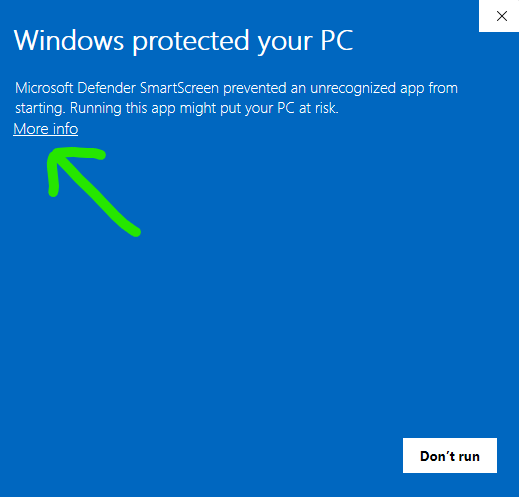
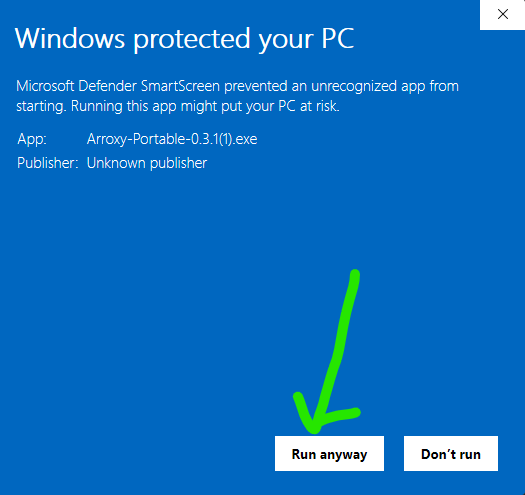
SmartScreen SmartScreen dialog after expanding More info, showing the
1. Click **More info**. 2. Click **Run anyway**. #### If Windows Defender flags or removes the file Defender heuristics sometimes flag unsigned NSIS installers and Electron portables as suspicious. If Defender quarantines `Arroxy-win-x64-Setup.exe` or `Arroxy-win-x64-Portable.exe`, restore it from **Windows Security → Virus & threat protection → Protection history**, then add the Arroxy executable as an allowed item under **Manage settings → Add or remove exclusions**. As with SmartScreen, the trigger is the missing publisher signature, not detected malware. > Only download Arroxy from the official GitHub Releases page. If you got the file from another website or someone sent it to you, delete it and download a fresh copy from the official source. The source code is public, so you can inspect it or build Arroxy yourself if you prefer. ### macOS first launch Arroxy is not yet code-signed for macOS, so Gatekeeper can show the scary *"Arroxy.app is damaged and can't be opened"* dialog after you install it from the DMG. That message means macOS quarantined an unsigned app; it does not mean the app files are actually damaged. On current macOS, the reliable fix is Terminal:
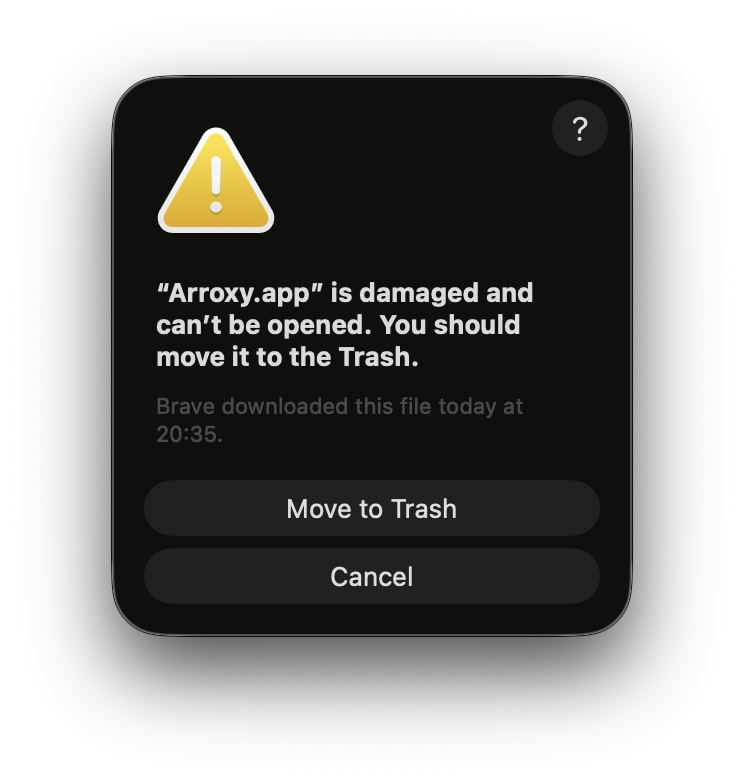
macOS dialog saying Arroxy.app is damaged and cannot be opened
1. Drag `Arroxy.app` from the mounted DMG into `/Applications`. 2. Open Terminal and run these two commands: ```bash sudo xattr -dr com.apple.quarantine /Applications/Arroxy.app open /Applications/Arroxy.app ``` The first command removes the quarantine attribute from your installed copy of Arroxy. The second launches the app. `sudo` may ask for your Mac password; Terminal will not show characters while you type it. **Apple Silicon vs Intel:** on an M-series Mac (M1 / M2 / M3 / M4), download the `arm64` DMG. On Intel Macs, download the `x64` DMG. Running the wrong build still works via Rosetta but is noticeably slower. > macOS builds are produced via CI on Apple Silicon and Intel runners. If you hit issues, please [open an issue](../../issues) — feedback from macOS users actively shapes the macOS testing cycle. ### Why you may see a warning Arroxy is open-source and MIT-licensed. The Windows and macOS builds are **not code-signed** — Apple Developer ID and Windows EV code-signing certificates each cost hundreds of dollars per year, which an indie project pays out of pocket. Without those signatures, Windows SmartScreen and macOS Gatekeeper will warn you on first launch. The warnings mean *your OS doesn't recognize the publisher* — they don't mean Arroxy is malware. Three ways to verify Arroxy yourself, in increasing rigor: - **Read the source.** Every line is on [GitHub](https://github.com/antonio-orionus/Arroxy) and you can [build it from source](#tech). - **Check the SHA256.** Match your file against the published [`SHA256SUMS`](https://github.com/antonio-orionus/Arroxy/releases/latest/download/SHA256SUMS) — see [Verify your download](#verify) below. - **Run a third-party scan.** Upload the file to [VirusTotal](https://www.virustotal.com). ### Linux first launch AppImages run directly — no installation. You just need to mark the file as executable. **File manager:** right-click the `.AppImage` → **Properties** → **Permissions** → enable **Allow executing file as program**, then double-click. **Terminal:** ```bash chmod +x Arroxy-linux-x64.AppImage ./Arroxy-linux-x64.AppImage ``` If launch still fails, you may be missing FUSE: ```bash # Ubuntu / Debian sudo apt install -y libfuse2 # Fedora sudo dnf install -y fuse-libs # Arch sudo pacman -S fuse2 ``` **Optional desktop integration:** install [AppImageLauncher](https://github.com/TheAssassin/AppImageLauncher) once, and any AppImage you double-click gets registered into your launcher menu automatically — no manual `.desktop` file needed. **Flatpak (sandboxed alternative):** download `Arroxy-linux-x64.flatpak` from the same release page. ```bash flatpak install --user ./Arroxy-linux-x64.flatpak flatpak run io.github.antonio_orionus.Arroxy ```
Verify your download (SHA256) Every release publishes a `SHA256SUMS` file alongside the binaries. To check that your download wasn't corrupted or tampered with in transit, hash your file locally and match the line in `SHA256SUMS`. Open the latest release page → **Assets** → download `SHA256SUMS`. **Windows (PowerShell or Command Prompt):** ```powershell certutil -hashfile Arroxy-win-x64-Setup.exe SHA256 ``` **macOS (Terminal):** ```bash shasum -a 256 Arroxy-mac-arm64.dmg ``` **Linux (Terminal):** ```bash sha256sum Arroxy-linux-x64.AppImage ``` Want a third-party malware scan? Upload the file at [VirusTotal](https://www.virustotal.com). A handful of generic-heuristic flags from minor engines is normal for unsigned Electron apps; widespread detections from major engines would be a real concern.
Windows: Installer vs Portable | | NSIS Installer | Portable `.exe` | | ------------- | :----------------------: | :---------------------: | | Installation required | Yes | No — run from anywhere | | Auto-updates | ✅ in-app | ❌ manual download | | Startup speed | ✅ faster | ⚠️ slower cold start | | Adds to Start Menu | ✅ | ❌ | | Easy uninstall | ✅ | ❌ delete the file | **Recommendation:** use the NSIS installer for auto-updates and faster startup. Use the portable `.exe` for a no-install, no-registry option.
--- ## Why Arroxy A side-by-side comparison with the most common alternatives: | | Arroxy | 4K Video Downloader | JDownloader | Y2Mate / online converters | Browser extensions | | ---------- | :----: | :-----------------: | :---------: | :------------------------: | :----------------: | | Free, no premium tier | ✅ | ⚠️ | ✅ | ⚠️ | ⚠️ | | Open source | ✅ | ❌ | ❌ | ❌ | ⚠️ | | Local processing only | ✅ | ✅ | ✅ | ❌ | ✅ | | No login or cookie export | ✅ | ⚠️ | ⚠️ | ⚠️ | ✅ | | No usage caps | ✅ | ⚠️ | ✅ | 🚫 | ⚠️ | | Cross-platform desktop app | ✅ | ✅ | ✅ | N/A | ❌ | | Subtitles + SponsorBlock | ✅ | ⚠️ | ❌ | ❌ | ❌ | Arroxy is built for one thing: paste a URL, get a clean local file. No accounts, no upsells, no data collection. --- ## Features ### Quality & formats - Up to **4K UHD (2160p)**, 1440p, 1080p, 720p, 480p, 360p - **High frame rate** preserved as-is — 60 fps, 120 fps, HDR - **Audio** — export audio-only as MP3, M4A/AAC, Opus, or WAV. In interactive downloads, pick the source's native surround/Dolby tracks (AC-3, E-AC-3, 5.1, DRC) when available, or set a global **Prefer surround / Dolby** default - Quick presets: *Best quality* · *Balanced* · *Small file* ### Privacy & control - 100% local processing — downloads go straight from YouTube to your disk - **Open source** — every line auditable, MIT licensed - Files saved straight to the folder you choose ### Workflow - **Flexible start modes** — choose a guided single download, playlist/channel picker, bulk URL paste, or Quick Download with saved defaults - **Central download queue** — every single, playlist, bulk, or quick job lands in one place for progress, pause, resume, cancel, retry, and priority control - **Clipboard watch** — copy a YouTube link and Arroxy auto-fills the URL when you refocus the app (toggle in Advanced settings) - **Auto-clean URLs** — strips tracking params (`si`, `pp`, `utm_*`, `fbclid`, `gclid`) and unwraps `youtube.com/redirect` links - **Tray mode** — closing the window keeps downloads running in the background - **23 languages** — auto-detects system locale, switchable any time - **Playlist sync** — re-scan a playlist against a local folder to skip already-downloaded videos; generates an `.m3u` playlist file updated as each video downloads - **Speed and pacing controls** — cap download bandwidth, add request delays, and tune fragment threads with presets (*Off · Balanced · Careful · Custom*) - **Filename templates** — name downloads your way with `{title}`, `{uploader}`, `{id}`, `{date}`, `{resolution}`, and `{playlist_index}`, globally or per download profile ### Subtitles & post-processing - **Subtitles** in SRT, VTT, or ASS — manual or auto-generated, in any available language - Save next to the video, embed into `.mkv`, or organize into a `Subtitles/` subfolder - **SponsorBlock** — skip or chapter-mark sponsors, intros, outros, self-promos - **Embedded metadata** — title, upload date, channel, description, thumbnail, and chapter markers written into the file ### YouTube + 2000 sites - **YouTube, in full** — Videos, Shorts, Channels, Playlists, YouTube Music, and Podcasts handled as first-class sources - **2000+ other sites** via yt-dlp — Vimeo, Twitch, Twitter/X, TikTok, SoundCloud, Bandcamp, Bilibili, BBC iPlayer, archive.org, and many more - **Audio-only and subtitles** work across every supported site, not just YouTube - If a site changes, yt-dlp ships fixes weekly and Arroxy auto-updates the binary on launch
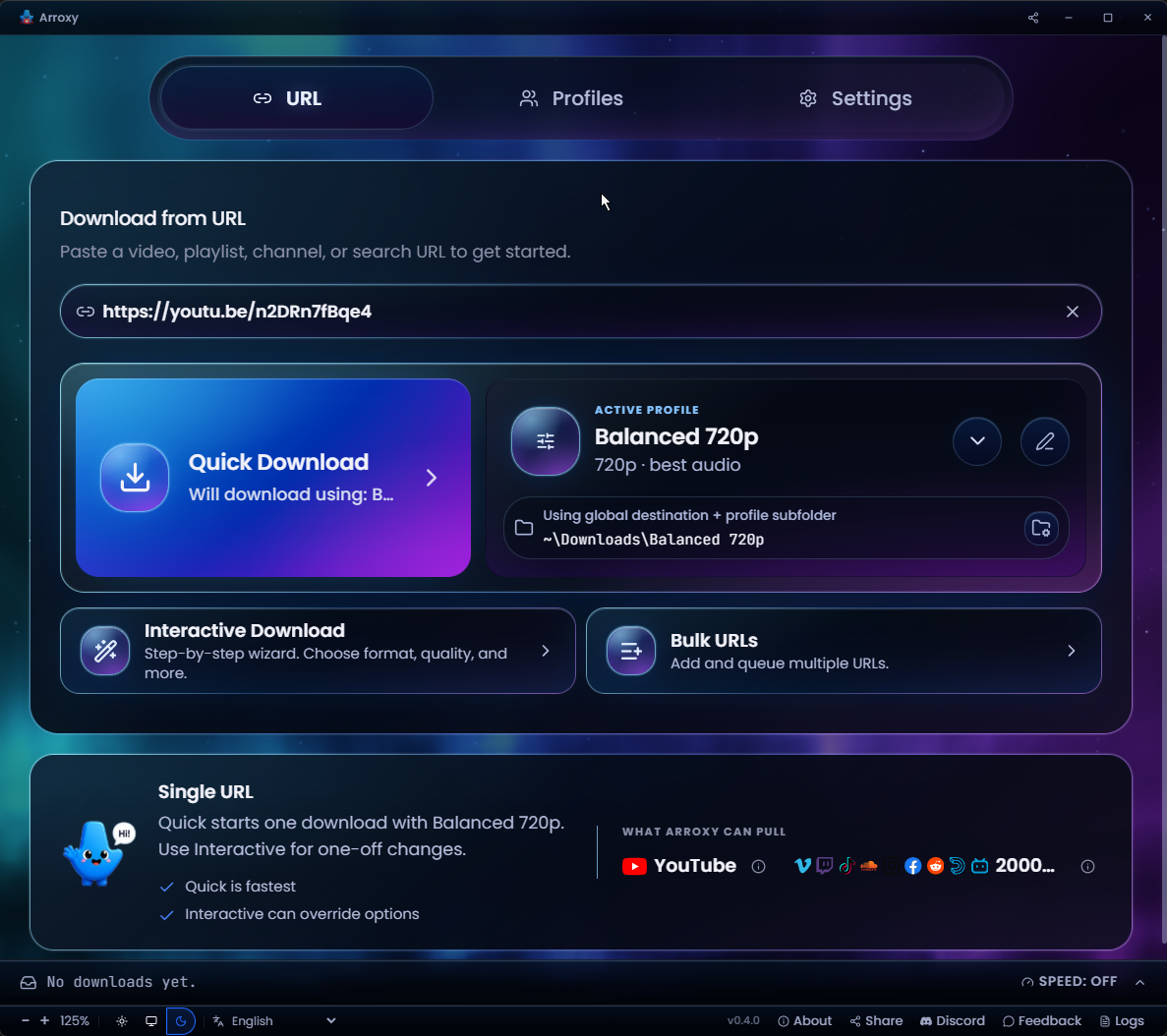
Arroxy — Quick Download home
Quick Download home
Paste a URL and pull it instantly with your active profile
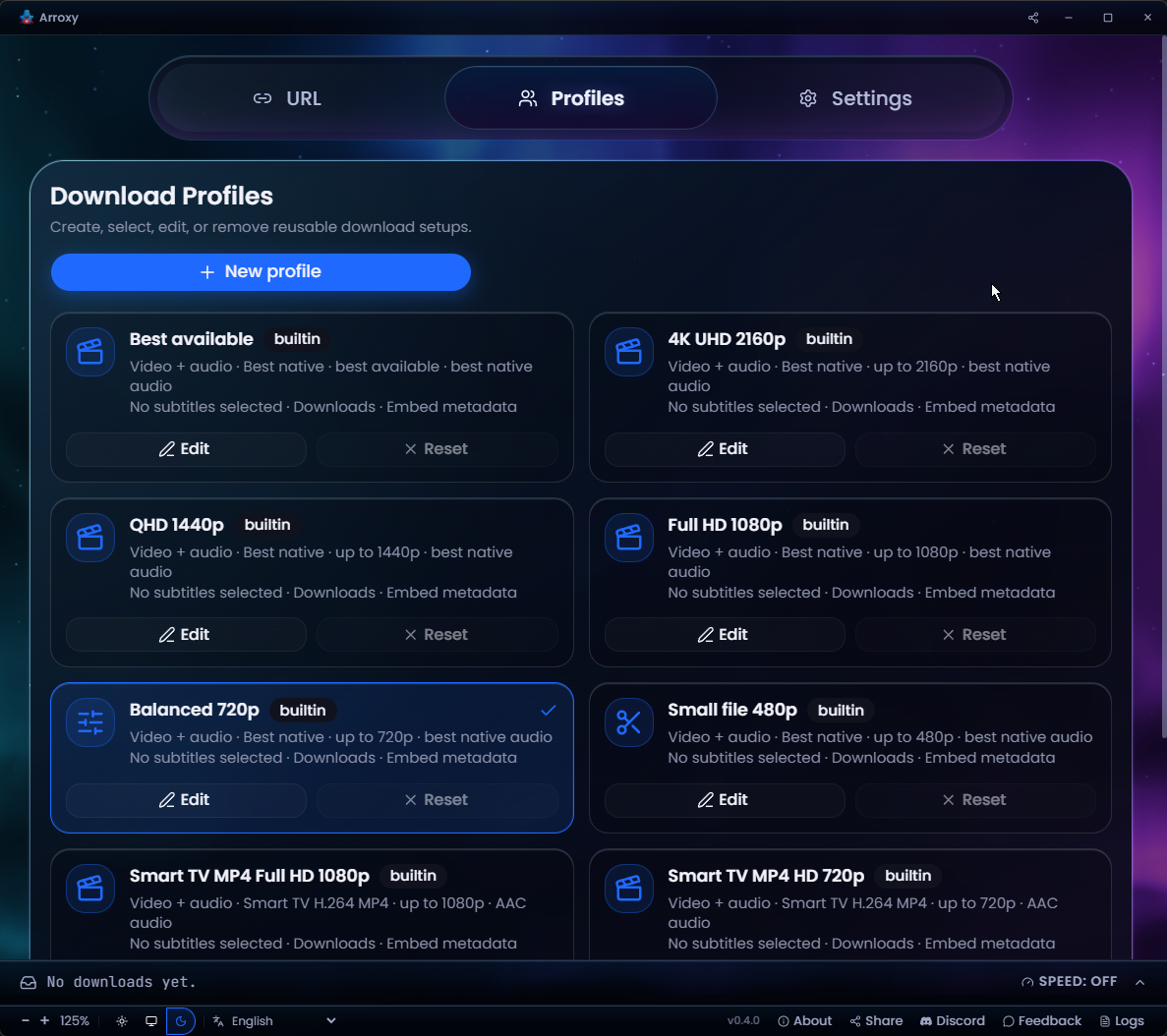
Arroxy — Download profiles
Reusable download profiles
Save format, quality, and output presets — reuse per download
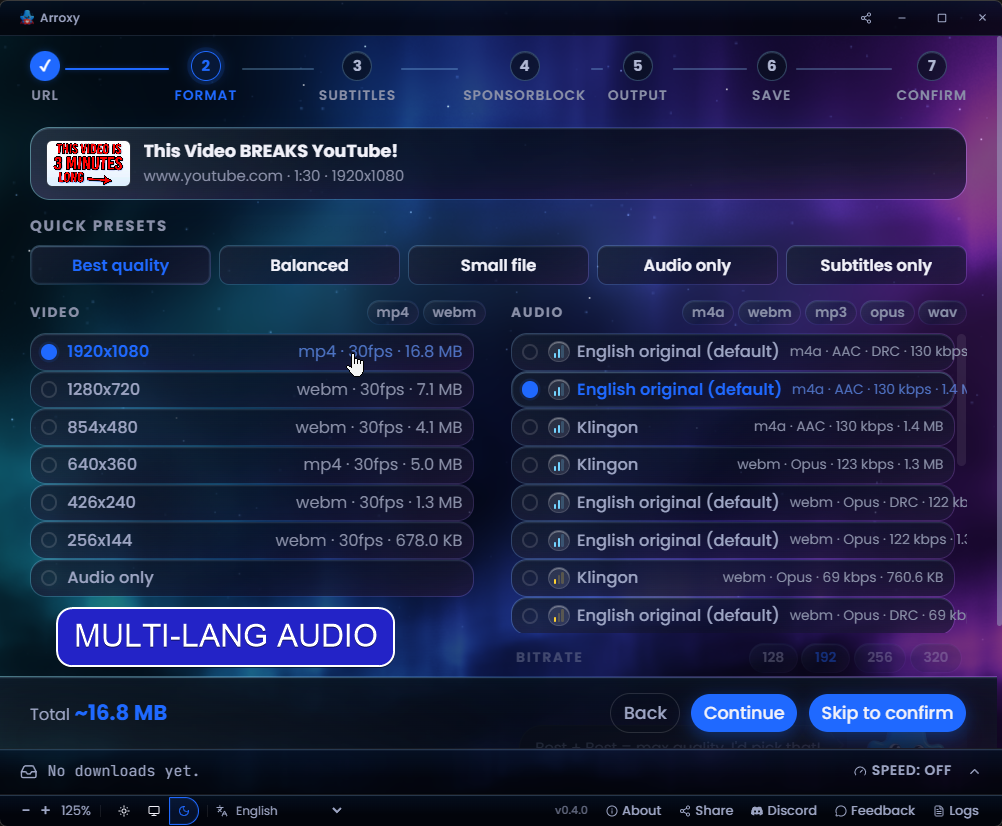
Arroxy — Multi-language audio
Multi-language audio tracks
Pick the exact audio language a video ships
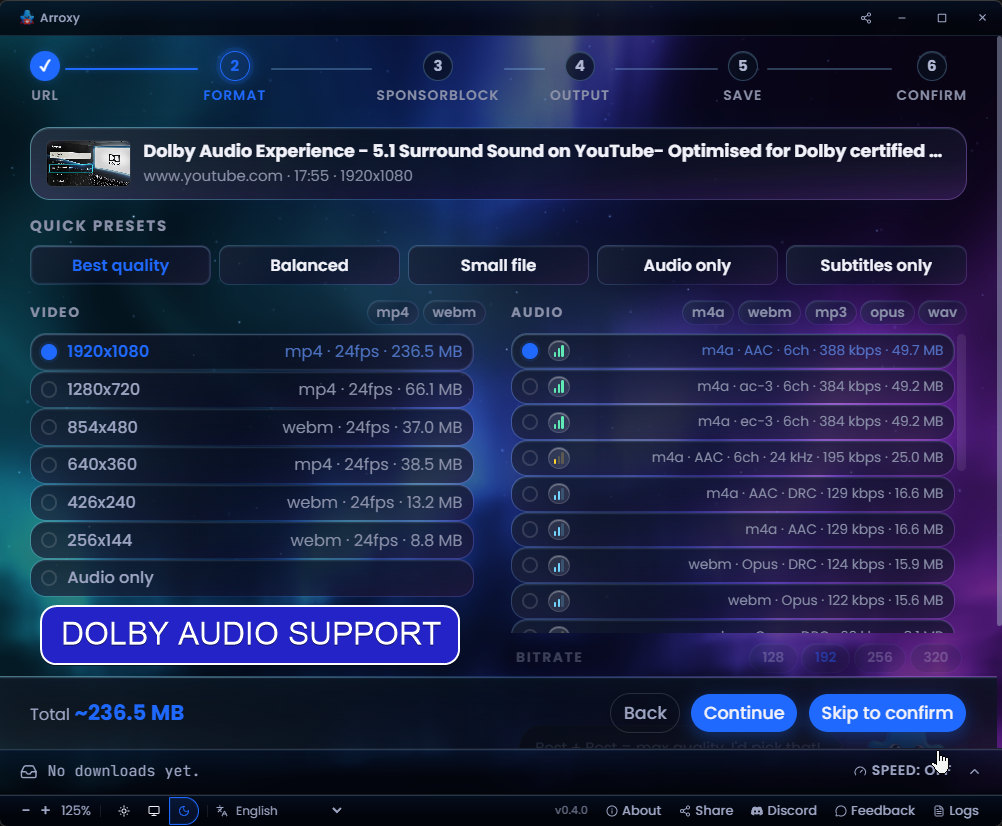
Arroxy — Surround / Dolby audio
Surround / Dolby audio
5.1 and Dolby tracks detected and preserved
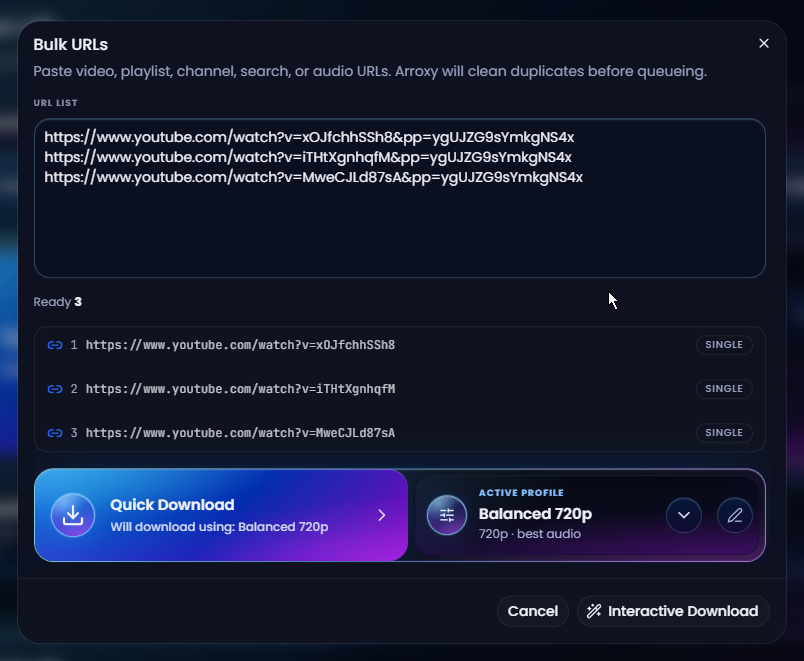
Arroxy — Bulk URL mode
Bulk URL mode
Paste a list, auto-dedupe, queue them all at once
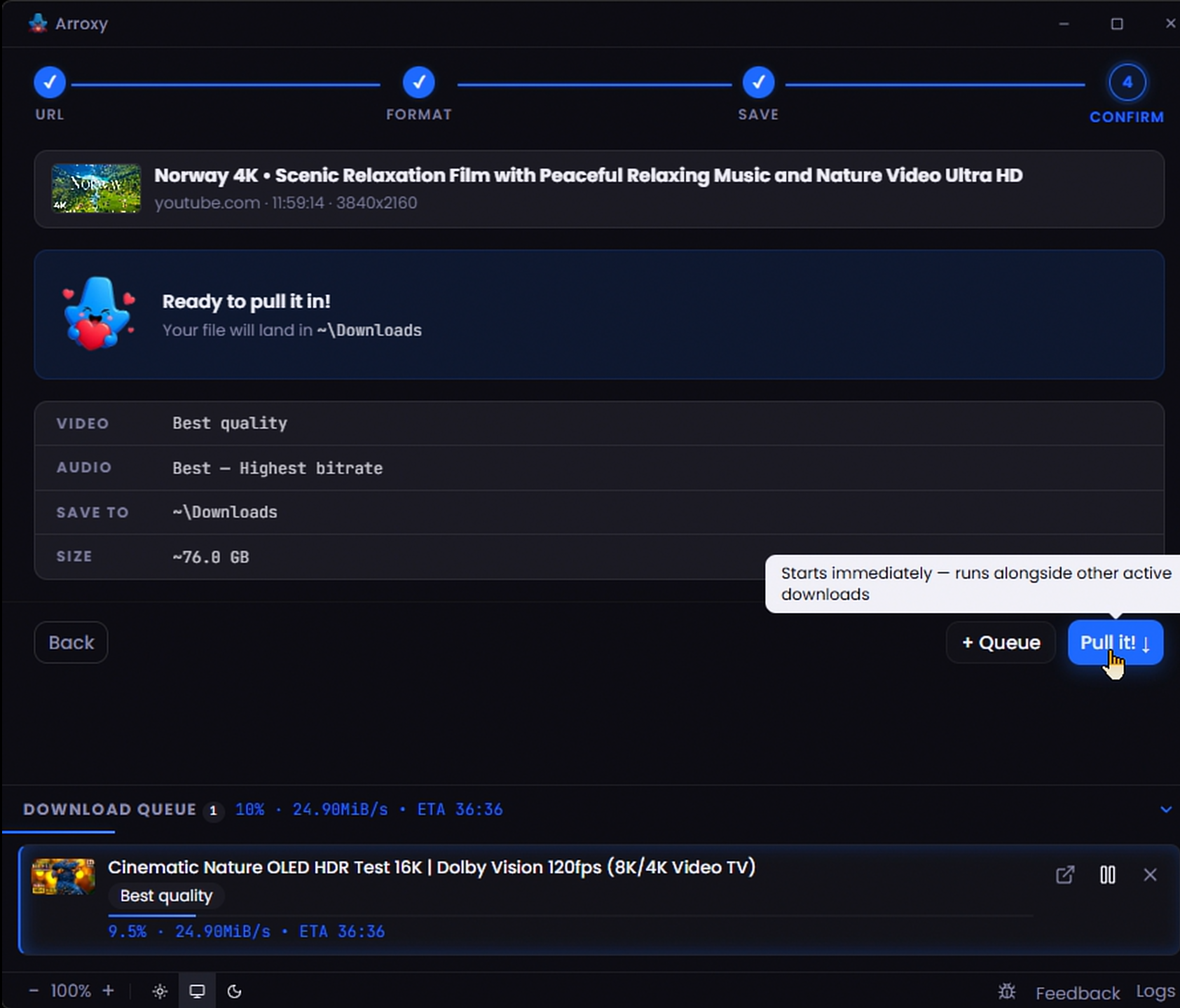
Arroxy — Parallel download queue
Parallel download queue
Several downloads at once with live progress
--- ## Privacy Downloads are fetched directly via [yt-dlp](https://github.com/yt-dlp/yt-dlp) from YouTube to the folder you pick — nothing routed through a third-party server. Watch history, download history, URLs, and file contents stay on your device. Arroxy sends anonymous, aggregate telemetry via [OpenPanel](https://openpanel.dev) — just enough for an indie project to understand launches, OS, app versions, and crashes. No URLs, video titles, file paths, account info, fingerprinting, or personal data. The per-install ID is random and not tied to your identity. You can opt out in Settings. --- ## FAQ **Is it really free?** Yes — MIT licensed, no premium tier, no feature gating. **What video qualities can I download?** Anything YouTube serves: 4K UHD (2160p), 1440p, 1080p, 720p, 480p, 360p, plus audio-only. 60 fps, 120 fps, and HDR streams are preserved as-is. **Can I extract just the audio as MP3?** Yes. Pick *audio-only* in the format menu and choose MP3, M4A/AAC, Opus, or WAV. **Do I need a YouTube account or cookies?** By default, no — Arroxy works without a YouTube account, login, or cookie export. Optional cookie support is available in Advanced settings (Cookies source: file or browser) for content that requires authentication, such as age-restricted or members-only videos. It is off by default. If you enable it, yt-dlp's wiki notes that [cookie-based automation can flag a Google account](https://github.com/yt-dlp/yt-dlp/wiki/Extractors#exporting-youtube-cookies); a throwaway account is the safer choice in that case. **Will it keep working when YouTube changes something?** yt-dlp is updated automatically on launch, and Arroxy ships fixes promptly when YouTube changes something. If you ever do hit an issue, optional cookie support is available in Advanced settings as a fallback. **What languages is Arroxy available in?** 23 languages, out of the box: Afaan Oromoo · Bahasa Indonesia · Deutsch · English · Español · Français · Kiswahili · O'zbekcha · Tiếng Việt · Türkçe · አማርኛ · العربية · اردو · پښتو · বাংলা · हिन्दी · မြန်မာဘာသာ · Ελληνικά · Русский · Српски · Українська · 中文 · 日本語. Arroxy auto-detects your operating system's language on first launch and you can switch at any time from the language picker in the toolbar. Runtime locale JSON lives in src/shared/i18n/locales/, and translator-facing PO catalogs live in i18n/locales/ — open a PR on GitHub to contribute. **Do I need to install anything else?** No. yt-dlp is downloaded automatically on first launch and cached on your machine; ffmpeg and ffprobe ship with the app. After that, no extra setup is needed. **Can I download playlists or whole channels?** Yes — both. Paste a playlist URL or a channel URL (e.g. `youtube.com/@handle`, `/channel/UC…`, `/c/Name`, `/user/Old`); choose how many entries to scan, then queue the whole list or pick specific videos. Date-range filters are coming soon. **macOS says "the app is damaged" — what do I do?** That's macOS Gatekeeper blocking an unsigned app, not actual damage. See [macOS first launch](#macos-first-launch) for the Terminal commands that clear quarantine and launch Arroxy. **Is downloading YouTube videos legal?** For personal, private use it is generally accepted in most jurisdictions. You are responsible for complying with YouTube's [Terms of Service](https://www.youtube.com/t/terms) and your local copyright laws. --- ## Roadmap Still planned — roughly in priority order: | Feature | Description | | ---------------- | ---------------- | | **Playlist & channel filters** | Date-range filters when enumerating a playlist or channel | | **YouTube audio track preferences** | Set an app-wide spoken-language track preference, with per-profile overrides when YouTube offers multiple audio tracks | | **In-app browser sign-in** | Open browser windows inside Arroxy so you can sign in and use site cookies without exporting them manually | | **One-click video download** | Start a video download in one click from a detected or pasted URL using your active profile | | **Stronger retry recovery** | A new retry path for downloads interrupted by unreliable or problematic internet connections | | **Full download manager drawer** | Turn the queue drawer into a fuller manager, including changing destination folders for queued items | | **Scheduled downloads** | Start a queue at a set time (overnight runs) | | **Clip trimming** | Download only a segment by start/end time | Have a feature in mind? [Open a request](../../issues) — community input shapes priority. --- ## Built with
Stack - **Electron** — cross-platform desktop shell - **React 19** + **TypeScript** — UI - **Tailwind CSS v4** — styling - **Zustand** — state management - **yt-dlp** + **ffmpeg** — download and mux engine (yt-dlp fetched at runtime; ffmpeg/ffprobe bundled at build time) - **Vite** + **electron-vite** — build tooling - **Vitest** + **Playwright** — unit and end-to-end tests
Build from source ### Prerequisites — all platforms | Tool | Version | Install | | ------- | ------- | ------- | | Git | any | [git-scm.com](https://git-scm.com) | | Node.js | 24.16.0 | `mise install` or `.node-version` | | Bun | 1.2.23 | `mise install` or `package.json` `packageManager` | Recommended: install `mise`, then run `mise install` in the checkout. Without mise, manually activate Node.js from `.node-version` and Bun from `package.json` before `bun run bootstrap`. ### Windows ```powershell powershell -c "irm bun.sh/install.ps1 | iex" ``` Visual Studio Build Tools and Python may be needed for native rebuilds. ### macOS ```bash brew install mise xcode-select --install ``` After cloning, run `mise trust && mise install` from the checkout. If your shell already uses `fnm`, `nvm`, or a Homebrew Bun, activate mise in `~/.zshrc` so Arroxy gets Node.js 24.16.0 and Bun 1.2.23: ```bash printf ' # mise if command -v mise >/dev/null 2>&1; then eval "$(mise activate zsh)" fi ' >> ~/.zshrc exec zsh ``` ### Linux (Ubuntu / Debian) ```bash curl -fsSL https://bun.sh/install | bash # Build + Electron runtime deps sudo apt install -y build-essential python3 tar libgtk-3-0 libnss3 libasound2t64 # E2E tests only (Electron needs a display) sudo apt install -y xvfb ``` ### Clone & run ```bash git clone https://github.com/antonio-orionus/Arroxy cd Arroxy mise trust mise install # recommended; skip if you manually activated the pinned tools bun run bootstrap bun run doctor bun run dev # Electron app against the Vite renderer ``` ### Build a distributable ```bash bun run build # typecheck + compile bun run dist # package for current OS bun run dist:win # package Windows targets when run on a supported host ``` > `bun run bootstrap` installs dependencies, rebuilds Electron app dependencies, verifies Electron, prepares embedded ffmpeg/ffprobe for development, and installs Playwright Chromium. yt-dlp is managed at runtime in your app data folder; ffmpeg and ffprobe are bundled with every Arroxy release.
--- ## Troubleshooting ### App won't open / no window appears The Arroxy process starts but no window shows up. Most often this is a GPU driver hang during startup. Try, in order: **1. Check the log.** It records startup, GPU info, and any crash. Path: | Platform | Path | | -------- | -------------------------------- | | Windows | `%APPDATA%\Arroxy\logs\main.log` | | macOS | `~/Library/Logs/Arroxy/main.log` | | Linux | `~/.config/Arroxy/logs/main.log` | **2. Launch with hardware acceleration disabled.** Open a terminal / Command Prompt and run the executable with a flag: ```bash # Windows (Portable) — PowerShell, run from the folder containing the exe .\Arroxy-win-x64-Portable.exe --disable-gpu # Windows (Portable) — Command Prompt (cmd.exe), from the same folder Arroxy-win-x64-Portable.exe --disable-gpu # Windows (Installed) — works in both PowerShell and cmd.exe "%LOCALAPPDATA%\Programs\Arroxy\Arroxy.exe" --disable-gpu # macOS /Applications/Arroxy.app/Contents/MacOS/Arroxy --disable-gpu # Linux (AppImage) ./Arroxy-linux-x64.AppImage --disable-gpu ``` If that works, the GPU/driver is the cause. Make the change permanent (next step). **3. Persist the flag via `argv.json`.** Create the file at: | Platform | Path | | -------- | ------------------------------------------------ | | Windows | `%APPDATA%\Arroxy\argv.json` | | macOS | `~/Library/Application Support/Arroxy/argv.json` | | Linux | `~/.config/Arroxy/argv.json` | With contents: ```json { "disable-hardware-acceleration": true } ``` Arroxy reads this before opening any window, so it works even when the window never appeared. **4. Other flags worth trying** (combine if needed): `--disable-software-rasterizer`, `--disable-gpu-sandbox`, `--in-process-gpu`. **5. Stale window position.** If the window may be opening off-screen (multi-monitor change since last run), delete `\window-state.json` and relaunch. **6. Still stuck?** Open an issue with: OS version, the contents of `main.log`, and any output from running with `--enable-logging --v=1`. --- ## Terms of use Arroxy is a tool for personal, private use only. You are solely responsible for ensuring your downloads comply with YouTube's [Terms of Service](https://www.youtube.com/t/terms) and the copyright laws of your jurisdiction. Do not use Arroxy to download, reproduce, or distribute content you do not have the right to use. The developers are not liable for any misuse. ## Star History Star History Chart
MIT License · Made with care by @OrionusAI