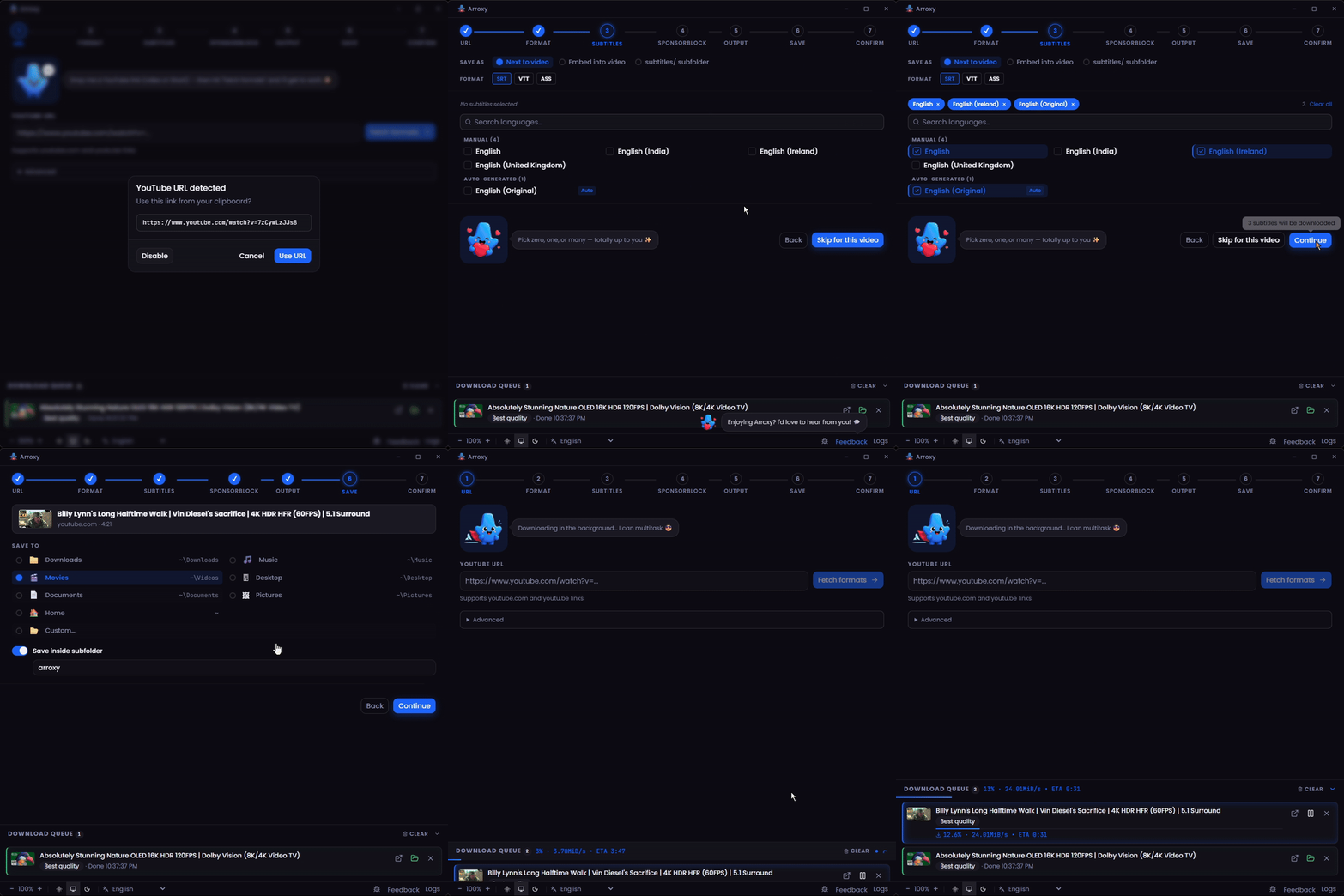
Arroxy 吉祥物 # Arroxy — 免费开源 YouTube(+ 2000 个网站)下载器,支持 Windows、macOS 和 Linux **4K · 1080p60 · HDR · Surround/Dolby audio · Playlists · MP3 · Shorts · Music · Channels · Subtitles · SponsorBlock · +2000 sites** **阅读语言:** [Afaan Oromoo](README.om.md) · [Deutsch](README.de.md) · [English](README.md) · [Español](README.es.md) · [Français](README.fr.md) · [Kiswahili](README.sw.md) · [O'zbekcha](README.uz.md) · [Tiếng Việt](README.vi.md) · [አማርኛ](README.am.md) · [العربية](README.ar.md) · [اردو](README.ur.md) · [پښتو](README.ps.md) · [বাংলা](README.bn.md) · [हिन्दी](README.hi.md) · [မြန်မာဘာသာ](README.my.md) · [Ελληνικά](README.el.md) · [Русский](README.ru.md) · [Српски](README.sr.md) · [Українська](README.uk.md) · **中文** · [日本語](README.ja.md) [![发布](https://img.shields.io/github/v/release/antonio-orionus/Arroxy?label=Release&color=blueviolet)](https://github.com/antonio-orionus/Arroxy/releases/latest) [![构建](https://img.shields.io/github/actions/workflow/status/antonio-orionus/Arroxy/release.yml?label=Build)](https://github.com/antonio-orionus/Arroxy/actions/workflows/release.yml) [![官网](https://img.shields.io/badge/website-arroxy.orionus.dev-blueviolet)](https://arroxy.orionus.dev/) ![许可证](https://img.shields.io/badge/license-MIT-green) ![平台](https://img.shields.io/badge/platform-cross--platform-1f2937?logo=github&logoColor=white) ![语言](https://img.shields.io/badge/i18n-21_languages-blue) 从 **YouTube 和 2000+ 个支持的网站**下载视频、Shorts、音乐、频道、播客或音轨 — 最高 4K HDR 60 fps,或导出为 MP3 / AAC / Opus。在 Windows、macOS 和 Linux 本地运行。**无广告、无冗余、无追加销售。** [**↓ 下载最新版本**](#install)  ·  [**官网**](https://arroxy.orionus.dev/)  ·  [Windows](#install) · [macOS](#install) · [Linux](#install) [![加入 Discord 社群](https://img.shields.io/badge/%E5%8A%A0%E5%85%A5%20Discord%20%E7%A4%BE%E7%BE%A4-5865F2?style=for-the-badge&logo=discord&logoColor=white)](https://discord.gg/ueGvXwQH8y) Arroxy 演示 Arroxy — Quick Download home 如果 Arroxy 帮你节省了时间,点个 ⭐ 让更多人发现它。


> **What is Arroxy?** Arroxy is a free, open-source desktop GUI that downloads videos, audio, playlists, and subtitles from YouTube and 2000+ other [yt-dlp](https://github.com/yt-dlp/yt-dlp)-supported sites. It runs on Windows 10/11, macOS 11+ (Intel + Apple Silicon), and Linux (AppImage, Flatpak, tar.gz). MIT licensed. No account, no ads, no usage limits. Distributed via [Winget](https://winget.run/pkg/AntonioOrionus/Arroxy), [Scoop](https://github.com/antonio-orionus/scoop-bucket), [Homebrew Cask](https://github.com/antonio-orionus/homebrew-arroxy), Flatpak, AppImage, and direct download. > > _Last updated: 2026-06-17._ > 🌐 这是 AI 辅助翻译。[英文 README](README.md) 是真实来源。发现错误?欢迎 [提交 PR](../../pulls)。 --- ## 目录 - [下载](#install) - [为什么选 Arroxy](#why) - [功能特性](#features) - [隐私](#privacy) - [常见问题](#faq) - [路线图](#roadmap) - [技术栈](#tech) --- ## 下载 | 平台 | 格式 | | ------------------- | ------------------------------------------------------------------------------------------------------------------------------------------------------------------------------------------------------------------------------------------------------------------------------------------------------------------------------------------------------------------------------------------------------------------------------------------------------------------------------------------------------------------------------------------------------------------------------------------------------------------------------------------------------- | | Windows | [![Windows Setup](https://img.shields.io/badge/Windows-Setup-0078D4?style=for-the-badge&logo=windows&logoColor=white)](https://github.com/antonio-orionus/Arroxy/releases/latest/download/Arroxy-win-x64-Setup.exe) [![Windows Portable](https://img.shields.io/badge/Windows-Portable-0078D4?style=for-the-badge&logo=windows&logoColor=white)](https://github.com/antonio-orionus/Arroxy/releases/latest/download/Arroxy-win-x64-Portable.exe) | | macOS | [![macOS Apple Silicon](https://img.shields.io/badge/macOS-Apple%20Silicon-000000?style=for-the-badge&logo=apple&logoColor=white)](https://github.com/antonio-orionus/Arroxy/releases/latest/download/Arroxy-mac-arm64.dmg) [![macOS Intel](https://img.shields.io/badge/macOS-Intel-000000?style=for-the-badge&logo=apple&logoColor=white)](https://github.com/antonio-orionus/Arroxy/releases/latest/download/Arroxy-mac-x64.dmg) | | Linux | [![Linux AppImage](https://img.shields.io/badge/Linux-AppImage-FCC624?style=for-the-badge&logo=linux&logoColor=black)](https://github.com/antonio-orionus/Arroxy/releases/latest/download/Arroxy-linux-x64.AppImage) [![Linux Flatpak](https://img.shields.io/badge/Linux-Flatpak-4A90D9?style=for-the-badge&logo=flathub&logoColor=white)](https://github.com/antonio-orionus/Arroxy/releases/latest/download/Arroxy-linux-x64.flatpak) [![Linux tar.gz](https://img.shields.io/badge/Linux-tar.gz-6B7280?style=for-the-badge&logo=linux&logoColor=white)](https://github.com/antonio-orionus/Arroxy/releases/latest/download/Arroxy-linux-x64.tar.gz) | | Verify | [![SHA256 Checksums](https://img.shields.io/badge/SHA256-Checksums-4B5563?style=for-the-badge&logo=github&logoColor=white)](https://github.com/antonio-orionus/Arroxy/releases/latest/download/SHA256SUMS) | [**获取最新版本 →**](https://github.com/antonio-orionus/Arroxy/releases/latest) ### 为什么可能会看到警告 Arroxy 是开源软件,采用 MIT 许可证。Windows 和 macOS 版本**未经代码签名** — Apple Developer ID 和 Windows EV 代码签名证书每年各需数百美元,对于独立项目来说完全自掏腰包。没有这些签名,Windows SmartScreen 和 macOS Gatekeeper 在首次启动时会向你发出警告。这些警告的意思是*你的系统不认识该发布者* — 并不意味着 Arroxy 是恶意软件。 三种自行验证 Arroxy 的方式,按严格程度递增: - **查看源码。** 每一行都在 [GitHub](https://github.com/antonio-orionus/Arroxy) 上,你也可以[从源码构建](#tech)。 - **校验 SHA256。** 将你的文件与发布的 [`SHA256SUMS`](../../releases/latest) 对比 — 见下方[验证你的下载](#verify)。 - **运行第三方扫描。** 将文件上传至 [VirusTotal](https://www.virustotal.com)。 ### Windows 首次启动 首次启动时,您可能会看到 **«Windows protected your PC»** 或 **«Unknown publisher»**。这适用于 `Arroxy-win-x64-Setup.exe` 和 `Arroxy-win-x64-Portable.exe`。Arroxy 是免费开源软件,Windows 版本未使用付费证书签名,这正是 SmartScreen 标记它们的原因。这**不**代表 Arroxy 自动就是不安全的。要继续操作:
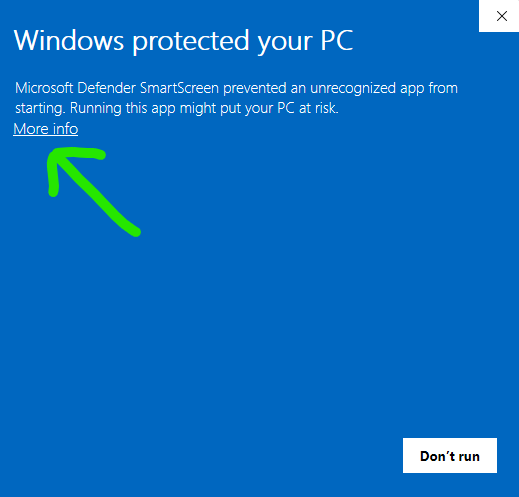
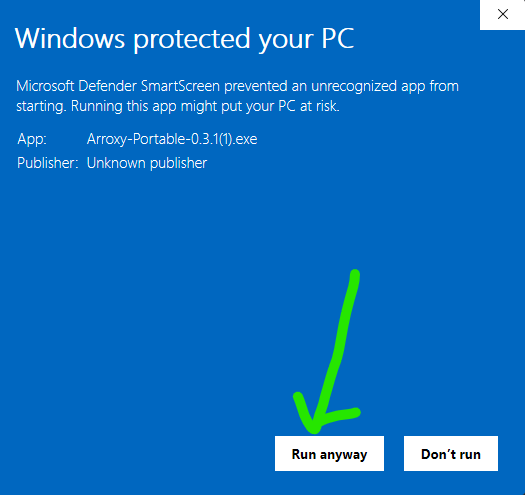
SmartScreen SmartScreen dialog after expanding More info, showing the
1. 点击 **More info**。 2. 点击 **Run anyway**。 #### 如果 Windows Defender 标记或删除了文件 Defender 启发式规则有时会将未签名的 NSIS 安装包和 Electron 便携版标记为可疑。如果 Defender 隔离了 `Arroxy-win-x64-Setup.exe` 或 `Arroxy-win-x64-Portable.exe`,请从 **Windows Security → Virus & threat protection → Protection history** 还原,然后在 **Manage settings → Add or remove exclusions** 中将 Arroxy 可执行文件添加为允许项。与 SmartScreen 一样,触发原因是缺少发布者签名,而非检测到恶意软件。 > 请仅从官方 GitHub Releases 页面下载 Arroxy。如果您从其他网站获取了该文件,或有人发送给您,请删除它并从官方来源重新下载。源代码是公开的,如果您愿意,可以自行审查或编译 Arroxy。 ### macOS 首次启动 Arroxy 尚未为 macOS 进行代码签名,因此 Gatekeeper 会阻止首次启动。具体的解除方式取决于你的 macOS 版本 — Sequoia 15 收紧了旧的右键 → 打开绕过方式。 #### macOS Sequoia 15 及更高版本(当前) 在 Sequoia 15 及更新版本中,右键 → 打开对许多被隔离的应用不再能绕过 Gatekeeper。请改用系统设置面板: 1. 将 `Arroxy.app` 从挂载的 DMG 拖入 `/Applications`。 2. 双击 Arroxy,出现阻止对话框 — 点击 **Done**(不要点击 *Move to Trash*)。 3. 打开 **System Settings → Privacy & Security**,滚动到 **Security** 部分。你会看到 *"Arroxy was blocked to protect your Mac"*(或类似提示)。 4. 点击 **Open Anyway**,用密码或 Touch ID 确认,然后从 `/Applications` 重新启动 Arroxy。 #### macOS Sonoma 14 及更早版本 1. 将 `Arroxy.app` 从挂载的 DMG 拖入 `/Applications`。 2. 在 `/Applications` 中右键(或 Control-单击)`Arroxy.app`,选择 **Open**。 3. 警告对话框现在有 **Open** 按钮 — 点击它并确认。Arroxy 正常打开,此后警告不再出现。 #### "App is damaged" 或持续的 Gatekeeper 拦截 — Terminal 修复方法 如果 macOS 显示 *"Arroxy is damaged and can't be opened"*,或以上步骤均无法解除拦截,原因是 DMG 上的隔离属性(某些浏览器和 macOS 自身的文件位置转换机制会设置该属性)。从已安装的应用中清除该属性: ```bash xattr -dr com.apple.quarantine /Applications/Arroxy.app ``` **Apple Silicon vs Intel:** 在搭载 M 系列芯片(M1 / M2 / M3 / M4)的 Mac 上,请下载 `arm64` DMG。在 Intel Mac 上,请下载 `x64` DMG。运行错误版本仍可通过 Rosetta 启动,但速度会明显变慢。 > macOS 构建通过 CI 在 Apple Silicon 和 Intel runner 上生成。如遇问题,请 [提交 issue](../../issues) — macOS 用户的反馈会直接影响 macOS 测试周期。 ### Linux 首次启动 AppImage 直接运行 — 无需安装。只需将文件标记为可执行。 **文件管理器:** 右键 `.AppImage` → **属性** → **权限** → 启用 **允许作为程序执行**,然后双击运行。 **终端:** ```bash chmod +x Arroxy-linux-x64.AppImage ./Arroxy-linux-x64.AppImage ``` 如果仍无法启动,可能缺少 FUSE: ```bash # Ubuntu / Debian sudo apt install -y libfuse2 # Fedora sudo dnf install -y fuse-libs # Arch sudo pacman -S fuse2 ``` **可选桌面集成:** 安装一次 [AppImageLauncher](https://github.com/TheAssassin/AppImageLauncher),此后双击任意 AppImage 即可自动注册到启动器菜单 — 无需手动创建 `.desktop` 文件。 **Flatpak(沙箱版):** 从同一发布页下载 `Arroxy-*.flatpak`。 ```bash flatpak install --user Arroxy-linux-x64.flatpak flatpak run io.github.antonio_orionus.Arroxy ```
验证你的下载(SHA256) 每次发布都会在二进制文件旁边附上 `SHA256SUMS` 文件。为确认下载文件在传输过程中未被损坏或篡改,请在本地对文件进行哈希计算,并与 `SHA256SUMS` 中对应的行进行比对。打开最新发布页 → **Assets** → 下载 `SHA256SUMS`。 **Windows (PowerShell or Command Prompt):** ```powershell certutil -hashfile Arroxy-win-x64-Setup.exe SHA256 ``` **macOS (Terminal):** ```bash shasum -a 256 Arroxy-mac-arm64.dmg ``` **Linux (Terminal):** ```bash sha256sum Arroxy-linux-x64.AppImage ``` 想要第三方恶意软件扫描?将文件上传到 [VirusTotal](https://www.virustotal.com)。小型引擎给出少量通用启发式标记对于未签名的 Electron 应用来说属于正常;主流引擎大面积检测才是真正值得警惕的情况。
通过包管理器安装 已经在用包管理器?可以跳过手动下载流程。 | 渠道 | 命令 | | ------------------ | ------------------------------------------------------------------------------------------------- | | Winget | `winget install AntonioOrionus.Arroxy` | | Scoop | `scoop bucket add arroxy https://github.com/antonio-orionus/scoop-bucket && scoop install arroxy` | | Homebrew | `brew tap antonio-orionus/arroxy && brew install --cask arroxy` | | Flatpak | `flatpak install --user Arroxy-linux-x64.flatpak` |
Windows:安装版 vs 便携版 | | NSIS 安装版 | 便携版 `.exe` | | ------------- | :----------------------: | :---------------------: | | 需要安装 | 是 | 否 — 任意位置直接运行 | | 自动更新 | ✅ 应用内更新 | ❌ 需手动下载 | | 启动速度 | ✅ 更快 | ⚠️ 冷启动较慢 | | 添加到开始菜单 | ✅ | ❌ | | 卸载方便 | ✅ | ❌ 删除文件即可 | **建议:** 使用 NSIS 安装版以获得自动更新和更快的启动速度。使用便携版 `.exe` 实现免安装、不写注册表。
--- ## 为什么选 Arroxy 与最常见的替代方案逐项对比: | | Arroxy | 4K Video Downloader | JDownloader | Y2Mate / online converters | Browser extensions | | ---------- | :----: | :-----------------: | :---------: | :------------------------: | :----------------: | | 免费,无付费版 | ✅ | ⚠️ | ✅ | ⚠️ | ⚠️ | | 开源 | ✅ | ❌ | ❌ | ❌ | ⚠️ | | 仅本地处理 | ✅ | ✅ | ✅ | ❌ | ✅ | | 无需登录或导出 Cookie | ✅ | ⚠️ | ⚠️ | ⚠️ | ✅ | | 无使用上限 | ✅ | ⚠️ | ✅ | 🚫 | ⚠️ | | 跨平台桌面应用 | ✅ | ✅ | ✅ | N/A | ❌ | | 字幕 + SponsorBlock | ✅ | ⚠️ | ❌ | ❌ | ❌ | Arroxy 只做一件事:粘贴链接,获取干净的本地文件。无账号、无追加销售、无数据收集。 --- ## 功能特性 ### 画质与格式 - 最高 **4K UHD(2160p)**、1440p、1080p、720p、480p、360p - **高帧率**原样保留 — 60 fps、120 fps、HDR - **音频** — 将仅音频导出为 MP3、M4A/AAC、Opus 或 WAV。在交互式下载中,可用时选择来源的原生环绕声/Dolby 音轨(AC-3、E-AC-3、5.1、DRC),或设置全局默认 **优先环绕声 / Dolby** - 快速预设:*最佳画质* · *平衡* · *小文件* ### 隐私与控制 - 100% 本地处理 — 下载直接从 YouTube 到你的硬盘 - 无登录、无 Cookie、无 Google 账号绑定 - 文件直接保存到你选择的文件夹 ### 工作流 - **灵活的开始模式** — 选择引导式单个下载、播放列表/频道选择器、批量粘贴 URL,或使用已保存默认值的 Quick Download - **中央下载队列** — 单个、播放列表、批量或快速任务都会进入同一个地方,用于查看进度、暂停、继续、取消、重试和控制优先级 - **剪贴板监控** — 复制 YouTube 链接后切回应用,Arroxy 自动填入 URL(可在高级设置中切换) - **自动清理 URL** — 剥除跟踪参数(`si`、`pp`、`utm_*`、`fbclid`、`gclid`)并解包 `youtube.com/redirect` 跳转链接 - **托盘模式** — 关闭窗口后下载在后台继续运行 - **21 种语言** — 自动检测系统语言,随时切换 - **播放列表同步** — 将播放列表与本地文件夹重新比对,跳过已下载的视频;生成一个 `.m3u` 播放列表文件,并在每个视频下载后更新 - **速度和节奏控制** — 限制下载带宽、添加请求延迟,并用预设调整分片线程(*关闭 · 平衡 · 谨慎 · 自定义*) ### 字幕与后处理 - **字幕**以 SRT、VTT 或 ASS 格式下载 — 手动或自动生成,支持任意可用语言 - 保存到视频旁边、嵌入 `.mkv`,或整理到 `Subtitles/` 子文件夹 - **SponsorBlock** — 跳过或章节标记赞助商、片头、片尾、自我推广片段 - **嵌入元数据** — 标题、上传日期、频道、描述、封面图和章节标记写入文件 ### YouTube + 2000 个网站 - **YouTube,全面支持** — 视频、Shorts、频道、播放列表、YouTube Music 和播客作为一等来源处理 - **通过 yt-dlp 支持 2000+ 个其他网站** — Vimeo、Twitch、Twitter/X、TikTok、SoundCloud、Bandcamp、Bilibili、BBC iPlayer、archive.org 等众多网站 - **仅音频和字幕**在所有支持的网站上均可使用,不限于 YouTube - 若某个网站发生变化,yt-dlp 每周发布修复,Arroxy 在启动时自动更新二进制文件
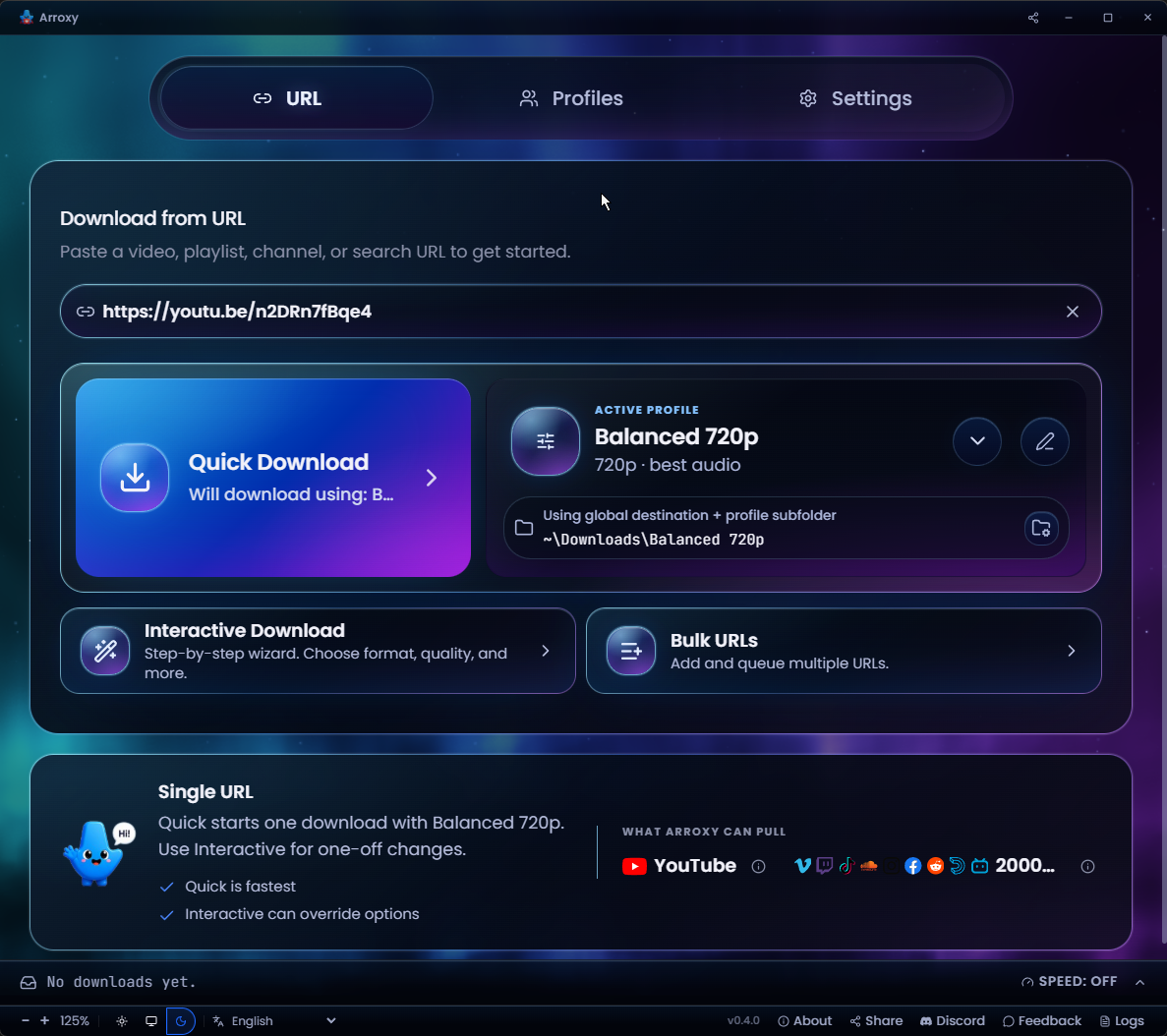
Arroxy — Quick Download home
快速下载主页
粘贴网址,用当前配置一键下载
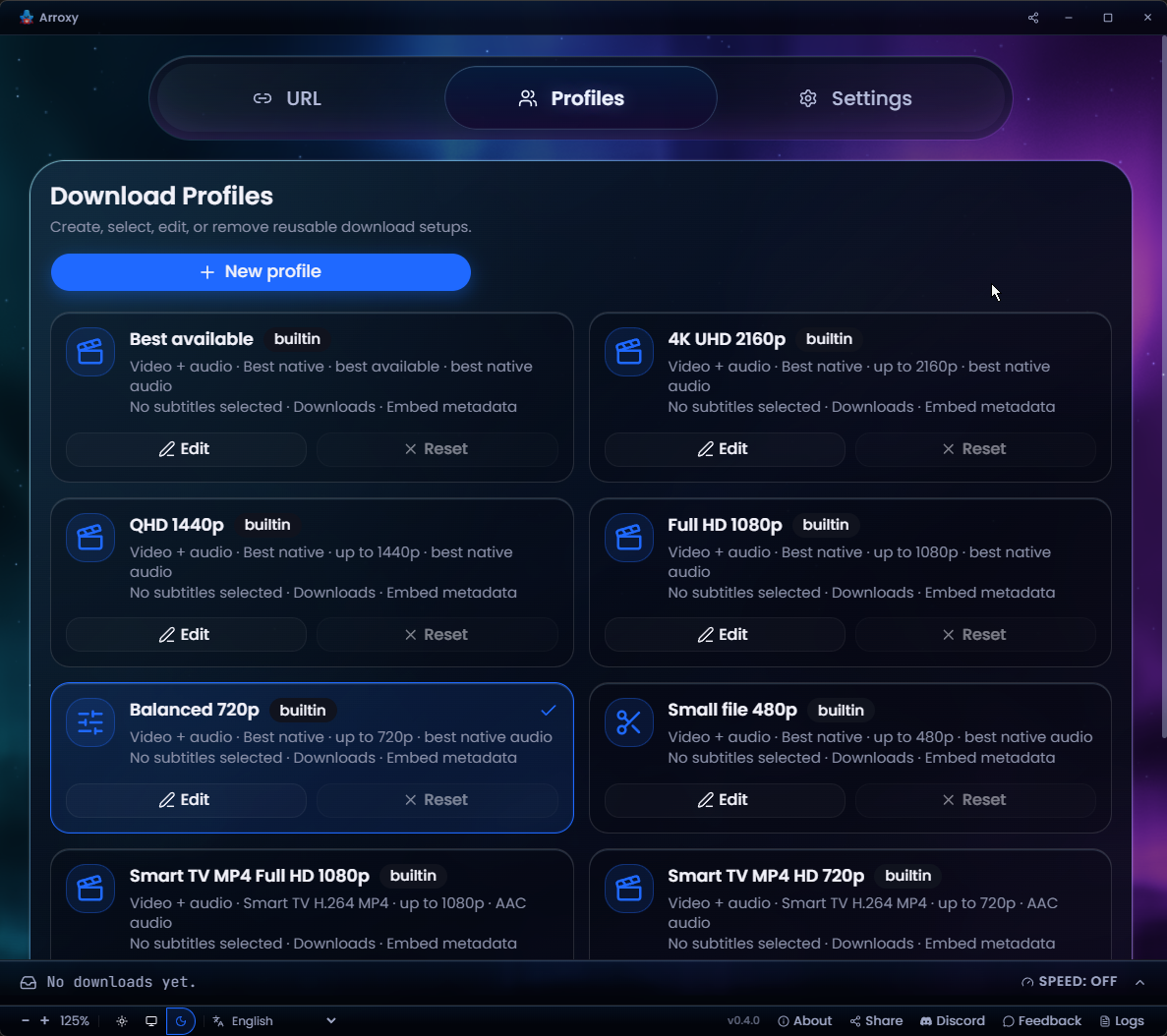
Arroxy — Download profiles
可复用的下载配置
将格式、画质和输出保存为预设——每次下载复用
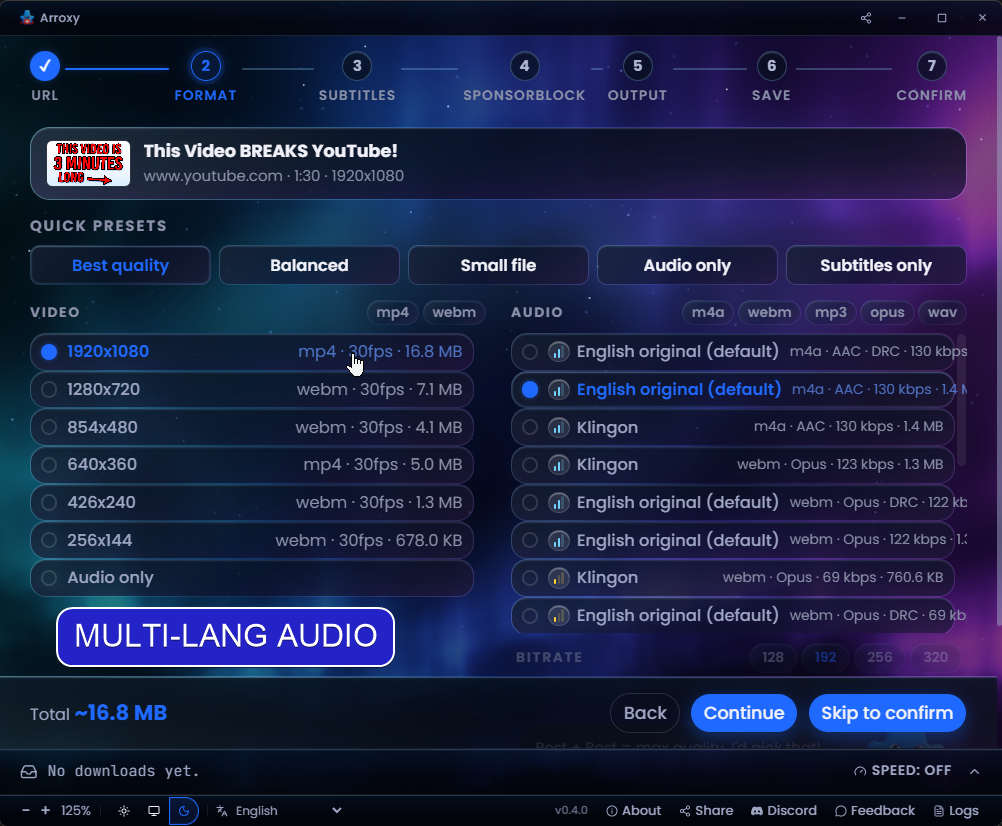
Arroxy — Multi-language audio
多语言音轨
精确选择视频自带的音频语言
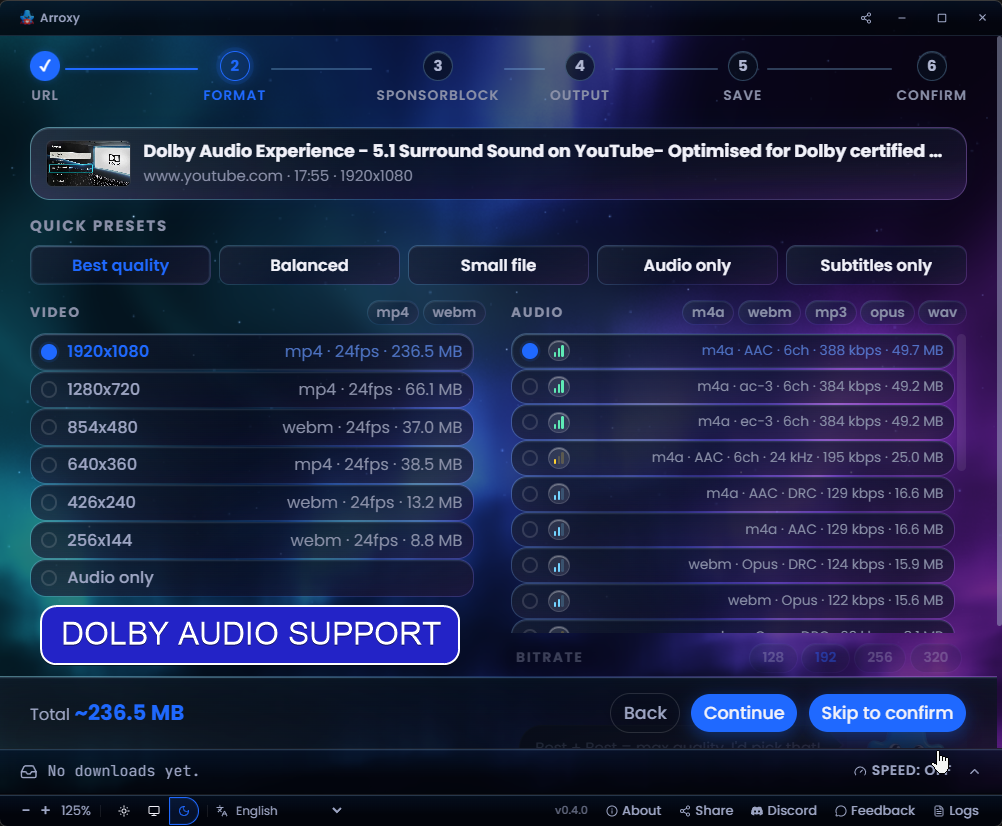
Arroxy — Surround / Dolby audio
环绕声 / Dolby 音频
识别并保留 5.1 和 Dolby 音轨
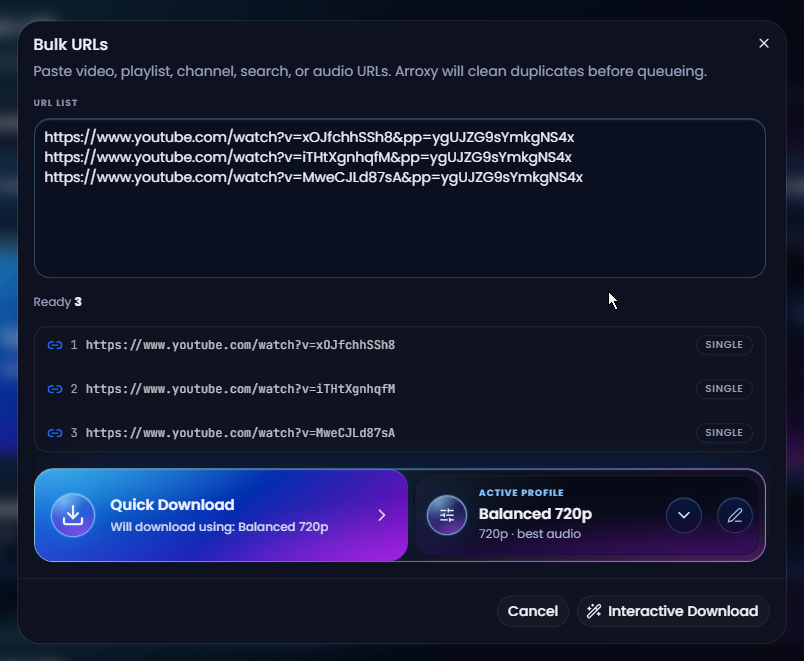
Arroxy — Bulk URL mode
批量网址模式
粘贴列表,自动去重,一次性全部入队
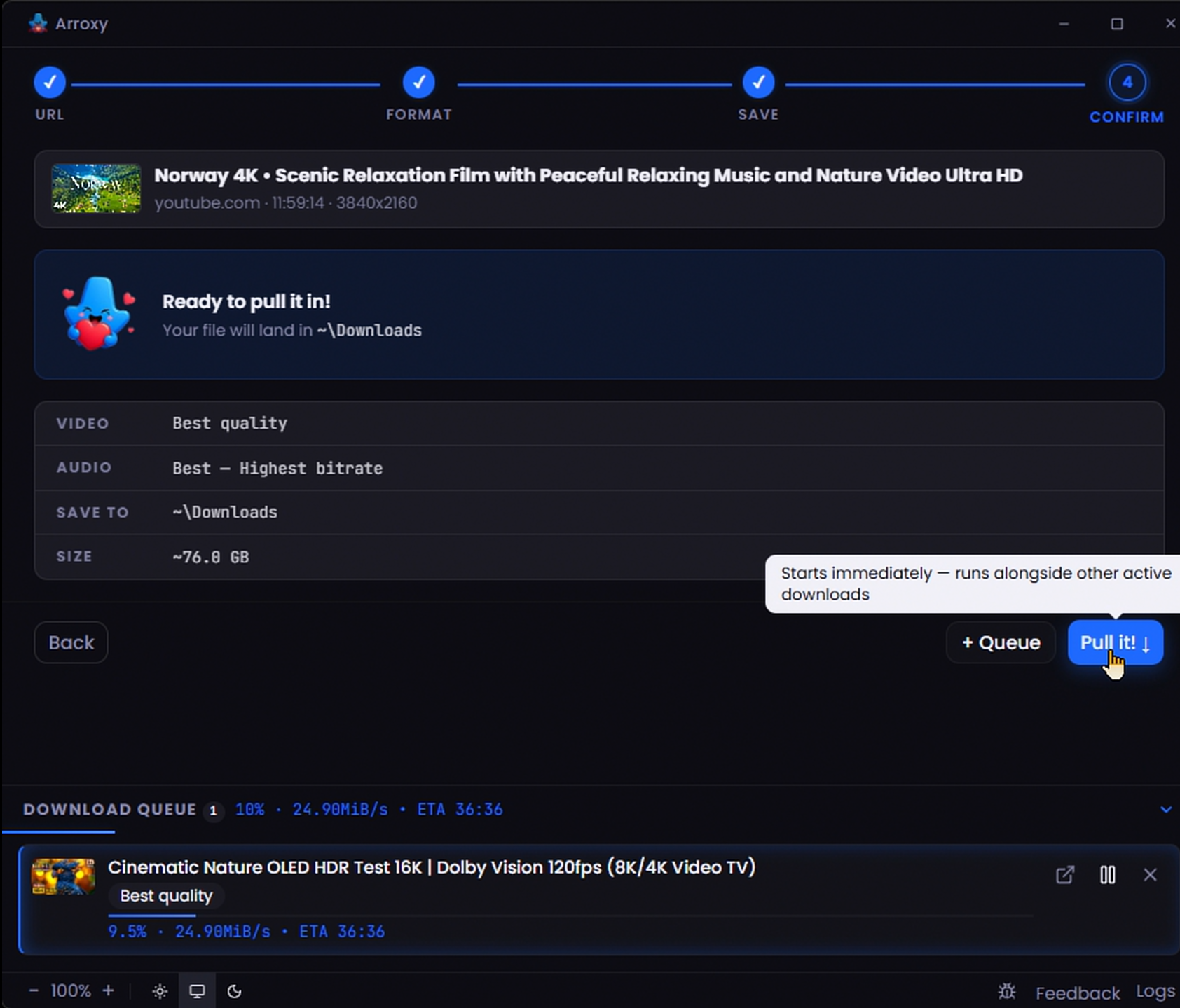
Arroxy — Parallel download queue
并行下载队列
多个下载同时进行,实时显示进度
--- ## 隐私 下载通过 [yt-dlp](https://github.com/yt-dlp/yt-dlp) 直接从 YouTube 获取到你选择的文件夹 — 不经过任何第三方服务器。观看历史、下载历史、URL 和文件内容均保留在你的设备上。 Arroxy 通过 [OpenPanel](https://openpanel.dev) 发送匿名聚合遥测数据 — 仅用于了解启动次数、OS、应用版本和崩溃。无 URL、无视频标题、无文件路径、无账号信息、无指纹识别、无个人数据。每次安装的 ID 是随机的,不与你的身份绑定。你可以在设置中选择退出。 --- ## 常见问题 **真的免费吗?** 是的 — MIT 许可证,无付费版,无功能门槛。 **能下载哪些视频画质?** YouTube 提供的都行:4K UHD(2160p)、1440p、1080p、720p、480p、360p,以及纯音频。60 fps、120 fps 和 HDR 流原样保留。 **能将音频提取为 MP3 吗?** 可以。在格式菜单里选择*仅音频*,然后选择 MP3、M4A/AAC、Opus 或 WAV。 **需要 YouTube 账号或 Cookie 吗?** 默认不需要 — Arroxy 无需 YouTube 账号、登录或导出 Cookie 即可工作。对于需要身份验证的内容(例如年龄限制或仅会员可见的视频),高级设置中提供可选的 Cookie 支持(Cookies source: file or browser)。该选项默认关闭。如果你启用它,yt-dlp 的 wiki 指出[基于 Cookie 的自动化可能会标记 Google 账号](https://github.com/yt-dlp/yt-dlp/wiki/Extractors#exporting-youtube-cookies);这种情况下使用一次性账号是更安全的选择。 **YouTube 更新后还能继续使用吗?** yt-dlp 在启动时自动更新,YouTube 一旦发生变化,Arroxy 会及时发布修复。如果你确实遇到问题,高级设置中提供可选的 Cookie 支持作为后备方案。 **Arroxy 支持哪些语言?** 开箱即用支持二十一种:English、Español(西班牙语)、Deutsch(德语)、Français(法语)、日本語(日语)、中文、Русский(俄语)、Українська(乌克兰语)、हिन्दी(印地语)、Afaan Oromoo、Kiswahili、O'zbekcha(乌兹别克语)、Tiếng Việt(越南语)、አማርኛ(阿姆哈拉语)、العربية(阿拉伯语)、اردو(乌尔都语)、پښتو(普什图语)、বাংলা(孟加拉语)、မြန်မာဘာသာ(缅甸语)、Ελληνικά(希腊语)和 Српски(塞尔维亚语)。Arroxy 在首次启动时自动检测系统语言,随时可在工具栏的语言选择器中切换。运行时语言 JSON 位于 src/shared/i18n/locales/,面向译者的 PO 目录位于 i18n/locales/ — 可在 GitHub 上发 PR 贡献。 **需要额外安装其他软件吗?** 不需要。yt-dlp 会在首次启动时自动下载并缓存到你的机器上;ffmpeg 和 ffprobe 随应用一起提供。之后无需任何额外配置。 **能下载播放列表或整个频道吗?** 可以,两者都支持。粘贴播放列表或频道 URL(例如 `youtube.com/@handle`、`/channel/UC…`、`/c/Name`、`/user/Old`);选择要扫描的条目数量,然后将整个列表加入队列或选择特定视频。日期范围筛选即将推出。 **macOS 提示"应用已损坏" — 怎么处理?** 这是 macOS Gatekeeper 在拦截未签名应用,并非真正损坏。请参见["App is damaged" — Terminal 修复方法](#macos-first-launch),其中有一行 `xattr` 命令即可清除该问题。 **下载 YouTube 视频合法吗?** 在大多数地区,个人私人使用一般被接受。你需要自行负责遵守 YouTube 的[服务条款](https://www.youtube.com/t/terms)及当地版权法律。 --- ## 路线图 仍在计划中 — 大致按优先级排序: | 功能 | 描述 | | ---------------- | ---------------- | | **播放列表与频道筛选** | 枚举播放列表或频道时的日期范围筛选 | | **YouTube 音轨偏好** | 当 YouTube 提供多个音轨时,设置全应用默认口语音轨,并允许每个配置单独覆盖 | | **应用内浏览器登录** | 在 Arroxy 内打开浏览器窗口,登录并使用站点 cookies,无需手动导出 | | **一键视频下载** | 使用当前配置,从检测到或粘贴的 URL 一键开始视频下载 | | **更强的重试恢复** | 为不稳定或有问题的网络连接中断的下载提供新的重试路径 | | **完整下载管理器抽屉** | 将队列抽屉扩展为更完整的管理器,包括为排队项目更改目标文件夹 | | **定时下载** | 在设定时间启动队列(适合连夜批量下载) | | **片段裁剪** | 按起止时间只下载视频的某一段 | 有想法?[提交请求](../../issues) — 社区意见决定优先级。 --- ## 技术栈
Stack - **Electron** — 跨平台桌面外壳 - **React 19** + **TypeScript** — UI - **Tailwind CSS v4** — 样式 - **Zustand** — 状态管理 - **yt-dlp** + **ffmpeg** — 下载与混流引擎(yt-dlp 在运行时获取;ffmpeg/ffprobe 在构建时打包) - **Vite** + **electron-vite** — 构建工具 - **Vitest** + **Playwright** — 单元测试与端到端测试
从源码构建 ### 前置要求 — 所有平台 | 工具 | 版本 | 安装 | | ------- | ------- | ------- | | Git | 任意 | [git-scm.com](https://git-scm.com) | | Node.js | 24.16.0 | `mise install` 或 `.node-version` | | Bun | 1.2.23 | `mise install` 或 `package.json` `packageManager` | 推荐安装 `mise`,然后在 checkout 中运行 `mise install`。如果不用 mise,请先按 `.node-version` 手动启用 Node.js,并按 `package.json` 启用 Bun,再运行 `bun run bootstrap`。 ### Windows ```powershell powershell -c "irm bun.sh/install.ps1 | iex" ``` 原生 rebuild 可能需要 Visual Studio Build Tools 和 Python。 ### macOS ```bash xcode-select --install curl -fsSL https://bun.sh/install | bash ``` ### Linux(Ubuntu / Debian) ```bash curl -fsSL https://bun.sh/install | bash # 构建和 Electron 运行时依赖 sudo apt install -y build-essential python3 tar libgtk-3-0 libnss3 libasound2t64 # 仅 E2E 测试(Electron 需要显示器) sudo apt install -y xvfb ``` ### 克隆并运行 ```bash git clone https://github.com/antonio-orionus/Arroxy cd Arroxy mise install # 推荐;如果已手动启用固定版本工具,可跳过 bun run bootstrap bun run doctor bun run dev # 使用 Vite renderer 运行 Electron 应用 ``` ### 打包发行版 ```bash bun run build # 类型检查 + 编译 bun run dist # 为当前系统打包 bun run dist:win # 在受支持的主机上打包 Windows 目标 ``` > `bun run bootstrap` 会安装依赖、重建 Electron 应用依赖、验证 Electron、为开发准备嵌入式 ffmpeg/ffprobe,并安装 Playwright Chromium。yt-dlp 在运行时由应用数据目录管理;ffmpeg 和 ffprobe 随每个 Arroxy 版本一起提供。
--- ## Troubleshooting ### App won't open / no window appears The Arroxy process starts but no window shows up. Most often this is a GPU driver hang during startup. Try, in order: **1. Check the log.** It records startup, GPU info, and any crash. Path: | Platform | Path | | -------- | -------------------------------- | | Windows | `%APPDATA%\Arroxy\logs\main.log` | | macOS | `~/Library/Logs/Arroxy/main.log` | | Linux | `~/.config/Arroxy/logs/main.log` | **2. Launch with hardware acceleration disabled.** Open a terminal / Command Prompt and run the executable with a flag: ```bash # Windows (Portable) — PowerShell, run from the folder containing the exe .\Arroxy-win-x64-Portable.exe --disable-gpu # Windows (Portable) — Command Prompt (cmd.exe), from the same folder Arroxy-win-x64-Portable.exe --disable-gpu # Windows (Installed) — works in both PowerShell and cmd.exe "%LOCALAPPDATA%\Programs\Arroxy\Arroxy.exe" --disable-gpu # macOS /Applications/Arroxy.app/Contents/MacOS/Arroxy --disable-gpu # Linux (AppImage) ./Arroxy-linux-x64.AppImage --disable-gpu ``` If that works, the GPU/driver is the cause. Make the change permanent (next step). **3. Persist the flag via `argv.json`.** Create the file at: | Platform | Path | | -------- | ------------------------------------------------ | | Windows | `%APPDATA%\Arroxy\argv.json` | | macOS | `~/Library/Application Support/Arroxy/argv.json` | | Linux | `~/.config/Arroxy/argv.json` | With contents: ```json { "disable-hardware-acceleration": true } ``` Arroxy reads this before opening any window, so it works even when the window never appeared. **4. Other flags worth trying** (combine if needed): `--disable-software-rasterizer`, `--disable-gpu-sandbox`, `--in-process-gpu`. **5. Stale window position.** If the window may be opening off-screen (multi-monitor change since last run), delete `\window-state.json` and relaunch. **6. Still stuck?** Open an issue with: OS version, the contents of `main.log`, and any output from running with `--enable-logging --v=1`. --- ## 使用条款 Arroxy 仅供个人私人使用。你需要自行确保下载行为符合 YouTube 的[服务条款](https://www.youtube.com/t/terms)及你所在地区的版权法律。请勿使用 Arroxy 下载、复制或分发你不享有权利的内容。开发者对任何滥用行为不承担责任。 ## Star History Star History Chart
MIT 许可证 · 由 @OrionusAI 用心打造