---
title: Dagre Layout
order: 9
---
# Dagre Layout
## Overview
Dagre is a hierarchical layout suitable for directed acyclic graphs (DAGs). It can automatically handle the direction and spacing between nodes and supports both horizontal and vertical layouts. See more Dagre layout [examples](/en/examples#layout-dagre), [source code](https://github.com/dagrejs/dagre/blob/master/lib/layout.js), and [official documentation](https://github.com/dagrejs/dagre/wiki).
 ## Configuration
```js
const graph = new Graph({
layout: {
type: 'dagre',
rankdir: 'TB',
align: 'UL',
nodesep: 50,
ranksep: 50,
},
});
```
## Options
> For more options, refer to the [official documentation](https://github.com/dagrejs/dagre/wiki#configuring-the-layout)
## Configuration
```js
const graph = new Graph({
layout: {
type: 'dagre',
rankdir: 'TB',
align: 'UL',
nodesep: 50,
ranksep: 50,
},
});
```
## Options
> For more options, refer to the [official documentation](https://github.com/dagrejs/dagre/wiki#configuring-the-layout)
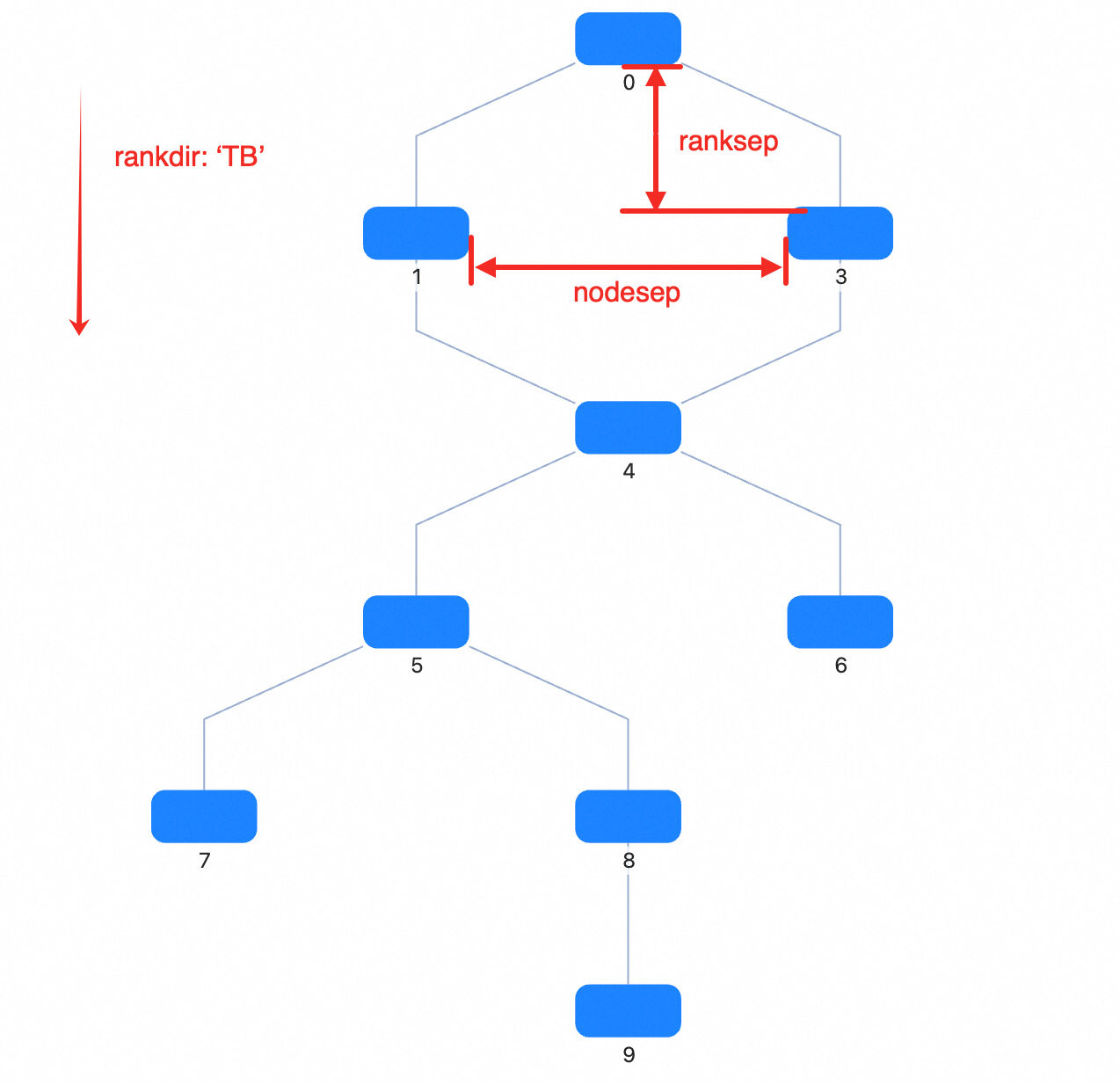 | Property | Description | Type | Default | Required |
| --------------- | ------------------------------------------------------------------------------------------------------------------------------------------ | --------------------------------------------------- | ----------------- | -------- |
| type | Layout type | `dagre` | - | ✓ |
| rankdir | Layout direction, options | `TB` \| `BT` \| `LR` \| `RL` | `TB` | |
| align | Node alignment, options | `UL` \| `UR` \| `DL` \| `DR` | `UL` | |
| nodesep | Node spacing (px). For `TB` or `BT`, it is the horizontal spacing; for `LR` or `RL`, it is the vertical spacing | number | 50 | |
| ranksep | Rank spacing (px). For `TB` or `BT`, it is the vertical spacing between adjacent ranks; for `LR` or `RL`, it is the horizontal spacing | number | 100 | |
| ranker | Algorithm for assigning ranks to nodes: `longest-path`, `tight-tree`, or `network-simplex` | `network-simplex` \| `tight-tree` \| `longest-path` | `network-simplex` | |
| directed | Whether to treat the graph as directed | boolean | true | |
| compound | Whether to support nested structures | boolean | true | |
| multigraph | Whether to allow multi-edges | boolean | true | |
| nodeSize | G6 custom property, specify node size for all or each node. If a single number, width and height are the same; if array: `[width, height]` | number \| number[] \| () => (number \| number[]) | [0, 0] | |
| edgeMinLen | Minimum number of ranks crossed by an edge | number \| (edge) => number | 1 | |
| edgeWeight | Edge weight, used to affect optimization priority | number \| (edge) => number | | |
| edgeLabelSize | Edge label size, used to reserve layout space | number[] \| (edge) => number[] | | |
| edgeLabelPos | Edge label position | string \| (edge) => string | | |
| edgeLabelOffset | Offset between the label and the edge | number \| (edge) => number | | |
> Note: `dagre` does not require configuring `controlPoints` separately. G6 automatically converts the polyline points returned by the layout into `style.controlPoints` on the edge.
### rankdir
> `TB` | `BT` | `LR` | `RL`, **Default**: `TB`
Layout direction
- `TB`: Top to Bottom;
| Property | Description | Type | Default | Required |
| --------------- | ------------------------------------------------------------------------------------------------------------------------------------------ | --------------------------------------------------- | ----------------- | -------- |
| type | Layout type | `dagre` | - | ✓ |
| rankdir | Layout direction, options | `TB` \| `BT` \| `LR` \| `RL` | `TB` | |
| align | Node alignment, options | `UL` \| `UR` \| `DL` \| `DR` | `UL` | |
| nodesep | Node spacing (px). For `TB` or `BT`, it is the horizontal spacing; for `LR` or `RL`, it is the vertical spacing | number | 50 | |
| ranksep | Rank spacing (px). For `TB` or `BT`, it is the vertical spacing between adjacent ranks; for `LR` or `RL`, it is the horizontal spacing | number | 100 | |
| ranker | Algorithm for assigning ranks to nodes: `longest-path`, `tight-tree`, or `network-simplex` | `network-simplex` \| `tight-tree` \| `longest-path` | `network-simplex` | |
| directed | Whether to treat the graph as directed | boolean | true | |
| compound | Whether to support nested structures | boolean | true | |
| multigraph | Whether to allow multi-edges | boolean | true | |
| nodeSize | G6 custom property, specify node size for all or each node. If a single number, width and height are the same; if array: `[width, height]` | number \| number[] \| () => (number \| number[]) | [0, 0] | |
| edgeMinLen | Minimum number of ranks crossed by an edge | number \| (edge) => number | 1 | |
| edgeWeight | Edge weight, used to affect optimization priority | number \| (edge) => number | | |
| edgeLabelSize | Edge label size, used to reserve layout space | number[] \| (edge) => number[] | | |
| edgeLabelPos | Edge label position | string \| (edge) => string | | |
| edgeLabelOffset | Offset between the label and the edge | number \| (edge) => number | | |
> Note: `dagre` does not require configuring `controlPoints` separately. G6 automatically converts the polyline points returned by the layout into `style.controlPoints` on the edge.
### rankdir
> `TB` | `BT` | `LR` | `RL`, **Default**: `TB`
Layout direction
- `TB`: Top to Bottom;
 - `BT`: Bottom to Top;
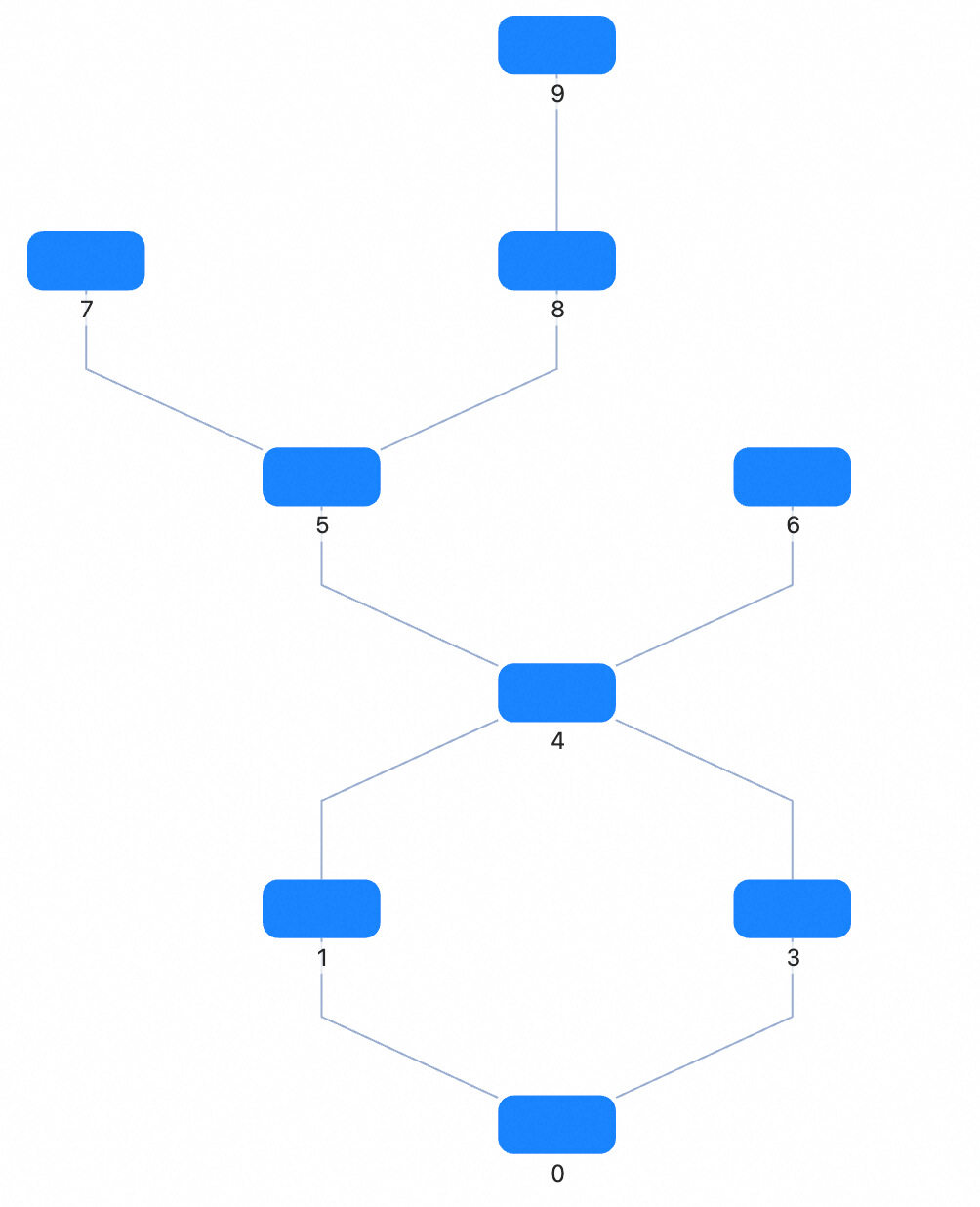 - `LR`: Left to Right;
 - `RL`: Right to Left.
 ### align
> `UL` | `UR` | `DL` | `DR`, **Default**: `UL`
Node alignment
- `UL`: Upper Left
- `UR`: Upper Right
- `DL`: Down Left
- `DR`: Down Right
### nodesep
> number, **Default**: 50
Node spacing (px). For `TB` or `BT`, it's the horizontal spacing; for `LR` or `RL`, it's the vertical spacing
### ranksep
> number, **Default**: 50
Rank spacing (px). For `TB` or `BT`, it's the vertical spacing between ranks; for `LR` or `RL`, it's the horizontal spacing between ranks
### ranker
> `network-simplex` | `tight-tree` | `longest-path`, **Default**: `network-simplex`
Algorithm for assigning ranks to nodes, supports three algorithms:
- `longest-path`: Uses DFS to recursively find the longest path for each node. Simple and fast, but may result in many long edges.
- `tight-tree`: An optimization algorithm to reduce the number of long edges. It first uses `longest-path` to compute initial ranks, then adjusts slack edges to build a feasible tree.
- `network-simplex`: Based on [A Technique for Drawing Directed Graphs](https://www.graphviz.org/documentation/TSE93.pdf), iteratively modifies node ranks to minimize slack edges.
### nodeSize
> number \| number[] \| () => (number \| number[])
G6 custom property, specify node size for all or each node. If a single number, width and height are the same; if array: `[width, height]`
```js
(d) => {
// d is a node
if (d.id === 'testId') return 20;
return [10, 20];
};
```
## Applicable Scenarios
- **Flowcharts**: Suitable for displaying flowcharts, automatically handling direction and spacing between nodes.
- **Dependency Graphs**: Display dependencies between packages or modules.
- **Task Scheduling Graphs**: Show dependencies and execution order between tasks.
## Related Documentation
> The following documents can help you better understand Dagre layout
- [Graph Layout Algorithms|Detailed Dagre Layout](https://mp.weixin.qq.com/s/EdyTfFUH7fyMefNSBXI2nA)
- [In-depth Interpretation of Dagre Layout Algorithm](https://www.yuque.com/antv/g6-blog/xxp5nl)
### align
> `UL` | `UR` | `DL` | `DR`, **Default**: `UL`
Node alignment
- `UL`: Upper Left
- `UR`: Upper Right
- `DL`: Down Left
- `DR`: Down Right
### nodesep
> number, **Default**: 50
Node spacing (px). For `TB` or `BT`, it's the horizontal spacing; for `LR` or `RL`, it's the vertical spacing
### ranksep
> number, **Default**: 50
Rank spacing (px). For `TB` or `BT`, it's the vertical spacing between ranks; for `LR` or `RL`, it's the horizontal spacing between ranks
### ranker
> `network-simplex` | `tight-tree` | `longest-path`, **Default**: `network-simplex`
Algorithm for assigning ranks to nodes, supports three algorithms:
- `longest-path`: Uses DFS to recursively find the longest path for each node. Simple and fast, but may result in many long edges.
- `tight-tree`: An optimization algorithm to reduce the number of long edges. It first uses `longest-path` to compute initial ranks, then adjusts slack edges to build a feasible tree.
- `network-simplex`: Based on [A Technique for Drawing Directed Graphs](https://www.graphviz.org/documentation/TSE93.pdf), iteratively modifies node ranks to minimize slack edges.
### nodeSize
> number \| number[] \| () => (number \| number[])
G6 custom property, specify node size for all or each node. If a single number, width and height are the same; if array: `[width, height]`
```js
(d) => {
// d is a node
if (d.id === 'testId') return 20;
return [10, 20];
};
```
## Applicable Scenarios
- **Flowcharts**: Suitable for displaying flowcharts, automatically handling direction and spacing between nodes.
- **Dependency Graphs**: Display dependencies between packages or modules.
- **Task Scheduling Graphs**: Show dependencies and execution order between tasks.
## Related Documentation
> The following documents can help you better understand Dagre layout
- [Graph Layout Algorithms|Detailed Dagre Layout](https://mp.weixin.qq.com/s/EdyTfFUH7fyMefNSBXI2nA)
- [In-depth Interpretation of Dagre Layout Algorithm](https://www.yuque.com/antv/g6-blog/xxp5nl)