# DSH WorkBuddy XD Pool


English | [中文](./README.md)
Merge **every WorkBuddy account** you have ever signed into on this machine into a single **DeepSeek Harness model pool**. No manual setup: each account you sign in on the WorkBuddy desktop app automatically becomes a pool member, and when one account gets rate-limited (HTTP 429), requests automatically fail over to the next healthy account.
> Unlike single-account connectors (e.g. `dsh-workbuddy-connect`), XD Pool treats multi-account as the norm — it never picks or imports an account by hand. It scans every historical sign-in snapshot left by the WorkBuddy desktop app, merges them all into one shared pool, and exposes them as a single `workbuddy-xdpool` provider group whose requests auto-fail-over across members.
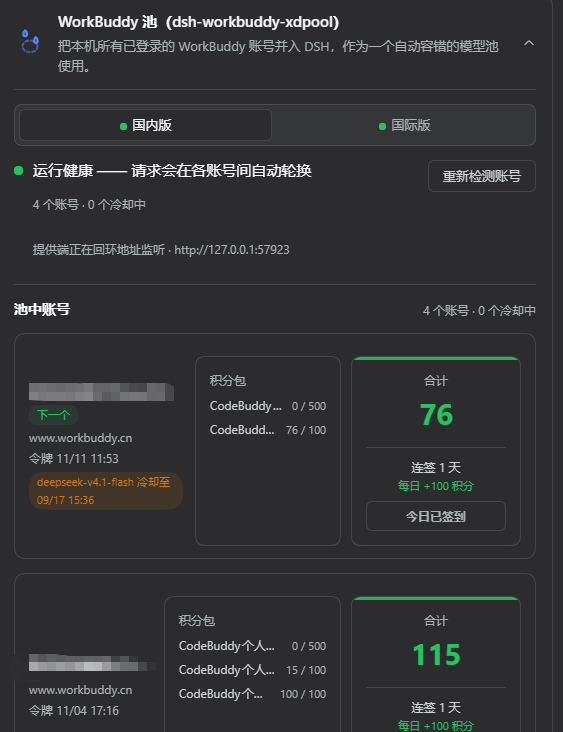
**Settings card (Settings → Plugins → DSH WorkBuddy XD Pool)**
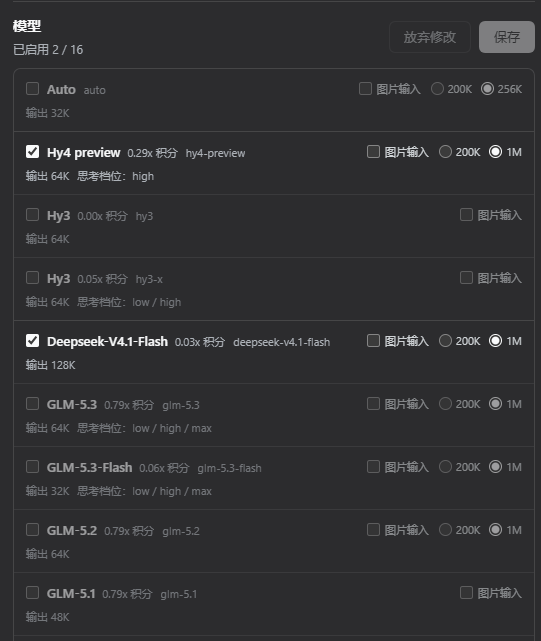
**Model picker (domestic and international appear as two separate supplier groups; the rate multiplier is baked into model.name because the DSH 0.1.2 composer only reads name)**
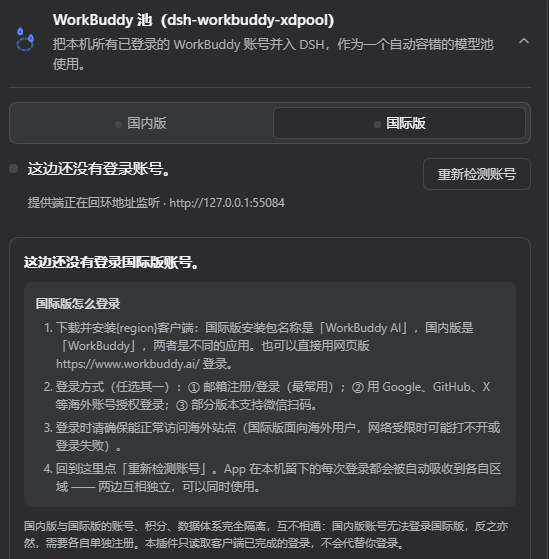
**Domestic / international dual suppliers (each with its own accounts, credits and models, usable at the same time)**
## Features
- **Zero-config**: install, enable, done. Every account signed into the WorkBuddy desktop app is auto-discovered into the rotation pool on first use.
- **Automatic failover**: the pool tracks each account's `429` cooldown. A cooling account is skipped in favor of the next healthy one; cooldowns expire automatically. Requests pause only when every account is cooling at once.
- **Pool health at a glance**: the settings card shows pool health (N accounts / X cooling, which account is next), each account's token expiry, and cooldown countdowns.
- **Live remaining credits**: per-account credit packages (`package · remain / size`) and a big green total, refreshed from upstream in real time.
- **Annotated model catalog**: the card lists pool models with their credit multiplier (e.g. `GLM-5.2 · x0.79`), free / limited-free / night-discount tags, image-input capability, and context window — kept live from upstream `credits` / `tags`.
- **Daily check-in**: below each account's credits the card offers a check-in button showing the current streak, the per-day credit, and any milestone bonus. Collect an account's reward with one click — several accounts can be collected in turn, with no need to switch the pool's preferred account first. The status is re-read before claiming, so an account that already collected today is **never double-collected**. Also available as the `checkin` CLI command.
- **CN / global region auto-detection**: the upstream origin is picked per account from its login domain — a global sign-in (`workbuddy.ai`) uses `www.workbuddy.ai`, while a CN sign-in (the default) uses `copilot.tencent.com` and `www.codebuddy.cn`. Both regions can coexist in one pool, each account talking to its own region, with rotation and failover working across both.
- **Three manual actions**: re-detect desktop sign-ins, clear all cooldowns, and daily check-in — available both on the card and via the CLI.
## Install
Prerequisite: WorkBuddy desktop app installed and signed in (the plugin reuses the app's sign-in state; adding accounts = signing in / switching accounts in the desktop app — each is absorbed into the pool automatically). Tested against DSH Desktop host `0.1.2`; compatible with `0.1.1-rc.2` / `0.1.2` (the settings-section install picks `settings.installSection` on `0.1.2-rc.1+`, or the older free function earlier).
**Option A — install from npm (recommended)**
```sh
# if dsh is not on PATH, use node ~/.dsh/profiles/node_modules/@deepseek-ai/dsh/lib/bin.js instead
dsh plugin --profile desktop add dsh-workbuddy-xdpool
```
> npm is the fast path: the only dependency pulled in is the plugin itself (**roughly 1 package, a few seconds**).
> Installing from GitHub source also installs the dev toolchain (bundler, test runner, hundreds of packages), which is markedly slower.
**Option B — install from GitHub source**
```sh
dsh plugin --profile desktop add github:aosi526/dsh-workbuddy-xdpool
```
**Option C — manual bundle registration**
```sh
# 1) install the package (npm or GitHub)
dsh plugin --profile desktop add dsh-workbuddy-xdpool
# 2) register the bundle: edit ~/.dsh/profiles/desktop/package.json and append
# "dsh-workbuddy-xdpool" to the end of the "dsh" → "profile" → "bundles" array
# 3) restart DSH Desktop
```
**Build locally** (developers):
```sh
pnpm install
pnpm build # outputs lib/index.js + lib/index.d.ts + lib/bin.js + lib/client.js
pnpm test # 26 tests (failover rotation, per-(account,model) cooldowns, check-in guards)
pnpm typecheck # host side
pnpm typecheck:client # client side
```
> `pnpm install` needs pnpm 11 (`npx pnpm@11`); add `--config.confirmModulesPurge=false --config.minimumReleaseAge=0` if the supply-chain age policy blocks freshly published rc packages.
> **The built output is committed** (`lib/` is no longer ignored). A GitHub install therefore runs
> no install-time script and never hits pnpm's "build scripts are blocked" prompt. **After changing
> `src/`, re-run `pnpm build` and commit `lib/` too**, or users would receive the old build.
After install: a **WorkBuddy XD Pool** group appears in the model picker; Settings → Plugins → **DSH WorkBuddy XD Pool** card shows pool health, per-account tokens/credits/check-in/cooldowns, plus "Detect accounts again" and "Clear all cooldowns" buttons. Works on Web / TUI profiles too (`--profile web` / `--profile dsh-tui`).
## CLI
```sh
dsh plugin --profile desktop exec dsh-workbuddy-xdpool status # pool accounts/cooldown + shim state (--credits, --json, --rates)
dsh plugin --profile desktop exec dsh-workbuddy-xdpool accounts # discovered accounts (--json)
dsh plugin --profile desktop exec dsh-workbuddy-xdpool doctor # diagnose discovery/cooldown/upstream
dsh plugin --profile desktop exec dsh-workbuddy-xdpool reset # clear all 429 cooldowns now
dsh plugin --profile desktop exec dsh-workbuddy-xdpool checkin # today's check-in state per account (--json)
dsh plugin --profile desktop exec dsh-workbuddy-xdpool checkin all
# collect every account's daily reward (or pass one label)
dsh plugin --profile desktop exec dsh-workbuddy-xdpool login # guide to adding another desktop account
```
## How accounts get into the pool
Auto-discovery. Every sign-in on the WorkBuddy desktop app leaves a token-bearing snapshot; XD Pool scans them and absorbs each into the pool. So multi-account = sign in / switch accounts in the desktop app, then hit "Detect accounts again" or restart DSH.
To snapshot an extra login explicitly (e.g. to pin one account for verification):
```sh
dsh plugin --profile desktop exec dsh-workbuddy-xdpool import myKey
dsh plugin --profile desktop exec dsh-workbuddy-xdpool accounts
dsh plugin --profile desktop exec dsh-workbuddy-xdpool remove myKey
```
Snapshots are stored under `~/.dsh/.workbuddy-xdpool/` named by the **MD5-8 prefix** of their key (so keys with Chinese, `/`, or spaces are safe). Long-lived use relies on refresh-token auto-renewal; if it lapses, re-sign-in on the desktop and `import --force`.
## Configuration
Effective config is read from the plugin settings section (`settings.workbuddy-xdpool`), editable on the Models settings page and applied live:
| Field | Description | Default |
| --- | --- | --- |
| `authFile` | Override the WorkBuddy desktop auth-file path (equiv. to `WORKBUDDY_AUTH_FILE`) | auto-probed |
| `cooldownMs` | Per-account 429 cooldown in milliseconds | `60000` |
Or set it directly in `~/.dsh/settings.yaml`:
```yaml
workbuddy-xdpool:
cooldownMs: 120000
```
## Architecture
- **Host side** (`src/`): registers the `workbuddy-xdpool` provider, the `workbuddy-xdpool` settings section (`settings.installSection`), four same-origin routes (status / re-scan / clear cooldowns / check-in), and account discovery + catalog seeding. The upstream client picks the CN or global origin per credential from its login domain.
- **Client** (`src/client/`): the browser card loaded via `dsh.client`; the collapsible shell reuses the host's `dsm-plugin-card*` style language (`--dsw-alias-*` theme tokens), with content classes namespaced `dsm-workbuddy-xdpool-*`. Check-in is the plugin's only mutating route: POST-only, loopback-origin-only, an explicit per-account `accountId`, and a pre-claim status re-check.
- **Build**: `tsdown` produces `lib/index.js` (host entry) + `lib/index.d.ts` (types) + `lib/bin.js` (CLI) + `lib/client.js` (CJS browser bundle wrapped in `window.__ModuleLoader__.load`). All four are committed, so an install needs no build-time script.
## Known limitations
- **Only accounts on this machine**: the pool cannot and will not perform WorkBuddy sign-in / QR auth for you (tokens are minted by the WorkBuddy desktop app's own Tencent SSO and are device-bound). Add accounts by signing in on the desktop app.
- Depends on WorkBuddy client endpoints (not an official public API); may need updates when WorkBuddy changes.
- If Windows/Linux usernames differ and Windows env vars aren't forwarded into WSL, point `WORKBUDDY_AUTH_FILE` or the config `authFile` at the real location.
## Disclaimer
- For **personal study and research only** — drives your own WorkBuddy accounts on your own machine. Do not use commercially or beyond reasonable personal use.
- You are responsible for complying with WorkBuddy's terms of service; any consequences (account limits, emptied quotas, outages) are your own.
- The authors are not liable for any direct or indirect loss from using or misusing this project.
- This project is not affiliated with, endorsed by, or authorized by Tencent, WorkBuddy, or DeepSeek; all names belong to their respective owners.
## Acknowledgments
This project was built with reference to the following public projects, whose copyright notices are retained as their licenses require. The reference is to **design ideas and established findings**; the code is an independent implementation, and the modules that draw on an existing pattern say so in their file headers:
- [corrinehu/dsh-workbuddy-connect](https://github.com/corrinehu/dsh-workbuddy-connect) (MIT) — the core reference for settings-section registration (`settings.installSection`) and the DSH plugin structure, client-card loading, desktop credential refresh, and loopback shim hardening.
- [dingminhua/dsh-connect-workbuddy](https://github.com/dingminhua/dsh-connect-workbuddy) (MIT, Copyright (c) 2026 LaoDing) — the reference for the `dsm-plugin-card*` card style language and `--dsw-alias-*` theme tokens; the **daily check-in** endpoints (`/v2/billing/meter/checkin-activity-status` and `/v2/billing/meter/daily-checkin`), the credit-package aggregation rules (monthly-cycle vs one-off gift), and picking the upstream origin per credential domain for CN/global follow interface shapes that project had already validated.
- [Sliverkiss/workbuddy2api](https://github.com/Sliverkiss/workbuddy2api) (MIT) — reference implementation of the upstream WorkBuddy protocol (`copilot.tencent.com` wire behavior) and credits endpoints.
All copyrights belong to their respective authors. This project takes the **reference-the-design, implement-independently** approach and does not wholesale copy any reference project's source. If an attribution is missing or wrong, please open an issue.
## License
[MIT](./LICENSE)