# EWS Meeting MCP
[](https://www.npmjs.com/package/ews-meeting-mcp)
[](LICENSE)
[](package.json)
[](pyproject.toml)
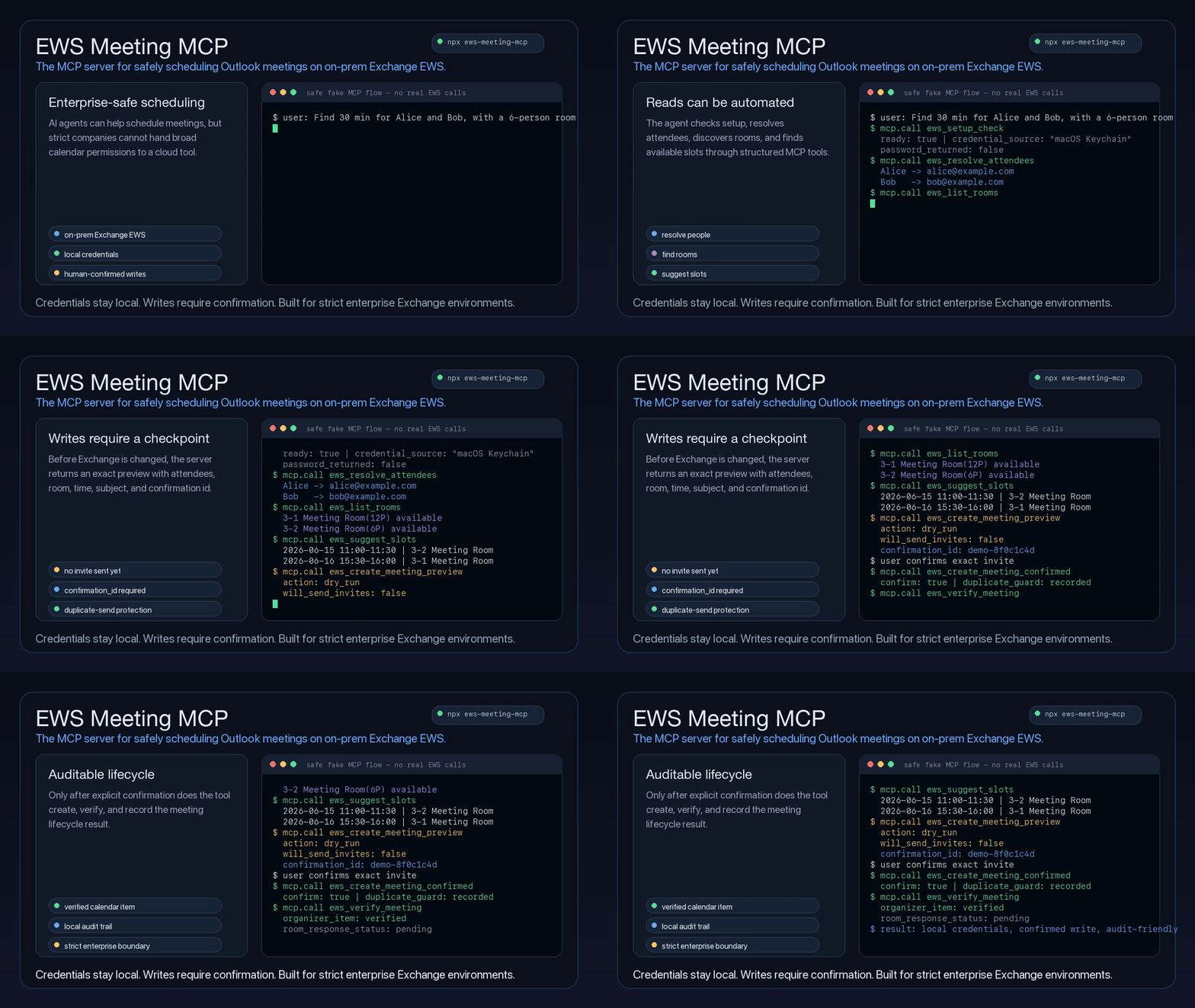
The MCP server for safely reading Outlook inbox messages, sending self-only reports, and scheduling meetings on on-prem Exchange EWS.
EWS Meeting MCP gives coding assistants and desktop agents a safe, structured way to read Outlook inbox messages and availability, send a report only to the configured mailbox, discover rooms, suggest meeting slots, and create, update, or cancel meetings only after an explicit human confirmation step.
It is built for companies where calendar access is sensitive infrastructure: regulated teams, internal networks, strict security review, legacy Exchange deployments, and organizations that cannot simply hand a cloud agent broad Microsoft 365 permissions. Credentials stay local, meeting writes are previewed before they touch Exchange, self-only report sends require idempotency protection, and every write can be traced through a local audit trail.
```bash
npx ews-meeting-mcp
```
## Why This Exists
Many teams still run calendar infrastructure through on-prem Exchange/EWS. General-purpose agents can reason about scheduling, but they should not receive raw passwords, guess attendee addresses, or send calendar invitations without a reviewable checkpoint.
This is not a generic Outlook wrapper or a Microsoft Graph-first calendar connector. It is designed for the stricter enterprise case: local EWS access, room resources, explicit human approval, duplicate-send protection, and audit-friendly meeting lifecycle tools.
This project wraps Exchange calendar operations in a small MCP surface with:
- **Room-aware scheduling**: finds overlapping attendee availability and filters meeting rooms by Exchange discovery or local policy.
- **Human-in-the-loop writes**: create, update, and cancel operations require a preview plus a matching `confirmation_id`.
- **Outlook Show As**: create or update personal appointments with `show_as: "out_of_office"` (EWS `OOF`). Empty attendees and rooms never send invitations; this does not configure email automatic replies.
- **Local-first credential handling**: reads `.env`, shell environment, or macOS Keychain without passing passwords through the model.
- **Structured recovery**: setup failures return machine-readable error codes and user-facing setup commands.
- **Auditability**: lifecycle previews, confirmed actions, duplicate confirmations, in-progress states, and structured errors are written to a local JSONL audit log.
- **Agent-ready instructions**: the MCP server exposes tool descriptions and initialization guidance, and the repo includes a companion skill for agents that support skills.
## What Agents Can Do
| Capability | Tooling | Safety posture |
| --- | --- | --- |
| Check setup and credentials | `ews_setup_check`, `ews_keychain_status` | Never returns the EWS password |
| Set up meeting signatures | `ews_signature_setup_guide` | Returns copyable HTML sample and local env guidance |
| Read Outlook inbox | `ews_search_emails`, `ews_read_email` | Read-only; does not mark messages as read or change mailbox state |
| Send a weekly report to self | `ews_send_email_to_self` | Only sends to `EWS_EMAIL`; recipient is not an input; requires a stable idempotency key and real EWS CreateItem + SendItem |
| Read calendar availability | `ews_list_calendar`, `ews_get_free_busy`, `ews_find_calendar_events` | Read-only |
| Resolve people and rooms | `ews_resolve_attendees`, `ews_list_rooms` | Uses Exchange directory when available |
| Suggest slots | `ews_suggest_slots` | Applies local workday, avoid windows, and room capacity |
| Create meetings | `ews_create_meeting_preview`, `ews_create_meeting_confirmed` | Supports optional weekly recurrence; requires preview, explicit approval, and matching confirmation id |
| Update meetings | `ews_update_meeting_preview`, `ews_update_meeting_confirmed` | Requires exact EWS item metadata and matching confirmation id |
| Cancel meetings | `ews_cancel_meeting_preview`, `ews_cancel_meeting_confirmed` | Requires exact EWS item metadata and matching confirmation id |
| Verify and audit | `ews_verify_meeting`, `ews_get_audit_log` | Confirms server-side state without exposing credentials |
## Documentation
- [Usage Guide](docs/usage.md): local setup, Keychain, scheduling policy, smoke checks, CLI examples, MCP config, and npm wrapper details.
- [Agent Guide](docs/agent-guide.md): tool contracts, setup checks, attendee resolution, room selection, preview-confirm flows, audit log, and verification rules.
- [Publishing](docs/publishing.md): npm package and GitHub Actions release checklist.
## Quick Start
### 1. Configure EWS
Create a `.env` file in the working directory or provide equivalent environment variables:
```bash
EWS_ENDPOINT=https://mail.company.com/EWS/Exchange.asmx
EWS_EMAIL=your_user@company.com
EWS_USERNAME='DOMAIN\your_user'
EWS_AUTH_TYPE=NTLM
EWS_TIMEZONE=Asia/Taipei
```
Use `EWS_AUTH_TYPE=BASIC` only if IT confirms Basic auth is enabled and the endpoint is protected by HTTPS.
### 2. Store the Password
For local development, the generic `ACCOUNT_PASSWORD` override works, but do not put it in MCP config:
```bash
ACCOUNT_PASSWORD='your-password'
```
On macOS, Keychain is safer than storing the password in `.env` or MCP client config:
```bash
read -rsp "Account password: " ACCOUNT_PASSWORD
echo
security add-generic-password -U -s ews-meeting-mcp-account-password -a 'DOMAIN\your_user' -w "$ACCOUNT_PASSWORD"
unset ACCOUNT_PASSWORD
```
Use the same Keychain service/account pair from any local tool that needs this account password:
```bash
ACCOUNT_PASSWORD_KEYCHAIN_SERVICE=ews-meeting-mcp-account-password
ACCOUNT_PASSWORD_KEYCHAIN_ACCOUNT='DOMAIN\your_user'
```
If `ACCOUNT_PASSWORD_KEYCHAIN_ACCOUNT` is omitted, `EWS_USERNAME` is used. `ACCOUNT_PASSWORD` is only a generic local override; Keychain is preferred.
### 3. Add the MCP Server
For an npm-installed MCP client:
```json
{
"mcpServers": {
"ews-meeting-mcp": {
"command": "npx",
"args": ["-y", "ews-meeting-mcp@0.1.25"],
"env": {
"EWS_ENDPOINT": "https://mail.company.com/EWS/Exchange.asmx",
"EWS_EMAIL": "your_user@company.com",
"EWS_USERNAME": "DOMAIN\\your_user",
"ACCOUNT_PASSWORD_KEYCHAIN_SERVICE": "ews-meeting-mcp-account-password",
"ACCOUNT_PASSWORD_KEYCHAIN_ACCOUNT": "DOMAIN\\your_user",
"EWS_AUTH_TYPE": "NTLM",
"EWS_TIMEZONE": "Asia/Taipei"
}
}
}
}
```
For a local checkout:
```json
{
"mcpServers": {
"ews-meeting-mcp": {
"command": "/path/to/ews-meeting-mcp/.venv/bin/python",
"args": ["-m", "ews_meeting_mcp.mcp_server"],
"cwd": "/path/to/ews-meeting-mcp",
"env": {
"PYTHONPATH": "src"
}
}
}
}
```
### Optional: Add an Outlook-Style Signature
Meeting invites append a configured HTML signature by default. Ask the MCP tool for a copyable starter template:
```text
ews_signature_setup_guide
```
Save the returned `sample_html` as `ews-meeting-signature.html` in the MCP working directory, then edit the name, email, title, logo URL, and disclaimer. You can also point to a different file:
```bash
EWS_MEETING_SIGNATURE_HTML_PATH=/path/to/ews-meeting-signature.html
EWS_MEETING_SIGNATURE_ENABLED=true
```
Use an HTTPS logo URL recipients can access, or replace the `![]() ` source with a base64 data URI. Set `EWS_MEETING_SIGNATURE_ENABLED=false` to temporarily stop appending the signature.
### 4. Verify Setup
```bash
npx ews-meeting-mcp --cli env
npx ews-meeting-mcp --cli probe
```
The first command prints the configured endpoint and account without printing the password. The second command validates that the account can connect to EWS.
## Agent Workflow
For incoming Outlook mail, search the configured inbox first and then read the selected message:
```text
user asks about company email
-> ews_setup_check
-> ews_search_emails with the narrowest known filters
-> user selects or identifies one message
-> ews_read_email with the exact id and optional changekey
```
These mailbox tools are read-only. They do not mark messages as read, send mail, move messages, or change labels.
For the Thursday Jira weekly-report automation, compose the report from the Jira results and then call the dedicated self-only mail tool through this EWS MCP:
```text
weekly report is ready
-> ews_setup_check
-> ews_send_email_to_self with subject, body, and a stable idempotency_key
-> stop after sent=true; do not use Gmail, to: me, or another mail provider
```
`ews_send_email_to_self` takes no recipient, `to`, `cc`, or `bcc` argument. It obtains the only recipient from `EWS_EMAIL`, sends through Exchange EWS, and appends the configured HTML signature by default. It does not write the email body or recipient address to the audit log. Reuse the same idempotency key for an automation retry; a completed or in-progress key will not call Exchange again.
Scheduling should follow this shape:
```text
user request
-> ews_setup_check
-> ews_signature_setup_guide, if the user needs help creating the optional HTML signature
-> ews_resolve_attendees, if names or aliases are provided
-> ews_list_rooms, if a room may be needed
-> ews_suggest_slots
-> user chooses a slot and room
-> ews_create_meeting_preview
-> show exact invite details, recurrence if present, and confirmation_id
-> user explicitly confirms
-> ews_create_meeting_confirmed with confirm=true and the same confirmation_id
-> ews_verify_meeting, when item id and changekey are available
```
Recurring meetings are created by passing a structured `recurrence` object to both preview and confirmed create calls. For example, "every Monday and Wednesday" uses weekly recurrence:
```json
{
"type": "weekly",
"interval": 1,
"weekdays": ["MO", "WE"],
"range": {
"type": "numbered",
"count": 10
}
}
```
"Every business day until 7/26" means Monday through Friday, without holiday or makeup-day handling:
```json
{
"type": "weekly",
"interval": 1,
"weekdays": ["MO", "TU", "WE", "TH", "FR"],
"range": {
"type": "end_date",
"end_date": "2026-07-26"
}
}
```
If the user asks only for weekdays such as "every Monday and Wednesday" without an end date, occurrence count, or explicit no-end choice, ask for one before previewing.
Existing meeting changes should use exact calendar metadata:
```text
user asks to update or cancel a meeting
-> ews_find_calendar_events with the narrowest known time window
-> user chooses one exact event, if more than one candidate exists
-> ews_update_meeting_preview or ews_cancel_meeting_preview
-> show current/proposed details, warnings, and confirmation_id
-> user explicitly confirms
-> matching confirmed tool with confirm=true and the same confirmation_id
```
Agents should never infer an event from subject text when multiple candidates are possible.
## Safety Model
EWS Meeting MCP is designed around a simple rule: reads may be automated, and every write must have a narrow safety gate. Inbox reads are limited to explicit read-only search and read tools; meeting writes require preview plus explicit confirmation, while the self-only report send requires configured-self enforcement plus idempotency protection.
- Authentication failures are fail-fast: the EWS client uses `FailFast`, and after one invalid-credential or locked-account response the MCP blocks all later EWS calls in that process. Fix the shared Keychain item and restart the MCP before trying again.
- Confirmed create, update, and cancel tools refuse to run unless `confirm=true` is passed.
- Confirmed tools require the exact `confirmation_id` returned by the matching preview.
- Confirmed update and cancel tools also require the exact EWS `id` and `changekey` from `ews_find_calendar_events` or a prior verified result.
- Duplicate confirmed requests return `error_code: "duplicate_confirmation"` with prior result metadata instead of calling EWS again.
- In-progress confirmations return `error_code: "confirmation_in_progress"` and should not be blindly retried.
- Preview tools never save, move, delete, or send Exchange notifications.
- `ews_send_email_to_self` is the only mail-write capability. It is self-only, requires `EWS_EMAIL` to be configured, and sends a saved draft with EWS `CreateItem` followed by `SendItem`; it does not accept an arbitrary recipient.
- Self-only sends require a stable, non-secret `idempotency_key`. A duplicate or in-progress key is refused before another EWS send. If delivery is uncertain, inspect Sent Items before retrying.
- Self-only send audit entries contain only action/status and non-sensitive delivery/idempotency metadata; they do not contain the configured email address, subject, body, password, or token.
- The local confirmation ledger and audit log store operation metadata, not EWS passwords.
If `ews_setup_check` returns `ready: false`, an agent should show the returned `user_message` or `setup_command` verbatim and stop. It should not ask for attendee emails or continue scheduling as a workaround.
## Scheduling Policy
By default, scheduling tools look for `ews-meeting-policy.json` in the current working directory. Set `EWS_MEETING_POLICY_FILE` to point at a different file.
If no policy file exists, built-in defaults are used:
- workday: `10:00` to `18:00`
- avoid: `12:00-14:00`
- fallback rooms: `2-11`, `2-13`, `2-14`, `3-1`, `3-2`, `3-4`
Live room selection uses Exchange room-list discovery when available, then falls back to configured rooms.
Example policy:
```json
{
"workday_start": "10:00",
"workday_end": "18:00",
"avoid": ["12:00-14:00"],
"rooms": [
{
"alias": "3-1",
"name": "3-1 Meeting Room(12P)",
"email": "3-1MeetingRoom@company.com",
"capacity": 12
}
]
}
```
Policy rooms are merged with the default fallback rooms by `alias`. A matching alias overrides the default room, and new aliases are appended.
## CLI Usage
The npm wrapper starts the MCP server by default:
```bash
npx ews-meeting-mcp
```
Pass `--cli` to run the Python CLI through the same package:
```bash
npx ews-meeting-mcp --cli env
npx ews-meeting-mcp --cli calendar --days 7
```
Suggest a 30-minute meeting slot:
```bash
npx ews-meeting-mcp --cli suggest \
--attendee alice@company.com \
--attendee bob@company.com \
--start 2026-06-15T09:00:00+08:00 \
--end 2026-06-19T18:00:00+08:00 \
--duration-minutes 30 \
--limit 5
```
Preview a meeting invitation without sending anything:
```bash
npx ews-meeting-mcp --cli create-meeting \
--attendee alice@company.com \
--attendee bob@company.com \
--start 2026-06-15T11:00:00+08:00 \
--end 2026-06-15T11:30:00+08:00 \
--subject "Project sync" \
--body "Discuss next steps" \
--location "Webex"
```
Actually create the meeting and send invitations:
```bash
npx ews-meeting-mcp --cli create-meeting \
--attendee alice@company.com \
--attendee bob@company.com \
--start 2026-06-15T11:00:00+08:00 \
--end 2026-06-15T11:30:00+08:00 \
--subject "Project sync" \
--body "Discuss next steps" \
--location "Webex" \
--confirm
```
The `--confirm` flag is intentionally required. Without it, the command prints a dry-run preview and does not call EWS to create the event.
## Calendar Show As / 不在辦公室
The create and update preview/confirmed MCP tools accept optional `show_as`:
| `show_as` | EWS `LegacyFreeBusyStatus` |
| --- | --- |
| `free` | `Free` |
| `tentative` | `Tentative` |
| `busy` | `Busy` |
| `out_of_office` | `OOF` |
Omitting it during creation keeps the existing Busy default; omitting it during updates preserves the stored status. Personal appointments use `attendees: []` and `rooms: []`, and are saved with `SendToNone`. Existing meetings with attendees or resources retain their invitation behavior. Weekly recurring creation also accepts `show_as`; recurrence editing capabilities are unchanged.
Call `ews_create_meeting_preview` with, for example:
```json
{
"subject": "不在辦公室",
"attendees": [],
"rooms": [],
"start": "2026-09-21T09:00:00+08:00",
"end": "2026-09-21T18:00:00+08:00",
"show_as": "out_of_office",
"include_signature": false
}
```
Show the user the start/end, timezone offsets, `show_as`, and invitation behavior. After explicit confirmation, call `ews_create_meeting_confirmed` with the same arguments plus `confirm: true` and the returned `confirmation_id`. Changing the status after preview invalidates that confirmation. Query/verification tools return the stored `show_as` and raw `legacy_free_busy_status`; use `ews_verify_meeting` to read the server after saving.
See [Calendar status usage, MCP update steps, and live verification](docs/calendar-show-as.md) for update examples and a manual verification checklist. This feature affects the calendar status only, not mail automatic replies.
## Local Development
For detailed setup, smoke tests, CLI examples, and MCP client configuration, see the [Usage Guide](docs/usage.md).
The short development loop is:
```bash
python3 -m venv .venv
source .venv/bin/activate
pip install -r requirements.txt
cp .env.example .env
npm test
```
Run the MCP server from a checkout:
```bash
env PYTHONPATH=src python -m ews_meeting_mcp.mcp_server
```
## Companion Skill
The repo includes a companion skill for agents that support skills:
```text
skills/ews-meeting-mcp/SKILL.md
```
See the [Agent Guide](docs/agent-guide.md) for the same workflow in plain Markdown.
## Troubleshooting
Operational troubleshooting lives in the [Usage Guide](docs/usage.md). For agent behavior, setup-check handling, and lifecycle safety, see the [Agent Guide](docs/agent-guide.md).
## Release
See [Publishing](docs/publishing.md).
## License
MIT
` source with a base64 data URI. Set `EWS_MEETING_SIGNATURE_ENABLED=false` to temporarily stop appending the signature.
### 4. Verify Setup
```bash
npx ews-meeting-mcp --cli env
npx ews-meeting-mcp --cli probe
```
The first command prints the configured endpoint and account without printing the password. The second command validates that the account can connect to EWS.
## Agent Workflow
For incoming Outlook mail, search the configured inbox first and then read the selected message:
```text
user asks about company email
-> ews_setup_check
-> ews_search_emails with the narrowest known filters
-> user selects or identifies one message
-> ews_read_email with the exact id and optional changekey
```
These mailbox tools are read-only. They do not mark messages as read, send mail, move messages, or change labels.
For the Thursday Jira weekly-report automation, compose the report from the Jira results and then call the dedicated self-only mail tool through this EWS MCP:
```text
weekly report is ready
-> ews_setup_check
-> ews_send_email_to_self with subject, body, and a stable idempotency_key
-> stop after sent=true; do not use Gmail, to: me, or another mail provider
```
`ews_send_email_to_self` takes no recipient, `to`, `cc`, or `bcc` argument. It obtains the only recipient from `EWS_EMAIL`, sends through Exchange EWS, and appends the configured HTML signature by default. It does not write the email body or recipient address to the audit log. Reuse the same idempotency key for an automation retry; a completed or in-progress key will not call Exchange again.
Scheduling should follow this shape:
```text
user request
-> ews_setup_check
-> ews_signature_setup_guide, if the user needs help creating the optional HTML signature
-> ews_resolve_attendees, if names or aliases are provided
-> ews_list_rooms, if a room may be needed
-> ews_suggest_slots
-> user chooses a slot and room
-> ews_create_meeting_preview
-> show exact invite details, recurrence if present, and confirmation_id
-> user explicitly confirms
-> ews_create_meeting_confirmed with confirm=true and the same confirmation_id
-> ews_verify_meeting, when item id and changekey are available
```
Recurring meetings are created by passing a structured `recurrence` object to both preview and confirmed create calls. For example, "every Monday and Wednesday" uses weekly recurrence:
```json
{
"type": "weekly",
"interval": 1,
"weekdays": ["MO", "WE"],
"range": {
"type": "numbered",
"count": 10
}
}
```
"Every business day until 7/26" means Monday through Friday, without holiday or makeup-day handling:
```json
{
"type": "weekly",
"interval": 1,
"weekdays": ["MO", "TU", "WE", "TH", "FR"],
"range": {
"type": "end_date",
"end_date": "2026-07-26"
}
}
```
If the user asks only for weekdays such as "every Monday and Wednesday" without an end date, occurrence count, or explicit no-end choice, ask for one before previewing.
Existing meeting changes should use exact calendar metadata:
```text
user asks to update or cancel a meeting
-> ews_find_calendar_events with the narrowest known time window
-> user chooses one exact event, if more than one candidate exists
-> ews_update_meeting_preview or ews_cancel_meeting_preview
-> show current/proposed details, warnings, and confirmation_id
-> user explicitly confirms
-> matching confirmed tool with confirm=true and the same confirmation_id
```
Agents should never infer an event from subject text when multiple candidates are possible.
## Safety Model
EWS Meeting MCP is designed around a simple rule: reads may be automated, and every write must have a narrow safety gate. Inbox reads are limited to explicit read-only search and read tools; meeting writes require preview plus explicit confirmation, while the self-only report send requires configured-self enforcement plus idempotency protection.
- Authentication failures are fail-fast: the EWS client uses `FailFast`, and after one invalid-credential or locked-account response the MCP blocks all later EWS calls in that process. Fix the shared Keychain item and restart the MCP before trying again.
- Confirmed create, update, and cancel tools refuse to run unless `confirm=true` is passed.
- Confirmed tools require the exact `confirmation_id` returned by the matching preview.
- Confirmed update and cancel tools also require the exact EWS `id` and `changekey` from `ews_find_calendar_events` or a prior verified result.
- Duplicate confirmed requests return `error_code: "duplicate_confirmation"` with prior result metadata instead of calling EWS again.
- In-progress confirmations return `error_code: "confirmation_in_progress"` and should not be blindly retried.
- Preview tools never save, move, delete, or send Exchange notifications.
- `ews_send_email_to_self` is the only mail-write capability. It is self-only, requires `EWS_EMAIL` to be configured, and sends a saved draft with EWS `CreateItem` followed by `SendItem`; it does not accept an arbitrary recipient.
- Self-only sends require a stable, non-secret `idempotency_key`. A duplicate or in-progress key is refused before another EWS send. If delivery is uncertain, inspect Sent Items before retrying.
- Self-only send audit entries contain only action/status and non-sensitive delivery/idempotency metadata; they do not contain the configured email address, subject, body, password, or token.
- The local confirmation ledger and audit log store operation metadata, not EWS passwords.
If `ews_setup_check` returns `ready: false`, an agent should show the returned `user_message` or `setup_command` verbatim and stop. It should not ask for attendee emails or continue scheduling as a workaround.
## Scheduling Policy
By default, scheduling tools look for `ews-meeting-policy.json` in the current working directory. Set `EWS_MEETING_POLICY_FILE` to point at a different file.
If no policy file exists, built-in defaults are used:
- workday: `10:00` to `18:00`
- avoid: `12:00-14:00`
- fallback rooms: `2-11`, `2-13`, `2-14`, `3-1`, `3-2`, `3-4`
Live room selection uses Exchange room-list discovery when available, then falls back to configured rooms.
Example policy:
```json
{
"workday_start": "10:00",
"workday_end": "18:00",
"avoid": ["12:00-14:00"],
"rooms": [
{
"alias": "3-1",
"name": "3-1 Meeting Room(12P)",
"email": "3-1MeetingRoom@company.com",
"capacity": 12
}
]
}
```
Policy rooms are merged with the default fallback rooms by `alias`. A matching alias overrides the default room, and new aliases are appended.
## CLI Usage
The npm wrapper starts the MCP server by default:
```bash
npx ews-meeting-mcp
```
Pass `--cli` to run the Python CLI through the same package:
```bash
npx ews-meeting-mcp --cli env
npx ews-meeting-mcp --cli calendar --days 7
```
Suggest a 30-minute meeting slot:
```bash
npx ews-meeting-mcp --cli suggest \
--attendee alice@company.com \
--attendee bob@company.com \
--start 2026-06-15T09:00:00+08:00 \
--end 2026-06-19T18:00:00+08:00 \
--duration-minutes 30 \
--limit 5
```
Preview a meeting invitation without sending anything:
```bash
npx ews-meeting-mcp --cli create-meeting \
--attendee alice@company.com \
--attendee bob@company.com \
--start 2026-06-15T11:00:00+08:00 \
--end 2026-06-15T11:30:00+08:00 \
--subject "Project sync" \
--body "Discuss next steps" \
--location "Webex"
```
Actually create the meeting and send invitations:
```bash
npx ews-meeting-mcp --cli create-meeting \
--attendee alice@company.com \
--attendee bob@company.com \
--start 2026-06-15T11:00:00+08:00 \
--end 2026-06-15T11:30:00+08:00 \
--subject "Project sync" \
--body "Discuss next steps" \
--location "Webex" \
--confirm
```
The `--confirm` flag is intentionally required. Without it, the command prints a dry-run preview and does not call EWS to create the event.
## Calendar Show As / 不在辦公室
The create and update preview/confirmed MCP tools accept optional `show_as`:
| `show_as` | EWS `LegacyFreeBusyStatus` |
| --- | --- |
| `free` | `Free` |
| `tentative` | `Tentative` |
| `busy` | `Busy` |
| `out_of_office` | `OOF` |
Omitting it during creation keeps the existing Busy default; omitting it during updates preserves the stored status. Personal appointments use `attendees: []` and `rooms: []`, and are saved with `SendToNone`. Existing meetings with attendees or resources retain their invitation behavior. Weekly recurring creation also accepts `show_as`; recurrence editing capabilities are unchanged.
Call `ews_create_meeting_preview` with, for example:
```json
{
"subject": "不在辦公室",
"attendees": [],
"rooms": [],
"start": "2026-09-21T09:00:00+08:00",
"end": "2026-09-21T18:00:00+08:00",
"show_as": "out_of_office",
"include_signature": false
}
```
Show the user the start/end, timezone offsets, `show_as`, and invitation behavior. After explicit confirmation, call `ews_create_meeting_confirmed` with the same arguments plus `confirm: true` and the returned `confirmation_id`. Changing the status after preview invalidates that confirmation. Query/verification tools return the stored `show_as` and raw `legacy_free_busy_status`; use `ews_verify_meeting` to read the server after saving.
See [Calendar status usage, MCP update steps, and live verification](docs/calendar-show-as.md) for update examples and a manual verification checklist. This feature affects the calendar status only, not mail automatic replies.
## Local Development
For detailed setup, smoke tests, CLI examples, and MCP client configuration, see the [Usage Guide](docs/usage.md).
The short development loop is:
```bash
python3 -m venv .venv
source .venv/bin/activate
pip install -r requirements.txt
cp .env.example .env
npm test
```
Run the MCP server from a checkout:
```bash
env PYTHONPATH=src python -m ews_meeting_mcp.mcp_server
```
## Companion Skill
The repo includes a companion skill for agents that support skills:
```text
skills/ews-meeting-mcp/SKILL.md
```
See the [Agent Guide](docs/agent-guide.md) for the same workflow in plain Markdown.
## Troubleshooting
Operational troubleshooting lives in the [Usage Guide](docs/usage.md). For agent behavior, setup-check handling, and lifecycle safety, see the [Agent Guide](docs/agent-guide.md).
## Release
See [Publishing](docs/publishing.md).
## License
MIT