# ResilientDB: Global-Scale Sustainable Blockchain Fabric
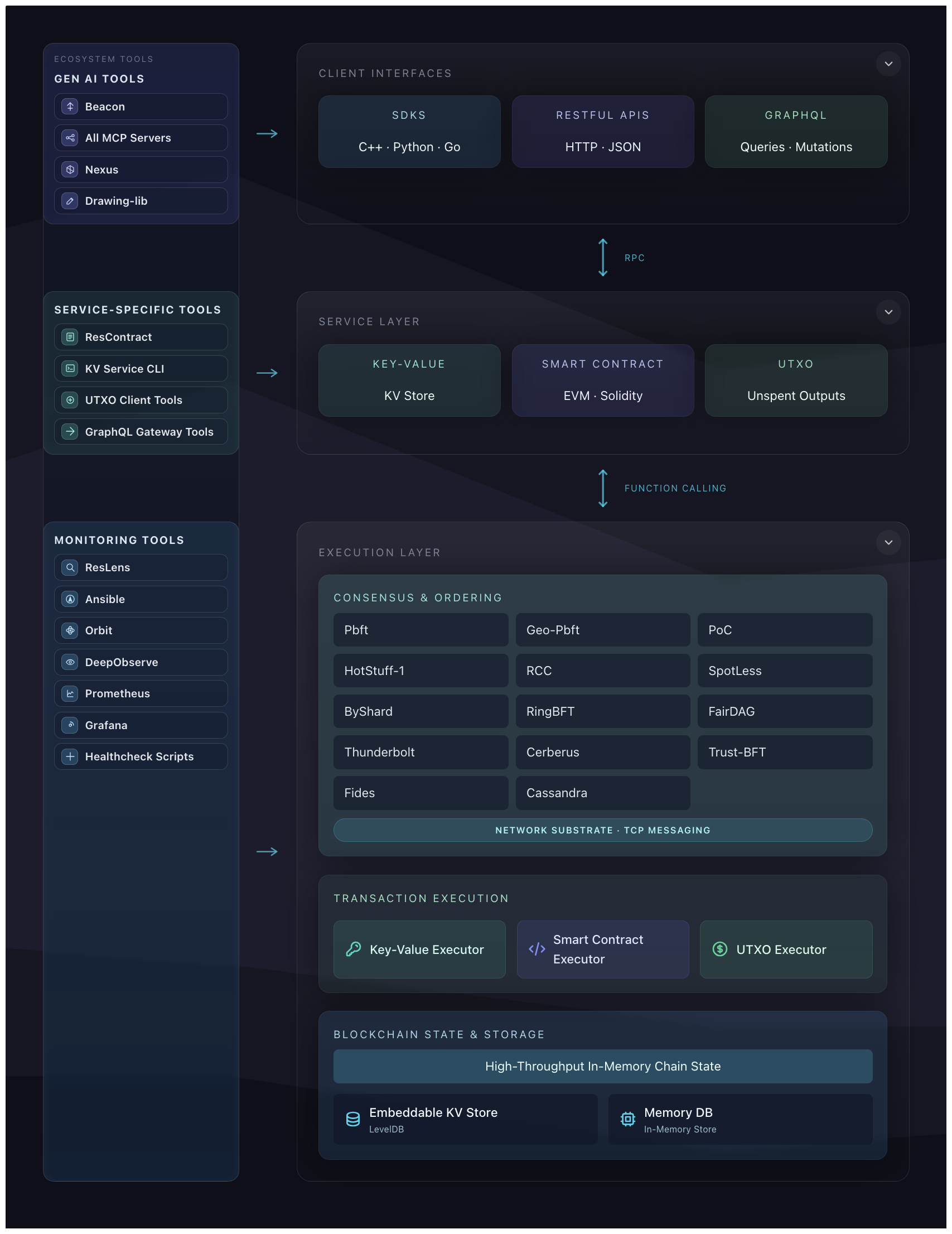
**[Apache ResilientDB](https://resilientdb.com/)** is a **High Throughput Yielding Permissioned Blockchain Fabric** founded by **ExpoLab** at **UC Davis** in 2018. ResilientDB advocates a **system-centric** design by implementing a **multi-threaded architecture** with **deep pipelines**. Further, ResilientDB **separates** the ordering of client transactions from their execution, allowing it to **process messages out of order**.
# Downloads:
Download address for run-directly software package: https://downloads.apache.org/incubator/resilientdb/
### Quick Facts on ResilientDB
1. ResilientDB orders client transactions through a highly optimized implementation of the **[PBFT](https://css.csail.mit.edu/6.824/2014/papers/castro-practicalbft.pdf)** [Castro and Liskov, 1998] protocol, which helps to achieve consensus among its replicas. ResilientDB also supports deploying other state-of-the-art consensus protocols *[release are planned]* such as **[GeoBFT](http://www.vldb.org/pvldb/vol13/p868-gupta.pdf)** [**[released](https://github.com/resilientdb/resilientdb/releases/tag/nexres-v1.1.0)**], **[PoE](https://openproceedings.org/2021/conf/edbt/p111.pdf)**, **[RCC](https://arxiv.org/abs/1911.00837)**, **[RingBFT](https://openproceedings.org/2022/conf/edbt/paper-73.pdf)**, **[PoC](https://arxiv.org/abs/2302.02325)**, **[SpotLess](https://arxiv.org/abs/2302.02118)**, **[HotStuff](https://arxiv.org/abs/1803.05069)**, and **[DAG](https://arxiv.org/pdf/2105.11827.pdf)**, to name a few.
2. ResilientDB requires deploying at least **3f+1** replicas, where **f (f > 0)** is the maximum number of arbitrary (or malicious) replicas.
3. ResilientDB supports a primary-backup architecture, which designates one of the replicas as the **primary** (replica with identifier **0**). The primary replica initiates consensus on a client transaction, while backups agree to follow a non-malicious primary.
4. ResilientDB exposes a wide range of interfaces such as a **Key-Value** store, **Smart Contracts**, **UTXO**, and a **Python SDK**.
5. To persist blockchain, chain state, and metadata, ResilientDB provides durability through **LevelDB**.
6. ResilientDB provides access to a seamless **GUI display** for deployment and maintenance, and supports **Grafana** for plotting monitoring data.
7. ResilientDB ships with a rich **ecosystem** of first‑class tools under the `ecosystem/` directory, including **wallets (ResVault)**, **SDKs and ORMs (Python, Rust, ResDB‑ORM)**, **APIs (GraphQL, REST)**, and **monitoring & deployment tooling (ResLens, Ansible/Docker, Orbit, etc.)**, making it easy to build, observe, and operate applications on top of ResilientDB.
8. **[Historial Facts]** The ResilientDB project was founded by **[Mohammad Sadoghi](https://expolab.org/)** along with his students ([Suyash Gupta](https://gupta-suyash.github.io/index.html) as the lead Architect, [Sajjad Rahnama](https://sajjadrahnama.com/) as the lead System Designer, and [Jelle Hellings](https://www.jhellings.nl/)) at **[UC Davis](https://www.ucdavis.edu/)** in 2018 and was open-sourced in late 2019. On September 30, 2021, we released ResilientDB v-3.0. In 2022, ResilientDB was completely rewritten and re-architected ([Junchao Chen](https://github.com/cjcchen) as the lead Architect, [Dakai Kang](https://github.com/DakaiKang) as the lead Recovery Architect, along with the entire ResilientDB community, paving the way for a new sustainable foundation, referred to as NexRes, Next Generation ResilientDB). Thus, on September 30, 2022, NexRes-v1.0.0 was born, marking a new beginning for **[ResilientDB](https://resilientdb.com/)**. On October 21, 2023, **[ResilientDB](https://cwiki.apache.org/confluence/display/INCUBATOR/ResilientDBProposal)** was officially accepted into **[Apache Incubation](https://incubator.apache.org/projects/resilientdb.html)**. On September 16, 2026, Apache ResilientDB officially graduated as a Top-Level Project (TLP).
---
## Online Documentation:
#### Table of Contents
1. Software Stack Architecture
- SDK, Interface/API, Platform, Execution, and Chain Layers
- Detailed API Documentation: **Core** and **SDK**
2. **SDK Layer:** **Python SDK** and **Wallet - ResVault**
3. **Interface Layer:** **Key-Value**, **Solidity Smart Contract**, **Unspent Transaction Output (UTXO) Model**, ResilientDB Database Connectivity (RDBC) API
4. **Platform Layer:** **Consensus Manager Architecture (ordering, recovery, network, chain management)**
- **Recovery & Checkpoint Design**
5. **Execution Layer:** Transaction Manager Design (Runtime)
6. **Chain Layer:** Chain State & Storage Manager Design **durability**
7. **Installing & Deploying ResilientDB**
- Build Your First Application: **KV Service**, **UTXO**
- Dashboard: **Monitoring**, **Deployment**, **Data Pipeline**
- System Parameters & Configuration
- Continuous Integration & Testing
## Ecosystem Overview
Beyond the core NexRes engine, ResilientDB ships with a rich ecosystem of tools that make it easier to build applications and data/AI pipelines on top of the ledger:
- **Core Node (NexRes)**: High-throughput, BFT-replicated state machine that orders and executes transactions with strong consistency and durability.
- **APIs (GraphQL & REST)**: ResilientDB exposes HTTP and GraphQL services for committing and querying transactions, making it easy to integrate with web backends, data services, and AI workflows.
- **ResVault (Wallet & Extension)**: Browser extension wallet that manages keys, lets users authenticate, and approve transactions from web apps, tying writes on-chain to user-controlled identities.
- **SDKs & ORMs**: Language-specific libraries and client toolkits (e.g., Python ORM, Rust SDK, ResVault SDK, ResShare SDK) that provide higher-level APIs for modeling assets, talking to GraphQL/REST, and wiring ResilientDB services into applications.
- **Monitoring (ResLens & dashboards)**: Monitoring UIs and middleware (ResLens stack) that surface cluster health, performance metrics, and profiling data for running deployments.
- **Deployment Tooling (Orbit, Ansible, Docker)**: Tools and playbooks for bringing up ResilientDB clusters and supporting services (GraphQL, Nginx, etc.) on local and cloud environments using Docker, Ansible, and the Orbit desktop deployer.
Together, these components provide an end-to-end path from user-facing applications (web, services, or AI agents) through wallets and APIs down to the ResilientDB core.
## OS Requirements
Ubuntu 20+
---
## Project Structure
```
incubator-resilientdb/
├── api/ # API layer and interfaces
├── benchmark/ # Performance benchmarking tools
│ └── protocols/ # Protocol-specific benchmarks
│ ├── pbft/ # PBFT protocol benchmarks
│ └── poe/ # PoE protocol benchmarks
├── chain/ # Blockchain chain management
│ ├── state/ # Chain state management
│ └── storage/ # Storage layer (LevelDB, etc.)
├── common/ # Common utilities and libraries
│ ├── crypto/ # Cryptographic functions
│ ├── lru/ # LRU cache implementation
│ ├── proto/ # Protocol buffer definitions
│ ├── test/ # Testing utilities
│ └── utils/ # General utilities
├── ecosystem/ # Ecosystem components (git subtrees)
│ ├── ai-tools/ # AI, docs, and MCP tools
│ │ ├── beacon/ # Beacon docs site
│ │ ├── nexus/ # Nexus research / LLM tools
│ │ └── mcp/ # MCP integrations (GraphQL, ResInsight)
│ ├── cache/ # Caching libraries
│ │ ├── resilient-node-cache/ # Node.js cache
│ │ └── resilient-python-cache/ # Python cache
│ ├── deployment/ # Deployment tooling
│ │ ├── ansible/ # Ansible playbooks
│ │ └── orbit/ # Orbit desktop deployer
│ ├── graphql/ # GraphQL + HTTP services
│ ├── monitoring/ # Monitoring stack
│ │ ├── reslens/ # ResLens UI
│ │ └── reslens-middleware/ # ResLens backend
│ ├── sdk/ # SDKs and ORMs
│ │ ├── resdb-orm/ # Python ORM
│ │ ├── resvault-sdk/ # ResVault SDK
│ │ └── rust-sdk/ # Rust SDK
│ ├── smart-contract/ # Smart contract stack
│ │ ├── rescontract/ # Contracts and examples
│ │ ├── resilient-contract-kit/ # Contract dev toolkit
│ │ └── smart-contract-graphql/ # Contract GraphQL service
│ ├── third_party/ # External tools (e.g., PocketFlow)
│ └── tools/ # Dev and app tools
│ ├── create-resilient-app/ # App scaffolding CLI
│ ├── drawing-lib/ # Shared drawing widget
│ ├── reshare-lib/ # ResShare SDK
│ └── resvault/ # ResVault wallet extension
├── executor/ # Transaction execution engine
│ ├── common/ # Common execution utilities
│ ├── contract/ # Smart contract execution
│ ├── kv/ # Key-value execution
│ └── utxo/ # UTXO execution
├── interface/ # Client interfaces and APIs
│ ├── common/ # Common interface utilities
│ ├── contract/ # Smart contract interface
│ ├── kv/ # Key-value interface
│ ├── rdbc/ # ResilientDB Database Connectivity
│ └── utxo/ # UTXO interface
├── monitoring/ # Core monitoring components
├── platform/ # Core platform components
│ ├── common/ # Common platform utilities
│ ├── config/ # Configuration management
│ ├── consensus/ # Consensus protocols
│ │ ├── checkpoint/ # Checkpoint management
│ │ ├── execution/ # Transaction execution
│ │ ├── ordering/ # Transaction ordering
│ │ └── recovery/ # Recovery mechanisms
│ ├── networkstrate/ # Network strategy layer
│ ├── proto/ # Protocol definitions
│ ├── rdbc/ # RDBC implementation
│ └── statistic/ # Statistics and metrics
├── proto/ # Protocol buffer definitions
│ ├── contract/ # Smart contract protos
│ ├── kv/ # Key-value protos
│ └── utxo/ # UTXO protos
├── scripts/ # Deployment and utility scripts
│ └── deploy/ # Deployment scripts
├── service/ # Service implementations
│ ├── contract/ # Smart contract service
│ ├── kv/ # Key-value service
│ ├── tools/ # Service tools
│ ├── utils/ # Service utilities
│ └── utxo/ # UTXO service
├── third_party/ # Third-party dependencies
└── tools/ # Development and build tools
```
**Note**: The `ecosystem/` directory contains git subtrees for ecosystem components. You can clone the repository without ecosystem components for a smaller, faster download. See [ecosystem/README.md](ecosystem/README.md) for details.
## Build and Deploy ResilientDB
Next, we show how to quickly build ResilientDB and deploy 4 replicas and 1 client proxy on your local machine. The proxy acts as an interface for all the clients. It batches client requests and forwards these batches to the replica designated as the leader. The 4 replicas participate in the PBFT consensus to order and execute these batches. Post execution, they return the response to the leader.
Install dependencies:
./INSTALL.sh
For non-root users, see [INSTALL/README.md](https://github.com/apache/incubator-resilientdb/blob/master/INSTALL/README.md)
Generate the certificates and the public-private keys.
./service/tools/kv/server_tools/generate_keys_and_certs.sh
Run ResilientDB (Providing a Key-Value Service):
./service/tools/kv/server_tools/start_kv_service.sh
- This script starts 4 replicas and 1 client. Each replica instantiates a key-value store.
Build Interactive Tools:
bazel build service/tools/kv/api_tools/kv_service_tools
### Issues ###
If you cannot build the project successfully, try to reduce the bazel jobs [here](
https://github.com/apache/incubator-resilientdb/blob/master/.bazelrc#L1).
## Functions ##
ResilientDB supports two types of functions: version-based and non-version-based.
Version-based functions will leverage versions to protect each update, versions must be obtained before updating a key.
***Note***: Version-based functions are not compatible with non-version-based functions. Do not use both in your applications.
We show the functions below and show how to use [kv_service_tools](service/tools/kv/api_tools/kv_service_tools.cpp) to test the function.
### Version-Based Functions ###
#### Get ####
Obtain the value of `key` with a specific version `v`.
kv_service_tools --config config_file --cmd get_with_version --key key --version v
| parameters | descriptions |
| ---- | ---- |
| config | the path of the client config which points to the db entrance |
| cmd | get_with_version |
| key | the key you want to obtain |
| version | the version you want to obtain. (If the `v` is 0, it will return the latest version |
Example:
bazel-bin/service/tools/kv/api_tools/kv_service_tools --config service/tools/config/interface/service.config --cmd get_with_version --key key1 --version 0
Results:
> get key = key1, value = value: "v2"
> version: 2
#### Set ####
Set `value` to the key `key` based on version `v`.
kv_service_tools --config config_file --cmd set_with_version --key key --version v --value value
| parameters | descriptions |
| ---- | ---- |
| config | the path of the client config which points to the db entrance |
| cmd | set_with_version |
| key | the key you want to set |
| version | the version you have obtained. (If the version has been changed during the update, the transaction will be ignored) |
| value | the new value |
Example:
bazel-bin/service/tools/kv/api_tools/kv_service_tools --config service/tools/config/interface/service.config --cmd set_with_version --key key1 --version 0 --value v1
Results:
> set key = key1, value = v3, version = 2 done, ret = 0
>
> current value = value: "v3"
> version: 3
#### Get Key History ####
Obtain the update history of key `key` within the versions [`v1`, `v2`].
kv_service_tools --config config_file --cmd get_history --key key --min_version v1 --max_version v2
| parameters | descriptions |
| ---- | ---- |
| config | the path of the client config which points to the db entrance |
| cmd | get_history |
| key | the key you want to obtain |
| min_version | the minimum version you want to obtain |
| max_version | the maximum version you want to obtain |
Example:
bazel-bin/service/tools/kv/api_tools/kv_service_tools --config service/tools/config/interface/service.config --cmd get_history --key key1 --min_version 1 --max_version 2
Results:
> get history key = key1, min version = 1, max version = 2
> value =
> item {
> key: "key1"
> value_info {
> value: "v1"
> version: 2
> }
> }
> item {
> key: "key1"
> value_info {
> value: "v0"
> version: 1
> }
> }
#### Get Top ####
Obtain the recent `top_number` history of the key `key`.
kv_service_tools --config config_path --cmd get_top --key key --top top_number
| parameters | descriptions |
| ---- | ---- |
| config | the path of the client config which points to the db entrance |
| cmd | get_top |
| key | the key you want to obtain |
| top | the number of the recent updates |
Example:
bazel-bin/service/tools/kv/api_tools/kv_service_tools --config service/tools/config/interface/service.config --cmd get_top --key key1 --top 1
Results:
>key = key1, top 1
> value =
> item {
> key: "key1"
> value_info {
> value: "v2"
> version: 3
> }
>}
#### Get Key Range ####
Obtain the values of the keys in the ranges [`key1`, `key2`]. Do not use this function in your practice code
kv_service_tools --config config_file --cmd get_key_range_with_version --min_key key1 --max_key key2
| parameters | descriptions |
| ---- | ---- |
| config | the path of the client config which points to the db entrance |
| cmd | get_key_range_with_version |
| min_key | the minimum key |
| max_key | the maximum key |
Example:
bazel-bin/service/tools/kv/api_tools/kv_service_tools --config service/tools/config/interface/service.config --cmd get_key_range_with_version --min_key key1 --max_key key3
Results:
>min key = key1 max key = key2
> getrange value =
> item {
> key: "key1"
> value_info {
> value: "v0"
> version: 1
> }
> }
> item {
> key: "key2"
> value_info {
> value: "v1"
> version: 1
> }
>}
### Non-Version-Based Function ###
#### Set #####
Set `value` to the key `key`.
kv_service_tools --config config_file --cmd set --key key --value value
| parameters | descriptions |
| ---- | ---- |
| config | the path of the client config which points to the db entrance |
| cmd | set |
| key | the key you want to set |
| value | the new value |
Example:
bazel-bin/service/tools/kv/api_tools/kv_service_tools --config service/tools/config/interface/service.config --cmd set --key key1 --value value1
Results:
> set key = key1, value = v1, done, ret = 0
#### Get ####
Obtain the value of `key`.
kv_service_tools --config config_file --cmd get --key key
| parameters | descriptions |
| ---- | ---- |
| config | the path of the client config which points to the db entrance |
| cmd | get |
| key | the key you want to obtain |
Example:
bazel-bin/service/tools/kv/api_tools/kv_service_tools --config service/tools/config/interface/service.config --cmd get --key key1
Results:
> get key = key1, value = "v2"
#### Get Key Range ####
Obtain the values of the keys in the ranges [`key1`, `key2`]. Do not use this function in your practice code
kv_service_tools --config config_path --cmd get_key_range --min_key key1 --max_key key2
| parameters | descriptions |
| ---- | ---- |
| config | the path of the client config which points to the db entrance |
| cmd | get_key_range |
| min_key | the minimum key |
| max_key | the maximum key |
Example:
bazel-bin/service/tools/kv/api_tools/kv_service_tools --config service/tools/config/interface/service.config --cmd get_key_range --min_key key1 --max_key key3
Results:
> getrange min key = key1, max key = key3
> value = [v3,v2,v1]
## Deployment Script
We also provide access to a [deployment script](https://github.com/resilientdb/resilientdb/tree/master/scripts/deploy) that allows deployment on distinct machines.
## Deploy via Docker
1. **Install Docker**
Before getting started, make sure you have Docker installed on your system. If you don't have Docker already, you can download and install it from the official [Docker website](https://www.docker.com/products/docker-desktop/).
2. **Pull the Latest ResilientDB Image**
Choose the appropriate [ResilientDB image](https://hub.docker.com/repository/docker/expolab/resdb/general) for your machine's architecture:
- For amd architecture, run:
```shell
docker pull expolab/resdb:amd64
```
- For Apple Silicon (M1/M2) architecture, run:
```shell
docker pull expolab/resdb:arm64
```
3. **Run a Container with the Pulled Image**
Launch a Docker container using the ResilientDB image you just pulled:
- For amd architecture, run:
```shell
docker run -d --name myserver expolab/resdb:amd64
```
- For Apple Silicon (M1/M2) architecture, run:
```shell
docker run -d --name myserver expolab/resdb:arm64
```
4. **Test with Set and Get Commands**
Exec into the running server:
```shell
docker exec -it myserver bash
```
5. **NOTE: If you encounter a Connection Refused error**
Run the following command within the container:
```shell
./service/tools/kv/server_tools/start_kv_service.sh
```
Verify the functionality of the service by performing set and get operations provided above [functions](README.md#functions).
## Custom Ports ##
When starting the service locally, current services are running on 10000 port-base with 5 services where the server config is located [here](https://github.com/apache/incubator-resilientdb/blob/master/service/tools/config/server/server.config)
If you want to change the setting, you need to generate the certificates.
Go the the workspace where the resilientdb repo is localted.
Change the setting parameters here and run the script:
```shell
./service/tools/kv/server_tools/generate_config.sh
```
Then re-run the start script:
```shell
./service/tools/kv/server_tools/start_kv_service.sh
```
## Smart Contract ##
ResilientDB includes a built‑in smart contract service that lets you deploy and execute Solidity contracts on top of NexRes. There are two primary ways to work with smart contracts:
1. **Low‑level flow via `contract_service_tools`**
This flow uses the `contract_service_tools` client and JSON payloads:
- **Create an owner account**: call `contract_service_tools` with a JSON file containing `{"command": "create_account"}` to obtain an on‑chain owner address.
- **Compile and deploy your contract**:
- Write your contract in Solidity (e.g., `token.sol`).
- Compile to JSON using `solc`, for example:
`solc --evm-version homestead --combined-json bin,hashes --pretty-json --optimize token.sol > token.json`
- Deploy with a JSON payload that includes:
- `command: "deploy"`
- `contract_path`: path to the compiled JSON (e.g., `service/tools/kv/api_tools/example_contract/token.json`)
- `contract_name`: contract identifier (e.g., `"token.sol:Token"`)
- `init_params`: constructor parameters (if any)
- `owner_address`: the owner account address
- The response returns a **contract address** for future calls.
- **Execute contract functions**: call `contract_service_tools` with a JSON payload that includes:
- `command: "execute"`
- `contract_address`: deployed contract address
- `caller_address`: account invoking the function
- `func_name`: function signature (e.g., `"transfer(address,uint256)"`)
- `params`: encoded parameters
2. **Higher‑level tools: ResContract CLI and ResVault**
Instead of crafting JSON by hand, you can use tools from the `ecosystem/` directory that wrap this functionality:
- **ResContract CLI** (`ecosystem/smart-contract/rescontract/`):
Command‑line interface for creating accounts, deploying contracts, and invoking methods, with a friendlier UX and helpers around contract artifacts.
- **ResVault** (`ecosystem/tools/resvault/`):
Browser wallet and extension that can create accounts, approve transactions, and drive contract interactions from web apps, tying on‑chain activity to user identities.
These tools provide full functionality up to and including **deployment and interaction with smart contracts**. See their individual READMEs for detailed usage and examples.
In addition, you can use the **Key‑Value interfaces** to query or update associated balances via `get_balance` and `set_balance` commands when needed.