headroom: a fuel gauge for AI coding agents

**Your coding agents check their Claude and Codex limits before they start a job.** headroomd reads the 5-hour and weekly limits your subscriptions report and answers go, wait or reroute, over the CLI or MCP.

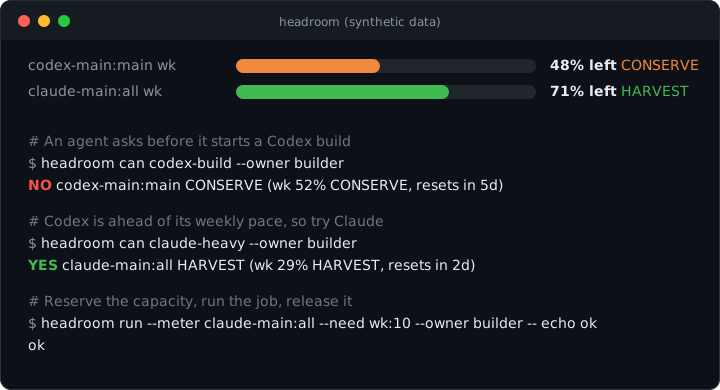
Terminal demo: Headroom checks Claude and Codex quota, waits or reroutes when needed, and reserves capacity before a job

```sh npm install -g headroomd # or: brew install apertur3/tap/headroom headroom setup headroom can claude-fable --owner me && echo go ``` Then install the Claude Code plugin (requires headroomd above): ```sh claude plugin marketplace add Apertur3/headroom claude plugin install headroom@headroom ```

CI npm version MIT license

macOS, Linux, Windows (experimental). No telemetry. Zero runtime dependencies. Not related to headroomlabs-ai/headroom, the context-compression project. --- ## Install Node 22.13 or newer. The npm package is `headroomd`; the Homebrew formula is `apertur3/tap/headroom`. Both install the `headroom` command. ```sh npm install -g headroomd # or, on macOS and Linux: brew install apertur3/tap/headroom # finds your logins, runs the doctor, asks before each change headroom setup # one block per account: percent used, reset time and pace state per window headroom ``` Claude usage comes from Claude Code's statusline. Add this to `~/.claude/settings.json` (or the `settings.json` of each other profile), or chain an existing statusline with `headroom statusline --chain ''`: ```json { "statusLine": { "type": "command", "command": "headroom statusline" } } ``` Alongside it, Headroom runs Claude Code's own `/usage` at most every 10 minutes (it adds the scoped meters the statusline does not carry; the statusline never runs under `claude -p`, so it can go stale between runs). `headroom doctor` and `headroom status` say which is in use. Headroom never edits your Claude settings files. For Claude Code, install the plugin after installing headroomd with npm or Homebrew: ```sh claude plugin marketplace add Apertur3/headroom claude plugin install headroom@headroom ``` It bundles the Headroom skill, the MCP server registration and a quota line on every prompt. Using it alongside `headroom hook install` does not print the quota line twice. See [Claude Code plugin](docs/claude-code-plugin.md) for requirements and uninstall commands. Already running Claude Code or another agent? Copy [skills/headroom/SKILL.md](skills/headroom/SKILL.md) into its skills directory and say "set up headroom". Without the plugin, `headroom setup` offers to register the MCP server for your default Claude Code profile. To register it by hand, or in another profile: ```sh claude mcp add --scope user headroom -- headroom mcp CLAUDE_CONFIG_DIR=~/.claude-work claude mcp add --scope user headroom -- headroom mcp ``` Agents without MCP, Codex for example, call the CLI. Then give your agents the instructions in [For agents](#for-agents). The MCP tools and example calls are in [docs/mcp-and-agents.md](docs/mcp-and-agents.md).
Manual setup and optional configuration The three commands above are the short path. Discovery on its own: ```sh headroom accounts discover # finds Claude, Codex, Antigravity, Grok and Kimi logins ``` On macOS and Linux, `brew install apertur3/tap/headroom` installs the same package and adds a `brew services start headroom` service. By hand, the same steps are one command: ```sh headroom setup # discovery, doctor, service, MCP registration -- asks before each change ``` Run `headroom notify configure` to choose notification channels, a preset and overrides. Run `headroom update` only when you choose to install a newer package; `headroom uninstall` reverses setup, and `headroom completion ` prints a shell completion script. `accounts discover` prints what it wrote (`Wrote ~/.headroom/accounts.toml (4 accounts). Next: headroom doctor`) and, the first time, seeds `~/.headroom/policy.toml` and `routing.toml` from `examples/` so `headroom can --owner ` works immediately with the example action classes (`claude-fable`, `codex-build`, `gemini-bulk`) -- edit `routing.toml` to match your accounts. Keep an optional second profile that is deliberately logged out without polling it: add `enabled = false` to its `[[accounts]]` block, or run `headroom accounts disable `. It remains configured and can be restored with `headroom accounts enable `. Full walkthrough, including what each step grants and why: [docs/quickstart.md](docs/quickstart.md). `status`/`doctor` check the npm registry at most once a day (a plain GET of the `headroomd` version, no account data) and print a one-line notice when a newer `headroomd` is out; run `headroom update` (never automatic) to install it. Set `update_check = false` in `~/.headroom/policy.toml` to turn the check off -- see [Staying up to date](docs/quickstart.md#staying-up-to-date).
--- ## For agents Paste this into the `CLAUDE.md` or `AGENTS.md` your agents read, and replace the placeholders with your own action classes, meters and agent name. The agent then checks Headroom before it dispatches work, instead of asking you. ```markdown ## Usage limits (Headroom) Check Headroom before you start work on a subscription. Do not ask me about usage or reset times. - `headroom can --owner `: exit 0 means go, exit 2 means no. Any other exit is an error: treat it as no. Classes are the `[consumes]` entries in `~/.headroom/routing.toml`. - On no, try the next class in your fallback list. If none has room, run `headroom wait --meter --until-reset --max 6h` (exit 3 means it timed out), then run `headroom can` again before you start anything. - Start a job with `headroom run --meter --need : --owner -- `, for example `--need 5h:10` for 10 percent of the 5-hour window. It reserves the points, runs the command and releases them when it exits. Exit 2 means refused; otherwise it returns the command's own exit code. - UNKNOWN means there is no trustworthy reading. Treat it as no. Never pass `--allow-unknown` unless I ask for it. - For the full picture, read `headroom --json`, not the human view. - In Claude Code with the Headroom MCP server, `quota_can` answers the same question as `headroom can`. ``` To put live quota in front of the agent on every turn, run `headroom hook install --agent claude` (or answer yes in `headroom setup`). Each Claude Code prompt then carries one line the daemon wrote at its last poll, with its age, for about 60 tokens per turn; `headroom line` prints the same line for any agent. Claude Code on macOS and Linux only for now; Windows, Codex and Gemini hooks are not supported yet. A plain `can` is advisory. A reservation tells other agents that use Headroom the points are taken; it does not limit what the job itself spends, and it cannot stop tools that do not use Headroom. The longer version, with pace states, leases and reserves, is [skills/headroom/SKILL.md](skills/headroom/SKILL.md). --- ## Platform support and known limitations
7
sources read
3
OSes tested in CI
1
local daemon, one call per decision
0
telemetry (one opt-out update check)

Sources: five subscription services (Claude, Codex, Kimi, and the experimental Antigravity and Grok) and two local server types (vLLM and llama.cpp). A stale or failed reading prints UNKNOWN, never a number. Full writeup · Reproduce it

| Platform | Status | |---|---| | macOS | The primary platform: daily use on one machine, plus CI. Antigravity needs macOS 14 or later | | Linux | CI on Ubuntu; cold install also checked by hand on ARM64 | | Windows | **Experimental.** Tests run in CI. On Windows 11, `headroom install-service` registers a "Headroom Daemon" task that starts immediately and serves a per-user named pipe whose name is a hash only. `headroom uninstall --home` asks the running daemon to shut down over that pipe, removes the task and the home, and exits 0. After an in-place upgrade, `headroom install-service` restarts the daemon onto the new version, except a daemon started by 0.2.6 or older, which has no shutdown request and must be stopped by hand once (end node.exe in Task Manager). Verified on Windows 11: MCP registration (`claude mcp add --scope user headroom -- headroom mcp` shows Connected) and a real Claude login read (fresh on the first poll). Not verified on Windows: a slow stop (the 27 second wait is covered by unit tests only) and start at logon and across reboots. Full detail below | | Antigravity | Experimental. Depends on a private local endpoint that the vendor can change | | Grok | Experimental. Reads the Grok CLI's undocumented chat-proxy endpoint and presents itself as the Grok CLI |
The full table: tests, CI, install checks, Windows, vendor endpoints | | | |---|---| | Tests | `npm test` (vitest), run on every push on macOS, Ubuntu and Windows; some tests are POSIX-only and skip on Windows. Current counts are in the CI logs; method and limits: [docs/verification.md](docs/verification.md) | | CI platforms | macOS, Ubuntu and Windows (`macos-latest`, `ubuntu-latest`, `windows-latest`): lint, tests, build, `npm pack --dry-run`, privacy sweep, `npm audit` | | Daily use | one macOS machine; this is the only environment a person uses every day | | Install from the packed tarball | scripted cold-install smoke test ([`smoke-cold.sh`](scripts/smoke-cold.sh)) runs in the release workflow; also checked by hand on macOS and on Linux ARM64 | | Windows | **experimental.** On Windows 11, `headroom install-service` registers a "Headroom Daemon" task that starts immediately and serves a per-user named pipe whose name is a hash only. `headroom uninstall --home` asks the running daemon to shut down over that pipe, removes the task and the home, and exits 0. After an in-place upgrade, `headroom install-service` restarts the daemon onto the new version, except a daemon started by 0.2.6 or older, which has no shutdown request and must be stopped by hand once (end node.exe in Task Manager). Verified on Windows 11: MCP registration (`claude mcp add --scope user headroom -- headroom mcp` shows Connected) and a real Claude login read (fresh on the first poll). Not verified on Windows: a slow stop (the 27 second wait is covered by unit tests only) and start at logon and across reboots. Earlier, 0.2.4 was installed on Windows 11 and `accounts discover`, `doctor`, `status` / `can` / `gate` / `dashboard` (UNKNOWN, never a fake number) and the HTML report permissions worked. The process watchdog is inactive on Windows. PowerShell's default execution policy blocks the `npm` and `headroom` `.ps1` shims; use `cmd`, or relax the policy | | Works with | Claude Code through MCP (registered with `claude mcp add`, covered by [`mcp-registration.test.ts`](test/mcp-registration.test.ts) and [`daemon-mcp.test.ts`](test/daemon-mcp.test.ts)); any agent that can run a shell command, through the CLI and `--json`. Other MCP clients: untested | | Antigravity | experimental; macOS 14 or later only, and it depends on a private local endpoint that the vendor can change | | Vendor endpoints | private and unversioned. Headroom pins them, records redacted fixtures and prints UNKNOWN when a shape changes, but it cannot promise they keep working |
--- ## Why An agent that fans out several jobs needs two answers first: can this account afford them, and which other jobs have already reserved capacity? Vendor screens answer neither for a program, and a stale reading can send more work to an account that no longer has capacity. Headroom combines vendor readings with cooperative reservations. When a reading is stale or failed it says UNKNOWN instead of a number, and `can` answers NO for it unless you pass `--allow-unknown`. One daemon reads quota across Claude, Codex, Antigravity, Grok, Kimi, and local vLLM or llama.cpp pools, keeps history, and detects resets. Antigravity and Grok support is experimental.

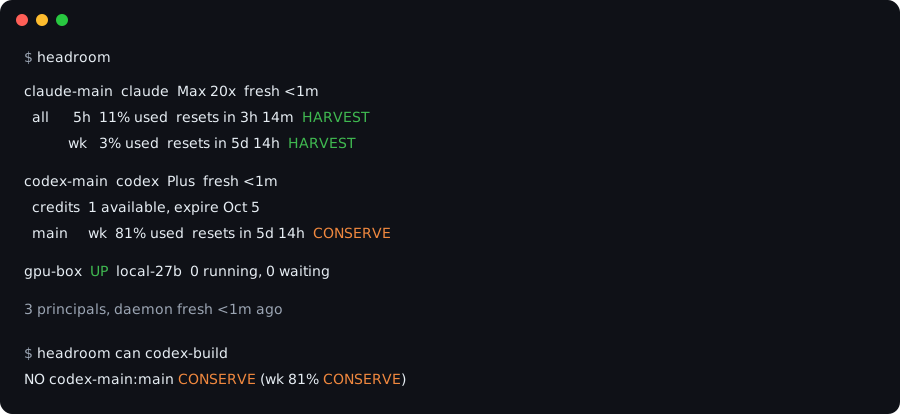
Terminal card: headroom prints one block per account with percent used, reset time and pace state per window, then headroom can codex-build answers NO

### Demo

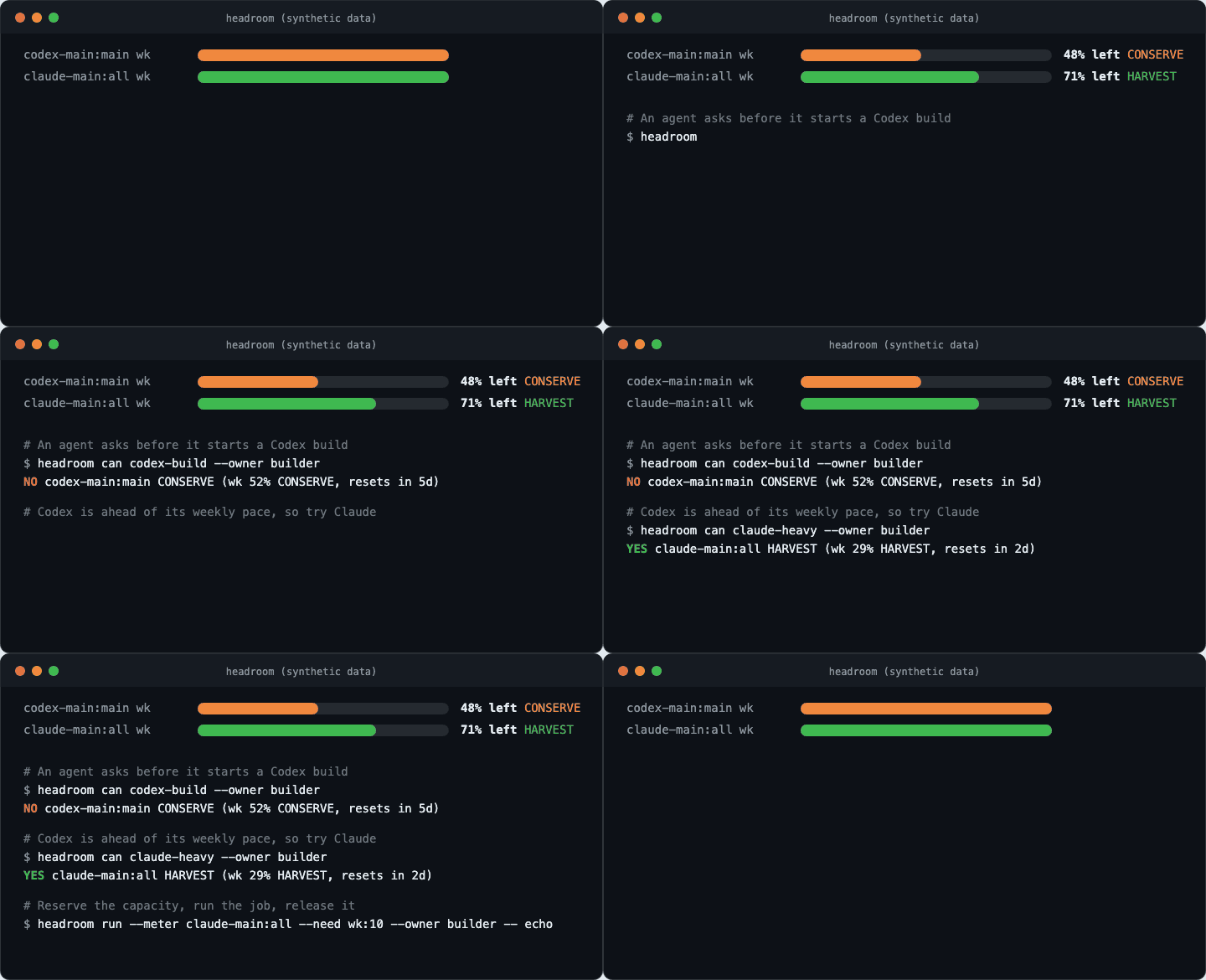
Animated terminal: two fuel bars drain to what is left of the week, headroom can says NO for the Codex week that is ahead of pace and YES for Claude, then headroom run reserves capacity and runs the job

Synthetic data. The terminal runs the real CLI against a mock home, generated by scripts/render-demo-animated.mjs.

Install  ·  For agents  ·  Why  ·  Demo  ·  Design principles  ·  Docs

### How it differs from a usage analyzer Usage analyzers such as [ccusage](https://github.com/ccusage/ccusage) read local usage files and report estimated costs. Headroom reads the usage and limits your vendors report, from their own usage endpoints, and answers before work starts: `can`, `gate`, `route`, leases and an inbox, for agents that dispatch work. They answer different questions and work side by side. --- ## Before and after Without a check, an agent finds the limit by hitting it, in the middle of a task. With Headroom it checks first and tries the next class in your fallback list when the answer is NO. `can` only checks; when several jobs start at once, use `headroom run` so each one reserves its capacity. **Without Headroom** ```sh # weekly limit reached mid-task, work stops half done codex exec "refactor the billing module" ``` **With Headroom** ```sh if headroom can codex-build --owner builder; then codex exec "refactor the billing module" elif headroom can claude-fable --owner builder; then claude -p "refactor the billing module" else # no class has room: wait for a reset, then check again before dispatching headroom wait --meter codex-main:main --until-reset --max 6h fi ``` `headroom run --meter ... --need ... --owner ... -- ` goes one step further: it checks, reserves the capacity for the job's duration so other agents that use Headroom see it as taken, runs the command, and releases the reservation. Runnable examples against synthetic data are in [`examples/`](examples). --- ## Features
Reads real limits
Subscription usage and limits as Claude, Codex, Antigravity, Grok and Kimi report them, plus availability and load for local vLLM or llama.cpp pools.
Pace, not just percent
HARVEST, NORMAL, CONSERVE, FREEZE or UNKNOWN per window, from a straight line burn with a grace period after each reset.
Go, wait or reroute
can, gate, route, plan, fill and wait answer before the job starts.
Reservations
Leases and per-meter reserves coordinate capacity among agents that use Headroom (run, can --lease).
Fails closed
A stale or failed reading prints UNKNOWN, never a number. By default, can answers NO for it.
Local only
A daemon on a 0600 socket (a named pipe on Windows), Headroom's own secrets in the OS store, no telemetry. The CLI checks npm for a newer version at most once a day; turn it off with update_check = false.
Reads Claude · Codex · Antigravity (experimental) · Grok (experimental) · Kimi · local vLLM · local llama.cpp
Called from Claude Code through MCP (tested); any agent that can run a shell command, through the CLI and --json. Other MCP clients: untested.
Everything it ships | | | |---|---| | Vendors and meters | Claude `all`, `fable`, `routines` and reported scoped meters; Codex `main`, `spark`, `credits`; Antigravity `gemini`, `claude-gpt`; Grok, Kimi; and local vLLM or llama.cpp `capacity` pools | | Pace | HARVEST, NORMAL, CONSERVE, FREEZE or UNKNOWN per window, from a straight line burn with a grace period after each reset | | Decisions | `can`, `gate`, `route`, `plan`, `fill`, `wait`, leases, per-meter reserves, and a spend ledger coordinate shared capacity and pacing | | Views and automation | Terminal status, `dashboard`/`top` (and `--html ` browser report), `statusline --render`, `usage --paste` or `--clipboard`, JSON contract output, local daemon, and MCP tools | | Operations | Interactive `setup`; the `notify configure` picker with calm, quiet and everything presets; `inbox`; `export` as JSON or CSV; `doctor --bundle`; `update`; `uninstall`; and shell `completion` | Headroom is not a router. Which model is good at what is your opinion and changes monthly. Keep it in `~/.headroom/routing.toml`; Headroom only filters your fallback list by budget. It also never sits in the request path.
--- ## Dashboard The Headroom browser dashboard: two subscriptions with their 5-hour and weekly windows, a state per meter, and a remaining-capacity chart against an even-pace guide and a reserve floor Synthetic data, generated by [`scripts/render-dashboard-demo.mjs`](scripts/render-dashboard-demo.mjs). ### Human dashboard and browser report Open the terminal overview, or export a local browser snapshot: ```sh headroom dashboard headroom dashboard --once --ascii ``` Use Tab to select a meter, `v` for details, and `e` for events. Both chart views show recorded remaining capacity, with gaps where readings are missing or untrusted. To open the same recorded history in a browser: ```sh headroom dashboard --html report.html ``` Open the generated file in your browser. The report shows subscription usage and reset times in an overview, with selectable window charts and sample details. It supports light and dark themes and makes no external requests. It is a snapshot: generate it again for newer readings. Existing files are preserved unless you pass `--force`; new files use mode 0600 on systems that support Unix permissions. --- ## Design principles Each of these is a rule the code enforces and a test pins. Past real-world breakage is the reason for every one. - **Fail closed: never a fake number.** A missing, stale or inconsistent reading becomes UNKNOWN, and `can` answers NO for it unless you explicitly pass `--allow-unknown`. - **A stale-lane canary that cannot be silenced.** A lane with no fresh reading for 6 hours raises an alert, whatever the notification config says. - **Only kill what Headroom provably started.** On macOS and Linux, a process is signalled only if its recorded pid, command and start time still match. - **Secrets stay in their own stores.** Notification tokens live in the OS secret store; vendor credentials are read at use time from the vendor's own store or credential file and never copied. Output is redacted. - **A redacted fixture per past breakage.** Every Antigravity failure shape seen in the field has a fixture and a test.
Where each one is enforced and tested - **Fail closed: never a fake number.** A missing, stale, held or inconsistent reading becomes UNKNOWN, and `can` answers NO for it unless you pass `--allow-unknown` ([`freshnessGate`, `canConsume`](src/policy.ts), tested in [`store-policy.test.ts`](test/store-policy.test.ts)). Antigravity lanes that report no usage are classified as blocked, idle or unknown, never filled in ([`antigravity-lanes.ts`](src/antigravity-lanes.ts), [`antigravity-lane-classifier.test.ts`](test/antigravity-lane-classifier.test.ts)). - **A stale-lane canary that cannot be silenced and does not spam humans.** A meter lane with no fresh reading for 6 hours (configurable) raises an alert into the inbox and `headroom doctor`. It runs before and independently of the notification config, so a muted channel or `events_off` cannot hide it. External channels get nothing per lane; at most one plain-language message per principal per episode, after 24 hours, held during quiet hours ([`canary.ts`](src/canary.ts), [`stale-lane-canary.test.ts`](test/stale-lane-canary.test.ts)). - **Process hygiene: only kill what Headroom provably started.** A process is signalled only if recorded evidence (pid, command and start time from when Headroom launched it) still matches the live process, re-checked immediately before every signal, so a recycled pid is never hit. An age watchdog reaps Headroom-started `agy` processes that outlive their limit ([`process-tree.ts`](src/process-tree.ts), [`agy-watchdog.ts`](src/agy-watchdog.ts), [`antigravity-keepalive-stop-recycled-pid.test.ts`](test/antigravity-keepalive-stop-recycled-pid.test.ts), [`agy-watchdog.test.ts`](test/agy-watchdog.test.ts)). The test suite itself fails if any process it started outlives the run ([`global-leak-gate.ts`](test/global-leak-gate.ts)). The watchdog and the pid and start-time checks are not active on Windows. - **Secrets stay in their own stores.** Headroom's own credentials (notification tokens) are read at use time from the macOS Keychain (`secret-tool` on Linux, Credential Manager on Windows) and never written to disk; vendor tokens are read at call time from the vendor's own store or credential file (for Kimi's manual token and the Moonshot key, a 0600 file you save yourself) and dropped. Output and logs are redacted ([`notify.ts`](src/notify.ts), [`security.ts`](src/security.ts), [`security.test.ts`](test/security.test.ts), [SECURITY.md](SECURITY.md)). - **A redacted fixture per past breakage.** Every Antigravity failure shape seen in the field has a fixture (recorded and redacted, or synthetic) and a test that runs it through the real code path ([`test/fixtures/antigravity/`](test/fixtures/antigravity), [`record-antigravity-fixture.sh`](scripts/record-antigravity-fixture.sh)). The repo also scans itself and its packed npm tarball for private addresses, emails and home paths ([`privacy-sweep.sh`](scripts/privacy-sweep.sh), run in CI).
--- ## How it fits together How Headroom fits together: accounts, adapters, daemon and agents Headroom reads Claude, Codex, Grok and Kimi through native TypeScript adapters. Antigravity is experimental and supported on macOS 14 or later: it requires a logged-in `agy` and a running Headroom daemon. The npm and Homebrew packages include a universal macOS reader, verified by SHA-256 before use. Gemini CLI is not required or supported for consumer subscriptions; [Google ended consumer Gemini CLI access on June 18, 2026](https://developers.googleblog.com/an-important-update-transitioning-gemini-cli-to-antigravity-cli/). For Antigravity quota, the bundled macOS reader finds the running Antigravity language server (the daemon-kept `agy`) in the process list, takes its local port and, where the process has one, the local CSRF token from its command line, and asks that server on 127.0.0.1 for its quota summary. It does not read agy's OAuth or session credential. The daemon also reads the tail of agy's newest log under `~/.gemini/antigravity-cli/log` for login-state markers only. Headroom never reads the Gemini CLI's OAuth file. Missing or failed summaries stay UNKNOWN. An idle window with real fractions may carry a doubt marker when its reset time looks synthetic. A five-hour window entirely absent from an otherwise-successful response (a genuinely idle rolling window) prints `n/a` instead of UNKNOWN and does not block a budget check. The endpoint contracts and native reader build on [CodexBar](https://github.com/steipete/codexbar) (MIT). ### A budget check before a job This synthetic example has 20% usage and another owner reserving 75%. The remaining capacity cannot cover another 10-point job, so the child command never starts: ```text $ headroom run --meter claude-main:all --need wk:10 --owner builder -- codex exec "Run the tests" wk needs 10 more but only 0.0 left after 75.0% already leased before the 10% reserve ``` When there is enough capacity, `run` reserves it, starts the command, and releases the reservation when it finishes. The check and reservation are atomic across processes. A plain `can` or `gate` is advisory; use `run` or `can --lease` when starting work. These reservations coordinate agents that use Headroom; they cannot stop unrelated tools from consuming the subscription. ### Examples Runnable against synthetic data, no logins needed. Build once, then point the CLI at a seeded home: ```sh npm run build # sets HEADROOM_HOME to a throwaway demo home eval "$(node scripts/demo-home.mjs)" # walks a fallback list, dispatches on the first class with room bash examples/orchestrator-loop.sh # refuses a job the budget cannot cover (exit 1) bash examples/ci-gate.sh # the MCP call a client sends, over stdio bash examples/mcp-quota-can.sh ``` The scripts refuse to run unless `HEADROOM_HOME` points at that demo home, so they cannot touch a real `~/.headroom`, and they call the repo build (`dist/cli.js`), not a global `headroom`. They print which binary they use. See [`examples/`](examples) for the scripts and the starter `accounts.toml`, `policy.toml` and `routing.toml`. --- ## Documentation - [docs/claude-code-plugin.md](docs/claude-code-plugin.md): Claude Code plugin install, quota line, MCP and uninstall - [docs/quickstart.md](docs/quickstart.md): install to first truthful line, macOS, Linux and Windows - [docs/concepts.md](docs/concepts.md): principal, meter, window, observation, pace states, leases, events - [docs/mcp-and-agents.md](docs/mcp-and-agents.md): the MCP tools, example calls, and how an orchestrator should use them - [docs/json-contract.md](docs/json-contract.md): the versioned field-by-field shape of every `--json` output and MCP tool result, and its compatibility promise - [docs/vendors.md](docs/vendors.md): what Headroom reads per vendor, and its known live limitations ## How it compares and what it reads Headroom is not a cost tracker: [ccusage](https://github.com/ccusage/ccusage) estimates spend from local logs, while headroomd reads the limit the vendor enforces. They work side by side. Headroom is unofficial. Claude is read through Claude Code itself by default; other readers use undocumented vendor endpoints with your own login. See [Vendor endpoints and your accounts](#vendor-endpoints-and-your-accounts). ## Vendor endpoints and your accounts

Independent open source project, not affiliated with, sponsored by or endorsed by Anthropic, OpenAI, Google, xAI or Moonshot AI. Several integrations use undocumented vendor endpoints with your own login: see Vendor endpoints and your accounts. Claude, Codex, Antigravity, Grok and Kimi are trademarks of their respective owners, used here only to name the services Headroom reads. This is the npm package headroomd (repository Apertur3/headroom), not related to other projects named Headroom such as the context-compression library headroomlabs-ai/headroom.

Several adapters read usage endpoints that the vendors do not document as public APIs. Headroom calls them with your own credentials, taken from the vendor CLIs you installed and signed in to on the same machine, and only to read usage: it sends no prompts, changes no account settings, and never writes to another tool's credential store. Use it only with accounts you own. Vendor terms may restrict this kind of access, and a vendor can change or block an endpoint at any time; use it at your own risk. Headroom does not rotate credentials to get past a block or a limit. Use only accounts you own; Headroom does not help get around a vendor's limits. Every request identifies itself as `headroomd/`. The default (`claude_probe = false`) needs no token and no undocumented endpoint: Headroom reads the statusline snapshot, or runs Claude Code's own `/usage`, and never reads Claude's Keychain item or calls Anthropic. Setting `claude_probe = true` opts into a last-resort call, made only when no other reading is available: Headroom reads Claude Code's OAuth token and calls an undocumented Anthropic endpoint, and Anthropic's terms reserve that login for ordinary use of Claude Code. | Source | What Headroom calls | Credential | Documented by the vendor | |---|---|---|---| | Claude, statusline snapshot (default, preferred) | No network call: reads the JSON Claude Code passes to its `statusLine` command | None | Not applicable (local) | | Claude, `/usage` fallback (default) | Runs your own `claude -p "/usage"` at most every 10 minutes per profile, with or without a fresh statusline snapshot; no model turn, no cost | None handled by Headroom: Claude Code uses its own login | Yes, `usage_report` is in the Agent SDK reference (marked experimental) | | Claude, usage probe (opt-in: `claude_probe = true` in `policy.toml`) | `GET api.anthropic.com/api/oauth/usage` | Claude Code's OAuth token, from the macOS Keychain or `.credentials.json` | No. Sends `User-Agent: headroomd/` | | Codex | `GET chatgpt.com/backend-api/wham/usage` and `.../wham/rate-limit-reset-credits`; also the Codex CLI's local session logs | ChatGPT token in `~/.codex/auth.json` | No. Sends `User-Agent: headroomd/` | | Antigravity quota (experimental) | agy's local language server on 127.0.0.1 | agy's local CSRF token from its process command line, where present; not agy's OAuth or session credential | No (private local endpoint) | | Grok (experimental) | `GET cli-chat-proxy.grok.com/v1/billing?format=credits` and `/v1/settings` | Bearer token from `~/.grok/auth.json` (written by `grok login`) | No. Sends `User-Agent: headroomd/` | | Kimi, CLI credential | `GET api.kimi.com/coding/v1/usages` | Access token from `~/.kimi-code/credentials/kimi-code.json` | No. Sends `User-Agent: headroomd/` | | Kimi, manual token | The `www.kimi.com/apiv2` web gateway | A `kimi-auth` web session token you save yourself to a 0600 file (default `~/.kimi/auth.token`) | No | | Kimi, optional balance | `GET api.moonshot.ai/v1/users/me/balance` | A Moonshot API key you save to a 0600 `moonshot.key` file | Yes (Moonshot platform API) | | Local vLLM, llama.cpp | Your own server at the `base_url` you configure | None from a vendor | Not applicable | Per-vendor detail: [docs/vendors.md](docs/vendors.md). ## Security Headroom never writes a vendor credential or notification token to disk, and redacts secrets from its output. With `claude_probe = true` on macOS, a bundled helper, `headroom-claude-probe`, reads Claude Code's Keychain token by running `/usr/bin/security`, which the Keychain item's own access list admits, keeps it in the helper's memory and makes the usage request itself, so the token never reaches Node or Headroom's output. With Claude Code 2.1.263 on macOS 26.5 this needed no Keychain dialog. The helper ships inside the npm package as a universal binary, verified against a recorded SHA-256 before every use. Tokens are otherwise read at call time from the vendor's own credential file and dropped after the request. The daemon listens on a 0600 local socket on macOS and Linux. On Windows it uses a named pipe where both sides prove they hold a per-daemon session token, kept in a 0600 file under `HEADROOM_HOME`. There is no telemetry. Apart from the vendors you configure and the notification channels you enable, the only request Headroom makes unprompted is the daily npm version check above, a plain GET with no account data (`update_check = false` turns it off); `headroom update` and `headroom engine install` contact npm and GitHub only when you run them. The engine is pinned and checksum verified, and every query lands in an audit log. Details in [SECURITY.md](SECURITY.md). ## Status Releases are published to npm as `headroomd`; [CHANGELOG.md](CHANGELOG.md) lists what changed in each one. Vendor endpoints are private and change without notice: Headroom pins them, records fixtures, backs off on 401, 403 and 429, and prints UNKNOWN instead of a stale number. What is and is not verified is in [Platform support and known limitations](#platform-support-and-known-limitations). Antigravity requires macOS and a daemon-kept `agy`; see [vendor setup](docs/vendors.md#antigravity). Contributions are welcome: see [CONTRIBUTING.md](CONTRIBUTING.md) and the issues labelled [good first issue](https://github.com/Apertur3/headroom/labels/good%20first%20issue). MIT. Third party notices in [THIRD_PARTY_NOTICES.md](THIRD_PARTY_NOTICES.md).