openapi: 3.1.0
info:
title: Channable order connection order_attachments statistics API
description: "# Introduction\n\nWelcome to the Channable API __v1__.\n\nThis version of the Channable API allows you to:\n\n- Access orders\n- Manage order shipments\n- Update the stock of an offer on all marketplaces\n- Access returns\n\n### Details\n\n| Key | Value\n------------- | -----------\nApi version | `v1`, `v2`\nProtocol | `HTTPS`\nHostname | `api.channable.com`\nCommon Path v1 | `/v1/companies/:company_id/projects/:project_id`\nCommon Path v2 | `/v2/companies/:company_id/projects/:project_id`\n\n\nThe Common Path is shared by all endpoints except the transporters endpoints in this version of our API. Note that you have to replace :company_id and :project_id with valid values. All endpoints using v2 will state so in their names, and should use the common path v2. All other endpoints are v1 endpoints and should use Common Path v1.\n\n## Taxonomy\n\n\n| Term | Description\n------------- | -----------\n`Platform` | A webshop platform, such as WooComerce, Lightspeed, etc.\n`Marketplace` | A place where you can sell your products, such as Amazon, Bol, eBay, etc. Sometimes referred to as _channel_.\n`Order` | A purchase of any products made by a client.\n`Offer` | A selling proposal made by a seller over any class of products. It includes price, stock and other seller-dependent values.\n\n\n## Rate Limiting\n\nThe Channable API has a rate limiting policy to which you must comply. \nIt is defined on a per-company basis, meaning that generating new API tokens will not circumvent our rate-limiting.\n\n| Frequency | Burst\n------------- | -----------\nMax 4 requests per second | Burst of 200 requests\n\n**Note**: We use the [Leaky Bucket algorithm](https://en.wikipedia.org/wiki/Leaky_bucket) for rate-limiting.\n\n## Getting started\n\n\nTo get started you need to:\n\n1. Find the project ids you are interested in\n1. Find your Channable company id\n1. Generate an **API token** for your company\n\n**Note**: Information about the supported channels can be found in our [help center](https://helpcenter.channable.com/hc/en-us/articles/360011094300-For-which-marketplaces-does-Channable-support-an-order-connection-integration-).\n\n### 1. Find your project ids\n\nTo find the project ids you are interested in:\n\n1. Log in to the Channable app\n2. Select a project\n3. Open the project `Settings`\n4. Copy the _Project id_ value\n\n\n### 2. Generate an API Token for your company\n\nTo both find your Channable `company_id` and to generate a new **API token** for your company, go to [app.channable.com](https://app.channable.com) and sign in.\n\nOn the main page navigate to company settings then channabke API.\nFrom here you can see your company id, as well as generate your API token.\n\n\n\n**Notes**:\n\n- Only owners of companies are able to generate an API Token.\n- Channable does not store your tokens. Please store them securely.\n- In case you lose or leak your token, generate a new one. The previously generated tokens can be revoked by you or will expire after 1 year.\n- Two API tokens can be valid at any time, allowing you to seamlessly change to a new token, if needed.\n\n### 3. Using the API Token\n\nYou must include your API token in every request you make to Channable. \nThe token should be included in the headers of the request: `Authorization: Bearer your_api_token`\n\n\n\nAfter generating your API token you are ready to try out the endpoints and build your integration\nusing the Channable Sandbox.\n\n**How to include the token in your requests:**\n\n```shell\n# Headers method: Authorization: Bearer\ncurl \"api_endpoint_here\"\n -H \"Authorization: Bearer your_api_token\"\n```\n\n\n### Common error codes and their meanings\n\nThe Channable API uses the following error codes:\n\nCode | Meaning | Reason\n---------- | ------- | -------\n400 | Bad Request | The server cannot or will not process the request due to something that is perceived to be a client error (e.g., malformed request syntax, invalid request message framing, or deceptive request routing)\n401 | Unauthorized | You are using an invalid or already revoked API token.\n403 | Forbidden | You are not allowed to access the resources your request targets.\n404 | Not Found | The targeted resources could not be found.\n405 | Method Not Allowed | You tried to access an endpoint with an invalid HTTP method.\n406 | Not Acceptable | You requested a format that isn't json.\n409 | Conflict | Your request could not be completed due to a conflict with the current state of the target resource.\n422 | Unprocessable Entity | We could understand the content type of the request entity, but we are unable to process the contained instructions.\n429 | Too Many Requests | You have sent too many requests in a given amount of time, thus exceeding our rate-limiting policy. Please try again later.\n500 | Internal Server Error | We had a problem with our server. Please try again later.\n503 | Service Unavailable | We are temporarily offline for maintenance. Please try again later.\n\n\n## Sandbox Testing\n\nThe Channable API sandbox lets you test your order integration with the Channable API in a safe\nenvironment without sending requests to the marketplaces you want to connect to. All data is mocked\nbut the structure of the data and API calls needed to manage your orders are the same no matter\nwhich marketplace you end up connecting with.\n\n\n### Setup\n\nTo set up a test environment with the Channable Sandbox you must first make a connection with the\nSandbox. This can be done in the same way as all other connections within Channable by going to\n\"Company settings\" -> \"Connections\" and clicking on \"+ Add new connection\".\n\n\n\nSelect \"Channable Sandbox\", give the connection a label and click on the blue \"Create\" button.\nNo further information is needed.\n\nOnce you have made a connection, navigate to the project you want to use and click on\n\"Setup\" -> \"Setup orders\" > \"+ Setup orders\".\n\n\n\nFrom here make an order connection between the \"Channable API\" and the \"Channable Sandbox\" and\nactivate the order connection. You are now ready to start testing.\n\n\n\n### Orders\n\nTo create a test order, navigate to \"Setup\" -> \"Orders\" -> \"Settings\" of the Channable Sandbox\norder connection.\n\n\n\nFrom here click on the gear in the top right and \"Send test order\".\n\n\n\nIn the popup fill in an item id and click the blue \"Send test order\" button. A test order has now\nbeen created, and you can use all request methods described in \"Orders\" to interact with it. If you\nneed special test cases, most data in the test order can be provided by you in the popup when you\nclick on \"Send test order\".\n\n\n### Shipments/Cancellations\n\nOnce one or more testorders have been created, use the request methods described in \"Shipment\nupdate\" and \"Cancellation update\" under \"Orders\" above to mark an order as \"shipped\" and to give it\ntrack & trace information or to mark the order as \"cancelled\".\n\n\n### Offers\n\nTo test sending offer updates, that is updating the stock value on all marketplaces that you have\nan order connection to, you can use the request methods described in \"Offers\" above. You do not need\nto have created a test order to test this as you can update the stock value of any product in your\nstore, also products that you have not received an order for through Channable.\n\n\n### Returns\n\nReturns come from the marketplaces you will connect to. In order to test this, navigate to\n\"Setup\" -> \"Setup orders\" -> \"Settings\" of the Channable Sandbox order connection. \n\n\n\nFrom here click on the gear in the top right and \"Send test return\".\n\n\n\nIn the popup fill in a Channable order id and click the blue \"Send test return\" button. A test\nreturn has now been created for the order id you filled in. You can now use all request methods\ndescribed in \"Returns\" to handle the return.\n\n\n### When you are done testing\n\nOnce you are satisfied with your Channable API setup and want to go live, contact our\nsupport department\nand they will help you setup the order connections.\n"
version: v1
x-logo:
url: https://www.channable.com/_next/image?url=https%3A%2F%2Fmedia.graphassets.com%2FcntRnbAcSrCmS1wLTWrb&w=256&q=75
tags:
- name: statistics
paths:
/v1/companies/{company_id}/projects/{project_id}/statistics/orders:
get:
tags:
- statistics
summary: All Statistics
description: 'Statistics for all order configs of a project for a given time frame.
Contains the following information per orders config in the project:
- Total number of orders
- Total number of ordered products
- Total amount spent on commission to marketplaces
- Total amount spent on shipping costs
- Total order revenue
- The currency of the marketplace
- Daily revenue numbers
Contains the following information aggregated across all orders configs in the project:
- Total number of orders
- Total number of ordered products
- Total amount spent on commission to marketplaces
- Total amount spent on shipping costs
- Total order revenue'
operationId: all_statistics_companies__company_id__projects__project_id__statistics_orders_get
parameters:
- name: project_id
in: path
required: true
schema:
type: integer
title: Project Id
- name: company_id
in: path
required: true
schema:
type: integer
title: Company Id
- name: download
in: query
required: false
schema:
type: boolean
description: If true, a file download will be served
default: false
title: Download
description: If true, a file download will be served
- name: start_date
in: query
required: false
schema:
anyOf:
- type: string
format: date
- type: string
format: date-time
- type: 'null'
title: Start Date
- name: end_date
in: query
required: false
schema:
anyOf:
- type: string
format: date
- type: string
format: date-time
- type: 'null'
title: End Date
responses:
'200':
description: Successful Response
content:
application/json:
schema:
$ref: '#/components/schemas/OrderStatisticsCombined'
'422':
description: Validation Error
content:
application/json:
schema:
$ref: '#/components/schemas/HTTPValidationError'
/v1/companies/{company_id}/projects/{project_id}/statistics/orders/{order_config_id}:
get:
tags:
- statistics
summary: Single Orders Config Statistics
description: "Statistics for a specific order config for the given time frame.\n\nContains the following information:\n- Cumulative counts:\n - Order revenue\n - Order shipping costs\n - Amount spent on commission to marketplaces\n- Daily counts:\n - Order revenue\n - Order shipping costs\n - Amount spent on commission to marketplaces\n - Number of orders\n - Number of ordered products"
operationId: single_orders_config_statistics_companies__company_id__projects__project_id__statistics_orders__order_config_id__get
parameters:
- name: order_config_id
in: path
required: true
schema:
type: integer
title: Order Config Id
- name: project_id
in: path
required: true
schema:
type: integer
title: Project Id
- name: start_date
in: query
required: false
schema:
anyOf:
- type: string
format: date
- type: string
format: date-time
- type: 'null'
title: Start Date
- name: end_date
in: query
required: false
schema:
anyOf:
- type: string
format: date
- type: string
format: date-time
- type: 'null'
title: End Date
responses:
'200':
description: Successful Response
content:
application/json:
schema:
$ref: '#/components/schemas/OrderConfigStatistics'
'422':
description: Validation Error
content:
application/json:
schema:
$ref: '#/components/schemas/HTTPValidationError'
components:
schemas:
StatsPlot:
properties:
points:
$ref: '#/components/schemas/OrderStatisticPointList'
title: Plot Point
description: Date and value for a single statistics point.
label:
type: string
title: Label
currency:
anyOf:
- type: string
- type: 'null'
title: Currency
type: object
required:
- points
- label
title: StatsPlot
OrderStatisticPointList:
items:
$ref: '#/components/schemas/StatPoint'
type: array
title: OrderStatisticPointList
OrderStatistics:
items:
$ref: '#/components/schemas/OrderStatistic'
type: array
title: OrderStatistics
ValidationError:
properties:
loc:
items:
anyOf:
- type: string
- type: integer
type: array
title: Location
msg:
type: string
title: Message
type:
type: string
title: Error Type
input:
title: Input
ctx:
type: object
title: Context
type: object
required:
- loc
- msg
- type
title: ValidationError
OrderConfigStatistics:
properties:
name:
type: string
title: Name
stats_total:
items:
$ref: '#/components/schemas/StatsPlot'
type: array
title: Cumulative Statistics
description: Three point lists containing cumulative revenue, cumulative shipping costs and cumulative commission costs.
stats_revenue:
items:
$ref: '#/components/schemas/StatsPlot'
type: array
title: Daily Statistics
description: Three point lists containing daily revenue, daily shipping costs and daily commission costs.
stats_orders:
items:
$ref: '#/components/schemas/StatsPlot'
type: array
title: Daily Statistics
description: Two point lists containing daily order and ordered products counts.
type: object
required:
- name
- stats_total
- stats_revenue
- stats_orders
title: OrderConfigStatistics
OrderStatisticsTotals:
properties:
revenue:
type: string
pattern: ^(?!^[-+.]*$)[+-]?0*\d*\.?\d*$
title: Revenue
commission:
type: string
pattern: ^(?!^[-+.]*$)[+-]?0*\d*\.?\d*$
title: Commission
shipping:
type: string
pattern: ^(?!^[-+.]*$)[+-]?0*\d*\.?\d*$
title: Shipping
orders:
type: integer
title: Orders
products:
type: integer
title: Products
currency:
type: string
title: Currency
type: object
required:
- revenue
- commission
- shipping
- orders
- products
- currency
title: OrderStatisticsTotals
StatPoint:
items:
anyOf:
- type: string
- type: string
pattern: ^(?!^[-+.]*$)[+-]?0*\d*\.?\d*$
type: array
title: StatPoint
HTTPValidationError:
properties:
detail:
items:
$ref: '#/components/schemas/ValidationError'
type: array
title: Detail
type: object
title: HTTPValidationError
OrderStatisticsCombined:
properties:
order_statistics:
$ref: '#/components/schemas/OrderStatistics'
title: Single Orders Config Statistics
total:
anyOf:
- $ref: '#/components/schemas/OrderStatisticsTotals'
- type: 'null'
title: Aggregate Orders Configs Statistics
type: object
required:
- order_statistics
- total
title: OrderStatisticsCombined
OrderStatistic:
properties:
id:
anyOf:
- type: integer
- type: 'null'
title: Id
label:
anyOf:
- type: string
- type: 'null'
title: Label
points:
$ref: '#/components/schemas/OrderStatisticPointList'
title: Daily Revenue
total_commission:
type: string
pattern: ^(?!^[-+.]*$)[+-]?0*\d*\.?\d*$
title: Total Commission
total_orders:
type: integer
title: Total Orders
total_products:
type: integer
title: Total Products
total_revenue:
type: string
pattern: ^(?!^[-+.]*$)[+-]?0*\d*\.?\d*$
title: Total Revenue
total_shipping:
type: string
pattern: ^(?!^[-+.]*$)[+-]?0*\d*\.?\d*$
title: Total Shipping
currency:
anyOf:
- type: string
- type: 'null'
title: Currency
type: object
required:
- points
- total_commission
- total_orders
- total_products
- total_revenue
- total_shipping
title: OrderStatistic
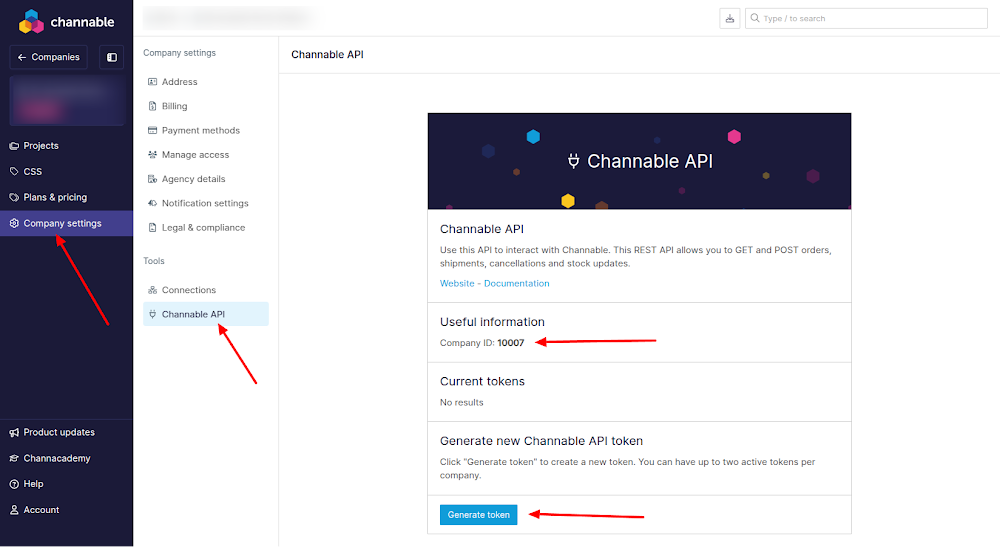 \n\n**Notes**:\n\n- Only owners of companies are able to generate an API Token.\n- Channable does not store your tokens. Please store them securely.\n- In case you lose or leak your token, generate a new one. The previously generated tokens can be revoked by you or will expire after 1 year.\n- Two API tokens can be valid at any time, allowing you to seamlessly change to a new token, if needed.\n\n### 3. Using the API Token\n\nYou must include your API token in every request you make to Channable.
 \n\nSelect \"Channable Sandbox\", give the connection a label and click on the blue \"Create\" button.\nNo further information is needed.\n\nOnce you have made a connection, navigate to the project you want to use and click on\n\"Setup\" -> \"Setup orders\" > \"+ Setup orders\".\n\n
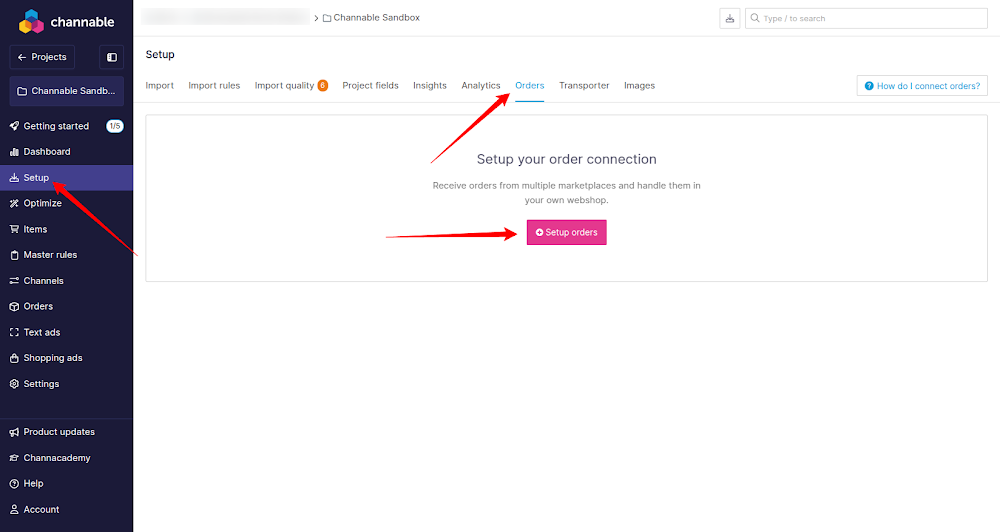 \n\nFrom here make an order connection between the \"Channable API\" and the \"Channable Sandbox\" and\nactivate the order connection. You are now ready to start testing.\n\n
 \n\n### Orders\n\nTo create a test order, navigate to \"Setup\" -> \"Orders\" -> \"Settings\" of the Channable Sandbox\norder connection.\n\n
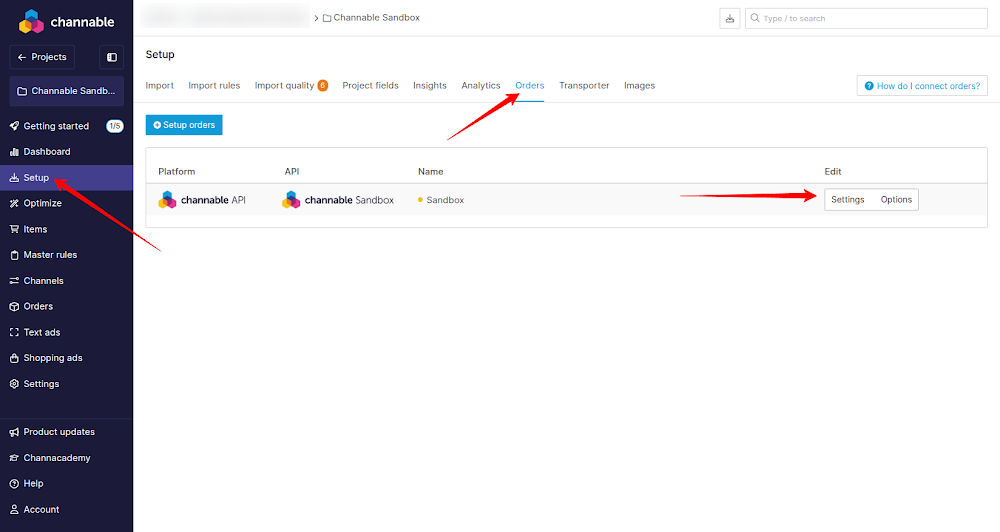 \n\nFrom here click on the gear in the top right and \"Send test order\".\n\n
 \n\nIn the popup fill in an item id and click the blue \"Send test order\" button. A test order has now\nbeen created, and you can use all request methods described in \"Orders\" to interact with it. If you\nneed special test cases, most data in the test order can be provided by you in the popup when you\nclick on \"Send test order\".\n\n\n### Shipments/Cancellations\n\nOnce one or more testorders have been created, use the request methods described in \"Shipment\nupdate\" and \"Cancellation update\" under \"Orders\" above to mark an order as \"shipped\" and to give it\ntrack & trace information or to mark the order as \"cancelled\".\n\n\n### Offers\n\nTo test sending offer updates, that is updating the stock value on all marketplaces that you have\nan order connection to, you can use the request methods described in \"Offers\" above. You do not need\nto have created a test order to test this as you can update the stock value of any product in your\nstore, also products that you have not received an order for through Channable.\n\n\n### Returns\n\nReturns come from the marketplaces you will connect to. In order to test this, navigate to\n\"Setup\" -> \"Setup orders\" -> \"Settings\" of the Channable Sandbox order connection. \n\n
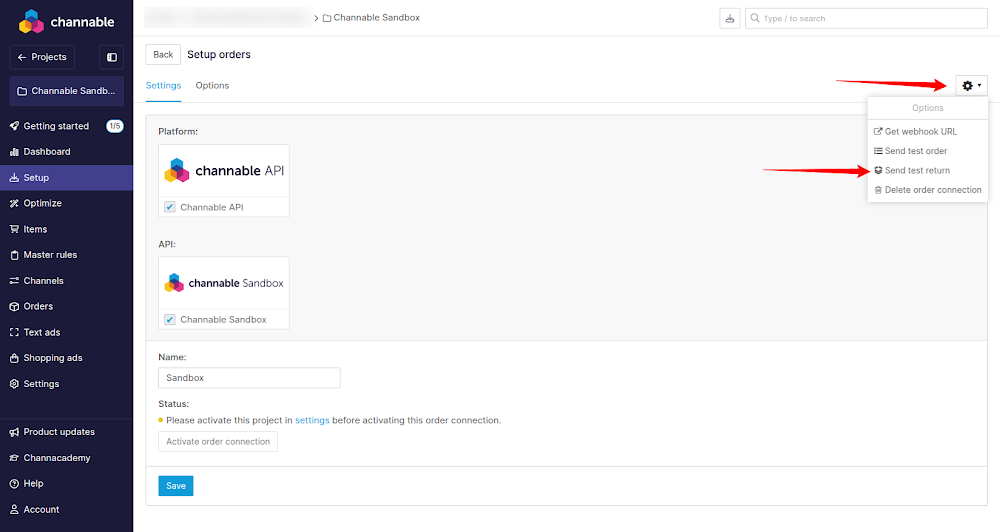 \n\nIn the popup fill in a Channable order id and click the blue \"Send test return\" button. A test\nreturn has now been created for the order id you filled in. You can now use all request methods\ndescribed in \"Returns\" to handle the return.\n\n\n### When you are done testing\n\nOnce you are satisfied with your Channable API setup and want to go live, contact our\nsupport department\nand they will help you setup the order connections.\n"
version: v1
x-logo:
url: https://www.channable.com/_next/image?url=https%3A%2F%2Fmedia.graphassets.com%2FcntRnbAcSrCmS1wLTWrb&w=256&q=75
tags:
- name: statistics
paths:
/v1/companies/{company_id}/projects/{project_id}/statistics/orders:
get:
tags:
- statistics
summary: All Statistics
description: 'Statistics for all order configs of a project for a given time frame.
Contains the following information per orders config in the project:
- Total number of orders
- Total number of ordered products
- Total amount spent on commission to marketplaces
- Total amount spent on shipping costs
- Total order revenue
- The currency of the marketplace
- Daily revenue numbers
Contains the following information aggregated across all orders configs in the project:
- Total number of orders
- Total number of ordered products
- Total amount spent on commission to marketplaces
- Total amount spent on shipping costs
- Total order revenue'
operationId: all_statistics_companies__company_id__projects__project_id__statistics_orders_get
parameters:
- name: project_id
in: path
required: true
schema:
type: integer
title: Project Id
- name: company_id
in: path
required: true
schema:
type: integer
title: Company Id
- name: download
in: query
required: false
schema:
type: boolean
description: If true, a file download will be served
default: false
title: Download
description: If true, a file download will be served
- name: start_date
in: query
required: false
schema:
anyOf:
- type: string
format: date
- type: string
format: date-time
- type: 'null'
title: Start Date
- name: end_date
in: query
required: false
schema:
anyOf:
- type: string
format: date
- type: string
format: date-time
- type: 'null'
title: End Date
responses:
'200':
description: Successful Response
content:
application/json:
schema:
$ref: '#/components/schemas/OrderStatisticsCombined'
'422':
description: Validation Error
content:
application/json:
schema:
$ref: '#/components/schemas/HTTPValidationError'
/v1/companies/{company_id}/projects/{project_id}/statistics/orders/{order_config_id}:
get:
tags:
- statistics
summary: Single Orders Config Statistics
description: "Statistics for a specific order config for the given time frame.\n\nContains the following information:\n- Cumulative counts:\n - Order revenue\n - Order shipping costs\n - Amount spent on commission to marketplaces\n- Daily counts:\n - Order revenue\n - Order shipping costs\n - Amount spent on commission to marketplaces\n - Number of orders\n - Number of ordered products"
operationId: single_orders_config_statistics_companies__company_id__projects__project_id__statistics_orders__order_config_id__get
parameters:
- name: order_config_id
in: path
required: true
schema:
type: integer
title: Order Config Id
- name: project_id
in: path
required: true
schema:
type: integer
title: Project Id
- name: start_date
in: query
required: false
schema:
anyOf:
- type: string
format: date
- type: string
format: date-time
- type: 'null'
title: Start Date
- name: end_date
in: query
required: false
schema:
anyOf:
- type: string
format: date
- type: string
format: date-time
- type: 'null'
title: End Date
responses:
'200':
description: Successful Response
content:
application/json:
schema:
$ref: '#/components/schemas/OrderConfigStatistics'
'422':
description: Validation Error
content:
application/json:
schema:
$ref: '#/components/schemas/HTTPValidationError'
components:
schemas:
StatsPlot:
properties:
points:
$ref: '#/components/schemas/OrderStatisticPointList'
title: Plot Point
description: Date and value for a single statistics point.
label:
type: string
title: Label
currency:
anyOf:
- type: string
- type: 'null'
title: Currency
type: object
required:
- points
- label
title: StatsPlot
OrderStatisticPointList:
items:
$ref: '#/components/schemas/StatPoint'
type: array
title: OrderStatisticPointList
OrderStatistics:
items:
$ref: '#/components/schemas/OrderStatistic'
type: array
title: OrderStatistics
ValidationError:
properties:
loc:
items:
anyOf:
- type: string
- type: integer
type: array
title: Location
msg:
type: string
title: Message
type:
type: string
title: Error Type
input:
title: Input
ctx:
type: object
title: Context
type: object
required:
- loc
- msg
- type
title: ValidationError
OrderConfigStatistics:
properties:
name:
type: string
title: Name
stats_total:
items:
$ref: '#/components/schemas/StatsPlot'
type: array
title: Cumulative Statistics
description: Three point lists containing cumulative revenue, cumulative shipping costs and cumulative commission costs.
stats_revenue:
items:
$ref: '#/components/schemas/StatsPlot'
type: array
title: Daily Statistics
description: Three point lists containing daily revenue, daily shipping costs and daily commission costs.
stats_orders:
items:
$ref: '#/components/schemas/StatsPlot'
type: array
title: Daily Statistics
description: Two point lists containing daily order and ordered products counts.
type: object
required:
- name
- stats_total
- stats_revenue
- stats_orders
title: OrderConfigStatistics
OrderStatisticsTotals:
properties:
revenue:
type: string
pattern: ^(?!^[-+.]*$)[+-]?0*\d*\.?\d*$
title: Revenue
commission:
type: string
pattern: ^(?!^[-+.]*$)[+-]?0*\d*\.?\d*$
title: Commission
shipping:
type: string
pattern: ^(?!^[-+.]*$)[+-]?0*\d*\.?\d*$
title: Shipping
orders:
type: integer
title: Orders
products:
type: integer
title: Products
currency:
type: string
title: Currency
type: object
required:
- revenue
- commission
- shipping
- orders
- products
- currency
title: OrderStatisticsTotals
StatPoint:
items:
anyOf:
- type: string
- type: string
pattern: ^(?!^[-+.]*$)[+-]?0*\d*\.?\d*$
type: array
title: StatPoint
HTTPValidationError:
properties:
detail:
items:
$ref: '#/components/schemas/ValidationError'
type: array
title: Detail
type: object
title: HTTPValidationError
OrderStatisticsCombined:
properties:
order_statistics:
$ref: '#/components/schemas/OrderStatistics'
title: Single Orders Config Statistics
total:
anyOf:
- $ref: '#/components/schemas/OrderStatisticsTotals'
- type: 'null'
title: Aggregate Orders Configs Statistics
type: object
required:
- order_statistics
- total
title: OrderStatisticsCombined
OrderStatistic:
properties:
id:
anyOf:
- type: integer
- type: 'null'
title: Id
label:
anyOf:
- type: string
- type: 'null'
title: Label
points:
$ref: '#/components/schemas/OrderStatisticPointList'
title: Daily Revenue
total_commission:
type: string
pattern: ^(?!^[-+.]*$)[+-]?0*\d*\.?\d*$
title: Total Commission
total_orders:
type: integer
title: Total Orders
total_products:
type: integer
title: Total Products
total_revenue:
type: string
pattern: ^(?!^[-+.]*$)[+-]?0*\d*\.?\d*$
title: Total Revenue
total_shipping:
type: string
pattern: ^(?!^[-+.]*$)[+-]?0*\d*\.?\d*$
title: Total Shipping
currency:
anyOf:
- type: string
- type: 'null'
title: Currency
type: object
required:
- points
- total_commission
- total_orders
- total_products
- total_revenue
- total_shipping
title: OrderStatistic
\n\nIn the popup fill in a Channable order id and click the blue \"Send test return\" button. A test\nreturn has now been created for the order id you filled in. You can now use all request methods\ndescribed in \"Returns\" to handle the return.\n\n\n### When you are done testing\n\nOnce you are satisfied with your Channable API setup and want to go live, contact our\nsupport department\nand they will help you setup the order connections.\n"
version: v1
x-logo:
url: https://www.channable.com/_next/image?url=https%3A%2F%2Fmedia.graphassets.com%2FcntRnbAcSrCmS1wLTWrb&w=256&q=75
tags:
- name: statistics
paths:
/v1/companies/{company_id}/projects/{project_id}/statistics/orders:
get:
tags:
- statistics
summary: All Statistics
description: 'Statistics for all order configs of a project for a given time frame.
Contains the following information per orders config in the project:
- Total number of orders
- Total number of ordered products
- Total amount spent on commission to marketplaces
- Total amount spent on shipping costs
- Total order revenue
- The currency of the marketplace
- Daily revenue numbers
Contains the following information aggregated across all orders configs in the project:
- Total number of orders
- Total number of ordered products
- Total amount spent on commission to marketplaces
- Total amount spent on shipping costs
- Total order revenue'
operationId: all_statistics_companies__company_id__projects__project_id__statistics_orders_get
parameters:
- name: project_id
in: path
required: true
schema:
type: integer
title: Project Id
- name: company_id
in: path
required: true
schema:
type: integer
title: Company Id
- name: download
in: query
required: false
schema:
type: boolean
description: If true, a file download will be served
default: false
title: Download
description: If true, a file download will be served
- name: start_date
in: query
required: false
schema:
anyOf:
- type: string
format: date
- type: string
format: date-time
- type: 'null'
title: Start Date
- name: end_date
in: query
required: false
schema:
anyOf:
- type: string
format: date
- type: string
format: date-time
- type: 'null'
title: End Date
responses:
'200':
description: Successful Response
content:
application/json:
schema:
$ref: '#/components/schemas/OrderStatisticsCombined'
'422':
description: Validation Error
content:
application/json:
schema:
$ref: '#/components/schemas/HTTPValidationError'
/v1/companies/{company_id}/projects/{project_id}/statistics/orders/{order_config_id}:
get:
tags:
- statistics
summary: Single Orders Config Statistics
description: "Statistics for a specific order config for the given time frame.\n\nContains the following information:\n- Cumulative counts:\n - Order revenue\n - Order shipping costs\n - Amount spent on commission to marketplaces\n- Daily counts:\n - Order revenue\n - Order shipping costs\n - Amount spent on commission to marketplaces\n - Number of orders\n - Number of ordered products"
operationId: single_orders_config_statistics_companies__company_id__projects__project_id__statistics_orders__order_config_id__get
parameters:
- name: order_config_id
in: path
required: true
schema:
type: integer
title: Order Config Id
- name: project_id
in: path
required: true
schema:
type: integer
title: Project Id
- name: start_date
in: query
required: false
schema:
anyOf:
- type: string
format: date
- type: string
format: date-time
- type: 'null'
title: Start Date
- name: end_date
in: query
required: false
schema:
anyOf:
- type: string
format: date
- type: string
format: date-time
- type: 'null'
title: End Date
responses:
'200':
description: Successful Response
content:
application/json:
schema:
$ref: '#/components/schemas/OrderConfigStatistics'
'422':
description: Validation Error
content:
application/json:
schema:
$ref: '#/components/schemas/HTTPValidationError'
components:
schemas:
StatsPlot:
properties:
points:
$ref: '#/components/schemas/OrderStatisticPointList'
title: Plot Point
description: Date and value for a single statistics point.
label:
type: string
title: Label
currency:
anyOf:
- type: string
- type: 'null'
title: Currency
type: object
required:
- points
- label
title: StatsPlot
OrderStatisticPointList:
items:
$ref: '#/components/schemas/StatPoint'
type: array
title: OrderStatisticPointList
OrderStatistics:
items:
$ref: '#/components/schemas/OrderStatistic'
type: array
title: OrderStatistics
ValidationError:
properties:
loc:
items:
anyOf:
- type: string
- type: integer
type: array
title: Location
msg:
type: string
title: Message
type:
type: string
title: Error Type
input:
title: Input
ctx:
type: object
title: Context
type: object
required:
- loc
- msg
- type
title: ValidationError
OrderConfigStatistics:
properties:
name:
type: string
title: Name
stats_total:
items:
$ref: '#/components/schemas/StatsPlot'
type: array
title: Cumulative Statistics
description: Three point lists containing cumulative revenue, cumulative shipping costs and cumulative commission costs.
stats_revenue:
items:
$ref: '#/components/schemas/StatsPlot'
type: array
title: Daily Statistics
description: Three point lists containing daily revenue, daily shipping costs and daily commission costs.
stats_orders:
items:
$ref: '#/components/schemas/StatsPlot'
type: array
title: Daily Statistics
description: Two point lists containing daily order and ordered products counts.
type: object
required:
- name
- stats_total
- stats_revenue
- stats_orders
title: OrderConfigStatistics
OrderStatisticsTotals:
properties:
revenue:
type: string
pattern: ^(?!^[-+.]*$)[+-]?0*\d*\.?\d*$
title: Revenue
commission:
type: string
pattern: ^(?!^[-+.]*$)[+-]?0*\d*\.?\d*$
title: Commission
shipping:
type: string
pattern: ^(?!^[-+.]*$)[+-]?0*\d*\.?\d*$
title: Shipping
orders:
type: integer
title: Orders
products:
type: integer
title: Products
currency:
type: string
title: Currency
type: object
required:
- revenue
- commission
- shipping
- orders
- products
- currency
title: OrderStatisticsTotals
StatPoint:
items:
anyOf:
- type: string
- type: string
pattern: ^(?!^[-+.]*$)[+-]?0*\d*\.?\d*$
type: array
title: StatPoint
HTTPValidationError:
properties:
detail:
items:
$ref: '#/components/schemas/ValidationError'
type: array
title: Detail
type: object
title: HTTPValidationError
OrderStatisticsCombined:
properties:
order_statistics:
$ref: '#/components/schemas/OrderStatistics'
title: Single Orders Config Statistics
total:
anyOf:
- $ref: '#/components/schemas/OrderStatisticsTotals'
- type: 'null'
title: Aggregate Orders Configs Statistics
type: object
required:
- order_statistics
- total
title: OrderStatisticsCombined
OrderStatistic:
properties:
id:
anyOf:
- type: integer
- type: 'null'
title: Id
label:
anyOf:
- type: string
- type: 'null'
title: Label
points:
$ref: '#/components/schemas/OrderStatisticPointList'
title: Daily Revenue
total_commission:
type: string
pattern: ^(?!^[-+.]*$)[+-]?0*\d*\.?\d*$
title: Total Commission
total_orders:
type: integer
title: Total Orders
total_products:
type: integer
title: Total Products
total_revenue:
type: string
pattern: ^(?!^[-+.]*$)[+-]?0*\d*\.?\d*$
title: Total Revenue
total_shipping:
type: string
pattern: ^(?!^[-+.]*$)[+-]?0*\d*\.?\d*$
title: Total Shipping
currency:
anyOf:
- type: string
- type: 'null'
title: Currency
type: object
required:
- points
- total_commission
- total_orders
- total_products
- total_revenue
- total_shipping
title: OrderStatistic