openapi: 3.0.1
info:
title: Defined.ai Deliverables Input Units API
description: "# Introduction\n\nWelcome to the Defined.ai Public API.\n\nTo get started you need a Defined.ai Enterprise account to manage your project in [Enterprise Portal](https://enterprise.definedcrowd.com).\nPlease contact Defined.ai’s sales team at sales@defined.ai to set up your Defined.ai Enterprise account.\n\nDefined.ai offers an intelligent data infrastructure that provides high-quality training data that enables customers \nwith AI roadmaps reach market at better quality and speed. Defined.ai collects, structures, \nand enriches high-quality training data for AI initiatives using efficient data workflows that combine human intelligence,\nautomatic tools and machine learning capabilities. \n\nThis REST API provides a programmable interface for directly integrating your data processes with Defined.ai’s platform. \nFrom the REST API, you can create or clone Projects based on Workflow Templates, upload your data, \nand monitor them during their execution. Upon Project completion, it’ll be possible to quickly retrieve high-quality \ntraining data enriched by the Defined.ai platform.\n\nHere are some essential concepts to help you understand and use our REST API to its fullest potential: \n\n* A **Contributor** is someone who participates in the project execution. This is our human intelligence component.\n* One or more Contributors work on **Input Units**. When you submit data for evaluation, each individual item within that submitted data is an Input Unit. \n* A **Workflow Template** is a pre-configured set of steps designed for executing specific types of tasks. A Project combines a Workflow Template with Input Units.\n* A **Job** determines the rules of execution for each input unit (e.g. how many Contributor can execute each input unit).\n\n\nOur Workflow Templates fall into the following offers:\n* Mean Opinion Score\n* Pronunciation Validation\n* ABx Testing\n\nWorkflow Templates can be data collection specific. Here, Defined.ai uses data-based “prompts” that you provide as Input Units and are then displayed in our data collection tools. Defined.ai also provides Workflow Templates for structuring and enriching customer-provided data. That data, which you provide as Input Units, can be text and audio. \n\nOur REST API is based on four primary actions:\n\n1. [**Clone a Project**](#operation/Projects_CloneProject) – A Project consists of a specific Workflow Template, a configuration that instructs Defined.ai how to execute the Project and the actual data to operate on.\n2. [**Set Subscriptions**](#operation/Subscriptions_SubmitSubscriptions) – Subscribe to automatic notifications for specific email addresses. Email notifications are sent for events that happen during the life cycle of the project (e.g. when the upload finishes or when the deliverables are ready to download)\n3. [**Upload Input Units**](#operation/UploadManagement_UploadInputUnits) – This is a unit of work that can be performed by one or more Contributors. Each uploaded unit within the data that you submit will be validated and uploaded into the platform. Each unit can then be executed multiple times by different Contributors in different steps, depending on the configuration defined in the project. It is possible to know what to upload by [getting the input unit schema](#operation/UploadManagement_GetInputUnitSchema). When the upload is finished, the project starts automatically.\n4. [**Get Deliverables**](#operation/ProjectsDeliverables_GetDeliverables) – When project execution is complete, this action allows you to obtain the results. \n \nThe following image shows the end-to-end life cycle of a project:\n\n 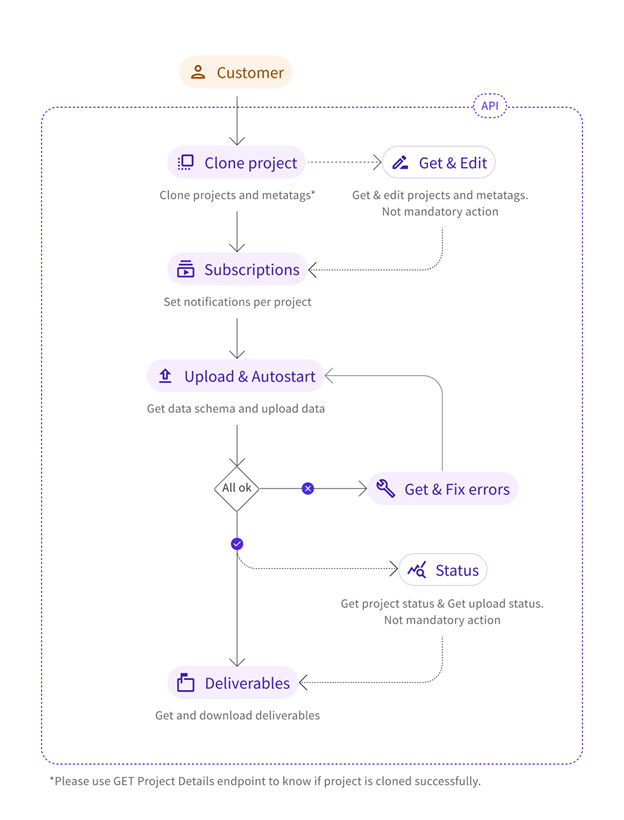\n\n\n\n# Authentication\n\nAny application utilizing our REST APIs must first authenticate with our service. Our service utilizes the \nOAuth v2 protocol for authenticating. This requires both an “**Access Key ID**” and an “**Access Key Secret**” \nthat can be secured through Defined.ai’s [Enterprise Portal](https://enterprise.definedcrowd.com). The Access Key pair \nmust be secured appropriately and cannot be shared.\n\nAssociated with an Access Key pair is a set of permissions which are scoped to different functionalities.\n\nBased on your scenario, review the REST API’s below, identify the permissions required and create the \nappropriate API Key permissions. The mapping is described in the following table:\n\n| Access Key Permissions | Rest API Permissions |\n| :--- | :--- |\n| View Projects | List Projects
Read Project Properties |\n| Create Projects | List Projects
Read Project Properties
Create Projects
Upload Data
Update Project Properties |\n| Full Projects | List Projects
Read Project Properties
Create Projects
Upload Data
Update Project Properties
Delete Project
|\n\n\nUpon successful authentication, an OAuth token is returned.\n\nOAuth tokens have an expiration time. Access Key Pairs may also be revoked at any time by an Enterprise Portal user. It’s important to take this into consideration when authoring your application.\n\nSecurity scheme type: OAuth2\n\n\n\n
\nOAuth2 Scopes\n\nPublicAPIv2 — everything\n\n\nAfter the authentication has been done successfully, it’s possible to start to use the API. To do that, the URL for the API should be the following:\n\n> https://api.production-na01.definedcrowd.com/[VERSION]/[APINAME]/\n\nFor example:\n\n> https://api.production-na01.definedcrowd.com/v2.0/public/projects/3964986c-3d34-447f-9d75-740584575d2b/clone\n\nNote: All calls must be performed over Secure HTTP (HTTPS).\n\n# Errors\n\nEach of our REST APIs returns standard HTTP responses that communicate successes or errors. If a response is unsuccessful, we provide detailed error information in the response, as in the example below:\n\n~~~json\nHttpStatusCode: 400\nBody:\n{\n \"errors\": [\n {\n \"code\": \"requestInvalidParameter\",\n \"innercode\": \"projectItemCountOOB\",\n \"message\": \"The number of items per page is out of bounds.\",\n \"details\": {\n \"ItemsPerPage\": 101,\n \"ItemsPerPageNeeded\": \"ItemsPerPage > 0 AND ItemsPerPage < 100\"\n }\n }\n ]\n}\n~~~\n\n\nThe following error codes are returned in cases where an API invocation was unsuccessful\n\n| **HTTP Status Code** | **Error Code** | **Error Inner Code** |\n| --- | --- | --- |\n| 400 Bad Request | | |\n| | invalidProjectId | none |\n| | projectAlreadyExists | none |\n| | projectInvalidInputUnit | |\n| | | duplicateId |\n| | | duplicateIdInPlatform |\n| | | invalidSchemaFormat |\n| | partnerInvalidKey | none |\n| | projectInvalidState | |\n| | | invalidCurrentState |\n| | | invalidStateChange |\n| | projectInvalidType | none |\n| | requestInvalidBody | |\n| | | duplicatedEmail |\n| | | emailInvalid |\n| | | jobSettingsContributorsPerInputUnitOOB |\n| | | jsonParsingError |\n| | | projectConfigNull |\n| | | projectIdNull |\n| | | projectInvalidFutureDesiredDeliveryDate |\n| | | projectMetatagCountOOB |\n| | | projectMetatagInvalidCharacters |\n| | | projectMetatagKeyLengthOOB |\n| | | projectMetatagValueLengthOOB |\n| | | projectNameNull |\n| | | projectNameSizeOOB |\n| | | projectUnitCountOOB |\n| | | projectSettingsAgeDistributionOOB |\n| | | projectSettingsCategoryNull |\n| | | projectSettingsCategoryIdNull |\n|\t|\t| ProjectSettingsCategoryDisplayNameNull |\n|\t|\t| ProjectSettingsCategoryDisplayNameOOB |\n| | | projectSettingsCategoryDescriptionNull |\n| | | projectSettingsCategoryCountOOB |\n| | | projectSettingsCategoryDuplicated |\n| | | projectSettingsCategoryExampleCountOOB |\n| | | projectSettingsContributorsPerUnitOOB |\n| | | projectSettingsDeviceLocationDistributionOOB |\n| | | projectSettingsDeviceLocationInvalidTarget |\n| | | projectSettingsDomainNull |\n| | | projectSettingsDomainCountOOB |\n|\t|\t| projectSettingsDomainDescriptionNull |\n| | | projectSettingsDomainDisplayNameNull |\n| | | projectSettingsDomainDisplayNameOOB |\n| | | projectSettingsDomainDuplicated |\n|\t|\t| projectSettingsDomainExampleCountOOB |\n| | | projectSettingsDomainIdNull |\n| | | projectSettingsDomainIdOOB |\n| | | projectSettingsDomainIntentsDuplicated |\n| | | projectSettingsDomainIntentsNull |\n| | | projectSettingsDomainIntentsOOB |\n| | | projectSettingsExamplesOOB |\n| | | projectSettingsGenderDistributionOOB |\n| | | projectSettingsInputUnitAudioUrlNull |\n| | | projectSettingsInputUnitAudioUrlInvalid |\n| | | projectSettingsInputUnitDetailsTooLong |\n| | | projectSettingsInputUnitDuplicated |\n| | | projectSettingsInputUnitNull |\n| | | projectSettingsInputUnitSentenceNull |\n|\t|\t| projectSettingsIntentDescriptionNull |\n| | | projectSettingsIntentDisplayNameNull |\n| | | projectSettingsIntentDisplayNameOOB |\n|\t|\t| projectSettingsIntentExampleCountOOB |\n| | | projectSettingsIntentIdNull |\n| | | projectSettingsIntentIdOOB |\n| | | projectSettingsLanguageCodeInvalid |\n| | | projectSettingsLanguageCodeNull |\n| | | projectSettingsLanguageNull |\n|\t|\t| projectSettingsLanguageTestUnsupported |\n| | | projectSettingsNull |\n| | | projectSettingsSubCategoryCountOOB |\n| | | projectSettingsSubCategoryDescriptionNull |\n|\t|\t| projectSettingsSubCategoryDisplayNameNull |\n|\t|\t| projectSettingsSubCategoryDisplayNameOOB |\n| | | projectSettingsSubCategoryDuplicated |\n| | | projectSettingsSubCategoryExampleCountOOB |\n| | | projectSettingsSubCategoryIdNull |\n| | | projectSettingsTextCollectionNull |\n| | | projectSettingsTextCorrectionNull |\n| | | projectWebhookNotAbsoluteUrl |\n| | | projectWebhookNotHttps |\n| | | projectWebhookNull |\n| | | subscriptionInvalidType |\n| | | subscriptionSettingsEmailCountOOB |\n| | requestInvalidParameter | |\n| | | projectItemCountOOB |\n| | | projectPageNumberOOB |\n| | | subscriptionInvalidType |\n| | jobInvalid | jobNotCloneable |\n| 401 Unauthorized | | |\n| | authorizationInvalidToken | none |\n| 402 Payment Required | | |\n| | accountNotEnoughCredits | none |\n| 403 Forbidden | | |\n| | accountInvalidProject | none |\n| | invalidEmailListConsent | none |\n| 404 Not Found | | |\n| | projectNotFound | none |\n| | subscriptionNotFound | none |\n| 500 Internal Server Error | | |\n| | internalServerError | none |\n"
version: v2
x-logo:
url: https://definedcrowd.azureedge.net/content/images/dai-logo-black.svg
backgroundColor: '#FFFFFF'
href: https://defined.ai/
security:
- Bearer: []
tags:
- name: Input Units
description: "Each input unit is a single component of work done by the contributors. There are several types of units – audio, text, and image. In a given project, all units should have the same structure. The input unit schema explains the structure of input units. \n\n Note: Input Units are a part of projects. They are not separate entities. "
paths:
/v2.0/public/projects/{projectId}/inputUnitsSchema:
get:
tags:
- Input Units
summary: Get Input Unit Schema
description: "The format of the input unit required for the project upload is retrieved. Please note that,\r\nthe endpoint will return an object with required fields and their properties format for each input unit\r\non the desired project. However, when uploading you need to create an array with those required fields,\r\nrespecting their properties. To upload, you should use the [UPLOAD INPUT UNIT](#operation/UploadManagement_UploadInputUnits) endpoint.\r\n \r\n**Permission Required:** Upload Data"
operationId: UploadManagement_GetInputUnitSchema
parameters:
- name: projectId
in: path
description: Project ID.
required: true
schema:
type: string
format: uuid
example: 00000000-0000-0000-0000-000000000000
responses:
'200':
description: Returns hit Upload Schema for the requested project.
content:
text/plain:
schema: {}
example:
type: object
required:
- audioSample
- sentenceSample
properties:
audioSample:
type: string
format: uri
urlType: audio
examples:
- http://example.com
sentenceSample:
type: string
id:
type: string
format: guid
details:
type: string
maxLength: 500
examples:
- This is a sample of details
application/json:
schema: {}
example:
type: object
required:
- audioSample
- sentenceSample
properties:
audioSample:
type: string
format: uri
urlType: audio
examples:
- http://example.com
sentenceSample:
type: string
id:
type: string
format: guid
details:
type: string
maxLength: 500
examples:
- This is a sample of details
text/json:
schema: {}
example:
type: object
required:
- audioSample
- sentenceSample
properties:
audioSample:
type: string
format: uri
urlType: audio
examples:
- http://example.com
sentenceSample:
type: string
id:
type: string
format: guid
details:
type: string
maxLength: 500
examples:
- This is a sample of details
'204':
description: No hit Upload Schema for the requested project.
'400':
description: Invalid job configuration.
'401':
description: Invalid authentication (invalid/expired token).
'404':
description: Project does not exist.
/v2.0/public/projects/{projectId}/inputUnits:
post:
tags:
- Input Units
summary: Upload Input Units
description: "You can upload input units to the project, which contributors will work on.\r\nMaximum size allowed is 250 MB of data.\r\n \r\n**How to upload**\r\n \r\nTo know which properties should be used to upload the input units properly, you should use the\r\n[GET INPUT UNIT SCHEMA](#operation/UploadManagement_GetInputUnitSchema) endpoint.\r\nPlease note that, the endpoint will return an object with required\r\nfields and their properties format for each input unit on the desired project. However, when uploading\r\nyou need to create an array with those required fields, respecting their properties.\r\n \r\n**Configure your Amazon S3 bucket policy to grant cross-account access to Define.ai**\r\n \r\nYou can use AWS S3 to store and submit your input units with the file URLs in\r\nS3:// protocol(for example, S3://bucket-name/key-name) rather than http:// or https:// protocol.\r\nConfigure your S3 bucket policy to give permission to the following IAM role for Define.ai\r\nto access your files. \n\r\nTo do this, you must be the S3 bucket owner.\r\nGot to bucket >> permission >> bucket policy, and add the following policy \n\r\n(Note that the place holder ${BucketName} should be replaced by your S3 bucket name)\r\n\n\r\n \r\n {\r\n \"Version\": \"2012-10-17\",\r\n \"Statement\": [{\r\n \"Effect\": \"Allow\",\r\n \"Principal\": {\r\n \"AWS\": \"arn:aws:iam::463637393528:user/prod-devteam-user\"\r\n },\r\n \"Action\": [\r\n \"s3:GetObject\",\r\n \"s3:ListBucket\"\r\n ],\r\n \"Resource\": [\r\n \"arn:aws:s3:::${BucketName}/*\",\r\n \"arn:aws:s3:::${BucketName}\"\r\n ]\r\n }]\r\n }\r\n \r\n\n\r\n**How validation works**\r\n \r\nTwo validations phases follow the upload operation. First, a synchronous phase and, if completed\r\nsuccessfully, an asynchronous phase. Validation failure will return a list of up to 50 error codes and\r\nmessages to resolve. Review these errors and upload the unsuccessful input units again.\r\n \r\nThe project state will change to PROCESSING DATA UPLOAD once there are input units passing all syntax and\r\nformat evaluations.\r\n \r\n**Example of how validation and upload of Input Units work**\r\n \r\nYou upload 1 000 input units. 100 validation errors are found. Remember the validation returns the\r\nfirst 50 error messages. Review the errors and correct errors for all 100 input units and reload the\r\nset of 100 (not all 1 000). Validation takes place (asynchronous phase), and successful input units are\r\nuploaded to the system.\r\n \r\n**Understand the project state based on asynchronous validation phase**\r\n \r\nErrors found will change the project state to either UPLOAD ERRORS or INSUFFICIENT DATA, depending on\r\nwhether there is valid input unit(s). Retrieve the error list by using GET PROJECT ERRORS endpoint.\r\n \r\nA single valid input unit will change the project state to PROCESSING DATA UPLOAD. Data can be added\r\nuntil the project state changes to PREPARING PROJECT.\r\n \r\n**Permission Required:** Upload Data"
operationId: UploadManagement_UploadInputUnits
parameters:
- name: projectId
in: path
description: Project ID.
required: true
schema:
type: string
format: uuid
example: 00000000-0000-0000-0000-000000000000
requestBody:
content:
application/json:
schema:
type: array
items:
type: object
example:
- audioSample: S3://bucket-name/key-name
sentenceSample: This is a sentence sample.
details: This is a sentence details.
- audioSample: https://audio-sample.wav
sentenceSample: This is a sentence sample.
details: This is a sentence details.
required: true
responses:
'202':
description: Accepted. Job is updated asynchronously.
content:
text/plain:
schema:
$ref: '#/components/schemas/DefinedCrowd.PublicApi.Api.Results.Upload.UploadInputUnitsResult'
application/json:
schema:
$ref: '#/components/schemas/DefinedCrowd.PublicApi.Api.Results.Upload.UploadInputUnitsResult'
text/json:
schema:
$ref: '#/components/schemas/DefinedCrowd.PublicApi.Api.Results.Upload.UploadInputUnitsResult'
'400':
description: Invalid parameters.
'401':
description: Invalid authentication (invalid/expired token).
'404':
description: Project does not exist.
/v2.0/public/projects/{projectId}/errors:
get:
tags:
- Input Units
summary: Get Project Errors
description: "After the synchronous upload is completed successfully, the asynchronous process is triggered.\r\nValidation errors during this phase will change the project state to either UPLOAD ERRORS or\r\nINSUFFICIENT DATA, depending on whether there is valid input unit(s). A detailed list of errors will be\r\nreturned. Review the error list and re-upload the set using the same Input Unit ID.\r\n \r\n**List of possible errors:**\r\n| Error Types | Description |\r\n|----------------------------------|--------------------------------------------------------------------------------------------------------------------------------------------------------------------|\r\n| ConnectionUnsuccessful | Connection to the URL provider was unsuccessful |\r\n| UrlNotSupported | The provided URL is not formatted over HTTP, HTTPS or S3 protocols |\r\n| FileDoesNotExist\n\n Possible values for errorDetails field:\n\n* NoSuchKey.\n\n* NoSuchBucket. | The provided URL does not contain a file or, if S3 protocol is used, the specified key/bucket does not exist. |\r\n| FileIsNotValid\n\nPossible values for `errorDetails` field:\n\n* .WAV file failed format validations. Check public API documentation or contact Enterprise Support.\n\n* .WAV file failed validation: fmt chunk size must be greater than or equal to 16.\n\n* .WAV file failed validation: bits per sample must be between 4 and 16.\n\n* .WAV file failed validation: PCM audio format is required. \n\n* .WAV file failed validation: number of channels must be between 1 and 8. | The provided URL contains invalid file formats (accepted file formats: audio (.wav)) |\r\n| UnauthorizedAccess | The provided URL cannot be accessed due to authentication issues |\r\n| StatusCodeDoesNotIndicateSuccess\n\nPossible values for `errorDetails` field:\n\n* e.g. 429 TooManyRequests. | Remote server returned an error when queried resource under corresponding URL. Please, see `errorDetails` for actual error code and error message. |\r\n| PlatformError | Something went wrong on our side |\r\n\n\r\n**Sample:**\r\n \r\n {\r\n \"uploadInputUnitsError\":\r\n [\r\n {\r\n \"inputDataUnitId\": \"00000000-0000-0000-0000-000000000000\",\r\n \r\n \"errorType\": \"FileIsNotValid\",\r\n \r\n \"errorDetails\": \".WAV file failed validation: ChunkSize should always be 16 (PCM format) or greater. \",\r\n \r\n \"errorProperty\": {\r\n \"inputDataUnitProperty\": \"audioSample\",\r\n \r\n \"inputDataUnitPropertyValue\": \"http://example.com\"\r\n },\r\n \r\n \"inputDataUnit\": { }\r\n }\r\n ],\r\n \"totalCount\": 1\r\n }\r\n \r\n\n\r\n**Permission Required:** Read Project Properties"
operationId: UploadManagement_GetProjectErrors
parameters:
- name: projectId
in: path
description: Project ID.
required: true
schema:
type: string
format: uuid
example: 00000000-0000-0000-0000-000000000000
- name: pageNumber
in: query
description: The page to retrieve.
schema:
type: integer
format: int32
default: 0
- name: itemsPerPage
in: query
description: The number of items to retrieve per page. The maximum number of items per page allowed is 100.
schema:
type: integer
format: int32
default: 10
- name: uploadId
in: query
description: ID for a set of uploaded input units.
schema:
type: string
format: uuid
example: 00000000-0000-0000-0000-000000000000
responses:
'200':
description: Returns a list with project information.
content:
text/plain:
schema:
$ref: '#/components/schemas/DefinedCrowd.PublicApi.Api.Results.Project.GetPagedProjectErrorsQueryResults'
application/json:
schema:
$ref: '#/components/schemas/DefinedCrowd.PublicApi.Api.Results.Project.GetPagedProjectErrorsQueryResults'
text/json:
schema:
$ref: '#/components/schemas/DefinedCrowd.PublicApi.Api.Results.Project.GetPagedProjectErrorsQueryResults'
'400':
description: Invalid parameters.
'401':
description: Invalid authentication (invalid/expired token).
'404':
description: Project does not exist.
/v2.0/public/projects/{projectId}/uploads:
get:
tags:
- Input Units
summary: Get Project Uploads
description: "Retrieve the status of a project’s input unit set. Each set of uploaded input units generate an ID\r\nthat you can use to retrieve the upload status, the number of input units submitted, the successful\r\ninput units, and the error input units.\r\n \r\n**Permission Required:** Read Project Properties"
operationId: UploadManagement_GetProjectUploads
parameters:
- name: projectId
in: path
description: Project ID.
required: true
schema:
type: string
format: uuid
example: 00000000-0000-0000-0000-000000000000
- name: pageNumber
in: query
description: The page to retrieve. (0 by default)
schema:
type: integer
format: int32
default: 0
- name: itemsPerPage
in: query
description: "The number of items to retrieve per page.\r\nThe maximum number of items per page allowed is 100. (10 by default)."
schema:
type: integer
format: int32
default: 10
responses:
'200':
description: Returns a list with information about the uploads.
content:
text/plain:
schema:
$ref: '#/components/schemas/DefinedCrowd.PublicApi.Api.Results.Upload.UploadStatusesResult'
application/json:
schema:
$ref: '#/components/schemas/DefinedCrowd.PublicApi.Api.Results.Upload.UploadStatusesResult'
text/json:
schema:
$ref: '#/components/schemas/DefinedCrowd.PublicApi.Api.Results.Upload.UploadStatusesResult'
'400':
description: Invalid parameters.
'401':
description: Invalid authentication (invalid/expired token).
'404':
description: Project does not exist.
/v2.0/public/projects/{projectId}/uploads/{uploadId}:
get:
tags:
- Input Units
summary: Get Project Upload
description: " Retrieve the status of an input unit set uploaded for a project.\r\n \r\n**Permission Required:** Read Project Properties"
operationId: UploadManagement_GetProjectUpload
parameters:
- name: projectId
in: path
description: Project ID.
required: true
schema:
type: string
format: uuid
example: 00000000-0000-0000-0000-000000000000
- name: uploadId
in: path
description: ID for a set of uploaded input unit.
required: true
schema:
type: string
format: uuid
example: 00000000-0000-0000-0000-000000000000
responses:
'200':
description: Returns upload information.
content:
text/plain:
schema:
$ref: '#/components/schemas/DefinedCrowd.PublicApi.Api.Results.Upload.UploadStateResult'
application/json:
schema:
$ref: '#/components/schemas/DefinedCrowd.PublicApi.Api.Results.Upload.UploadStateResult'
text/json:
schema:
$ref: '#/components/schemas/DefinedCrowd.PublicApi.Api.Results.Upload.UploadStateResult'
'400':
description: Invalid parameters.
'401':
description: Invalid authentication (invalid/expired token).
'404':
description: Project or upload does not exist.
components:
schemas:
DefinedCrowd.PublicApi.Api.Results.Project.GetPagedProjectErrorsQueryResults:
title: JSON object
type: object
properties:
uploadInputUnitsError:
type: array
items:
$ref: '#/components/schemas/DefinedCrowd.PublicApi.Api.Results.Project.UploadInputUnitError'
description: List of errors in the data unit uploading asynchronous process.
nullable: true
totalCount:
type: integer
description: Total number of items available.
format: int32
additionalProperties: false
DefinedCrowd.PublicApi.Api.Results.Project.UploadInputUnitError:
title: JSON object
type: object
properties:
inputDataUnitId:
type: string
description: Unique identifier of the input data unit where the error occurred.
format: uuid
example: 00000000-0000-0000-0000-000000000000
errorType:
enum:
- connectionUnsuccessful
- fileDoesNotExist
- fileIsNotValid
- unauthorizedAccess
- statusCodeDoesNotIndicateSuccess
- platformError
- urlNotSupported
type: string
description: Type of error.
x-enumNames:
- ConnectionUnsuccessful
- FileDoesNotExist
- FileIsNotValid
- UnauthorizedAccess
- StatusCodeDoesNotIndicateSuccess
- PlatformError
- UrlNotSupported
x-enumDescriptions:
- ''
- ''
- ''
- ''
- ''
- ''
- ''
x-ms-enum:
name: FileUploadErrorMessage
modelAsString: true
errorDetails:
type: string
description: Details of error.
nullable: true
errorProperty:
allOf:
- $ref: '#/components/schemas/DefinedCrowd.PublicApi.Api.Results.Project.ErrorProperty'
nullable: true
inputDataUnit:
description: Fields of the original uploaded input unit.
nullable: true
additionalProperties: false
DefinedCrowd.PublicApi.Api.Results.Upload.UploadStatusesResult:
title: JSON object
type: object
properties:
uploads:
type: array
items:
$ref: '#/components/schemas/DefinedCrowd.PublicApi.Api.Results.Upload.UploadStateResult'
description: Details from project’s input unit sets.
nullable: true
totalCount:
type: integer
description: Total number of items available.
format: int32
additionalProperties: false
DefinedCrowd.PublicApi.Api.Results.Upload.UploadStateResult:
title: JSON object
type: object
properties:
uploadId:
type: string
description: ID for a set of uploaded input units.
format: uuid
example: 00000000-0000-0000-0000-000000000000
inputDataUnitsStats:
allOf:
- $ref: '#/components/schemas/DefinedCrowd.PublicApi.Api.Results.Upload.Dtos.InputDataUnitsStatsResult'
description: Upload statistics.
nullable: true
isUploading:
type: boolean
description: Indication if the upload is still ongoing or not.
uploadStartTimestamp:
type: string
description: Date and timestamp of when the upload started.
format: date-time
uploadEndTimestamp:
type: string
description: Date and timestamp of when the upload ended.
format: date-time
nullable: true
additionalProperties: false
DefinedCrowd.PublicApi.Api.Results.Upload.Dtos.InputDataUnitsStatsResult:
title: JSON object
type: object
properties:
submitted:
type: integer
description: Number of input units submitted.
format: int32
success:
type: integer
description: Number of input units uploaded successfully.
format: int32
error:
type: integer
description: Number of input units with errors.
format: int32
additionalProperties: false
DefinedCrowd.PublicApi.Api.Results.Upload.UploadInputUnitsResult:
title: JSON object
type: object
properties:
uploadId:
type: string
description: ID for a set of uploaded input units.
format: uuid
example: 00000000-0000-0000-0000-000000000000
additionalProperties: false
DefinedCrowd.PublicApi.Api.Results.Project.ErrorProperty:
title: JSON object
type: object
properties:
inputDataUnitProperty:
type: string
description: Name of property for which error exists.
nullable: true
inputDataUnitPropertyValue:
type: string
description: Original value of the property for which error exists.
nullable: true
additionalProperties: false
securitySchemes:
Bearer:
type: apiKey
description: Please enter into field the word 'Bearer' following by space and JWT
name: Authorization
in: header
x-tagGroups:
- name: ' '
tags:
- Supported Languages
- name: Project life cycle
tags:
- Project Management
- Subscriptions
- Jobs
- Input Units
- Deliverables
- name: Speech Technologies
tags:
- Mean Opinion Score
- Pronunciation Validation