openapi: 3.0.0
info:
title: AI Hat Virtual Try-On
description: "# Overview\nStep into the future of fashion with our Hyper-Realistic AR Try-On for Headwear,\
\ powered by cutting-edge AI technology. This innovative solution transforms online shopping into\
\ an immersive experience, allowing customers to virtually try on headwear with unmatched precision\
\ and realism.\nFrom instant style discovery to true-to-life visualization, our AR technology ensures\
\ every hat and headband looks and feels authentic. Helping shoppers find their perfect fit and style\
\ before they buy. Elevate engagement, boost confidence, and redefine the way customers interact with\
\ your products.\n\n## Integration Guide\nThis guide walks you through:\n\n* **Endpoint:** `/s2s/v2.0/task/hat`\n\
* **Authentication:** All requests require an `Authorization: Bearer YOUR_API_KEY`\n* **Workflow:**\n\
\ 1. **Prepare a selfie image:** Uploading an image or providing a valid image URL of yourself\
\ as the virtual try-on target.\n 1. **Prepare a hat image:** Upload a hat product image or a\
\ photo of a person wearing hat.\n 1. **Select a style and a gender:** Select a preferred style\
\ and the gender you wish to visualize.\n 1. **Fire an AI task and Retrieve Task ID:** Capture\
\ the `task_id` from the response.\n 1. **Poll Status (`GET`):** Use the `task_id` to check the\
\ status of the task. Continue polling until `task_status` is `\"success\"` or `\"error\"`.\n\n---\n\
\n* Authentication\n- Include your API key in the request header using **Bearer Token**:\n```\nAuthorization:\
\ Bearer YOUR_API_KEY\n```\nYou can find your API Key at https://yce.makeupar.com/api-console/en/api-keys/.\n\
\n---\n\n* AI Hat API Usage Guide\n\nThis guide explains how to upload images, prepare reference hat,\
\ and create virtual try-on tasks using the AI Hat API.\n\n***\n\n * Step 1. Prepare a Selfie Image\n\
\nYou can:\n* Upload a selfie image using the File API (`/s2s/v2.0/file`), or\n* Provide a valid\
\ image URL.\n\n * Step 1.1 Upload a File Using the File API\n\nUse the **File API** (`/s2s/v2.0/file`)\
\ to upload a target user image.\n\n**Image Requirements:**\n\n* Upload a selfie photo.\n* Ensure\
\ the photo clearly shows the upper body.\n* Avoid backgrounds with multiple people or distracting\
\ objects.\n\n**Example Request:**\n\n```bash\ncurl --request POST \\\n --url https://yce-api-01.makeupar.com/s2s/v2.0/file\
\ \\\n --header 'Authorization: Bearer YOUR_API_KEY' \\\n --header 'content-type: application/json'\
\ \\\n --data '{\n \"files\": [\n {\n \"content_type\": \"image/jpg\",\n \"\
file_name\": \"selfie_photo_01_3dbd1b6683.jpg\",\n \"file_size\": 547541\n }\n ]\n\
\ }'\n```\n\n***\n\n * Step 1.2. Retrieve File API Response\n\nThe response includes:\n\n* \
\ `file_id` for creating an AI task.\n* `requests.url` for uploading the actual image file.\n\n\
**Sample Response:**\n\n```json\n{\n \"status\": 200,\n \"data\": {\n \"files\": [\n {\n\
\ \"content_type\": \"image/jpg\",\n \"file_name\": \"selfie_photo_01_3dbd1b6683.jpg\"\
,\n \"file_id\": \"SaGaqpDgKwFrVBgMpQMA3HY0LeqdT9/13W5TOD8/u/FfjK3xgCQ+hRt9MJXBFaud\",\n \
\ \"requests\": [\n {\n \"method\": \"PUT\",\n \"url\": \"https://yce-us.s3-accelerate.amazonaws.com/demo/ttl30/...signature...\"\
,\n \"headers\": {\n \"Content-Length\": \"547541\",\n \"Content-Type\"\
: \"image/jpg\"\n }\n }\n ]\n }\n ]\n }\n}\n```\n\n***\n\n \
\ * Step 1.3. Upload Image to Provided URL\n\nUse the `requests.url` from the File API response to\
\ upload the image:\n\n```bash\ncurl --location --request PUT 'https://yce-us.s3-accelerate.amazonaws.com/demo/ttl30/...signature...'\
\ \\\n --header 'Content-Type: image/jpg' \\\n --header 'Content-Length: 547541' \\\n --data-binary\
\ @'./selfie_photo_01_3dbd1b6683.jpg'\n```\n\n***\n\n * Step 2. Prepare a Reference Hat Image\n\n\
You can:\n\n* Upload a hat image using the File API (`/s2s/v2.0/file`), or\n* Provide a valid\
\ image URL.\n\n**Supported Hat Images:**\n\n* A hat product image.\n* A photo of a person wearing\
\ hat.\n\nRefer to **[File Specs and Errors](#section/overview/File-Specs-and-Errors)** for detailed\
\ specifications.\n\n***\n\n * Step 3. Create an AI Task\n\nSelect a preferred style and the gender\
\ you wish to visualize.\nUse the **AI Task API** (`/s2s/v2.0/task/hat`) to create a virtual try-on\
\ task.\n\n**Parameters:**\n\n* For the user image: `src_file_id` or `src_file_url`.\n* For the\
\ hat image: `ref_file_id`, or `ref_file_url`.\n\n**Example Request:**\n\n```bash\ncurl --request\
\ POST \\\n --url https://yce-api-01.makeupar.com/s2s/v2.0/task/hat \\\n --header 'Authorization:\
\ Bearer YOUR_API_KEY' \\\n --header 'content-type: application/json' \\\n --data '{\n \"src_file_url\"\
: \"https://example.com/selfie.jpg\",\n \"ref_file_url\": \"https://example.com/accessory.jpg\"\
,\n \"gender\": \"female\",\n \"style\": \"random\"\n}'\n```\n\n**Sample Response:**\n\n```json\n\
{\n \"status\": 200,\n \"data\": {\n \"task_id\": \"SaGaqpDgKwFrVBgMpQMA3HY0LeqdT9_13W5TOD8_u_GPi6NqQ3dhlmN-6ntFwhzT\"\
\n }\n}\n```\n\n***\n\n * Step 4. Poll for Task Result\n\nUse the task ID to check the status:\n\
\n```bash\ncurl --request GET \\\n --url https://yce-api-01.makeupar.com/s2s/v2.0/task/hat/SaGaqpDgKwFrVBgMpQMA3HY0LeqdT9_13W5TOD8_u_GPi6NqQ3dhlmN-6ntFwhzT\
\ \\\n --header 'Authorization: Bearer YOUR_API_KEY' \\\n --header 'content-type: application/json'\n\
```\n\n***\n\n * Step 5. Retrieve Result\n\nA successful response includes a download URL for the\
\ result image:\n\n```json\n{\n \"status\": 200,\n \"data\": {\n \"error\": null,\n \"results\"\
: {\n \"url\": \"https://yce-us.s3-accelerate.amazonaws.com/demo/ttl30/...signature...\"\n \
\ },\n \"task_status\": \"success\"\n }\n}\n```\n\nInvalid API Key error response:\n\n```json\n\
{\n \"status\": 401,\n \"error\": \"Unauthorized\",\n \"error_code\": \"InvalidAccessToken\"\n\
}\n```\n\n---\n\n## File Specs & Errors\n\n* AI Hat Virtual Try-On Specification\n\n * Image Requirements\n\
\n| Type | Minimum Resolution | Notes |\n| ------ | ------------------ | ----- |\n| Selfie | 512\
\ × 512 | Face visible, head-to-chest preferred |\n| Hat | 512 × 512 (product)
800 × 800 (worn)\
\ | Clear, unobstructed hat view |\n\n**Supported Hat Image**\n\n* Product Image Requirements\n \
\ * Minimum resolution: 512 × 512 pixels\n * Only one product per image\n * The product should\
\ cover more than 25% of the image height\n\n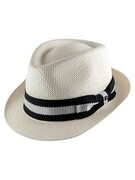\n\
\n* Worn Image Requirements\n * Minimum resolution: 800 × 800 pixels\n * Single Item Requirement:\
\ The model must wear exactly one item. Multiple items or accessories are not permitted.\n * Coverage\
\ Ratio: The worn item must occupy more than 20% of the total image height. This ensures the item\
\ is clearly visible and prominent within the frame.\n\n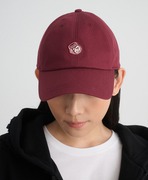\n\
\n**Supported Selfie View**\n\n* Recommended image resolution: at least 512 × 512 pixels.\n* Recommended\
\ face coverage: more than 15% of the image height.\n* Single Subject Requirement: The image must\
\ contain exactly one human subject. No additional people or partial figures are allowed.\n* Face\
\ Visibility: The subject's face must be fully visible without obstruction. Hair, accessories, or\
\ objects should not cover key facial features.\n* Framing: The image must include at least a head\
\ shot, covering the area from the top of the head to the chest. A half-body shot (head to waist)\
\ is preferred for optimal analysis.\n\n\n\
\n**Try-on Styles**\n\n* There are five predefined styles for generating the virtual try-on output:\
\ \"style_sporty_casual\" \"style_urban_fashion\" \"style_vacation_casual\" \"style_warm_cozy\" and\
\ \"style_bohemian\". You can specify this style parameter when creating an AI task or allow the system\
\ to select a style at random by default.\n\n\n\
\n---\n\n* Supported Formats & Dimensions\n\n| AI Feature | Supported Dimensions | Supported File\
\ Size | Supported Formats |\n| ---- | ---- | ---- | ---- |\n| AI Hat Virtual Try-On | Input:\
\ long side <= 4096
Output: 896 x 1152 | < 10MB | jpg/jpeg/png/heic |\n\n* Error Codes\n\n| Error\
\ Code | Description |\n| ------------------------------ | --------------------------------------------\
\ |\n| error\\_download\\_image | Failed to download source or reference image |\n| error\\\
_inference | Inference pipeline error |\n| error\\_no\\_face \
\ | No face detected in source image |\n| error\\_nsfw\\_content\\_detected\
\ | NSFW content detected in result |\n| exceed\\_max\\_filesize | File size\
\ exceeds 10 MB |\n| invalid\\_parameter | Invalid gender or style\
\ value |\n| unknown\\_internal\\_error | Other internal errors \
\ |\n\n\n* Environment & Dependency\n\n| Sample Code Language / Tool | Recommended Runtime\
\ Versions |\n|---|---|\n| cURL | - bash >= 3.2 - curl >= 7.58 (modern TLS/HTTP support)\
\ - jquery >= 1.6 (robust JSON parsing) |\n| Node.js (JavaScript) | Node >= 18 (for global fetch)\
\ |\n| JavaScript | - Chrome / Edge >= 80 - Firefox >= 74 - Safari >= 13.1 |\n| PHP\
\ | PHP >= 7.4 (for modern TLS/compat), ext-curl (recommended) or allow_url_fopen=On + ext-openssl,\
\ ext-json |\n| Python | Python >= 3.10 (for f-strings), requests >= 2.20.0 |\n| Java | Java 11+ (for\
\ HttpClient), Jackson Databind >= 2.12.0 |\n\n---\n\n## Unit Consumption\n\n| AI Feature | Unit Consumed\
\ |\n|---|---|\n| AI Hat Virtual Try-On V2.0 | 2 |\n\n---\n"
version: ''
termsOfService: https://www.makeupar.com/perfectbeauty/youcam/terms-of-service-api
contact:
email: YouCamOnlineEditor_API@perfectcorp.com
license:
name: Privacy policy
url: https://www.makeupar.com/perfectbeauty/youcam/privacy-policy-api
servers:
- url: https://yce-api-01.makeupar.com
tags:
- name: V2.0
description: Generate virtual try-on experiences for hats from uploaded images using AI processing,
supporting gender-specific style parameters.
paths:
/s2s/v2.0/task/hat:
post:
summary: Run an AI Hat task.
description: 'This endpoint initiates the hat virtual try-on process. You must provide a source
file, reference files (URL or ID), specify gender and style parameters. The task will be processed
asynchronously, and you can check its status using the task_id returned in this response.
'
tags:
- V2.0
security:
- BearerAuthenticationV2: []
requestBody:
required: true
content:
application/json:
schema:
allOf:
- $ref: '#/components/schemas/GenderRunTaskV2'
- type: object
properties:
style:
type: string
enum:
- random
- style_sporty_casual
- style_urban_fashion
- style_vacation_casual
- style_warm_cozy
- style_bohemian
default: random
description: To control outfit and background style.
example: random
responses:
'200':
description: Successful execution of the task
content:
application/json:
schema:
$ref: '#/components/schemas/BasicRunTaskResponseV2'
'400':
description: Failed execution of task
content:
application/json:
schema:
allOf:
- $ref: '#/components/schemas/RunError'
'401':
$ref: '#/components/responses/InvalidApiKey'
'429':
$ref: '#/components/responses/TooManyRequests'
/s2s/v2.0/task/hat/{task_id}:
get:
summary: Check the status of a AI Hat task.
tags:
- V2.0
security:
- BearerAuthenticationV2: []
parameters:
- name: task_id
in: path
required: true
schema:
type: string
example: grH0CvsgXuAIHLUzD0V1Ol34hoet3R1tvdbtiVHrDb6_UqCLKIejAIajwxrhOAfe
description: ID of task to check
responses:
'200':
description: Successful check of the task status
content:
application/json:
schema:
$ref: '#/components/schemas/TaskStatusResponseV2'
'400':
$ref: '#/components/responses/InvalidTaskId'
'401':
$ref: '#/components/responses/InvalidApiKey'
'500':
$ref: '#/components/responses/TaskTimeout'
components:
securitySchemes:
BearerAuthenticationV2:
type: http
scheme: bearer
description: 'Use the standard ''Bearer authentication''. Put your ''API Key'' in header: `Authorization:Bearer
YOUR_API_KEY`. Notice that there is '' '' a space between ''Bearer'' and the ''YOUR_API_KEY''.'
schemas:
BasicRunTaskV2SrcFileUrl:
type: object
required:
- src_file_url
properties:
src_file_url:
type: string
description: Url of the file to run task. The url should be publicly accessible.
example: https://example.com/selfie.jpg
BasicRunTaskV2RefFileUrl:
type: object
properties:
ref_file_url:
type: string
description: Url of the reference file to run task. The url should be publicly accessible.
example: https://example.com/accessory.jpg
BasicRunTaskV2RefFileId:
type: object
properties:
ref_file_id:
type: string
description: ID of the reference file to run task. File ID from upload file API.
example: pfNK5PuRe0MrwLHcGA3DOmB1ahwfXTbYHjv+KoBIxbE=
BasicRunTaskV2SrcFileId:
type: object
required:
- src_file_id
properties:
src_file_id:
type: string
description: ID of file to run task. File ID from upload file API.
example: pfNK5PuRe0MrwLHcGA3DOmB1ahwfXTbYHjv+KoBIxbE=
BasicRunTaskV2WithRequiredRef:
title: BasicRunTaskV2WithRef
anyOf:
- allOf:
- title: Run task with src file url & ref file url
required:
- ref_file_url
- $ref: '#/components/schemas/BasicRunTaskV2SrcFileUrl'
- $ref: '#/components/schemas/BasicRunTaskV2RefFileUrl'
- allOf:
- title: Run task with src file url & ref file ID
required:
- ref_file_id
- $ref: '#/components/schemas/BasicRunTaskV2SrcFileUrl'
- $ref: '#/components/schemas/BasicRunTaskV2RefFileId'
- allOf:
- title: Run task with src file ID & ref file url
required:
- ref_file_url
- $ref: '#/components/schemas/BasicRunTaskV2SrcFileId'
- $ref: '#/components/schemas/BasicRunTaskV2RefFileUrl'
- allOf:
- title: Run task with src file ID & ref file ID
required:
- ref_file_id
- $ref: '#/components/schemas/BasicRunTaskV2SrcFileId'
- $ref: '#/components/schemas/BasicRunTaskV2RefFileId'
GenderRunTaskV2:
allOf:
- $ref: '#/components/schemas/BasicRunTaskV2WithRequiredRef'
- type: object
required:
- gender
properties:
gender:
type: string
enum:
- female
- male
description: Gender of the person in the image.
example: female
BasicRunTaskResponseV2:
type: object
properties:
status:
type: integer
description: Response status
example: 200
data:
type: object
properties:
task_id:
type: string
description: ID of this task. Task result is valid to query by this ID for 24 hours.
example: grH0CvsgXuAIHLUzD0V1Ol34hoet3R1tvdbtiVHrDb6_UqCLKIejAIajwxrhOAfe
RunError:
type: object
properties:
status:
type: integer
description: Response status
example: 400
error:
type: string
description: Error message
example: The operation could not be completed
error_code:
type: string
enum:
- InvalidParameters
- CreditInsufficiency
- InvalidStyleGroup
- InvalidStyle
- BadRequest
description: "Error code:\n * InvalidParameters - Invalid request parameters\n * CreditInsufficiency\
\ - Insufficient unit to run\n * BadRequest - Unexpected request parameter\n * InvalidStyleGroup\
\ - Invalid style group id\n * InvalidStyle - Invalid style id\n"
EngineErrorCode:
type: string
nullable: true
enum:
- error_exceed_max_image_size
- exceed_max_filesize
- invalid_parameter
- error_download_image
- error_download_mask
- error_decode_image
- error_decode_mask
- error_nsfw_content_detected
- error_no_face
- error_pose
- error_face_parsing
- error_inference
- exceed_nsfw_retry_limits
- error_upload
- unknown_internal_error
description: 'Errors:
- \`error_exceed_max_image_size\` - Input image size exceeds the maximum limit
- \`exceed_max_filesize\` - Input file size exceeds the maximum limit
- \`invalid_parameter\` - Invalid parameter value
- \`error_download_image\` - Download source image error
- \`error_download_mask\` - Download mask image error
- \`error_decode_image\` - Decode source image error
- \`error_decode_mask\` - Decode mask image error
- \`error_nsfw_content_detected\` - NSFW content detected in source image
- \`error_no_face\` - No face detected on source image
- \`error_pose\` - Failed to detect pose on source image
- \`error_face_parsing\` - Failed to do face segmentation on source image
- \`error_inference\` - Inference pipeline error
- \`exceed_nsfw_retry_limits\` - Exceed the retry limits to avoid generated NSFW image
- \`error_upload\` - Upload result image error
- \`unknown_internal_error\` - Others
'
TaskStatusResponseBodySingleUrlResultsV2:
type: object
properties:
url:
type: string
description: URL to download this result. Valid for 2 hours
example: https://example.com/sample-result-url
TaskStatusResponseV2:
type: object
properties:
status:
type: integer
description: Response status
example: 200
data:
type: object
properties:
task_status:
type: string
enum:
- running
- success
- error
description: Status of this task
error:
$ref: '#/components/schemas/EngineErrorCode'
error_message:
type: string
description: Detailed description of error
results: null
$ref: '#/components/schemas/TaskStatusResponseBodySingleUrlResultsV2'
responses:
InvalidApiKey:
description: Invalid or missing API key
content:
application/json:
schema:
type: object
properties:
status:
type: integer
example: 401
description: Response status
error:
type: string
example: Invalid API key
TooManyRequests:
description: Too many requests
content:
application/json:
schema:
type: object
properties:
status:
type: integer
example: 429
description: Response status
error:
type: string
example: Too many requests
InvalidTaskId:
description: Invalid task ID
content:
application/json:
schema:
type: object
properties:
status:
type: integer
example: 400
description: Response status
error:
type: string
example: Invalid task ID
TaskTimeout:
description: Task execution timeout
content:
application/json:
schema:
type: object
properties:
status:
type: integer
example: 500
description: Response status
error:
type: string
example: Task execution timed out