openapi: 3.0.0
info:
title: AI Ring Virtual Try-On
description: "# Overview\nEasily Create Your AR Ring or Engagement Ring Try Ons. You Only Need to Upload\
\ Images. Opt for 2D images for effortless yet high-quality virtual try-on experiences with minimal\
\ effort.\n\n## Integration Guide\nThis guide walks you through:\n\n* **Endpoint:** `/s2s/v2.0/task/2d-vto/ring`\n\
* **Authentication:** All requests require an `Authorization: Bearer YOUR_API_KEY`\n* **Workflow:**\n\
\ 1. **Prepare a hand image:** Uploading an image or provide a valid image URL of your hand\n\
\ 1. **Prepare a ring image:** Uploading an image or provide a valid image URL of a ring product\n\
\ 1. **Fire an AI task and Retrieve Task ID:** Capture the `task_id` from the response.\n 1.\
\ **Poll Status (`GET`):** Use the `task_id` to check the status of the task. Continue polling until\
\ `task_status` is `\"success\"` or `\"error\"`.\n\n---\n\n* API Playground\n\nInteractively explore\
\ and test the API using our official playground:\n\n**API Playground:**\n[http://yce.makeupar.com/api-console/en/api-playground/ai-ring-virtual-try-on/](http://yce.makeupar.com/api-console/en/api-playground/ai-ring-virtual-try-on/)\n\
\n---\n\n* Authentication\n- Include your API key in the request header using **Bearer Token**:\n\
\ ```\n Authorization: Bearer YOUR_API_KEY\n ```\nYou can find your API Key at https://yce.makeupar.com/api-console/en/api-keys/.\n\
\n\n* 1. Upload an Image\n\nYou may upload a file directly to the server or provide a valid image\
\ URL in the VTO task payload.\n\n * Upload Endpoint\n\n```\nPOST /s2s/v2.0/file\n```\n\nAlternatively,\
\ skip this step if you already have a public image URL.\n\nYou may upload a file directly to the\
\ URL provided in the response from the File API and then use the corresponding `src_file_id` returned\
\ by the File API to invoke the AI task later. Or provide a valid image URL in the VTO task payload\
\ as `src_file_url`. The `src_file_id` or `src_file_url` will serve as the virtual try-on target.\n\
\nYou must also provide another ring product image as a reference using `ref_file_ids` or `ref_file_urls`\
\ to be applied to your `src_file_id` or `src_file_url`.\n\nThe AI engine supports automatic background\
\ removal for your ring product image. However, you may provide an occlusion mask image file for either\
\ your hand (`srcmsk_file_id` or `srcmsk_file_url`) or the ring product (`refmsk_file_ids` or `refmsk_file_urls`)\
\ to fine-tune the segmentation.\n\n---\n\n* 2. Create a Ring VTO Task and Poll for Results\n\nOnce\
\ you have an image and a template ID, create a task. The API processes the request asynchronously.\
\ You must poll the task status until it reaches `success` or `error`.\n\n * Create Task Endpoint\n\
\n```\nPOST /s2s/v2.0/task/2d-vto/ring\n```\n\n * Polling Endpoint\n\n```\nGET /s2s/v2.0/task/2d-vto/ring/{task_id}\n\
```\n\n---\n\n## File Specs & Errors\n\n* AI Ring Virtual Try-On Specification\n\n**Supported Ring\
\ View**\nThe ring image must be provided in a three-quarter front view (approximately 45 degrees).\n\
\n\n\
\n**Supported Hand View**\nThe back of the hand should be fully visible with all five fingers clearly\
\ shown and without any occlusion.\n\n\n\
\n**ring\\_wearing\\_finger: integer (0–4)**\nSpecifies the finger on which the ring is worn:\n0 =\
\ Thumb\n1 = Index finger\n2 = Middle finger\n3 = Ring finger\n4 = Little finger\n\n**ring\\_wearing\\\
_location: float (0.0–1.0)**\nIndicates the position along the finger:\n0.0 = Near the MCP joint (large\
\ knuckle)\n1.0 = Near the PIP joint (middle joint)\n\n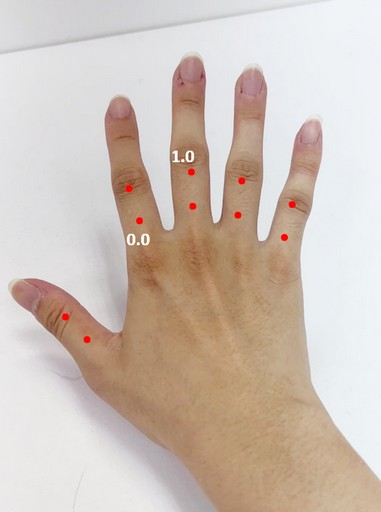\n\
\n**ring\\_shadow\\_intensity: float (0.0–1.0)**\nControls the shadow strength:\n0.0 = No shadow\n\
1.0 = Maximum shadow\nDefault: 0.15\n\n**ring\\_ambient\\_light\\_intensity: float (0.0–1.0)**\nDefines\
\ how much the lighting references the target hand image:\n0.0 = Ignore the hand image lighting\n\
1.0 = Fully match the hand image lighting and shadow rendering\nDefault: 1.0\n\n**ring\\_anchor\\\
_point: array of two points in pixel coordinate (optional)**\nMarks the inner edge of the ring where\
\ it contacts the finger, specifying the left and right points. This is particularly useful for wide\
\ or thick rings.\nIf this parameter is not provided, the AI engine will automatically detect the\
\ anchor points.\n\n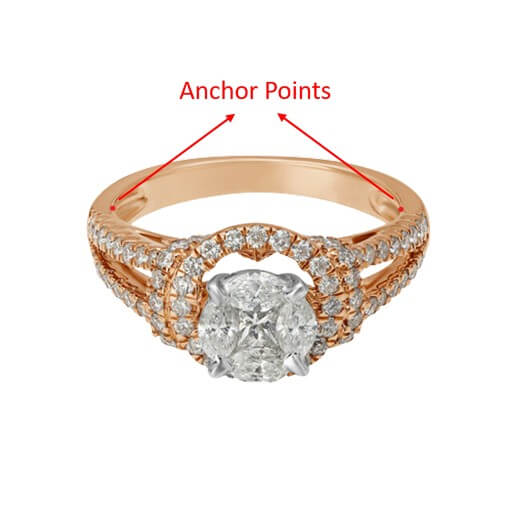\n\
\n\n---\n\n* Supported Formats & Dimensions\n\n|AI Feature|Supported Dimensions|Supported File Size|Supported\
\ Formats|\n| ---- | ---- | ---- | ---- |\n|AI Ring Virtual Try-On|long side <= 4096 |< 10MB|jpg/jpeg/png|\n\
\n* Error Codes\n\n|Error Code|Description|\n| ---- | ---- |\n| RUNTIME_ERROR | An unexpected error\
\ occurred during runtime |\n| PHOTO_DETECTION_FAIL | The user photo could not be processed correctly,\
\ for example no hand detected |\n| OBJECT_DETECTION_FAIL | The object photo could not be processed\
\ correctly, for example no product detected |\n| PHOTO_CHECK_INVALID | The pose or size of the user\
\ photo is invalid |\n| INPUT_ERROR | The input file format is incorrect |\n| INPUT_MAIN_IMAGE_EMPTY\
\ | A user image is required |\n\n\n* Environment & Dependency\n\n| Sample Code Language / Tool |\
\ Recommended Runtime Versions |\n|---|---|\n| cURL | - bash >= 3.2 - curl >= 7.58 (modern\
\ TLS/HTTP support) - jq >= 1.6 (robust JSON parsing) |\n| Node.js (JavaScript) | Node >= 18\
\ (for global fetch) |\n| JavaScript | - Chrome / Edge >= 80 - Firefox >= 74 - Safari\
\ >= 13.1 |\n| PHP | PHP >= 7.4 (for modern TLS/compat), ext-curl (recommended) or allow_url_fopen=On\
\ + ext-openssl, ext-json |\n| Python | Python >= 3.10 (for f-strings), requests >= 2.20.0 |\n| Java\
\ | Java 11+ (for HttpClient), Jackson Databind >= 2.12.0 |\n\n---\n\n## JS Camera Kit\n{% partial\
\ file=\"/_partials/js-camera-kit.md\" /%}\n\n---\n\n## Unit Consumption\n\n| AI Feature | Unit Consumed\
\ |\n|---|---|\n| AI Ring Virtual Try-On V1.0 | 1 Unit for Single-item wear
2 Units for Stacked\
\ wear |\n\n---\n"
version: ''
termsOfService: https://www.makeupar.com/perfectbeauty/youcam/terms-of-service-api
contact:
email: YouCamOnlineEditor_API@perfectcorp.com
license:
name: Privacy policy
url: https://www.makeupar.com/perfectbeauty/youcam/privacy-policy-api
servers:
- url: https://yce-api-01.makeupar.com
paths:
/s2s/v2.0/file/2d-vto/ring:
post:
summary: Create a new file.
description: To upload a new file, you'll first need to use the File API. It will give you a URL
– use that URL to upload your file. Once the upload is finished, you can use the file_id from
the same response to start using our AI features.
tags:
- V1.0
security:
- BearerAuthenticationV2: []
requestBody:
required: true
content:
application/json:
schema:
allOf:
- $ref: '#/components/schemas/FileV1.1'
responses:
'200':
description: Successful retrieval of file upload information
content:
application/json:
schema:
allOf:
- $ref: '#/components/schemas/FileResponseV2'
'400':
$ref: '#/components/responses/InvalidParameters'
'401':
$ref: '#/components/responses/InvalidApiKey'
/s2s/v2.0/task/2d-vto/ring:
post:
summary: Run an AI 2D Virtual Try On Ring task.
description: 'AI tasks are asynchronous. Prefer webhook-based completion handling when the feature
supports webhooks. Configure your webhook endpoint, verify webhook signatures, and use the received
`task_id` to query the task result after a `success` or `error` notification. See the [webhook
integration guide](/develop/webhook.md) for setup and verification details.
If webhooks are not supported for the feature, or if your integration cannot use webhooks, implement
polling. After starting an AI task, keep polling the task status endpoint at the given `polling_interval`
until the task status is either `success` or `error`.
Do not stop polling a running task for longer than the allowed polling window. If the task is
not polled in time, the task may expire; a later status check can return `InvalidTaskId` even
if processing finished, and the consumed units may still be charged.
'
tags:
- V1.0
security:
- BearerAuthenticationV2: []
requestBody:
required: true
content:
application/json:
schema:
$ref: '#/components/schemas/RingRunTaskV2'
responses:
'200':
description: Successful execution of the task
content:
application/json:
schema:
$ref: '#/components/schemas/BasicRunTaskResponseV2'
'400':
description: Failed execution of task
content:
application/json:
schema:
allOf:
- $ref: '#/components/schemas/RunError'
'401':
$ref: '#/components/responses/InvalidApiKey'
'429':
$ref: '#/components/responses/TooManyRequests'
/s2s/v2.0/task/2d-vto/ring/{task_id}:
get:
summary: Check the status of a AI 2D Virtual Try On Ring task.
tags:
- V1.0
security:
- BearerAuthenticationV2: []
parameters:
- name: task_id
in: path
required: true
schema:
type: string
example: grH0CvsgXuAIHLUzD0V1Ol34hoet3R1tvdbtiVHrDb6_UqCLKIejAIajwxrhOAfe
description: ID of task to check
responses:
'200':
description: Successful check of the task status
content:
application/json:
schema:
$ref: '#/components/schemas/TaskStatusResponseV2'
'400':
$ref: '#/components/responses/InvalidTaskId'
'401':
$ref: '#/components/responses/InvalidApiKey'
'500':
$ref: '#/components/responses/TaskTimeout'
components:
securitySchemes:
BearerAuthenticationV2:
type: http
scheme: bearer
description: 'Use the standard ''Bearer authentication''. Put your ''API Key'' in header: `Authorization:Bearer
YOUR_API_KEY`. Notice that there is '' '' a space between ''Bearer'' and the ''YOUR_API_KEY''.'
schemas:
RingRunTaskV2:
allOf:
- $ref: '#/components/schemas/2dVtoRunTaskV2'
- type: object
properties:
object_infos:
type: array
items:
type: object
properties:
parameter:
type: object
properties:
ring_need_remove_background:
type: boolean
description: Whether the ring image needs background removal.
default: true
example: true
ring_anchor_point:
type: array
description: 'The anchor point of the ring image, marking the 2 farthest points
along the inner edge of the ring
Type: 2x2 list of integers
Range: 2 (x,
y) pixel coordinates
Default: null (use engine default)'
default: null
example: null
minItems: 2
maxItems: 2
items:
type: array
minItems: 2
maxItems: 2
items:
type: integer
ring_wearing_finger:
type: integer
description: 'Defines on which finger the ring is worn.
Default: null (use engine
default)
Range: 0 ~ 4 [thumb to pinky]'
enum:
- 0
- 1
- 2
- 3
- 4
default: null
example: null
ring_wearing_location:
type: number
description: 'Defines the placement of the ring on the selected finger in the user
photo.
Range: 0.0 ~ 1.0(0 = base of the finger, 1 = first knuckle)'
minimum: 0
maximum: 1
default: null
example: null
ring_shadow_intensity:
type: number
description: Shadow intensity applied to the ring (higher = darker shadow).
minimum: 0
maximum: 1
default: 0.15
example: 0.15
ring_ambient_light_intensity:
type: number
description: Ambient light adjustment intensity for the ring.
minimum: 0
maximum: 1
default: 1
example: 1
FileV1.1:
title: File V1.1
description: This object represents a file.
type: object
required:
- files
properties:
files:
type: array
items:
type: object
required:
- content_type
- file_name
- file_size
properties:
content_type:
type: string
example: image/jpg
description: Specifies the file's content MIME type. Supported values currently include
image and video formats, such as image/jpg and video/mp4.
file_name:
type: string
example: my-selfie.jpg
description: Name of this file
file_size:
type: integer
example: 50000
description: File size in bytes. Supported limits are 10 MB for image files and 100 MB
for video files.
BasicFileResponse:
type: object
properties:
files:
type: array
items:
type: object
properties:
content_type:
type: string
example: image/jpg
description: Content MIME type for this file.
file_name:
type: string
example: my-selfie.jpg
description: Name of this file
file_id:
type: string
example: U8aqJbsXGT537jtGnEDFHqxdDXqh8+oTF/cSkLimzuvVwMP+Jb1XbjPsf7ZgUgLY
description: ID of this file. Other run task API will need this \`file_id\`.
requests:
type: array
description: Using upload \`url\`, \`headers\`, \`method\` below to upload file. After
completion, the \`file_id\` is used to proceed with calling run task API.
items:
type: object
properties:
headers:
type: object
example:
Content-Type: image/jpg
Content-Length: 50000
description: Headers to include when uploading the file
url:
type: string
example: https://example.com/presigned-upload-url
description: URL to upload this file
method:
type: string
example: PUT
description: HTTP method to upload this file
FileResponseV2:
type: object
properties:
status:
type: integer
example: 200
description: Response status
data: null
$ref: '#/components/schemas/BasicFileResponse'
BasicRunTaskV2SrcFileUrl:
type: object
required:
- src_file_url
properties:
src_file_url:
type: string
description: Url of the file to run task. The url should be publicly accessible.
example: https://example.com/selfie.jpg
2dVtoRunTaskV2SrcmskFileUrl:
type: object
properties:
srcmsk_file_url:
type: string
description: Url of the source mask file to run task. The url should be publicly accessible.
example: https://example.com/src_mask.jpg
2dVtoRunTaskV2RefFileUrls:
type: object
required:
- ref_file_urls
properties:
ref_file_urls:
type: array
description: Url of the reference file to run task. The url should be publicly accessible.
example:
- https://example.com/vto_sku.jpg
items:
type: string
2dVtoRunTaskV2RefmskFileUrls:
type: object
properties:
refmsk_file_urls:
type: array
description: Url of the reference mask file to run task. The url should be publicly accessible.
example:
- https://example.com/vto_sku_mask.jpg
items:
type: string
2dVtoRunTaskV2RefFileIds:
type: object
required:
- ref_file_ids
properties:
ref_file_ids:
type: array
description: ID of the reference file file to run task. File ID from upload file API.
example:
- pfNK5PuRe0MrwLHcGA3DOmB1ahwfXTbYHjv+KoBIxbE=
items:
type: string
2dVtoRunTaskV2RefmskFileIds:
type: object
properties:
refmsk_file_ids:
type: array
description: ID of the reference mask file file to run task. File ID from upload file API.
example:
- pfNK5PuRe0MrwLHcGA3DOmB1ahwfXTbYHjv+KoBIxbE=
items:
type: string
BasicRunTaskV2SrcFileId:
type: object
required:
- src_file_id
properties:
src_file_id:
type: string
description: ID of file to run task. File ID from upload file API.
example: pfNK5PuRe0MrwLHcGA3DOmB1ahwfXTbYHjv+KoBIxbE=
2dVtoRunTaskV2SrcmskFileId:
type: object
properties:
srcmsk_file_id:
type: string
description: ID of the source mask file to run task. File ID from upload file API.
example: pfNK5PuRe0MrwLHcGA3DOmB1ahwfXTbYHjv+KoBIxbE=
2dVtoRunTaskV2SrcInfo:
type: object
required:
- source_info
properties:
source_info:
type: object
description: Contain source photo informations.
properties:
name:
type: string
description: The source url or File ID.
example: https://example.com/selfie.jpg
mask_name:
type: string
description: The source mask url or File ID.
example: https://example.com/src_mask.jpg
required:
- name
2dVtoRunTaskV2ObjInfos:
type: object
required:
- object_infos
properties:
object_infos:
type: array
items:
type: object
description: Contain several object informations in this list.
properties:
name:
type: string
description: The reference url or File ID. Indicate which reference product image should
be matched.
example: https://example.com/vto_sku.jpg
mask_name:
type: string
description: The reference mask url or File ID. Indicate which reference product image
should be matched.
example: https://example.com/vto_sku_mask.jpg
required:
- name
2dVtoRunTaskV2:
allOf:
- anyOf:
- allOf:
- title: Run task with src file url & srcmsk file url & ref file urls & refmsk file urls
- $ref: '#/components/schemas/BasicRunTaskV2SrcFileUrl'
- $ref: '#/components/schemas/2dVtoRunTaskV2SrcmskFileUrl'
- $ref: '#/components/schemas/2dVtoRunTaskV2RefFileUrls'
- $ref: '#/components/schemas/2dVtoRunTaskV2RefmskFileUrls'
- allOf:
- title: Run task with src file url & srcmsk file url & ref file IDs & refmsk file IDs
- $ref: '#/components/schemas/BasicRunTaskV2SrcFileUrl'
- $ref: '#/components/schemas/2dVtoRunTaskV2SrcmskFileUrl'
- $ref: '#/components/schemas/2dVtoRunTaskV2RefFileIds'
- $ref: '#/components/schemas/2dVtoRunTaskV2RefmskFileIds'
- allOf:
- title: Run task with src file ID & srcmsk file ID & ref file urls & refmsk file urls
- $ref: '#/components/schemas/BasicRunTaskV2SrcFileId'
- $ref: '#/components/schemas/2dVtoRunTaskV2SrcmskFileId'
- $ref: '#/components/schemas/2dVtoRunTaskV2RefFileUrls'
- $ref: '#/components/schemas/2dVtoRunTaskV2RefmskFileUrls'
- allOf:
- title: Run task with src file ID & srcmsk file ID & ref file IDs & refmsk file IDs
- $ref: '#/components/schemas/BasicRunTaskV2SrcFileId'
- $ref: '#/components/schemas/2dVtoRunTaskV2SrcmskFileId'
- $ref: '#/components/schemas/2dVtoRunTaskV2RefFileIds'
- $ref: '#/components/schemas/2dVtoRunTaskV2RefmskFileIds'
- $ref: '#/components/schemas/2dVtoRunTaskV2SrcInfo'
- $ref: '#/components/schemas/2dVtoRunTaskV2ObjInfos'
BasicRunTaskResponseV2:
type: object
properties:
status:
type: integer
description: Response status
example: 200
data:
type: object
properties:
task_id:
type: string
description: ID of this task. Task result is valid to query by this ID for 24 hours.
example: grH0CvsgXuAIHLUzD0V1Ol34hoet3R1tvdbtiVHrDb6_UqCLKIejAIajwxrhOAfe
RunError:
type: object
properties:
status:
type: integer
description: Response status
example: 400
error:
type: string
description: Error message
example: The operation could not be completed
error_code:
type: string
enum:
- InvalidParameters
- CreditInsufficiency
- InvalidStyleGroup
- InvalidStyle
- BadRequest
description: "Error code:\n * InvalidParameters - Invalid request parameters\n * CreditInsufficiency\
\ - Insufficient unit to run\n * BadRequest - Unexpected request parameter\n * InvalidStyleGroup\
\ - Invalid style group id\n * InvalidStyle - Invalid style id\n"
EngineErrorCode:
type: string
nullable: true
enum:
- error_exceed_max_image_size
- exceed_max_filesize
- invalid_parameter
- error_download_image
- error_download_mask
- error_decode_image
- error_decode_mask
- error_nsfw_content_detected
- error_no_face
- error_pose
- error_face_parsing
- error_inference
- exceed_nsfw_retry_limits
- error_upload
- unknown_internal_error
description: 'Errors:
- \`error_exceed_max_image_size\` - Input image size exceeds the maximum limit
- \`exceed_max_filesize\` - Input file size exceeds the maximum limit
- \`invalid_parameter\` - Invalid parameter value
- \`error_download_image\` - Download source image error
- \`error_download_mask\` - Download mask image error
- \`error_decode_image\` - Decode source image error
- \`error_decode_mask\` - Decode mask image error
- \`error_nsfw_content_detected\` - NSFW content detected in source image
- \`error_no_face\` - No face detected on source image
- \`error_pose\` - Failed to detect pose on source image
- \`error_face_parsing\` - Failed to do face segmentation on source image
- \`error_inference\` - Inference pipeline error
- \`exceed_nsfw_retry_limits\` - Exceed the retry limits to avoid generated NSFW image
- \`error_upload\` - Upload result image error
- \`unknown_internal_error\` - Others
'
TaskStatusResponseBodySingleUrlResultsV2:
type: object
properties:
url:
type: string
description: URL to download this result. Valid for 2 hours
example: https://example.com/sample-result-url
TaskStatusResponseV2:
type: object
properties:
status:
type: integer
description: Response status
example: 200
data:
type: object
properties:
task_status:
type: string
enum:
- running
- success
- error
description: Status of this task
error:
$ref: '#/components/schemas/EngineErrorCode'
error_message:
type: string
description: Detailed description of error
results: null
$ref: '#/components/schemas/TaskStatusResponseBodySingleUrlResultsV2'
responses:
InvalidParameters:
description: Invalid request parameters
content:
application/json:
schema:
type: object
properties:
status:
type: integer
example: 400
description: Response status
error:
type: string
example: Invalid parameter value
error_code:
type: string
example: InvalidParameters
InvalidApiKey:
description: Invalid or missing API key
content:
application/json:
schema:
type: object
properties:
status:
type: integer
example: 401
description: Response status
error:
type: string
example: Invalid API key
TooManyRequests:
description: Too many requests
content:
application/json:
schema:
type: object
properties:
status:
type: integer
example: 429
description: Response status
error:
type: string
example: Too many requests
InvalidTaskId:
description: Invalid task ID
content:
application/json:
schema:
type: object
properties:
status:
type: integer
example: 400
description: Response status
error:
type: string
example: Invalid task ID
TaskTimeout:
description: Task execution timeout
content:
application/json:
schema:
type: object
properties:
status:
type: integer
example: 500
description: Response status
error:
type: string
example: Task execution timed out